What Is GoldDigger?
GoldDigger is an Android banking trojan associated with the GoldFactory malware family. It is designed to steal financial and identity information by abusing permissions, deceptive interfaces, and device-access features after a victim installs a malicious application.
Names and capabilities within a malware family can change as operators release variants. Defenders should validate behavior, package details, infrastructure, permissions, and campaign context instead of assuming that every sample labeled GoldDigger has identical functions.
Key Takeaways
- GoldDigger campaigns rely on social engineering to convince victims to install an untrusted Android application.
- Accessibility and related permissions can enable overlay, input capture, navigation, and device-control abuse.
- A malicious mobile application can expose banking credentials, one-time codes, messages, and identity information.
- Response should isolate the device, protect financial accounts, reset credentials from a trusted device, and assess identity theft.
How GoldDigger Works
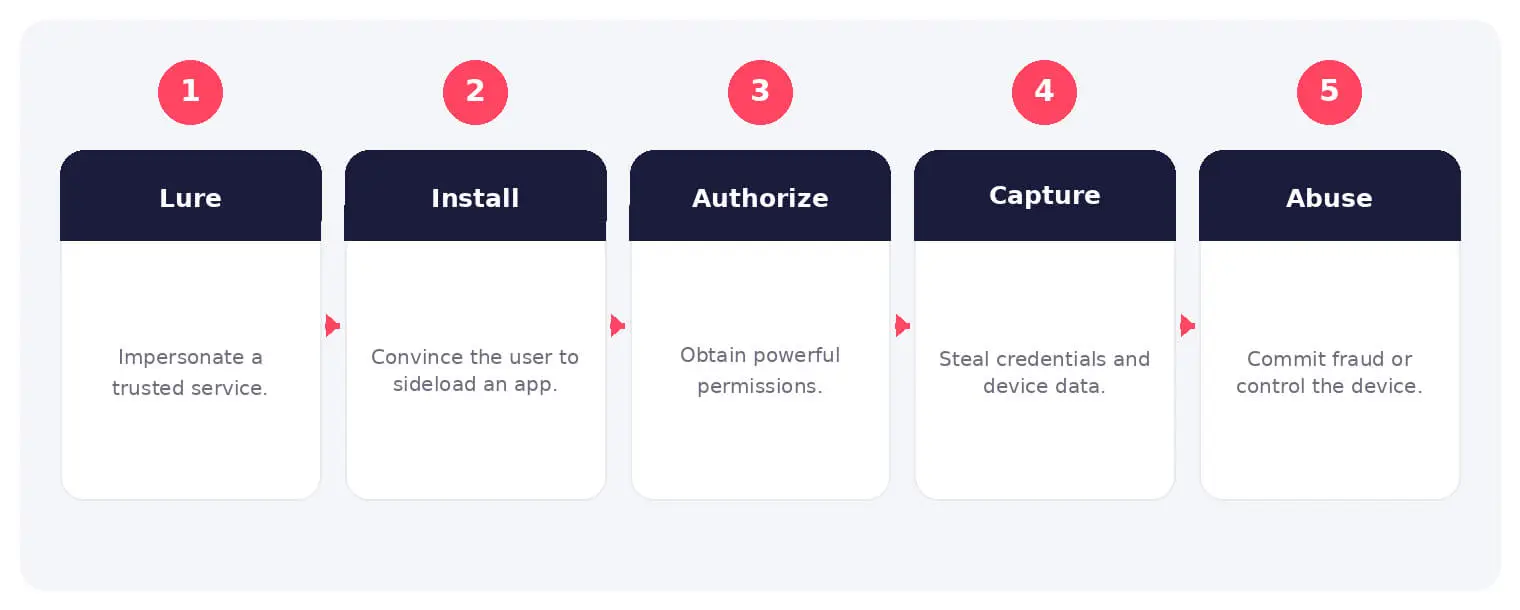
Delivery may use phishing messages, fake websites, social media, or impersonated government, financial, or utility services. Android users may be instructed to enable installation outside the official store and grant powerful permissions.
Once active, the trojan can present fake screens, observe input, collect device and account information, and communicate with operator infrastructure. Campaign details vary, so analysis should focus on observed permissions, network traffic, overlays, and control behavior.
Common Types and Techniques
- Fake financial or government service applications
- Credential overlays and deceptive login screens
- Accessibility-service abuse and input capture
- Remote commands, data collection, and account fraud
Security and Business Risks
- Banking credential and account theft
- Interception of messages or authentication codes
- Identity fraud using collected personal information
- Loss of control over an enrolled or trusted device
Warning Signs and Detection
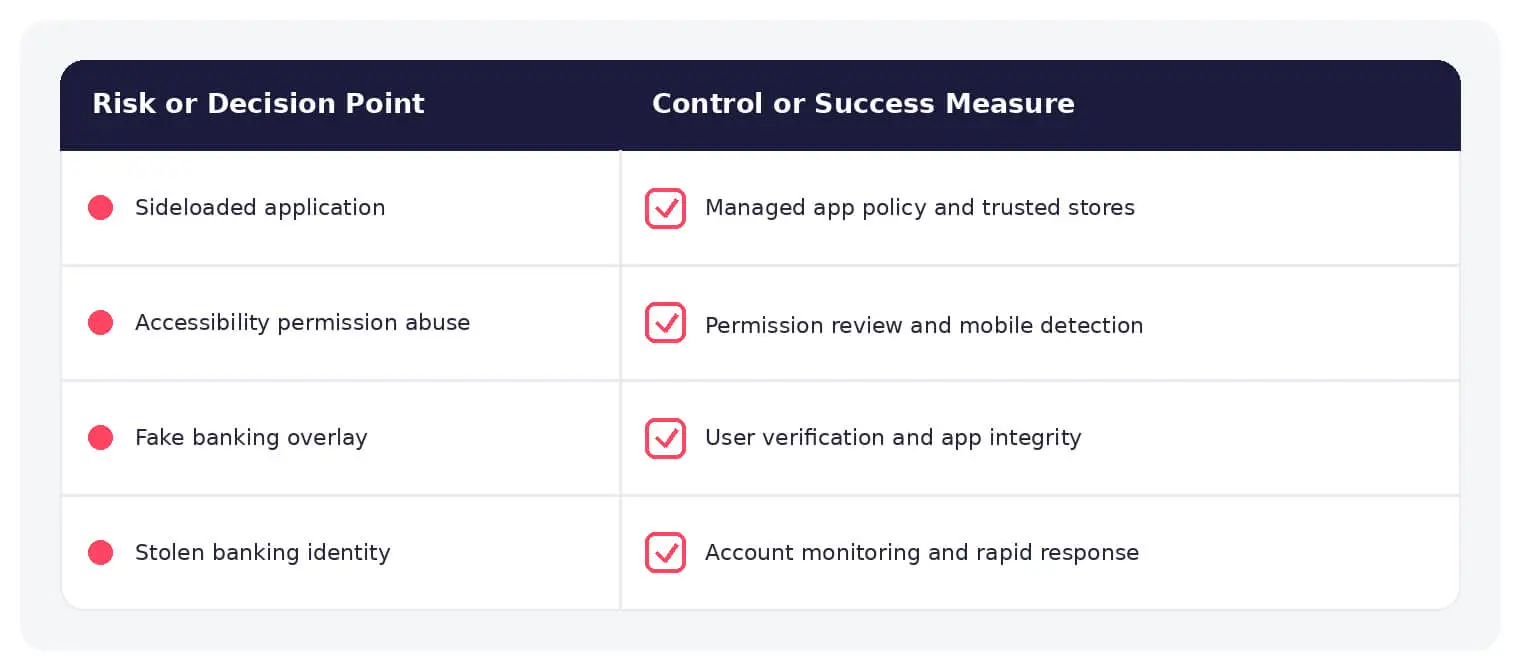
Investigate unexpected accessibility services, device-administrator privileges, apps installed outside approved stores, unfamiliar VPN or overlay behavior, unusual battery or data use, and connections to known campaign infrastructure. Mobile threat defense can expose package and behavior indicators.
Prevention and Response
Install applications only from trusted stores, verify publisher and requested permissions, block unknown-source installation in managed environments, protect banking accounts with strong authentication, keep Android current, and train users to distrust installation instructions received through messages.
How SOCRadar Can Help
SOCRadar combines external asset visibility, threat intelligence, Dark Web monitoring, vulnerability context, and indicator enrichment to help teams identify exposure and investigate activity connected to GoldDigger Android trojan.
Explore SOCRadar Cyber Threat Intelligence or request a demo to strengthen threat-informed prevention and investigation.
Frequently Asked Questions
Is GoldDigger an Android Banking Trojan?
Yes. GoldDigger is an Android banking trojan linked to the GoldFactory malware family, designed to steal financial and identity information after a victim installs a malicious application. Capabilities can change between variants and campaigns, so defenders should confirm behavior through verified sample analysis and current intelligence rather than assuming every sample labeled GoldDigger is identical.
What Is the GoldFactory Malware Family?
GoldFactory is a malware family associated with Android-focused financial fraud, with GoldDigger among its known trojans. Families like this often ship multiple variants that share code, infrastructure, or delivery patterns, and operator naming can lag behind changes observed in the wild. Tracking family-level campaigns alongside sample-level indicators gives a more reliable picture than labels alone.
How Does GoldDigger Reach Android Devices?
Delivery relies on social engineering, such as phishing messages, fake websites, social media posts, or impersonated government, financial, or utility services that persuade the victim to install an application outside an official store. During setup, victims may be told to enable installation from unknown sources and grant sensitive permissions.
Why Does GoldDigger Abuse Android Accessibility Permissions?
Accessibility services grant broad control over a device, including reading screen content, observing typed input, and interacting with other applications. GoldDigger uses this access to support overlay attacks, input capture, and remote device control. Any application requesting accessibility permissions without a clear, legitimate purpose should be treated as a red flag.
What Are GoldDigger Overlay Attacks?
Overlay attacks place a deceptive window on top of a legitimate app, such as a fake login screen that captures banking credentials the moment the victim enters them. Combined with accessibility abuse, the trojan can also harvest one-time codes and interact with banking applications under remote command. Campaign behavior varies, so analysis should focus on observed overlays, permissions, and network traffic.
What Information Can GoldDigger Expose on a Compromised Device?
A compromised device can expose banking credentials, one-time codes, SMS messages, device and account details, and personal information usable for identity fraud. Because operators can issue remote commands, the scope of collection may grow over the life of an infection. Any accounts regularly accessed from the device are also at risk of takeover.
What Are the Warning Signs of a GoldDigger Infection?
- Accessibility services or device-administrator privileges granted to an app with no reason to hold them
- Applications installed outside approved stores or sideloaded after an in-app prompt
- Unfamiliar VPN, overlay, or pop-up behavior during banking sessions
- Unusual battery drain, data usage, or connections to known campaign infrastructure
Mobile threat defense can surface package names and behavior indicators that confirm or rule out suspicion.
What Should a Suspected GoldDigger Victim Do First?
- Isolate the device from networks and stop using it for banking or account access
- Contact affected financial institutions and report suspected fraudulent activity
- Reset credentials and revoke active sessions from a separate, trusted device
- Review enrolled devices, recovery email and phone settings, and linked accounts
Password resets may not invalidate sessions an attacker has already established, so confirm session termination and recovery settings with each affected service. Preserve evidence if an organizational or legal investigation may be required.
Does Uninstalling the GoldDigger App End the Risk?
No. Removing the application addresses its activity on the device, but it does not reverse stolen credentials, exposed identity data, or fraudulent transactions. Device-administrator or accessibility grants can also complicate removal, and financial accounts, active sessions, recovery settings, and enrolled devices still need review. In some incidents, rebuilding or replacing the device may be necessary depending on how much control the trojan obtained.
Does Multi-Factor Authentication Protect Against GoldDigger?
Phishing-resistant MFA, such as passkeys or hardware security keys, reduces the chance that a stolen password alone grants account access. It does not automatically revoke a session an attacker has already opened, and codes delivered by SMS can be captured when a trojan reads messages or presents overlays. Pair strong authentication with login alerts, prompt review of account activity, and bank-specific fraud controls.
How Can Organizations Block GoldDigger on Managed Android Devices?
Block installation from unknown sources in managed environments, restrict which apps can hold accessibility or device-administrator grants, require installation only from approved stores, and keep Android versions current. User training should emphasize distrust of installation instructions received through messages, since social engineering is the primary entry point for these campaigns.

Oct 16, 2026
CVE-2026-102764: BeyondTrust Zero-Day Exploited
BeyondTrust has disclosed CVE-2026-102764, a critical Remote Support vulnerability exploited as a zero-day weeks before customers received a patch. The attack began…

Oct 15, 2026
Cisco Secure Email & PAN-OS Zero-Days Exploited
Cisco Secure Email & PAN-OS Zero-Days Exploited Cisco and Palo Alto Networks have patched two actively exploited zero-day vulnerabilities that can lead…
Oct 15, 2026
SOCRadar Splunk Integration: New MSSP and Vulnerability Apps
SOCRadar Splunk Integration: New MSSP and Vulnerability Apps Your analysts live in Splunk. Your external risk does not: SOCRadar alarms for dozens…
Intelligence in your inbox every Thursday.
Join 30,000+ security professionals reading SOCRadar research.
Subscribe