Real-World Use Cases
Real-World Use Cases
📌 TL;DR: SOCRadar MCP Server enables CISOs, SOC teams, red teams, pentesters, and product teams to automate investigations, correlate intelligence, and orchestrate security workflows through natural-language prompts. Below are concise real-world scenarios; for deeper workflows, see our dedicated MCP blogs such as “MCP Servers for SOC Teams: 10 Threat Intelligence Use Cases” and “MCP Servers in Threat Intelligence: 10 Use Cases for CISOs.”How can Penetration Testers benefit from an MCP Server?
Scenario: A pentester wants to automate post-scan decision logic, something normally scripted manually. Example Task: “Scan target for open ports, and if ports 21 or 22 are open, perform additional brute-force checks and banner grabbing.” MCP Execution: { “task”: “conditional_port_scan”, “target”: “example.com”, “actions”: [ “scan_ports”, { “condition”: “if_ports_open”, “ports”: [21, 22], “then”: [“run_hydra”, “grab_service_banner”] } ] } Outcome: The pentester gets results and next steps automatically executed, saving hours of scripting.What can CISOs automate using an MCP Server?
Scenario: CISOs need to know who is attacking them, how, and why, not just that alerts exist. Without attacker context, defense becomes reactive. Example Task: “What are the latest IOCs associated with threat actors targeting the financial sector? I need to understand the current threat landscape for our industry.” Outcome: MCP servers pull detailed actor profiles, motivations, infrastructure, and sector-specific activity. CISOs can quickly understand attacker behavior and anticipate threats instead of only responding to them.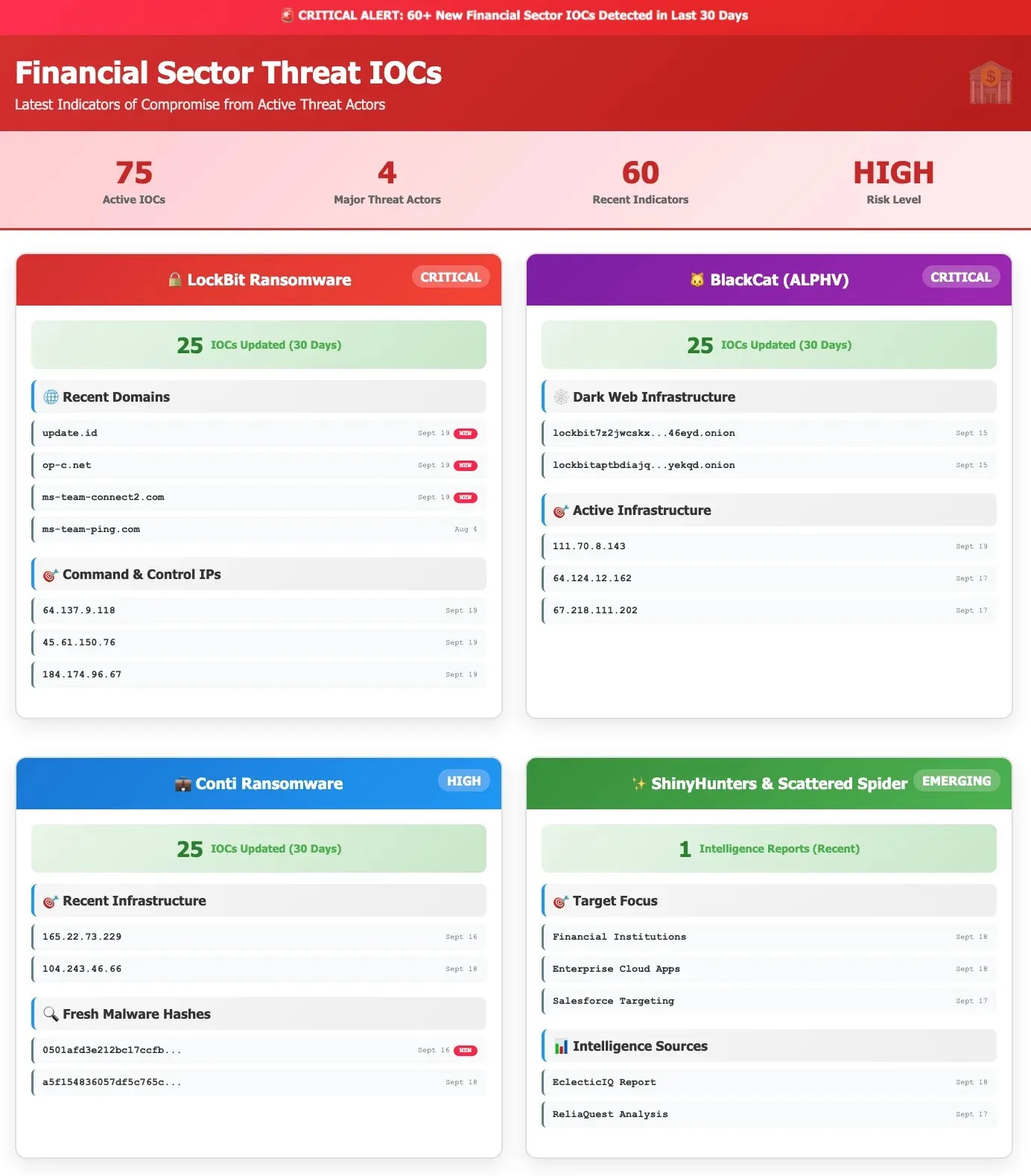 For full CISO workflows (attack surface visibility, remediation prioritization, credential exposure, fraud monitoring), see “MCP Servers in Threat Intelligence: 10 Use Cases for CISOs.”
How can SOC Teams use MCP for threat detection or enrichment?
Scenario: A Tier 1 analyst needs instant context around a suspicious IP. Example Task: “Investigate IP 198.51.100.10 and show reputation, malware associations, breach records, and any linked phishing domains.” Outcome: The MCP Server merges SOCRadar Threat Intelligence, attack surface signals, dark web findings, and repository exposures into one enriched profile with recommended next steps.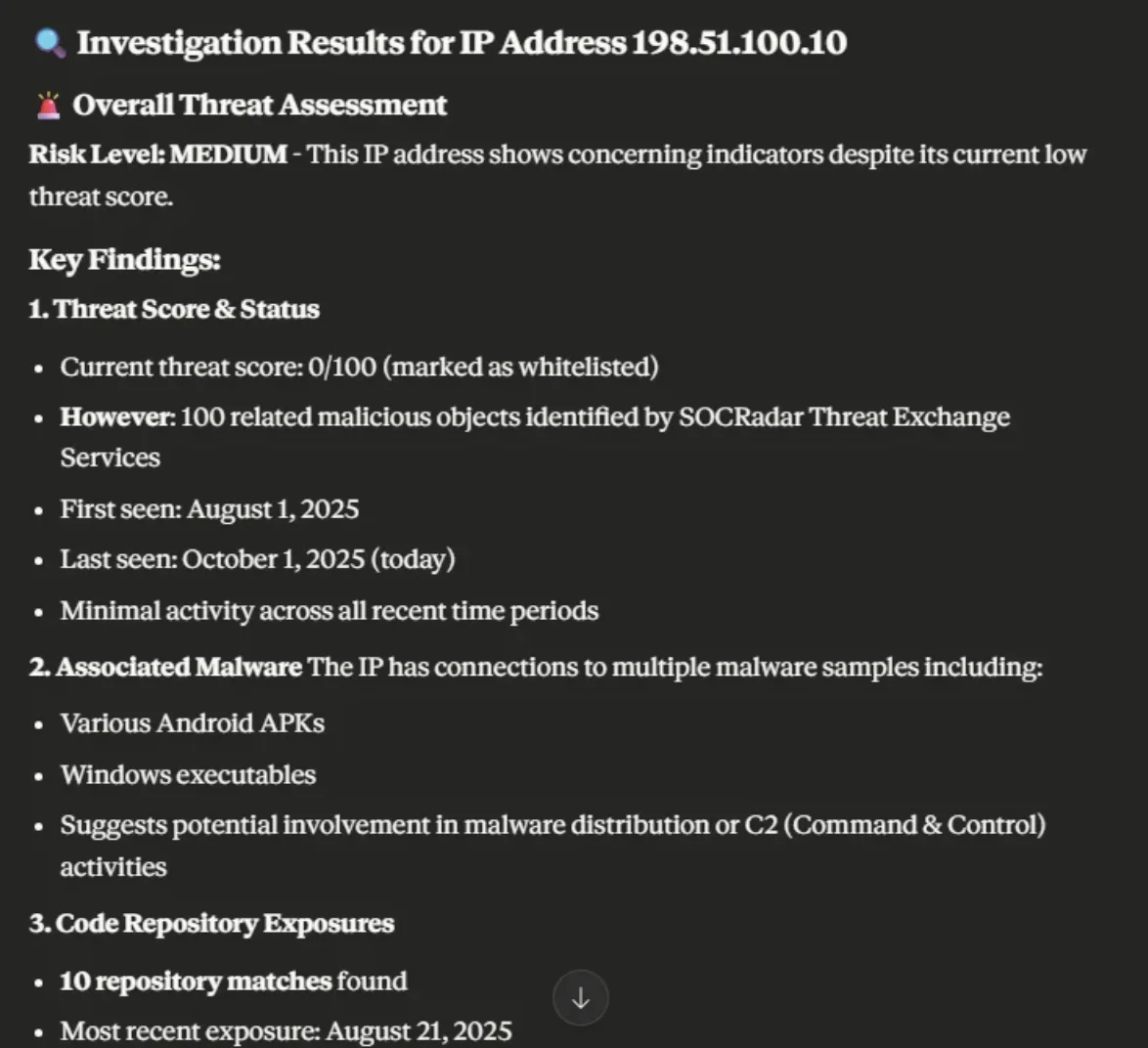 See the SOC MCP Use Cases blog for detailed examples (critical incident surfacing, phishing detection, code repo exposure monitoring, ransomware infrastructure tracking, credential analysis, and more)
How do Red Teams simulate advanced attacker behavior using MCPs?
Scenario: A Red Teamer wants to use recent stealer logs to generate custom phishing payloads. Example Task: “Generate a fake banking login page based on the most used device fingerprints from US stealer logs.” MCP-Powered Flow:- Step 1: MCP Server pulls stealer log samples
- Step 2: Extracts device types, browser headers, locale info
- Step 3: Generates payload HTML with injected context
How can Cybersecurity Product Teams integrate MCP into their workflow?
Scenario: A product team wants to develop a new agent-compatible service without reinventing orchestration logic. Example Task: “Create an endpoint that detects typo-squatted domains and returns results in MCP format for our Claude agent.” Implementation:- Wrap the tool (DNS Twister, WHOIS) inside an MCP-compatible API
- Define input/output schemas
- Deploy to MCP marketplace or internal registry
Uncategorized @us-en

Oct 16, 2026
CVE-2026-102764: BeyondTrust Zero-Day Exploited
BeyondTrust has disclosed CVE-2026-102764, a critical Remote Support vulnerability exploited as a zero-day weeks before customers received a patch. The attack began…
Cyber News
Oct 15, 2026
Cisco Secure Email & PAN-OS Zero-Days Exploited
Cisco Secure Email & PAN-OS Zero-Days Exploited Cisco and Palo Alto Networks have patched two actively exploited zero-day vulnerabilities that can lead…
CTI Fundamentals
Oct 15, 2026
SOCRadar Splunk Integration: New MSSP and Vulnerability Apps
SOCRadar Splunk Integration: New MSSP and Vulnerability Apps Your analysts live in Splunk. Your external risk does not: SOCRadar alarms for dozens…
Intelligence in your inbox every Thursday.
Join 30,000+ security professionals reading SOCRadar research.
Subscribe