Oct 31, 2025
Mar 26, 2026
10 Mins Read
Jul 08, 2026

Summarize with:
How to Detect Brand Impersonation Attacks Early: A Step by Step Monitoring Guide
Brand impersonation rarely starts with a loud signal. It usually begins with a lookalike domain, a copied login page, a fake social profile, or a rogue mobile app that appears credible enough to fool users before security teams spot it.
That is what makes early detection so important. If teams wait for customer complaints, credential theft, or public reports, they are already behind the attack. A better approach is to monitor the external footprint continuously, validate suspicious assets quickly, and act before the impersonation campaign gains traction.
This guide walks through a practical monitoring workflow for doing exactly that. It focuses on how security teams can reduce noise, investigate faster, and identify brand abuse earlier across web, social media, and mobile channels.
Why Early Detection Changes the Outcome
Brand impersonation attacks succeed because they exploit trust. Attackers do not need to breach internal systems first. They only need to look convincing enough to capture credentials, push scams, or distribute malware under the cover of a familiar brand.
In practice, this creates three common problems for defenders. First, suspicious domains appear in high volumes, and many never become active threats. Second, cloned content often looks legitimate at first glance, which slows triage. Third, brand abuse no longer stays limited to domains. It spreads across social platforms, messaging channels, and unofficial app distribution sites.
Early monitoring helps solve this by shifting the question from “Has damage already happened?” to “What signals suggest this attack is being prepared or deployed right now?”

Three Common Use Cases for Early Brand Impersonation Detection
- Detecting cloned websites before credentials are stolen
A cloned website is one of the clearest signs of an active impersonation attempt. Attackers often copy login portals, payment pages, or employee access pages and publish them on newly registered domains.
The challenge is speed. A cloned site can stay online long enough to collect credentials even if it is discovered only a few hours late. Early warning mechanisms improve that timeline by alerting defenders when copied assets appear outside approved domains.
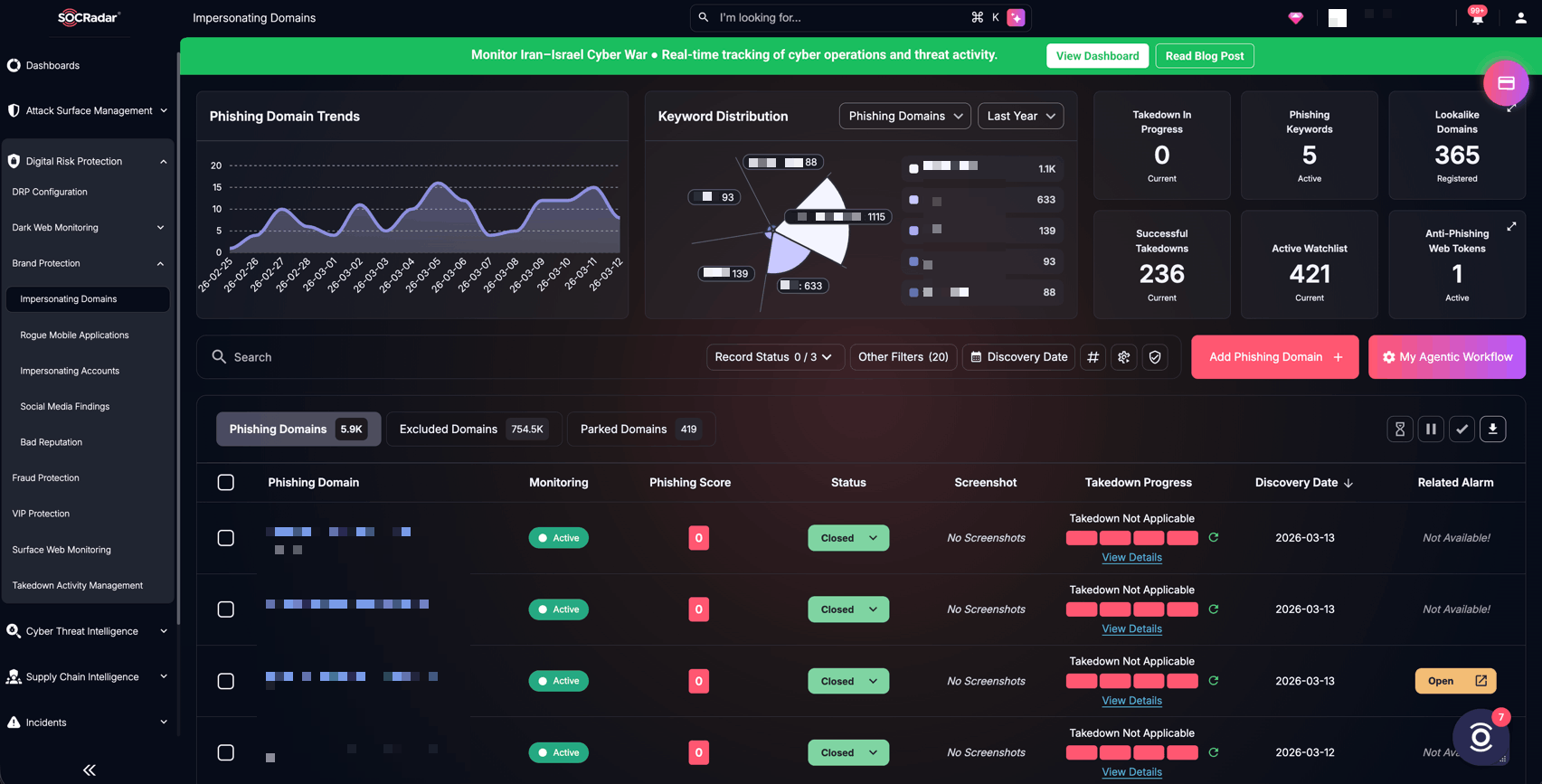
Dashboard view showing monitored brand domains and suspicious web impersonation findings (SOCRadar Brand Protection)
- Reducing false positives in phishing infrastructure monitoring
Security teams already know that domain monitoring alone creates noise. New lookalike domains appear constantly, but not all of them host phishing content. Some stay parked, some are defensive registrations, and some never become operational.
The real challenge is triage. Analysts need a fast way to determine whether a suspicious domain is actively impersonating the brand’s visual identity, content, or structure. Automated inspection helps narrow the list to the domains that deserve immediate action.
- Finding fake social accounts and rogue mobile apps early
Brand impersonation does not stop at websites. Fraudulent social media accounts can build credibility over time, especially when they copy official branding, executive names, or customer-facing messaging. Rogue mobile apps create a similar risk when they imitate legitimate applications or use brand assets to lure users into downloading malware.
These threats often mature quietly. A fake account may post for days before it starts engaging targets directly. A malicious app may sit in a third-party repository until a scam campaign pushes traffic to it. Continuous monitoring shortens that window.
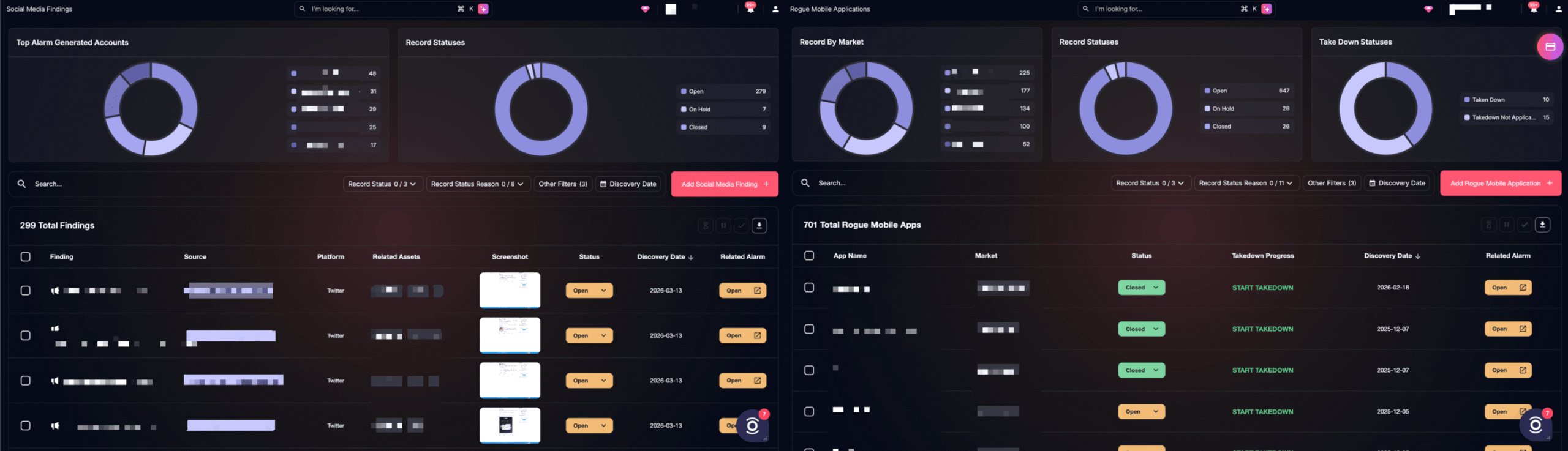
SOCRadar platform dashboards showing suspicious social media accounts/posts and rogue mobile application detections (SOCRadar Brand Protection)
Step 1: Define What the Organization Needs to Monitor
Early detection starts with visibility. Before a platform can identify impersonation, it needs a clear picture of what belongs to the organization and what should be treated as suspicious.
Start by mapping the most important elements of the brand footprint:
- Official domains and subdomains
- Brand names and product names
- Executive and public-facing employee names
- Campaign-specific keywords
- Official social media handles and app names
This is where many monitoring programs either become too broad or too shallow. If the keyword set is too generic, alerts become noisy. If it is too narrow, attackers slip through with small variations.
A more effective approach is to connect keywords to the sources where they matter most. Executive names may be more useful in social monitoring than in domain monitoring. Brand names may matter more in domain registrations, web content, and app store listings. This refinement reduces irrelevant alerts and improves analyst focus.
Step 2: Set a Tripwire for Cloned Web Assets
Once the baseline is in place, the next priority is detecting when legitimate web content is copied and served from an unauthorized location.
This is where an anti-phishing token or embedded web script becomes useful. A small script can be added to legitimate brand assets such as:
- Customer portals
- Webmail login pages
- Account access pages
- Main corporate websites
When a threat actor copies that page and hosts it on a rogue domain, the embedded script can check whether the content is being served from an expected parent domain. If the domain does not match, the system generates an alert.
This matters because cloned-site detection based on copied assets is far more reliable than relying on domain similarity alone. Instead of guessing whether a lookalike domain might become malicious, the team gets a stronger signal that the page content itself has been reused in an unauthorized environment.
Step 3: Automate Triage for Suspicious Domains
After detection comes the harder question: which alerts deserve immediate response?
A domain may resemble the brand and still pose no immediate risk. Another may look ordinary on the surface but contain copied logos, credential prompts, or brand references hidden in images. Analysts need fast validation, not just alert volume.
A step-based decision workflow can help automate this triage. A strong setup typically includes several inspection points:
- Logo similarity analysis
This stage compares visual marks on a suspicious page against official logos or brand imagery. It helps catch phishing pages that rely on copied branding to establish trust.
- OCR for image-based brand references
Some attackers place brand names inside images instead of HTML text to avoid text-based scanning. Optical character recognition helps surface those hidden references.
- Website content and structure inspection
This stage reviews page behavior, structure, and embedded elements for phishing traits, such as login forms, copied wording, suspicious redirects, or scripts commonly used in credential harvesting.
- Final decision and escalation logic
Once the workflow gathers these signals, the system can combine them into a final assessment. High-confidence findings move forward for analyst review or direct response, while weaker findings stay monitored without overwhelming the team.
The operational benefit here is not just automation. It is selective automation. Teams avoid spending the same amount of effort on every domain alert and reserve analyst time for the assets that look truly dangerous.
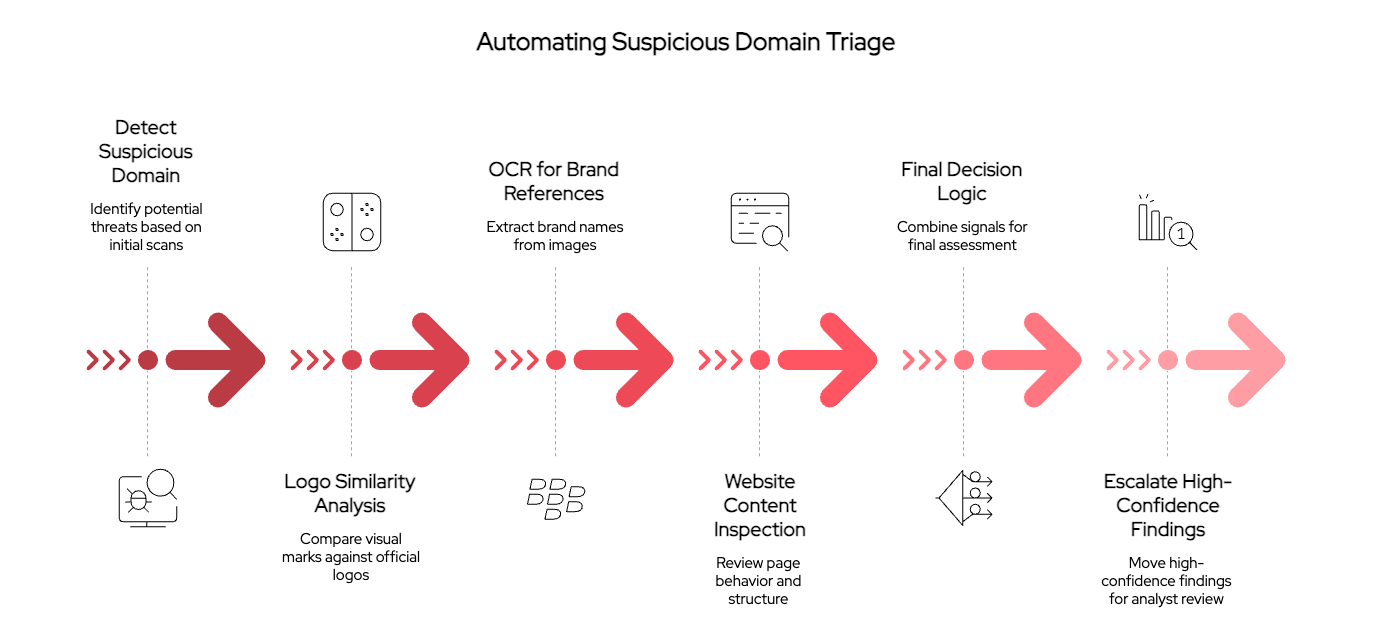
Automated phishing triage workflow showing visual inspection, OCR, content analysis, and alert escalation
Step 4: Extend Monitoring Beyond Domains
A web-focused program catches only part of the problem. Attackers reuse brand identity across platforms, and some campaigns begin on social media or mobile channels before they ever involve a phishing site.
To close that gap, extend monitoring into two areas.
Social media monitoring
Track platforms where impersonators are most likely to build credibility or contact targets directly, including X, Instagram, Facebook, TikTok, YouTube, and LinkedIn.
Look for indicators such as:
- Profiles using brand names with slight variations
- Accounts impersonating executives or support teams
- Reused logos and banners
- Repetitive scam wording
- Engagement patterns that suggest coordinated abuse
A mature workflow also keeps watch on previously mitigated accounts. If a removed or inactive profile becomes active again, the security team should know immediately.
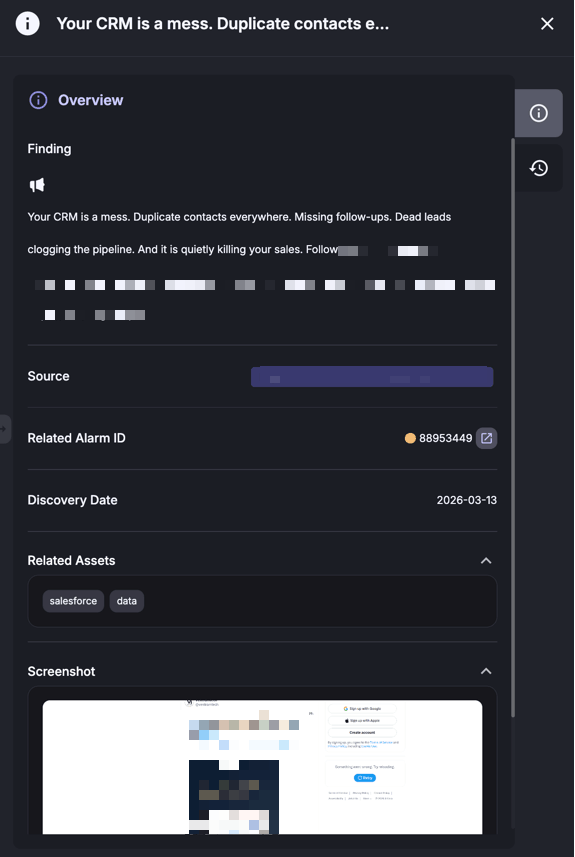
Example of a suspicious social media finding and details (SOCRadar Brand Protection)
Mobile app monitoring
Monitor both official app stores and third-party APK repositories for applications that imitate the organization’s legitimate apps, names, or trademarks.
This matters especially for brands with customer-facing mobile services. Users often assume an app is legitimate if it looks familiar, even when it comes from an unofficial source. Early discovery gives teams more time to verify the app, assess the risk, and move toward removal.
Step 5: Build a Response Path, Not Just a Detection Program
Detection alone does not reduce risk unless the team can act quickly once a finding is verified.
For that reason, each alert type should map to a response path. A simple structure works well:
- Verify the finding through automated inspection or analyst review
- Classify the threat by channel, severity, and likely impact
- Escalate high-confidence cases for takedown or internal response
- Preserve evidence such as screenshots, domains, account names, and timestamps
- Track reappearance in case the same actor recreates the asset later
This structure gives defenders consistency. It also helps keep teams from treating every suspicious asset as an emergency while still moving fast on confirmed abuse.
In practice, the strongest programs combine automated verification with direct remediation workflows. Once a phishing page, fake profile, or rogue app is confirmed, the team should be able to initiate takedown action without switching between disconnected tools and manual processes.
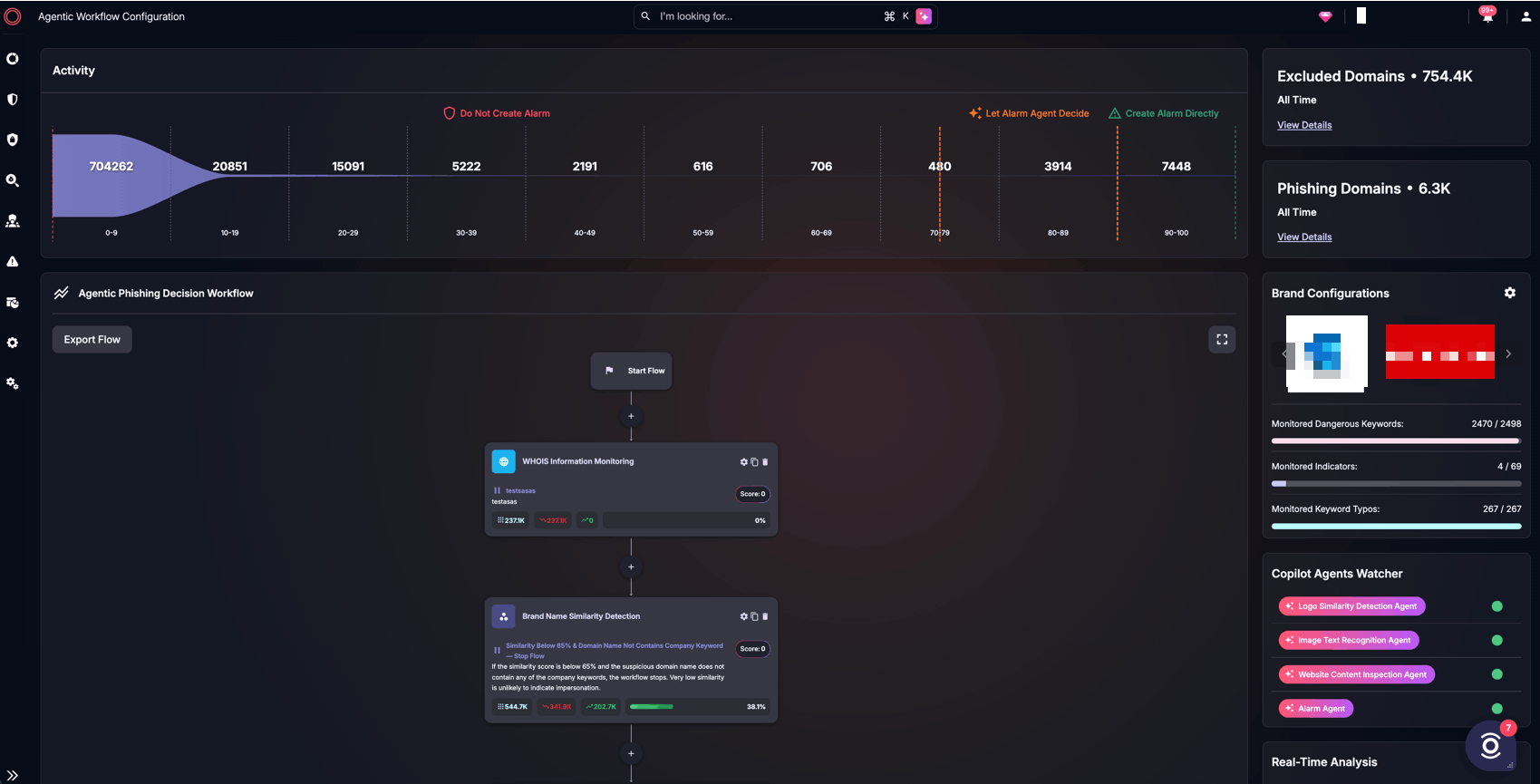
SOCRadar’s Agentic Phishing Decision Workflow configuration page (SOCRadar Brand Protection)
What a Low-Noise Monitoring Program Looks Like
A good brand impersonation monitoring program does not try to collect every possible alert. It focuses on relevance, confidence, and response speed.
That usually means:
- Defining a precise monitoring baseline
- Using cloned-asset detection for high-fidelity web alerts
- Automating triage for suspicious domains
- Extending monitoring into social and mobile ecosystems
- Keeping remediation tightly connected to investigation
When these parts work together, analysts spend less time sorting through weak signals and more time acting on verified threats.
Conclusion
Brand impersonation attacks are difficult to catch because they often appear outside the organization’s perimeter and evolve across multiple channels at once. That is why early detection depends on more than basic domain watching. It requires a structured workflow that identifies suspicious assets, validates them quickly, and supports fast remediation.
This is where SOCRadar’s Brand Protection can support operations without forcing teams into a reactive cycle. When monitoring, triage, and takedown workflows are connected, security teams gain a practical way to detect impersonation earlier and reduce the time attackers have to exploit brand trust.

Table Of Content
How to Detect Brand Impersonation Attacks Early: A Step by Step Monitoring Guide
Why Early Detection Changes the Outcome
Three Common Use Cases for Early Brand Impersonation Detection
Step 1: Define What the Organization Needs to Monitor
Step 2: Set a Tripwire for Cloned Web Assets
Step 3: Automate Triage for Suspicious Domains
Step 4: Extend Monitoring Beyond Domains
Step 5: Build a Response Path, Not Just a Detection Program
What a Low-Noise Monitoring Program Looks Like
Conclusion
Related Articles


Insider Threats: The Hidden Enemy of Cybersecurity
Oct 09, 2024