Mar 10, 2026
Jan 31, 2026
5 Mins Read
Sep 13, 2026
Table Of Content
Related Articles
SMS Bombing
Threat Actors
Jan 08, 2026
Dark Web Monitoring
Feb 19, 2026
Ransomware
Jan 31, 2026
OSINT Framework
Apr 17, 2026

What Is Malware?
Malware, short for malicious software, is code intentionally designed to compromise confidentiality, integrity, availability, or control of a device, application, or network. It can steal information, monitor users, provide remote access, disrupt operations, encrypt data, or prepare a system for another attack.
Malware is a broad category rather than one behavior. A ransomware payload, remote access Trojan, infostealer, worm, rootkit, loader, and destructive wiper can use different delivery and persistence techniques while sharing malicious intent.
Key Takeaways
- Malware categories describe purpose, propagation, or technical behavior and often overlap.
- Phishing, stolen credentials, malicious downloads, vulnerabilities, and supply-chain compromise are common entry paths.
- Behavioral detection remains important because files, infrastructure, and signatures change.
- Response must identify persistence, secondary payloads, exposed identities, and lateral movement.
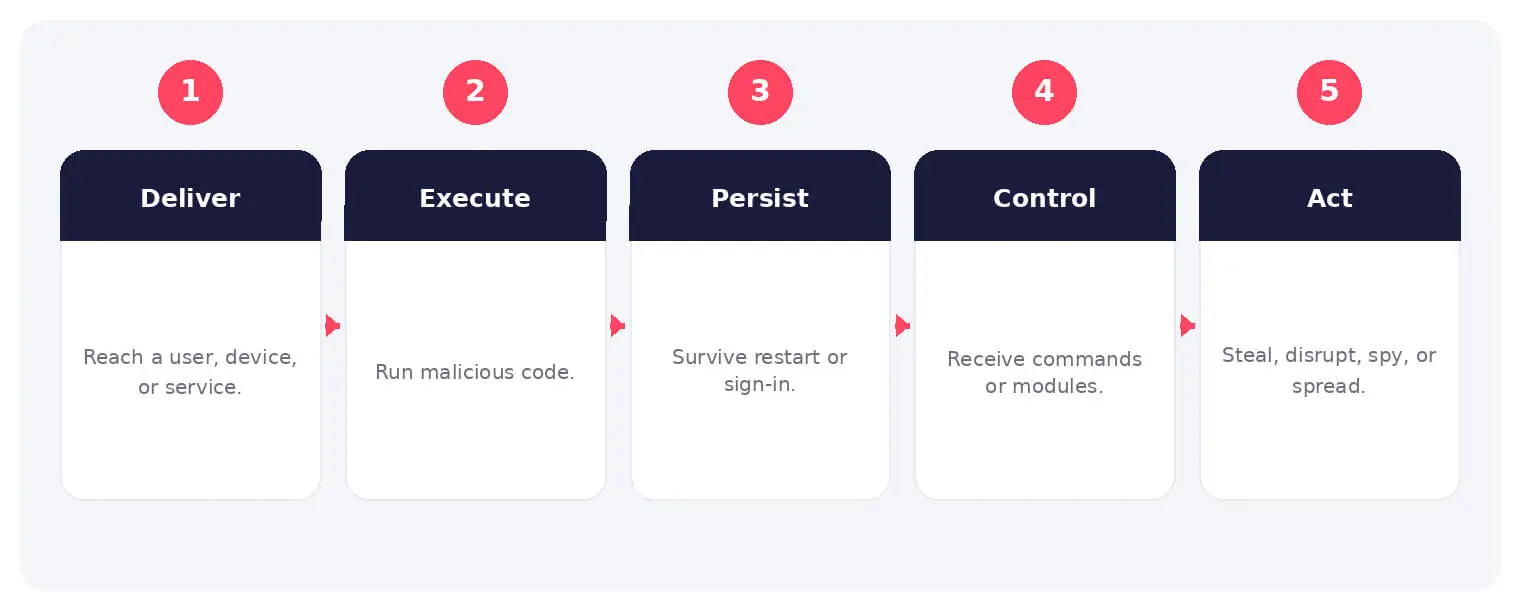
How Malware Works
Malware reaches a target through deception, exploitation, unsafe software, removable media, or an existing foothold. After execution it may establish persistence, disable controls, contact command infrastructure, and gather system information.
The malware then performs its objective or retrieves additional modules. Some families act immediately, while others remain quiet and collect credentials, tokens, documents, or environmental details before the operator decides what to do next.
Common Types and Techniques
- Trojans, backdoors, and remote access tools
- Ransomware, wipers, and destructive malware
- Infostealers, spyware, and keyloggers
- Viruses, worms, rootkits, and botnet malware
Security and Business Risks
- Data theft, identity compromise, and fraud
- Operational disruption and recovery cost
- Unauthorized remote access and lateral movement
- Extortion, sabotage, or long-term surveillance
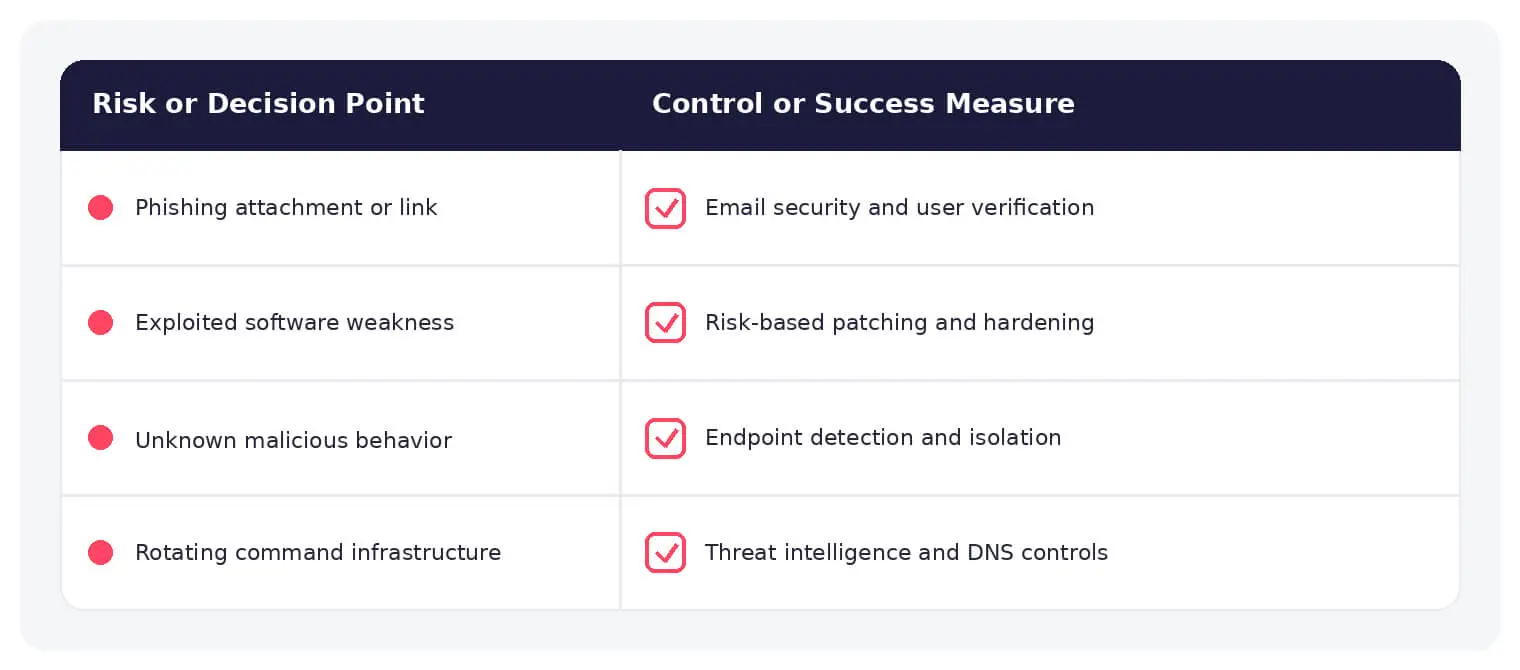
Warning Signs and Detection
Look for unusual process relationships, persistence, security-tool tampering, credential access, rare outbound traffic, mass file changes, and unexpected administration. Combine endpoint behavior with identity, network, cloud, and threat-intelligence context.
Prevention and Response
Patch systems, protect email and browsers, restrict privileges and scripts, allow only trusted applications, segment networks, secure backups, and use endpoint detection and response. Isolate suspected systems and scope for affected accounts and connected hosts.
How SOCRadar Can Help
SOCRadar combines external asset visibility, threat intelligence, Dark Web monitoring, vulnerability context, and indicator enrichment to help teams identify exposure and investigate activity connected to malware.
Explore SOCRadar Cyber Threat Intelligence or request a demo to strengthen threat-informed prevention and investigation.
Frequently Asked Questions
Is Malware the Same as a Virus?
No. Malware is the umbrella term for any software built to steal, disrupt, spy, or grant unauthorized access, and a virus is just one subtype that attaches to host files and replicates when they run. Ransomware, trojans, infostealers, worms, rootkits, loaders, and wipers are all malware, but each behaves and spreads differently.
How Does Malware Typically Get Into an Organization?
Common entry paths include phishing attachments and links, stolen or purchased credentials, exploited internet-facing vulnerabilities, malicious downloads and installers, infected removable media, and software supply-chain compromise. Many incidents combine techniques, such as a phishing email that delivers a credential-stealing payload.
What Does Malware Do After It Executes?
Behavior depends on the family, but common actions include establishing persistence through scheduled tasks or registry run keys, disabling security tools, contacting command-and-control infrastructure, and gathering system details. Some payloads act immediately, such as encrypting files for ransom, while others stay quiet and collect credentials or documents until the operator chooses the next step.
What Is Fileless Malware?
Fileless malware runs through memory injection, scripts, or trusted administrative tools such as PowerShell and WMI instead of dropping a conventional executable to disk. It leaves fewer artifacts for file scanning, but the activity still appears in process command lines, script logging, identity events, and network traffic.
What Are the Warning Signs of a Malware Infection?
Watch for unusual parent-child process relationships, unexpected persistence entries, tampering with security tools, rare outbound connections, mass file modifications, and administrative activity no one can account for. Individually these events can be benign, so correlating endpoint behavior with identity, network, and threat-intelligence context reduces false positives.
Why Do Antivirus Signatures Miss New Malware?
Attackers routinely rotate file hashes, packers, and infrastructure so that known signatures stop matching. Behavioral detection helps because it evaluates what code does, such as process injection, credential dumping, or security-tool tampering, rather than what the file looks like on disk.
What Should You Do First After Detecting Malware?
Isolate the affected system from the network while preserving evidence for investigation. Then scope the incident: determine which accounts were used, which hosts contacted the same infrastructure, and whether persistence or secondary payloads remain. Reset affected credentials and revoke active sessions where the platform allows it, since a password change alone may not invalidate stolen session tokens.
Is Deleting the Malware Enough to Clean an Infected System?
Rarely. Malware often leaves persistence mechanisms, modified settings, rogue accounts, or compromised credentials behind, and reinfection is common while the original entry point stays open. Verification should confirm that systems, identities, and configurations have returned to a known-good state; rebuilding a device may be justified in severe cases.
Which Controls Reduce the Risk of Malware Infections?
A layered set of controls covers the stages an infection depends on:
- Timely patching of operating systems and applications
- Email filtering, browser hardening, and phishing-resistant MFA
- Least-privilege access and restrictions on macros and scripts
- Application allowlisting where operationally feasible
- Network segmentation and secured, offline backups
- Endpoint detection and response with behavioral monitoring
No individual control eliminates every technique, which is why detection and response capabilities remain part of a practical baseline.
Does Malware Only Affect Windows Systems?
No. Infostealers and backdoors run on macOS, mobile trojans spread through malicious apps, and Linux servers and containers are frequently compromised through exposed services or weak credentials. Any system that executes code and communicates over a network is a potential target.