Autonomous Exposure Management (AEM)
Know what’s yours. Know who’s coming. Prove the fix.
Discover every external asset, see which threat actors have a way in, rank what to fix first, and re-check fixes on demand.
See what's exposed. Fix what matters.
Your attack surface changes daily, and when findings are ranked by severity alone, the few that matter get lost. SOCRadar Autonomous Exposure Management correlates your exposed assets and discovered vulnerabilities with threat intelligence, so your team sees which risks to act on first. On-demand validation closes the gap between finding and fix, and a running grade tracks your overall security posture.
grade
Discover what’s yours.
Automatically map domains, IPs, certificates, open ports, mobile apps, and third-party apps continuously, with the discovery path behind every asset and new assets flagged the day they appear.
Prioritize what’s targeted.
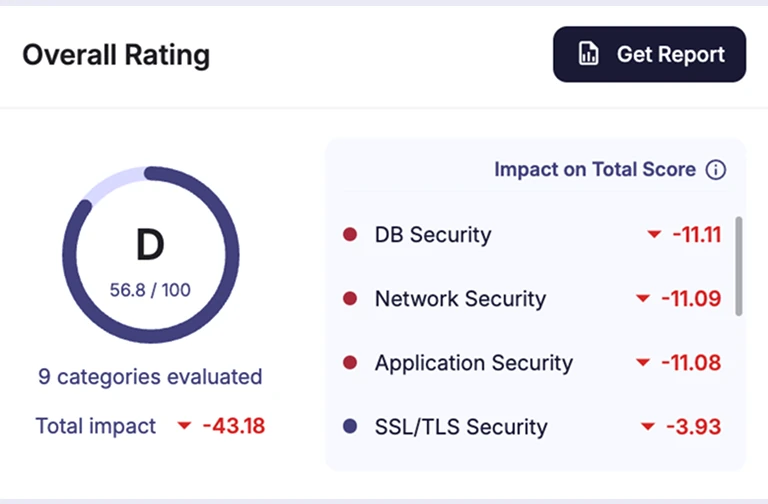
Get one A–F grade and a short fix list ranked by impact on your score, with threat actors and leaked credentials matched to the assets they affect.
Prove the fix.
Re-check a remediated finding on demand instead of waiting for the next scan. If it comes back later, it reopens with its alarm.
Use Cases
Every exposure, from discovery to proof.
Remediation prioritization
Replace the spreadsheet with a ranked fix list. Instead of a long list sorted by severity alone, your team gets a short fix list that weighs severity, threat context, and how much each fix improves your grade.
Shadow IT discovery
Surface the assets your inventory misses. Forgotten microsites, unscanned infrastructure, and shadow SaaS are flagged the day they appear, each with the discovery path that ties it to your organization.
Fix validation
Confirm a fix held without waiting for the next scan. Re-check findings from active scans on demand, follow every finding through its lifecycle, and catch regressions when a resolved finding reopens.
Threat-informed exposure
Connect threat intelligence to the assets it affects. See which threat actors are matched to your exposed technology and which leaked credentials tie to which login page, on the same map as your assets.
Third-party exposure
Find the apps and suppliers that widen your surface. Apps your company uses are matched against a 1,000+ app catalog and tagged as sanctioned or shadow, AI tools, exposed logins, or breached.
Board and audit reporting
Show leadership that exposure is going down. Track your A–F grade over time against an anonymous industry benchmark, and export findings mapped to framework controls for audit prep.
MSSP service delivery
Turn exposure monitoring into a reportable service. Give each client a graded view of their exposure and proof of what was fixed for every QBR and renewal.
Key Features
One exposure cycle, inside your threat intelligence platform.
Autonomous Exposure Management runs inside SOCRadar Extended Threat Intelligence, so threat actor activity, leaked credentials, dark web mentions, and supplier risk enrich every exposure it finds. Your team sees the context behind each finding and pivots to it in one click.
See how you’re rated and what to fix first.
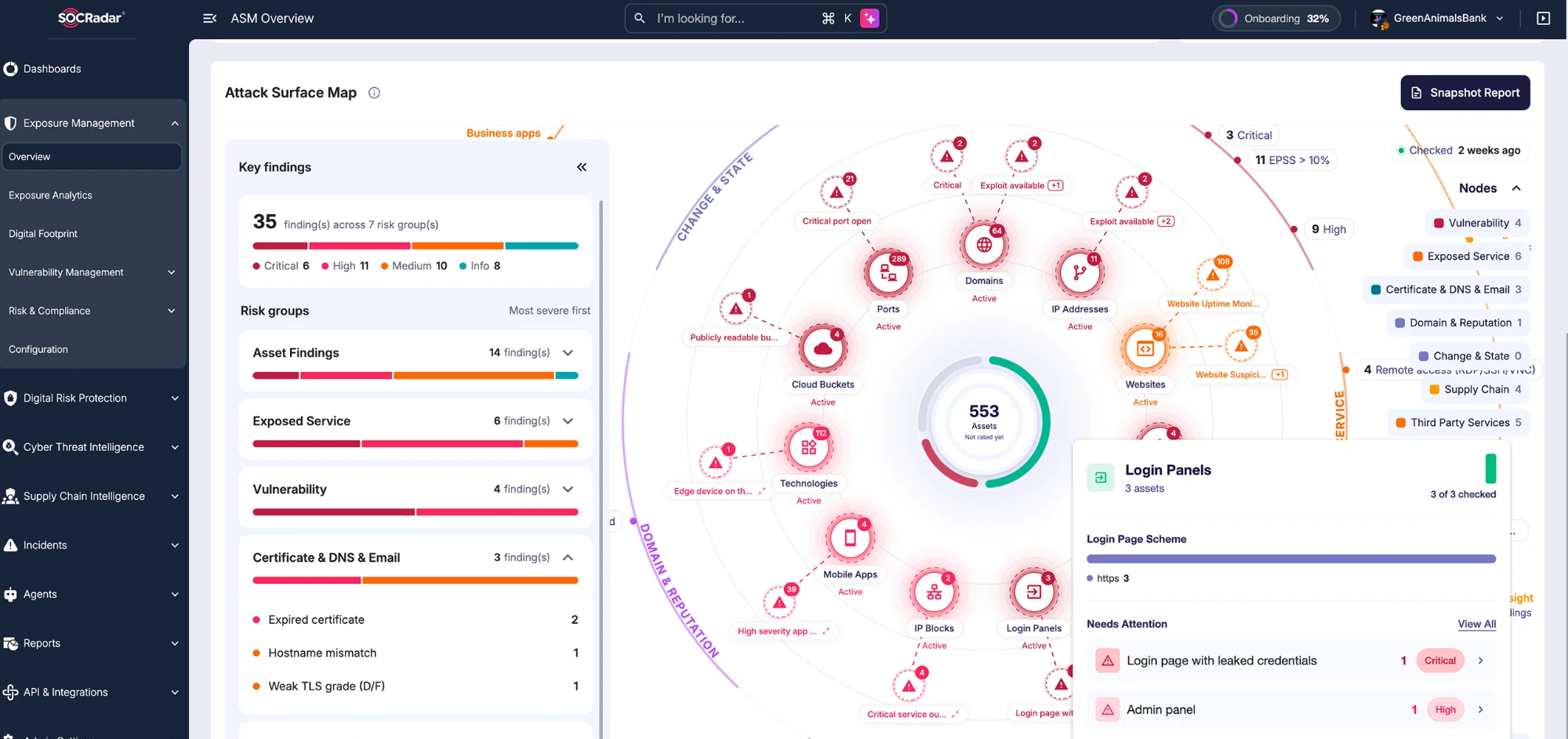
The Overview page answers four questions on one screen: how you’re rated, what you have, what’s exposed, and what to fix first.
- Security Rating with an A–F grade for your external attack surface
- Attack Surface Map with your grade at the center, 11 asset types, and threat context around them
- Key findings ranked so the most valuable fix sits at the top
- Nearly every count opens the records behind it
- Snapshot Report PDF to share the current picture
Every external asset, mapped and explained
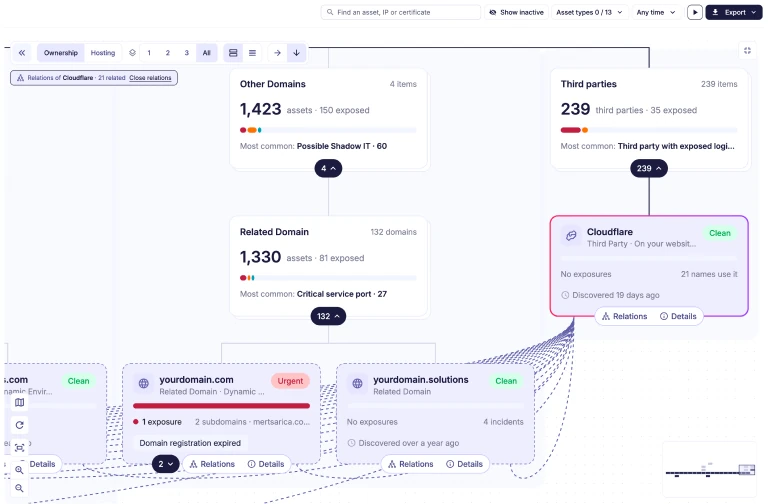
See your full external footprint as one tree, with risks that only show up across assets.
- Continuous discovery of domains, subdomains, IPs, certificates, open ports, and mobile apps
- A discovery path for every asset, so you know why it’s on your list
- 100+ insights and risks, each with how to fix and how to check
- Automated Perimeter Audit flags assets found in the last 24 hours with no scan on record
- One search bar on every screen, with saved filters and Filter With AI
See who’s likely to use each exposure.
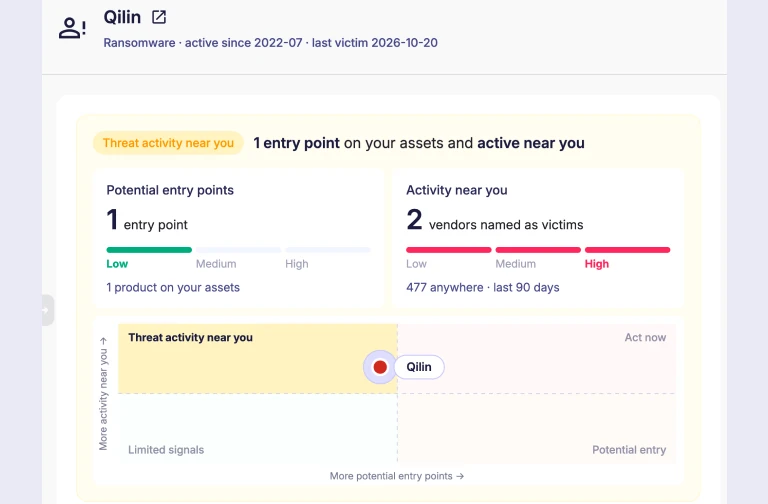
Threat context sits on the same map as your assets, so your team can fix what attackers are likely to target first.
- Threat groups matched to your assets through the CVEs they’re known to exploit
- Identity leaks, dark web marketplace, hack forum, and Telegram mentions linked to the assets they touch
- Supply chain vendors shown next to the exposures they create
- Third Party Exposure matches your apps against a 1,000+ app catalog in 11 main types
- One click from an exposure to the actor, leak, or vendor record behind it
Prove the fix without waiting for the next scan.
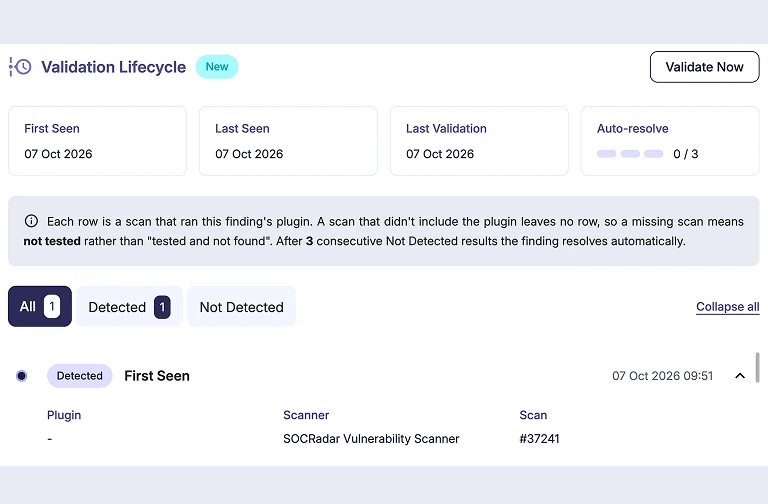
Every finding from active scans carries a lifecycle, so your team can confirm a fix held and spot one that returns.
- 5 lifecycle states: New, Continuous, Missing, Resolved, and Reopened
- Validate Now re-checks a remediated finding on demand
- Validate Selected re-checks up to 100 findings at once
- Validation history with evidence for every scan that tested a finding
- A resolved finding that returns reopens automatically, along with its alarm
Track your risk posture and speed up audit prep.
Risk & Compliance turns findings into a posture leadership can follow and evidence your audit team can use.
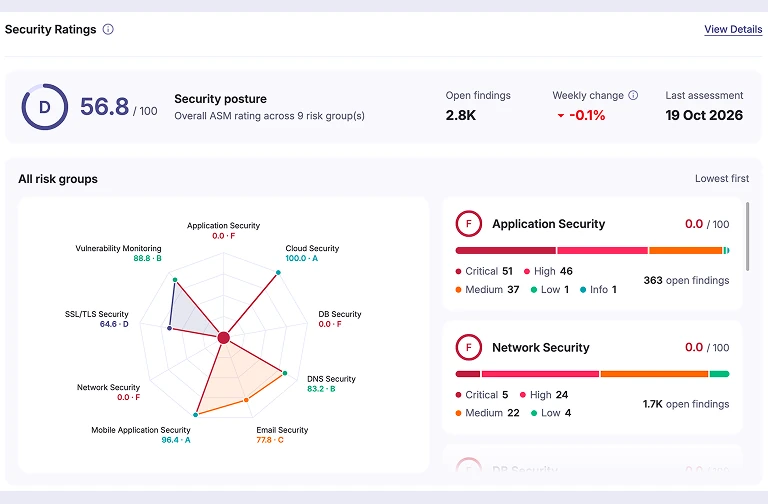
- 9 risk groups scored 0–100 and graded A–F, with the impact of each rule on your total score
- Grade trend over time and an anonymous industry benchmark
- Findings mapped to framework controls as Full, Partial, or Supporting
- Security Profile Report and compliance summary in PDF and Excel
- Reports, exports, alarms, and page links hand evidence to the right owners
Key Platform Capabilities.
-
Active & passive vulnerability scanning
Detect vulnerabilities across externally exposed systems and applications, on a schedule or on demand, without waiting for the next scan window.
-
Closed-loop fix validation
Fixed findings resolve automatically when scans no longer see them, reopen with their alarm if they return, and can be re-checked on demand at any time.
-
Advanced search and shareable views
Build searches with AND and OR condition groups, pin saved filters, and share a link that opens the exact filtered view.
-
Technology estate and listening services
See what’s listening on each asset and which technologies and versions run on your sites, including components loaded at runtime.
-
Mobile app security
Follow findings in your mobile apps build by build, with the newest build showing exactly what changed.
-
Enterprise-grade asset configuration
Tune 6 discovery modules with business-specific seeds, keywords, scope, and blacklists, choose which assets wait for approval, and revert changes.
Key benefits
Benefits of Autonomous Exposure Management
Faster prioritization, proven fixes, and a clear view of your risk posture, delivered inside one threat intelligence platform.
Continuously discover assets, shadow IT, third-party apps, and vulnerabilities across your environment, with new assets flagged the day they appear.
Correlate exposures and vulnerabilities with threat actors, leaked credentials, and supplier risk, so your team works a short, ranked fix list instead of a severity-sorted backlog.
Re-check remediated findings on demand instead of waiting for the next scan, and catch regressions when a resolved finding reopens with its alarm.
Track an A–F grade over time against an anonymous industry benchmark, and share reports mapped to framework controls with leadership and auditors.
FAQ
Frequently asked questions.
What is Autonomous Exposure Management (AEM)?
Autonomous Exposure Management is SOCRadar’s exposure management module, led by threat intelligence. It discovers your external attack surface, shows which threat actors are matched to your exposures, ranks what to fix first, and re-checks fixes on demand so you can prove they held.
How is AEM different from Attack Surface Management (ASM)?
AEM replaces SOCRadar’s Attack Surface Management module. ASM answered what you have and what’s open. AEM adds what matters, who’s likely to use it, and whether the fix held, with a graded posture, a lifecycle on every active scan finding, on-demand validation, and findings mapped to framework controls.
What does "autonomous" mean in AEM?
The platform does the legwork: it flags new assets, resolves and reopens findings as scans see them, and reads patterns across your surface. Your team makes the call on scans, validation, and remediation.
How does AEM prioritize findings?
Instead of ranking by severity alone, AEM gives your external attack surface one A–F grade and ranks each fix by its impact on your score. Threat context, such as actors matched to your exposed technology and leaked credentials, sits next to the assets it affects.
How does AEM support a CTEM program?
AEM covers discovery, prioritization, and validation in line with Gartner’s Continuous Threat Exposure Management (CTEM) approach, giving your program a starting point for each of those stages.
Does AEM help with audit and compliance reporting?
AEM maps findings to framework controls as Full, Partial, or Supporting, with a health score per framework and exports in PDF and Excel. It supports audit prep with evidence from your own findings; it doesn’t certify compliance.
How does AEM help MSSPs?
MSSPs get a graded view of each client’s exposure and proof of what was fixed, ready for QBRs and renewals, with no reconfiguration across client tenants.
Experience the power of comprehensive cybersecurity firsthand.
See SOCRadar in action. Join 30,000+ security professionals who trust SOCRadar to protect their organizations.