Mar 10, 2026

Jan 31, 2026
6 Mins Read
Sep 13, 2026
Table Of Content
Related Articles

SMS Bombing

Threat Actors
Jan 08, 2026
Dark Web Monitoring
Feb 19, 2026
OSINT Framework
Apr 17, 2026

Dark Web
Jan 31, 2026

What Is Ransomware?
Ransomware is malware used to deny access to data or systems and demand payment. Modern operations often steal information before encryption and threaten publication, customer contact, or additional disruption. Some attacks focus on data theft and extortion without deploying an encryptor.
A ransomware incident is usually the final stage of a broader intrusion. Operators may spend days or weeks using stolen credentials, exploiting exposed systems, disabling defenses, moving laterally, compromising backups, and collecting data before visible impact begins.
Key Takeaways
- Ransomware response must address the intrusion, not only encrypted files.
- Initial access brokers and affiliate programs divide the attack into specialized roles.
- Identity misuse, lateral movement, data staging, and backup access create pre-encryption detection opportunities.
- Restoration is safer when systems, identities, and backups are validated before reconnection.
How Ransomware Works
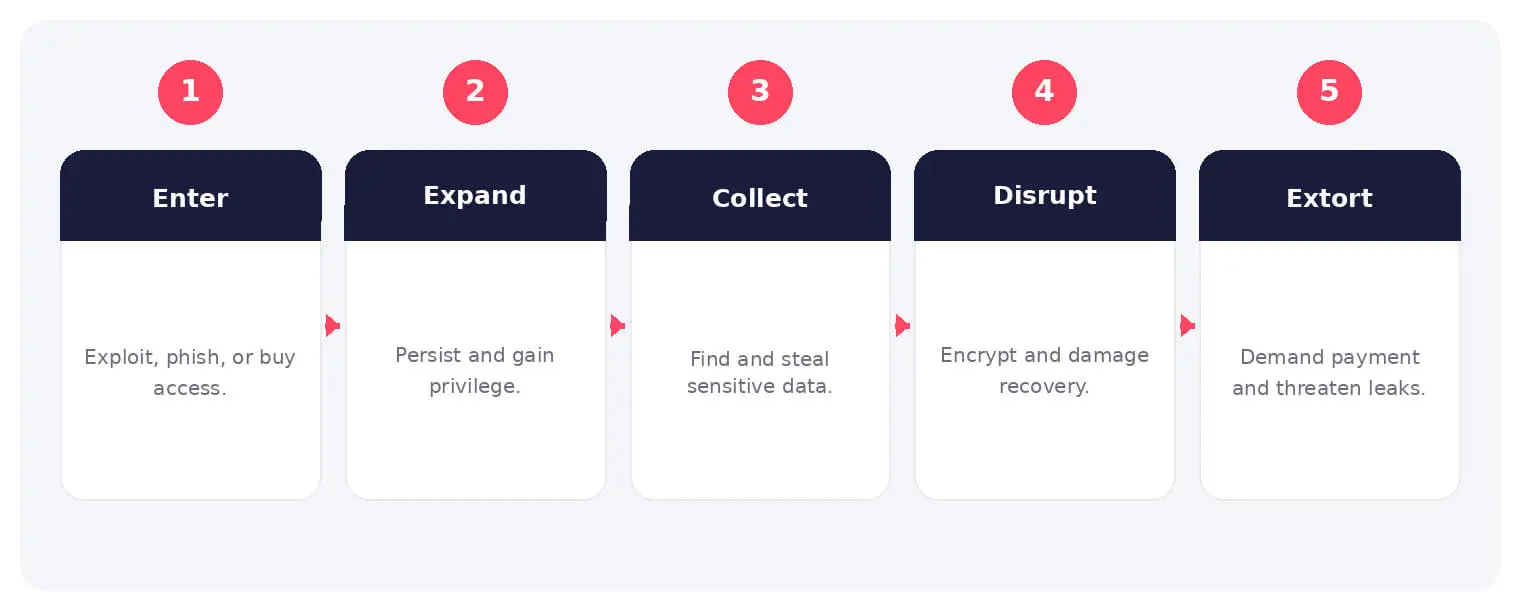
Attackers gain entry through stolen credentials, phishing, exposed remote access, vulnerabilities, or suppliers. They escalate privileges, map the network, collect sensitive data, and weaken security controls.
The operator encrypts systems, deletes recovery options, or steals data for leverage. Negotiation and publication may follow. The absence of encryption does not reduce the seriousness of confirmed data theft.
Common Types and Techniques
- Crypto-ransomware that encrypts files or systems
- Double and multiple extortion with data theft
- Data-theft-only extortion
- Ransomware as a service and affiliate operations
Security and Business Risks
- Extended operational outage and recovery expense
- Loss or publication of sensitive information
- Legal, regulatory, and contractual obligations
- Fraud, partner impact, and reputational damage
Warning Signs and Detection
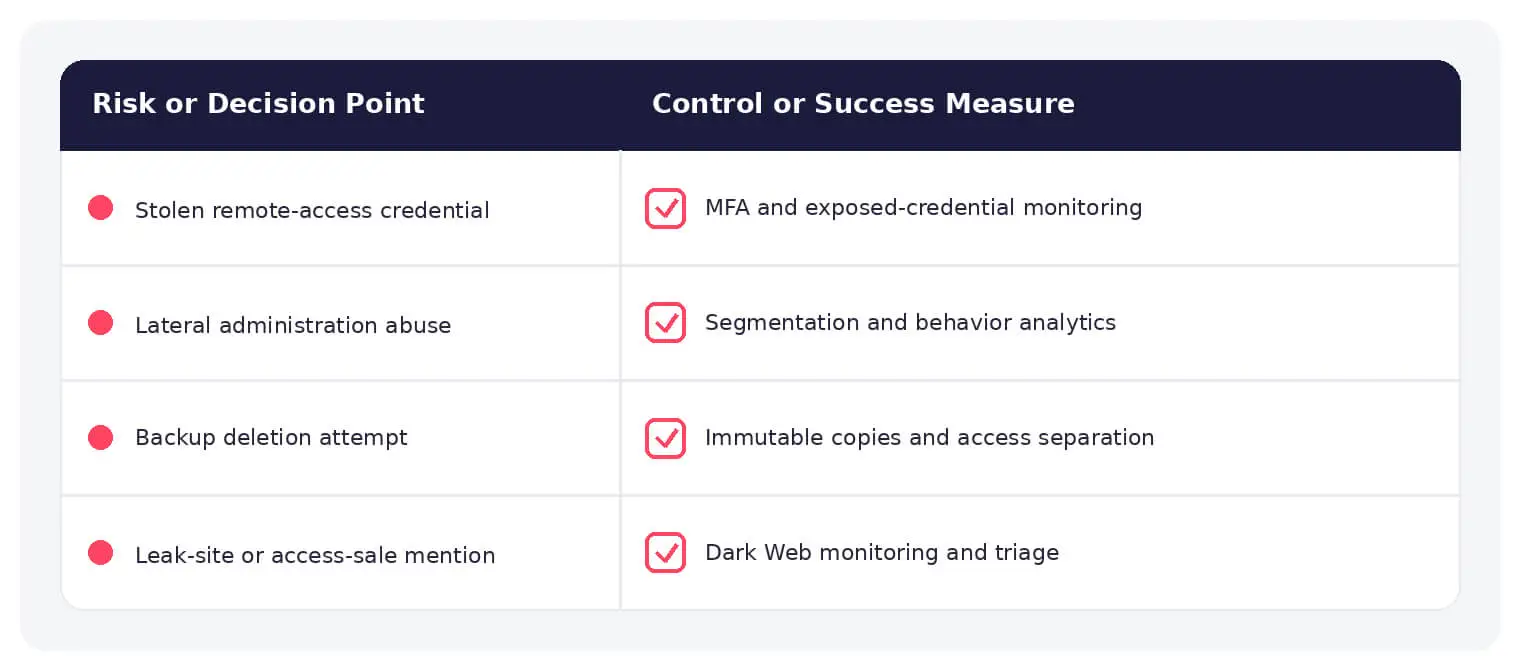
Detect unusual privileged access, remote administration, security-tool changes, credential dumping, broad discovery, lateral movement, data staging, backup deletion, and mass file modification. External monitoring can expose access sales or leak-site claims.
Prevention and Response
Use phishing-resistant MFA, patch exposed services, restrict remote administration, segment networks, protect privileged identities, maintain offline or immutable backups, monitor broadly, and rehearse decisions with legal, communications, and business leaders.
How SOCRadar Can Help
SOCRadar combines external asset visibility, threat intelligence, Dark Web monitoring, vulnerability context, and indicator enrichment to help teams identify exposure and investigate activity connected to ransomware.
Explore SOCRadar Dark Web Monitoring or request a demo to strengthen threat-informed prevention and investigation.
Frequently Asked Questions
What Is Ransomware?
Ransomware is malware that denies access to data or systems and demands payment to restore access or keep stolen information private. Modern operations often exfiltrate sensitive data before any encryption begins, and some skip encryption entirely in favor of pure extortion. A visible ransomware incident is usually the final stage of an intrusion that has already run for days or weeks.
Do All Ransomware Attacks Encrypt Files?
No. In data-theft-only extortion, operators steal information and demand payment without deploying an encryptor. The absence of encryption does not reduce the seriousness of a confirmed breach, because stolen data can still be published, sold, or used for follow-on attacks.
What Is Double Extortion?
Double extortion means the attacker steals data before or alongside encryption and threatens to publish it, contact customers, or cause further disruption unless payment is made. This increases pressure even when the victim can restore encrypted systems from backups. Some groups escalate to multiple extortion, adding techniques such as DDoS attacks or direct outreach to executives and business partners.
How Do Attackers Gain Initial Access to a Network?
Common entry points include:
- Stolen credentials, often sourced from infostealer logs or previous breaches
- Phishing that delivers loaders or harvests logins
- Exposed remote access such as VPNs, RDP, or admin interfaces without strong controls
- Unpatched vulnerabilities in internet-facing services
- Supplier compromise that provides a trusted path into the environment
Initial access brokers frequently sell these footholds to ransomware affiliates, splitting the operation into specialized roles.
What Happens Before Encryption Starts?
Operators often spend days or weeks escalating privileges, dumping credentials, mapping the network, moving laterally, collecting sensitive data, disabling security tools, and locating or sabotaging backups. They typically delay visible impact until exfiltration is complete and recovery options are weakened. This quiet phase is where detection is most valuable, because identity misuse, broad discovery, and data staging generate activity defenders can observe.
What Are the Early Warning Signs of a Ransomware Attack?
- Unusual privileged logins or newly created administrative accounts
- Security-tool configuration changes or tamper attempts
- Credential dumping and unusual use of administrative utilities
- Broad network discovery, scanning, or lateral movement
- Large outbound transfers or data staging on file servers
- Backup job deletion, shadow copy removal, or changes to backup consoles
- Mass file modification or renaming across shares
Signals outside the perimeter matter as well: access for sale in underground markets, exposed credentials, or leak-site claims can reveal an operation before or shortly after impact.
What Should an Organization Do First During a Ransomware Incident?
Activate the incident response plan and bring legal, communications, and business leadership into the decision loop. Isolate affected systems and remote access paths, preserve forensic evidence before rebuilding anything, and establish which stages are still active: identity compromise, data theft, encryption, or backup tampering. Contain the intrusion itself, not only the encrypted files, or attackers may re-enter restored systems.
Should a Victim Pay the Ransom?
Payment is a legal, ethical, and operational decision that requires specialist advice, including review of potential sanctions exposure. Paying does not guarantee a working decryptor, deletion of stolen data, or protection from repeat extortion. Because attackers may retain access to restored environments, recovery depends on finding and closing the original intrusion path regardless of whether payment occurs.
Are Backups Enough to Recover From Ransomware?
Resilient backups reduce dependence on attacker-provided decryptors, but they are not a complete answer. Attackers routinely target backup consoles, credentials, and retention jobs before triggering encryption, and stolen data remains exposed even after a clean restore. Isolated or immutable copies protected by separate identities, combined with tested restore procedures, improve recovery odds, and restored systems should still be checked for residual attacker access before reconnecting.
How Can Organizations Reduce Their Ransomware Risk?
- Enforce phishing-resistant MFA on remote access and privileged accounts
- Patch internet-facing services and close unused remote administration paths
- Segment networks and restrict lateral movement pathways
- Protect privileged identities and monitor their use
- Maintain offline or immutable backups and test restores regularly
- Rehearse incident decisions with legal, communications, and business leaders
No single control prevents every ransomware scenario, but layered controls shorten the attack path and create detection points before encryption begins.
What Is Ransomware as a Service?
Ransomware as a service (RaaS) is a model in which developers lease encryptors, leak sites, and negotiation infrastructure to affiliates in exchange for a share of ransom payments. Initial access brokers sell footholds, affiliates run the intrusions and deploy payloads, and some programs provide tooling and negotiation support. This division of labor lowers the required skill level and explains why the same malware families appear under many different operator brands.