
What Are Indicators of Compromise (IOCs)?
Indicators of Compromise (IOCs) are observable artifacts that may show malicious activity or a security breach.
Common IOCs include file hashes, domains, IP addresses, URLs, registry paths, process names, certificates, email artifacts, and behavioral patterns. An indicator is evidence to evaluate, not automatic proof, because infrastructure is reused, changes quickly, and can have legitimate explanations.
Key Takeaways
- Indicators of Compromise (IOCs) are observable artifacts that may show malicious activity or a security breach.
- Common IOCs include file hashes, domains, IP addresses, URLs, registry paths, process names, certificates, email artifacts, and behavioral patterns. An indicator is evidence to evaluate, not automatic proof, because infrastructure is reused, changes quickly, and can have legitimate explanations.
- False positives from shared infrastructure is a primary concern.
- Effective programs combine prevention, continuous visibility, accountable ownership, and tested response.
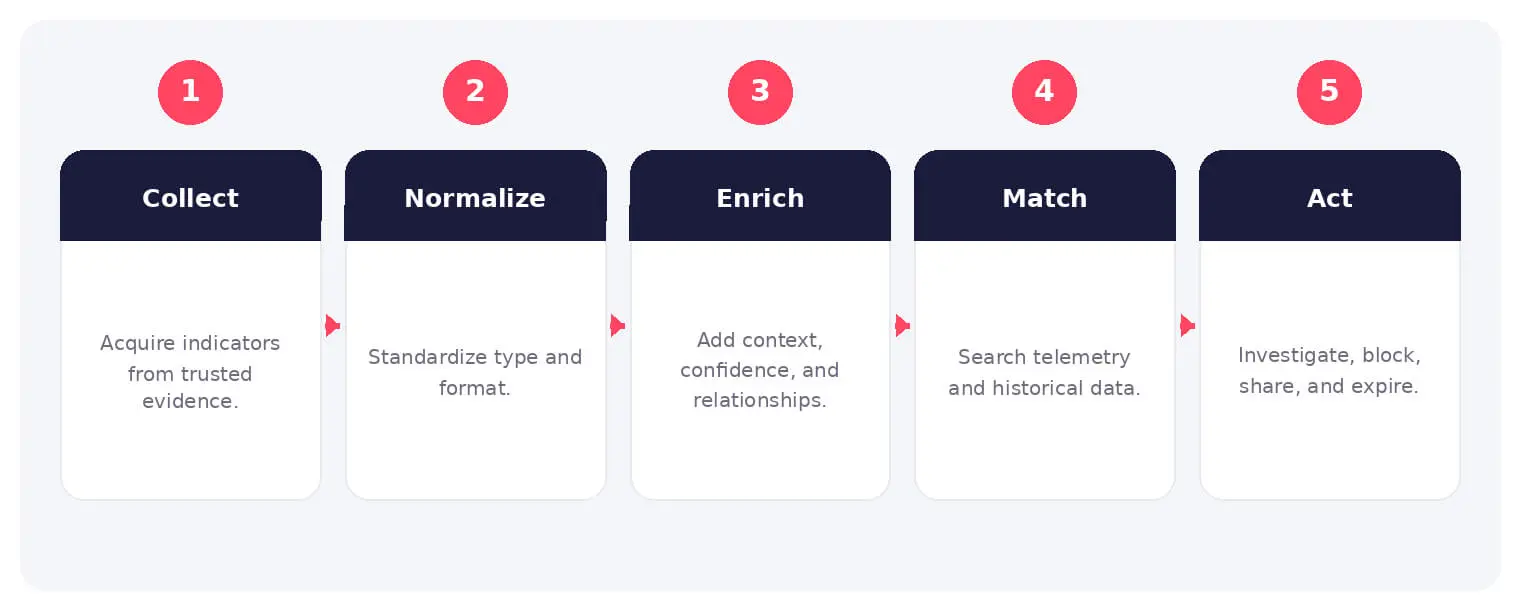
How It Works
The operating flow above turns the concept into observable steps. Exact implementations vary, but each stage needs accountable ownership, trusted inputs, documented policy, and evidence that analysts can use during investigation and review.
Common IOCs include file hashes, domains, IP addresses, URLs, registry paths, process names, certificates, email artifacts, and behavioral patterns. An indicator is evidence to evaluate, not automatic proof, because infrastructure is reused, changes quickly, and can have legitimate explanations.
Common Types and Capabilities
- Network and domain indicators
- File and malware indicators
- Host and persistence artifacts
- Email, identity, and behavioral indicators
Security and Business Risks
- False positives from shared infrastructure
- Stale indicators that create noise
- Overblocking without context
- Missed attacks caused by indicator-only detection
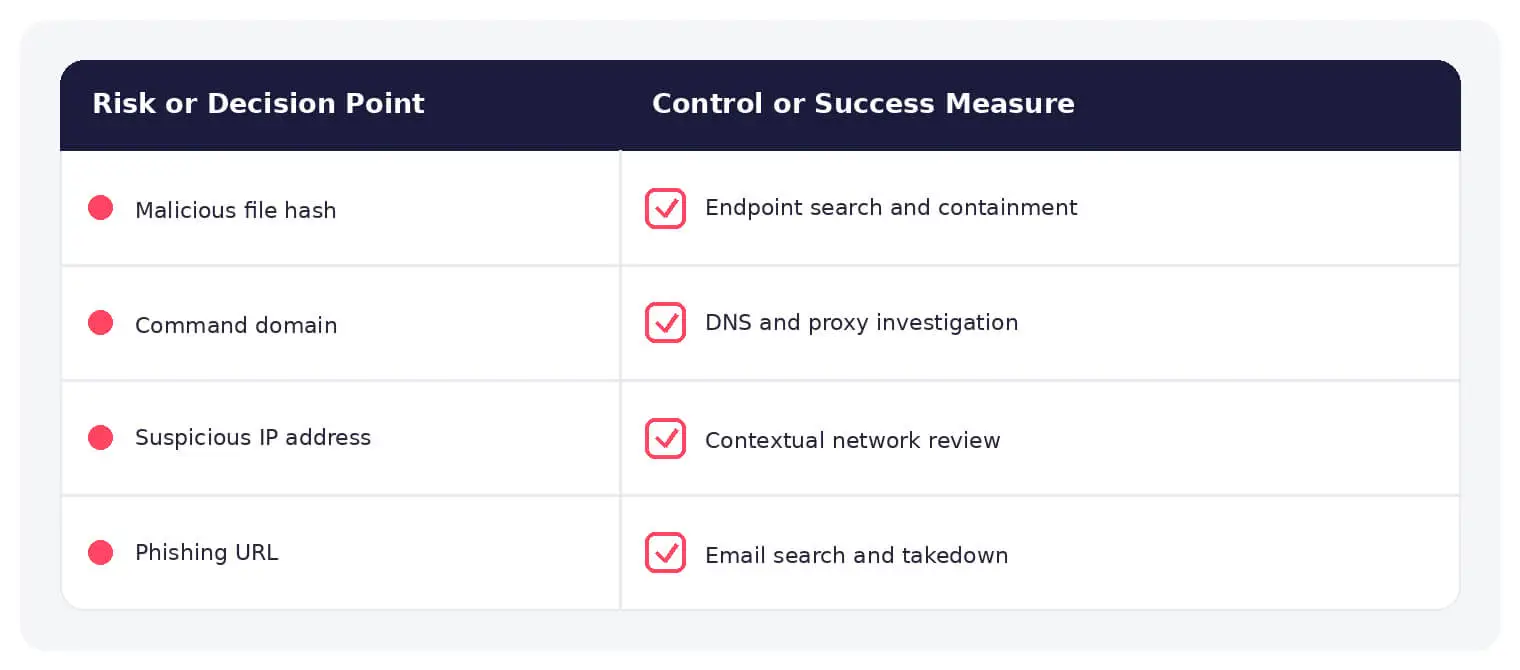
Warning Signs and Detection
Validate source, first and last seen dates, confidence, prevalence, infrastructure ownership, passive DNS, certificate history, related malware, internal matches, user and asset context, and whether the indicator remains active.
Best Practices
Use structured formats, record provenance and confidence, enrich before enforcement, apply expiration, separate hunting from blocking thresholds, correlate multiple signals, preserve sightings, share under suitable handling rules, and convert lessons into behavior-based detection.
How SOCRadar Can Help
SOCRadar adds external visibility, threat intelligence, exposure context, and continuous monitoring to help teams validate and prioritize risks related to indicators of compromise. This context complements internal security operations, identity, response, and governance controls.
Explore SOCRadar IOC Radar or request a demo to strengthen threat-informed prevention and response.
Frequently Asked Questions
What Are Indicators of Compromise (IOCs)?
Indicators of Compromise are observable artifacts that may point to malicious activity or an active breach. Typical examples include file hashes, suspicious domains and IP addresses, URLs, registry paths, process names, certificates, and email artifacts. An IOC is evidence to investigate, not automatic proof of a compromise.
What Types of Artifacts Are Commonly Used as IOCs?
Most indicators fall into four broad groups:
- Network and domain indicators: malicious IPs, domains, URLs, and certificate details.
- File and malware indicators: hashes, filenames, and embedded strings.
- Host and persistence artifacts: registry paths, scheduled tasks, and process names.
- Email, identity, and behavioral indicators: sender artifacts, anomalous logins, and unusual activity patterns.
Why Do Shared Infrastructure and Stale Indicators Cause False Positives?
Attackers frequently reuse cloud providers, CDNs, and compromised hosts, so a domain or IP that served malware last month may host legitimate traffic today. Blocking such indicators without context can disrupt business services. Stale entries also add continuous noise that drains analyst time and erodes trust in the feed.
How Do Analysts Evaluate an IOC Before Acting on It?
Analysts typically review the source reputation, first and last seen dates, confidence score, and prevalence, along with infrastructure ownership, passive DNS history, and certificate history. They also check for related malware, internal log matches, and user and asset context to judge whether the indicator is still active and relevant to their environment.
Should IOCs Be Used for Blocking or Only for Threat Hunting?
High-confidence, high-prevalence indicators may justify automated blocking, while lower-confidence ones are better suited for hunting and alerting. Separating hunting thresholds from blocking thresholds reduces the risk of overblocking. Enrichment and expiration policies should be applied before any indicator reaches enforcement controls.
What Should a Team Do When an IOC Matches Internal Activity?
Treat the match as a lead: confirm the sighting, correlate it with other signals such as process, network, and identity data, and scope the affected user or asset. Preserve the evidence for investigation, contain the activity according to your incident response plan, and record the sighting to improve future detection rules.
Why Do Indicator-Only Detection Strategies Miss Attacks?
Attackers can rotate domains, generate new hashes, and stand up fresh infrastructure faster than blocklists update, so never-before-seen malware can slip past a purely signature-based approach. Attacker techniques tend to remain more stable than the infrastructure they use, which is why correlating indicators with behavioral detection closes part of that gap.
How Can Teams Keep Their IOC Feeds Reliable Over Time?
Use structured formats, record the provenance and confidence of every indicator, and apply expiration dates so entries age out of enforcement rules. Preserve sightings to measure which sources actually produce value, and share vetted indicators under suitable handling rules such as TLP designations.
What Business Problems Come From Poor IOC Management?
Unmanaged indicator feeds lead to blocked legitimate services, noisy alerts, and wasted investigation hours, and they can bury real intrusions under false positives. Over time this slows incident response and undermines confidence in security tooling. Disciplined curation, enrichment, and expiration keep detection useful and defensible.
What Is the Difference Between IOCs and IOAs?
IOCs are retrospective artifacts that suggest a compromise has already occurred, such as a malicious hash or callback domain. Indicators of Attack (IOAs) focus on behaviors and intent observed during an attack, such as unusual credential use or persistence attempts, before the activity is confirmed malicious. Mature programs combine both approaches rather than choosing one.
Oct 15, 2026
Cisco Secure Email & PAN-OS Zero-Days Exploited
Cisco Secure Email & PAN-OS Zero-Days Exploited Cisco and Palo Alto Networks have patched two actively exploited zero-day vulnerabilities that can lead…
Oct 15, 2026
SOCRadar Splunk Integration: New MSSP and Vulnerability Apps
SOCRadar Splunk Integration: New MSSP and Vulnerability Apps Your analysts live in Splunk. Your external risk does not: SOCRadar alarms for dozens…
Oct 14, 2026
CVE-2026-105445: Docker Hub PAT Reassignment Flaw
CVE-2026-105445: Docker Hub PAT Reassignment Flaw Docker has disclosed CVE-2026-105445 , a critical privilege assignment flaw in Docker Hub that could allow…
Intelligence in your inbox every Thursday.
Join 30,000+ security professionals reading SOCRadar research.
Subscribe