
What Is a Remote Access Trojan (RAT)?
A remote access Trojan, or RAT, is malware that gives an attacker remote control over an infected device. It may execute commands, manage files, capture screens, record input, access cameras or microphones, steal credentials, and install additional tools.
A RAT imitates the capabilities of legitimate remote administration but operates without informed authorization and commonly includes stealth or persistence. Context is essential because approved support software can also be abused after an attacker steals an account.
Key Takeaways
- RATs provide interactive access and can support surveillance, theft, lateral movement, and payload delivery.
- Phishing, fake software, loaders, vulnerabilities, and supply-chain compromise are common entry paths.
- Encrypted command traffic and legitimate hosting can make network-only detection difficult.
- Response should assume credentials and sensitive information visible on the device may be exposed.
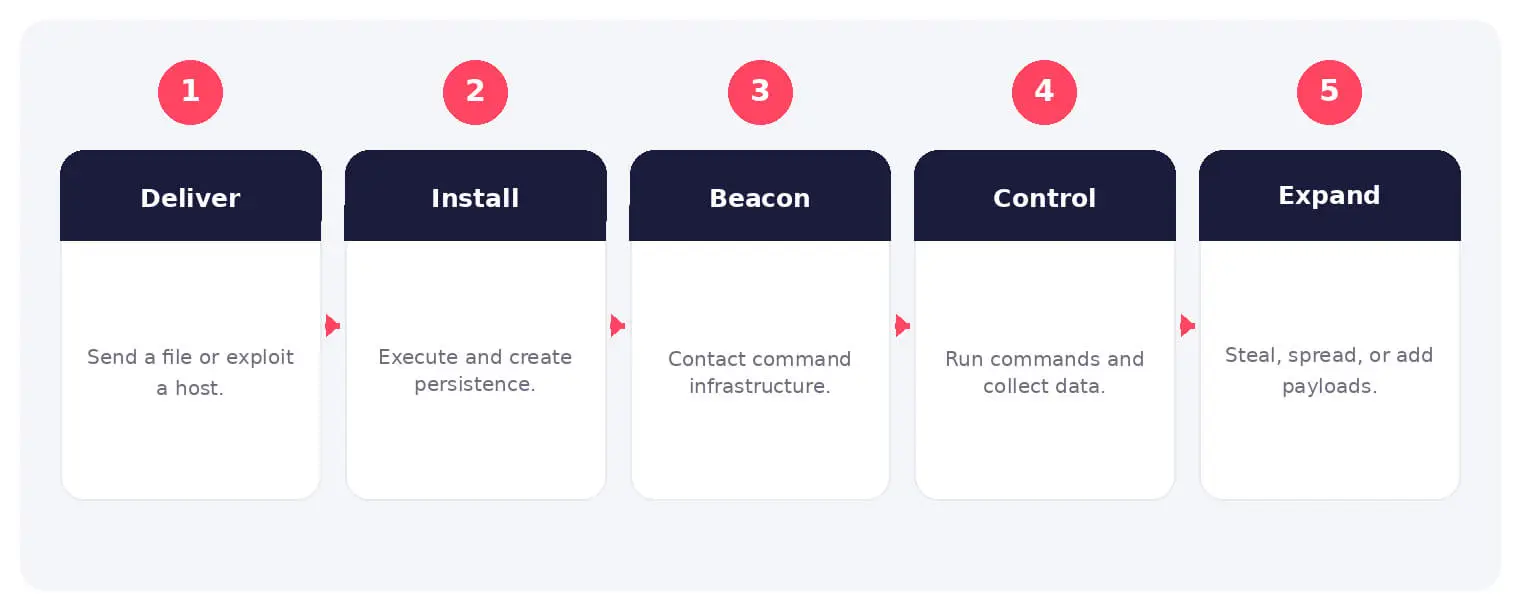
How a Remote Access Trojan (RAT) Works
The victim executes a disguised file or an attacker installs the RAT after gaining access. The malware establishes persistence and registers with command infrastructure using a unique host identifier.
The operator sends commands for discovery, file transfer, screenshots, keylogging, shell access, or additional payloads. Some RATs use common cloud services, dynamic DNS, or proxy layers to conceal control traffic.
Common Types and Techniques
- Commodity and criminal remote access Trojans
- Targeted espionage and surveillance RATs
- Mobile RATs abusing device permissions
- Legitimate remote tools used without authorization
Security and Business Risks
- Credential, document, and financial theft
- Covert surveillance through screen, audio, or camera
- Lateral movement and additional malware deployment
- Long-term unauthorized control of business systems
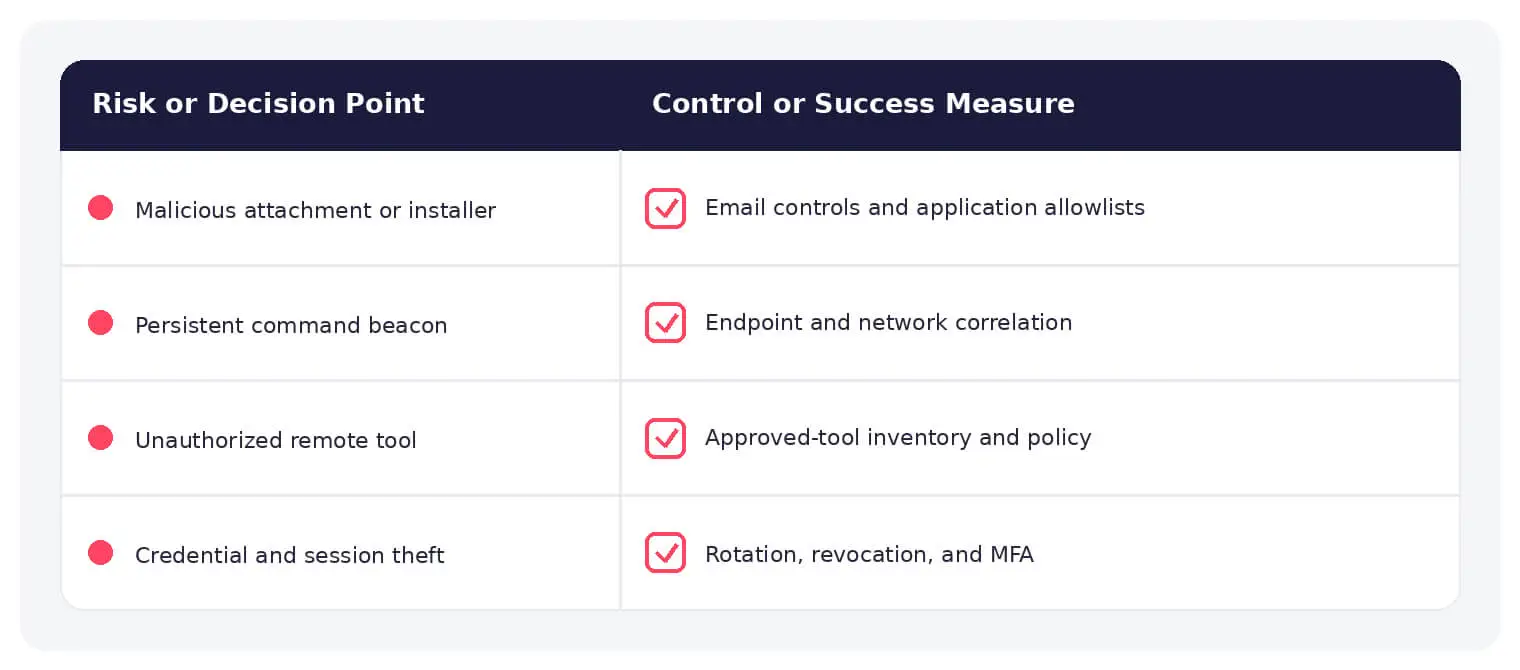
Warning Signs and Detection
Look for unusual persistence, unsigned binaries, suspicious parent-child processes, repeated outbound beacons, remote shell behavior, unexpected screen capture, and new remote administration. Correlate activity with user, device, destination, and approval context.
Prevention and Response
Harden email and downloads, patch systems, restrict execution and privileges, manage remote-access tools, segment networks, and use endpoint detection. Isolate infected devices, block control infrastructure, rotate credentials from a trusted system, and hunt for related hosts.
How SOCRadar Can Help
SOCRadar combines external asset visibility, threat intelligence, Dark Web monitoring, vulnerability context, and indicator enrichment to help teams identify exposure and investigate activity connected to remote access Trojan.
Explore SOCRadar Cyber Threat Intelligence or request a demo to strengthen threat-informed prevention and investigation.
Frequently Asked Questions
What Makes a Remote Access Trojan Different From Other Malware?
A RAT is built for interactive, operator-driven control: file transfers, shell access, screen capture, and keylogging are issued in real time against a specific victim. Many other malware families follow automated routines, such as encrypting files or harvesting saved credentials, without further live interaction. That command channel is what makes RATs useful for surveillance, lateral movement, and staged follow-on attacks.
How Do Attackers Deliver Remote Access Trojans?
Common delivery paths include phishing attachments and links, fake installers and software updates, cracked applications, loaders bundled with other malware, exploitation of unpatched systems, and supply-chain compromise. An attacker who already holds credentials or remote access can also install a RAT manually. In some incidents there is no malicious file at all, because a stolen account for a legitimate remote tool becomes the entry point.
Can a Remote Access Trojan Spy Through a Camera or Microphone?
Many RAT families include audio and camera capture when hardware and operating system permissions allow it, and mobile variants frequently abuse permissions users grant during installation. Whether a particular infection actually recorded anything cannot be assumed; it requires forensic evidence such as process activity, device access logs, or recovered media. Treat any confirmed RAT on a device with a microphone or camera as a potential surveillance incident.
How Does a RAT Communicate With Its Operator?
Most RATs beacon to command infrastructure over encrypted protocols such as HTTPS and register with a unique host identifier so the operator can manage each victim separately. Some abuse trusted services, including cloud storage, messaging platforms, and dynamic DNS, or route traffic through proxies to resemble normal activity. Because destinations can be legitimate and the traffic is encrypted, network-only detection often misses active infections.
What Warning Signs Point to a Possible RAT Infection?
Common indicators include:
- Persistence entries or startup items with no matching approved software
- Unsigned binaries running from unusual locations
- Suspicious parent-child process chains, such as a document viewer spawning a scripting host
- Regular outbound beacons to the same destination
- Remote shell activity, unexpected screen capture, or input hooking
A remote administration tool that appeared without a matching request or approval is another strong signal. Correlate each finding with the user, device, and destination before treating it as malicious.
Why Is RAT Command Traffic Hard to Detect With Network Tools Alone?
RAT operators rely on TLS encryption, mainstream cloud services, dynamic DNS, and proxy layers, so control traffic can look like ordinary web browsing. Fast-changing infrastructure also limits the value of static blocklists on their own. Pairing network telemetry with endpoint behavior signals and indicator enrichment generally provides better coverage than either approach alone.
What Should You Do First After Discovering a RAT?
Isolate the device from the network while preserving memory and disk evidence where feasible, then identify the persistence mechanisms, command infrastructure, and earliest point of compromise. Treat everything visible on the device, including typed passwords, open documents, and connected cloud accounts, as potentially exposed to the operator. From a trusted system, rotate exposed credentials, revoke active sessions and tokens, and hunt other hosts for the same indicators.
Does Resetting Passwords Cut Off a RAT’s Access?
Resetting credentials limits further logins with stolen passwords, but a reset alone does not always terminate sessions the operator has already established. Existing cookies, session tokens, or OAuth grants can remain valid depending on the platform, so sign out all sessions and revoke application authorizations where the service supports it. Perform resets from a separate, trusted device rather than the infected one.
Should an Infected Device Be Rebuilt?
Reimaging is a common decision when system integrity cannot be trusted, but it is not required in every incident. If forensics indicate the RAT ran with limited privileges, its persistence was fully identified and removed, and there is no sign of kernel-level tampering, a validated cleanup may be acceptable in some environments. High-value systems and incidents with uncertain timelines generally justify a rebuild along with credential rotation.
How Can Organizations Reduce the Risk of RAT Infections?
No single control blocks every delivery path, so layer them:
- Filter email and restrict software downloads to reduce initial delivery
- Patch internet-facing systems and applications promptly
- Apply application control and least-privilege accounts to limit post-execution impact
- Inventory and monitor remote administration tools so approved software is distinguishable from abuse
- Segment networks and deploy endpoint detection that watches behavior rather than file names
Email authentication such as SPF, DKIM, and DMARC reduces direct spoofing of your domains, but attackers can still use impersonation and compromised accounts to deliver a RAT, so pair it with content inspection and clear reporting channels.
What Can an Operator Do With RAT Access to a Business System?
Typical actions include harvesting credentials and documents, watching users through the screen or camera, moving laterally with stored credentials or active sessions, deploying additional payloads such as ransomware, and maintaining long-term unauthorized access. Because the operator works interactively rather than running a fixed script, the impact often extends beyond whatever first triggered the alert. Scoping the incident across other hosts and accounts is part of containment.
Can Legitimate Remote Administration Tools Be Abused Like a RAT?
The capabilities overlap heavily, so the distinction rests on authorization and intent rather than features. Approved remote tools are deployed, monitored, and governed by the organization, while a RAT is installed without informed consent and typically adds concealment, persistence, and theft functions. The gray area is misuse of legitimate software: a stolen support account or a repurposed remote management agent can provide the same control as a purpose-built RAT without any custom malware.
Nov 02, 2026
Ivanti Connect Secure Zero-Day Chain Enables Root Access
A previously unknown threat actor tracked as UTA0576 chained three Ivanti Connect Secure zero-day vulnerabilities to run code as root on VPN…

Nov 02, 2026
Pataya Food Leak, Belgian Military Data, China Housing Fund, Anka DDoS, and Vijay Sales Access
SOCRadar Dark Web Team identified several underground posts, including an alleged 500GB Pataya Food data leak, an alleged Belgian military archive containing…

Oct 30, 2026
Binance Hack: Inside the $6.3B Hot Wallet Theft
The Binance hack drained an estimated $6.3 billion from the exchange’s hot wallets across roughly 10 blockchains on the evening of October…
Intelligence in your inbox every Thursday.
Join 30,000+ security professionals reading SOCRadar research.
Subscribe