
Microsoft Outlook Outage: What You Need to Know
The Microsoft Outlook outage that started on November 12, 2026, began as an Exchange Online mailbox access problem in the Americas and widened into a global Microsoft 365 service degradation. A Microsoft 365 outage is a service-side failure in Microsoft’s cloud that blocks or slows tenant access to apps such as Outlook, Teams and SharePoint Online. About 20 hours after the first incident was opened, Microsoft was still restoring server capacity region by region and had not published a root cause.

The questions below cover what happened, which services were hit, what Microsoft has said about the cause, and what security and IT teams should do while recovery continues.
Key Takeaways
- Started as a mailbox problem: Exchange Online mailbox access failed for users in the Americas on November 12, 2026, then Microsoft confirmed any region could be affected.
- Spread across Microsoft 365: Teams, SharePoint Online, Copilot, Defender XDR, Purview, Intune and other services that rely on Exchange Online were listed as potentially affected.
- No confirmed root cause: Microsoft points to servers failing health checks and an overwhelmed secure-connection process, and says there is no indication of malicious activity.
- Still recovering: As of November 13, 2026, 12:30 UTC, Microsoft’s latest update reported progress but warned that intermittent issues may continue.
- Phishing risk is real: Outage-themed password reset lures appeared within hours, so users should rely only on Microsoft’s official status channels.
Microsoft 365 Outage Summarized
| Attribute | Details |
|---|---|
| Incident IDs | EX1550543 (Exchange Online), MO1550821 (dependent Microsoft 365 services) |
| Start Time | November 12, 2026, 16:17 UTC (EX1550543) |
| First Affected Service | Exchange Online mailbox access via Outlook on the web, desktop, mobile, MAPI, Exchange ActiveSync and REST API |
| Services Listed as Affected | Teams, SharePoint Online, Microsoft 365 Copilot, Defender XDR, Defender for Office 365, Purview, Intune, Planner, To Do, Power BI, Fabric, Microsoft Graph, Universal Print, Windows 365, Microsoft 365 admin center |
| Geographic Scope | Began in the Americas; Microsoft later said users in any region could be affected; Downdetector reports from at least 74 countries and territories |
| Peak Reports | Nearly 140,000 Outlook reports on Downdetector globally (more than 130,000 in the US), November 12, 2026 |
| Root Cause | Not confirmed; servers failing health checks and an overwhelmed secure-connection process; a correlated network configuration change is being rolled back but is not confirmed as the cause |
| Cyberattack | No indication of malicious activity, per Microsoft |
| Status | Recovering, not resolved, as of November 13, 2026, 12:30 UTC |
Microsoft Outlook Outage Timeline
November 13, 2026, about 11:04 UTC Recovery
Recovery reaches Asia Pacific first
Microsoft reports further progress in mailbox access and delayed email processing, with recovery actions completed on Asia Pacific infrastructure first and other regions to follow. It warns that intermittent issues may continue and has not declared the incident resolved.
November 13, 2026, about 09:10 UTC Status
Email timeout window extended to 48 hours
Microsoft extends the timeout window so queued mail keeps retrying instead of failing, and prioritizes backlog processing. Service capacity has not yet returned to normal levels.
November 13, 2026, about 07:45 UTC Recovery
Patch brings the first signs of stability
Microsoft reports positive server-stability results after patching an authentication and routing configuration component on part of its infrastructure, and plans to expand the patch to servers in active regions.
November 13, 2026, 04:57 UTC Microsoft
Microsoft scales up capacity
Microsoft scales up virtual machines to absorb the traffic surge as affected regions come back online.
November 13, 2026, 03:07 UTC Status
Fixes are not taking as expected
Microsoft says its changes are “not taking as expected” and starts looking at other ways to add capacity.
November 13, 2026, 01:06 UTC Microsoft
Network configuration change rolled back
Microsoft says a process that sets up secure connections on affected servers is overwhelmed and starts reverting a recent network configuration change that correlates with the start of impact. It has not confirmed that change as the cause.
November 13, 2026, about 00:00 UTC Outage
Restored servers fail again under traffic
Servers that Microsoft had returned to service become unresponsive again once they receive traffic, setting recovery back.
November 12, 2026, about 22:10 UTC Status
Early fixes fall short
Microsoft says its earlier actions “have not provided the anticipated relief” and that a core process on affected servers is overwhelmed. It begins isolating and restarting infrastructure.
November 12, 2026, about 20:56 UTC Recovery
Alternative health check returns some servers
An alternative health-check method brings a subset of affected servers back into service, and Microsoft prepares automated restarts for servers that are still unresponsive.
November 12, 2026, 19:43 to 19:57 UTC Microsoft
Servers are failing automated health checks
Microsoft says affected servers are failing automated health checks, tests a configuration change and restarts affected servers. At this point it says it has found no recent change correlated with the start of impact.
November 12, 2026, about 19:06 UTC Microsoft
Microsoft pauses all deployments
Microsoft pauses all deployments and configuration changes. Around the same time, it says the elevated load comes from servers becoming unexpectedly unavailable, not from a rise in traffic.
November 12, 2026, about 18:15 UTC Outage
Outlook reports peak on Downdetector
Outlook reports on Downdetector peak above 130,000 in the US and near 140,000 globally, with reports coming from at least 74 countries and territories.
November 12, 2026, about 18:07 to 18:26 UTC Microsoft
Microsoft widens the scope to all regions
Microsoft warns that users in any region may be affected and opens MO1550821 to track dependent services, including Teams, SharePoint Online, Microsoft 365 Copilot and Defender XDR.
November 12, 2026, 16:17 UTC Outage
Exchange Online incident begins
Microsoft opens EX1550543 as users in the Americas lose access to Exchange Online mailboxes through Outlook on the web, desktop and mobile apps.
November 12, 2026, 14:45 to 15:53 UTC Status
Separate Teams incident is resolved
A separate Teams incident, TM1550488, affects users in North America and is resolved before the Exchange Online problems begin.
What Happened in the Microsoft Outlook Outage?
The Microsoft Outlook outage is a multi-region Microsoft 365 service degradation that began on November 12, 2026, and left users unable to open Exchange Online mailboxes through Outlook on the web, desktop and mobile apps. The disruption later reached Teams, SharePoint Online, Copilot, Defender XDR and other services that depend on Exchange Online.
When Did the Microsoft 365 Outage Start?
Microsoft’s Exchange Online incident, EX1550543, started at 16:17 UTC on November 12, 2026. User complaints surged on Downdetector shortly afterward, and US Outlook reports peaked above 130,000 around 18:15 UTC. Microsoft opened a second, broader incident, MO1550821, at 18:26 UTC to track Microsoft 365 services that rely on Exchange Online.
Which Microsoft Services Are Down?
Exchange Online and Outlook were hit first and hardest. Microsoft’s MO1550821 advisory later listed Teams calendar and scheduling features, SharePoint Online, Microsoft 365 Copilot, Defender XDR, Safe Links in Defender for Office 365, Purview, Intune, Planner, To Do, Power BI, Fabric, Microsoft Graph and parts of the Microsoft 365 admin center as potentially affected.
Why Did the Outage Spread Beyond Outlook?
Many Microsoft 365 workloads read mail, calendar and contact data from Exchange Online, so a failure at the mailbox layer cascades into apps that look unrelated. Teams meeting scheduling, Microsoft Graph mail and calendar calls, Safe Links URL checks and Purview data classification all lean on that layer, which is why impact widened hours after the first Outlook reports.
What Caused the Microsoft Outlook Outage?
Microsoft has not confirmed a root cause as of November 13, 2026. Its updates describe servers failing automated health checks and dropping out, which pushed elevated load onto the remaining infrastructure without any rise in overall traffic. A process that sets up secure connections became overwhelmed. Microsoft is rolling back a recent network configuration change that correlates with the start of impact and is reviewing a small number of configuration updates as possible contributors, without naming either as the cause.
Was the Microsoft Outage a Cyberattack?
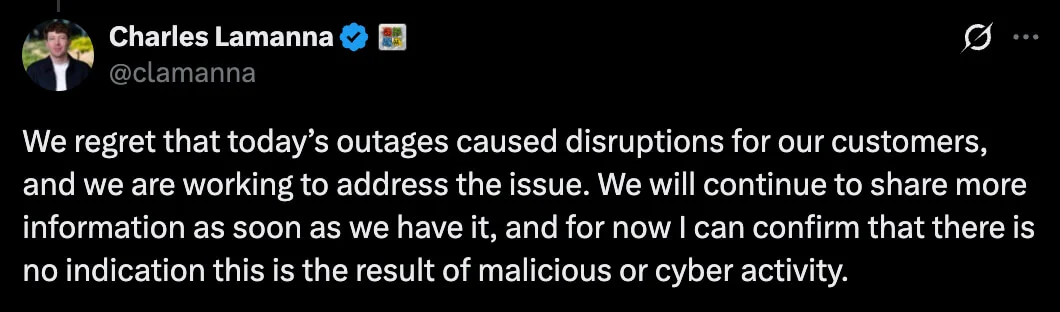
Microsoft says no. Microsoft executive Charles Lamanna stated on X that there was no indication the outage resulted from malicious or cyber activity, and Microsoft’s service advisories report no malicious activity. Security teams should still treat that assessment as preliminary until Microsoft publishes its Post-Incident Report with a confirmed root cause.
How Many Users and Countries Were Affected?
Downdetector logged outage reports from users in at least 74 countries and territories within about an hour of the disruption starting. Outlook reports peaked near 140,000 globally, nearly seven in 10 of them from the US, and Microsoft confirmed users in any region could be affected. Reported downstream impact included public-sector email in the UK, Singapore and Japan, plus Microsoft 365 connectors used by OpenAI and Anthropic.
Is Outlook Still Down?
As of November 13, 2026, 12:30 UTC, Microsoft’s latest update reported additional progress in mailbox access and delayed email processing but warned that intermittent issues may continue. Service capacity had not returned to normal levels, recovery reached Asia Pacific infrastructure first, and Microsoft had neither declared the incident resolved nor given a timeline for full recovery.
Were Emails Sent During the Outage Lost?
Mail sent during the outage should arrive late rather than be lost. Microsoft extended the email timeout window to 48 hours so queued messages keep retrying, and it is prioritizing backlog processing. Administrators should tell users not to resend messages in bulk, because duplicates add load to mail queues that are already congested.
What Are the Microsoft Incident IDs for the Outage?
Microsoft tracks the outage in the Microsoft 365 admin center under EX1550543 for Exchange Online mailbox access and MO1550821 for dependent Microsoft 365 services. A separate Teams incident in the Americas, TM1550488, was resolved earlier on November 12, 2026. When the admin center fails to load, status.cloud.microsoft carries Microsoft’s public status updates.
Are Attackers Exploiting the Microsoft Outage?
Warnings about fake Outlook password reset emails and texts circulated on the evening of November 12, 2026, within hours of the disruption. Outage lures typically impersonate Microsoft with “service restoration” notices, cloned sign-in pages and fake support phone numbers. Users should ignore links in such messages and check status only through Microsoft’s official channels.
What Should Microsoft 365 Administrators Do During the Outage?
Administrators should track EX1550543 and MO1550821 instead of troubleshooting locally, since password resets, Outlook profile rebuilds and tenant setting changes will not fix a server-side fault. Security teams should warn staff about outage-themed phishing, move urgent communication to a pre-approved backup channel, and expect reduced Defender XDR and Safe Links coverage until services recover.
Can Organizations Claim SLA Credits for the Outage?
Microsoft’s online services SLA commits to 99.9% monthly uptime for Exchange Online, Teams and SharePoint Online, with service credits of 25%, 50% or 100% as uptime falls below 99.9%, 99% and 95%. Credits are not automatic: tenant admins must file a claim by the end of the calendar month after the incident, citing incident IDs, affected user counts and impact times.
Recommendations for Security and IT Teams
A prolonged Microsoft 365 outage is an availability problem first, but it also opens security gaps that attackers can use. These steps apply while recovery continues and after Microsoft declares the incident resolved:
- Use official status sources only: Follow EX1550543 and MO1550821 in the admin center or status.cloud.microsoft, and tell staff that Microsoft will not ask them to re-enter passwords through emailed or texted links.
- Add a URL filtering layer: With Safe Links verification listed as affected, enforce URL and domain filtering at the DNS, proxy or secure web gateway layer so malicious links in delayed mail are still blocked.
- Watch sign-in activity: Review Microsoft Entra ID sign-in logs for unusual locations, MFA fatigue attempts and new device registrations, since outage-themed credential phishing tends to spike during disruptions.
- Avoid tenant changes: Hold off on password resets, profile rebuilds, connector changes and conditional access edits unless Microsoft guidance calls for them; local changes add noise without fixing a server-side fault.
- Clear the alert backlog after recovery: Check Defender XDR, Purview and any email-delivered security alerts for items that arrived late or were missed during the outage window.
- Document the impact: Record affected users, locations and start and end times per service to support an SLA credit claim and your own post-incident review.
- Plan for the next outage: Map which business processes depend on Exchange Online and keep a tested out-of-band channel for incident response and executive communication.