Manage SOCRadar Alerts Where Your Team Already Works with SOCRadar and Zendesk
A new high-severity alert lands in your threat intelligence platform. Someone notices it eventually, copies the details into a ticket, assigns it, and the investigation starts in one tool while the record of it lives in another. Every alert that crosses platforms by hand loses time, context, or both. What if SOCRadar alerts arrived in Zendesk as tickets on their own, with the full alert context one click away in the sidebar?
They now can: SOCRadar Alert Management has passed the Zendesk partner review and is officially live on the Zendesk Marketplace.
Alerts in One Tool, Tickets in Another
Many organizations run their SOC and security operations through Zendesk Support: it’s where work is assigned, tracked, escalated, and audited. But threat alerts are generated somewhere else. Bridging that gap manually means analysts re-key alert details into tickets, severity and classification get applied inconsistently, and the ticket rarely carries enough context for the assignee to act without opening a second console.
Context Switching Slows Response Down
Even when a ticket exists, the investigation still forces a round trip: open the intelligence platform, find the matching alert, read the details, come back, update the ticket, repeat. Each switch adds friction, and friction adds minutes to every alert – minutes that compound across hundreds of alerts a month. Status updates drift out of sync between the two systems, and nobody is quite sure which one reflects reality.
Integration With Zendesk
The SOCRadar Alert Management app is built on the Zendesk App Framework and runs directly within Zendesk Support, without requiring additional infrastructure or third-party services. Customers can install it from the Zendesk Marketplace in just a few clicks.
Once connected, the app brings SOCRadar alerts into your Zendesk workflow end-to-end:
- SOCRadar alert dashboard within Zendesk: view SOCRadar alerts directly in Zendesk and quickly find relevant records using flexible filtering and search capabilities.
- Automatic Zendesk ticket creation: tickets are created automatically for SOCRadar alerts that meet the configured severity threshold, and include key information such as the alert ID, severity, and alert-type tags for easier classification and routing.
- Alert management without leaving Zendesk: update the alert status, add comments, and request assistance from a SOCRadar analyst directly within Zendesk, without switching between platforms.
- Alert context directly in the ticket sidebar: access the linked SOCRadar alert details, relevant context, and recommended actions from the Zendesk ticket sidebar, supporting faster investigation and response.
- Flexible integration settings: configure the historical data range, polling interval, minimum severity threshold, and alert types excluded from synchronization.
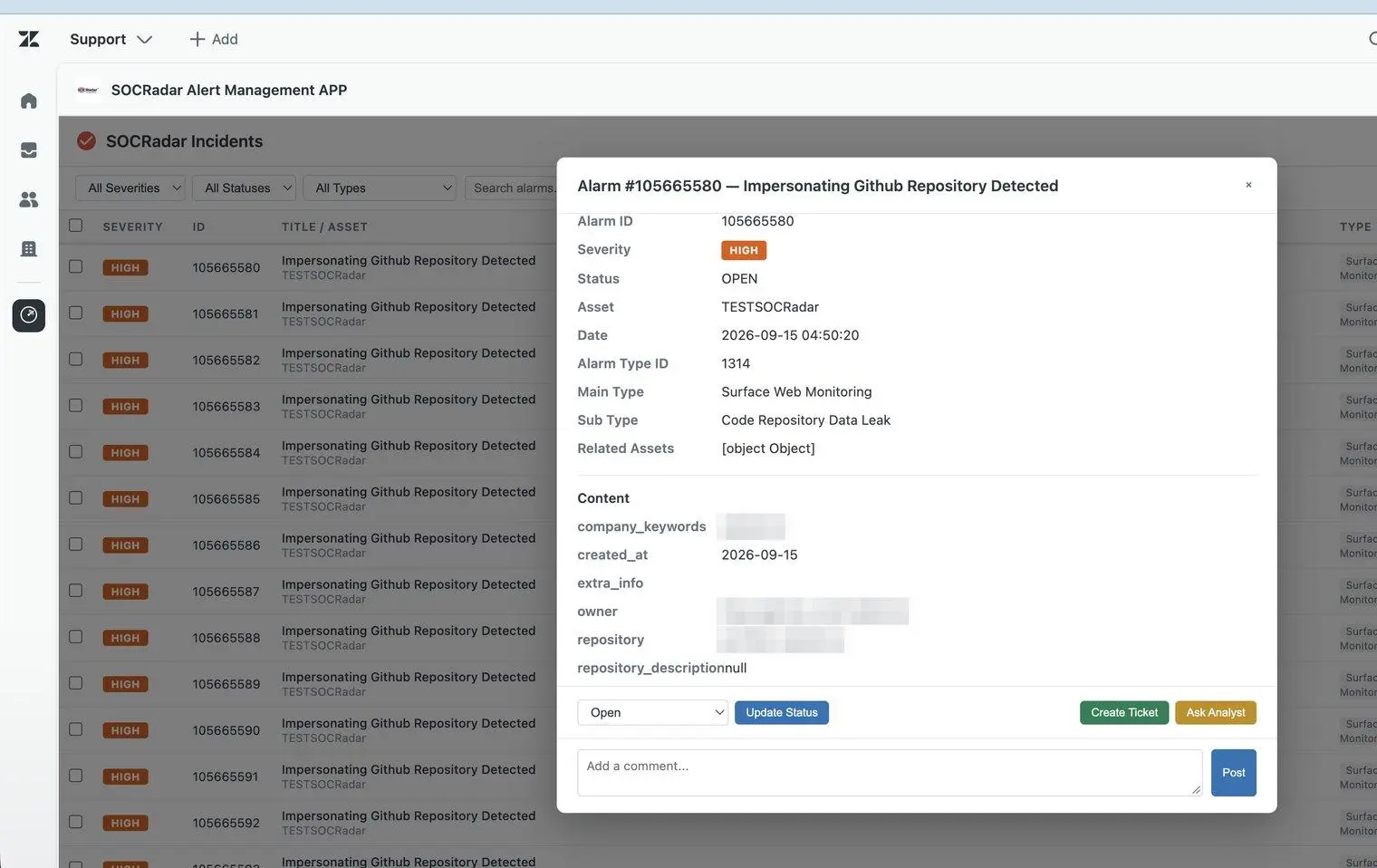
The SOCRadar alert dashboard inside Zendesk: filter and search alerts, open the details, and act without leaving Zendesk.
How It Works in Practice
Imagine SOCRadar raises a high-severity alert about credentials tied to your domain. Because the alert meets your configured severity threshold, a Zendesk ticket is created automatically, already tagged with the alert ID, severity, and alert type, so your routing rules send it to the right queue without anyone touching it.
The assigned analyst opens the ticket and finds the linked SOCRadar alert details, relevant context, and recommended actions right in the sidebar. They investigate, add comments, update the alert status, and if they need a second opinion, request assistance from a SOCRadar analyst, all from inside Zendesk. The ticket and the alert stay in sync, and the full trail of the response lives where your team already tracks its work.
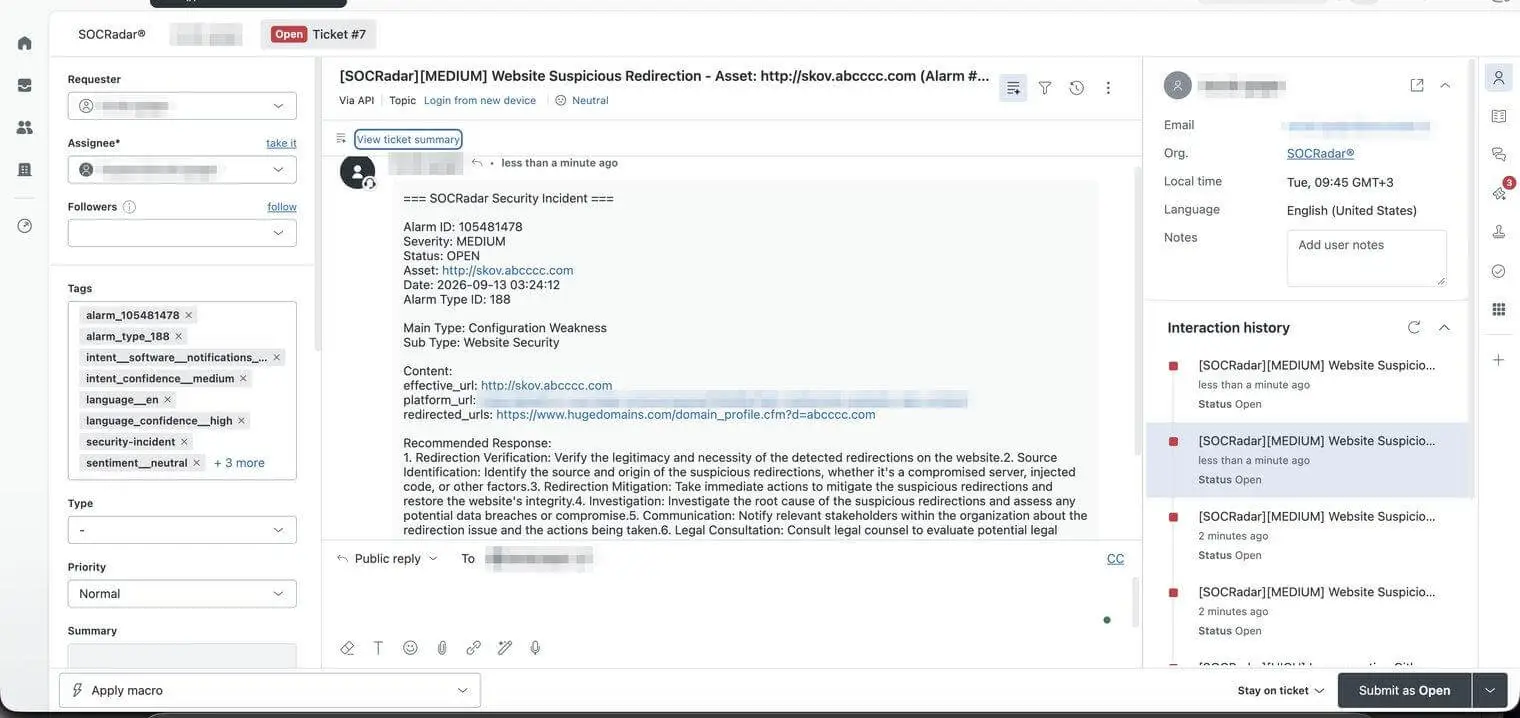
An automatically created Zendesk ticket carrying the SOCRadar alert details, tags, and recommended response.
Take the Next Step
For organizations managing their SOC and security operations through Zendesk Support, SOCRadar Alert Management brings threat alert investigation and ticket management into a single workflow: no re-keying, no context switching, no extra infrastructure.
To get started, install the app from the Zendesk Marketplace, connect it to your SOCRadar account, and tune the settings – severity threshold, polling interval, historical range, and excluded alert types – to match how your team triages.
For questions or feedback, reach out to your SOCRadar Account Manager or sales team. If you are new to SOCRadar, request a demo.