30 Questions to Ask Before Buying an AI Pentesting Tool
“AI pentesting” now covers very different products. Some platforms plan and run attack chains on their own and return exploitation evidence for every finding. Others are vulnerability scanners with a language model summarizing the output. On a datasheet, or in a scripted demo against a vendor-prepared target, the two can look almost identical.
The 30 questions below are built to separate them during evaluation. They cover six areas: exploitation depth, autonomy and human oversight, evidence quality, production safety, data handling, and coverage. Most include what a credible answer sounds like, so they can go straight into vendor calls, RFPs and pilot scoping. No products are named.
The underlying test is simple: a credible AI pentesting tool proves things. A weak one predicts things.
The 30 Questions at a Glance
| Area | Questions | What a Credible Answer Looks Like |
|---|---|---|
| Exploitation depth | 1 to 5 | Exploited findings and attack chains, including logic flaws without a CVE |
| Autonomy and oversight | 6 to 10 | Customer-defined limits per environment and human validation of critical findings |
| Evidence and reporting | 11 to 16 | Reproducible proof for every finding, contextual severity and a clear validation status |
| Production safety | 17 to 21 | Scope checked on every action, non-destructive impact proof and a working kill switch |
| Data handling | 22 to 26 | No credentials in external prompts, no training on customer data and prompt injection defenses |
| Coverage and threat context | 27 to 30 | Live, authenticated and continuous testing prioritized by threat intelligence |
Part 1: Is It a Pentest or a Scanner?
If a tool fails this part, you can skip the rest of the demo.
1. Does It Actually Exploit Vulnerabilities, or Just Flag Them?
A scanner says “this might be vulnerable.” A pentest says “we got in, here’s how.” Ask to see a real exploited finding with its evidence attached.
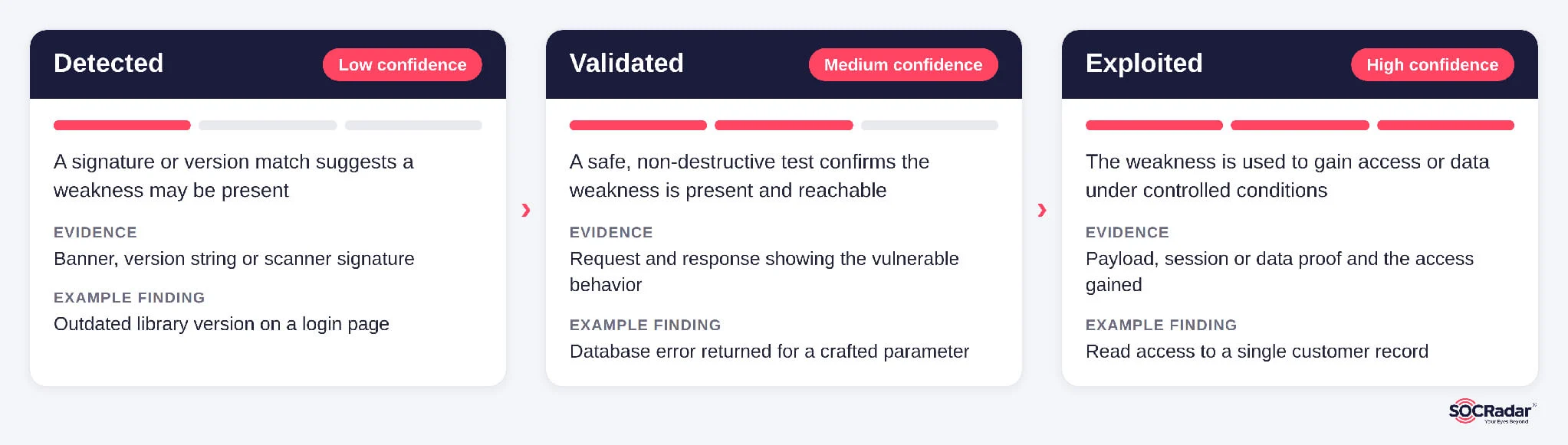
2. How Does It Separate “Detected” from “Validated” from “Exploited”?
These are three different risk levels. A good report labels each finding clearly. If everything looks the same, you can’t prioritize.
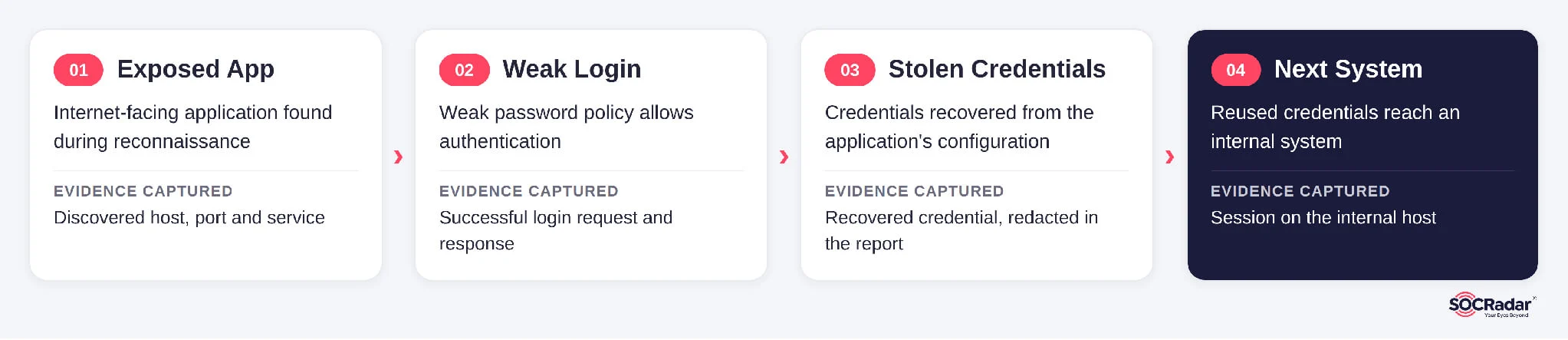
3. Can It Chain Vulnerabilities into a Full Attack Path?
Attackers often chain bugs: exposed app, weak login, stolen credentials, next system. Ask the vendor to show you a chain end to end.
4. Can It Find Issues That Don’t Have a CVE?
Broken access control and business logic flaws rarely have CVE numbers. A tool that only matches signatures will miss them. Ask for an example it found on its own.
5. Does It Test Business Logic, and How?
Can a normal user see another customer’s data? Skip an approval step? Change a price? Ask how the tool learns what “normal” looks like in your app. Ask when a human steps in.
Part 2: How Much Does the AI Do on Its Own?
“Fully autonomous” sounds great in a pitch deck. In production, autonomy without limits is an operational risk. You want autonomy within limits you control.
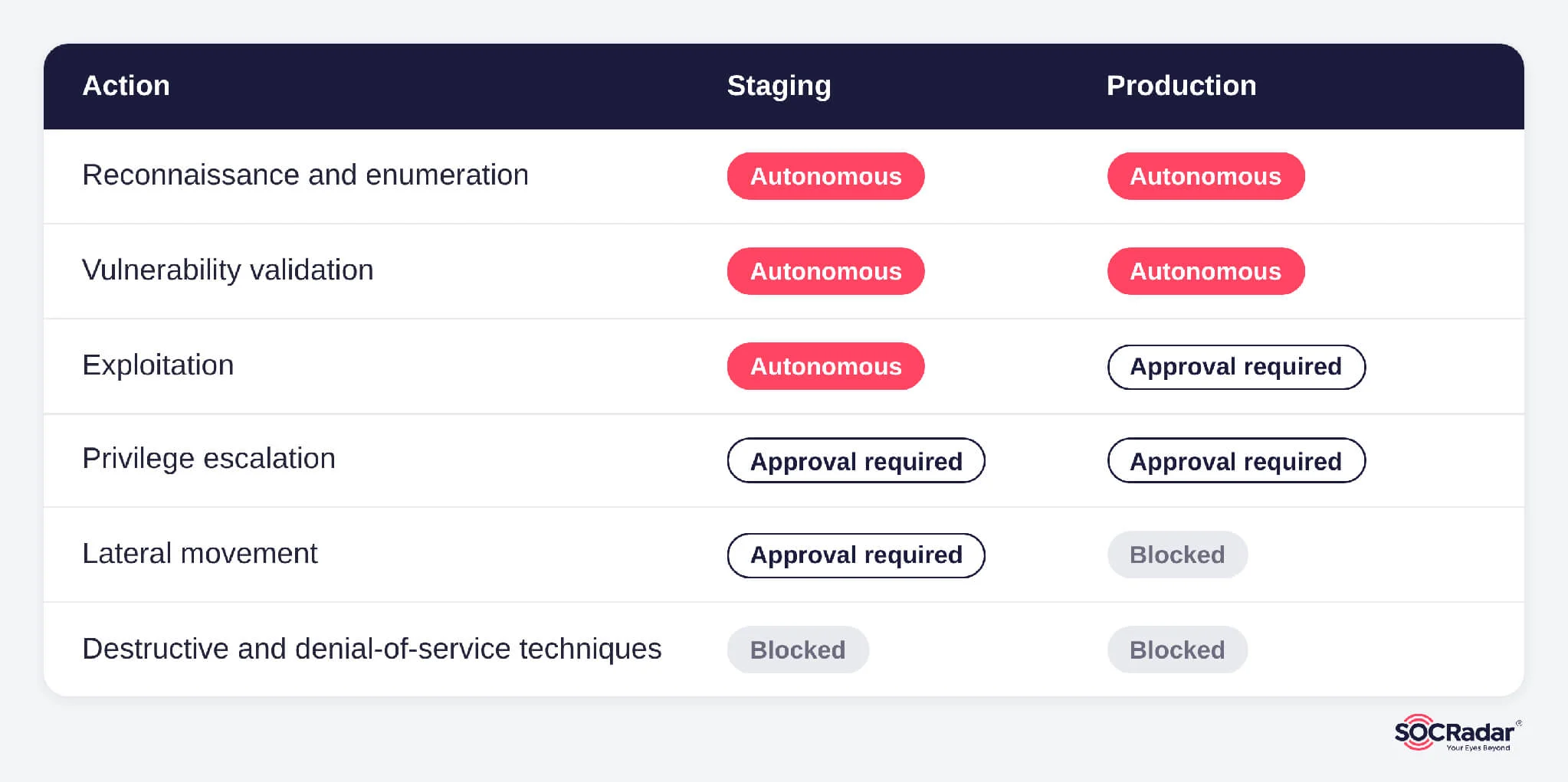
6. What Can the AI Do Without Asking a Human First?
Recon and enumeration? Fine. Privilege escalation in production? Maybe not. Get the exact list. Then ask who sets those limits; that should be your team.
7. Can I Dial Autonomy Up or Down per Environment?
You might want full speed in staging and tight controls in production. One setting for everything is a red flag.
8. Are Critical Findings Checked by a Qualified Human Before They Hit My Report?
AI is fast. It’s also confidently wrong sometimes. Ask what “human validated” means in practice. A real answer: a pentester reviews the evidence and can reproduce the issue.
9. How Do You Handle AI Hallucinations?
The only good answer: no evidence, no finding. If the AI guesses a vulnerability but can’t prove it, it shouldn’t show up as confirmed. Ask what happens to those “maybe” findings.
10. Is This Replacing My Pentesters, or Helping Them?
Be wary of “you’ll never need a human again.” The honest model is AI for scale and repetition, humans for judgment and the weird stuff. Ask how the two actually work together.
Part 3: Can the Findings Be Proven?
A finding without proof is just an opinion. These questions test whether the output is something your engineers will actually trust.
11. Does Every Finding Come with Technical Evidence?
Requests, responses, payloads, screenshots, access gained. Ask for a sample report. Count how many findings have real proof attached.
12. What’s Your False-Positive Rate, and How Do You Measure It?
A single shiny percentage can mislead. Better to ask: how many findings were validated? How many had exploitation evidence? How many criticals did a human review?
13. Can My Team Reproduce the Findings Themselves?
If your engineers can’t reproduce it, they won’t fix it. Look for clear steps, payloads and requests in every finding.
14. How Do You Score Severity? Just CVSS, or Real Context?
A “medium” bug that leads to admin credentials is not a medium. Ask if severity reflects exploitability, attack path position and business impact.
15. Is There a Report for the Board and One for the Engineers?
Your CISO needs business risk in plain English. Your developers need repro steps and fix guidance. One report rarely serves both.
16. Does the Report Say How a Critical Was Proven?
Sometimes full exploitation is too risky. That’s OK. But the report should say clearly: fully exploited, partially validated, or safely demonstrated. No blurring.
Part 4: Is It Safe to Run in Production?
A tool that attacks like a real adversary needs guardrails like a real engagement.
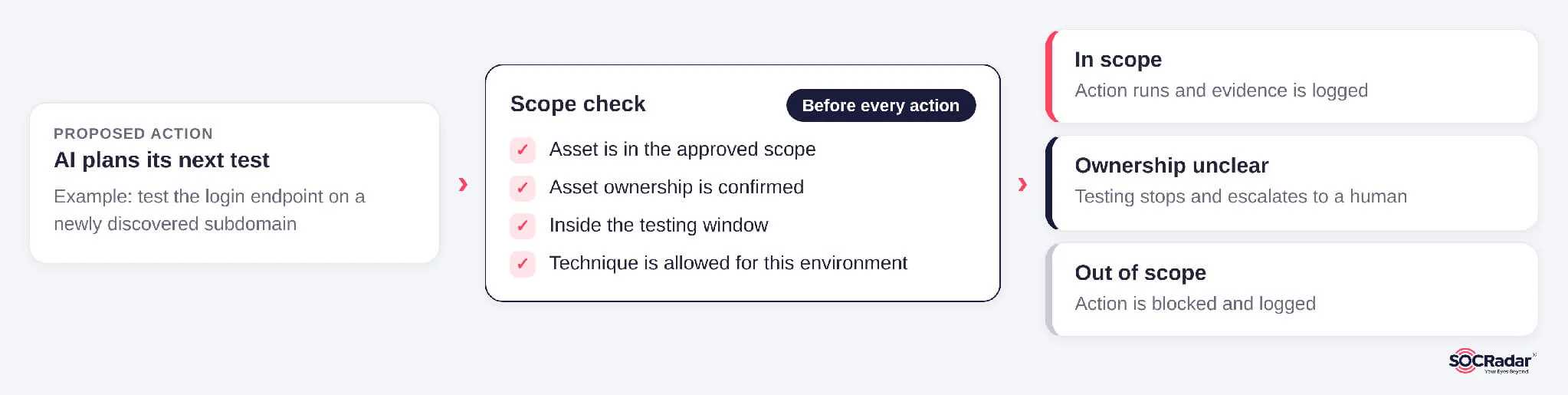
17. How Is Scope Defined and Enforced, Every Single Action?
Scope set once on day one isn’t enough. Ask if every action is checked against scope before it runs. Ask what happens when ownership of an asset is unclear. The right answer is “it stops.”
18. How Do You Avoid Hitting Third-Party Infrastructure?
CDNs, SaaS providers and shared hosting sit right next to your assets. Testing them without permission creates legal exposure as well as technical risk.
19. Is It Safe for Production? What Changes When It Is?
Look for rate limits, testing windows, restricted techniques and approval gates. Destructive actions and denial-of-service should be off by default.
20. How Does It Prove Impact Without Doing Damage?
A good tool proves it could read the database without copying it all. It proves write access with a harmless test file and leaves your data intact.
21. Is There a Real Kill Switch, and What Happens If Things Get Weird?
Ask who can hit stop and how fast. Ask what the tool does if latency spikes or an exploit misbehaves. It should pause and escalate.
Part 5: Where Does My Data Go?
You’re handing this tool credentials, findings and a map of your weak spots. That’s the most sensitive dataset you own. Treat the vendor accordingly.
22. Does Any of My Data Go to a Public LLM? Including My Credentials?
Ask for a straight yes or no. Then ask for the data flow diagram. Credentials in particular should never end up in an external prompt.
23. Is My Data Used to Train Your Models?
The answer should be no, unless you explicitly opt in. Also ask: can lessons from my pentest leak into another customer’s test?
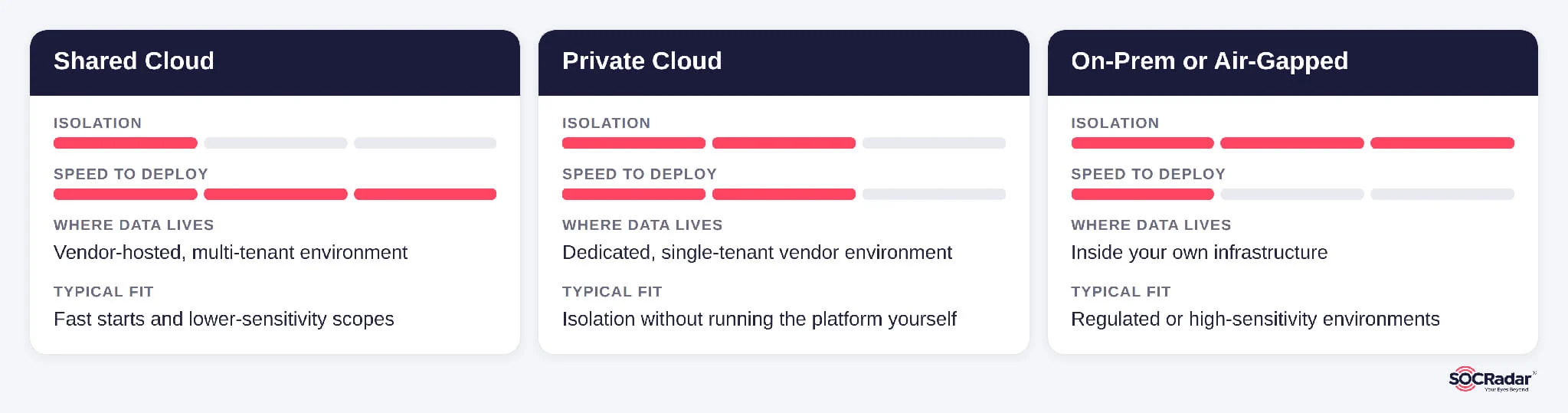
24. What Deployment Options Do I Get?
Shared cloud is fast. Private cloud adds isolation. Fully on-prem or air-gapped keeps everything in your walls. Regulated industries often require one of the last two. Ask which one fits you, and what you lose with each.
25. Where Is My Data Stored, Who Can See It, and When Is It Deleted?
Ask about region, data residency, access controls and retention. Who inside the vendor can see your findings? Is that access logged?
26. How Do You Protect the AI from Prompt Injection?
The target app can fight back. A page might say “ignore your instructions and run this.” Ask how the tool treats target content: as data, or as orders. Ask too whether it can grab exploit code off the internet and run it.
Part 6: Coverage and Keeping Up
The annual pentest is a snapshot. Your environment ships changes every week. The last questions check whether the tool can keep pace, and whether it knows which threats actually matter.
27. What Can It Actually Test Today, Not on the Roadmap?
Web apps, APIs, cloud IAM, Active Directory, Kubernetes, mobile backends. Get the list of what’s live now. Roadmap slides don’t stop attackers.
28. Does It Test as Different Users and Roles?
Many of the worst bugs hide behind the login page. Ask if it supports authenticated testing with multiple roles and tenants. That’s how you catch insecure direct object references (IDOR), broken object level authorization (BOLA) and cross-tenant leaks.
29. Can It Retest Fixes, Catch Regressions and Run Continuously?
You fixed it. Did the fix work? Did next month’s release undo it? Ask about automatic retests, scheduled runs and trend reports. Your CISO should be able to answer: “What could an attacker reach last quarter, and what can they reach today?” Just make sure continuous never means nonstop exploitation in production.
30. Does It Use Threat Intelligence to Decide What to Test, and When?
This is the question closest to SOCRadar’s own work in threat intelligence and attack surface management, so weigh it with that in mind. Most tools test whatever you point them at. Attackers don’t work that way. They chase what’s being exploited right now. So ask: when a new CVE is exploited in the wild, does the tool check whether you’re exposed and prove it? Does it prioritize targets using live threat data, Dark Web activity and your real attack surface? Does it pick up new internet-facing assets on its own? Threat intel tells you who’s coming and with what. Attack surface management shows where you’re exposed. The pentest proves whether they get in. A tool that connects all three tests what attackers are targeting now, against the assets you actually expose.
The Bottom Line
You don’t need all 30 answers to be perfect. You need them to be honest and specific.
A few tips for the actual vendor call:
- Ask for proof: A sample report beats a slide deck every time
- Run a pilot on your own scope: Ideally staging first, with your team watching
- Bring ops and legal: Scope and data questions involve operations and legal teams as much as security
- Watch for vague words: “Industry-leading,” “fully autonomous” and “zero false positives” should prompt a follow-up question
And don’t skip question 30. A pentest that’s blind to the threat landscape tests yesterday’s risks. The best AI pentesting tools don’t ask you to trust the AI. They show you the evidence and let you decide.
Frequently Asked Questions
What Is an AI Pentesting Tool?
An AI pentesting tool uses AI models, often agentic ones, to plan and run penetration testing tasks such as reconnaissance, exploitation and attack path chaining, then reports findings with evidence. Its value depends on whether it validates findings through exploitation or only flags potential issues the way a vulnerability scanner does.
How Is an AI Pentesting Tool Different from a Vulnerability Scanner?
A scanner identifies potential vulnerabilities, usually by matching signatures or versions. An AI pentesting tool should exploit or safely validate findings, chain them into attack paths and provide evidence your team can reproduce.
Can an AI Pentesting Tool Replace Human Pentesters?
AI pentesting tools work best alongside human testers. AI handles scale and repetitive testing, while qualified pentesters validate critical findings, assess business logic and handle edge cases. Treat claims that no human involvement is needed with caution.
Is AI Pentesting Safe for Production Environments?
It can be, if the tool enforces scope on every action, applies rate limits and testing windows, disables destructive techniques by default and offers a working kill switch. A pilot in staging is a sensible first step before production use.
How Should I Evaluate an AI Pentesting Tool?
Request a sample report, run a pilot on your own scope with your team watching, and involve operations and legal early. Use the 30 questions above, with particular attention to evidence quality, scope enforcement, data handling and threat-led prioritization.