Oct 15, 2026
Jun 23, 2026
6 Mins Read

Summarize with:
WhatsApp VBScript Campaign Installs ManageEngine Endpoint Central for Persistent Remote Access
A newly reported malware campaign uses WhatsApp direct messages to deliver VBScript (VBS/VBE) attachments that look like routine business documents. If a recipient downloads and then opens the attachment in WhatsApp Desktop or WhatsApp Web, the script starts a staged infection chain that ends with the silent installation of a legitimate RMM/UEM product, specifically a preconfigured ManageEngine Endpoint Central agent.
The WhatsApp VBScript Campaign was reported as active as of June 22, 2026, and it appears opportunistic rather than tied to a single industry. This post explains how the chain works, what defenders should look for, and which immediate controls reduce risk.
What Is This WhatsApp VBScript Campaign?
This WhatsApp VBScript campaign relies on social engineering. Operators distribute the primary VBScript payload as an attachment from previously hijacked WhatsApp accounts. This staged delivery aims to deploy a legitimate enterprise remote management agent, granting the adversary persistent and interactive control over the host.
The chain combines chat-based delivery (attachments), built-in Windows execution paths, and a final stage that abuses trusted IT software for remote control.
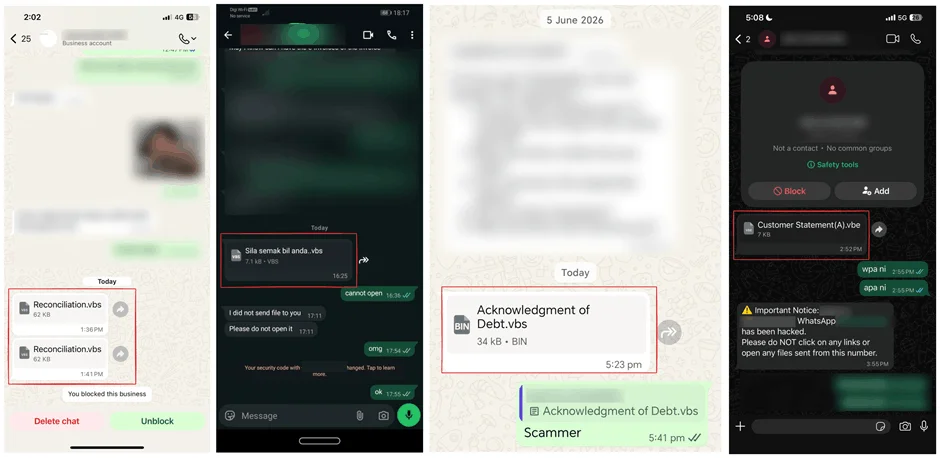
Malicious files sent in the recent WhatsApp VBScript campaign (Securelist)
Who and What Is Being Targeted?
Observed victims span multiple countries and territories, including Malaysia, Brazil, India, Mexico, Singapore, the UK, Spain, Taiwan, Australia, Russia, and Vietnam. Reported telemetry suggests Malaysia represents the majority of victims (about 80%).
Targeting appears broad and consumer-oriented, not focused on a specific enterprise vertical. The delivery method still matters for organizations because employees often use WhatsApp on corporate endpoints, and an RMM install can turn into an enterprise incident if the device can reach internal resources.
How Does the VBScript Attachment Trick Users Into Running It?
Attackers use filenames that resemble normal operational documents, often financial or payment-related. Examples include:
- “Financial Reports.vbs”
- “Debt confirmation.vbs”
- “Outstanding Payment List.vbs”
Some filenames are localized (Portuguese, French, German, Malay), which suggests the operators tailor lures by region. Multiple first-stage scripts also include Windows Update-themed comments or metadata and Chinese-language annotations to look benign on casual inspection.
The enabling factor is simple: if the recipient double-clicks the .vbs/.vbe file, Windows Script Host runs it via wscript.exe.
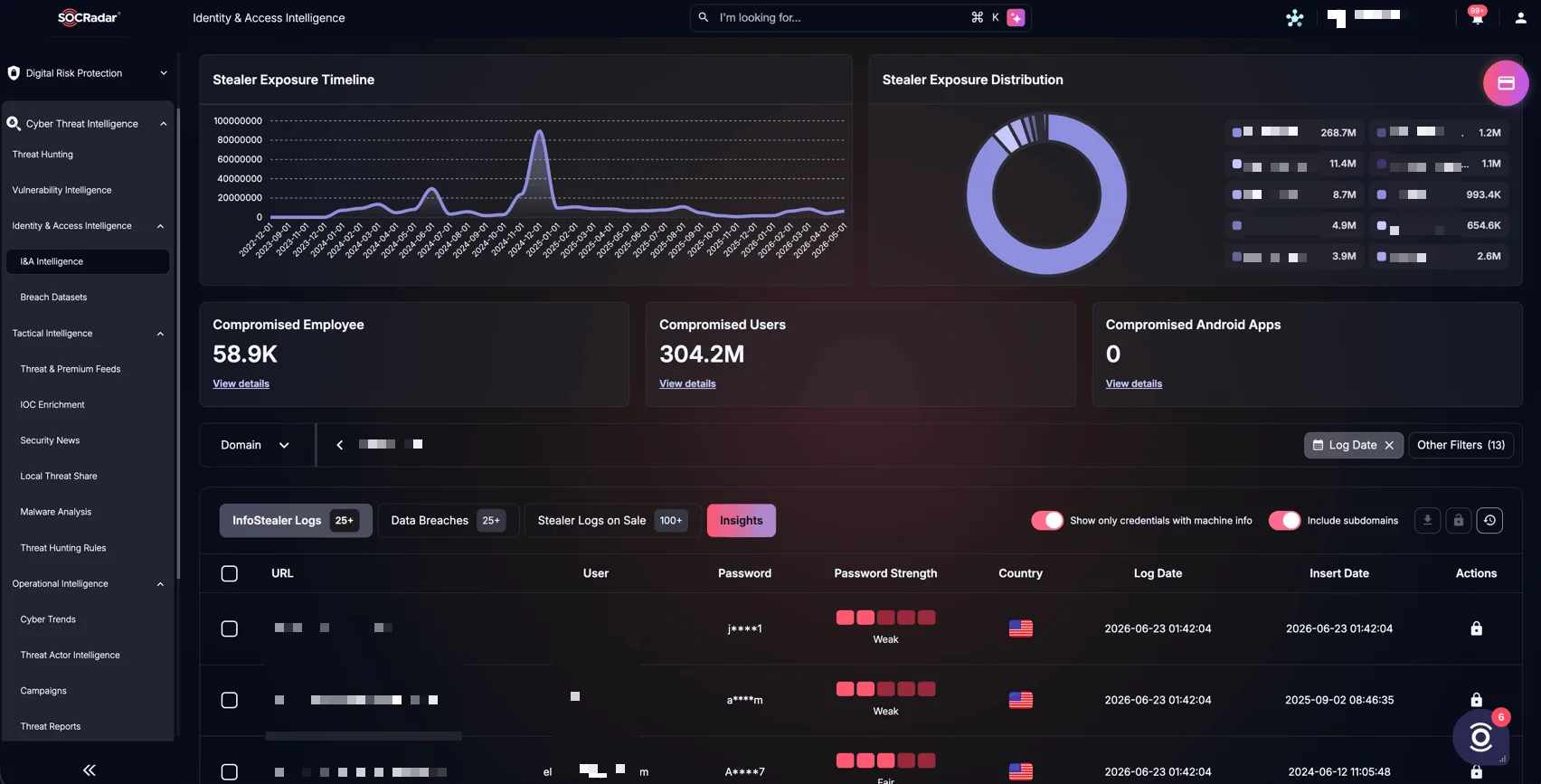
Gain visibility into unauthorized access and account abuse risk with SOCRadar Identity & Access Intelligence
The WhatsApp VBScript campaign shows how a single chat attachment can move from social engineering to a persistent RMM foothold in minutes – with no obvious malicious binary in sight. SOCRadar Cyber Threat Intelligence helps organizations track threats that can turn employee-targeted lures into unauthorized access and persistent compromise. With stronger visibility into evolving attacker methods and access-related risk, security teams can respond faster before initial compromise grows into a wider incident.
How Does The Multi-Stage Infection Chain Work?
The chain is built to blend into normal Windows activity while it downloads additional scripts and an installer bundle.
Stage 1: Create a workspace and fetch more scripts
After execution, the first script creates a working directory under:
- C:UsersPublicDocuments
Folder names often look randomized, such as Temp_<random> or MSUpdate_<random>. Some variants mark folders and files as Hidden and System to reduce visibility.
Stage 1 uses obfuscation such as string concatenation, encoded VBScript, randomized variable names, and junk content. Some variants reconstruct strings character-by-character to complicate static analysis.
It may also copy and rename legitimate Windows utilities like curl.exe or bitsadmin.exe into the working directory using DLL-like filenames, then use them to download additional payloads. A common tactic is downloading content with a misleading extension like .pdf or .txt, then renaming it to .vbs before execution.
Stage 2: UAC weakening and ZIP retrieval
Stage 1 downloads and runs two additional VBS payloads:
1) UAC configuration manipulation
The script attempts to change the registry value:
- HKLMSOFTWAREMicrosoftWindowsCurrentVersionPoliciesSystemConsentPromptBehaviorAdmin
It aims to set it to 0, reducing consent prompts for administrative actions. The code attempts elevation using ShellExecute with runas, repeated in a loop.
2) ZIP download, extraction, and launcher execution
Another script creates an additional randomized directory under C:UsersPublicDocuments (often hidden), downloads a ZIP using one of several methods (curl, bitsadmin, certutil, PowerShell, direct HTTP requests), extracts it via Shell.Application COM, then runs setup1.vbs using wscript.exe.
At least one variant attempts to remove Mark-of-the-Web (MotW) by deleting the Zone.Identifier alternate data stream from extracted files before executing them, which reduces Windows warnings.
Stage 3: Silent install of ManageEngine Endpoint Central agent
The ZIP contains a preconfigured ManageEngine Endpoint Central deployment package, including:
- UEMSAgent.msi (agent installer)
- UEMSAgent.mst (transform with attacker configuration)
- DCAgentServerInfo.json (management server details)
- certificates and helper files
- setup1.vbs (installer launcher)
setup1.vbs checks for required files, attempts to relaunch with admin rights, and then uses msiexec.exe to install the agent silently with the bundled configuration. The end result is a legitimate endpoint management agent that connects to attacker-controlled infrastructure.
Reported management server IPs in the configuration include:
- 202.61.160[.]208
- 202.61.160[.]202
- 202.61.160[.]201
- 202.61.160[.]160
- 202.61.160[.]137
- 38.55.151[.]63
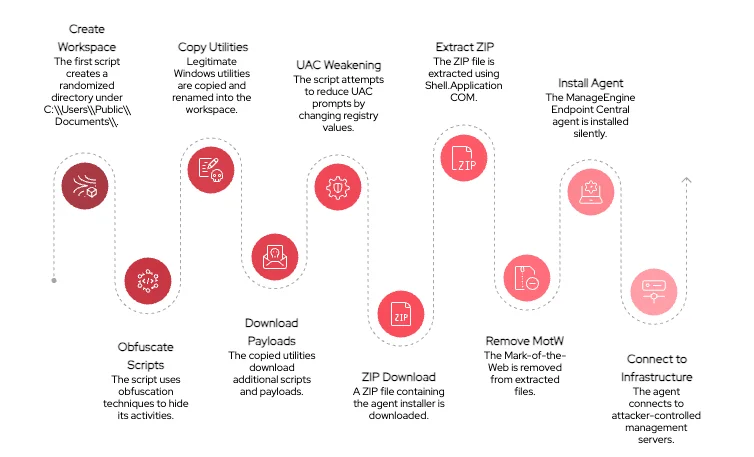
WhatsApp VBScript campaign multi-stage infection chain
Is This WhatsApp VBScript Campaign Attributed to a Known Threat Actor?
There is no confirmed attribution. The official research notessimplified Chinese comments embedded across multiple VBScript variants, which may indicate a Chinese-speaking operator, but this remains low confidence.
One management server IP (202.61.160[.]201) has appeared previously in activity associated with ValleyRAT and Gh0st RAT, but that overlap alone does not support a direct link based on the available information.
Why Does Installing Legitimate RMM Change the Risk?
Using a legitimate RMM/UEM agent provides persistence and remote control without relying on obviously malicious binaries. Once installed, an attacker can typically perform actions consistent with remote administration, depending on what policies and permissions the agent receives from its controller.
It also complicates response. Teams may see a known vendor MSI and signed components, but the install is still malicious because it is preconfigured to report to attacker-controlled servers.
What Should Defenders Do Right Now?
Focus on controls that block script execution from chat-delivered attachments and improve detection for the behaviors in this chain.
User and policy controls
- Treat unexpected WhatsApp attachments as suspicious, even if they come from a known contact, since accounts can be compromised.
- Block or strongly warn on opening script and executable attachment types from chat and download locations, including: VBS, VBE, EXE, BAT, CMD, JS, PS1.
Detection and hunting ideas to validate in your environment
- Alert on unusual wscript.exe execution, especially when launched from user download paths associated with WhatsApp Desktop or browser downloads.
- Hunt for randomized folder creation under C:UsersPublicDocuments followed by script execution from those folders.
- Monitor for registry write attempts to ConsentPromptBehaviorAdmin, particularly repeated elevation loops using ShellExecute with runas.
- Look for ZIP extraction via Shell.Application followed quickly by execution of setup1.vbs.
- Alert on msiexec.exe installing UEMSAgent.msi unexpectedly, especially when the source files reside under C:UsersPublicDocuments or other non-standard software distribution paths.
- Apply network controls where appropriate to block known malicious domains and monitor for unexpected connections to object storage commonly used for payload hosting.

Table Of Content
WhatsApp VBScript Campaign Installs ManageEngine Endpoint Central for Persistent Remote Access
What Is This WhatsApp VBScript Campaign?
Who and What Is Being Targeted?
How Does the VBScript Attachment Trick Users Into Running It?
How Does The Multi-Stage Infection Chain Work?
Is This WhatsApp VBScript Campaign Attributed to a Known Threat Actor?
Why Does Installing Legitimate RMM Change the Risk?
What Should Defenders Do Right Now?
Related Articles
Cisco Secure Email & PAN-OS Zero-Days Exploited
CVE-2026-105445: Docker Hub PAT Reassignment Flaw
Oct 14, 2026
CVE-2026-89111: Critical SAP Cloud SDK SSRF
Oct 14, 2026
October 2026 Patch Tuesday: 1,413 Flaws, 3 Zero-Days
Oct 14, 2026