| IoC | Description |
| 0533968891354ac78b45c486600a7890 | SOVA v4 |
| ca559118f4605b0316a13b8cfa321f65 | SOVA v4 without CIS regions |
| socrersutagans[.]site | C2 of SOVA v4 |
| omainwpatnlfq[.]site | Server used to display fake website of targeted app |
| 74b8956dc35fd8a5eb2f7a5d313e60ca | SOVA v5 |
| satandemantenimiento.com | C2 of SOVA v5 |
| http://wecrvtbyutrcewwretyntrverfd[.]xyz | C2 of SOVA v5 |
| 8a6889610a18296e812fabd0a4ceb8b75caadc5cec1b39e8173c3e0093fd3a57 | SHA256 of an APK sample |
| efb92fb17348eb10ba3a93ab004422c30bcf8ae72f302872e9ef3263c47133a7 | SHA256 of an APK sample |
| 795b279f312a773f7f556a978387f1b682f93470db4c1b5f9cd6ca2cab1399b6 | SHA256 of an APK sample |
| dd8a5a1a8632d661f152f435b7afba825e474ec0d03d1c5ef8669fdc2b484165 | SHA256 of an APK sample |
| http://a0545193.xsph[.]ru | Sample C2 URL |
| http://l8j1nsk3j5h1msal973nk37[.]fun | Sample C2 URL |
Aug 16, 2022
6 Mins Read
Apr 21, 2026

Summarize with:
Banking Trojan SOVA Has New Version with Updated Features
SOVA was announced as an Android banking trojan back in September 2021. Although it is currently under development, it already offers services on the market.
In the announcement for the underground forum, threat actors revealed a list of upcoming capabilities. They added: “Our bot is still under testing/development, but we have decided that we are ready to enter the market.”
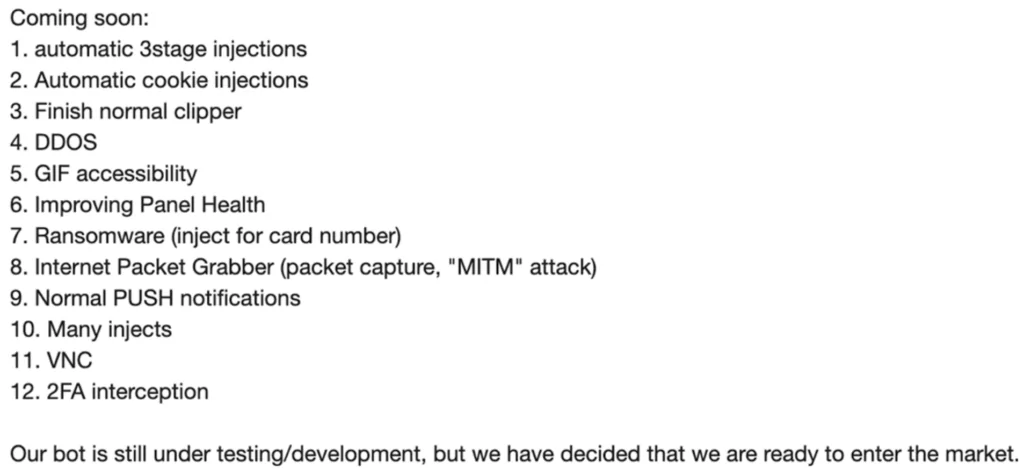
SOVA targeted applications for banking, crypto wallets, and shopping. The trojan displayed features such as injection, interception, data theft, and resilience to uninstallation until a new version was discovered in 2022. The latest version, v4, has new capabilities and more targets.
What Are the New Features in SOVA v4?
Threat actors behind SOVA have begun distributing a new version of their malware as of May 2022. According to researchers, there has been an increase in the targets, and over 200 applications were affected by SOVA. The banking trojan conceals as fake Android apps that display the logos of a few well-known companies, including Chrome, Amazon, NFT platform.
Banking trojan utilizes an open-source project on GitHub called RetroFit to interact with its C2 server. Some new codes were included in the malware’s updates. The vncinfo command was added to C2 communication, which is the most interesting feature. The malware is constantly updated. The following are descriptions of updated features:
- TAs are now able to take screenshots from the infected devices.
- The malware can also record and access any sensitive information. Along with Accessibility Service on Android, these features give TAs the ability to undertake fraudulent actions from the infected device.
- Multiple commands can be performed, including screen clicks, swipes, copy/paste, and TAs can display an overlay screen to conceal the victim’s screen. However, it was noticed that the C2 is still receiving information from numerous logs. This is an indication that SOVA is still undergoing development.
- The cookie stealing method was refactored and enhanced. TAs provided a detailed list of Google services they offer to steal data from and other apps. SOVA will also gather extra data for each stolen cookie, such as “is httpOnly,” its expiration date, etc.
- SOVA v4’s protection was reworked as well. It seeks to defend itself from various victim behaviors. By returning to the home screen and displaying a toast (little popup) stating “This app is secured,” SOVA can intercept and prevent actions, such as the user attempting to delete malware via the settings or tapping the icon.
- The core relocation of the malware is an oddity of SOVA v4. Malware uses the .apk file to unpack a .dex file with the malware’s main malicious functionality. The .dex file was kept by SOVA in the app’s directory in the previous and current versions, but now it is kept in the device’s shared storage directory (“Android/obb/”).
- SOVA v4 added a brand-new module specifically for the Binance exchange and the Trust Wallet. The goal is to gather various data, including the account balance, the victim’s activity inside the app, and even the seed phrase used to access the cryptocurrency wallet.
Mitigation
Cleafy researchers discovered numerous samples that pointed to a newer version, SOVA v5, and the added ransomware module is the most intriguing feature of it.
In older versions of SOVA, targeted applications were listed under packageList.txt. It is advisable to check if your banking, crypto wallet, or shopping app has been affected by this malware in the past and keep watch for any indicators of compromise.
To reduce risks, keep your device’s operating system up to date and use 2FA/MFA. If this malware is discovered on your device, using adb uninstall or performing a factory reset can be beneficial.
IoCs
TTPs
| TTP ID | Name |
| T1406 | Obfuscated Files or Information |
| T1414 | Capture Clipboard Data |
| T1421 | System Network Connections Discovery |
| T1430 | Location Tracking |
| T1424 | Process Discovery |
| T1507 | Network Information Discovery |
| T1412 | Capture SMS Messages |
| T1432 | Access Contact List |
| T1429 | Capture Audio |
| T1571 | Non-Standard Port |
| T1573 | Encrypted Channel |
| T1447 | Delete Device Data |
Table Of Content
Related Articles
GitLab CVE-2026-85706 Added to CISA KEV
Sep 14, 2026
Cisco FMC CVE-2026-20079 Actively Exploited
Sep 10, 2026
ShieldCrash PoC: Microsoft Defender Fix Bypass
Sep 10, 2026
September 2026 Patch Tuesday: 974 Flaws, 2 Zero-Days
Sep 09, 2026