Inside ICMacOS: From an Infostealer to a Persistent RAT
Over the past few years, Apple’s enterprise footprint has expanded significantly, with macOS capturing an important share of the global desktop operating system market. Modern enterprise adoption has surged, particularly in the United States, where roughly one in three software developers works on macOS.
Naturally, this rapid adoption has turned Mac environments into high-value targets for cybercriminals. Threat telemetry also reflects this, showing a sharp rise in macOS-directed attacks, highlighted by a surge in infostealer variants and detections. Lowering the barrier to entry for novice and sophisticated threat actors alike, the Malware-as-a-Service (MaaS) model has accelerated the spread of specialized stealers like AMOS, MacSync, and Cthulhu.
In September 2026, SOCRadar Threat Research Unit (STRU) identified ICMacOS (Icarus macOS), a newly marketed macOS MaaS stealer actively promoted across underground forums by the actor GlowComa.
Key Points
- STRU identified ICMacOS (aka Icarus macOS), a new macOS infostealer distributed under a MaaS subscription model since early September 2026.
- The stealer is actively advertised on cybercrime forums by a Russian-speaking actor operating under the handle GlowComa, with feature updates regularly announced via Telegram.
- GlowComa promotes ICMacOS alongside Icarus ClickFix, a companion panel designed to deliver payloads using malicious copy-and-paste terminal commands.
- The infection chain relies on initial dropper scripts to detect the host architecture and harvest administrator passwords using fake system dialogs before delivering the primary payload.
- Version 1 focuses on stealing core assets, including browser credentials, password manager databases, cryptocurrency wallets, developer secrets, messaging application data, and local files.
- Version 2 expands these credential-harvesting capabilities while introducing full RAT functionality, leveraging WebSockets for Command-and-Control (C2) and LaunchAgents for persistence.
Promotion of ICMacOS
Since early September 2026, ICMacOS has been actively marketed across top-tier Russian-speaking cybercrime forums including XSS, Exploit.in, and Rehub, under the persona GlowComa, a financially motivated actor active since January 2026.
Operating under the banner of the MADHASH crypto-draining affiliate group, GlowComa promotes ICMacOS as part of a broader “ICARUS” suite that includes an ICARUS ClickFix social engineering panel and a multi-chain crypto clipper, often bundling the tools to attract affiliates. Unified across platforms by shared TOX IDs and Telegram handles (such as @ObjectCollision, @SaykatChain, and @layer7king), GlowComa’s operations explicitly target global victims while enforcing strict exclusions for Russia and Commonwealth of Independent States (CIS) countries.
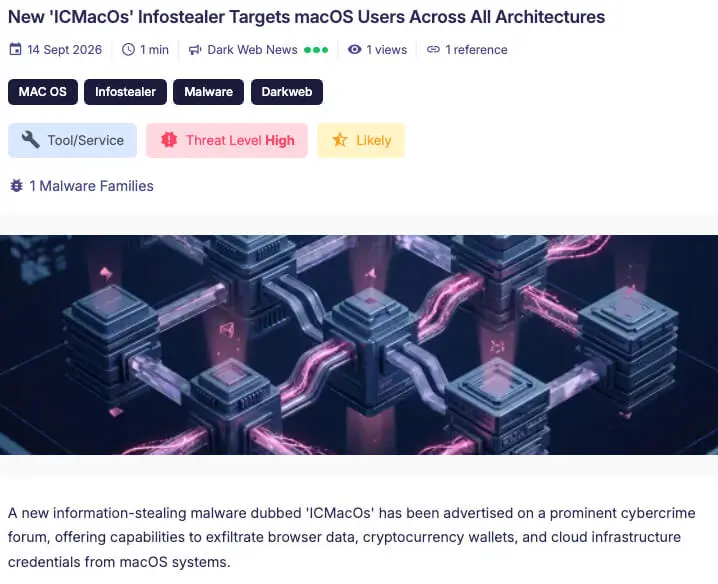
ICMacOS Advertisement on SOCRadar’s Security News
Despite aggressive marketing and positive feedback for companion tools like the ClickFix panel, GlowComa maintains a mixed reputation in the underground scene. The actor has been hit with multiple Exploit.in arbitration disputes regarding poor payload conversion rates, fast detection times, and unfulfilled service guarantees, prompting forum moderators to repeatedly demand escalating security deposits.
![Promotion Post of ICMacOS on Exploit.in (hxxps[://]forum[.]exploit[.]in/topic/291615/)](https://cdn.socradar.io/wp-content/uploads/2026/10/icmacos-promotion-exploit-forum.jpg.webp)
Promotion Post of ICMacOS on Exploit.in (hxxps[://]forum[.]exploit[.]in/topic/291615/)
Beyond forum postings, the operator maintains a primary Telegram channel (hxxps[://]t[.]me/s/icmacos/) to broadcast frequent stealer updates. Advertised as a stable macOS infostealer, ICMacOS is offered under a tiered subscription model: $699 weekly, $1,199 biweekly, or $1,699 monthly (discounted to $899 for existing users of their ICARUS ClickFix panel).
The malware supports both x86_64 and ARM64 (Apple Silicon) architectures, spanning macOS Sierra (10.12) through current builds. According to the developer, ICMacOS targets system Keychains, Chromium/Gecko/Safari browser data, desktop and browser-extension crypto wallets, 2FA apps, Telegram session tokens, cloud provider credentials (AWS, Kubernetes, SSH, .env files), and custom file paths, all while enforcing an explicit CIS geo-lock.
Subscriptions include access to a web-based management panel featuring build analytics, log tracking, custom VPS integration, and real-time Telegram alerts. Driven by an aggressive development cycle, what began as a standard information stealer has rapidly evolved into a persistent RAT equipped with LaunchAgent persistence mechanisms and a live C2 terminal driven by WebSockets.
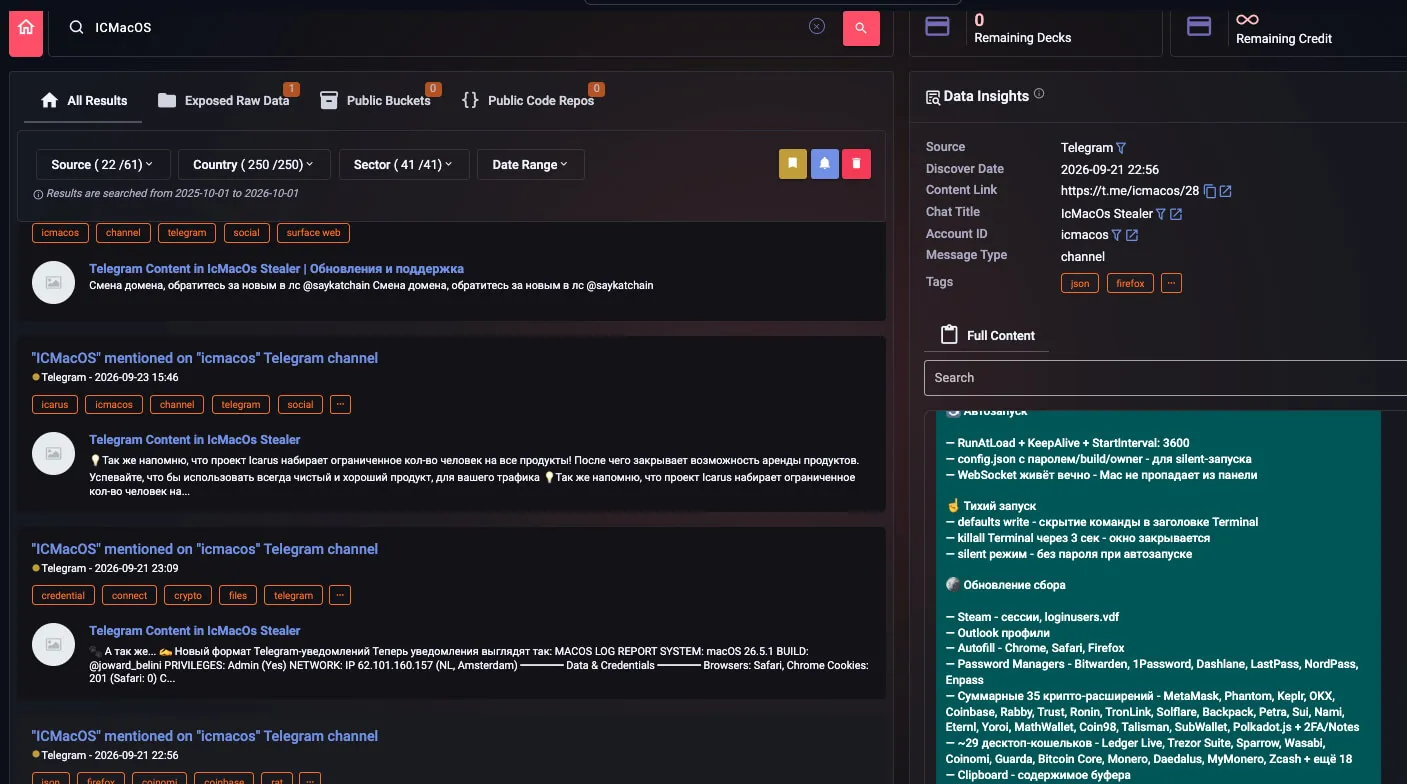
ICMacOS’s Telegram Messages on SOCRadar’s Threat Hunting Module
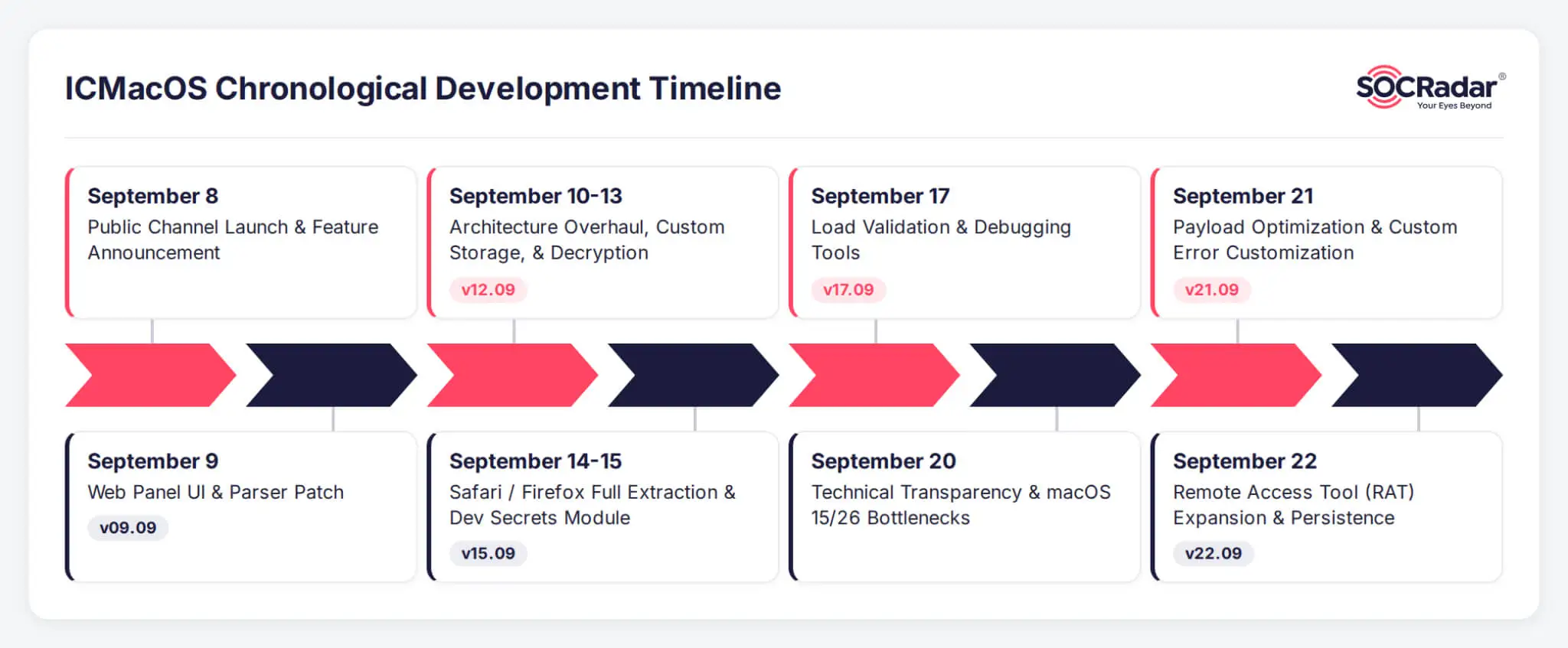
ICMacOS’s Telegram Development Updates Timeline
Management Panel
The ICMacOS management panel is built in Go and utilizes a MySQL backend for data storage. Upon logging in, operators are greeted with a dashboard displaying high-level analytics on infected hosts and exfiltrated assets. A dedicated “Logs” page provides a granular breakdown of compromised devices categorized by specific builder builds, detailing victim IP addresses, geographic locations, totals of harvested passwords, browser cookies, targeted local files, and cryptocurrency wallets.
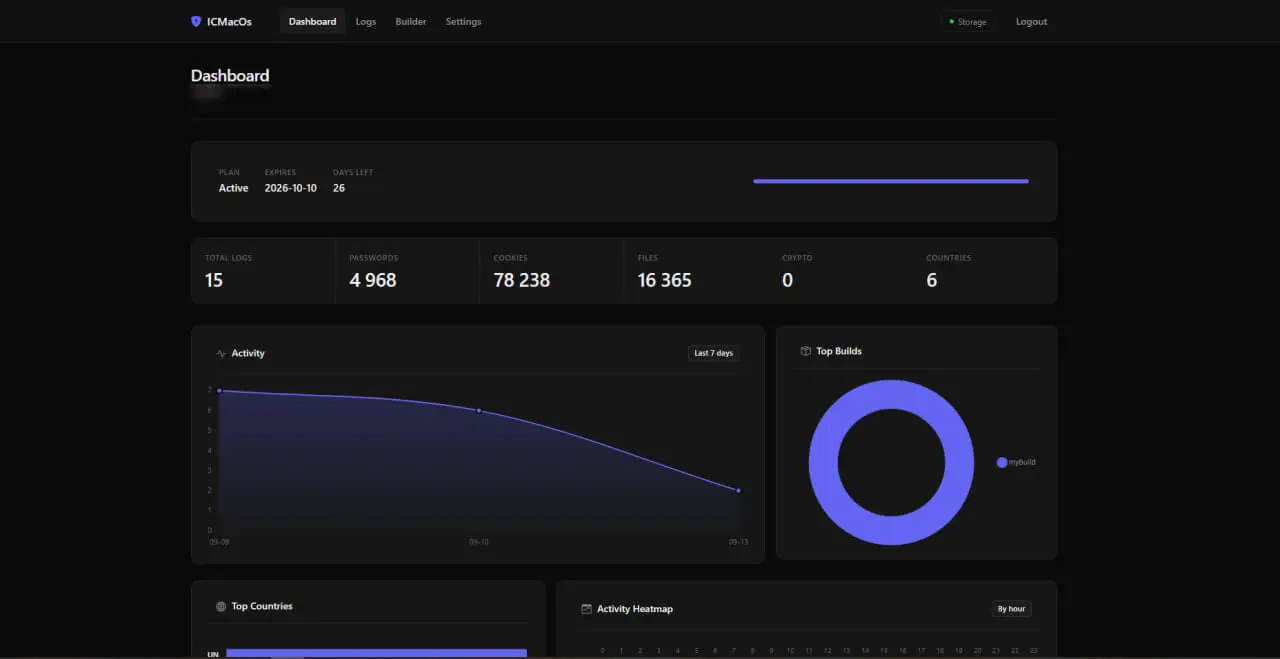
ICMacOS’s Dashboard
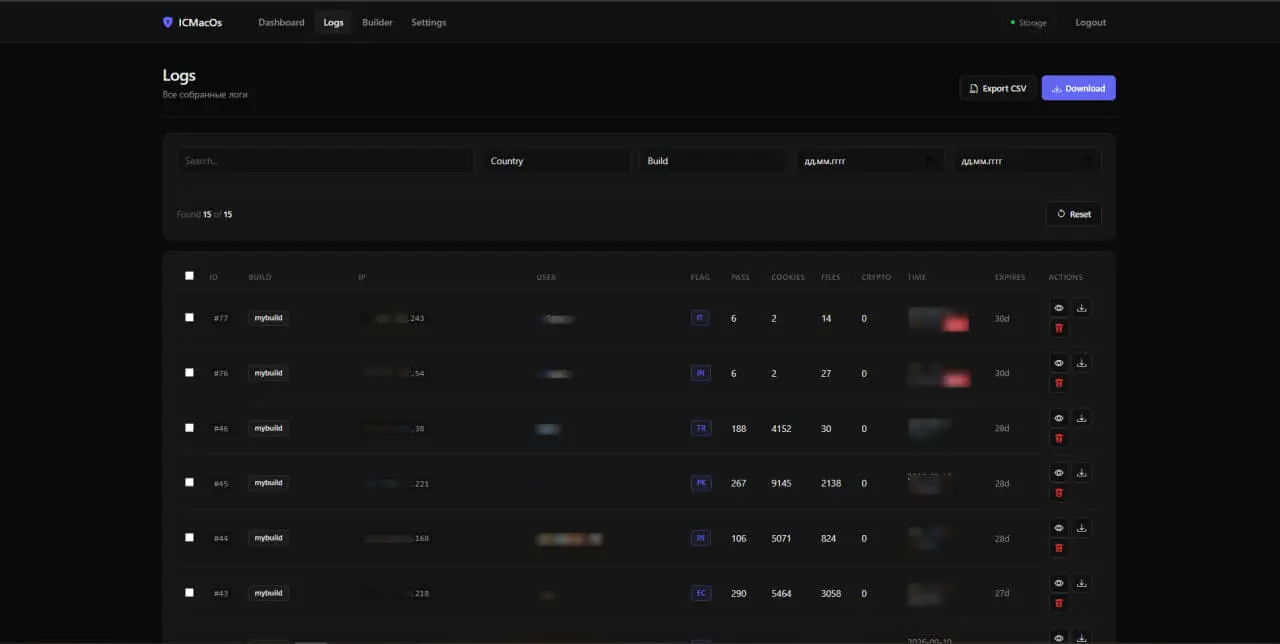
ICMacOS’s Logs Page
Technical Analysis
ICMacOS is distributed via ClickFix social-engineering pages embedding the operator’s build fetching commands. The infection chain starts with an initial stage script that downloads a build-specific dropper. Once running, the dropper deploys fake macOS system dialogs to trick the victim into entering their login password, validates the credentials against the local Keychain, retrieves remote configuration settings, and fetches the final stage payload (ICMacOs) compiled for the victim’s CPU architecture (arm64 or amd64).
First Stage: Initial Dropper Scripts
Delivery begins with a Bash script that retrieves the primary dropper payload from hxxps[://]escapeai[.]live/icmacos_run_v2.command, saves it to /tmp, and executes it using operator-specific build name and owner parameters to track campaigns.

ICMacOS First Dropper Script
Once executed, the script prepares the host for payload delivery. It first logs execution details to a hidden file (/tmp/.update-helper.log) and alters com.apple.Terminal preferences to strip titles, process names, and window headers, effectively hiding visual cues while running in the background.
Next, the dropper uses osascript to spawn a spoofed “System Preferences” dialog to capture the victim’s login password. To ensure accuracy, it validates the captured input directly against the macOS login Keychain: security unlock-keychain -p $PASSWORD ~/Library/Keychains/login.keychain-db. The script allows up to five password attempts before terminating. Upon a successful unlock, it retains the verified plain-text password in memory.
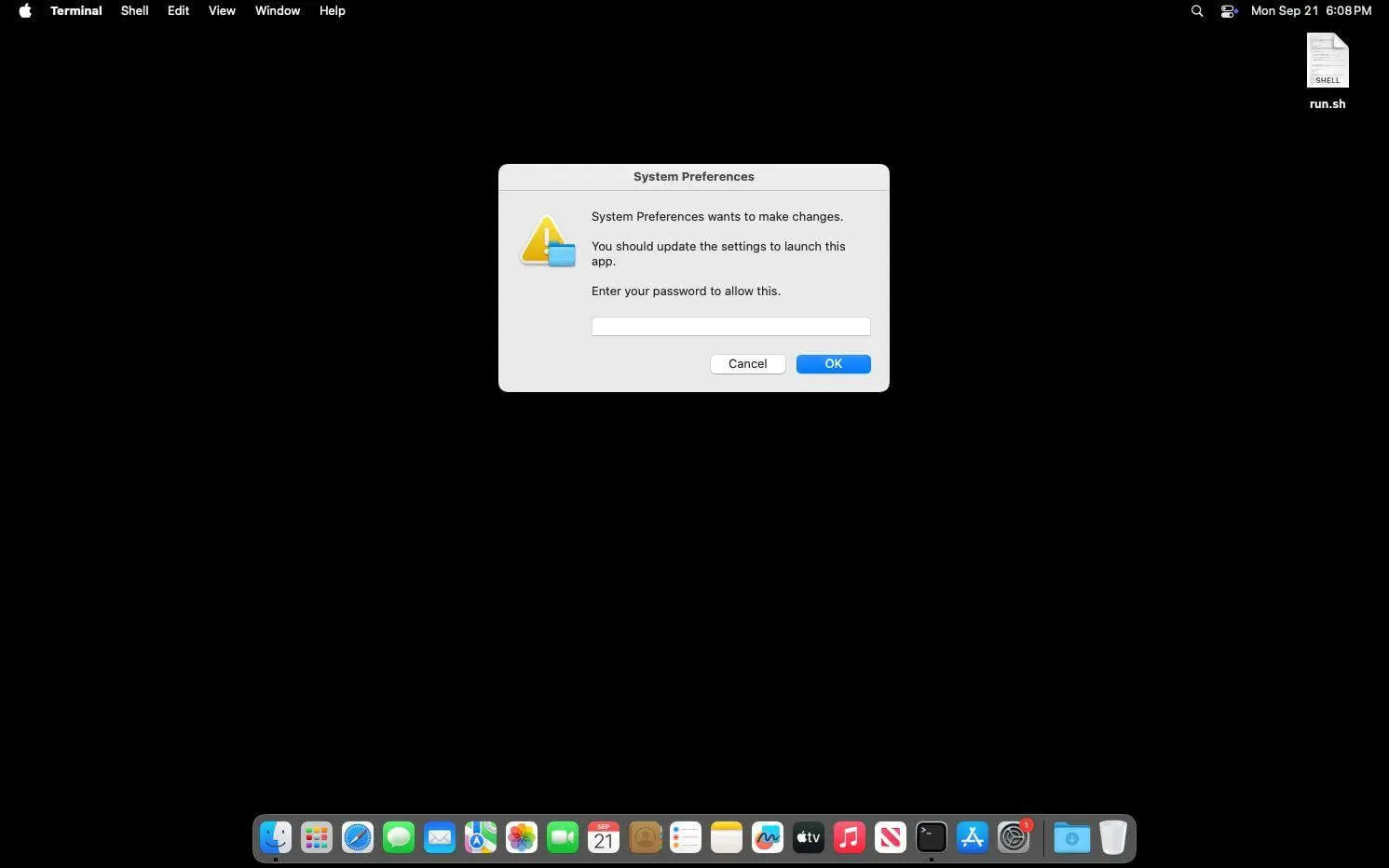
ICMacOS Dropper Default Fake System Dialog
Next, the dropper prepares to download the core ICMacOS payload. It queries uname -m to determine whether the target system is Apple Silicon (arm64) or Intel-based (amd64). Then it requests the next stage from hxxps[://]escapeai[.]live/ICMacOs?arch={architecture}&t=$(date +s%s), saving the archive to /tmp/.update-tmp/ICMacOs.gz.
After uncompressing the file and setting execution permissions, the dropper launches ICMacOs in the background using osascript and nohup. It passes the stolen login password, build name, and owner ID as command-line parameters. Finally, the dropper terminates the active session (killall Terminal) to hide the terminal window from the victim and presents a customizable fake error dialog based on remote configuration settings fetched from hxxps[://]escapeai[.]live/api/build_config.

ICMacOS Custom Fake Error Parsing
Second Stage: ICMacOS Stealer
The final ICMacOS payload is a 64-bit Mach-O executable compiled in Go. Analysis of retrieved samples revealed two distinct variants: Version 1, which focuses primarily on core credential theft and exfiltration, and Version 2, which evolves the malware into a persistent RAT while expanding its data-harvesting capabilities.
Version 1 – A Core Stealer
ICMacOS orchestrates its operations directly from the binary’s entry point (main.main), executing modular subroutines (main.*) in a clear sequential chain. Upon execution, the malware initializes logging at /tmp/.cache-update.log and conducts a geo-fencing check to determine if the target is located in a CIS country. It evaluates this via two methods:
- Runs locale | grep -c ru_RU to check for Russian language configurations.
- Queries curl -s –max-time 5 https://ipinfo.io/country to check the victim’s external IP geolocation.
If CIS indicators are detected, execution halts. Otherwise, ICMacOS proceeds to trigger its data-stealing modules.
System Information Theft
The stealer begins by gathering host metadata to build a structured exfiltration report header, concatenating system parameters, hardware details, and user environment data into a single summary log prior to exfiltration.
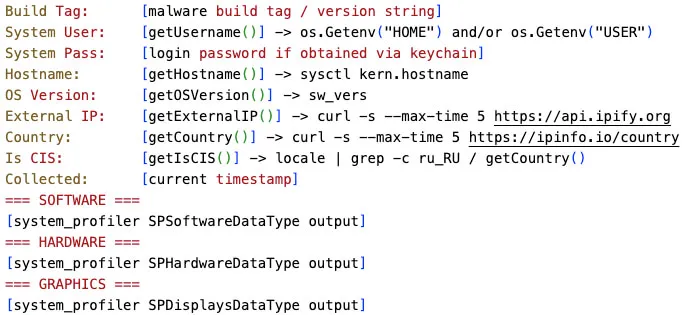
ICMacOS’s Collected Victim Information
Browser Credential & Extensions Theft
ICMacOS targets sensitive data across all major macOS browser engines, systematically extracting master decryption keys, saved credentials, history, and active sessions:
| Browser Family | Data |
|---|---|
| Chromium-Based (Chrome, Chrome Beta, Canary, Chromium, Brave, Opera, Opera GX, Vivaldi, Edge, Arc, Yandex) |
Extracts the AES-128 master key from the Keychain via: security find-generic-password -w -a “<username>” -s “<BrowserName> Safe Storage” Executes SQL queries against SQLite profile databases (Login Data, Cookies) and decrypts contents using the extracted key Copies raw database files (Login Data, Cookies, History, Web Data) |
| Apple Safari | Harvests cookie stores (Cookies.binarycookies), browsing history (History.db), bookmarks (Bookmarks.plist), downloads (Downloads.plist), and session data (LastSession.plist) across ~/Library/Safari/, ~/Library/Cookies and ~/Library/Containers/com.apple.Safari/Data/Library directories |
| Gecko-Based (Firefox, Waterfox, Postbox) |
Collects key4.db (NSS key store), logins.json (encrypted credentials), cookies.sqlite (session cookies), cert9.db (certificates), places.sqlite (history/bookmarks), and formhistory.sqlite (autofill records) Note: Obtaining key4.db alongside logins.json allows offline credential decryption |
The stealer also places heavy emphasis on browser extension data. It iterates over a pre-configured map of 29 extension IDs across every Chromium profile, searching for and exfiltrating localized storage paths:
<profile>/Local Extension Settings/<extension_id>/
<profile>/IndexedDB/chrome-extension_<extension_id>_0.indexeddb.leveldb/
Targeted Browser Extensions:
- Cryptocurrency Wallets: MetaMask, Phantom, Coinbase Wallet, Trust Wallet, Rabby Wallet, Keplr, Ronin Wallet, TronLink, Nami, SecondFi (Yoroi), Talisman, Bitwarden, Station Wallet, Enkrypt, Coin98, Pontem, Core, OKX, Martian (Aptos/Sui), Crypto.com, Slush (Sui), Fewcha Move
- Password Managers: 1Password, Bitwarden, LastPass, Dashlane
- Utilities & Productivity: 1clickVPN, Notion Web Clipper, Evernote Web Clipper
Desktop Cryptocurrency Wallet Theft
In addition to browser extensions, ICMacOS actively scans for and recursively copies standalone desktop cryptocurrency wallet directories from ~/Library/Application Support/{Wallet}:
| Wallets | |||
|---|---|---|---|
| Electrum | Yoroi | Ledger Live | Sparrow |
| Exodus | Gleec | Monero | Blockstream Green |
| Atomic | Nault | DashCore | Neon |
| Guarda | Zcash | Daedalus | Coinomi |
| Komodo | Decrediton | Wasabi | Ravencoin |
Keychain Extraction & Privilege Escalation
The stealer also targets Apple’s built-in Keychain system (~/Library/Keychains/login.keychain-db) to extract stored passwords, Wi-Fi credentials, and digital certificates. It employs a two-tier extraction strategy:
- Native Parsing:
The binary integrates keychainbreaker, an embedded Go library designed to parse and decrypt macOS Keychain files offline. Using the login password captured during the initial dropper stage, ICMacOS attempts direct decryption without prompting the user
- System Utility Fallback:
If offline decryption fails, the stealer falls back to Apple’s native security binary: security dump-keychain -d “$HOME/Library/Keychains/login.keychain-db” > “$WORKDIR/Keychain/keychain_dump_raw.txt” 2>/dev/null. Without elevated privileges, the -d flag only yields records the current process context is authorized to access (such as unconstrained generic passwords or Safari credentials).
To dump restricted system records, ICMacOS uses osascript to trigger a spoofed “System Preferences” dialog, tricking the user into granting administrator privileges: do shell script “security dump-keychain -d ‘$HOME/Library/Keychains/login.keychain-db’ > ‘$WORKDIR/Keychain/keychain_dump_raw.txt’ 2>/dev/null” with administrator privileges and do shell script “/bin/bash ‘%s’” with administrator privileges with prompt “%s”
Messaging Application Data Theft
ICMacOS targets local databases, session files, and authentication tokens across popular macOS desktop communication platforms:
| Target Application | Directory & Files |
|---|---|
| Telegram (Desktop & Lite) |
~/Library/Application Support/Telegram Desktop/tdata/ & ~/Library/Application Support/TelegramLite/tdata/ map0 / map1: Encrypted session/account data key_data: Local key file (required to decrypt map*) settings: Encrypted user settings D877F783D5D3EF8C*/: Encrypted message database shards usertags: Cached user and chat metadata Exfiltrating tdata/ alongside key_data enables complete session hijacking if no local application passcode is set. |
| ~/Library/Group Containers/group.net.whatsapp.WhatsApp.shared/ ChatStorage.sqlite + -wal + -shm: Full message history database ContactsV2.sqlite + -wal + -shm: Full contacts database CallHistory.sqlite + -wal + -shm: Voice/video call history Network/Cookies + -wal + -shm: Session authentication cookies com.whatsapp.WhatsApp.shared.plist: Preference file SQLite Write-Ahead Log (WAL) and Shared Memory (SHM) files are collected simultaneously to guarantee database snapshot consistency while WhatsApp is active. |
|
| Discord | ~/Library/Application Support/discord/ Local Storage/leveldb/: LevelDB database containing the Discord authentication token stored as a key/value entry. The token alone grants full access to the Discord account without requiring a password or 2FA axolotl.db: Signal Protocol session database for end-to-end encrypted messages (older Discord versions) session.db: Session state |
| Apple Messages (iMessage) |
~/Library/Messages/ chat.db: The SQLite database containing all iMessage/SMS message content, with attachments stored as BLOBs chat.db-wal and chat.db-shm: WAL and SHM files Attachments/ directory: Media files sent/received via iMessage |
Developer Credential & Secret Theft
The stealer systematically searches the victim’s $HOME directory for sensitive development configurations, cloud infrastructure tokens, and authentication artifacts. It also performs a recursive filesystem traversal to locate environment files matching .env*.
| Target Category | Files / Paths |
|---|---|
| SSH | .ssh/id_rsa, .ssh/id_ecdsa, .ssh/id_ed25519, .ssh/id_dsa, .ssh/config, .ssh/known_hosts, .ssh/authorized_keys |
| AWS | .aws/credentials, .aws/config |
| Git | .gitconfig, .git-credentials, .config/gh/hosts.yml, .config/git/config |
| Database | .pgpass, .my.cnf, .mysql_history |
| Package Managers | .npmrc, .pypirc, .netrc |
| Build Tools | .gradle/ |
| Container/Cloud | .docker/config.json, podman_auth.json, .config/containers/auth.json |
| Kubernetes | .kube/config |
| Cloud CLIs | .config/gcloud/application_default_credentials.json, .terraform.d/credentials.tfrc.json |
| GitHub CLI | .config/gh/hosts.yml |
| Terminal History | bash_history.txt → .bash_history, node_history.txt → .node_repl_history, psql_history.txt → .psql_history, python_history.txt → .python_history, mongodb_shell_history → .dbshell, mysql_history.txt → .mysql_history, .rediscli_history |
| IDE/Tools | WebStorm projects config, PhpStorm projects config, appstore_downloads, ssh_config |
Additional System & Personal Data Theft
ICMacOS further expands its exfiltration footprint by targeting personal productivity databases, communication history, and third-party remote management utilities:
- Apple Notes:
Extracts ~/Library/Group Containers/group.com.apple.notes/NoteStore.sqlite (along with -wal and -shm sidecars). This yields full note text, embedded attachment BLOBs, folder structures, and iCloud sync metadata
- Apple Call History:
Harvests ~/Library/Application Support/CallHistoryDB/CallHistory.storedata (along with -wal and -shm sidecars) to extract FaceTime and phone logs, including timestamps, call durations, and associated phone numbers or Apple IDs
- Termius SSH/SFTP Client: ,
Collects configuration data from ~/Library/Containers/com.termius.mac/Data/Library/Application Support/Termius/ to retrieve saved remote server credentials, private keys, and session histories
Archiving & Exfiltration
Once data collection completes, ICMacOS compresses the harvested artifacts into a hidden archive (e.g., /tmp/.systemd-private-helper.zip).
The stealer then exfiltrates the archive to its C2 endpoint (hxxps[://]escapeai[.]live/upload) via an HTTPS POST request formatted as multipart/form-data using Go’s standard mime/multipart package. System information and exfiltration statistics are also transmitted in parallel within separate form fields. Once the data is uploaded, the panel alerts an operator-controlled Telegram channel with a summary of the stolen data counts.
Version 2 – Evolution to a Persistent RAT
Version 2 transforms ICMacOS from a standalone stealer into a persistent RAT. While retaining and expanding all core data-harvesting modules from Version 1, Version 2 introduces instance control, administrative checks, reboot persistence, and direct interactive C2 capabilities.
Execution Safeguards & Administrative Checks
To prevent overlapping processes or conflicting infection instances, Version 2 begins execution with an anti-duplication routine:
- Process De-confliction: The binary enumerates active processes via pgrep ICMACOS (or its own active binary name) and terminates any existing instances using kill -SIGKILL {PID}
- Privilege Assessment: It evaluates whether it is running as root or if the executing user belongs to the wheel group (granting sudo rights). The result dictates whether to deploy elevated or user-level persistence mechanisms
LaunchAgent Persistence
To maintain access across reboots, ICMacOS installs a custom Property List (.plist) file targeting ~/Library/LaunchAgents/com.apple.systemupdater.plist. The chosen label (com.apple.systemupdater) mimics legitimate Apple system processes to blend into launchctl list output.
To ensure immediate execution, the stealer registers the agent into the active user GUI session without waiting for a reboot: launchctl bootstrap gui/<uid> ~/Library/LaunchAgents/com.apple.systemupdater.plist.
By combining the KeepAlive key with StartInterval: 3600, macOS automatically restarts the binary immediately if process execution drops, and re-invokes it every 60 minutes as a fallback mechanism.
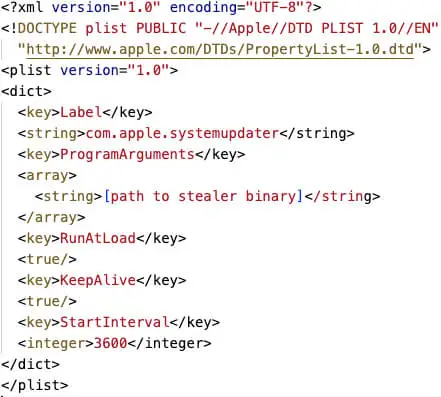
ICMacOS com.apple.systemupdater.plist File
Real-Time Interactive C2 (Gorilla WebSocket)
Alongside its background theft modules, Version 2 launches an interactive C2 client built on the Gorilla WebSocket library. It opens a persistent connection to wss[://]escapeai[.]live/ws?mac_id={hostname}&username={username}, parses incoming text instructions, executes them directly via /bin/sh, and pipes stdout/stderr back to the C2 server in real time.
Expanded Stealing Capabilities
Version 2 also introduces several additional stealing capabilities:
| Category | Files / Paths |
|---|---|
| Steam | ~/Library/Application Support/Steam/ config/loginusers.vdf: All accounts ever logged into Steam on this machine, with AccountName, PersonaName, and RememberPassword flag config/config.vdf: Global Steam configuration including cached tokens *.ssfn files (SteamGuard Sentry Files): These binary files act as trusted-device tokens and allow login bypass of SteamGuard 2FA userdata/: Per-account local storage for all installed games Possessing one .ssfn file allows an attacker to log into the Steam account from a new machine without triggering email/authenticator verification. |
| Outlook | ~/Library/Group Containers/UBF8T346G9.Office/Outlook/ This directory contains Outlook’s local cache of email messages, calendar entries, contacts, and task data in .olk15Message, .olk15Event, and similar format files. Also it copies any .olm (Outlook for Mac Data File) files found. |
| Clipboard Data | Captures whatever text is currently in the system clipboard at execution time via the pbpaste command. Requires no privileges and produces no UI prompt. |
| Browser Autofill Data | Chromium: Copies the Web Data SQLite database from each detected profile. Contains the autofill table with form field name/value pairs and the credit_cards table with card numbers (AES-encrypted with the same key used for passwords) Firefox: Copies formhistory.sqlite which stores previously submitted form field values indexed by field name Safari: Copies Safari_FormValues (a binary plist file) containing Safari’s saved form values |
| Password Managers | ~/Library/Application Support/{Password_Manager} & ~/Library/Containers/{Password_Manager} 1Password, Bitwarden, Keeper, Enpass, Dashlane, LastPass, NordPass, RoboForm, Trezor Suite, and Wasabi |
| Terminal History | Copies shell and REPL history files from the user’s home directory. Unlike collectDevSecrets which copies these as credential files, this function specifically targets history files for their command content (which often includes passwords typed inline, database connection strings, API keys used in commands, and other secrets): .zsh_history, .bash_history, .fish_history, .node_repl_history, .psql_history, .python_history, .dbshell, .mysql_history, .rediscli_history |
| Cryptocurrency Wallets | ~/Library/Application Support/{Wallet} Guarda, Komodo, Neon, Yoroi, Gleec, Nault, Zcash, Decrediton, Blockstream Green, Ledger Live, Monero, DashCore, Daedalus, Wasabi, Sparrow, Coinomi, Ravencoin |
Additional Python Payload
Further analysis identified a supplementary Python script served alongside the Mach-O binaries at hxxps[://]escapeai[.]live/payload[.]py. Designed to plug coverage gaps missed by the compiled Mach-O executables, it expands data collection across four additional vectors:
- VPN Configuration Profiles: Extracts saved credentials and configuration files for ProtonVPN, Mullvad VPN, NordVPN, ExpressVPN, and WireGuard
- Additional Messaging Applications: Targets session databases for Slack, Signal, and Zoom
- Automated “Filegrabber”: Searches Desktop, Documents, and Downloads for sensitive files matching key extensions (.txt, .pdf, .docx, .xlsx, .json, .csv, .key)
- Netscape Cookie Conversion: Converts SQLite cookie records directly into the standard Netscape HTTP Cookie format, enabling immediate reuse in session hijacking frameworks
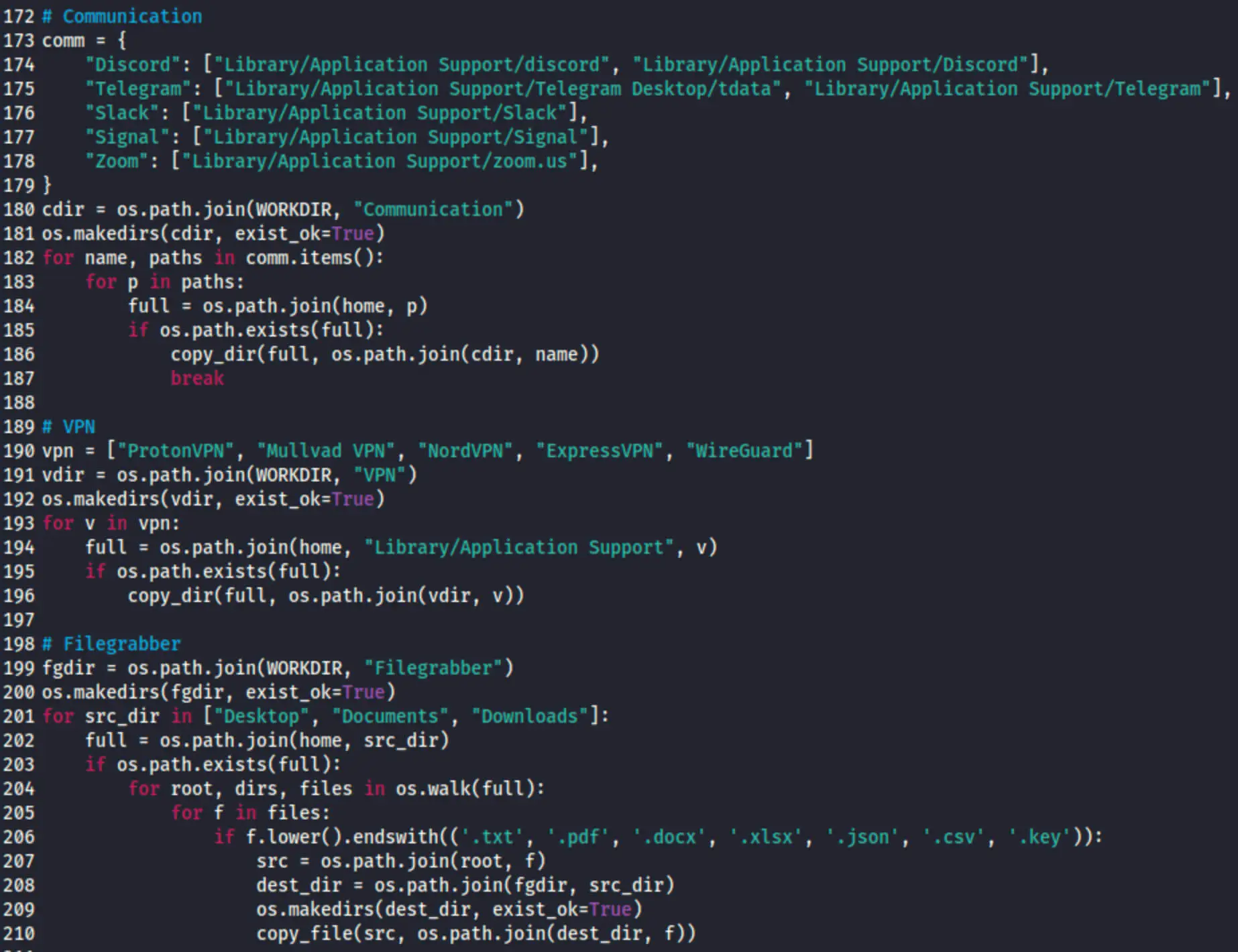
Excerpt Code from ICMacOS’s Python Payload
Conclusion
ICMacOS illustrates the increasingly blurred boundary between commodity information stealers and remote access malware. Within weeks of its public launch, the project evolved from one-shot credential and wallet theft into a persistent WebSocket-controlled implant capable of interactive shell access. Its focus on developer credentials, including SSH keys, cloud configurations, Kubernetes credentials, and environment files, also presents supply chain risks and creates a potential pathway from an individual macOS compromise into broader enterprise infrastructure.
SOCRadar’s Identity & Access Intelligence and Supply Chain Intelligence modules enable proactive monitoring for stolen credentials, and monitoring of third parties for third-party risks.
MITRE ATT&CK TTPs
| Tactic | Technique ID | Technique Name | Description |
|---|---|---|---|
| Execution | T1204.004 | User Execution: Malicious Copy and Paste | ICMacOS is executed through ClickFix (also advertised along with Icarus ClickFix). |
| Execution | T1059.004 | Command and Scripting Interpreter: Unix Shell | ICMacOS uses bash scripts to handle initial dropping, setup, payload execution, and command execution. |
| Execution | T1059.002 | Command and Scripting Interpreter: AppleScript | ICMacOS uses osascript to launch fake system password dialogs, elevate privileges, and execute background processes silently. |
| Execution | T1059.006 | Command and Scripting Interpreter: Python | ICMacOS uses a complementary Python script to harvest additional file types, VPN configs, and session cookies. |
| Persistence | T1543.001 | Create or Modify System Process: Launch Agent | ICMacOS installs persistence via LaunchAgents and .plist files. |
| Stealth | T1036.005 | Masquerading: Match Legitimate Resource Name or Location | ICMacOS uses Apple-like naming conventions (e.g., com.apple.systemupdater) to blend into legitimate processes in launchctl. |
| Stealth | T1480 | Execution Guardrails | ICMacOS includes a CIS country exclusion via locale | grep -c ru_RU and geo-IP lookup. |
| Stealth | T1564 | Hide Artifacts | ICMacOS modifies com.apple.Terminal preferences to strip window titles and headers, hiding active terminal activity from the victim. |
| Privilege Escalation | T1548 | Abuse Elevation Control Mechanism | ICMacOS runs AppleScript with administrator privileges. |
| Discovery | T1082 | System Information Discovery | ICMacOS executes the following commands for system discovery: system_profiler SPSoftwareDataType/SPHardwareDataType/SPDisplaysDataType, sysctl kern.hostname, sw_vers. |
| Discovery | T1083 | File and Directory Discovery | ICMacOS performs recursive directory traversal for credential files. |
| Discovery | T1057 | Process Discovery | ICMacOS uses pgrep ICMACOS to enumerate running malware instances before killing older processes. |
| Discovery | T1033 | System Owner/User Discovery | ICMacOS determines whether the process runs as root or if the current user belongs to the wheel (sudo-capable) group. |
| Credential Access | T1555.001 | Credentials from Password Stores: Keychain | ICMacOS performs Keychain extraction via keychainbreaker and security dump-keychain. |
| Credential Access | T1555.003 | Credentials from Password Stores: Credentials from Web Browsers | ICMacOS collects Chrome/Firefox/Safari login data, cookies and AES key. |
| Credential Access | T1555.005 | Credentials from Password Stores: Password Managers | ICMacOS collects storage and database files for 1Password, Bitwarden, LastPass, Dashlane, Keeper, Enpass, NordPass, RoboForm, and Trezor Suite. |
| Credential Access | T1056.002 | Input Capture: GUI Input Capture | ICMacOS displays fake “System Preferences” system dialogs via osascript to prompt the user for their macOS login password. |
| Credential Access | T1552.001 | Unsecured Credentials: Credentials In Files | ICMacOS recursively searches the user home directory for .env* files, developer tools (.aws/credentials, .ssh/, .pgpass), and cloud configuration files. |
| Credential Access | T1552.003 | Unsecured Credentials: Shell History | ICMacOS collects command-line history files (.bash_history, .zsh_history, etc.) to find hardcoded inline passwords, keys, and tokens. |
| Collection | T1115 | Clipboard Data | ICMacOS collects clipboard data via pbpaste. |
| Collection | T1119 | Automated Collection | ICMacOS automatically iterates through lists of 29 browser extensions (crypto wallets, password managers) to extract LevelDB/IndexedDB data. |
| Collection | T1213 | Data from Information Repositories | ICMacOS uses custom Python code (“Filegrabber” module) to search Desktop, Documents, and Downloads for sensitive file extensions (.txt, .pdf, .docx, .xlsx, .json, .csv, .key). |
| Collection | T1005 | Data from Local System | ICMacOS collects wallet files, SSH keys and dev credentials. |
| Collection | T1560 | Archive Collected Data | ICMacOS archives the collected data in a ZIP file. |
| Exfiltration | T1048.002 | Exfiltration Over Alternative Protocol: Exfiltration Over Asymmetric Encrypted Non-C2 Protocol | ICMacOS exfiltrates collected data via HTTPS POST to escapeai[.]live/upload. |
| Exfiltration | T1567 | Exfiltration Over Web Service | ICMacOS exfiltrates collected data via HTTPS POST to escapeai[.]live/upload. |
| Command & Control | T1071.001 | Application Layer Protocol: Web Protocols | ICMacOS includes a Gorilla WebSocket client for C2. |
IoCs
Network Indicators
| Type | Indicator | Description |
|---|---|---|
| Domain | escapeai[.]live | ICMacOS Login |
| Domain | mikoblico[.]xyz | ICMacOS Login |
| IP Address | 85.137.253[.]61 | ICMacOS Login |
| IP Address | 45.13.186[.]247 | ICMacOS Login |
| URL | hxxps[://]escapeai[.]live/api/build_config | ICMacOS Build Downloader URL |
| URL | hxxps[://]escapeai[.]live/icmacos_run_v2[.]command?t={date} | ICMacOS Downloader URL |
| URL | hxxp[://]escapeai[.]live/loader_v2[.]sh?build={build_name}&owner={owner} | ICMacOS Downloader URL |
| URL | hxxps[://]escapeai[.]live/ICMacOs?arch=arm64 | ICMacOS Delivery URL Based On Architecture |
| URL | hxxps[://]escapeai[.]live/ICMacOs?arch=amd64 | ICMacOS Delivery URL Based On Architecture |
| URL | hxxps[://]escapeai[.]live/payload[.]py | ICMacOS Python Version Delivery URL |
| URL | hxxps[://]escapeai[.]live/upload | ICMacOS Exfiltration POST URL |
| URL | wss[://]escapeai[.]live/ws?mac_id={hostname}&username={username} | ICMacOS WebSockets C2 |
Host Indicators
| Type | Indicator | Description |
|---|---|---|
| SHA256 | 5dfb0c01ac5c075e23ec37873b30ba16cf28e290e9439d04101f0a8191f929d8 | ICMacOS Dropper |
| SHA256 | 8cc449e7e240894e77187f6faff415bc8b9f2f9da73f60eef1f7605debd9144a | ICMacOS Dropper |
| SHA256 | 62e435102e1e1de74537f174ede7c8ff198dc4df3fd2e1167f537096e0b4dd17 | ICMacOS Dropper |
| SHA256 | 857236d1902f4604acdf27519c0310064d21f8a82af3b95b1e4f02fef581b1d0 | ICMacOS Dropper |
| SHA256 | 6917505bbdc8efa01ea1a0298eae62a93a57a8c98d3712a69d822dca4a667f05 | ICMacOS Dropper |
| SHA256 | dca852b53c259641e1782bd9122c5007130614a7a8fd17102400acb4f50f6e94 | ICMacOS Dropper |
| SHA256 | e7e8ac14aaee970c6d00c6cbb398decc56dfc128974c01bfc8e7acd13a18576e | ICMacOS Dropper |
| SHA256 | ec37acd3bd15f50eee2941d5644ca0ee738b36ce4a39e9e08058e35ebc7961fc | ICMacOS Dropper |
| SHA256 | fcf9de13ecc70b4fda3998ed7a93849edf86c48767a1a13f32f4a6a631a65ae2 | ICMacOS Dropper |
| SHA256 | 3d4f70172c8f31813e7b37fc1a49bce193663e33c4eb65952bb5aec9d7176826 | ICMacOS Dropper |
| SHA256 | 8b7606bdccdd6ff691db875283fdf5b6b658dd8d4d141b44e07f8f2583ff5604 | ICMacOS Dropper |
| SHA256 | bc8d70f000e73c0c7a69a2676805190e7109cab59df3e34c5a74d2cb7f13a7e4 | ICMacOS Mach-O v1 |
| SHA256 | a9b21ac0112855b835b5e5850ef167471eff7305d42b3a8104c1961b257a444d | ICMacOS Mach-O v1 |
| SHA256 | c8136413ad38a1028050f5d508e25267b518c5fdeac80b6442103d1009d8924c | ICMacOS Mach-O v1 |
| SHA256 | e52855d447d152bb698e565f361161cdc8946183ab09bf3cbea89765a2b5ff31 | ICMacOS Mach-O v2 |
| SHA256 | d9df05a3fb68d302ecf134a1214b609c6ec0a3fb9122907214afac3908b587f4 | ICMacOS Mach-O v2 |
| SHA256 | 8b4303a065e18e80050ef22031ec60b1a4e84f958d9e56cc5cc34cd29d988d69 | ICMacOS Python Payload |
Frequently Asked Questions
What Is ICMacOS?
ICMacOS, also known as Icarus macOS, is a macOS infostealer sold under a Malware-as-a-Service (MaaS) subscription model since early September 2026. SOCRadar identified it in September 2026. Within weeks of its launch, it evolved from a credential and wallet stealer into a persistent remote access trojan (RAT) with interactive shell access.
Who Is Behind ICMacOS?
ICMacOS is advertised by GlowComa, a financially motivated, Russian-speaking actor active since January 2026. GlowComa promotes it on the XSS, Exploit.in, and Rehub forums under the banner of the MADHASH crypto-draining affiliate group, alongside the Icarus ClickFix panel and a multi-chain crypto clipper. The actor posts stealer updates through a Telegram channel and has faced multiple Exploit.in arbitration disputes.
How Much Does ICMacOS Cost?
ICMacOS is offered at $699 per week, $1,199 every two weeks, or $1,699 per month. Existing users of the Icarus ClickFix panel can get the monthly plan for $899. Subscriptions include a web-based management panel with build analytics, log tracking, custom VPS integration, and real-time Telegram alerts.
How Does ICMacOS Infect macOS Devices?
ICMacOS spreads through ClickFix social engineering pages that trick victims into running copy-and-paste terminal commands. A Bash script downloads a dropper, which hides Terminal window details and shows a fake “System Preferences” dialog to capture the login password. The dropper validates the password against the login Keychain, allowing up to five attempts. It then checks the CPU architecture, downloads the matching payload, launches it in the background with the stolen password as a parameter, closes Terminal, and shows a fake error message.
Which macOS Versions and Architectures Does ICMacOS Support?
According to its developer, ICMacOS runs on macOS Sierra (10.12) through current builds and supports both Intel (x86_64) and Apple Silicon (ARM64) systems. The payload is a 64-bit Mach-O executable written in Go.
What Data Does ICMacOS Steal?
ICMacOS collects:
- Browser data: Saved credentials, cookies, history, and autofill records from Chromium-based and Gecko-based browsers, plus Safari cookies, history, and session data
- Browser extensions: Data from crypto wallet and password manager extensions, including MetaMask, Phantom, 1Password, and LastPass
- Desktop crypto wallets: Electrum, Exodus, Atomic, Ledger Live, Monero, and others
- Keychain contents: Stored passwords, Wi-Fi credentials, and certificates
- Messaging data: Telegram sessions, WhatsApp databases, Discord tokens, and iMessage history
- Developer secrets: SSH keys, AWS, Kubernetes, Docker, Google Cloud, and Terraform credentials, Git configs, and .env files
- Personal data: Apple Notes, call history, and Termius SSH client data
A separate Python payload adds VPN configurations, Slack, Signal, and Zoom sessions, and documents from the Desktop, Documents, and Downloads folders.
What Is the Difference Between ICMacOS Version 1 and Version 2?
Version 1 is a one-shot stealer that collects data, archives it, and uploads it to the command-and-control (C2) server. Version 2 keeps these features and adds RAT functionality: it removes duplicate running instances, checks for administrator rights, installs persistence, and opens a WebSocket connection that runs operator commands through /bin/sh in real time. It also expands collection to Steam, Outlook, clipboard contents, password manager apps, and shell history files such as zsh and fish.
How Does ICMacOS Maintain Persistence?
Version 2 installs a LaunchAgent at ~/Library/LaunchAgents/com.apple.systemupdater.plist, using a name that imitates a legitimate Apple process. It loads the agent immediately with launchctl bootstrap and configures it to restart if the process stops and to run again every 60 minutes.
Does ICMacOS Avoid Certain Countries?
Yes. ICMacOS stops running if it detects a Commonwealth of Independent States (CIS) country. It checks the system locale for Russian language settings and looks up the victim’s country through the device’s public IP address.
Why Is ICMacOS a Risk for Organizations?
ICMacOS targets developer credentials such as SSH keys, cloud configurations, Kubernetes credentials, and environment files. A single infected Mac can expose these secrets, creating supply chain risk and a potential path into broader enterprise infrastructure.
What Are the Signs of an ICMacOS Infection?
Signs include a LaunchAgent named com.apple.systemupdater.plist, hidden log files such as /tmp/.update-helper.log and /tmp/.cache-update.log, a hidden ZIP archive in /tmp, and network traffic to escapeai[.]live or mikoblico[.]xyz. The full list of domains, IP addresses, URLs, and file hashes is available in the IoCs section of this report.