Fake Microsoft Teams Installers Deliver Oyster Backdoor
Malicious ads and SEO poisoning are still good ways to get into someone’s computer. A recent campaign shows this again by getting people to download fake Microsoft Teams installers. These installers hide the Oyster (Broomstick) backdoor, a type of malware that lets attackers get in for a long time.
This blog post sums up the campaign as a lesson for CISOs, CEOs, SOC analysts, threat intelligence teams, and other people who work in cybersecurity.

How the Fake Microsoft Teams Attack Works
Attackers changed search engine rankings and used fake “Microsoft Teams” download links to get people to click on them. People who didn’t know what they were doing clicked on these links, went to fake websites, and downloaded installer files with strange certificates.
The installer put a bad DLL in the victim’s AppData folder, created a scheduled task called CaptureService, and used rundll32.exe to stay on the computer. The malware then linked up with domains that the attacker controlled, such as nickbush24.com and teams-install.icu.
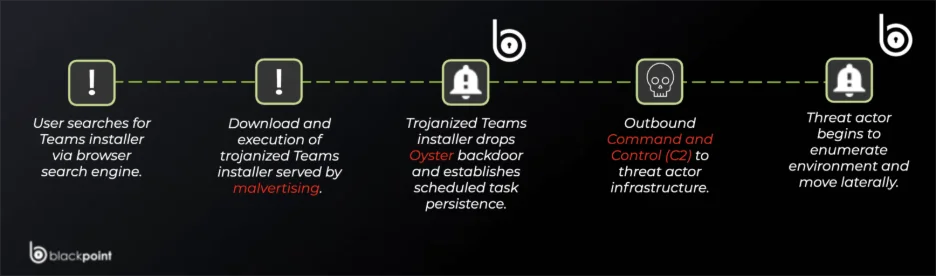
Oyster backdoor campaign killchain (Blackpoint)
Why the Fake Microsoft Teams Oyster Backdoor Campaign Matters
- Brand trust abuse: Using Microsoft Teams as bait is a way to break brand trust and get a lot of people to see it.
- Global reach: SEO poisoning and ads affect people all over the world at the same time.
- Stealth and persistence: Scheduled tasks and rundll32 abuse let attackers stay hidden.
- Escalation potential: Oyster can load more dangerous payloads, such as ransomware, because it is a loader.
10 Key Questions & Answers
- What is the goal of this operation?
A campaign that sends out fake Teams installers that install the Oyster backdoor. - What starts an infection?
Bad ads and poisoned search results for “Microsoft Teams download.” - What kind of malware is it?
The Oyster (Broomstick) backdoor was built to last and be used for C2. - How does the malware maintain persistence?
It creates a scheduled task named CaptureService that launches the malicious DLL (often via rundll32.exe), ensuring it runs regularly and remains active after reboots. - Who is the target?
Companies, IT managers, and people who use Teams. - What industries are at risk?
Healthcare, finance, and professional services are the most likely targets, but any Teams user could be in danger. - Which regions/countries are affected?
The campaign is global because people are abusing search engines and ads. - Which IOCs should you keep an eye on?
Teams-install.icu, IPs like 185.28.119.228, and file hashes of installers that have been infected with trojans. - What can we do to improve detection?
Watch for strange rundll32 runs, new scheduled tasks, and downloads from places that aren’t official. - What can businesses do?
Add threat intelligence to IOCs, limit downloads of installers, and keep an eye on SIEM‘s persistence mechanisms.
Key Security Lessons from the Oyster Backdoor Campaign
The Microsoft Teams campaign delivering Oyster backdoor teaches defenders important lessons:
- You can use people’s trust against them. Even simple searches like “download Teams” can lead to problems.
- Persistence is often easy to spot, so it’s important to keep an eye on scheduled tasks and rundll32 executions.
- Brand impersonation is becoming more common. Attackers use trusted names to make themselves look more credible.
- SEO poisoning isn’t going away. Businesses need to be just as careful with search results as they are with phishing emails.
- Threat intelligence speeds up defense by letting you block attacks faster with IOC enrichment and attack surface monitoring.
Mitigations and Remediation Table with SOCRadar Modules
| Category | Mitigation / Remediation Step | Details / Notes | SOCRadar Module |
| User Awareness & Policy | Restrict software downloads | Enforce that installers must only come from official vendor domains (e.g., microsoft.com). | — |
| Security awareness training | Educate staff about malvertising, SEO poisoning, and risks of downloading via search engines. | — | |
| Endpoint Protection | Application allowlisting | Block executables in user-writable folders (AppData, Temp). | Threat Hunting & Malware Analysis |
| EDR/AV monitoring | Detect execution of rundll32.exe loading DLLs from non-standard directories. | Threat Hunting & Malware Analysis | |
| Persistence Detection | Scheduled task monitoring | Alert on new scheduled tasks like CaptureService. | Threat Hunting & Malware Analysis |
| Windows Event monitoring | Track Event IDs 4698 (task creation) and 4688 (process creation). | Threat Hunting | |
| Network Security | Block known IOCs | Add domains (nickbush24.com, teams-install.icu) and IPs from feeds to blocklists. | Cyber Threat Intelligence |
| DNS security filtering | Prevent resolution of suspicious domains tied to Oyster C2. | Digital Risk Protection | |
| Email & Web Security | Web proxy filtering | Block access to malicious download domains with URL filtering. | Digital Risk Protection |
| Ad-blocking tools | Reduce exposure to poisoned ads with enterprise ad-blockers or a DNS sinkhole. | Digital Risk Protection | |
| Threat Intelligence | IOC enrichment & monitoring | Continuously update feeds with hashes, domains, and IPs tied to Oyster. | Cyber Threat Intelligence |
| MITRE ATT&CK mapping | Map detections to TTPs (T1053.005 scheduled tasks, T1218.011 rundll32 abuse, T1204.002 malicious installers). | Cyber Threat Intelligence | |
| Incident Response | Containment & isolation | Immediately isolate compromised endpoints and block outbound C2. | Threat Hunting |
| Forensics | Collect system logs, DLL artifacts, and scheduled task evidence. | Threat Hunting & Malware Analysis | |
| Remediation | Remove malicious DLLs, delete scheduled tasks, reset credentials, and rebuild if needed. | Threat Hunting & Malware Analysis | |
| Brand & External Monitoring | Detect spoofed domains | Identify malicious “Teams download” spoof sites before users are exposed. | Brand Protection & Digital Risk Protection |
| Takedown services | Request the removal of malicious or spoofed domains used in malvertising. | Brand Protection |
Conclusion and How SOCRadar Can Help
This campaign highlights how attackers continue to weaponize trusted brands and popular search terms to deliver sophisticated backdoors like Oyster. Beyond phishing emails, fake installers and poisoned search results have become a powerful initial access vector.
To combat these threats, organizations need visibility beyond their internal networks, spanning external attack surfaces, emerging IOCs, and impersonation attempts. SOCRadar’s integrated modules can support security teams at every stage:
- Cyber Threat Intelligence: Enrich and monitor IOCs tied to Oyster for faster detection and response.
- Digital Risk Protection: Identify malicious domains and ads that impersonate Microsoft Teams before users are exposed.
- Threat Hunting & Malware Analysis: Detect persistence techniques such as CaptureService scheduled tasks and rundll32/regsvr32 abuse.
- Brand Protection: Monitor and request takedowns for fake download sites exploiting trusted brands.
By combining these capabilities, security teams can proactively detect, block, and mitigate campaigns like this before they escalate.
Indicators of Compromise (IoCs)
File Hashes
MD5
- d28b4136a7e6148de5c26a055c711f4f
- d5ecd8120b6a107513b9871ec0475ace
SHA1
- 8d8ceba1b31f4ace5a9c44225014d3947fbf205a
- e7f8da0b97f4207738ce895ef15be4133122b307
SHA256
- 90b633cacfa185dd912a945f370e14191644ecff1300dbce72e2477171753396
- 9dc86863e3188912c3816e8ba21eda939107b8823f1afc190c466a7d5ca708d1
- ac5065a351313cc522ab6004b98578a2704d2f636fc2ca78764ab239f4f594a3
- d46bd618ffe30edea56561462b50eb23feb4b253316e16008d99abb4b3d48a02
- d47f28bf33f5f6ee348f465aabbfff606a0feddb1fb4bd375b282ba1b818ce9a
Network Indicators
IPv4
- 185.28.119.228
- 45.66.248.112
- 54.39.83.187
Domains
- maddeehot[.]online
- nickbush24[.]com
- teams-install[.]icu
- teams-install[.]top
- techwisenetwork[.]com
Hostnames
- server-na-qc2.farsafe.net
- team.frywow.com