
What Is DNS Monitoring?
DNS monitoring collects and analyzes domain-name queries, responses, records, infrastructure, and changes to detect security threats, configuration problems, and service disruption.
Because many connections begin with DNS, telemetry can reveal malware callbacks, phishing infrastructure, tunneling, look-alike domains, and compromised endpoints. Monitoring must account for encrypted DNS, caching, privacy, and authorized business use.
Key Takeaways
- DNS monitoring collects and analyzes domain-name queries, responses, records, infrastructure, and changes to detect security threats, configuration problems, and service disruption.
- Because many connections begin with DNS, telemetry can reveal malware callbacks, phishing infrastructure, tunneling, look-alike domains, and compromised endpoints. Monitoring must account for encrypted DNS, caching, privacy, and authorized business use.
- Malware command-and-control traffic is a primary concern.
- Strong programs combine prevention, continuous visibility, ownership, and tested response.
How It Works
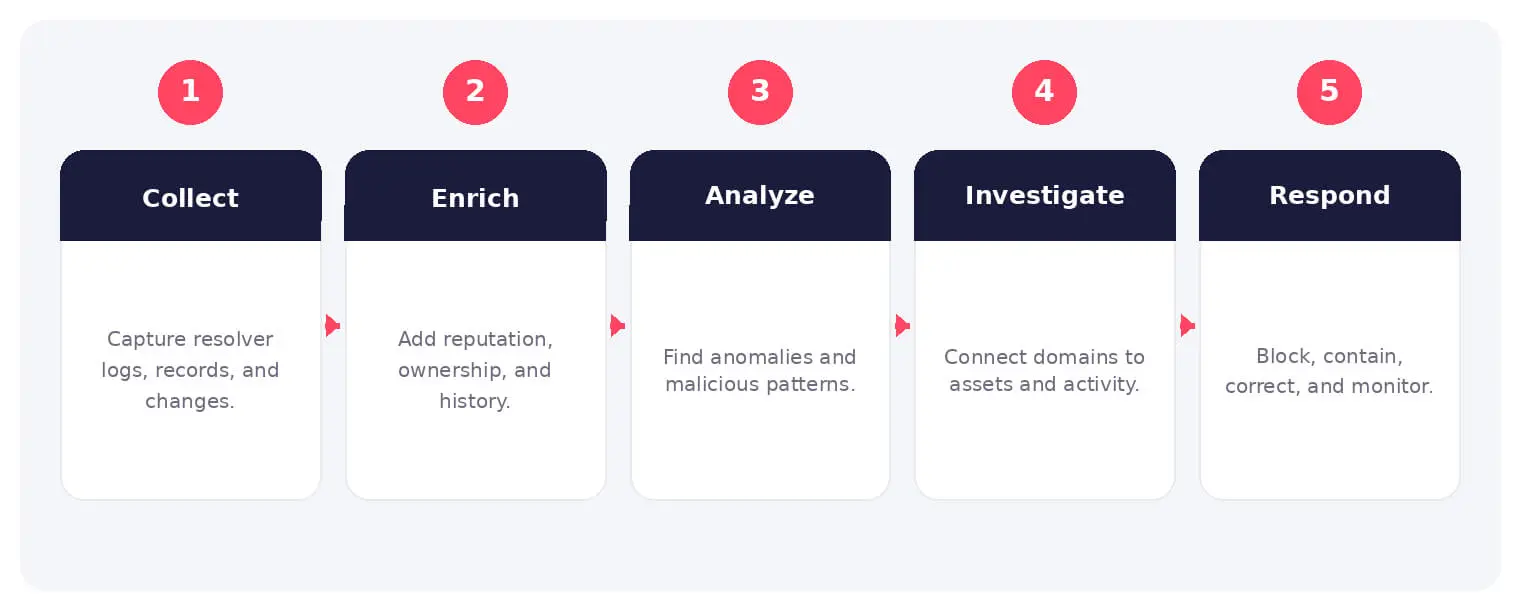
The operating flow above turns a broad security objective into observable steps. Exact implementations vary, but each stage needs an owner, trusted inputs, documented policy, and evidence that analysts can use during investigation and review.
Because many connections begin with DNS, telemetry can reveal malware callbacks, phishing infrastructure, tunneling, look-alike domains, and compromised endpoints. Monitoring must account for encrypted DNS, caching, privacy, and authorized business use.
Common Types and Capabilities
- Resolver query and response monitoring
- Authoritative DNS and zone monitoring
- Passive DNS and infrastructure analysis
- Domain, certificate, and brand monitoring
Security and Business Risks
- Malware command-and-control traffic
- DNS tunneling and data exfiltration
- Hijacking, poisoning, or unauthorized changes
- Phishing and look-alike domains
Warning Signs and Detection
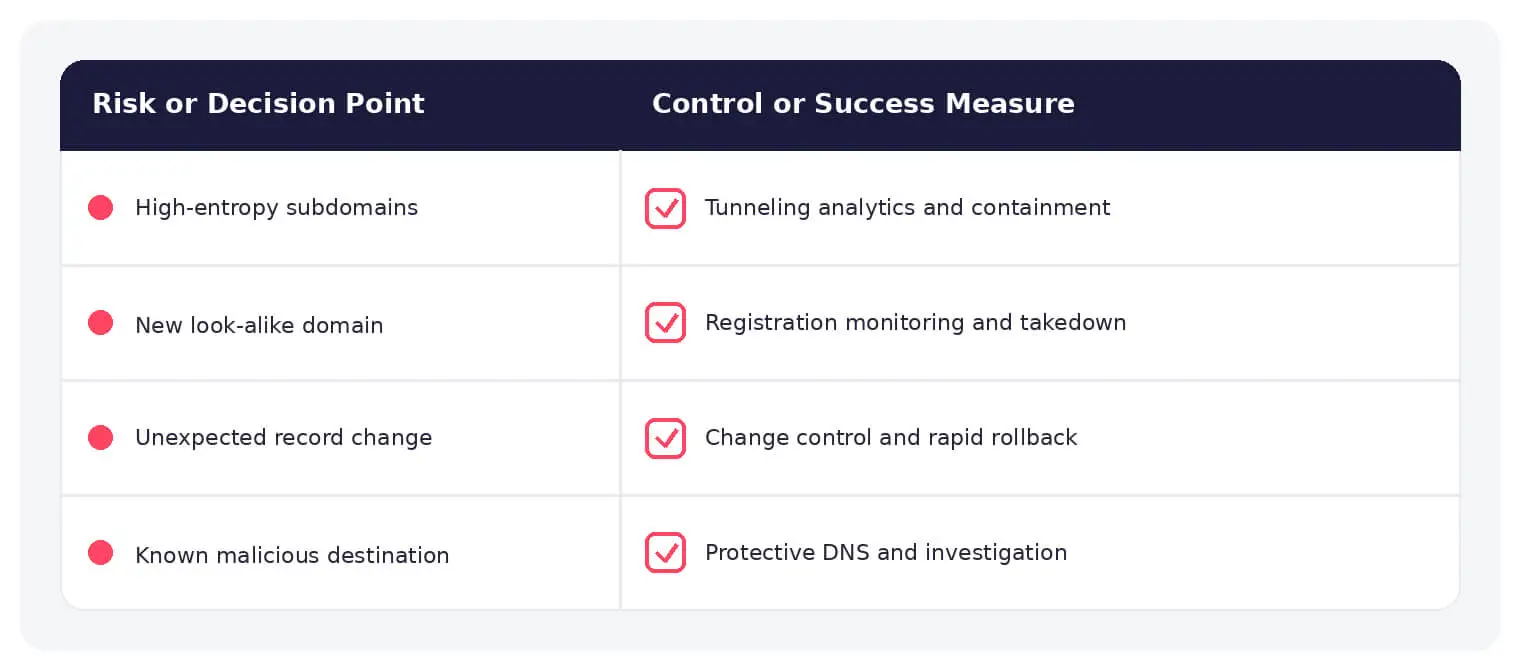
Look for algorithmic or newly registered domains, high-entropy subdomains, unusual query volume, rare record types, fast-flux behavior, NXDOMAIN spikes, record changes, resolver bypass, and unexpected name-server updates.
Best Practices
Centralize approved resolvers, protect DNS administration, enable change alerts and logging, use DNSSEC where appropriate, filter malicious domains, monitor look-alikes, and correlate DNS with endpoint and identity data.
How SOCRadar Can Help
SOCRadar adds outside-in asset visibility, threat intelligence, exposure context, and continuous monitoring that help security teams validate and prioritize risks related to DNS monitoring. This context complements internal cloud, data, network, and identity controls.
Explore SOCRadar Brand Protection or request a demo to strengthen threat-informed prevention and response.
Frequently Asked Questions
What Does DNS Monitoring Cover?
DNS monitoring covers the queries and responses moving through resolvers, authoritative zone data and record changes, passive DNS observations, and the health of name servers and related infrastructure. The objective is to detect security threats, configuration errors, and service disruption before they affect users.
Why Is DNS a Valuable Source of Security Telemetry?
Most connections begin with a DNS lookup, so malware callbacks, phishing lookups, and exfiltration attempts often leave DNS traces before other logs show anything. Because resolvers see traffic from many endpoints, they offer an early and centralized signal of compromise.
How Do Attackers Use DNS for Command-and-Control?
Malware often resolves attacker-controlled or algorithmically generated domains to reach command-and-control servers, which makes lookups a common detection point. Fast-flux setups and short TTL records let attackers rotate infrastructure quickly, so tracking newly observed domains and their age is important.
What Is DNS Tunneling and How Is It Detected?
DNS tunneling encodes data inside queries or responses, typically in long, high-entropy subdomains, to slip past firewalls for exfiltration or command delivery. Detection focuses on unusual record types such as TXT or NULL, unusually large or frequent queries, and subdomain entropy far above normal traffic.
Which Warning Signs Point to DNS-Based Threats?
Useful signals include NXDOMAIN spikes from failed beaconing, queries to newly registered or look-alike domains, abnormal query volume from a single host, and unexpected name-server or record changes. Endpoints bypassing approved resolvers deserve alerting as well.
How Should Teams Respond to Suspicious DNS Activity?
Block or sinkhole the domain at the resolver, identify the querying endpoint, and investigate that host for malware or misuse. Correlate the DNS evidence with endpoint, identity, and network logs to establish scope, and verify whether any zone changes were authorized if hijacking is suspected.
Which Preventive Controls Reduce DNS Risk?
Funnel traffic through approved, logged resolvers; protect DNS administration with strict access controls and change alerts; enable DNSSEC where appropriate; and filter known-malicious domains. Monitoring look-alike registrations of your own domains adds another layer against phishing.
What Business Impact Can DNS Incidents Cause?
Successful DNS attacks can result in data exfiltration through tunneling, malware infections delivered through malicious resolutions, and outages or traffic redirection caused by hijacked or poisoned records. For customer-facing domains, hijacking and look-alike phishing can also erode trust and expose the brand to fraud.
How Does Encrypted DNS Affect Monitoring?
DoH and DoT hide query contents from network observers, which can reduce passive visibility and let endpoints bypass internal policy. A practical approach is to point endpoints at approved resolvers that support encrypted transport and local logging, and to alert on traffic to unapproved external resolvers.
What Is the Difference Between Passive DNS and Resolver Monitoring?
Resolver monitoring watches live queries from your own endpoints, giving real-time insight into client behavior. Passive DNS aggregates historically observed resolution data, which supports infrastructure investigation, domain tracking, and retroactive hunting, but it does not show the queries your environment is sending currently.

Oct 16, 2026
CVE-2026-102764: BeyondTrust Zero-Day Exploited
BeyondTrust has disclosed CVE-2026-102764, a critical Remote Support vulnerability exploited as a zero-day weeks before customers received a patch. The attack began…

Oct 15, 2026
Cisco Secure Email & PAN-OS Zero-Days Exploited
Cisco Secure Email & PAN-OS Zero-Days Exploited Cisco and Palo Alto Networks have patched two actively exploited zero-day vulnerabilities that can lead…

Oct 15, 2026
SOCRadar Splunk Integration: New MSSP and Vulnerability Apps
SOCRadar Splunk Integration: New MSSP and Vulnerability Apps Your analysts live in Splunk. Your external risk does not: SOCRadar alarms for dozens…
Intelligence in your inbox every Thursday.
Join 30,000+ security professionals reading SOCRadar research.
Subscribe