Mar 10, 2026
Mar 10, 2026
6 Mins Read
Sep 13, 2026
Table Of Content
Related Articles

SMS Bombing

Threat Actors
Jan 08, 2026
Dark Web Monitoring
Feb 19, 2026
Ransomware
Jan 31, 2026
OSINT Framework
Apr 17, 2026

What Is a Web Shell?
A web shell is a script or executable placed on a web server to provide remote command execution or file management through web requests. Attackers use web shells to maintain access, run commands, upload tools, steal data, and move deeper into an environment.
A web shell is often a post-exploitation artifact rather than the original entry point. Deleting the file without fixing the exploited vulnerability, rotating affected credentials, and finding alternate persistence can allow the attacker to return.
Key Takeaways
- Minimal command and file-management shells is one important form or technique.
- Detection depends on correlated technical and operational context.
- Prevention should reduce both initial access and post-compromise impact.
- Response must preserve evidence and remove every reusable access path.
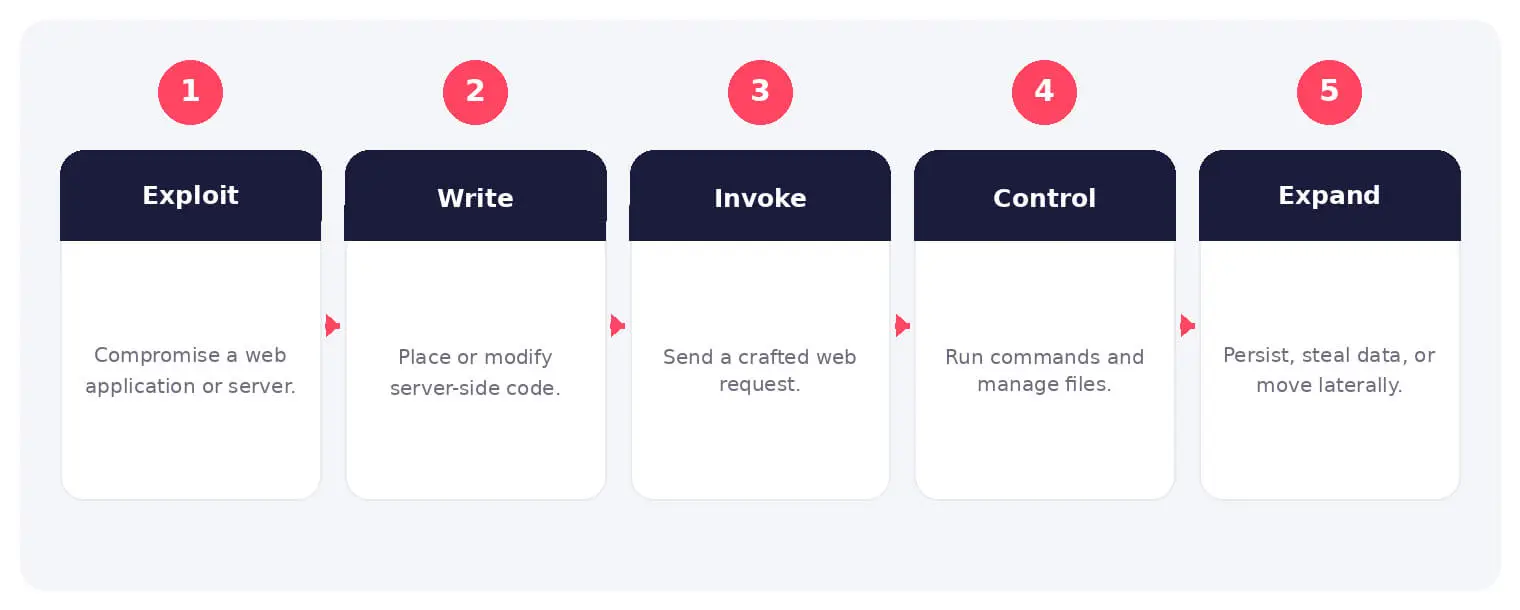
How a Web Shell Works
The sequence shown above is not mandatory in every case, but it provides a practical way to connect initial opportunity with the actor’s objective. Individual steps may occur in parallel, repeat, or be completed by different participants.
A web shell is often a post-exploitation artifact rather than the original entry point. Deleting the file without fixing the exploited vulnerability, rotating affected credentials, and finding alternate persistence can allow the attacker to return.
Common Types and Techniques
- Minimal command and file-management shells
- Obfuscated or encrypted web shells
- Memory-resident and framework-specific implants
- Legitimate administration features used as shells
Security and Business Risks
- Persistent remote access to the server
- Credential and secret theft
- Database access and lateral movement
- Website manipulation or malware delivery
Warning Signs and Detection
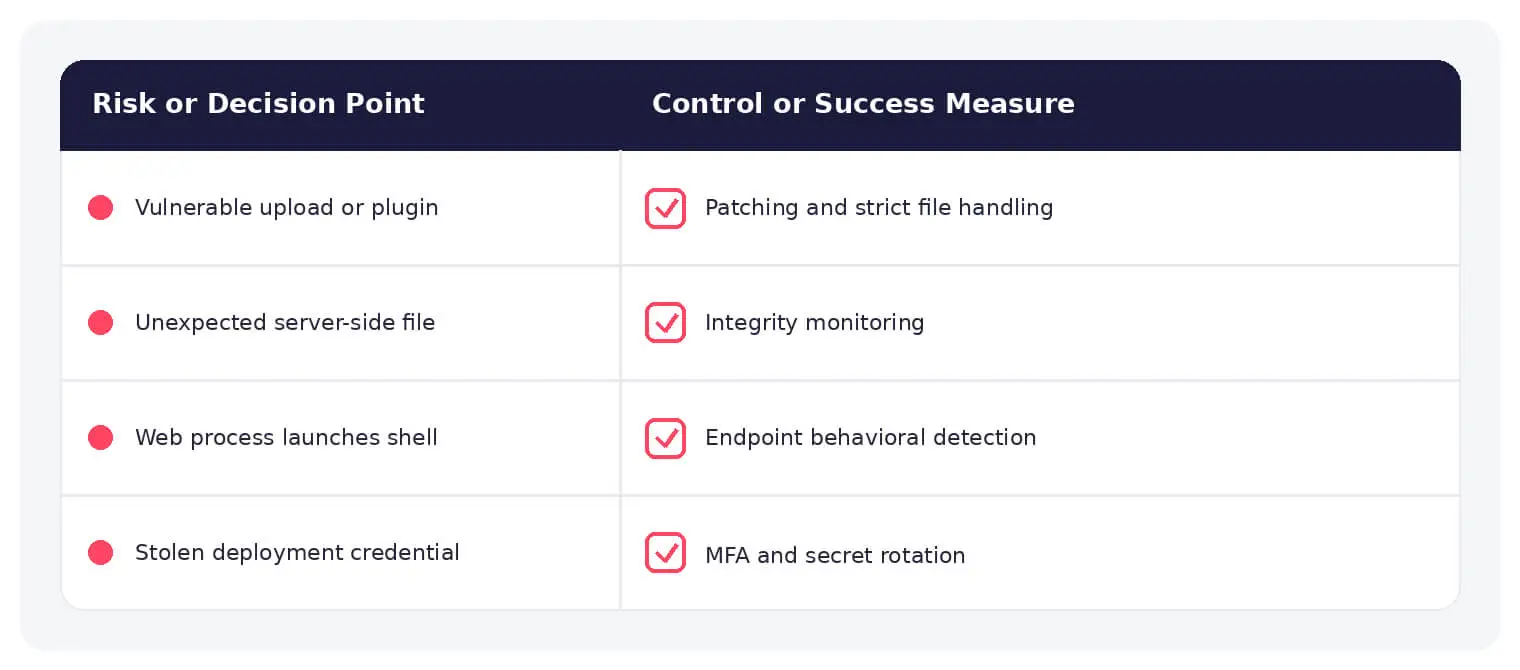
Look for unexpected web files, recent changes in writable directories, web-server processes spawning shells or utilities, unusual request parameters, outbound connections, and commands executed under the service identity.
Prevention and Response
Patch the initial weakness, restrict upload and write paths, run services with least privilege, monitor file integrity, separate management access, protect deployment credentials, and rebuild when server integrity cannot be established.
How SOCRadar Can Help
SOCRadar combines external asset visibility, threat intelligence, Dark Web monitoring, vulnerability context, and indicator enrichment to help teams identify exposure and investigate activity connected to web shell.
Explore SOCRadar Attack Surface Management or request a demo to strengthen threat-informed prevention and investigation.
Frequently Asked Questions
What Exactly Does a Web Shell Do on a Compromised Server?
A web shell is a script placed on a web server that lets an operator run commands and manage files through ordinary web requests. Once in place, it can be used to upload tools, read or modify data, harvest credentials, and pivot toward other systems. Because its traffic blends with normal HTTP activity, a shell can remain quietly useful to an attacker for long periods.
Why Are Web Shells Usually Post-Exploitation Tools Rather Than Entry Points?
Most attackers first compromise a server through a vulnerable application, an exposed admin interface, or stolen credentials, then drop the shell to keep access. The shell is the persistence mechanism, not the initial weakness. This is why deleting the file alone rarely ends an incident unless the original flaw and any stolen secrets are also addressed.
How Do Attackers Get a Web Shell Onto a Server?
Common routes include exploiting known vulnerabilities in web applications or CMS plugins, abusing unrestricted file upload that accepts executable script types, leveraging remote code execution flaws, or signing in with compromised administrator credentials. Forgotten internet-facing assets and poorly secured staging sites are frequent targets. Once write access to the web root exists, installing a shell can take seconds.
What Are Common Warning Signs of a Web Shell?
Useful indicators include unexpected or recently modified files in web roots and upload directories, web-server processes spawning command interpreters or utilities like whoami, unusual request parameters containing encoded commands, and outbound connections that match no known function. Commands running under the service account rather than a named user are another strong signal. File integrity monitoring helps surface changes that should not exist.
How Can Analysts Tell a Web Shell Apart From a Legitimate Administration Script?
Context matters more than the file itself. Legitimate admin tools are documented, deployed through known processes, and referenced in change records, while unauthorized shells typically appear outside release paths, carry obfuscated code, or hide inside modified legitimate files. Correlating file creation times with web logs, deployments, and authentication events usually clarifies the picture.
What Steps Should Follow the Discovery of a Web Shell?
Preserve logs, the shell file, and relevant memory before cleanup so the entry vector and attacker activity can be reconstructed. Hunt for additional shells, scheduled tasks, new accounts, modified authentication mechanisms, and exposed secrets, then rotate affected credentials and API keys. Finally, patch or close the initial weakness; otherwise the same path remains open.
When Is Rebuilding a Server the Right Response to a Web Shell?
Rebuilding is a strong option when attacker activity indicates privileged compromise, the scope of changes cannot be confidently mapped, or no trusted baseline exists to verify system integrity. It is not mandatory in every case, but restoring from a known-good image often reaches a reliable state faster than manual cleaning. Whichever path is chosen, the original vulnerability should be fixed before the server returns to service.
Which Controls Reduce the Likelihood of Web Shell Installation?
Patch internet-facing applications promptly and restrict what file upload features accept, including extension, content type, and storage outside the executable web root. Run application pools and services with least privilege, disable unnecessary script handlers, separate management interfaces from public traffic, and monitor file integrity on web directories. Protecting deployment credentials and pipelines matters as well, since attackers abuse them like any other form of write access.
Can a Web Shell Persist Through Restarts or Partial Cleanup?
File-based shells persist until removed, and some techniques go further: in-memory implants, framework-specific hooks, and secondary persistence such as scheduled tasks or altered legitimate files can survive simple file deletion or a service restart. Cleanup should include a sweep for alternate access paths and a comparison against a known-good baseline. Treat the incident as unresolved until the exploited weakness is closed and monitoring shows no recurrence.
Do Web Shells Endanger Only the Server They Occupy?
No. A shell often serves as a foothold for reading configuration files that contain database credentials, reaching internal services that trust the web server, and moving laterally into broader infrastructure. A compromised site can also be turned against visitors through injected malware, redirect schemes, or manipulated content, extending the business impact well beyond the single host.