Mar 10, 2026

Mar 30, 2026
4 Mins Read
Sep 13, 2026
Table Of Content
Related Articles

SMS Bombing

Threat Actors
Jan 08, 2026

Dark Web Monitoring
Feb 19, 2026

Ransomware
Jan 31, 2026

OSINT Framework
Apr 17, 2026

What Are Antidetect Browsers?
An antidetect browser is a browser or profile-management tool designed to alter or isolate fingerprint attributes such as user agent, screen properties, language, time zone, fonts, WebGL data, cookies, and network settings. It lets an operator present multiple apparently distinct browser identities from one environment.
Privacy testing and legitimate account management can use profile isolation, but criminal operators rely on antidetect browsers for account takeover, advertising fraud, carding, credential testing, marketplace abuse, and multi-account operations. Possession alone does not prove fraud; behavior and transaction context matter.
Key Takeaways
- Fingerprint spoofing and profile isolation is one important form or technique.
- Detection depends on correlated technical and operational context.
- Prevention should reduce both initial access and post-compromise impact.
- Response must preserve evidence and remove every reusable access path.
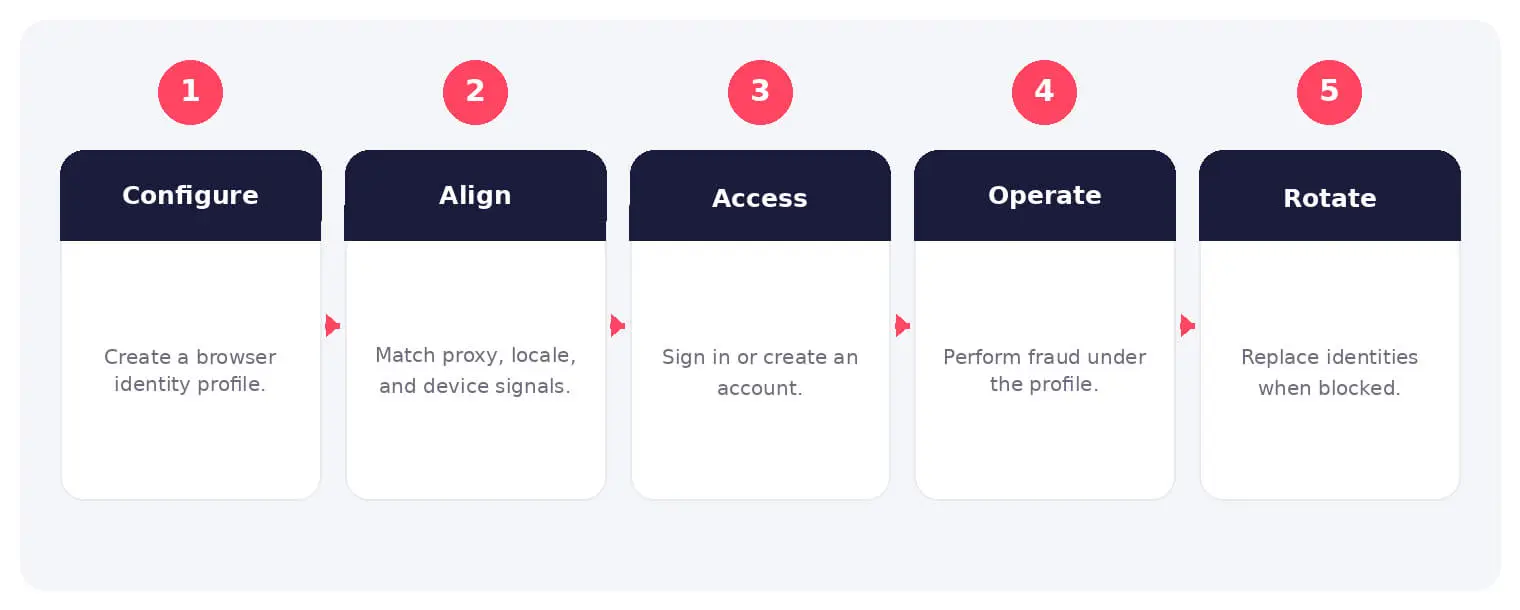
How Antidetect Browsers Works
The sequence shown above is not mandatory in every case, but it provides a practical way to connect initial opportunity with the actor’s objective. Individual steps may occur in parallel, repeat, or be completed by different participants.
Privacy testing and legitimate account management can use profile isolation, but criminal operators rely on antidetect browsers for account takeover, advertising fraud, carding, credential testing, marketplace abuse, and multi-account operations. Possession alone does not prove fraud; behavior and transaction context matter.
Common Types and Techniques
- Fingerprint spoofing and profile isolation
- Proxy and residential IP integration
- Cookie, token, and session import
- Automation and multi-account management
Security and Business Risks
- Account takeover and payment fraud
- Promotion, advertising, and marketplace abuse
- Evasion of device-based risk controls
- Scaled identity and credential operations
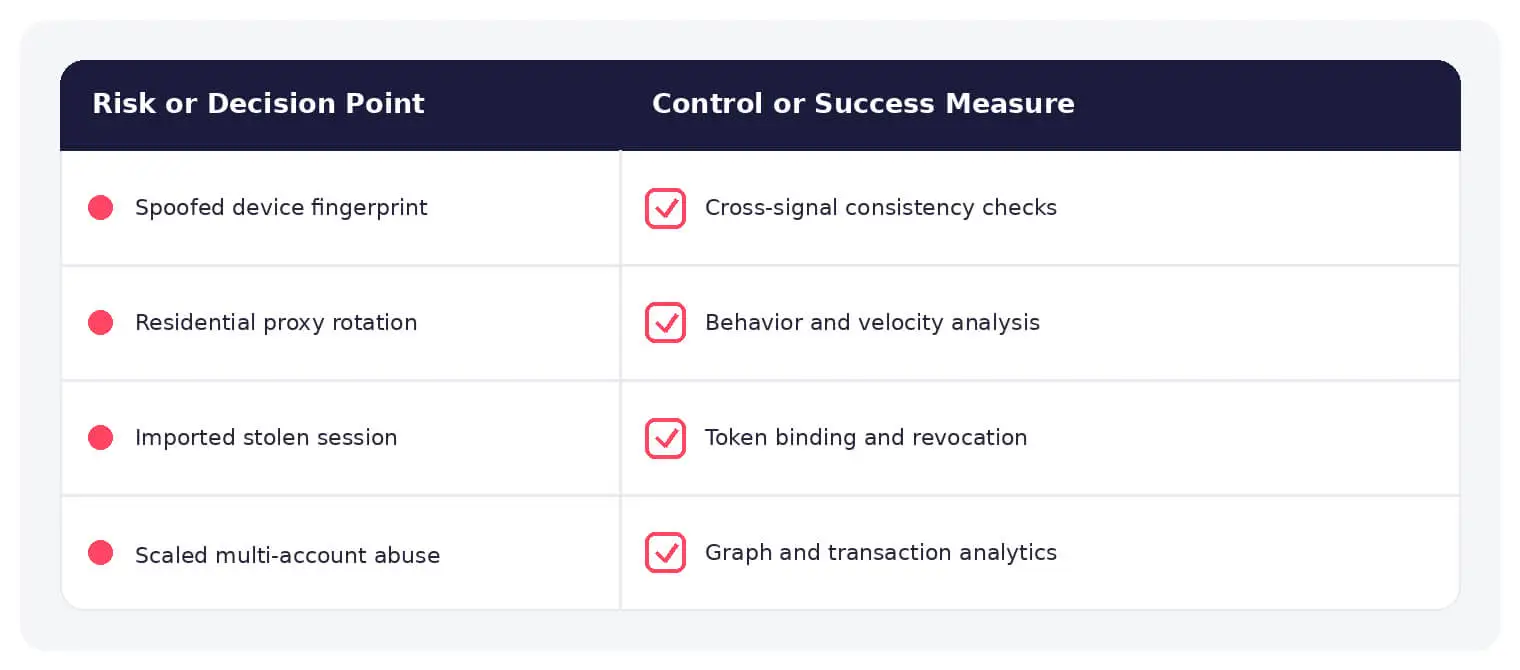
Warning Signs and Detection
Look for contradictions between network, locale, device, graphics, timing, and behavior; identical automation across supposedly distinct devices; imported sessions; rapid profile rotation; and transaction patterns inconsistent with the account.
Prevention and Response
Use layered risk decisions across identity, device, network, behavior, transaction, and history. Protect sessions, apply adaptive authentication, detect automation, and avoid blocking solely on one fingerprint attribute.
How SOCRadar Can Help
SOCRadar combines external asset visibility, threat intelligence, Dark Web monitoring, vulnerability context, and indicator enrichment to help teams identify exposure and investigate activity connected to antidetect browser.
Explore SOCRadar Extended Threat Intelligence or request a demo to strengthen threat-informed prevention and investigation.
Frequently Asked Questions
What Is an Antidetect Browser?
An antidetect browser is a browser or profile-management tool that alters or isolates fingerprint attributes such as the user agent, screen properties, time zone, fonts, WebGL data, and cookies. It allows an operator to present multiple apparently distinct browser identities from a single environment.
Are Antidetect Browsers Illegal?
The software itself is not inherently illegal and can support legitimate privacy testing or account management. Legality depends on conduct, authorization, fraud, data access, and jurisdiction rather than possession of the tool alone.
How Do Antidetect Browsers Differ From Private Browsing or Incognito Mode?
Incognito mode mainly limits local history and cookie persistence on the user’s device. Antidetect tools actively modify or isolate fingerprint attributes and are built to manage many separate identities, often with proxy and automation support.
How Do Antidetect Browsers Spoof a Device Fingerprint?
They override or fabricate attributes that risk engines collect, including canvas and WebGL output, installed fonts, language, time zone, and network settings. Each profile stores its own cookies and session data so the identity remains consistent across visits.
Why Are Residential Proxies Commonly Paired With Antidetect Browsers?
Residential proxies make traffic appear to originate from consumer networks that match the fabricated locale and time zone of the profile. This reduces the chance that simple IP reputation or geolocation checks will contradict the spoofed fingerprint.
What Criminal Activities Commonly Use Antidetect Browsers?
Observed use cases include account takeover, carding and payment fraud, credential testing, advertising and marketplace abuse, and multi-account operations that evade device-based controls. A single operator can run dozens of supposedly unrelated accounts in parallel.
What Warning Signs Suggest an Antidetect Browser Is in Use?
Look for contradictions between network, locale, device, graphics, and behavioral signals; identical automation patterns across supposedly distinct devices; imported sessions or tokens; rapid profile rotation; and transactions inconsistent with the account’s history.
Can Fingerprinting Alone Identify a Fraudulent User?
No. Fingerprints change over time and can be spoofed, so no single attribute should be treated as identity proof. Effective risk decisions correlate multiple signals, including device, network, behavior, and transaction context.
How Can Organizations Defend Against Antidetect Browser Abuse?
Apply layered risk decisions across identity, device, network, behavior, transaction, and account history. Protect sessions, apply adaptive authentication, detect automation, and avoid blocking users solely on one fingerprint attribute to limit false positives.
Does an Antidetect Browser Hide Someone’s Real IP Address?
The browser itself does not, but these tools are typically integrated with proxies, VPNs, or residential IP pools. Detection therefore depends on finding mismatches between the claimed network, the fabricated profile, and observable behavior rather than trusting IP data alone.