Mar 10, 2026

Mar 09, 2026
5 Mins Read
Sep 13, 2026
Table Of Content
Related Articles

SMS Bombing

Threat Actors
Jan 08, 2026
Dark Web Monitoring
Feb 19, 2026

Ransomware
Jan 31, 2026
OSINT Framework
Apr 17, 2026

What Is a Virtual Private Network (VPN)?
A Virtual Private Network (VPN) creates an encrypted tunnel that protects traffic between a user, device, site, or network and a VPN endpoint.
VPNs support remote access, site-to-site connectivity, and privacy on untrusted networks. Encryption protects data in transit, but broad network access, stolen credentials, vulnerable gateways, unsafe endpoints, and poor split-tunneling policy can still create risk.
Key Takeaways
- A Virtual Private Network (VPN) creates an encrypted tunnel that protects traffic between a user, device, site, or network and a VPN endpoint.
- VPNs support remote access, site-to-site connectivity, and privacy on untrusted networks. Encryption protects data in transit, but broad network access, stolen credentials, vulnerable gateways, unsafe endpoints, and poor split-tunneling policy can still create risk.
- Exploited internet-facing VPN gateways is a primary concern.
- Effective security combines prevention, continuous visibility, accountable ownership, and tested response.
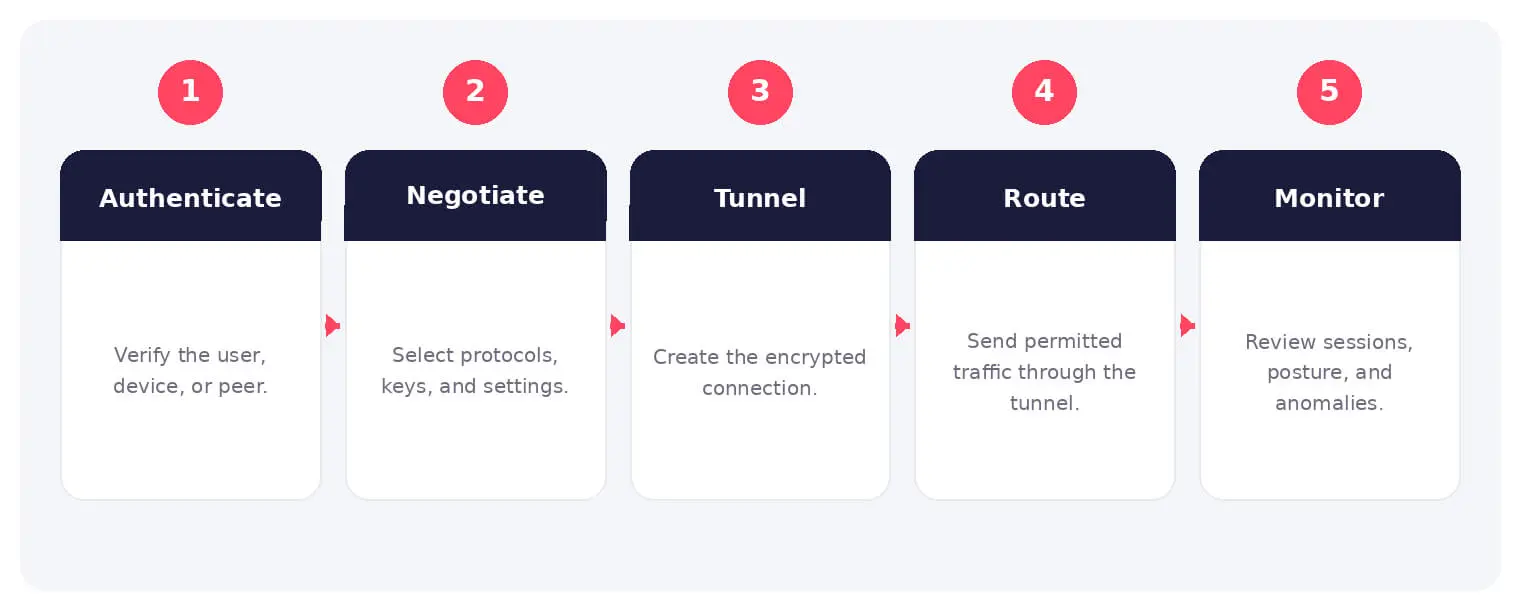
How It Works
The operating flow above turns the concept into observable steps. Exact implementations vary, but each stage needs accountable ownership, trusted inputs, documented policy, and evidence that analysts can use during investigation and review.
VPNs support remote access, site-to-site connectivity, and privacy on untrusted networks. Encryption protects data in transit, but broad network access, stolen credentials, vulnerable gateways, unsafe endpoints, and poor split-tunneling policy can still create risk.
Common Types and Capabilities
- Remote-access VPNs
- Site-to-site VPNs
- IPsec and SSL or TLS VPNs
- Full-tunnel and split-tunnel configurations
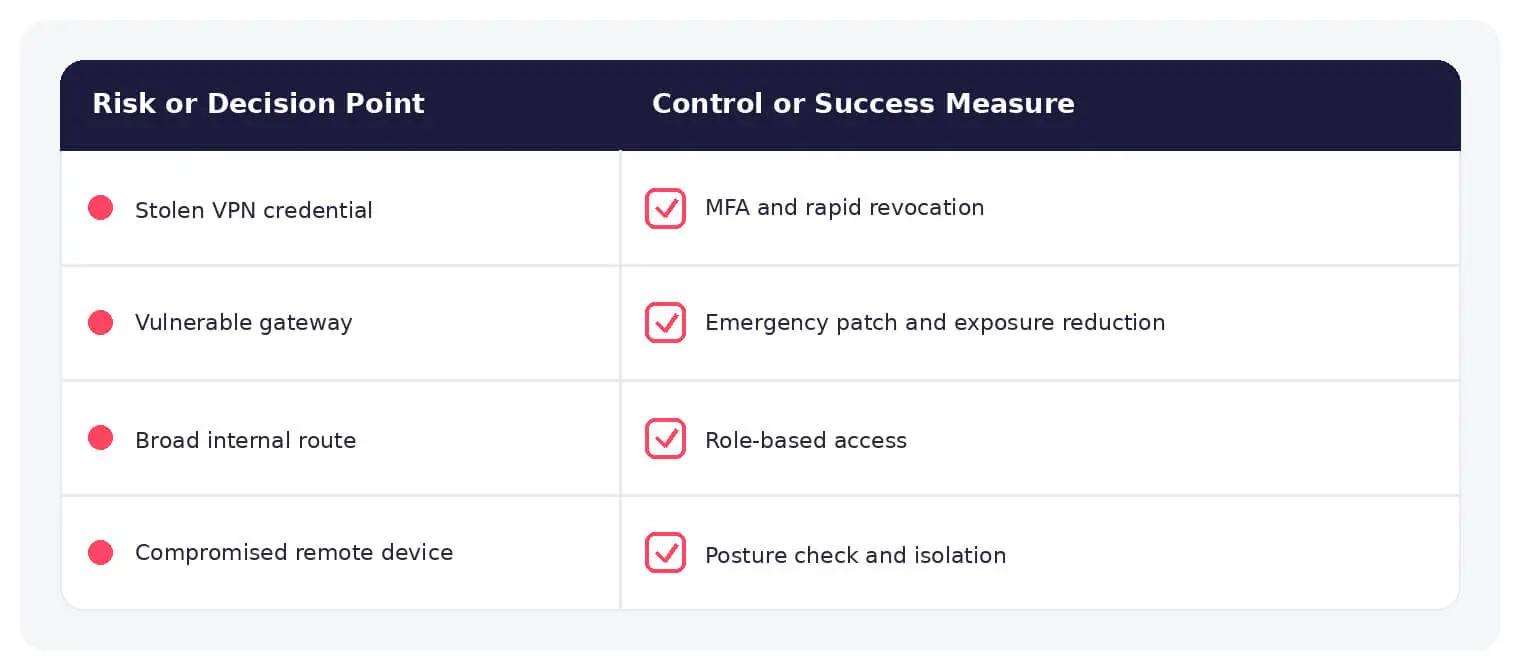
Security and Business Risks
- Exploited internet-facing VPN gateways
- Stolen credentials and session tokens
- Overly broad internal network access
- Compromised remote endpoints
Warning Signs and Detection
Monitor impossible travel, unusual login times, repeated MFA prompts, new devices, concurrent sessions, unexpected source countries, administrative logons, new accounts, configuration changes, appliance vulnerabilities, and lateral activity after connection.
Best Practices
Patch gateways quickly, require phishing-resistant MFA, restrict management exposure, use certificates and device posture, limit routes by role, disable legacy protocols, monitor sessions, revoke tokens, and move sensitive access toward application-level controls.
How SOCRadar Can Help
SOCRadar adds external visibility, threat intelligence, exposure context, and continuous monitoring to help teams validate and prioritize risks related to virtual private network. This context complements internal cloud, network, identity, and application controls.
Explore SOCRadar Vulnerability Intelligence or request a demo to strengthen threat-informed prevention and response.
Frequently Asked Questions
What Is a Virtual Private Network (VPN) Used For?
A Virtual Private Network (VPN) creates an encrypted tunnel that protects traffic between a user, device, site, or network and a VPN endpoint. Organizations rely on VPNs for remote access, site-to-site connectivity between locations, and privacy when connecting over untrusted networks such as public Wi-Fi or hotel networks.
How Does a VPN Protect Data in Transit?
A VPN encrypts traffic between the client and the VPN gateway, so data crossing untrusted networks cannot be read or altered in transit by intermediaries. This protection covers only the tunnel segment; after traffic leaves the VPN endpoint, it is no longer shielded by the tunnel unless an additional layer such as TLS is in place.
Does a VPN Make Remote Access Secure by Itself?
No. Encryption protects data in transit, but stolen credentials, compromised endpoints, overly broad internal network access, and unpatched gateways can still lead to a breach. A VPN should be paired with MFA, device posture checks, and least-privilege routing to be dependable.
Why Are Internet-Facing VPN Gateways Frequent Attack Targets?
VPN gateways are exposed to the internet by design and often hold routes into broad internal networks. Attackers scan for unpatched appliance vulnerabilities, harvest credentials from infostealer logs, and reuse valid session tokens, which makes exploited gateways a recurring initial access point in intrusions and ransomware cases.
What Is the Difference Between Full-Tunnel and Split-Tunnel VPN Configurations?
In a full-tunnel configuration, all client traffic routes through the VPN; in a split-tunnel setup, only selected destinations, typically corporate resources, use the tunnel while the rest goes directly through the local network. Split tunneling conserves bandwidth, but a poorly scoped policy can leave risky traffic paths or let a compromised device carry threats toward corporate resources.
What Is the Difference Between IPsec and SSL/TLS VPNs?
IPsec VPNs operate near the network layer and are widely used for site-to-site links between offices or data centers, while SSL/TLS VPNs run over TLS and are convenient for browser-based or client-based remote access. Both provide encrypted tunnels, but they differ in deployment effort, client requirements, and inspection options.
What Warning Signs Indicate a Compromised VPN Account or Session?
Look for impossible travel, unexpected source countries, unusual login times, repeated MFA prompts, new or unrecognized devices, concurrent sessions, and administrative logons from unexpected accounts. Configuration changes on the appliance and lateral activity shortly after a connection are also strong indicators that a session or gateway has been misused.
What Should Security Teams Do After Detecting Suspicious VPN Activity?
Terminate active sessions and revoke tokens instead of relying on a password reset alone, because stolen sessions can remain valid after a password change depending on the platform. Then review recent configuration changes on the gateway, hunt for lateral movement originating from the connection, and confirm the appliance runs a current, patched version.
How Can Organizations Reduce VPN Security Risks?
Patch VPN gateways quickly, require phishing-resistant MFA, and keep management interfaces off the public internet. Use certificates with device posture checks, limit internal routes by role, disable legacy protocols, monitor sessions continuously, and move the most sensitive access toward application-level controls where practical.
Is a VPN the Same as Zero Trust Network Access?
No. A traditional VPN grants network-level access to defined routes once a user connects, while Zero Trust Network Access (ZTNA) grants per-application access based on identity and device posture without exposing the underlying network. Many organizations combine both, using ZTNA for sensitive applications to reduce the impact of a compromised VPN session.