
What Is a Cybersecurity Sandbox?
A cybersecurity sandbox is an isolated environment used to execute or inspect suspicious files, URLs, scripts, documents, and code without exposing production systems.
Sandboxes capture behavior such as process creation, file changes, persistence, network communication, and evasion. They are valuable for triage and research, but sophisticated malware may delay execution, detect virtualization, require user interaction, or change behavior by region and environment.
Key Takeaways
- A cybersecurity sandbox is an isolated environment used to execute or inspect suspicious files, URLs, scripts, documents, and code without exposing production systems.
- Sandboxes capture behavior such as process creation, file changes, persistence, network communication, and evasion. They are valuable for triage and research, but sophisticated malware may delay execution, detect virtualization, require user interaction, or change behavior by region and environment.
- Sandbox escape or unsafe network access is a primary concern.
- Effective programs combine prevention, continuous visibility, accountable ownership, and tested response.
How It Works
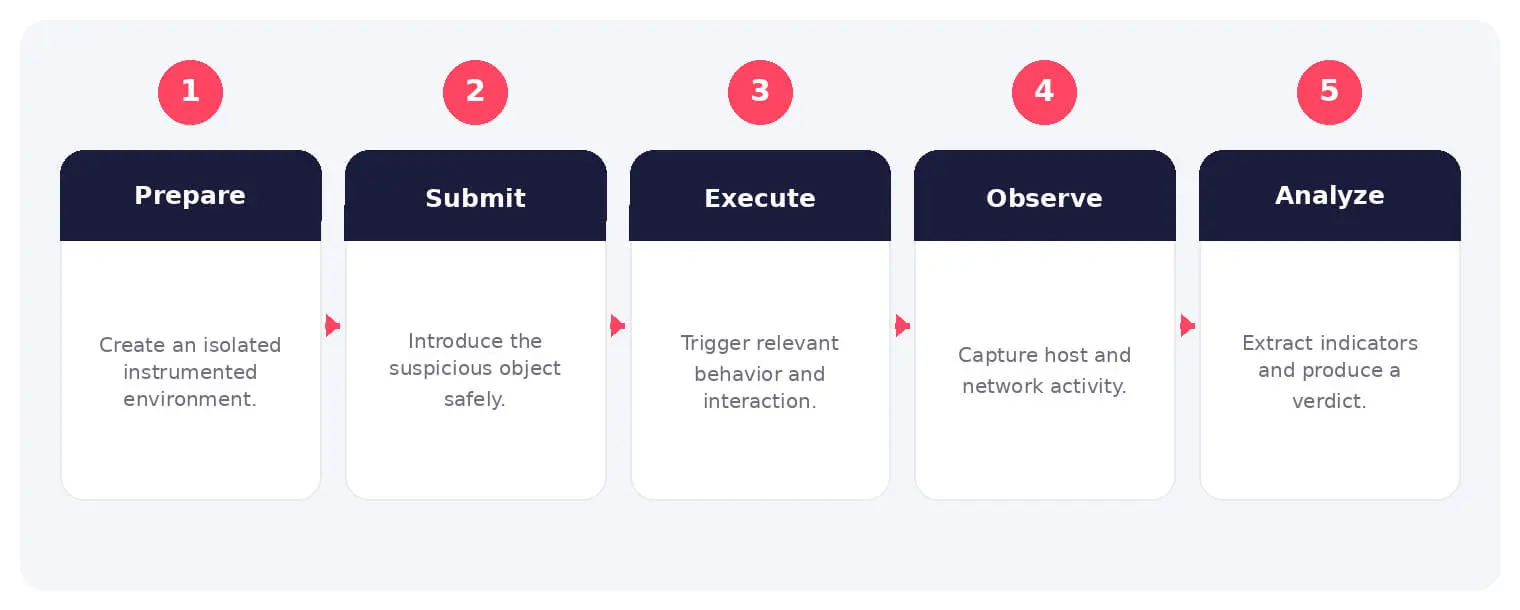
The operating flow above turns the concept into observable steps. Exact implementations vary, but each stage needs accountable ownership, trusted inputs, documented policy, and evidence that analysts can use during investigation and review.
Sandboxes capture behavior such as process creation, file changes, persistence, network communication, and evasion. They are valuable for triage and research, but sophisticated malware may delay execution, detect virtualization, require user interaction, or change behavior by region and environment.
Common Types and Capabilities
- Static and dynamic malware sandboxes
- File, document, and URL analysis
- Cloud and on-premises sandboxing
- Interactive and automated analysis
Security and Business Risks
- Sandbox escape or unsafe network access
- Evasion and false-clean verdicts
- Sensitive files submitted to third parties
- Indicators used without behavioral context
Warning Signs and Detection
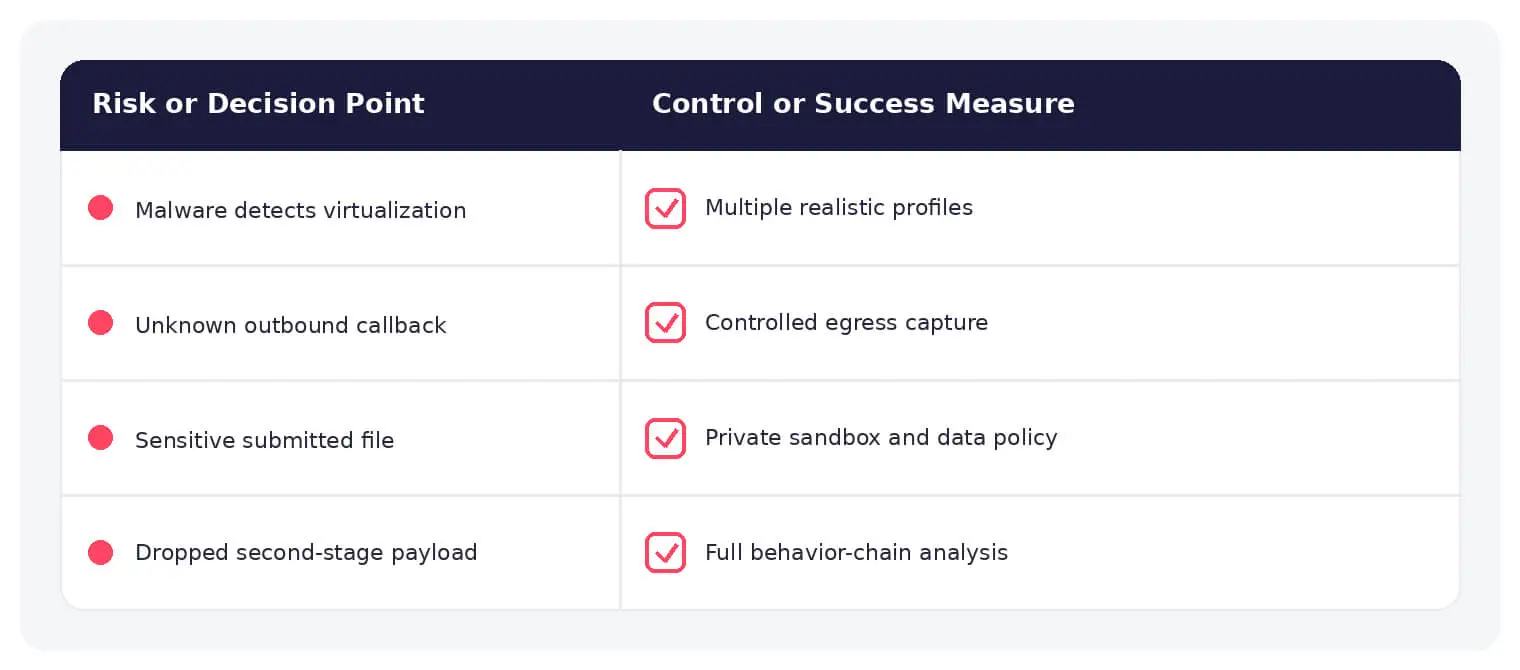
Look for delayed execution, environment checks, user-interaction requirements, process injection, dropped payloads, registry or scheduled-task persistence, encrypted callbacks, DNS changes, credential access, and differences across operating-system or locale profiles.
Best Practices
Isolate networks and storage, use disposable images, restrict egress, remove real credentials, protect submitted data, vary environments, combine static and dynamic analysis, preserve samples and evidence, and treat a clean result as one signal rather than proof.
How SOCRadar Can Help
SOCRadar adds external visibility, threat intelligence, exposure context, and continuous monitoring to help teams validate and prioritize risks related to cybersecurity sandbox. This context complements internal AI, cloud, security operations, and governance controls.
Explore SOCRadar Cyber Threat Intelligence or request a demo to strengthen threat-informed prevention and response.
Frequently Asked Questions
What Is a Cybersecurity Sandbox Used For?
A cybersecurity sandbox is an isolated environment where analysts execute or inspect suspicious files, URLs, scripts, and documents without risking production systems. It supports malware triage, incident investigations, and research by revealing what a sample actually does at runtime. This complements static inspection, which only examines file characteristics.
What Is the Difference Between Static and Dynamic Sandbox Analysis?
Static analysis examines a file’s code, strings, and structure without executing it, while dynamic analysis runs the sample in an isolated environment and records its behavior. Static techniques are fast and safe, but packed or obfuscated malware often hides its intent. Dynamic analysis exposes runtime actions such as dropped files and network callbacks, although it can miss behavior that only appears under specific conditions.
What Behavior Does a Sandbox Record During Execution?
Typical telemetry includes process creation, file modifications, registry or scheduled-task persistence, process injection, and outbound network communication. Many sandboxes also capture DNS queries, encrypted callbacks, credential access attempts, and memory or screenshot artifacts. Analysts use this evidence to classify samples and build detection rules.
Why Can Sophisticated Malware Evade a Sandbox?
Malware authors test samples against common analysis environments and add checks for virtualization artifacts, mouse activity, or system uptime. Some payloads delay execution, wait for user interaction, or change behavior based on the operating system, locale, or network configuration. A sample may therefore appear harmless in a sandbox while acting maliciously on a real endpoint.
What Warning Signs Should Analysts Look for in Sandbox Reports?
Delayed execution, environment or debugger checks, process injection, dropped payloads, registry or scheduled-task persistence, encrypted callbacks, unusual DNS changes, and credential access attempts all warrant closer review. Behavioral differences across operating-system or locale profiles also suggest environment-aware malware. Read the full behavioral report rather than relying on a single verdict score.
What Is Sandbox Escape and Why Does It Matter?
Sandbox escape occurs when malware breaks out of the isolated environment and reaches the host, hypervisor, or connected network. This can expose analysis infrastructure, leak submitted samples, or let an attacker pivot into the wider environment. Restricting egress, isolating storage, and keeping hypervisors patched reduce this exposure.
How Should Organizations Configure a Sandbox Safely?
Key controls include:
- Disposable images that are reset between runs
- Network and storage isolation from production systems
- Restricted egress limited to what detonation requires
- No real credentials or sensitive data on analysis machines
Varying environment profiles also helps surface samples that behave differently under specific conditions.
What Are the Risks of Submitting Files to Third-Party Online Sandboxes?
Uploaded samples, URLs, and metadata may be shared with other subscribers or appear in public reports, potentially exposing confidential documents or revealing that your organization is investigating a specific threat. For sensitive material, many teams prefer an on-premises or private sandbox where submission data stays under their control.
Is a Clean Sandbox Report Proof That a File Is Safe?
No. A clean verdict only means the sample showed no malicious behavior under that particular environment and time window. Treat it as one signal among many, weighed alongside static analysis, reputation data, and the context in which the file appeared.
Does Sandboxing Replace Antivirus or EDR?
No. Sandboxes are analysis tools for investigating unknown samples, while antivirus and EDR provide continuous prevention and detection on endpoints. Mature programs combine both, feeding sandbox findings into endpoint detections and investigation workflows.

Oct 27, 2026
Australia’s Annual Cyber Threat Report 2025-26 Shows Cyber Incidents Up 20%
Australia’s cyber security authority responded to 1,524 cyber security incidents in the 2025-26 financial year, a 20% increase from the previous year…

Oct 27, 2026
PHP2Shell Weaponized After Japanese Real Estate Extortion
An exposed server ties an extortion wave on about 20 Japanese property sites to an operator who later weaponized PHP2Shell (CVE-2026-109618, CVE-2026-109619)…

Oct 27, 2026
Wasmtime Sandbox Escape Flaws Patched in Cranelift
Two critical Wasmtime sandbox escape flaws, CVE-2026-115889 and CVE-2026-115893, let a crafted WebAssembly (Wasm) module push the Cranelift compiler into generating unsafe…
Intelligence in your inbox every Thursday.
Join 30,000+ security professionals reading SOCRadar research.
Subscribe