Unified Threat Management (UTM) combines multiple network security functions in one appliance or managed platform.
A UTM product may include firewalling, intrusion prevention, secure web and email filtering, antivirus, VPN, application control, and centralized reporting. Consolidation can simplify smaller environments, but capacity, licensing, resilience, and the security of the platform itself require careful management.
Key Takeaways
Unified Threat Management (UTM) combines multiple network security functions in one appliance or managed platform.
A UTM product may include firewalling, intrusion prevention, secure web and email filtering, antivirus, VPN, application control, and centralized reporting. Consolidation can simplify smaller environments, but capacity, licensing, resilience, and the security of the platform itself require careful management.
Single point of failure or compromise is a primary concern.
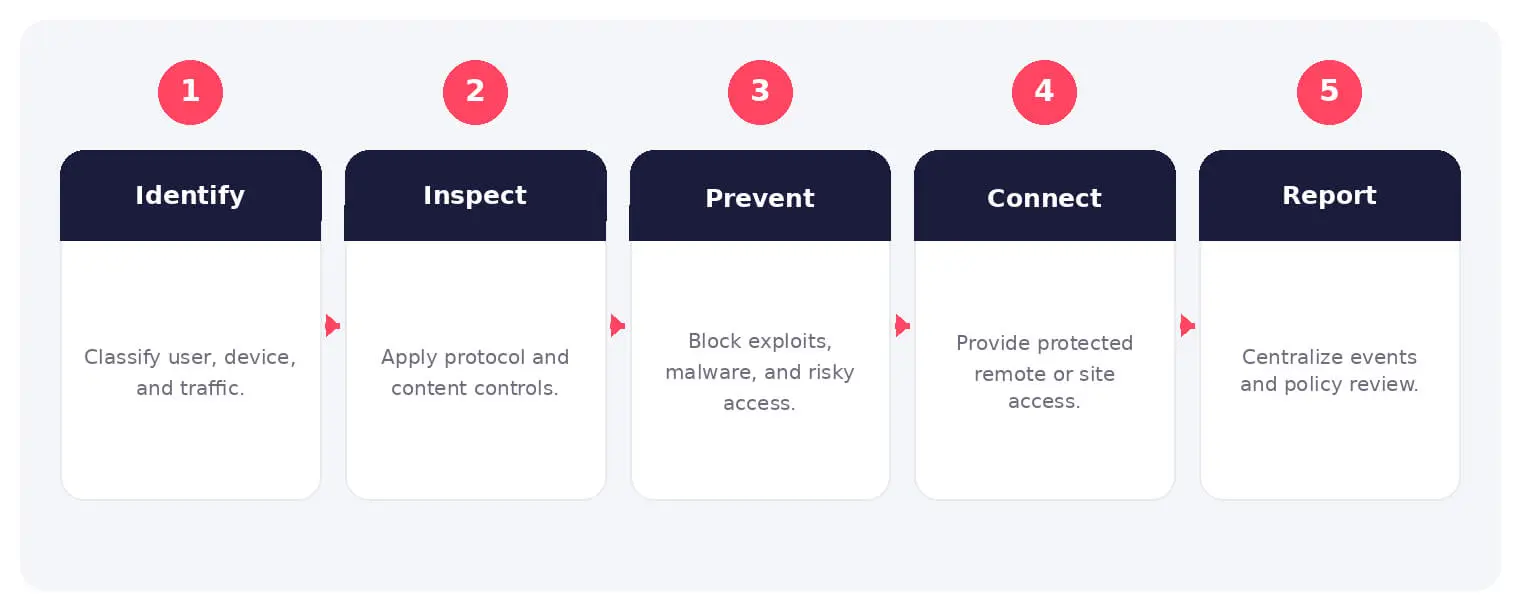
The main stages and decision points associated with unified threat management.
How It Works
The operating flow above turns the concept into observable steps. Exact implementations vary, but each stage needs accountable ownership, trusted inputs, documented policy, and evidence that analysts can use during investigation and review.
A UTM product may include firewalling, intrusion prevention, secure web and email filtering, antivirus, VPN, application control, and centralized reporting. Consolidation can simplify smaller environments, but capacity, licensing, resilience, and the security of the platform itself require careful management.
Common Types and Capabilities
Firewall and intrusion prevention
Web, DNS, email, and malware filtering
VPN and remote-access services
Application control and security reporting
Security and Business Risks
Single point of failure or compromise
Performance loss when features are enabled
Policy overlap and configuration complexity
Outdated signatures, software, or licenses
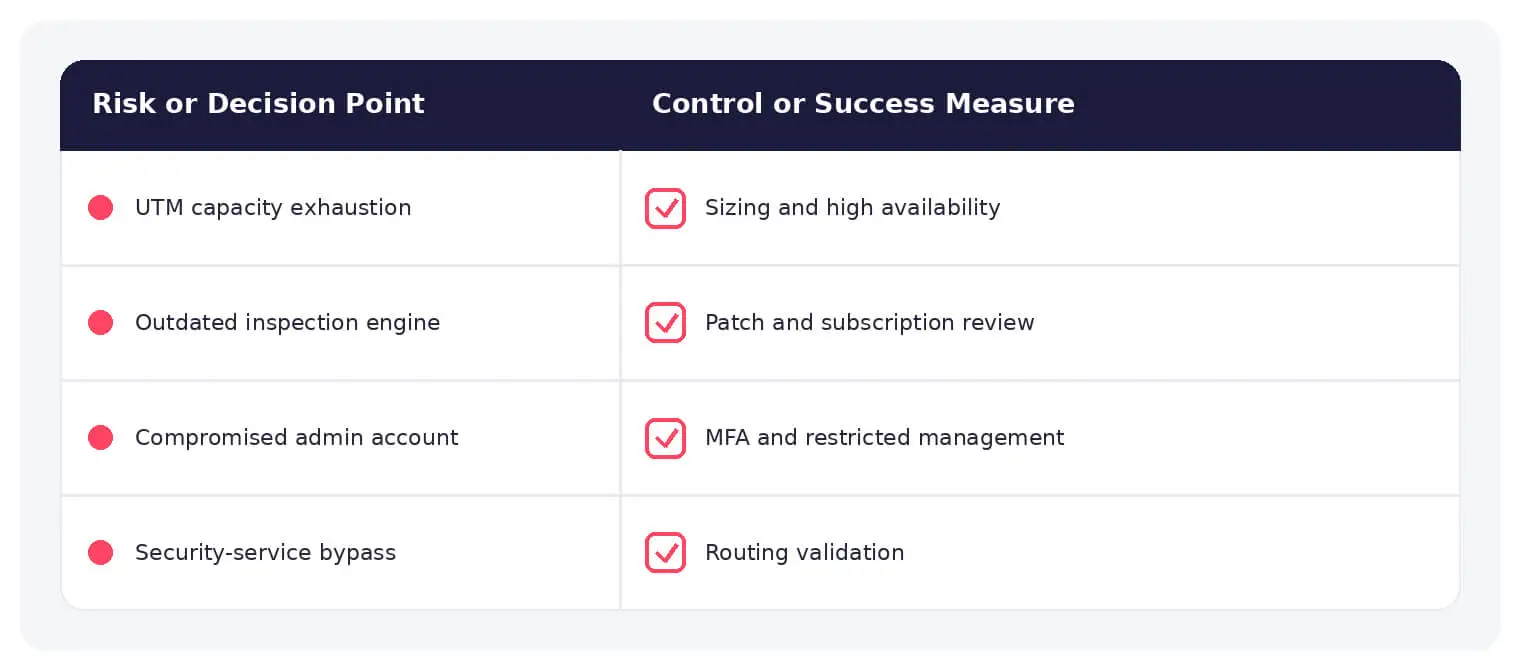
Common unified threat management risks paired with practical defensive controls.
Warning Signs and Detection
Monitor resource saturation, inspection failures, disabled subscriptions, management logons, policy changes, VPN anomalies, malware detections, repeated exploit attempts, failover state, and traffic that bypasses the platform.
Best Practices
Size for full inspection, deploy high availability, isolate administration, patch promptly, maintain subscriptions, use least-access policies, back up configuration, test failure modes, and forward useful logs.
How SOCRadar Can Help
SOCRadar adds external visibility, threat intelligence, exposure context, and continuous monitoring to help teams validate and prioritize risks related to unified threat management. This context complements internal cloud, network, identity, and application controls.
Explore SOCRadar Vulnerability Intelligence or request a demo to strengthen threat-informed prevention and response.
Frequently Asked Questions
What Is Unified Threat Management (UTM)?
Unified Threat Management (UTM) combines multiple network security functions, such as firewalling, intrusion prevention, web and email filtering, antivirus, VPN, application control, and reporting, in one appliance or managed platform. Consolidation is common in small and mid-sized environments where running separate dedicated tools is difficult to staff and maintain.
Which Security Functions Does a UTM Platform Typically Include?
Most UTM products bundle a firewall and intrusion prevention with web, DNS, email, and malware filtering, VPN and remote-access services, application control, and centralized reporting. The exact mix varies by vendor, and some functions require separate licenses or subscriptions to remain active.
What Is the Main Security Risk of Relying on a UTM Appliance?
Consolidation creates a single point of failure or compromise. If the appliance goes down, every control it hosts stops protecting traffic; if an attacker gains administrative access, they may be able to disable filtering, alter policies, or reroute traffic through the platform. High availability and strict control of administrative access are the primary mitigations.
How Does a UTM Platform Inspect Network Traffic?
Traffic entering the appliance is matched against firewall and application control policies, then passes through each enabled inspection layer, such as intrusion prevention, web or email filtering, and malware scanning. Every enabled layer consumes processing capacity, which is why the platform should be sized for full inspection rather than for passthrough throughput.
What Warning Signs Indicate a UTM Platform Is Struggling or Compromised?
Watch for sustained CPU and memory saturation, inspection failures or skipped scans, expired or disabled subscriptions, unexpected management logons, unexplained policy changes, VPN anomalies, repeated exploit attempts, and failover state changes. Traffic that appears to bypass the platform, such as unfiltered outbound connections, is another signal worth investigating.
What Should Teams Do If a UTM Appliance Fails or Is Compromised?
First confirm whether failover or an alternate path still protects critical traffic, then review recent management logons and policy changes before trusting the running configuration. If compromise is suspected, isolate the management interface, restore a known-good configuration from backup where available, and analyze logs to determine how access was obtained. A vendor-supported recovery or rebuild may be warranted in serious incidents.
How Can Organizations Reduce the Risks of a UTM Deployment?
Size the appliance for full inspection loads, deploy high availability, isolate administrative access, patch promptly, keep signatures and subscriptions current, apply least-access policies, back up configurations, and test failure modes regularly. Forwarding logs to a separate monitoring system lets analysts review what the device detects.
Does Enabling More UTM Features Reduce Network Performance?
It can. Inspection features such as intrusion prevention, antivirus scanning, and content filtering consume significant processing capacity, and vendor throughput figures often assume several of these features are disabled. Capacity planning should assume the full feature set is active, with headroom for peak traffic.
Is UTM the Same as a Next-Generation Firewall (NGFW)?
They overlap but are not identical. NGFW products concentrate on application-aware firewalling and intrusion prevention, often at higher throughput, while UTM bundles a broader set of functions, including email filtering, VPN, and reporting, into one platform. Vendor lines increasingly blur, so buyers should evaluate specific capabilities rather than product labels.
When Is a UTM Platform a Good Fit?
UTM often fits small and mid-sized environments, branch offices, and teams with limited security staff that benefit from one management console and one support relationship. High-throughput or heavily regulated environments may prefer dedicated, specialized controls so that a failure or compromise in one function does not affect the others.