

Mar 10, 2026

Jul 10, 2026
5 Mins Read
Sep 13, 2026
Table Of Content
Related Articles

SMS Bombing

Threat Actors
Jan 08, 2026

Dark Web Monitoring
Feb 19, 2026

Ransomware
Jan 31, 2026

OSINT Framework
Apr 17, 2026

What Is Malvertising?
Malvertising is the use of online advertising infrastructure to deliver malicious content, redirect users, distribute malware, or support scams and credential theft. Attackers may place deceptive ads through legitimate ad networks, compromise an advertising account, or abuse the complex chain of exchanges and redirects behind an advertisement.
A malicious advertisement does not always exploit the browser immediately. Some campaigns lead users to fake software downloads, support scams, phishing pages, or cloned websites. Others use drive-by techniques that test the device and deliver an exploit or payload.
Key Takeaways
- Malvertising can appear on legitimate websites because the ad supply chain is separate from the publisher.
- Search ads, fake software promotions, redirects, and compromised ad accounts are common paths.
- Conditional delivery and rapid domain rotation complicate investigation.
- Browser, DNS, endpoint, brand, and threat-intelligence signals should be correlated.
How Malvertising Works
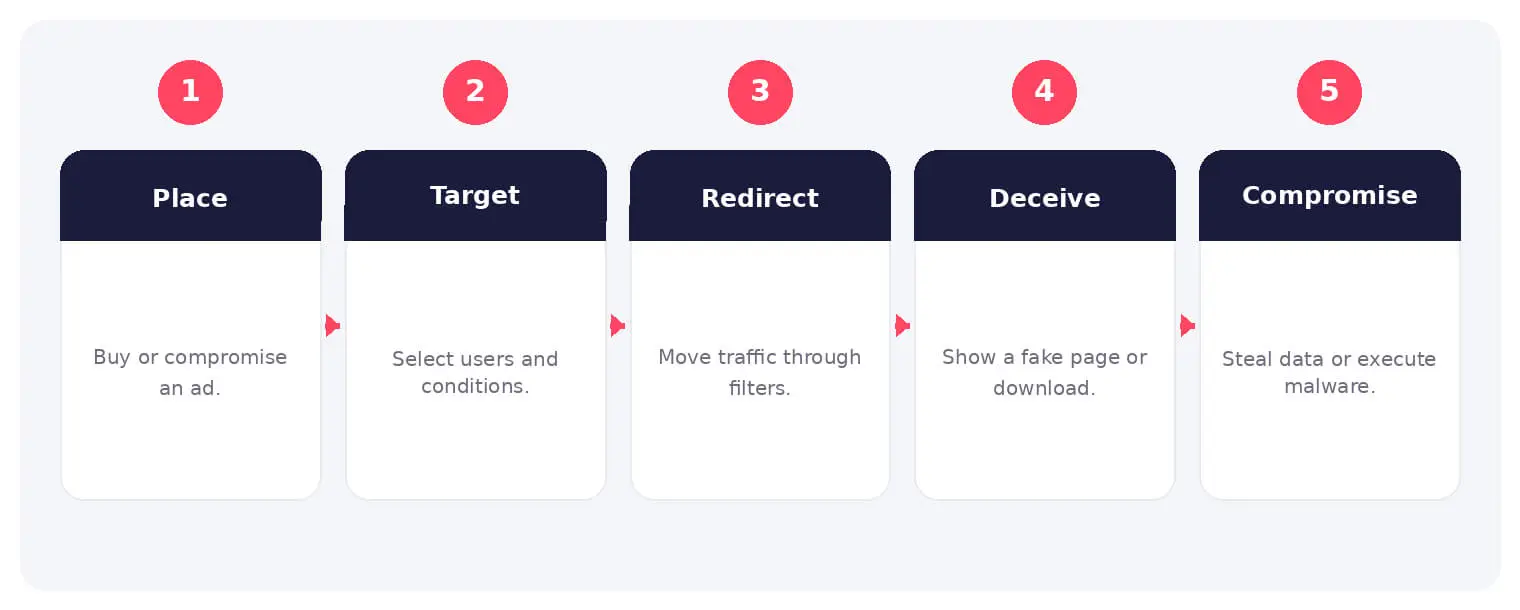
An attacker submits or compromises an advertisement and configures targeting rules by geography, device, browser, keyword, or time. The ad or redirect chain sends selected users to attacker-controlled content.
The destination may impersonate a known product, prompt a malicious installer, capture credentials, or attempt browser exploitation. Traffic distribution services can filter researchers and change the final destination quickly.
Common Types and Techniques
- Search-engine ads impersonating popular software
- Display ads with malicious redirect chains
- Fake updates, support scams, and phishing
- Drive-by download and exploit-kit delivery
Security and Business Risks
- Malware infection and credential theft
- Brand impersonation and customer fraud
- Ransomware or remote access following installation
- Reduced trust in websites and advertising channels
Warning Signs and Detection
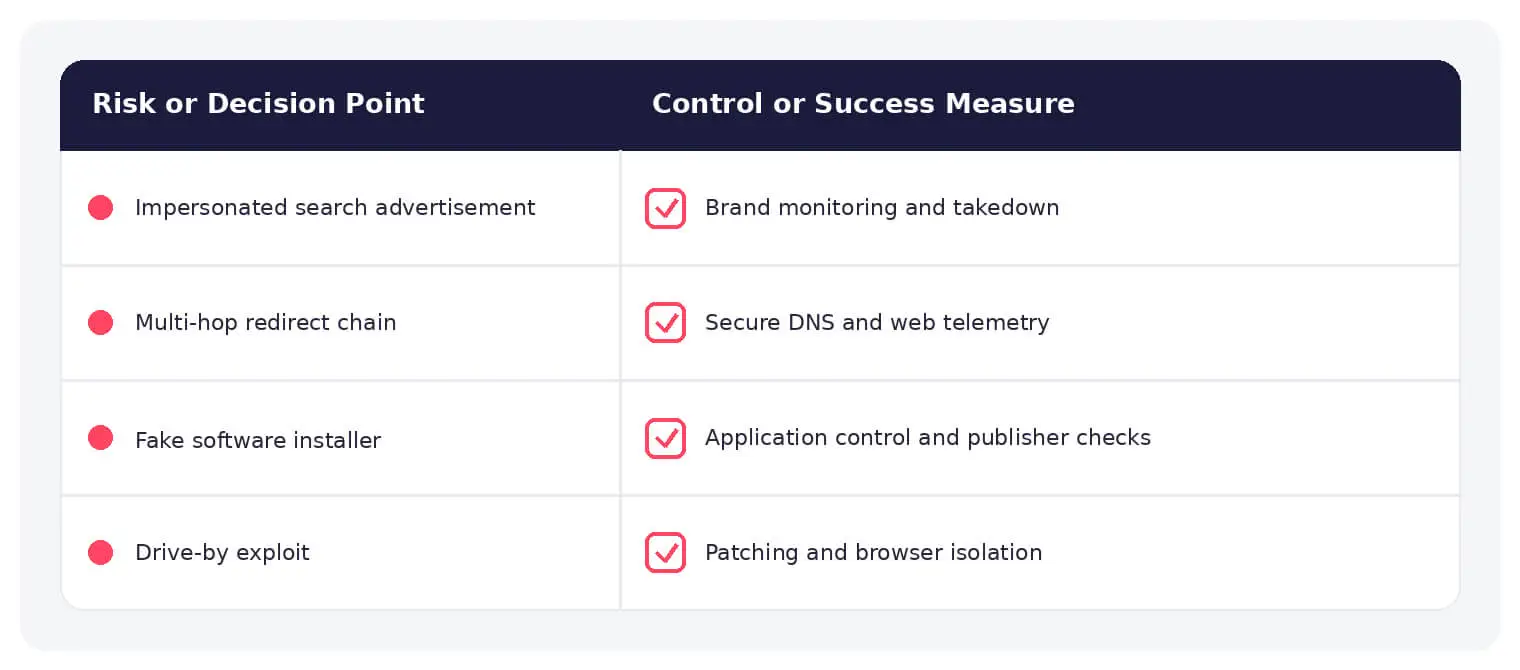
Investigate suspicious ads, redirect chains, young domains, cloned landing pages, unusual browser downloads, and processes launched after ad clicks. Preserve the complete referral and redirect path because the final page may change.
Prevention and Response
Use secure DNS, web filtering, browser hardening, ad and script controls appropriate to the environment, application allowlisting, and user training focused on sponsored results. Monitor brand terms and request takedown of malicious ads and domains.
How SOCRadar Can Help
SOCRadar combines external asset visibility, threat intelligence, Dark Web monitoring, vulnerability context, and indicator enrichment to help teams identify exposure and investigate activity connected to malvertising.
Explore SOCRadar Brand Protection or request a demo to strengthen threat-informed prevention and investigation.
Frequently Asked Questions
What Is Malvertising and How Is It Different from Phishing?
Malvertising delivers malicious content through online advertising infrastructure, such as sponsored search results or display placements. Phishing typically arrives through direct channels like email or SMS. The two overlap when a malicious ad leads to a fake login or credential-harvesting page, but the delivery mechanism is the advertisement itself.
Why Can Malicious Ads Appear on Legitimate Websites?
Most publishers serve advertising through external networks, exchanges, and real-time bidding rather than reviewing every creative themselves. An attacker can pass a malicious ad through that supply chain, compromise an advertiser account, or hide the payload behind redirects. The publisher’s own site may show no compromise because the problem sits in the advertising pipeline.
What Are the Most Common Malvertising Techniques?
Attackers rely on a small set of proven approaches:
- Sponsored search results that impersonate popular software and lead to malicious installers
- Display ads with redirect chains that bounce through multiple domains before reaching scam or phishing content
- Fake update pages and support scams that push harmful files or fraudulent hotlines
- Drive-by delivery, where the ad or landing page probes the browser for exploitable vulnerabilities
A single campaign can combine several of these techniques depending on the target.
How Do Attackers Control Who Sees a Malicious Ad?
Ad platforms allow targeting by geography, device, browser, keyword, and time of day, and attackers use the same controls. This lets them show the payload only to selected users while hiding it from ad reviewers and researchers. Traffic distribution services can also change the final destination within minutes.
What Warning Signs Suggest an Advertisement Is Malicious?
Watch for sponsored results for well-known software pointing to unfamiliar domains, landing pages cloned from a real vendor, prompts to install a supposedly missing update, and redirects passing through several unrelated domains. A download that starts right after an ad click, or a process launching unexpectedly, warrants investigation. Very young domains with no reputation are another signal.
Why Are Malvertising Campaigns Difficult to Investigate?
Conditional delivery means two users clicking the same ad can land on different pages, so an analyst may never see the payload. Domains and redirect paths rotate quickly, and the destination may be gone before anyone examines it. This is why preserving the full referral and redirect chain at the time of the click matters.
What Should a User Do After Clicking a Suspicious Advertisement?
Close the page without entering credentials or approving any prompts, then notify the security team with the URL, timestamp, and any downloads observed. If credentials were entered, reset the password and review active sessions, because a reset alone may not terminate a session that was already stolen. If an installer ran, isolate the device for analysis, since rebuilding may be necessary in some incidents.
How Should a Malicious Advertisement Be Reported?
Capture the ad creative, displayed domain, publisher or search term, timestamp, and redirect chain before it changes. Report the ad through the platform’s abuse channel and to the relevant hosting or domain providers. Avoid revisiting the page from an unprotected device just to gather more evidence.
How Can Organizations Reduce Malvertising Exposure?
Useful layers include secure DNS and web filtering to block malicious destinations, browser hardening, ad and script controls fitted to the environment, and application allowlisting to limit what a rogue installer can execute. User training should cover sponsored search results and fake update prompts, since both are common entry points. Monitoring brand terms also helps surface impersonating ads so they can be reported for takedown.
Is Malvertising the Same as Adware?
No. Malvertising uses advertising infrastructure to deliver redirects, malware, or phishing content, while adware is software installed on a device that displays unwanted ads and may collect browsing data. They can overlap, because an adware installer can be distributed through a malicious ad, but one is a delivery channel and the other is a type of unwanted software.