What Are the Main Types of Phishing?
Phishing includes deceptive attacks that impersonate trusted people or services to obtain access, data, money, or execution.
Delivery may use email, SMS, voice, QR codes, social media, search ads, collaboration tools, or cloned websites. Categories overlap and should be understood by delivery channel, target, and objective.
Key Takeaways
- Bulk email phishing and spear phishing is a central category or capability.
- Reliable assessment requires identity, timing, source, and operational context.
- Detection should correlate external, identity, device, network, and cloud evidence.
- Response should preserve evidence and remove every reusable access path.
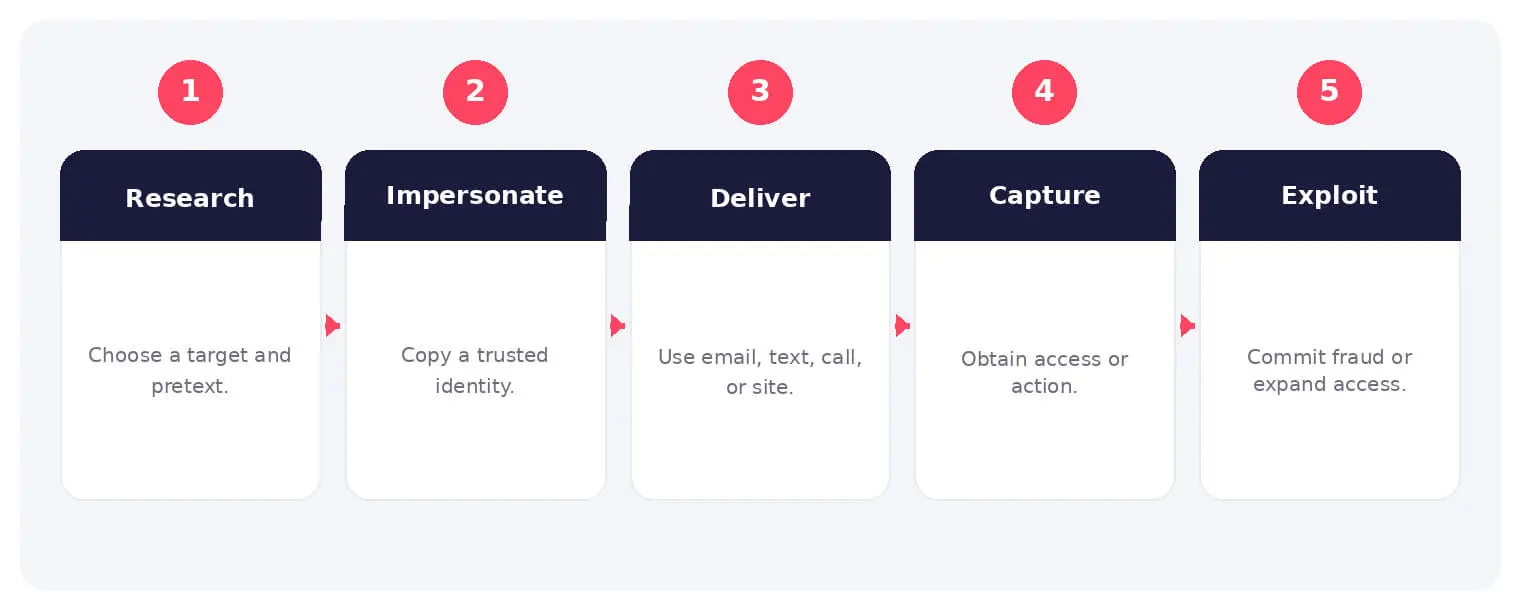
How the Main Types of Phishing Works
The sequence above provides a practical operating model. Individual stages may overlap, repeat, or involve different people and services, so analysts should validate each step against the available evidence.
Delivery may use email, SMS, voice, QR codes, social media, search ads, collaboration tools, or cloned websites. Categories overlap and should be understood by delivery channel, target, and objective.
Common Types and Techniques
- Bulk email phishing and spear phishing
- Smishing, vishing, and QR phishing
- Clone phishing and thread hijacking
- Adversary-in-the-middle and consent phishing
Security and Business Risks
- Credential and session theft
- Malware and ransomware delivery
- Payment fraud and BEC
- Customer and brand abuse
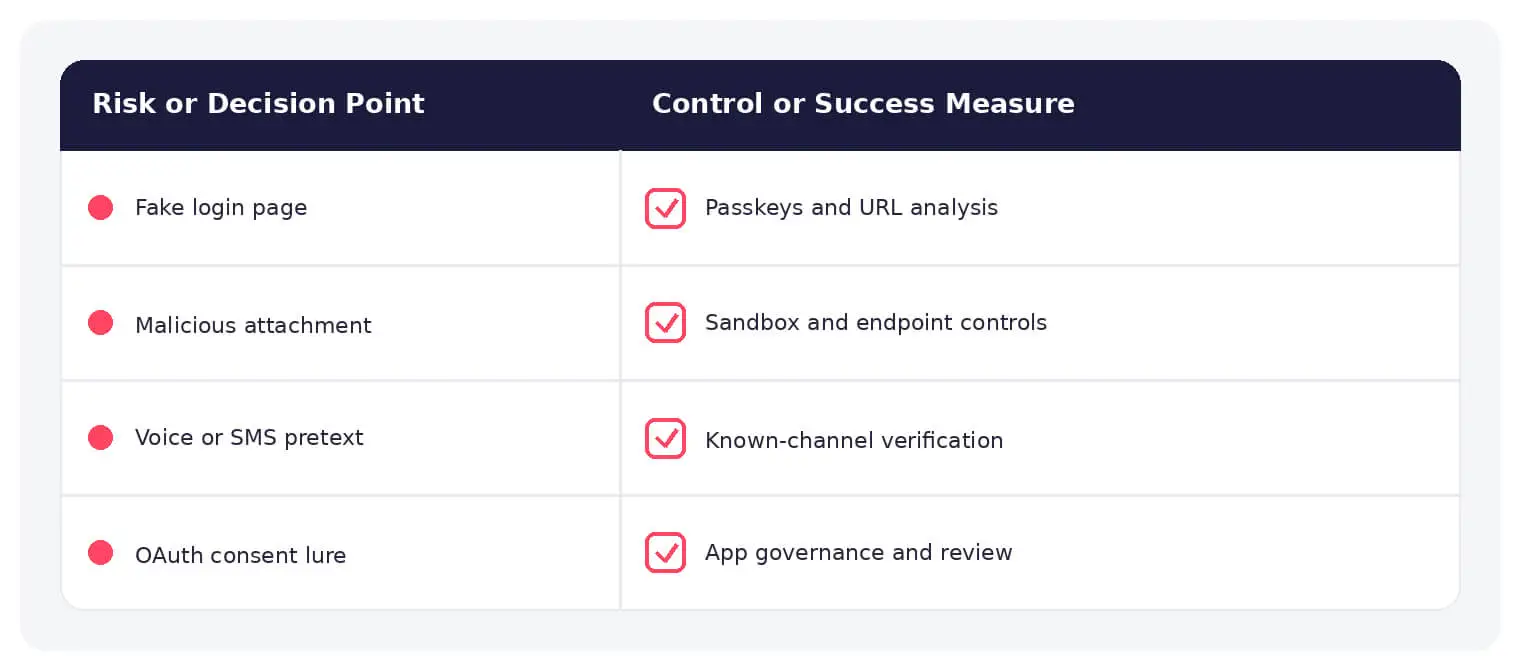
Warning Signs and Detection
Correlate sender, domain, link, attachment, authentication, session, device, mailbox, and transaction evidence.
Prevention and Response
Use phishing-resistant MFA, secure email and browsers, domain monitoring, staff training, independent verification, least privilege, and rapid session response.
How SOCRadar Can Help
SOCRadar combines external visibility, threat intelligence, Dark Web monitoring, brand protection, vulnerability context, and indicator enrichment to help teams investigate exposure connected to types of phishing.
Explore SOCRadar Brand Protection or request a demo to strengthen threat-informed prevention and response.
Frequently Asked Questions
What Are the Main Types of Phishing?
Phishing is commonly grouped into bulk email phishing, spear phishing, smishing (SMS), vishing (voice), QR code phishing, clone phishing, thread hijacking, adversary-in-the-middle phishing, and consent phishing. The categories overlap, so analysts classify an attack by its delivery channel, target, and objective rather than relying on a single label.
How Is Spear Phishing Different From Bulk Phishing?
Bulk phishing sends generic lures to large audiences, while spear phishing targets specific people or organizations using researched details such as names, roles, vendors, or ongoing projects. That personalization makes spear phishing more convincing and more likely to result in credential theft, fraud, or malware execution.
What Is Business Email Compromise (BEC)?
BEC is a phishing-derived fraud in which attackers impersonate executives, employees, or trusted vendors to trigger wire transfers, gift card purchases, or sensitive data requests. Many BEC messages contain no links or attachments, so they can pass content-based filters and rely on urgency and payment-process manipulation instead.
What Is Adversary-in-the-Middle (AiTM) Phishing?
AiTM phishing uses a proxy server to relay the real login page between the victim and the legitimate site, capturing the password along with the session cookie or MFA token. This allows one-time codes and push approvals to be bypassed. Phishing-resistant methods such as FIDO2 passkeys are designed to counter this technique.
How Do Clone Phishing and Thread Hijacking Work?
In clone phishing, an attacker copies a legitimate message and swaps the original link or attachment for a malicious one. Thread hijacking goes further by replying inside an existing email conversation, often from a compromised or spoofed mailbox, so the malicious request inherits the trust of the earlier exchange.
What Are the Warning Signs of a Phishing Attempt?
Common indicators include:
- Urgent or unusual requests, especially around payments or credentials
- Sender or reply-to domains that differ from the legitimate organization
- Link destinations that do not match the visible link text
- Unexpected login prompts or MFA approval requests
- Last-minute changes to bank details in an ongoing conversation
No single signal is conclusive, so analysts correlate sender, domain, link, attachment, authentication, session, device, and transaction evidence before deciding.
What Should You Do Right After Clicking a Phishing Link or Entering Credentials?
Report the incident to your security team immediately, then:
- Revoke active sessions or sign out of all sessions where the platform supports it
- Reset affected credentials, starting with accounts that lack phishing-resistant MFA
- Review mailbox forwarding rules and OAuth consent grants for attacker changes
- Monitor for follow-on logins, payment fraud, or unusual data access
If malware execution is suspected, isolate the device so responders can determine whether remediation beyond credential changes is required.
Does Changing a Password Stop an Ongoing Phishing Attack?
Not necessarily. On many platforms, a password reset does not automatically terminate active sessions, so a stolen session cookie can remain usable until it expires or is revoked. Effective response also invalidates sessions and refresh tokens and reviews any access or rules the attacker established.
Do SPF, DKIM, and DMARC Stop Phishing?
These protocols authenticate that mail genuinely comes from your domain and help block direct domain spoofing. They do not stop look-alike domains, display-name spoofing, compromised legitimate mailboxes, or thread hijacking, so they should be treated as one layer of a broader email security program.
Is Phishing Limited to Email?
No. Phishing also arrives through SMS, voice calls, QR codes, social media messages, sponsored search ads, collaboration tools, and cloned websites. The channel changes, but the objective stays the same: obtaining access, data, money, or code execution under the cover of a trusted identity.
Oct 27, 2026
September 2026: FBI Breach, Clop Hijack & IDScan Leak
The major cyber attacks of September 2026 hit federal law enforcement, a rival cybercrime gang, and the companies that verify identities. ShinyHunters…
Oct 27, 2026
Australia’s Annual Cyber Threat Report 2025-26 Shows Cyber Incidents Up 20%
Australia’s cyber security authority responded to 1,524 cyber security incidents in the 2025-26 financial year, a 20% increase from the previous year…
Oct 27, 2026
PHP2Shell Weaponized After Japanese Real Estate Extortion
An exposed server ties an extortion wave on about 20 Japanese property sites to an operator who later weaponized PHP2Shell (CVE-2026-109618, CVE-2026-109619)…
Intelligence in your inbox every Thursday.
Join 30,000+ security professionals reading SOCRadar research.
Subscribe