Jun 16, 2026
Mar 27, 2026
15 Mins Read

Summarize with:
Understanding Identity and Access Management (IAM)
In a world where digital tools, cloud services, and remote work have become the norm, managing who has access to sensitive data and systems will determine an organization’s security success. Identity and Access Management (IAM) is a security framework designed to ensure the right people have the right access at the right time.
Organizations today face growing cybersecurity threats and operational challenges, making IAM solutions a necessity. With the rise in phishing attacks, social engineering schemes, and account takeover incidents aiming for unauthorized access, a well-implemented IAM system secures your digital assets while also simplifying access control and increasing user productivity, serving as a critical defense mechanism.
This article explores Identity and Access Management (IAM) in detail, including its key components, benefits, and best practices. By understanding IAM, you can strengthen your organization’s security posture and ensure compliance with regulatory requirements.

“Identity and Access Management” illustrated by DALL-E
What is Identity and Access Management?
At its core, Identity and Access Management (IAM) is a set of policies, processes, and technologies that help organizations manage user identities and control access to digital resources. It ensures that employees, partners, customers, or even devices have appropriate access while keeping unauthorized users out.
IAM serves two primary purposes: security and efficiency. By verifying user identities and setting access permissions, IAM prevents unauthorized access, reduces data breach risks and identity attacks, and automates access-related tasks.
How IAM Works
IAM relies on three core principles:
- Identification: Determining who a user is using unique credentials (e.g., username or ID).
- Authentication: Verifying the user’s identity through passwords, Multi-Factor Authentication (MFA), or biometrics.
- Authorization: Granting or limiting access to resources based on predefined roles or policies.
Whether managing employee logins, granting customer access to specific applications, or securing third-party integrations, IAM ensures that access to resources is controlled, monitored, and secure.

Key Components of IAM
An effective Identity and Access Management (IAM) system consists of several core components, each working together to ensure secure and seamless access to resources. Here are the key components that form the backbone of any IAM solution:
- User Provisioning and Deprovisioning
User provisioning involves creating and managing user accounts, assigning roles, and granting access rights to systems and applications. Deprovisioning ensures that access is revoked when users leave the organization or no longer require specific permissions. This process helps reduce the risk of unauthorized access and insider threats, which are often exploited in social engineering and phishing attacks. - Authentication
Authentication verifies a user’s identity before granting access. This is achieved through credentials like passwords, biometrics, or Multi-Factor Authentication (MFA). MFA adds an additional layer of security by requiring multiple verification methods, such as a password combined with a one-time code sent to a mobile device. This extra layer helps mitigate the risk of account takeover (ATO) attacks. - Authorization
Authorization determines what resources a user can access and what actions they can perform. It is often role-based, where permissions are granted based on job roles, ensuring users have the least privilege access necessary to perform their tasks. Authorization policies are critical for minimizing risks while maintaining operational efficiency. - Directory Services
Directory services act as a central repository for user identities and access information. Systems like Active Directory (AD) or cloud-based directories store user credentials, group memberships, and access policies. These services enable IAM solutions to authenticate and authorize users efficiently across various systems. - Password Management
Password management involves enforcing policies for creating, storing, and resetting passwords. IAM systems ensure strong password practices, such as complexity requirements, regular updates, and self-service password resets. This minimizes the risk of password-related breaches while reducing IT support workloads. - Access Governance
Access governance focuses on monitoring and auditing user access to ensure compliance with organizational policies and regulations. It provides visibility into who has access to what, identifies unnecessary privileges, and ensures that access rights align with security standards.
How These Components Work Together
In a fully integrated IAM system, these components interact seamlessly to secure access:
- User provisioning creates accounts with appropriate roles.
- Authentication validates user identities upon login.
- Authorization ensures they can access only the resources they are allowed.
- Directory services manage identity data, while password management enforces secure login practices.
- Access governance continuously monitors and audits these processes to ensure compliance.
Together, these components enable organizations to manage user identities efficiently, secure access to resources, and maintain a strong cybersecurity posture.
Benefits of Implementing IAM Solutions
Implementing an Identity and Access Management (IAM) solution offers significant benefits by enhancing security, streamlining user management, and ensuring compliance.
IAM improves security by restricting access to authorized users, utilizing features like Multi-Factor Authentication (MFA), Role-Based Access Control (RBAC), continuous monitoring, and least-privilege access. It simplifies user management by automating provisioning, deprovisioning, and role management, reducing errors and saving time. IAM also boosts productivity with Single Sign-On (SSO), eliminating the need for multiple passwords.
Additionally, it lowers operational costs by reducing IT support burdens and improving security to minimize breach-related expenses. IAM helps organizations comply with regulations like GDPR and HIPAA by enforcing access controls and generating audit-ready reports.
Together, these benefits make IAM an essential tool for protecting digital resources, improving operations, and achieving compliance.
Best Practices for Effective IAM
Implementing an Identity and Access Management (IAM) system is only the first step toward securing an organization’s resources. To ensure its effectiveness, organizations must adopt best practices for managing and maintaining IAM systems. Here are key practices to follow:
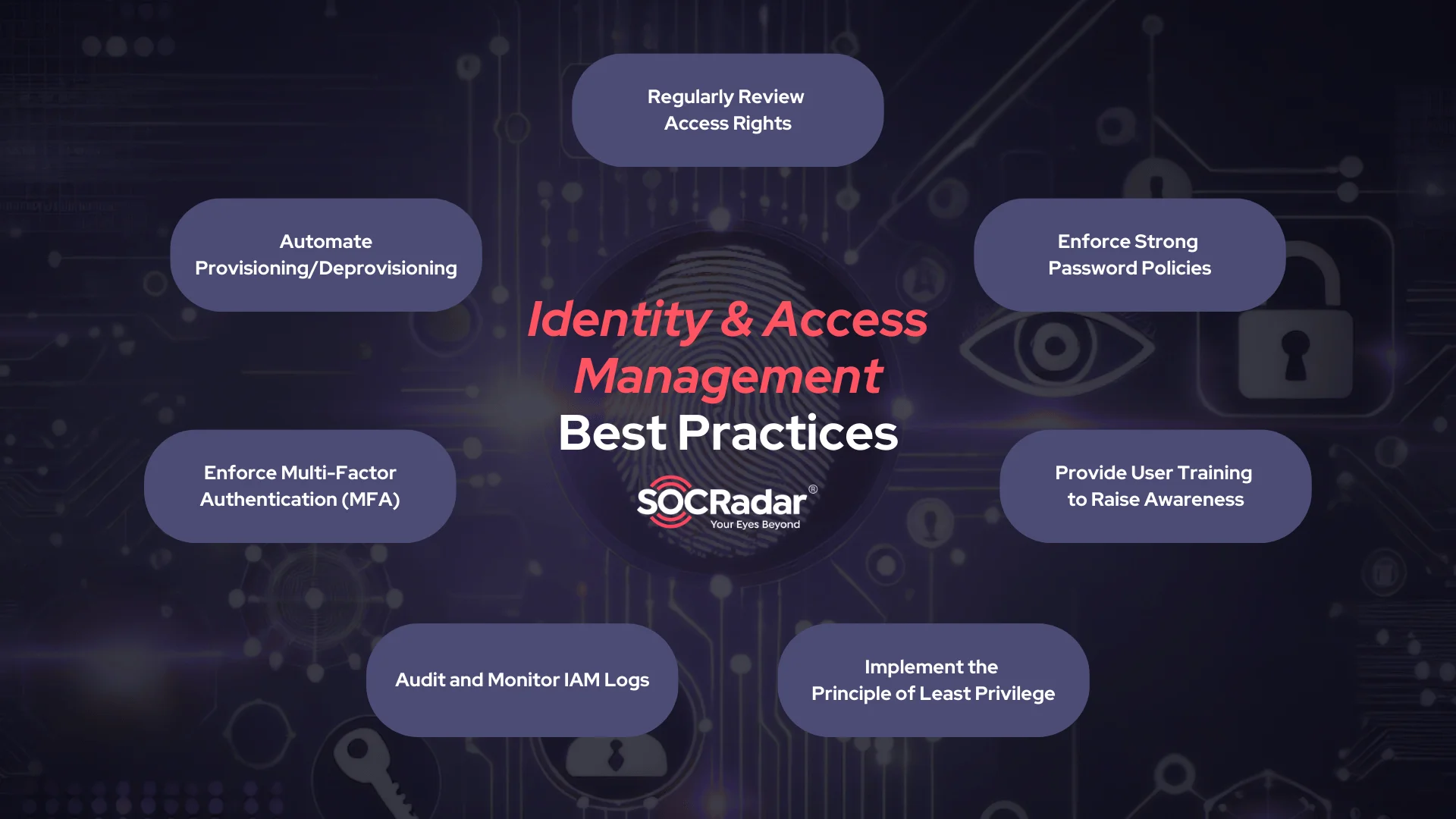
How to implement Identity and Access Management, best practices
- Regularly Review User Access Rights, Automate Provisioning/Deprovisioning
Over time, users may accumulate unnecessary or outdated permissions, increasing the risk of unauthorized access. Regularly reviewing and auditing user access ensures that permissions align with current roles and responsibilities. It is best to establish a routine process for reviewing access rights, particularly after role changes, terminations, or department transfers.
On another note, automating the process of granting and revoking access can ensure users have the right permissions at the right time. It also reduces errors and ensures that inactive accounts are deactivated promptly. You may also integrate IAM with HR systems to streamline onboarding and offboarding processes.
- Enforce Strong Password Policies and Multi-Factor Authentication (MFA)
Passwords remain a common entry point for cyberattacks. Enforcing strong password policies can reduce the risk of breaches caused by weak or reused credentials.
Also, be reminded that relying solely on passwords is no longer sufficient. Implementing MFA adds an extra layer of security by requiring users to provide additional verification factors, such as a one-time code or biometric authentication.
- Provide User Training and Awareness
IAM systems are only as effective as the people using them. Educating employees about access management policies, phishing risks, and secure password practices helps reduce human error and insider threats.
Conduct regular training sessions and workshops within your company to keep employees informed about IAM-related security measures. This training is especially important as phishing attacks and social engineering schemes are increasingly targeting organizations. One particularly dangerous tactic is Business Email Compromise (BEC), where attackers impersonate company executives or colleagues to gain unauthorized access to sensitive data or financial systems. These impersonations often lead to credential theft or the compromise of company assets.
- Audit and Monitor IAM Logs
Continuous monitoring of IAM logs helps identify suspicious activity, such as failed login attempts, unauthorized access, or unusual user behavior. Use automated tools to monitor IAM logs and set up alerts for anomalies that could indicate a security threat.
- Implement the Principle of Least Privilege (PoLP)
Limit user permissions to the minimum level required to perform their job. This reduces the risk of misuse and prevents attackers from accessing critical systems if a user account is compromised.
Failing to adhere to these best practices can lead to significant security vulnerabilities, such as unauthorized access, data breaches, and compliance violations. Inadequate IAM management increases the risk of insider threats, phishing attacks (such as BEC), and account takeovers, which can result in operational disruptions, reputational damage, and financial losses. By following these practices, organizations can mitigate risks and ensure that their IAM systems effectively protect sensitive resources.
Managing Identity Exposure and Access Risk with SOCRadar
Identity and access risks do not stop at login security alone. Even when organizations apply strong Identity and Access Management practices, exposed employee credentials, infected endpoints, and compromised third-party accounts can still create paths to unauthorized access. This makes external identity exposure monitoring especially useful, as it helps security teams see where leaked credentials, malware-related data, and access-related risks may already affect the organization.
SOCRadar supports this effort through Identity Access Intelligence, which helps organizations identify exposed credentials, compromised identities, and related access risks across external sources. Rather than showing only whether a username or password appeared in exposed data, the module helps connect that exposure to broader risk context, including affected systems, third-party services, endpoint visibility, and signs of credential theft activity.
What’s New in SOCRadar Identity Access Intelligence
SOCRadar’s upgraded Identity Access Intelligence expands visibility beyond raw credential exposure and adds deeper context for investigation and risk assessment. The updated experience is designed to help teams understand not only what was exposed, but also how that exposure may connect to enterprise assets, third-party services, endpoint activity, and infection-related behavior.
Some of the main additions include:
- Company Insight Intelligence for broader business and attack surface context
- Attack Flow Visualization for tracing infection and compromise paths
- File Insight for reviewing exposed endpoint artifacts
- Tag Insight for classifying exposed data and system findings
- SOCRadar Copilot for AI-assisted analysis and guidance
- Password strength validation for spotting weak or risky credentials
- Enhanced search for deeper investigation across assets, companies, and malware-related activity
Understanding Exposure in a Broader Business Context
One of the key additions is Company Insight Intelligence, which helps organizations evaluate identity-related risk in a broader operational context. Instead of presenting isolated exposure records, it maps compromised users and systems to functions such as login infrastructure, administrative portals, cloud services, and other internet-facing assets. It also highlights third-party credential exposure by showing which external platforms, such as identity providers or SaaS services, may be affected and what kind of access those leaked credentials could enable.
This view helps teams answer questions such as:
- Which exposed identities may affect sensitive business systems?
- Which third-party services appear in exposed credentials?
- Which parts of the attack surface may carry higher access-related risk?
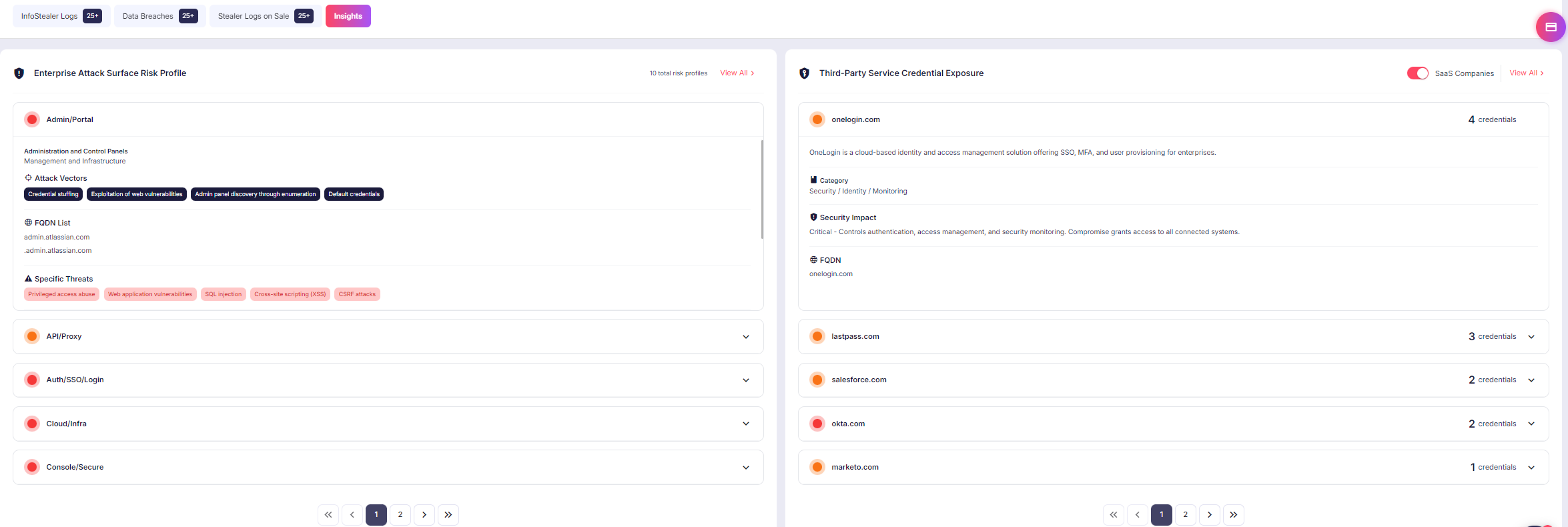
Company Insight Intelligence connects exposed identities to attack surface categories and third-party services, helping teams understand which systems may create the greatest operational risk.
Reviewing Endpoint Exposure and Security Posture
The update also improves visibility into endpoint posture by showing how compromised or at-risk systems are distributed across operating systems and antivirus configurations. This helps security teams identify patterns that may increase exposure, such as legacy platforms, uneven software distribution, or inconsistent endpoint protection coverage.
This kind of visibility can help teams:
- spot operating system concentration across exposed machines
- identify outdated or high-risk endpoint environments
- review whether antivirus coverage appears weak, inconsistent, or absent
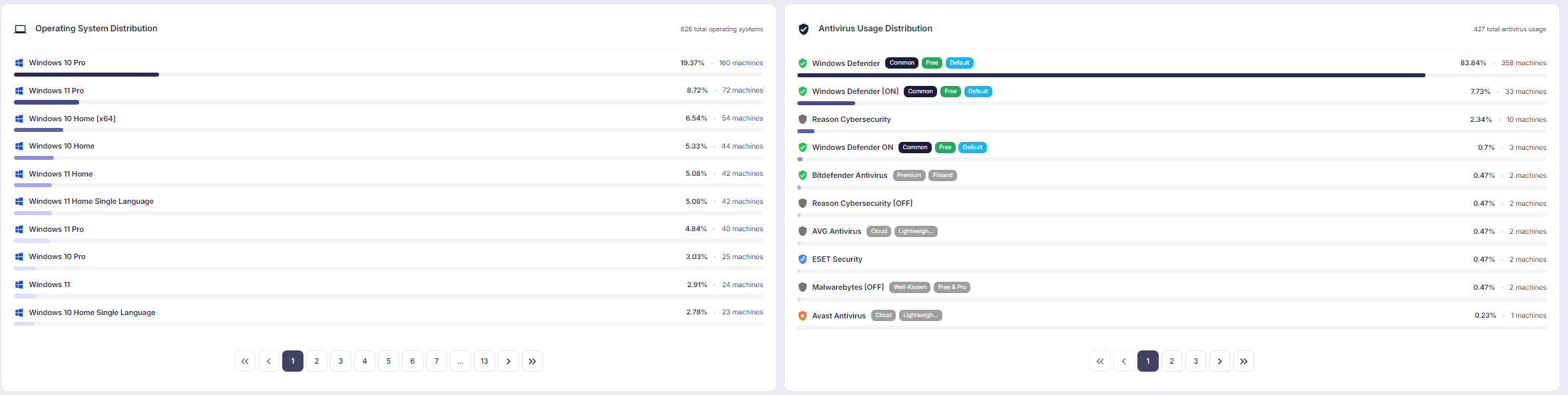
Operating system and antivirus distribution views help highlight endpoint patterns across exposed or at-risk machines, including legacy platforms and defensive coverage gaps.
Tracing the Path of Compromise with Attack Flow Visualization
Another major addition is Attack Flow Visualization, which helps reconstruct the path from initial compromise to endpoint impact. Instead of presenting isolated findings, this view connects the infection chain in a more understandable way, showing how malware execution, system interaction, and exposed artifacts relate to one another. It helps analysts understand how suspicious activity progressed and where the compromise may have moved across the observed environment.
Attack Flow Visualization helps analysts:
- follow the progression from initial access to endpoint compromise
- connect malware activity with exposed files, processes, and system behavior
- understand compromise paths in a more visual and investigation-friendly format
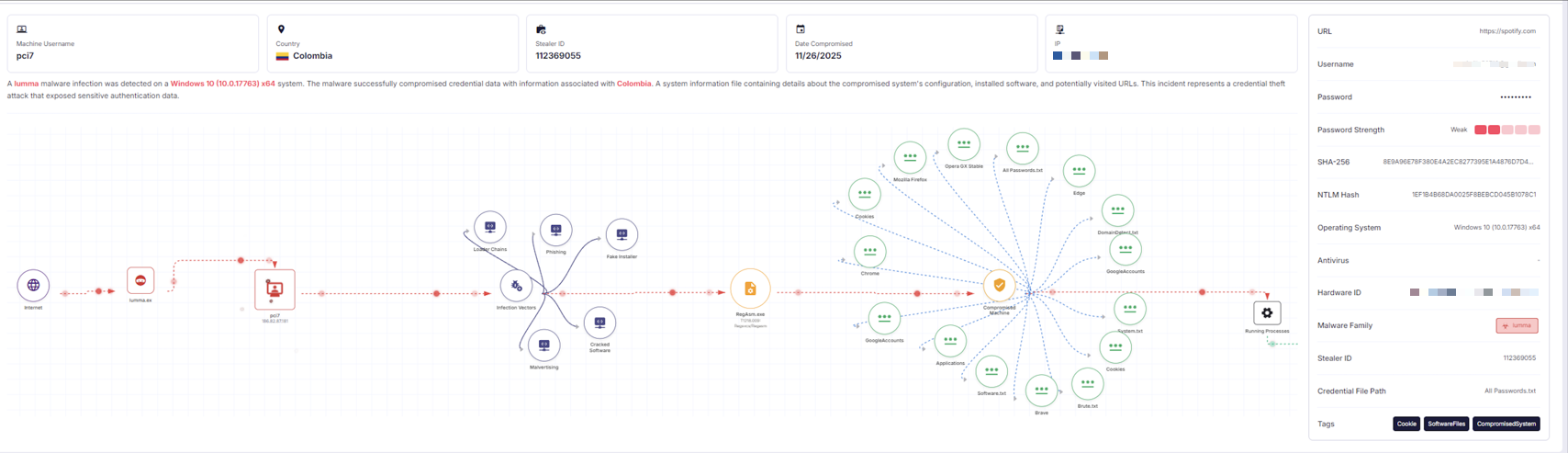
Attack Flow Visualization reconstructs the infection path from initial access to endpoint compromise, helping analysts connect exposed artifacts, malware activity, and system interaction in one view.
Adding MITRE ATT&CK Context to Investigations
Where applicable, the attack flow can also map observed behavior to relevant MITRE ATT&CK techniques, giving analysts more standardized context for investigation and reporting. This can be especially useful when teams need to align findings with internal detection logic, reporting frameworks, or incident documentation.
This helps with:
- investigation standardization
- internal reporting consistency
- clearer mapping between observed behavior and known attacker techniques
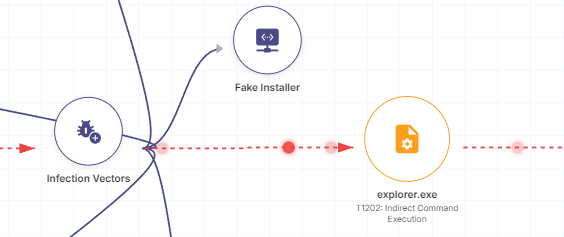
The attack flow view can also map observed behavior to MITRE ATT&CK techniques, adding clearer context for analysis and reporting.
Inspecting Compromised Endpoints with File Insight
The upgraded module also introduces File Insight, which provides a structured view of a compromised machine based on observed system data. This makes it possible to inspect folders, files, browser-related artifacts, and other exposed content in a way that resembles reviewing a live endpoint, without requiring direct access to the machine itself. For teams investigating credential theft or infostealer-related activity, this can make it easier to understand what data may have been accessible or exposed.
File Insight can help analysts review:
- folders and file paths
- browser-related artifacts
- credential-related files
- visible signs of exposed user activity
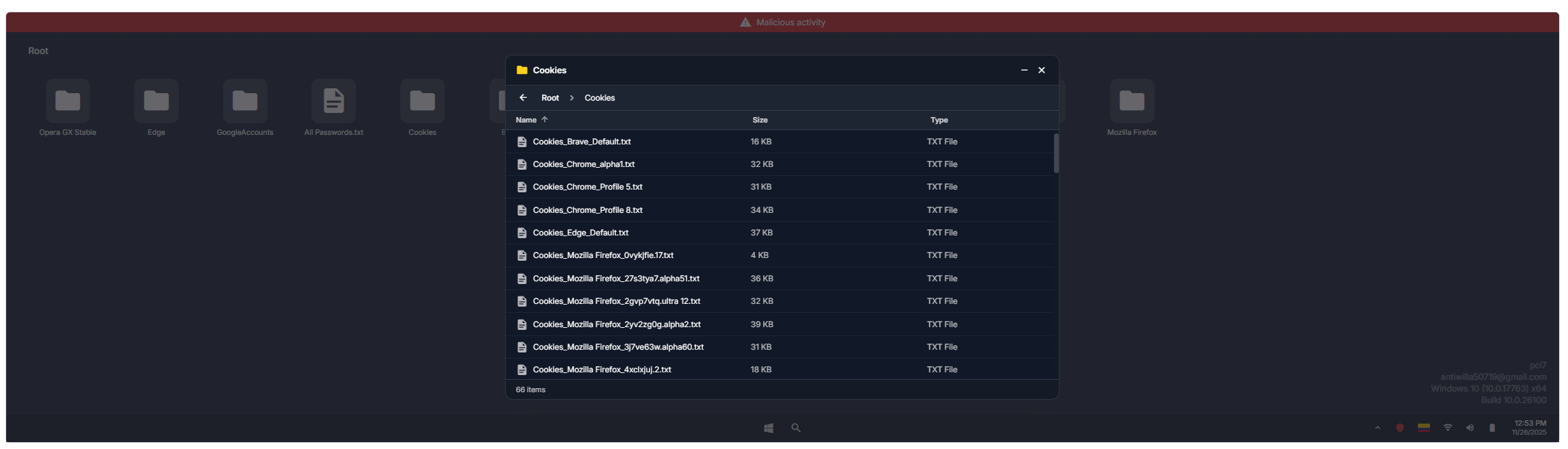
File Insight presents the visible file structure of a compromised machine, including folders and browser-related artifacts that can support credential and exposure investigations.
Reviewing Process Activity for Better Context
File Insight also includes process visibility, helping analysts review suspicious execution context and better understand the activity observed on the compromised endpoint. This adds another layer of context when assessing whether exposed credentials may be linked to malware execution, unauthorized tools, or suspicious system behavior.
This can support investigations by helping teams:
- inspect suspicious or unfamiliar processes
- review execution context around the compromise
- better understand how endpoint activity may relate to credential theft
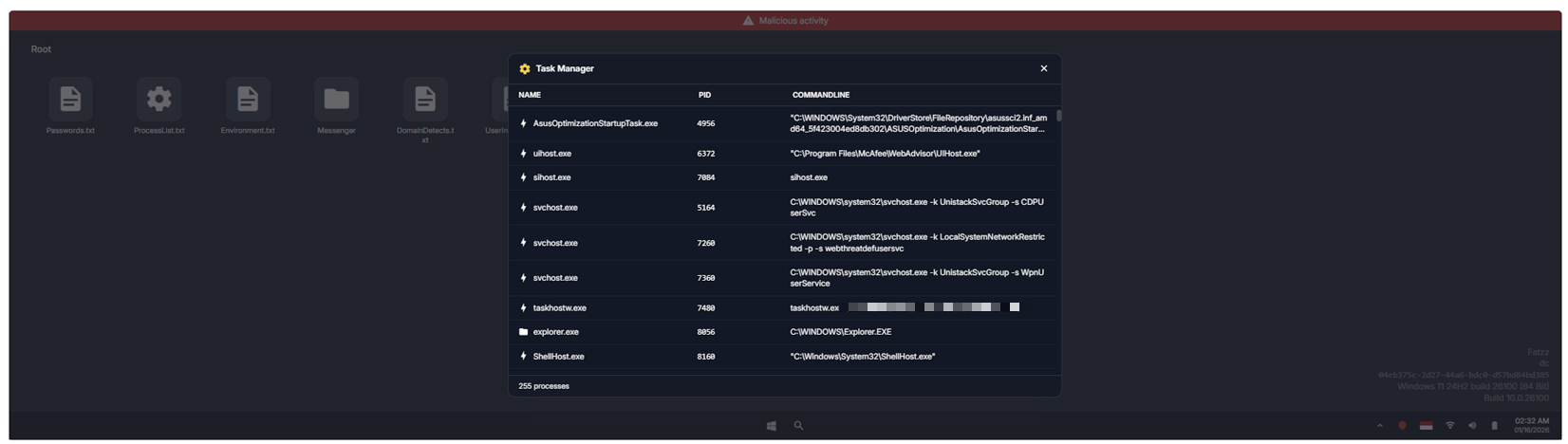
Process visibility within File Insight helps analysts review execution context and inspect suspicious or high-risk activity on a compromised endpoint.
Additional Enhancements for Faster Investigation
In addition to these investigation-focused views, the upgraded experience includes several supporting capabilities that improve analysis speed and usability:
- Tag Insight for classifying exposed artifacts
- SOCRadar Copilot for AI-assisted analysis and remediation guidance
- Password strength validation for identifying weak or risky credentials
- Enhanced search capabilities for more effective threat hunting across domains, companies, devices, and malware-related activity
Together, these additions help turn exposed identity data into more actionable security insight. Security teams can investigate faster with richer technical context, while security leaders gain clearer visibility into third-party credential exposure, attack surface concentration, and broader identity-related risk.
Supporting Broader Access Risk Investigations
Beyond identity exposure itself, SOCRadar also supports security teams with complementary capabilities that strengthen access-related risk investigations. SOCRadar Threat Hunting enables analysts to search for indicators linked to compromised credentials, suspicious domains, malware activity, or exposed infrastructure, while Email Threat Analyzer helps examine suspicious emails and possible phishing attempts that may have contributed to credential theft or account compromise.
These supporting capabilities help teams:
- investigate possible phishing-related credential exposure
- pivot from identity findings to broader threat indicators
- connect exposure data with wider threat activity
Turning Identity Exposure into Actionable Security Insight
By combining identity exposure visibility with broader threat intelligence and investigation support, SOCRadar helps organizations better understand and reduce the risks associated with credential compromise and unauthorized access.

Table Of Content
Related Articles

Top 5 Phishing Domain Takedown Service
Nmap Commands Guide: Cheat Sheet & Reference
Apr 17, 2026
How to Stop a DDoS Attack? (2026 Edition)
Jan 23, 2026