SOCRadar MCP: 126 Tools and the New MSSP MCP Server
Security analysts already ask AI assistants to summarize CVEs, draft reports and explain unfamiliar techniques. Ask the same assistant which of your domains were impersonated this week, and it can only guess: it has no view of your alarms, your assets or your executives’ leaked credentials.
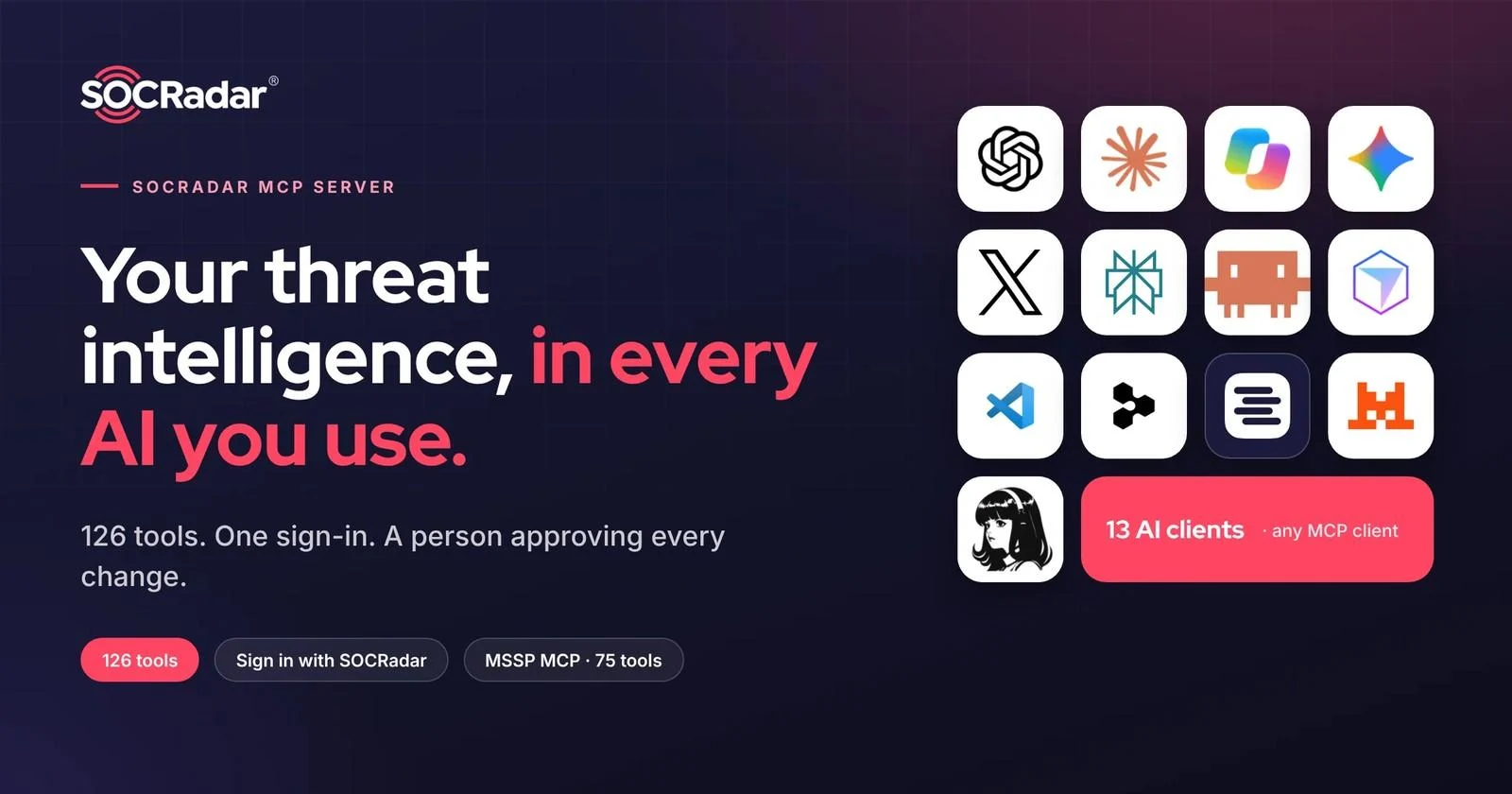
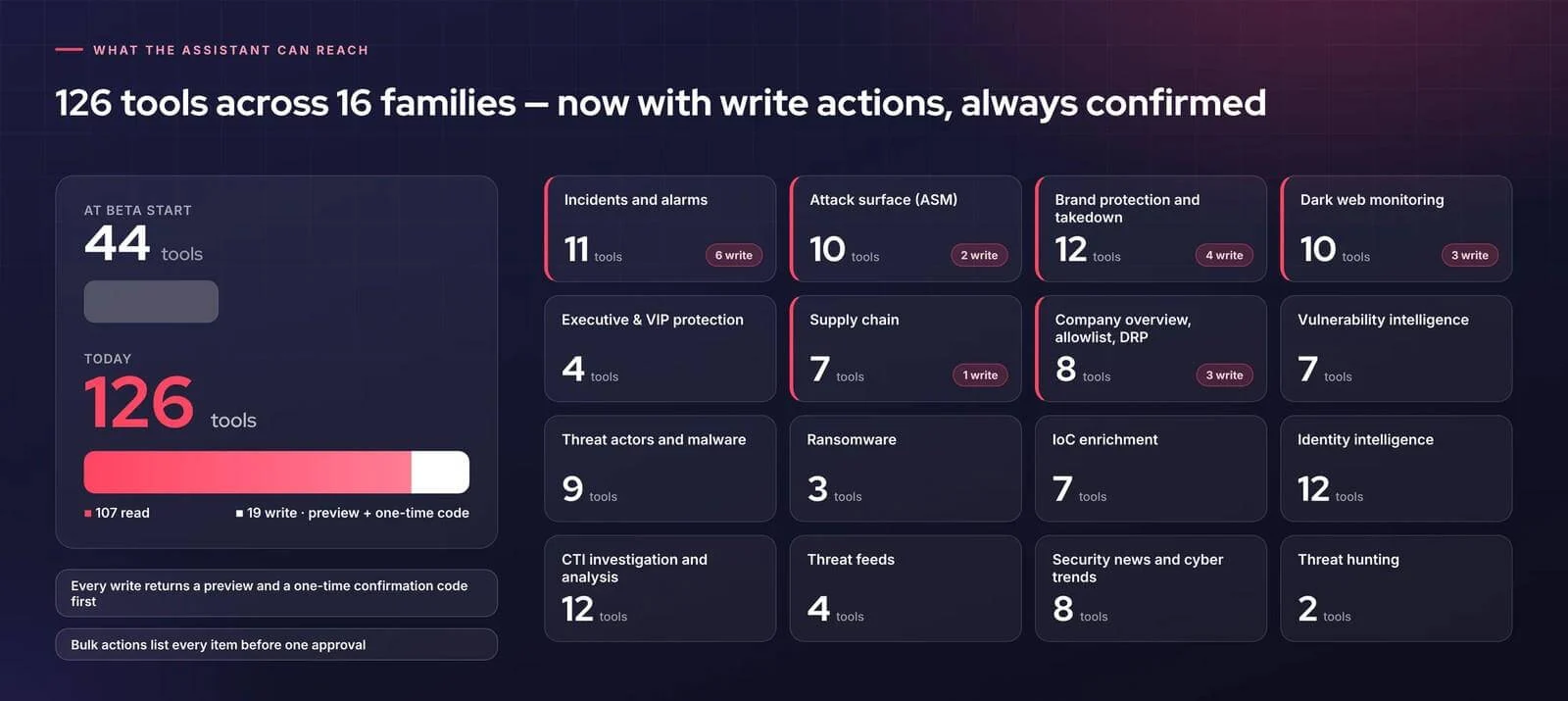
The SOCRadar MCP Server closes that gap. Serving customers since 2025 and one of the earliest MCP servers in threat intelligence, it now offers 126 tools across 16 families, a single Sign in with SOCRadar and a human approval step on every change. For MSSPs and multi-entity enterprises, the new MSSP MCP brings a whole customer portfolio into one conversation.
Key Takeaways
- 126 tools in 16 families: 107 tools read data and 19 can act, each behind a preview and a one-time confirmation code
- Sign in with SOCRadar: connect with your platform login, including 2FA, passkey or SAML SSO; API keys remain an option
- Shared Copilot credits: your own company data costs no credits, and advanced lookups use the Copilot credits the platform already uses
- 13 supported AI clients: six chat assistants and seven developer tools, plus any other MCP-compatible client
- MSSP MCP: a multi-tenant MCP server with 75 tools for portfolio-wide operations and tenant management
Why AI Assistants Need Grounded Threat Intelligence
Security teams no longer debate whether to use AI assistants; they use them daily and increasingly build their own agents. The open problem is connecting those assistants to threat intelligence safely and at scale:
- Ungrounded answers: assistants answer security questions from training data and the open web, without attribution and without visibility into your environment
- Credential and cost sprawl: custom integrations scatter long-lived API keys across laptops and configs, with separate quotas tracked outside your identity and access controls
- Unsupervised action: once an assistant can act, one misreading can become a real change with no preview, approval or audit trail
- No portfolio view: MSSPs and multi-entity enterprises run dozens or hundreds of companies, while most AI integrations see one at a time
SOCRadar MCP addresses each of these: answers grounded in your own SOCRadar data, under your own identity, with a person approving every change, and a dedicated server for managing many companies at once.
One Server for the Whole Platform
The SOCRadar MCP Server uses the open Model Context Protocol. Add one address, mcp.socradar.com, to the assistant your team already uses, and 126 tools across 16 families answer in plain language. The families cover incidents and alarm configuration, attack surface management, brand protection and takedowns, Dark Web monitoring, identity intelligence, threat actors, vulnerability intelligence, IoC enrichment, ransomware, supply chain, executive and VIP protection, and security news and cyber trends.
Of the 126 tools, 107 read data and 19 can act. Every one of the 19 asks for your confirmation before anything changes.
Connect With the Identity You Already Have
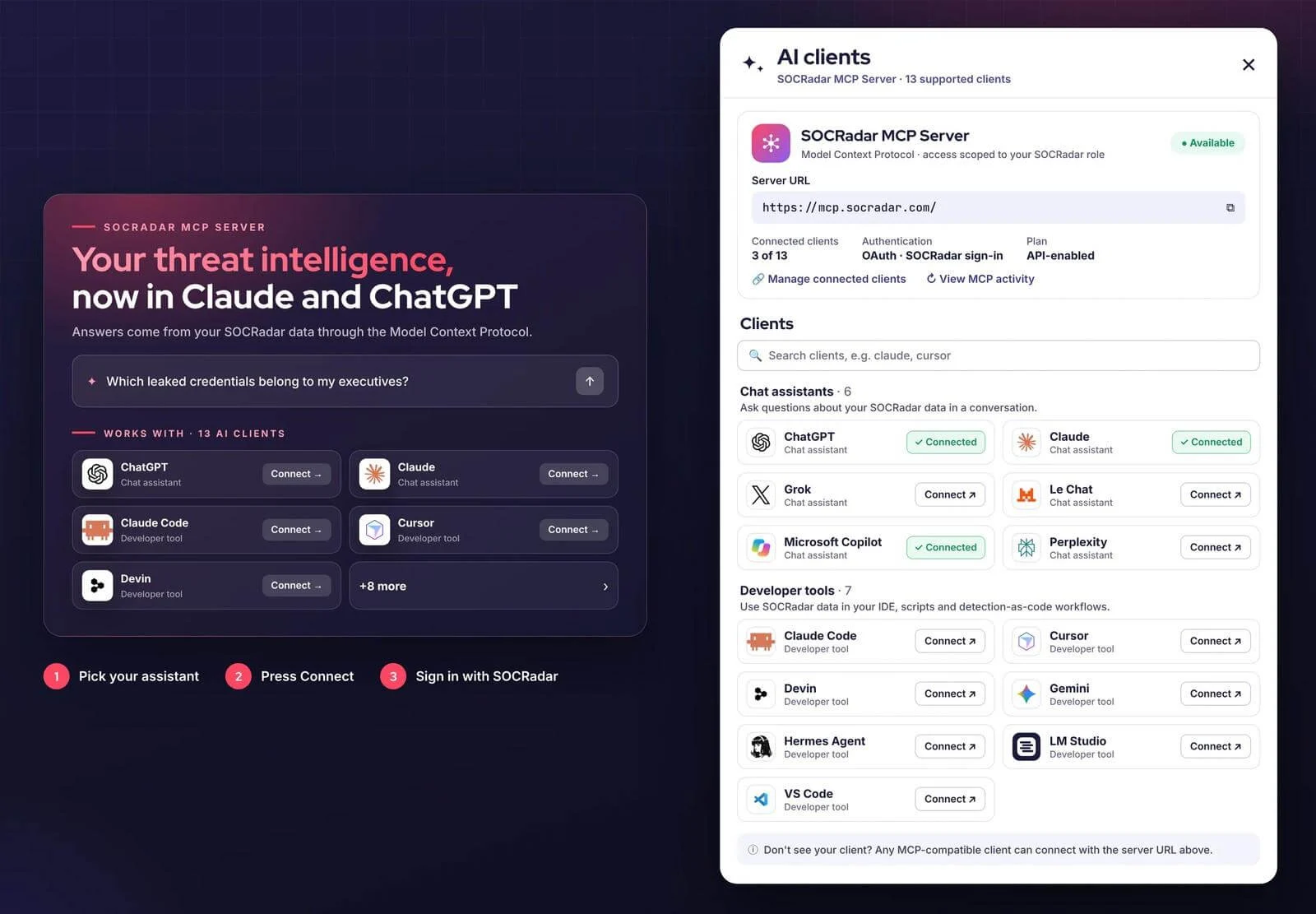
Open API & Integrations › Integrations on the SOCRadar platform, choose your assistant in the SOCRadar MCP Server banner, press Connect and sign in with SOCRadar. You can also add the server URL as a custom MCP connector in any client.
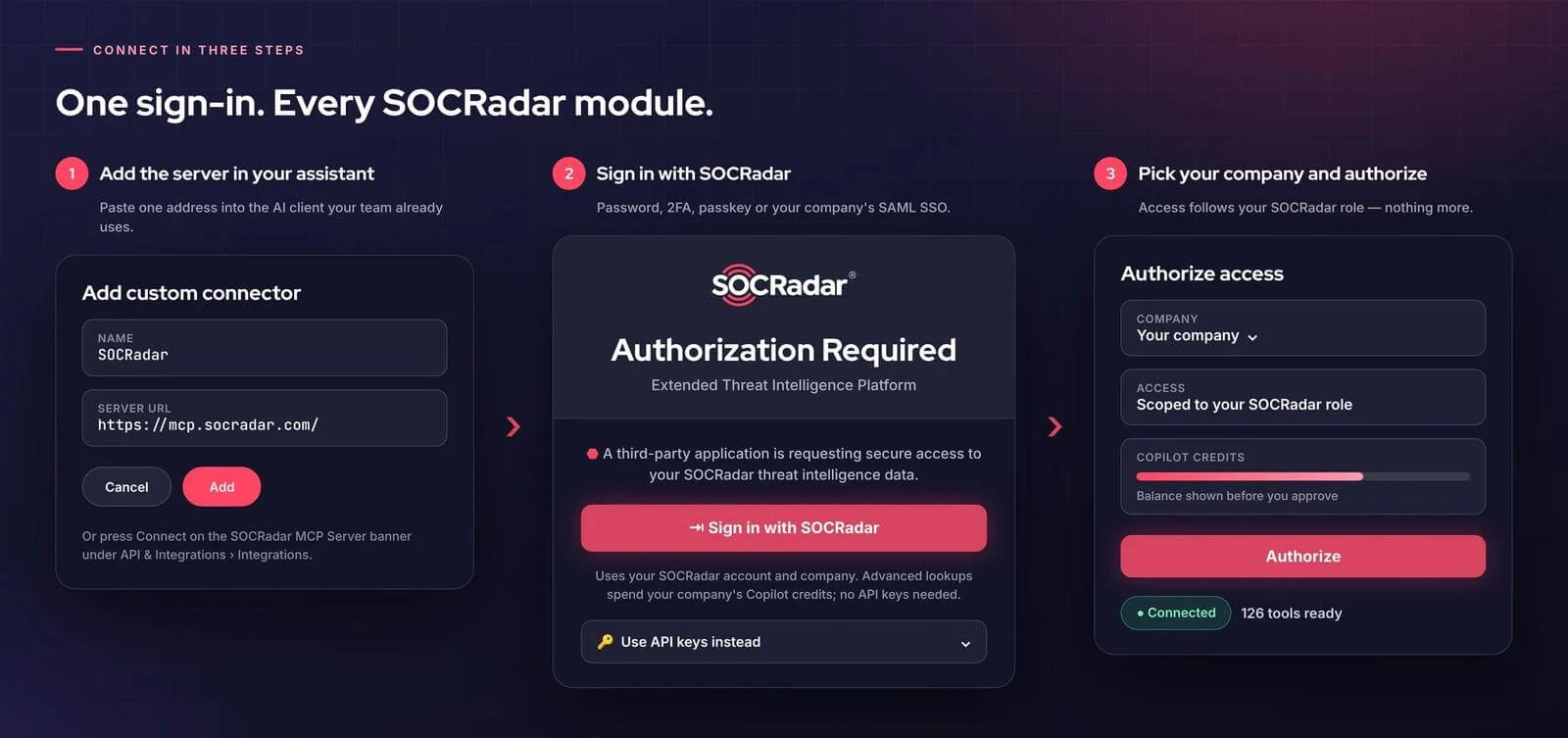
- Sign in with SOCRadar: use your platform login with password, 2FA, passkey or your company’s SAML SSO, pick the company, and every tool your role allows is ready; API-key connections remain available
- One credit pool: your own company data costs nothing extra, advanced intelligence lookups draw on the Copilot credits the platform already uses, and key-based connections keep their own quotas
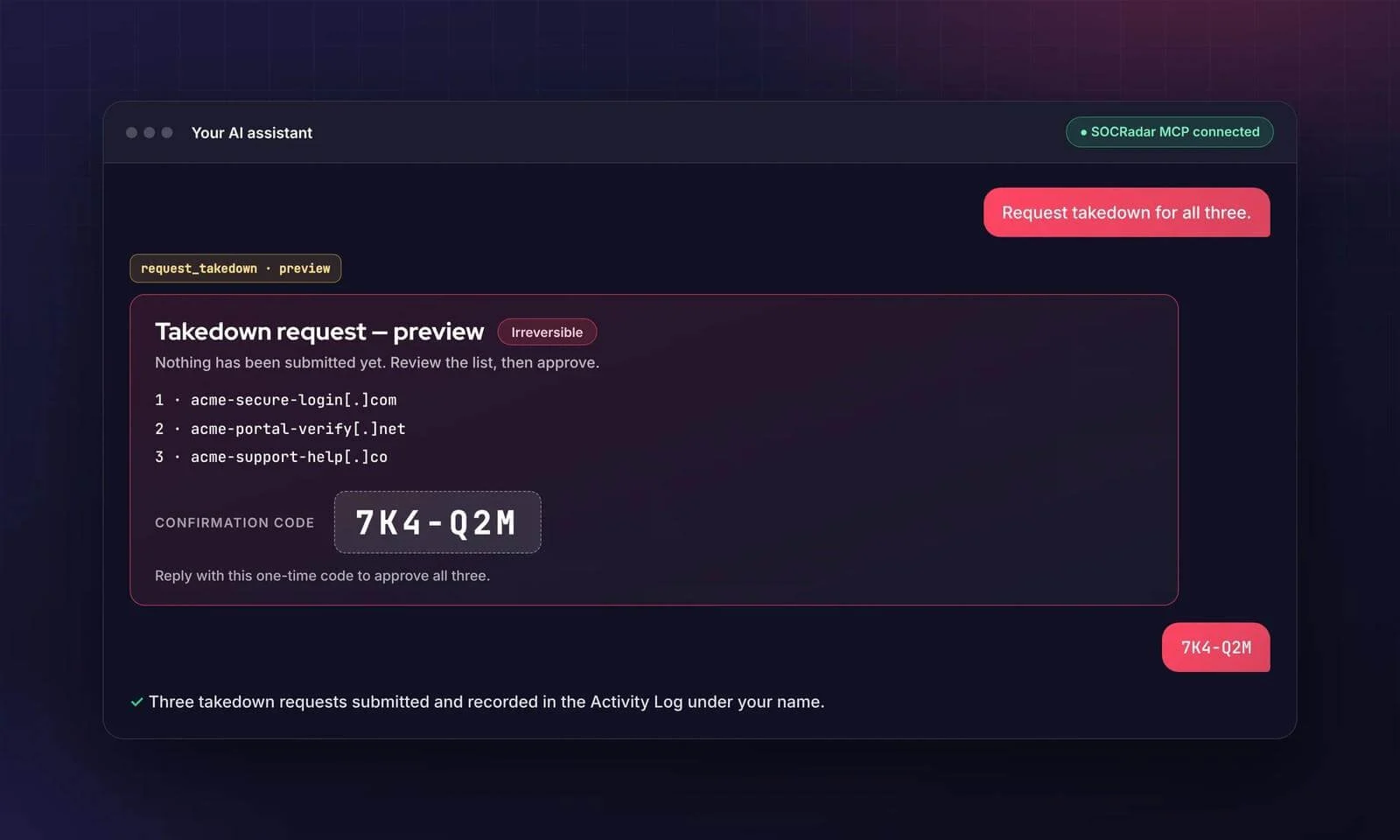
- Human-approved actions: every write returns a preview and a one-time confirmation code, bulk actions list every item before one approval, and irreversible steps are flagged
Grounded Answers and Human-Approved Actions
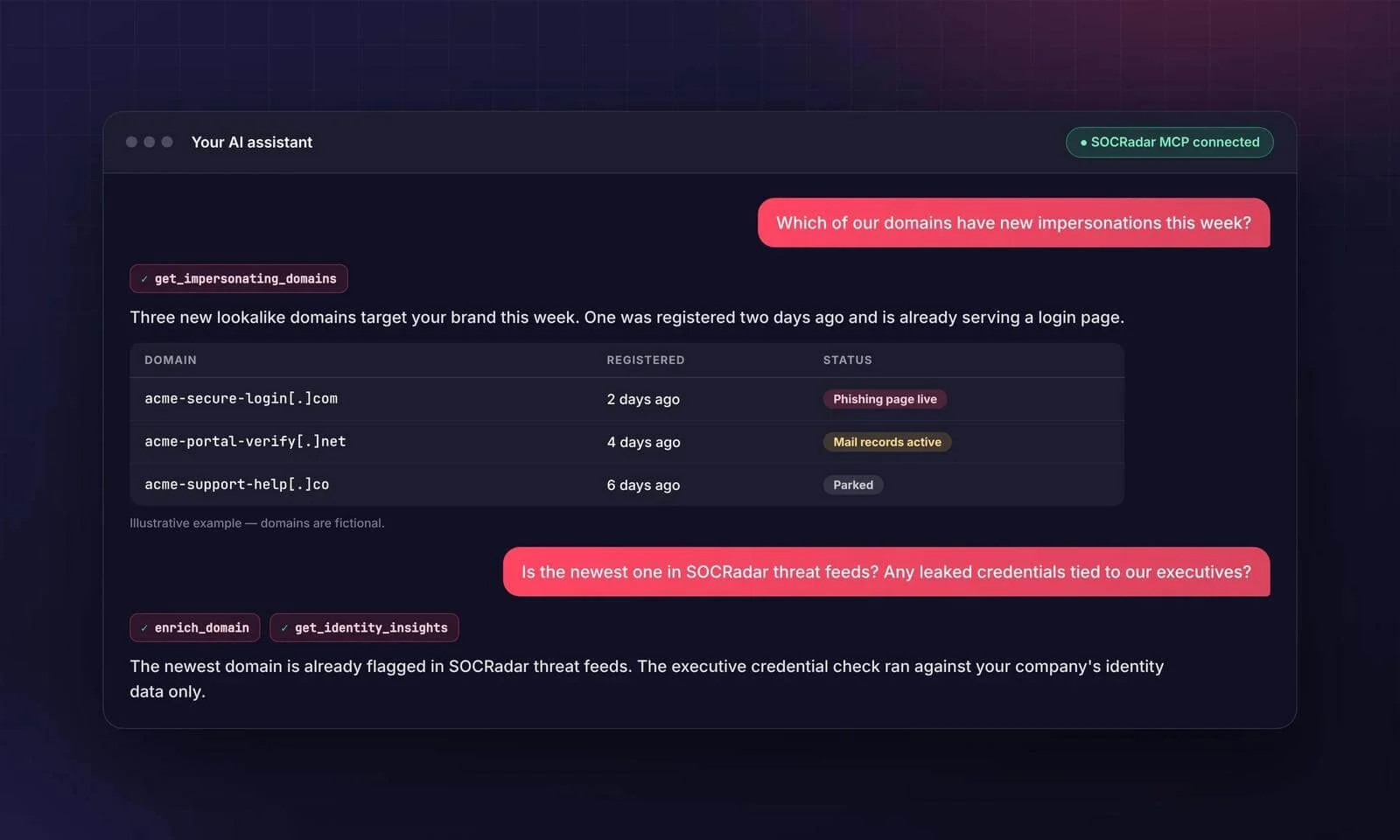
Once the assistant can see your SOCRadar data, a question about brand impersonation is answered from your own tenant, with the tool calls visible in the conversation, and can be followed by an enrichment pivot.
When you decide to act, the assistant does not submit the request directly. It shows a preview of exactly what will change, flags the action as irreversible where it applies and waits for your one-time confirmation code.
Visible, Attributable and Revocable
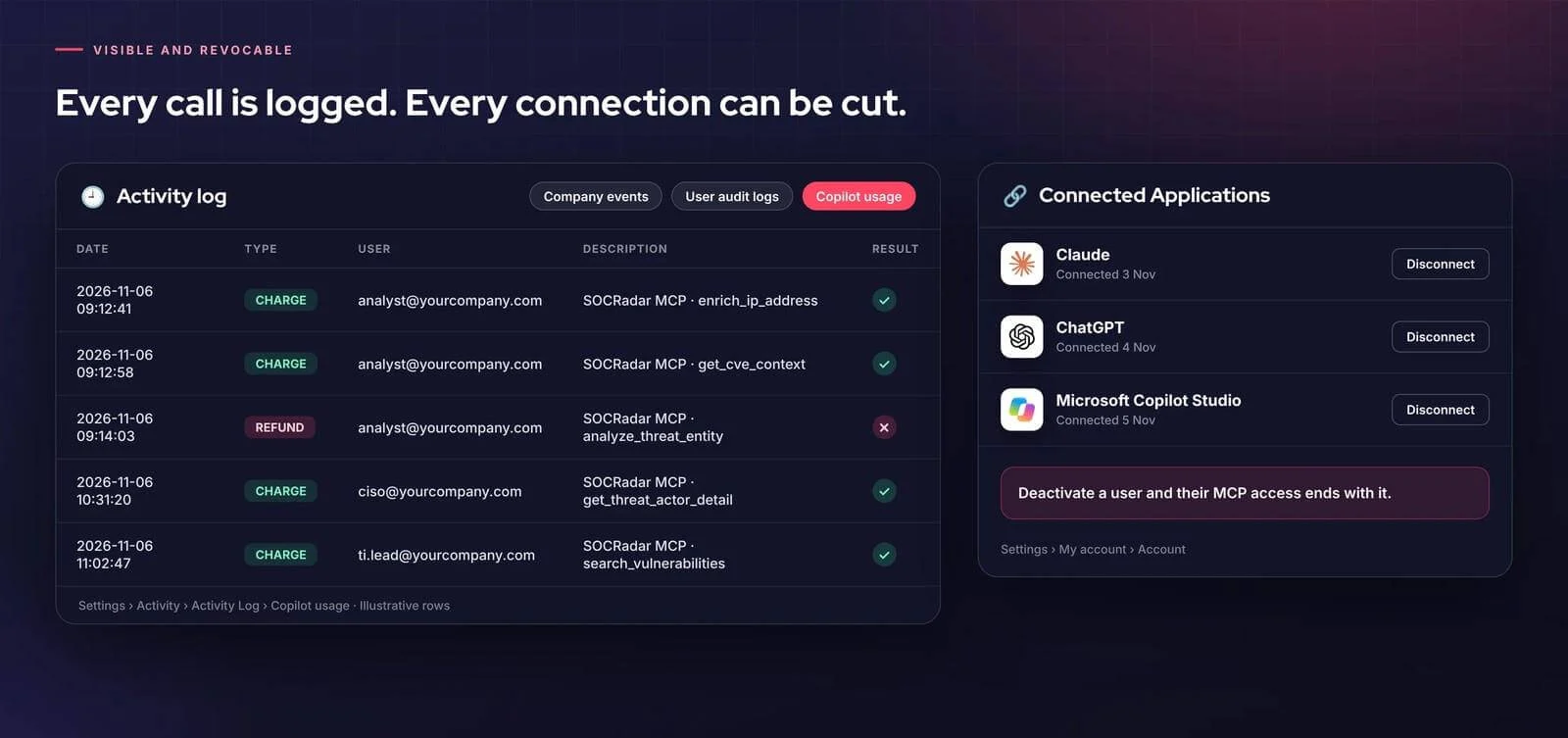
Actions and credit usage are logged per user, so you can trace who did what. Each connection is listed under Settings › My account › Account › Connected Applications with a Disconnect button, and deactivating a user also ends their user-based MCP access. Access always follows the user’s SOCRadar role.
One Connection for Every Role and Every Team’s Agents
The same connection serves the whole security organization. Teams can also use the 126 tools inside their own agents and workflows, such as Microsoft Copilot Studio agents, developer tools and other MCP-compatible clients, alongside tools from other systems.
| Team | Example Prompt | What They Get |
|---|---|---|
| SOC analysts | “Show critical incidents from the last 24 hours involving malware, grouped by threat actor.” | Triage, enrichment and pivots without leaving the chat |
| CISOs | “Generate an executive briefing on our current threat landscape.” | Executive-ready summaries from live data, on demand |
| Threat intelligence and vulnerability teams | “Which actors exploit CVE-2024-3400, and are we exposed?” | Actor profiles, TTPs, IoCs, CVE risk and exploitation signals in one thread |
| Brand and executive protection | “Which of my domains have new impersonations this week?” | Lookalike domains, fake accounts and VIP exposure, with takedown from the same conversation |
MSSP MCP: A Multi-Tenant MCP Server for Whole Portfolios
MSSP MCP is SOCRadar’s multi-tenant MCP server at mcp-mssp.socradar.com and among the earliest multi-tenant MCP servers. SOCRadar MCP serves company-level workflows; MSSP MCP serves portfolio-wide operations and tenant management for MSSPs and multi-entity enterprises.
- One portfolio connection: connect with your Multi-Tenant ID and Multi-Tenant API key for access to every managed company, from a handful to several hundred
- Cross-company insight: ask which customers had critical alarms today, compare the results, then investigate one company; every answer names its company
- Tenant administration with 75 tools: create companies from templates, extend subscriptions individually or in bulk, and manage ecosystems and settings from the conversation
- Agent-driven operations: build Copilot Studio agents and other MCP-compatible workflows for recurring multi-company tasks, with a preview and confirmation code required for anything irreversible or token-spending
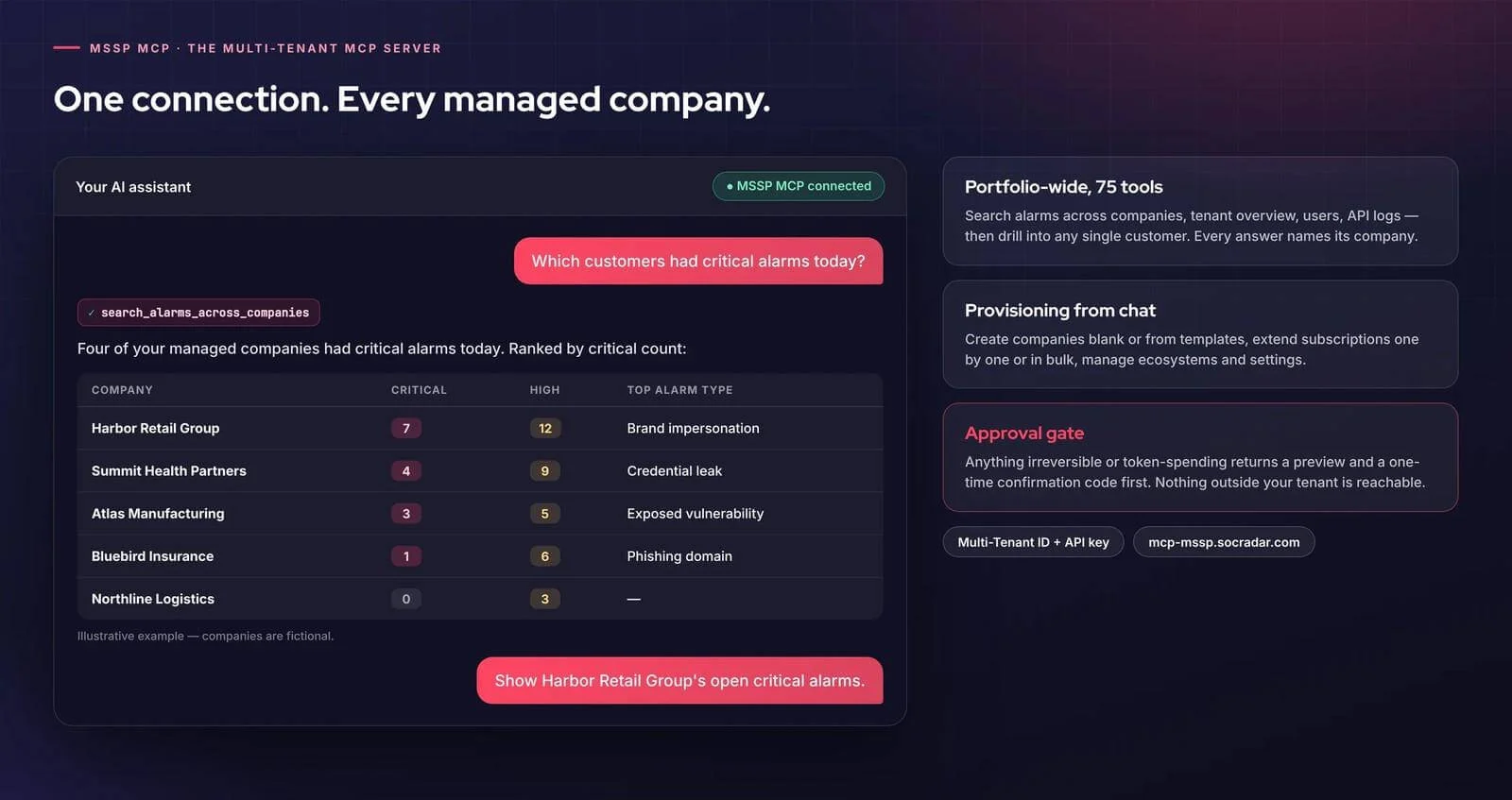
SOCRadar MCP uses Sign in with SOCRadar and the shared Copilot credit model. MSSP MCP uses separate Multi-Tenant credentials.
Supported AI Clients
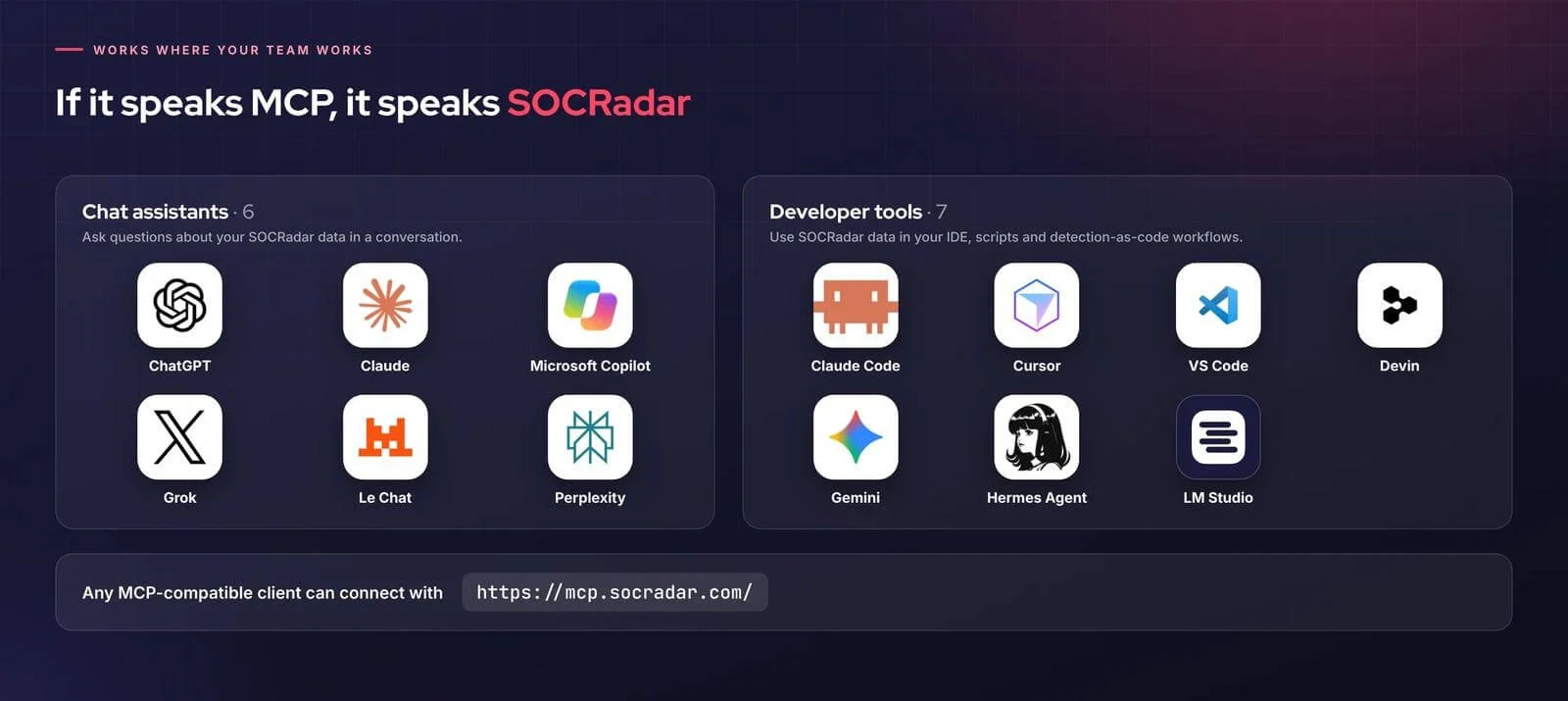
The platform lists 13 supported clients: ChatGPT, Claude, Microsoft Copilot, Grok, Le Chat and Perplexity as chat assistants, and Claude Code, Cursor, VS Code, Devin, Gemini, Hermes Agent and LM Studio as developer tools. Any other MCP-compatible client can connect with the same server URL.
Why MCP, and Why Now
Customers and technology partners increasingly ask for MCP support alongside existing APIs, so they can use threat intelligence directly inside their AI agents. APIs remain the foundation for integrations. MCP adds a standard way for an AI agent to discover tools, call them and show its work. SOCRadar has offered an MCP server since 2025 and now covers both company-level and multi-tenant use cases.
Getting Started
Open API & Integrations › Integrations on the SOCRadar platform, choose your assistant in the SOCRadar MCP Server banner and ask the first question about your own company. MSSPs connect to MSSP MCP with the Multi-Tenant ID and API key from Multi-Tenant Settings. Step-by-step guides are on the Help Center, including the guide to connecting SOCRadar to ChatGPT. For entitlement or module access, contact your SOCRadar Customer Success Manager; if you are not a customer yet, a demo walks through MCP on your own data.
Frequently Asked Questions
What Is the SOCRadar MCP Server?
A Model Context Protocol server that connects AI assistants to your SOCRadar platform data and tools. Serving customers since 2025, it now offers 126 tools (107 read, 19 write) in 16 families.
How Do I Connect the SOCRadar MCP Server?
Open API & Integrations › Integrations, choose your assistant in the SOCRadar MCP Server banner, press Connect and sign in with SOCRadar. You can also add mcp.socradar.com as a custom MCP connector in any MCP client.
Do I Still Need API Keys?
Not with Sign in with SOCRadar. Teams that prefer keys can choose “Use API keys instead”; key-based connections keep their own quotas and never use Copilot credits.
Which Tools Can I Use?
The tools your SOCRadar subscription and role allow. Tools outside your entitlements are not available; for entitlement or module access questions, contact your Customer Success Manager.
Does the SOCRadar MCP Server Use Credits?
Querying your own company data costs no credits. Advanced module lookups draw on the company’s Copilot credits, bulk tools are charged per item and failed calls are refunded. Every charge appears in Settings › Activity › Activity Log › Copilot usage.
Can the Assistant Change Things on Its Own?
No. Every write action returns a preview and a one-time confirmation code, bulk actions list every item, and irreversible steps are flagged. You can review or revoke any connection under Settings › My account › Account › Connected Applications.
What Happens When a User Leaves the Company?
Deactivating the user also ends their user-based MCP access, and their actions remain in the activity logs.
Is It Safe to Add a Custom Connector to My AI Client?
Custom connectors are not reviewed by the AI vendor, so add one only if your organization permits custom apps and trusts the server. SOCRadar authenticates with OAuth, scopes access to your entitlements and lists every connection for admins to review. Details are in the SOCRadar Trust Center.
Can Our Teams Use It in Their Own Agents?
Yes. Any MCP-compatible agent or workflow, such as a Microsoft Copilot Studio agent, can use the tools your role allows alongside tools from other systems.
Which AI Clients Are Supported?
ChatGPT, Claude, Microsoft Copilot, Grok, Le Chat and Perplexity as chat assistants, and Claude Code, Cursor, VS Code, Devin, Gemini, Hermes Agent and LM Studio as developer tools. Any other MCP client can connect with the same server URL.
Who Is MSSP MCP For?
MSSPs and enterprises with a multi-tenant structure. One Multi-Tenant ID and API key gives access to every managed company through 75 tools, including provisioning from chat, with approval gates on anything irreversible or token-spending.