sshole: OpenSSH Fixes Password Bypass on Alpine Linux
OpenSSH has shipped an emergency release, version 10.6p2, to stop a password bypass that lets a remote attacker log in to accounts that have no password set. The flaw, tracked as CVE-2026-123158 and nicknamed “sshole,” affects Linux systems that run OpenSSH on the musl C library with PAM disabled. That combination is the default openssh-server package on Alpine Linux.
Alpine published fixed packages for every branch from 3.16 to edge on November 5, 2026, the same day as the OpenSSH release. No exploitation in the wild had been reported at release, but the OpenSSH team urged affected users to act immediately, and the bug is simple to trigger once its conditions are met.
What Is the sshole Flaw (CVE-2026-123158)?
sshole is a password authentication bypass in OpenSSH’s sshd that lets a remote attacker log in to accounts that have no password set. The flaw affects only Linux systems that run OpenSSH on the musl C library with PAM disabled, which is how Alpine Linux builds its default openssh-server package.
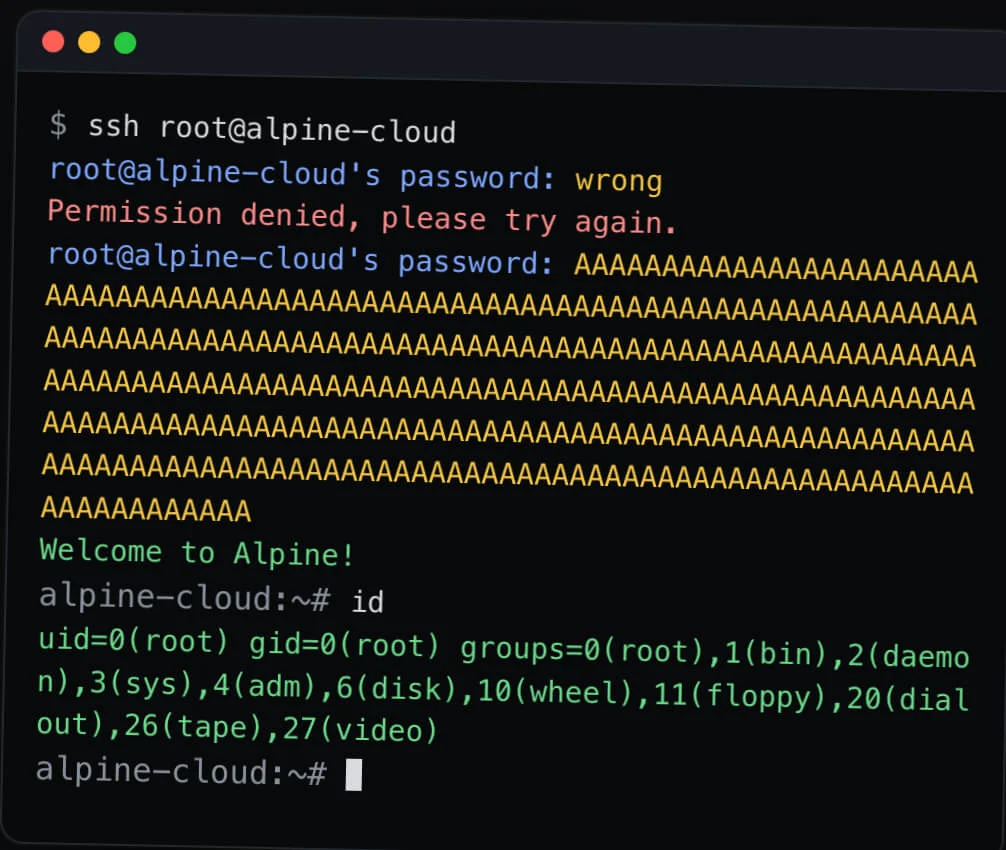
The exposed accounts are those whose password field holds only “*”, meaning no password was ever set. These are often accounts meant for SSH key logins only, so administrators would reasonably assume a password login to them is impossible.
How Severe Is CVE-2026-123158?
CVE-2026-123158 carries a CVSS 3.1 score of 8.1 (High), supplied by MITRE as the CVE Numbering Authority (CNA), and OpenSSH rates the fix critical. The record, published on November 5, 2026, lists OpenSSH before 10.6p2 on Linux as affected when musl libc is used without PAM and classifies the weakness as CWE-394 (Unexpected Status Code or Return Value).
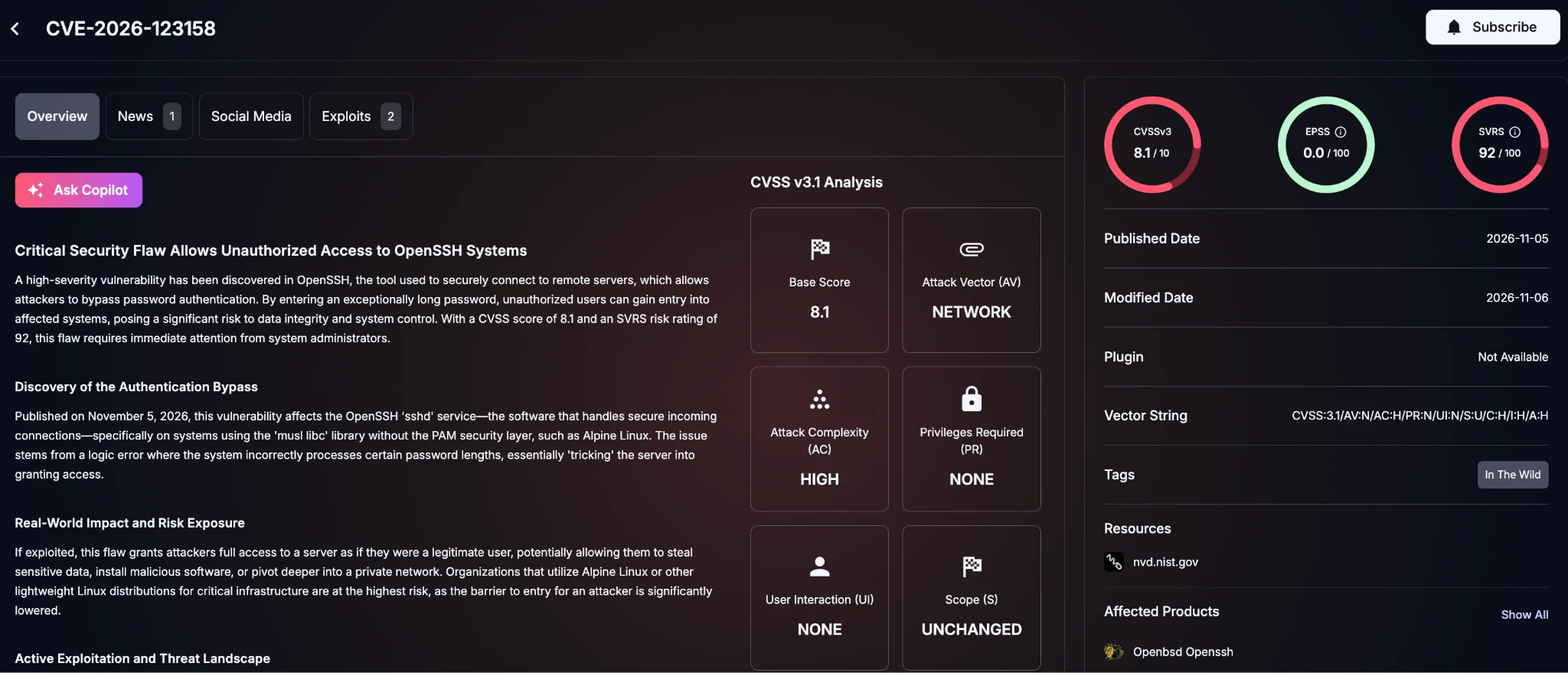
As of November 6, 2026, NVD lists the record as received but not yet analyzed. Alpine’s advisory was written before the ID was assigned and does not cite it.
Which Systems Are Affected and Which Are Not?
OpenSSH versions before 10.6p2 are affected when built and run on Linux with musl and without PAM. Alpine Linux is the most common example, and the researcher also suggests checking musl-based OpenWrt, Buildroot and Yocto builds wherever OpenSSH server is installed.
In public remarks, OpenSSH maintainer Damien Miller confirmed that glibc-based Linux distributions, non-Linux systems and systems that check passwords through PAM are not affected. The researcher says Dropbear, the default SSH server on OpenWrt, is not affected either.
How Would an Attacker Exploit sshole?
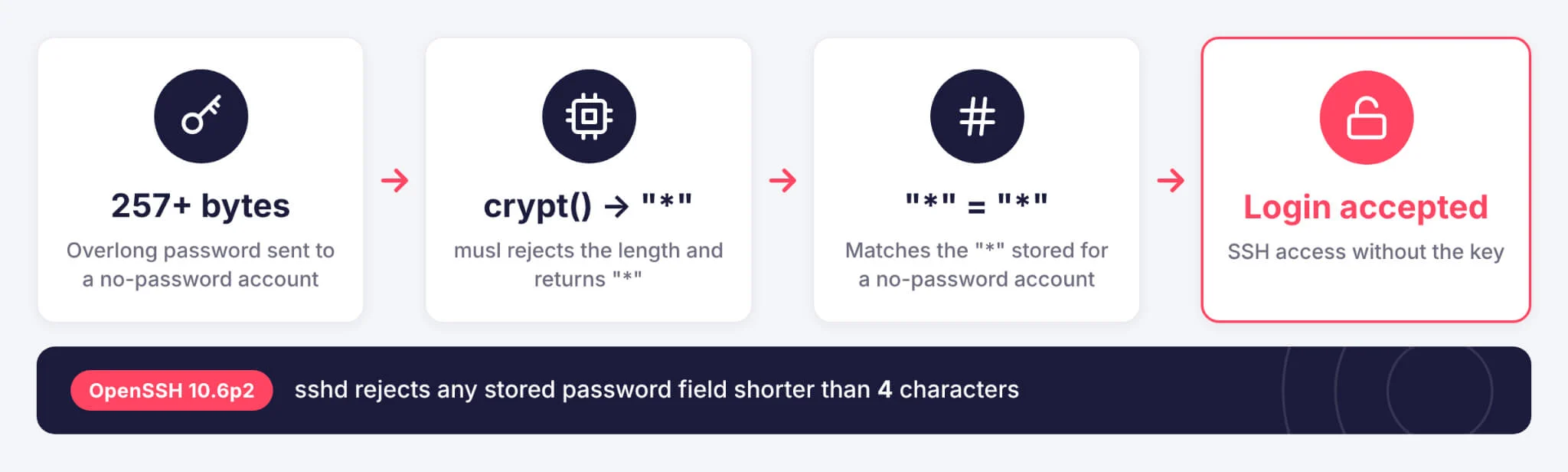
An attacker sends an overlong password, longer than 256 bytes, for an account that has no password. Alpine’s advisory describes the attack as remote, needing one connection and working on every attempt.
The attacker only needs the name of a suitable account. That is easy to guess on stock images that ship an “alpine” or “root” user.
Why Does an Overlong Password Get Accepted?
Three old design decisions meet in this flaw. Without PAM, sshd checks a password by hashing the attempt with crypt() and comparing the result with the stored hash. A 2016 OpenSSH change, made to fix the user-enumeration timing issue CVE-2016-6210, has sshd borrow the salt of another account’s real hash when the target account’s field is too short to contain one, such as a lone “*”.
musl treats that borrowed SHA-256 ($5$) or SHA-512 ($6$) salt differently from glibc. Since 2012, musl’s crypt() refuses passwords longer than 256 bytes for these hash types and returns the string “*” instead of an error. That output matches the “*” stored for the passwordless account, so sshd accepts the overlong password as correct.
OpenSSH calls the fix a critical security workaround, because the team considers the root cause to sit outside sshd. The write-up by Özgün Kültekin of Wakefield, who reported the issue, traces the chain through the musl and OpenSSH commit history.
What Conditions Must Be Met for Exploitation?
All four conditions in Alpine’s list must hold for a server to be exploitable:
- sshd without PAM: The server runs openssh-server built without PAM, or openssh-server-pam with UsePAM set to no
- Password logins enabled: PasswordAuthentication is set to yes, which is the OpenSSH default
- A passwordless account: At least one account has “*” as its password field
- A real hash elsewhere: At least one other local account has a $5$ or $6$ password hash
Servers with PasswordAuthentication set to no are not exploitable, and cloud-init images set it this way. The same goes for containers that do not run sshd, accounts locked with “!” and hosts with no $-style hash at all.
Which Accounts and Images Face the Most Risk?
Key-only users created without a password are the most likely targets, since their password field holds “*”. Users supplied by a directory service through musl-nscd carry “*” as well. Root has shipped as “root:*” since around Alpine 3.16, although the default PermitRootLogin prohibit-password setting still blocks a direct password login as root unless an administrator changed it to yes.
Indirect root access is the larger concern. Alpine’s official cloud images built with tiny-cloud, from 3.18.11 through 3.24.3, let the default “alpine” user run commands as root (doas) without a password. On those images, an attacker who uses the flaw to log in as “alpine” can take full root control, as long as another account on the machine has a real password set.
Which Versions Fix CVE-2026-123158?
OpenSSH 10.6p2, released on November 5, 2026, fixes the flaw by making sshd reject a match whenever the stored password field is shorter than four characters. Alpine published fixed packages the same day. Stable branches received a backported patch, so only edge moves to OpenSSH 10.6p2, and fixes also cover branches 3.16 through 3.21, even though 3.21 reached end of support on November 1, 2026.
| Alpine Branch | Fixed openssh Package |
|---|---|
| edge | 10.6_p2-r0 |
| 3.24 | 10.3_p1-r2 |
| 3.23 | 10.2_p1-r1 |
| 3.22 | 10.0_p1-r11 |
| 3.21 | 9.9_p2-r1 |
| 3.20 | 9.7_p1-r6 |
| 3.19 | 9.6_p1-r3 |
| 3.18 | 9.3_p2-r4 |
| 3.17 | 9.1_p1-r7 |
| 3.16 | 9.0_p1-r6 |
Images built from the 3.21.10, 3.22.8, 3.23.8 or 3.24.4 point releases, or later, already include the fixed package. Installing the package does not restart the running sshd, so the old binary keeps serving connections until a restart.
Is the sshole Flaw Being Exploited?
No attacks using the flaw have been reported in the wild as of November 6, 2026. However, CISA’s enrichment of the CVE record rates its exploitation status as proof of concept, and public reproduction labs have appeared on GitHub. The researcher’s site also offers an in-browser demonstration of the crypt() behavior on musl and glibc.
Because the conditions are easy to test and no special tooling is needed, the window between disclosure and abuse could be short. Miller pointed to the same risk when explaining the fast release: the OpenSSH team now sees long embargoes as dangerous, because AI agents have recently rediscovered the same bugs, sometimes within hours.
How Can Defenders Fix or Mitigate sshole?
Upgrading and restarting sshd is the fix, and disabling password logins is the fallback. The steps below come from Alpine’s advisory and the OpenSSH maintainers:
- Upgrade and restart: Run apk upgrade -U -a, then rc-service sshd restart so the patched binary is the one listening
- Turn off password logins where possible: Set PasswordAuthentication no, ideally in a drop-in under /etc/ssh/sshd_config.d on Alpine 3.19 and later, and change every PasswordAuthentication line in /etc/ssh/sshd_config, including those inside Match blocks
- Validate the change: Run sshd -t before restarting, then confirm that sshd -T | grep -i passwordauthentication prints “passwordauthentication no”; keep an existing session open while testing a new key login
Miller’s own advice for anyone who cannot patch right away was blunt: disable password authentication or disable SSH on these systems immediately.
How Can You Tell Whether a Server Was Accessed?
Authentication logs are the first place to look, and Alpine recommends these checks:
- Review authentication logs: Search /var/log/messages for “Accepted password for” entries that name an account with no password, such as alpine, root or a key-only user
- Look for follow-on activity: Review doas use, recently created users and authorized_keys files
- Assume the worst when in doubt: Alpine advises treating a machine as compromised if a login cannot be ruled out
As general practice, also inventory appliances, embedded images and containers outside Alpine that run OpenSSH server on musl without PAM, since they may need the same checks.
How Can SOCRadar Help?
Alpine runs in cloud instances, containers and small appliances that often fall outside central patch tracking. Any of them that exposes sshd to the internet and meets the four conditions above is open to this bypass.
- Attack Surface Management: Discovers internet-facing SSH services across your IP ranges and cloud assets, so teams can work out which ones run on Alpine or other musl-based hosts and patch those first
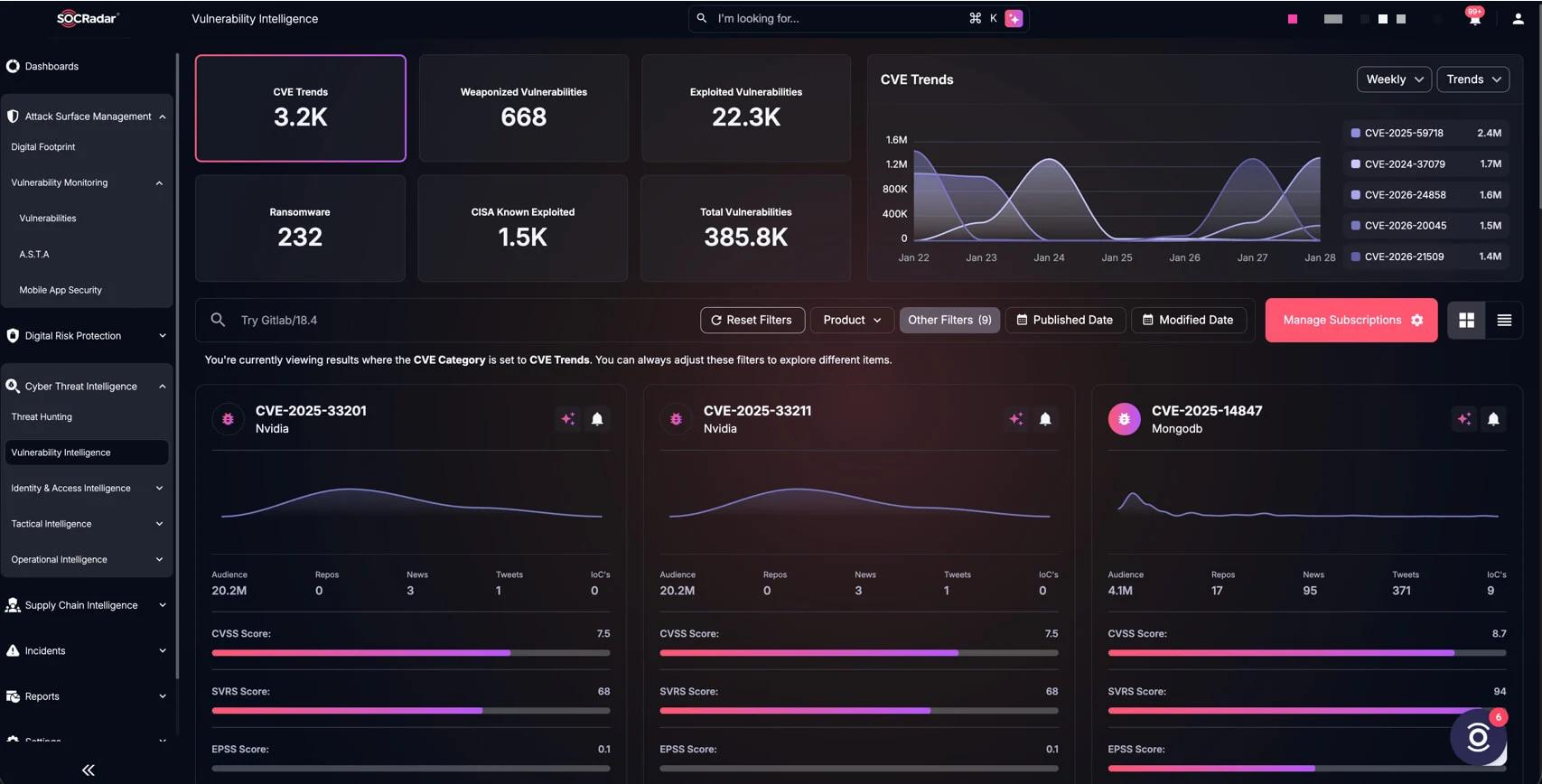
- Vulnerability Intelligence: Tracks CVE-2026-123158 as official analysis, scoring and exploit developments change, so prioritization reflects the current picture
External visibility shows where exposure exists. Confirming whether a passwordless account was actually used still depends on each host’s own authentication logs.
Frequently Asked Questions
Does sshole affect Ubuntu, Debian or Red Hat servers?
Standard Ubuntu, Debian and Red Hat servers are not affected, because those distributions are built on glibc. OpenSSH maintainer Damien Miller confirmed that glibc-based Linux systems, non-Linux systems and setups that check passwords through PAM are outside the flaw’s scope. The risk centers on musl-based systems running OpenSSH without PAM, with Alpine Linux as the main example.
Are Alpine-based Docker containers vulnerable to sshole?
Alpine-based containers are exposed only if they run sshd. Most container images do not include an SSH server, and those are not affected. A container that runs openssh-server without PAM, with password logins enabled, a passwordless account and another account holding a real password hash, meets every condition and should be updated and restarted.
Does setting PasswordAuthentication to no fully block sshole?
Setting PasswordAuthentication to no removes one of the four conditions the attack needs, so sshd stops accepting password logins entirely. Alpine recommends it as the workaround for systems that cannot be updated right away. Upgrading is still the permanent fix, because a later configuration change could turn password logins back on.
Is a restart needed after updating openssh on Alpine?
Yes. Installing the fixed openssh package does not restart the running sshd, so the old, vulnerable binary keeps accepting connections until the service restarts. On Alpine, run apk upgrade -U -a and then rc-service sshd restart, keeping an existing session open while you confirm that key-based logins still work.
Can attackers log in directly as root with sshole?
Direct root logins are usually blocked, because Alpine’s default PermitRootLogin prohibit-password setting rejects password logins for root even though root ships with a “*” password field. The bigger risk is indirect: on tiny-cloud images from 3.18.11 through 3.24.3, an attacker who logs in as “alpine” can reach root through passwordless doas.