Mar 10, 2026
Jan 02, 2026
6 Mins Read
Sep 13, 2026
Table Of Content
Related Articles
SMS Bombing
Threat Actors
Jan 08, 2026
Dark Web Monitoring
Feb 19, 2026
Ransomware
Jan 31, 2026
OSINT Framework
Apr 17, 2026

What Are Google Dorks?
Google dorking, also called Google hacking, uses advanced search operators to find precisely indexed content. Operators such as site:, filetype:, intitle:, inurl:, and quoted phrases help researchers narrow results to particular domains, file formats, page titles, paths, or text.
The technique is legitimate for research, administration, journalism, and authorized security testing. Attackers also use it to locate exposed documents, login pages, directory listings, error messages, credentials, and vulnerable systems. Search visibility is the problem, not the operator itself.
Key Takeaways
- site and domain-scoped searches is a central category or technique.
- Reliable assessment requires source, ownership, timing, and operational context.
- Detection should connect external evidence with identity, device, network, and business signals.
- Response should protect affected people and remove reusable access paths.
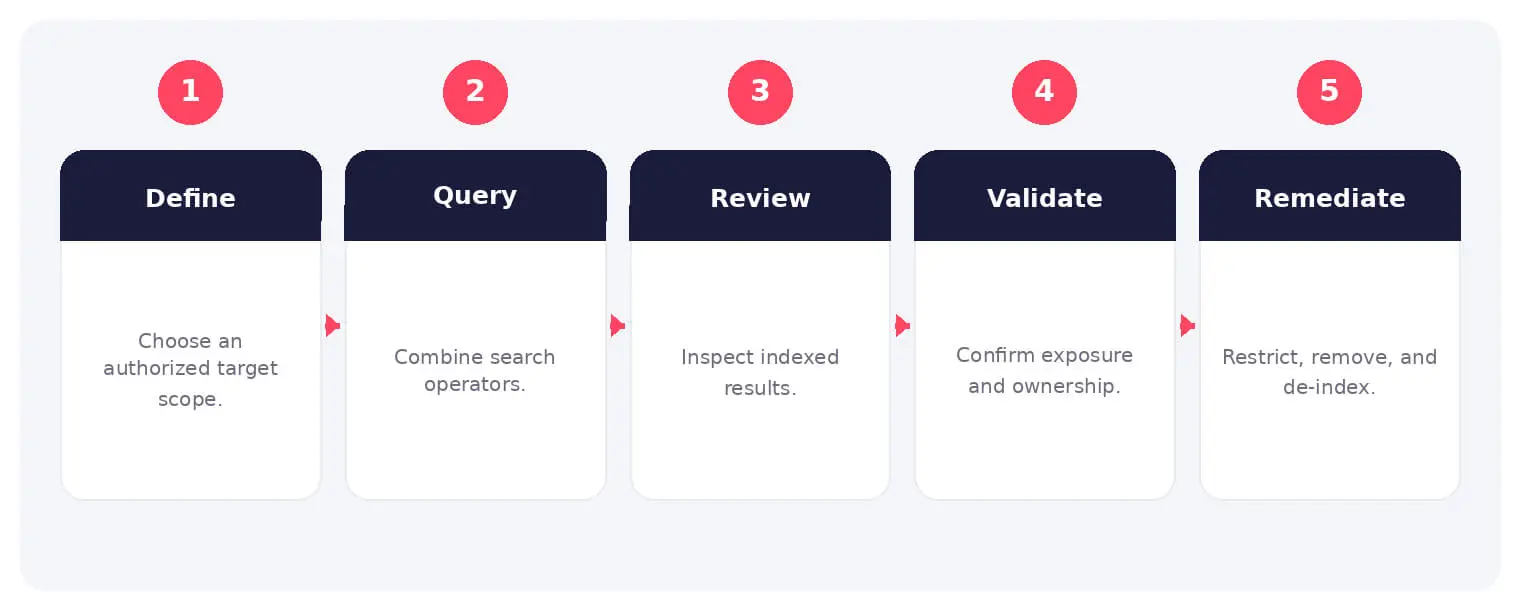
How Google Dorks Works
The sequence above provides a practical operating model. Individual steps can overlap, repeat, or involve different people and services, so each stage should be validated against available evidence.
The technique is legitimate for research, administration, journalism, and authorized security testing. Attackers also use it to locate exposed documents, login pages, directory listings, error messages, credentials, and vulnerable systems. Search visibility is the problem, not the operator itself.
Common Types and Techniques
- site and domain-scoped searches
- filetype searches for documents and backups
- intitle and inurl discovery of interfaces
- Quoted secrets, errors, and sensitive phrases
Security, Privacy, and Business Risks
- Exposure of credentials and internal documents
- Discovery of administration and test interfaces
- Privacy leakage through indexed files
- Faster reconnaissance for phishing or exploitation
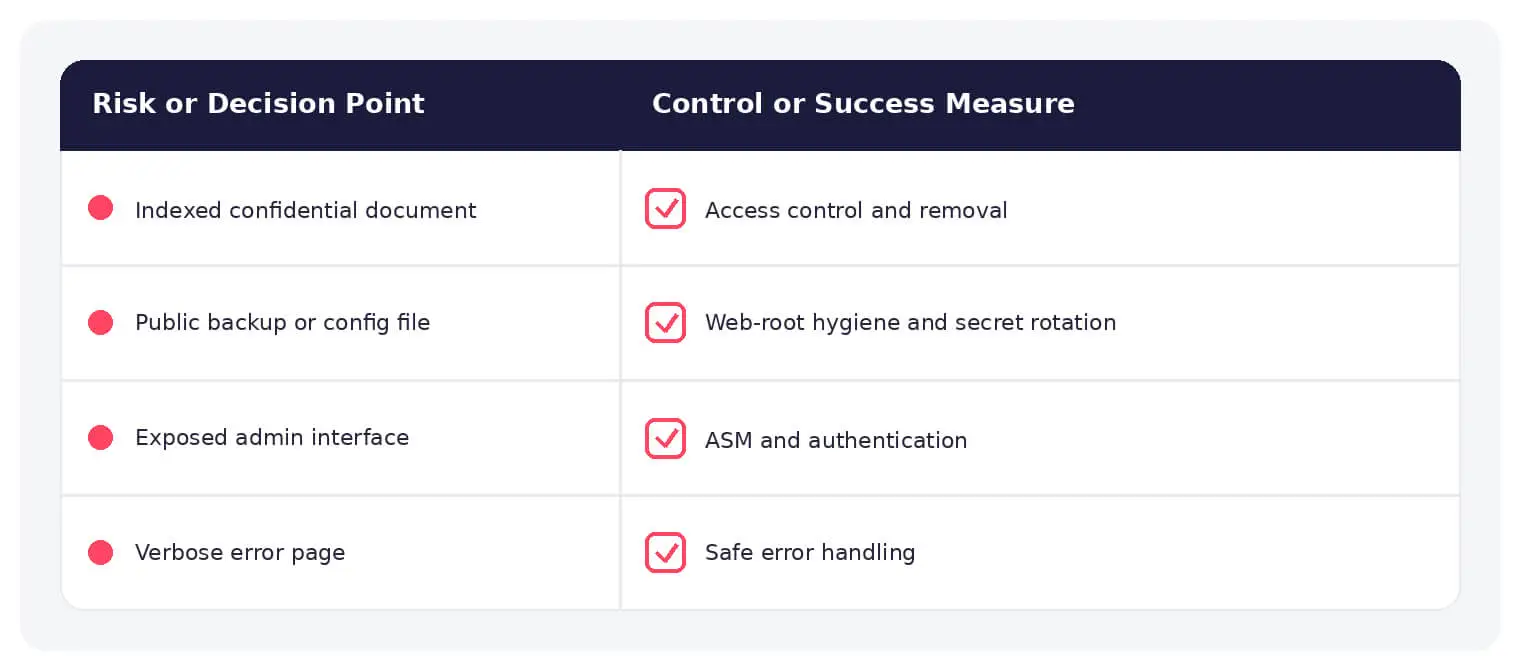
Warning Signs and Validation
Search for organization-owned domains, sensitive file types, known secret formats, directory listings, error pages, cached records, and forgotten subdomains. Use only authorized queries and handle findings securely.
Prevention and Response
Require authentication for sensitive content, remove public files, disable directory listing, prevent secrets in web roots, harden error messages, review robots and indexing controls, request de-indexing after fixing access, and rotate exposed secrets.
How SOCRadar Can Help
SOCRadar combines external intelligence, Dark Web visibility, brand monitoring, attack-surface discovery, and contextual enrichment to help teams identify exposure and investigate activity connected to Google dorking.
Explore SOCRadar Attack Surface Management or request a demo to strengthen external threat detection and response.
Frequently Asked Questions
What Is Google Dorking Used For?
Security researchers use dorking to find exposed files, misconfigured servers, forgotten subdomains, and other indexed content during authorized assessments. Administrators and journalists use the same operators to locate public records or verify what an organization has exposed. The technique itself is neutral; intent and authorization determine whether a given use is legitimate.
What Is the Difference Between Google Dorking and Google Hacking?
They describe the same practice. Google hacking became popular through Johnny Long’s 2004 book and the Google Hacking Database (GHDB), a public catalog of queries for locating vulnerable systems, while Google dorking is the more common label today. The word dorks simply refers to the precise queries themselves.
Which Search Operators Are Most Commonly Used in Google Dorks?
The core operators are site: to restrict results to a domain, filetype: to target formats such as PDF, XLSX, SQL, or BAK, intitle: and inurl: to match page titles and paths, and quoted phrases to search exact strings. Operators combine, so site:example.com filetype:xlsx narrows results to Excel files on one domain. A minus sign excludes terms and helps cut noise from large result sets.
Is Google Dorking Illegal?
Running queries against publicly indexed content is generally lawful in most jurisdictions. Legal problems begin when someone accesses a system without authorization, attempts to log in to an exposed interface, or exploits a discovered flaw, which can violate computer misuse laws and terms of service. Treat any testing of systems you do not own as off-limits without written permission.
Why Is Indexed Content a Security Risk?
Indexing turns overlooked files into discoverable targets. Directory listings, backup archives, spreadsheets with customer records, error pages containing stack traces, and hardcoded credentials can all surface in a single query. Because these queries scale, one forgotten file can become a starting point for account takeover or deeper intrusion.
How Do Attackers Use Google Dorks Against Organizations?
Attackers chain operators to enumerate login pages, admin panels, configuration and environment files such as .env, exposed logs, and cached records for a target. The output feeds phishing, credential stuffing, or direct exploitation, often without sending traffic to the target’s own network. Public dork collections such as the Google Hacking Database make the process fast and repeatable.
How Can I Tell Whether My Organization’s Data Is Exposed to Dorking?
Run authorized, domain-scoped queries against your own domains using sensitive file types, known secret formats, and common paths such as /backup, /admin, and /.env. Look for directory listings, detailed error pages, and forgotten subdomains that still resolve publicly. Automated attack surface discovery helps cover assets that individual teams may not track centrally.
What Should I Do After Finding an Exposed Secret Through a Dork?
Remove public access first, because anything left reachable can be re-crawled. Rotate the exposed credential, check whether other systems share it, and review logs to see whether it was used before discovery. Request cache removal only after access is fixed, so search engines do not index the content again.
Does a robots.txt File Prevent Indexing of Sensitive Pages?
No. robots.txt is a cooperative directive that compliant crawlers usually follow, but it hides nothing and can act as a map by listing restricted paths. Pages linked from elsewhere may still be indexed even when crawling is disallowed. Sensitive content needs authentication and authorization, not crawl directives.
How Do I Remove Indexed Content From Google?
The Search Console Removals tool hides results temporarily while you fix the underlying access problem, and the Remove Outdated Content tool drops cached entries for pages that no longer exist or have changed. Google also accepts removal requests for certain personal data, such as government IDs and financial account numbers. Removal requests expire, so fixing the source is what delivers a lasting result.
What Server Settings Reduce Exposure to Google Dorking?
Disable directory listing, require authentication for anything sensitive, keep backups, database dumps, and configuration files out of web roots, and return generic error messages without stack traces or version details. Restrict staging and admin interfaces with IP allowlists or VPN access. Re-run domain-scoped searches periodically to confirm the fixes held.
Is Google Dorking Related to the Deep Web?
No. The deep web is any content not indexed by standard search engines, including pages behind logins and databases. Dorking works on the opposite side of that line: it targets content that is indexed and publicly retrievable. Material found through dorking is still part of the surface web, just poorly protected.