
What Is a LAN (Local Area Network)?
A Local Area Network (LAN) connects devices within a limited area such as a home, office, school, branch, or data-center segment.
LANs commonly use Ethernet and Wi-Fi to share applications, printers, storage, and internet access. Although geographically limited, a flat or poorly managed LAN can let one compromised device discover and attack many others.
Key Takeaways
- A Local Area Network (LAN) connects devices within a limited area such as a home, office, school, branch, or data-center segment.
- LANs commonly use Ethernet and Wi-Fi to share applications, printers, storage, and internet access. Although geographically limited, a flat or poorly managed LAN can let one compromised device discover and attack many others.
- Unauthorized devices and rogue access points is a primary concern.
- Effective security combines prevention, continuous visibility, ownership, and tested response.
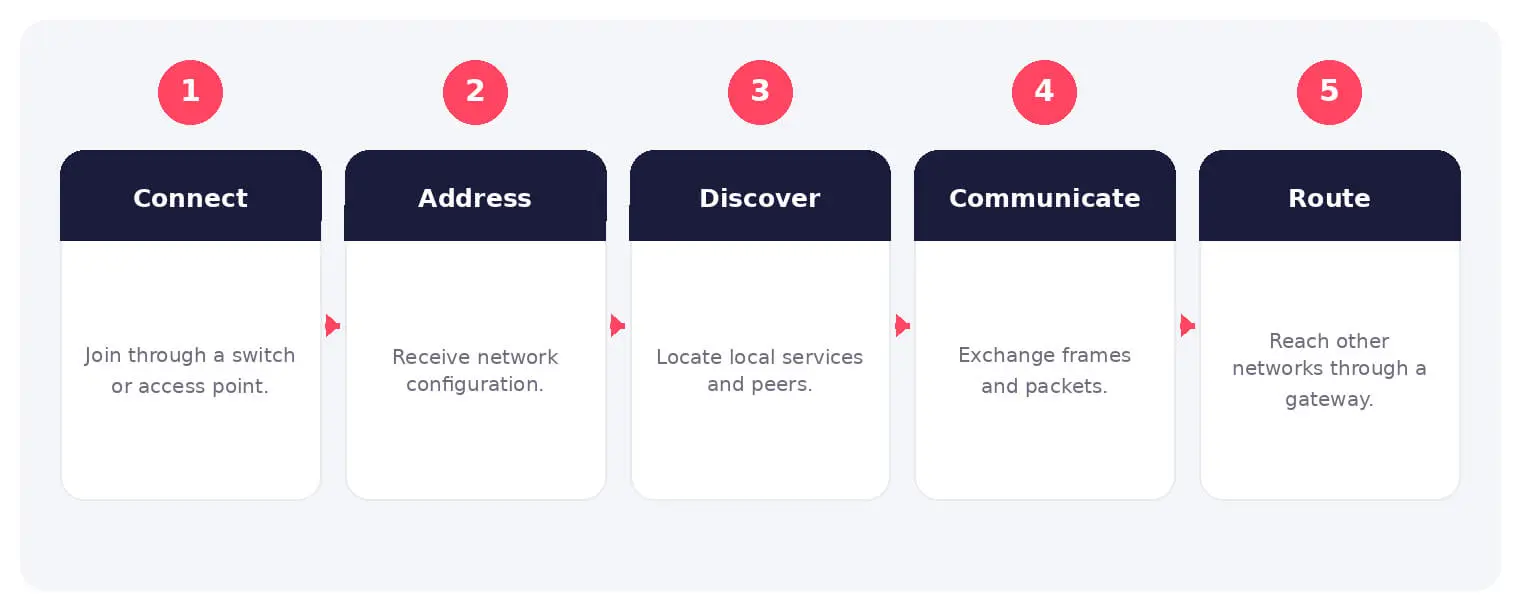
How It Works
The operating flow above turns the concept into observable steps. Exact implementations vary, but each stage needs accountable ownership, trusted inputs, documented policy, and evidence that analysts can use during investigation and review.
LANs commonly use Ethernet and Wi-Fi to share applications, printers, storage, and internet access. Although geographically limited, a flat or poorly managed LAN can let one compromised device discover and attack many others.
Common Types and Capabilities
- Wired Ethernet LANs
- Wireless LANs
- Virtual LANs and segmentation
- Campus and data-center LANs
Security and Business Risks
- Unauthorized devices and rogue access points
- Lateral movement on flat networks
- ARP, DHCP, and name-resolution attacks
- Eavesdropping and service disruption
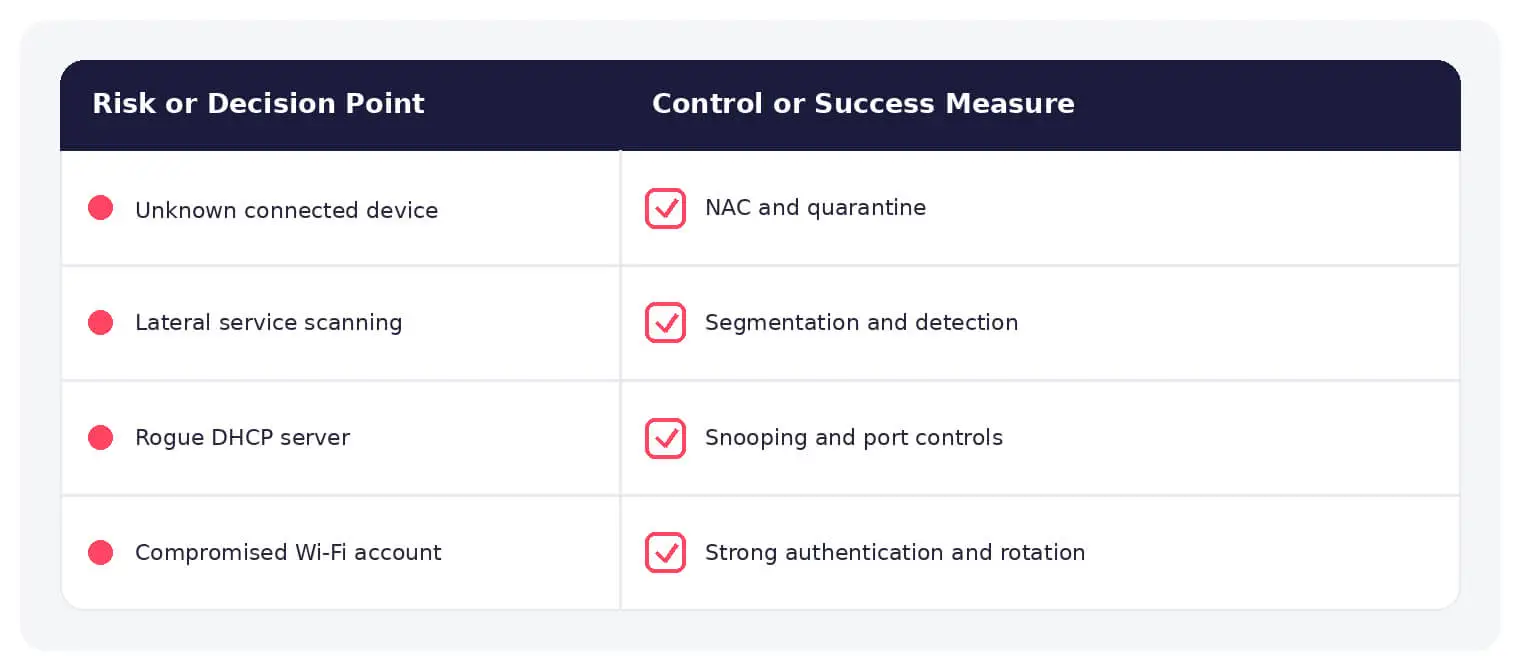
Warning Signs and Detection
Monitor new MAC addresses, rogue DHCP responses, ARP changes, unusual east-west scans, unexpected VLAN access, spanning-tree events, repeated authentication failures, broadcast spikes, insecure protocols, and unmanaged wireless devices.
Best Practices
Use network access control, secure Wi-Fi, VLAN segmentation, least-access rules, switch-port protections, trusted DHCP, encrypted management, asset inventory, traffic monitoring, and resilient switching.
How SOCRadar Can Help
SOCRadar adds external visibility, threat intelligence, exposure context, and continuous monitoring to help teams validate and prioritize risks related to local area network. This context complements internal endpoint, identity, and network controls.
Explore SOCRadar Attack Surface Management or request a demo to strengthen threat-informed prevention and response.
Frequently Asked Questions
What Is a Local Area Network (LAN)?
A Local Area Network (LAN) connects computers, printers, servers, and other devices within a limited physical area such as a home, office, school, branch, or a single data-center segment. Most LANs rely on Ethernet cabling and Wi-Fi to share applications, storage, printers, and internet access. Because devices often share a broadcast domain, they can frequently reach one another directly.
How Is a LAN Different From a WAN?
A LAN covers a small geographic footprint, typically a single building or campus, while a Wide Area Network (WAN) links sites across cities or countries, usually over leased lines or the internet. Organizations generally own and control their own LAN hardware, while WAN links often depend on service providers. Many enterprise networks are effectively a collection of LANs joined by WAN connections.
Is a Wireless LAN (WLAN) Still a LAN?
Yes. A WLAN is simply a LAN segment delivered over Wi-Fi instead of Ethernet cables, and it connects back to the same wired infrastructure. Wireless segments deserve extra attention because radio signals can extend beyond the physical premises, which makes strong WPA2 or WPA3 encryption, 802.1X authentication where possible, and rogue access point detection especially important.
Why Is a Flat LAN Risky for Lateral Movement?
On a flat LAN, every device can usually communicate with every other device at Layer 2. If an attacker compromises one endpoint, they can scan neighboring hosts, harvest credentials, and reach file shares or management interfaces without crossing a firewall. Segmentation with VLANs and enforced access rules limits this east-west reach.
Which Protocols Do Attackers Abuse on LANs?
Attackers commonly target ARP, DHCP, and name-resolution services because these protocols were designed without strong authentication. ARP spoofing can redirect traffic through an attacker’s machine, while a rogue DHCP server can hand out a malicious gateway or DNS server. Legacy name-resolution protocols such as LLMNR and NetBIOS can also expose hashed credentials to interception.
How Can You Spot a Rogue or Unauthorized Device on Your LAN?
Useful signals include unfamiliar MAC addresses appearing on switch ports, unrecognized wireless clients, duplicate IP or ARP conflicts, and unexpected DHCP offers on the wire. Switch logs showing port flapping or spanning-tree topology changes can also indicate unauthorized equipment. Reconciling these events against an asset inventory helps distinguish new legitimate hardware from intrusions.
What Should You Do First When You Find a Suspicious Device on the LAN?
Isolate the device by shutting down or quarantining its switch port, or by revoking its wireless authorization, before deeper investigation. Then review the port’s traffic history, identify the VLAN and IP address it used, and compare its MAC address and fingerprint against your asset inventory. Check neighboring systems for scanning or credential theft, since the suspicious device may not be the only one affected.
How Does VLAN Segmentation Improve LAN Security?
VLANs split one physical switch infrastructure into separate logical broadcast domains, so traffic between segments must pass through a router or firewall where policy can be enforced. Separating user workstations, servers, printers, IP cameras, and management interfaces reduces the blast radius of a single compromised device. Inter-VLAN rules should follow least-access principles rather than permitting all routed traffic by default.
What Is Network Access Control (NAC) and Why Does It Matter for LANs?
NAC verifies the identity and security posture of a device before granting network access, commonly using 802.1X authentication on switch ports and wireless networks. It can deny unknown devices or place them in a restricted quarantine VLAN. Combined with switch features such as port security and DHCP snooping, NAC significantly reduces the chance that unmanaged hardware can reach sensitive segments.
Is an Internal LAN Safe From Attack Because It Is Not Internet-Facing?
No. Attackers who phish an employee, hijack a remote-access session, or connect from inside the building operate directly on the LAN, and many LAN protocols assume trusted neighbors. Malware on laptops, unmanaged IoT devices, and exposed management interfaces create risk without any external exposure. Internal monitoring and segmentation remain necessary even on networks with strong perimeter defenses.

Oct 27, 2026
Australia’s Annual Cyber Threat Report 2025-26 Shows Cyber Incidents Up 20%
Australia’s cyber security authority responded to 1,524 cyber security incidents in the 2025-26 financial year, a 20% increase from the previous year…

Oct 27, 2026
PHP2Shell Weaponized After Japanese Real Estate Extortion
An exposed server ties an extortion wave on about 20 Japanese property sites to an operator who later weaponized PHP2Shell (CVE-2026-109618, CVE-2026-109619)…

Oct 27, 2026
Wasmtime Sandbox Escape Flaws Patched in Cranelift
Two critical Wasmtime sandbox escape flaws, CVE-2026-115889 and CVE-2026-115893, let a crafted WebAssembly (Wasm) module push the Cranelift compiler into generating unsafe…
Intelligence in your inbox every Thursday.
Join 30,000+ security professionals reading SOCRadar research.
Subscribe