What Is XHR (XMLHttpRequest)? How It Works and Security Risks
XHR, short for XMLHttpRequest, is a browser API that lets JavaScript send HTTP requests to a server and handle the response without reloading the page. It is the technology that made AJAX (Asynchronous JavaScript and XML) possible and turned static websites into the dynamic web applications used today.
Despite the name, XHR is not limited to XML. It handles JSON, plain text, HTML, binary data, and form data. Every modern browser supports it, and while the newer Fetch API is now preferred for new code, XHR remains widely used in libraries, legacy applications, and, notably, malicious scripts.
Key Takeaways
XHR is a JavaScript API for sending HTTP requests and receiving responses in the background
It powers dynamic page updates, form submissions, and API calls without full page reloads
The same-origin policy and CORS control which servers XHR can read responses from
Attackers use XHR in XSS payloads, e-skimmers, and data exfiltration, and abuse misconfigured CORS to steal data
Security teams can inspect XHR traffic in browser developer tools and proxies to find exposed APIs and malicious requests
XHR Definition
XMLHttpRequest is a JavaScript object, defined in a WHATWG living standard, that provides methods to open a connection, send a request, and process the response. The concept originated in Microsoft’s Internet Explorer 5 around 1999 as an ActiveX component and was later adopted by other browsers as a native object.
In browser developer tools, the Network panel groups these requests under the “Fetch/XHR” filter, which is why the term XHR is often used for any background API call a page makes.
How Does XMLHttpRequest Work?
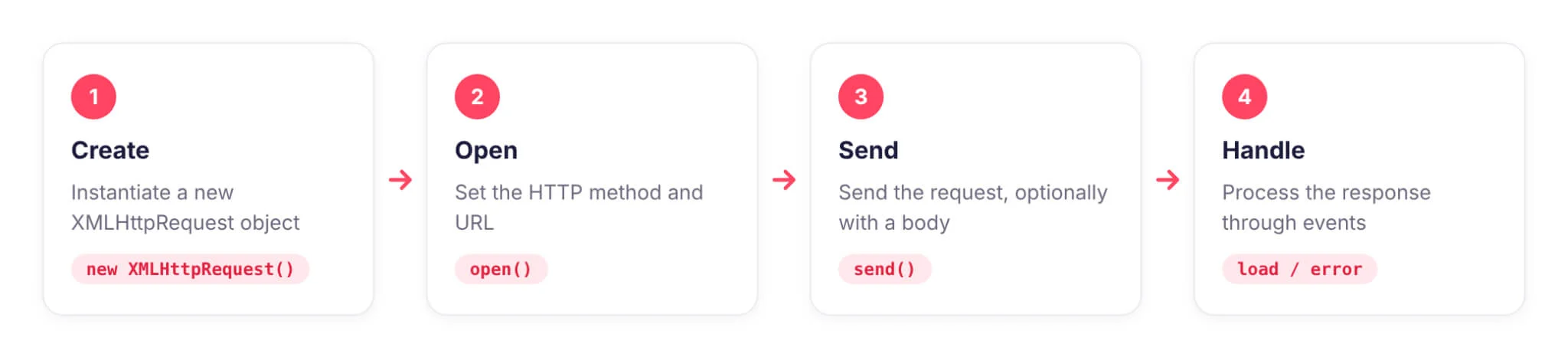
A basic XHR request follows four steps:
Create: instantiate a new XMLHttpRequest object
Open: call open() with the HTTP method and URL
Send: call send(), optionally with a request body
Handle: respond to events such as load, error, or readystatechange
XHR supports asynchronous and synchronous modes. Synchronous requests on the main thread are deprecated because they freeze the page until the response arrives.
XHR vs Fetch API
Feature
XMLHttpRequest
Fetch API
Syntax
Event and callback based
Promise based, works with async/await
Upload progress events
Supported
Not supported
Request cancellation
abort()
AbortController
Streaming responses
Limited
Supported through ReadableStream
Typical use today
Legacy code, upload progress, older libraries
Most new code
Both APIs follow the same security model: the same-origin policy and CORS.
XHR and the Same-Origin Policy
By default, the browser only lets a script read responses from the same origin, which means the same scheme, host, and port as the page. Cross-origin requests are governed by Cross-Origin Resource Sharing (CORS):
Simple requests: sent directly, but the browser only exposes the response if the server returns a matching Access-Control-Allow-Origin header
Preflighted requests: requests with custom headers or methods such as PUT and DELETE trigger an OPTIONS preflight that the server must approve
Credentialed requests: setting withCredentials = true sends cookies cross-origin, and the server must explicitly allow credentials for the specific origin
XHR Security Risks
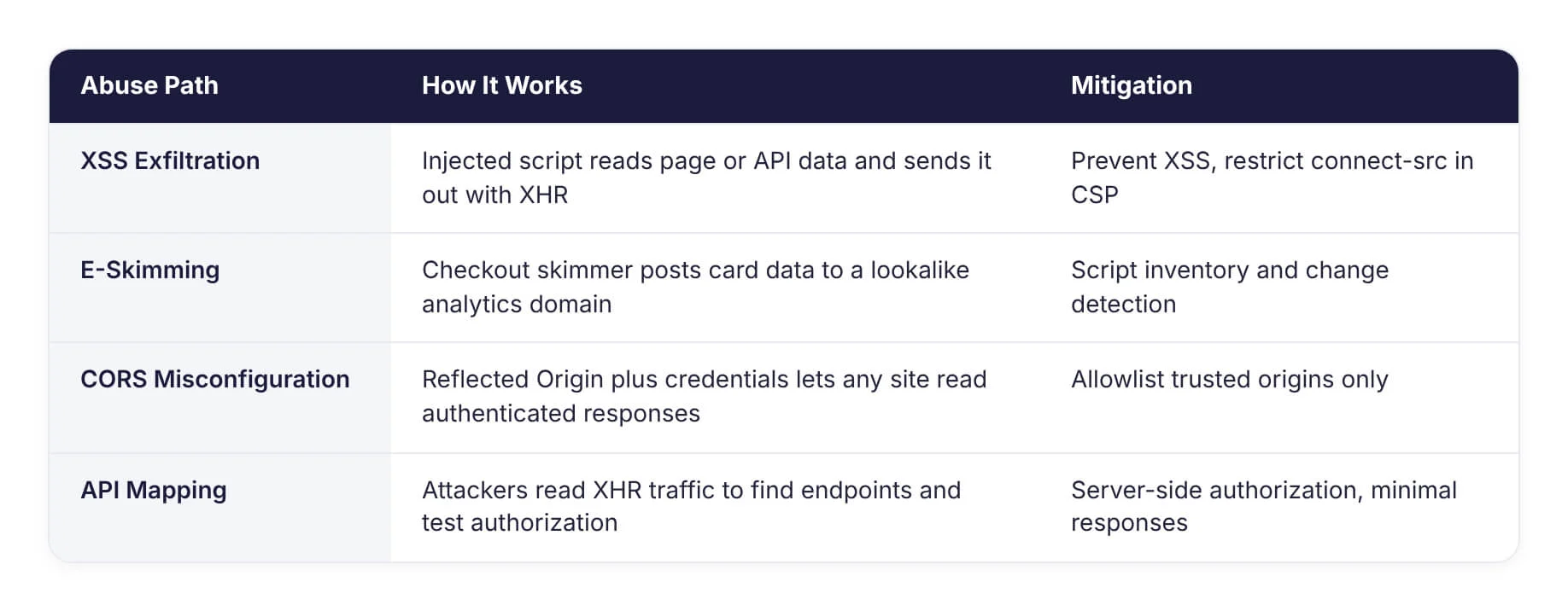
How attackers abuse XHR and the mitigations for each path
Data Exfiltration Through XSS
When an attacker gains script execution through cross-site scripting, XHR provides a ready-made channel to read data from the page or same-origin APIs and send it to an attacker-controlled server. Because these requests look like normal application traffic, they can blend in.
E-Skimming
Payment skimmers injected into checkout pages capture card data and send it out in the background, often with XHR or Fetch, to domains disguised as analytics or CDN services. MITRE ATT&CK tracks this as Exfiltration Over C2 Channel (T1041).
CORS Misconfiguration
Servers that reflect any Origin header back in Access-Control-Allow-Origin while also allowing credentials let any website make authenticated XHR requests on behalf of a logged-in user and read the response. This can expose personal data, API keys, and session information.
Cross-Site Request Forgery (CSRF)
XHR on its own cannot make cross-origin requests with custom headers without a CORS preflight, which is why many applications use a custom header as CSRF protection. Weak CORS policies or endpoints that accept state-changing GET requests can undo that protection.
Exposed and Undocumented APIs
Every XHR call a front end makes reveals an API endpoint, its parameters, and its response format. Attackers browse applications with interception proxies to map these endpoints, then test them for broken authorization, excessive data exposure, and missing rate limits.
Sensitive Data in Responses
APIs often return more data than the interface displays, such as internal IDs, email addresses, or role flags. Anyone can read the full XHR response in developer tools, so hidden fields are not protected fields.
XHR Security Best Practices
Strict CORS: allowlist specific trusted origins and never combine wildcard or reflected origins with credentials
Server-side authorization: enforce access control on every API endpoint regardless of how the front end calls it
Minimal responses: return only the data the client needs
CSRF protection: use SameSite cookies, anti-CSRF tokens, or custom headers verified by the server
Content Security Policy: restrict connect-src so scripts can only send XHR and Fetch requests to approved domains, which limits exfiltration
Input validation: validate and sanitize all data received through API calls
Monitoring: watch for client-side requests to unknown domains, especially on login and payment pages
How Can SOCRadar Help?
SOCRadar Attack Surface Management discovers internet-facing web applications and APIs, including forgotten hosts that may expose unprotected endpoints. Cyber Threat Intelligence tracks e-skimming infrastructure and exfiltration domains, and Dark Web Monitoring detects stolen data and API credentials that leak after client-side compromises.
Frequently Asked Questions
What Does XHR Stand For?
XHR stands for XMLHttpRequest, a browser API that allows JavaScript to send HTTP requests and receive responses without reloading the page.
What Is an XHR Request?
An XHR request is a background HTTP request made by JavaScript using the XMLHttpRequest object. Browser developer tools often use “XHR” to label any such background API call.
Is XMLHttpRequest Deprecated?
No. XMLHttpRequest is still part of the web platform and supported by all major browsers. Only synchronous XHR on the main thread is deprecated. The Fetch API is recommended for most new code.
What Is the Difference Between XHR and AJAX?
AJAX is a technique for updating parts of a web page asynchronously. XHR is the browser API that originally made AJAX possible. Today AJAX can also be implemented with the Fetch API.
Can XHR Make Cross-Origin Requests?
Yes, but the browser only exposes the response if the target server allows it through CORS headers. Requests with custom headers or methods require a successful preflight.
How Do Attackers Abuse XHR?
Attackers use XHR in injected scripts to steal data and send it to their servers, exploit misconfigured CORS to read authenticated responses, and analyze XHR traffic to find vulnerable API endpoints.
How Can I See XHR Requests in My Browser?
Open the browser’s developer tools, go to the Network panel, and select the Fetch/XHR filter. Each request shows its URL, headers, payload, and response.
Is XHR Secure?
XHR is as secure as the application using it. Risks come from weak CORS policies, missing server-side authorization, excessive data in responses, and injected scripts that use XHR for exfiltration.