Mar 10, 2026
Jan 31, 2026
5 Mins Read
Sep 13, 2026
Table Of Content
Related Articles
SMS Bombing
Threat Actors
Jan 08, 2026
Dark Web Monitoring
Feb 19, 2026
Ransomware
Jan 31, 2026
OSINT Framework
Apr 17, 2026

What Is a Web Application Firewall (WAF)?
A Web Application Firewall (WAF) inspects HTTP and HTTPS traffic to protect web applications and APIs from malicious requests and abusive behavior.
A WAF can block known attack patterns, enforce request limits, validate protocol behavior, and provide virtual patching. It cannot correct insecure code, broken authorization, business-logic abuse, or every attack that resembles legitimate application use.
Key Takeaways
- A Web Application Firewall (WAF) inspects HTTP and HTTPS traffic to protect web applications and APIs from malicious requests and abusive behavior.
- A WAF can block known attack patterns, enforce request limits, validate protocol behavior, and provide virtual patching. It cannot correct insecure code, broken authorization, business-logic abuse, or every attack that resembles legitimate application use.
- SQL injection and cross-site scripting is a primary concern.
- Effective security combines prevention, continuous visibility, accountable ownership, and tested response.
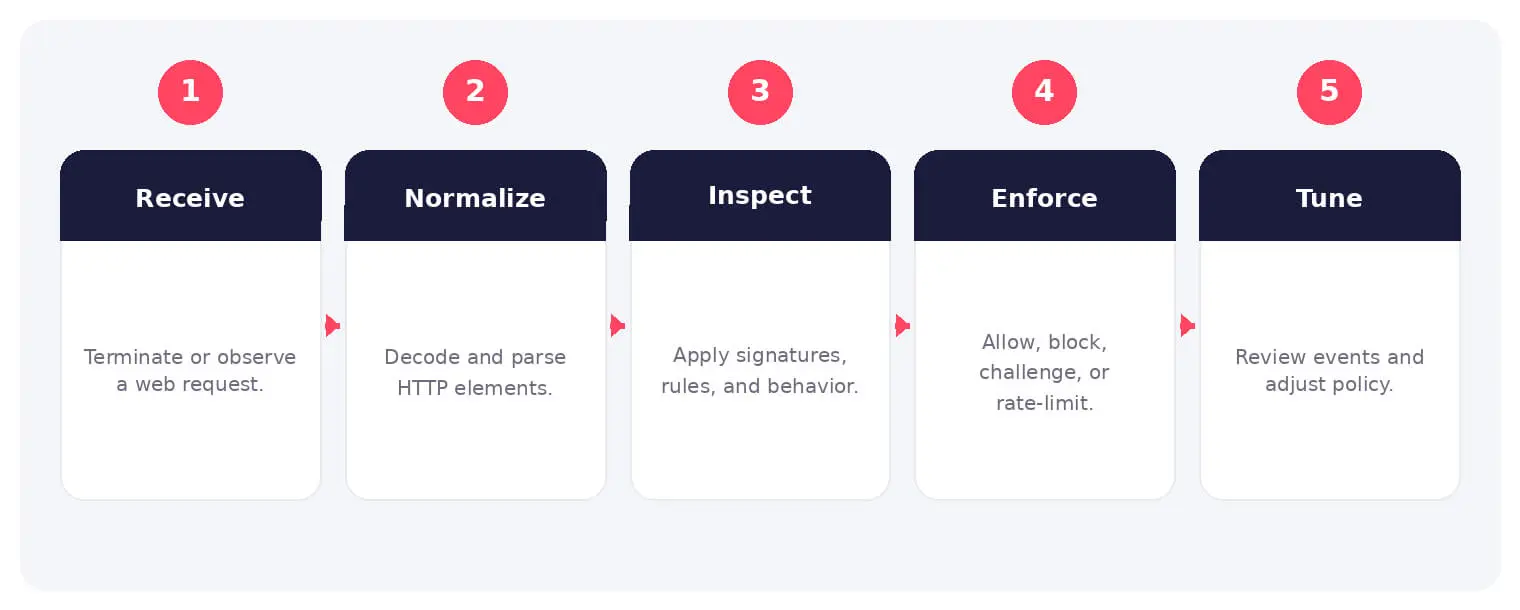
How It Works
The operating flow above turns the concept into observable steps. Exact implementations vary, but each stage needs accountable ownership, trusted inputs, documented policy, and evidence that analysts can use during investigation and review.
A WAF can block known attack patterns, enforce request limits, validate protocol behavior, and provide virtual patching. It cannot correct insecure code, broken authorization, business-logic abuse, or every attack that resembles legitimate application use.
Common Types and Capabilities
- Network-based and host-based WAFs
- Cloud-delivered WAF services
- Positive and negative security models
- API protection and bot management
Security and Business Risks
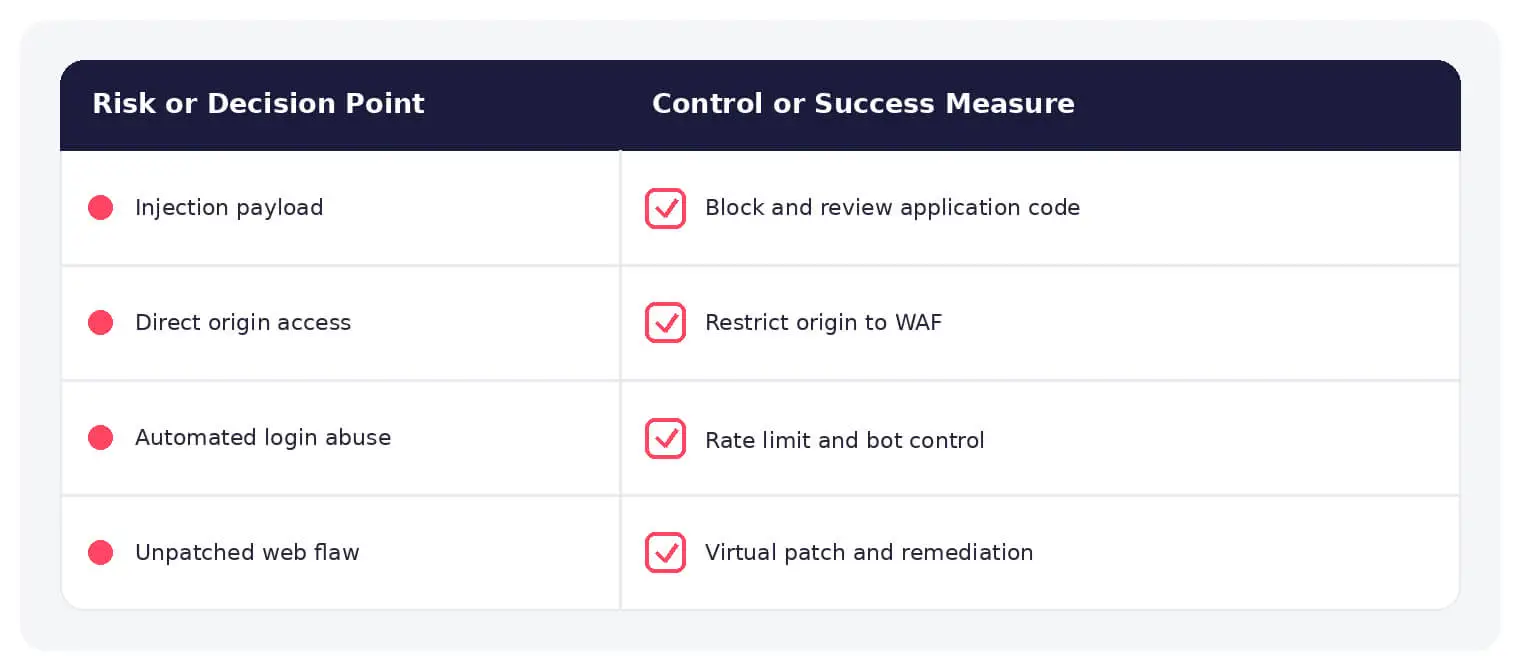
- SQL injection and cross-site scripting
- Exploit attempts against unpatched applications
- False positives that block legitimate users
- Bypass through alternate hosts or direct origins
Warning Signs and Detection
Monitor repeated rule matches, unusual methods, encoded payloads, automated enumeration, abnormal request rates, origin access, new hostnames, disabled rules, policy changes, authentication abuse, and application errors after requests.
Best Practices
Place every public application behind protection, hide direct origins, tune in monitor mode, use rate limits, validate APIs, patch root causes, protect administration, integrate application context, and test rules before enforcement.
How SOCRadar Can Help
SOCRadar adds external visibility, threat intelligence, exposure context, and continuous monitoring to help teams validate and prioritize risks related to web application firewall. This context complements internal cloud, network, identity, and application controls.
Explore SOCRadar Attack Surface Management or request a demo to strengthen threat-informed prevention and response.
Frequently Asked Questions
What Does a Web Application Firewall (WAF) Do?
A Web Application Firewall (WAF) inspects HTTP and HTTPS traffic directed at web applications and APIs, then blocks or flags requests that match malicious patterns or abusive behavior. It acts as a filtering layer between clients and the application, enforcing rules for known attacks, request limits, and protocol behavior.
How Is a WAF Different From a Traditional Network Firewall?
A network firewall filters traffic by IP address, port, and protocol, while a WAF evaluates the content of HTTP requests, including parameters, headers, and payloads. The two are complementary: one controls where traffic can travel, and the other judges whether application-level requests are malicious.
Which Attacks Does a WAF Help Protect Against?
WAFs are commonly tuned to detect and block SQL injection, cross-site scripting (XSS), and other injection or protocol abuse patterns found in the OWASP Top 10. They can also enforce rate limits against brute-force and enumeration attempts. Actual coverage depends on rule quality and tuning, so a WAF is one control layer rather than a complete defense.
What Are Positive and Negative Security Models?
A negative security model blocks requests that match known malicious signatures and allows everything else, which is easier to deploy but weaker against novel attacks. A positive security model allows only requests that fit a defined profile of expected behavior, which reduces unknown attacks but requires careful tuning to avoid blocking legitimate users. Many WAFs combine both approaches.
What Is Virtual Patching?
Virtual patching is a WAF capability that blocks attempts to exploit a known vulnerability before the application code is fixed. It gives teams time to remediate, but the underlying flaw remains until the real fix ships, so virtual rules should be tracked and retired once a patch is deployed.
Can a WAF Fix Insecure Application Code?
No. A WAF can block exploit attempts and buy remediation time, but it cannot correct insecure code, broken authorization, or business-logic flaws. Patching the root cause in the application is still necessary.
How Can Attackers Bypass a WAF?
Common bypass techniques include encoded or obfuscated payloads, unusual HTTP methods, request smuggling, and fragmented input that evades signatures. Requests that reach the application through alternate hostnames or direct origin access can skip WAF inspection altogether. Restricting origin ingress and keeping rules current shrinks these paths.
What Warning Signs Suggest a WAF Is Being Targeted or Misconfigured?
Repeated rule matches from the same source, spikes in encoded payloads, automated enumeration of URLs or parameters, and abnormal request rates often indicate active attack attempts. Application errors following blocked requests, disabled rules, or unexpected policy changes point to configuration or bypass problems that need review.
Should a WAF Run in Monitor Mode Before Blocking Traffic?
Running in monitor mode first is a widely recommended practice. It shows which legitimate requests the rules would block, allowing teams to tune thresholds and reduce false positives before switching to enforcement.
Why Should Direct Origin Access Be Restricted?
If attackers can reach the origin servers directly, they can reach the application without passing through WAF inspection. Restricting ingress to the WAF or CDN provider’s IP ranges and validating hostnames helps keep application traffic flowing through the filtering layer.
Do False Positives Create Business Risk?
Yes. Overly aggressive rules can block legitimate customers, break login or checkout flows, and increase support workload. Staged enforcement and continuous tuning help balance attack prevention with application availability.