What Is a Network Firewall?
A network firewall filters traffic between networks or security zones according to rules that define permitted sources, destinations, protocols, applications, and sessions.
Network firewalls protect boundaries such as internet edges, data centers, branches, cloud networks, and internal segments. Their effectiveness depends on placement, policy quality, inspection depth, secure administration, and continuous review.
Key Takeaways
- A network firewall filters traffic between networks or security zones according to rules that define permitted sources, destinations, protocols, applications, and sessions.
- Network firewalls protect boundaries such as internet edges, data centers, branches, cloud networks, and internal segments. Their effectiveness depends on placement, policy quality, inspection depth, secure administration, and continuous review.
- Open services and overly broad rules is a primary concern.
- Effective security combines prevention, continuous visibility, ownership, and tested response.
How It Works
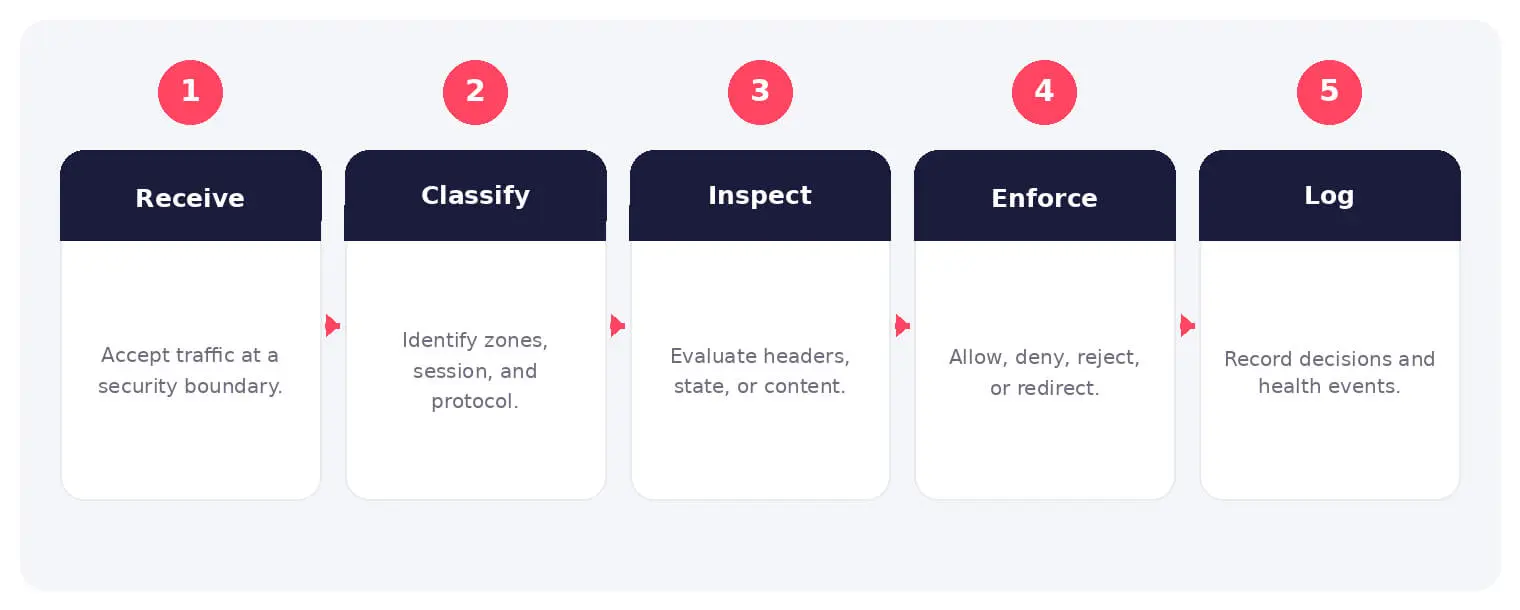
The operating flow above turns the concept into observable steps. Exact implementations vary, but each stage needs accountable ownership, trusted inputs, documented policy, and evidence that analysts can use during investigation and review.
Network firewalls protect boundaries such as internet edges, data centers, branches, cloud networks, and internal segments. Their effectiveness depends on placement, policy quality, inspection depth, secure administration, and continuous review.
Common Types and Capabilities
- Packet-filtering and stateful firewalls
- Next-generation network firewalls
- Virtual and cloud firewalls
- Internal segmentation firewalls
Security and Business Risks
- Open services and overly broad rules
- Uninspected encrypted traffic
- Policy drift and stale exceptions
- Exposed or vulnerable management planes
Warning Signs and Detection
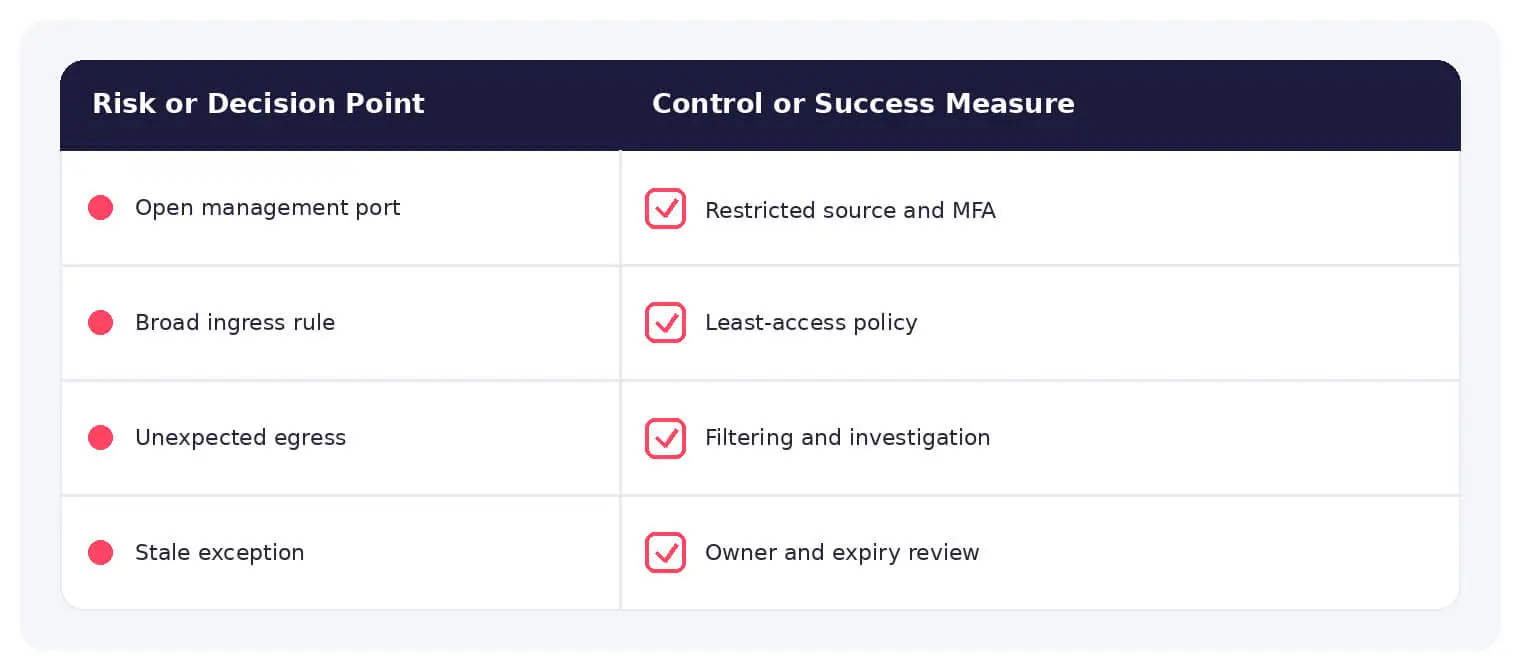
Review any-to-any rules, public administrative ports, unusual outbound connections, repeated denies, asymmetric routing, inspection failures, policy changes, rule shadowing, configuration drift, and appliances approaching capacity.
Best Practices
Adopt default-deny where practical, segment trust zones, restrict management, use change control, inspect egress, retain useful logs, patch promptly, remove stale rules, and test failover.
How SOCRadar Can Help
SOCRadar adds external visibility, threat intelligence, exposure context, and continuous monitoring to help teams validate and prioritize risks related to network firewall. This context complements internal network, endpoint, identity, and vulnerability controls.
Explore SOCRadar Attack Surface Management or request a demo to strengthen threat-informed prevention and response.
Frequently Asked Questions
What Is a Network Firewall?
A network firewall filters traffic between networks or security zones, enforcing rules that define permitted sources, destinations, protocols, applications, and sessions. Common placement points include internet edges, data centers, branch connections, cloud networks, and boundaries between internal segments.
Why Are Overly Broad Firewall Rules a Security Risk?
Broad rules, such as any-to-any allowances or wide port ranges, grant far more access than a service requires, so a single compromised host can reach systems that should be isolated from it. Open services that linger after a project ends extend the attack surface and frequently go unnoticed until an audit or an incident reveals them.
What Does a Next-Generation Firewall Add Over Traditional Filtering?
A stateful firewall tracks active sessions and permits return traffic for established connections, improving on packet filtering that judges each packet in isolation. A next-generation firewall builds on this with application awareness, user and identity context, and integrated intrusion prevention.
Can a Network Firewall Inspect Encrypted Traffic?
Yes, when TLS inspection is enabled, the firewall decrypts sessions for content analysis and re-encrypts them toward the destination. Without that capability, evaluation is limited to metadata such as IP addresses, ports, and certificate details, which is why uninspected encrypted traffic is treated as a distinct risk.
What Warning Signs Suggest Firewall Policy Problems?
Recurring indicators include:
- Any-to-any rules and unusually wide port ranges
- Administrative interfaces reachable from public networks
- Rule shadowing, where broad entries override specific restrictions
- Configuration drift from the approved baseline
- Inspection failures and appliances approaching capacity
Repeated denies on paths that should work and unusual outbound connections also warrant investigation.
How Should Teams Respond to a Suspected Firewall Misconfiguration?
Identify the specific rule, interface, or change involved, then determine what traffic it permitted and for how long before correcting it through change control. Review historical logs for signs that the exposure was used, verify the fix, and document the cause so the same gap does not reopen.
Which Practices Help Harden a Network Firewall Deployment?
Adopt a default-deny posture where practical, segment trust zones, and restrict access to the management plane with strong authentication and dedicated networks. Complement these with egress inspection, prompt patching, retained logs, and periodic failover testing to confirm the firewall holds up under stress.
How Can Teams Reduce Firewall Policy Drift?
Require documented change control for every rule edit, schedule recurring reviews of the rule base, and have rule owners recertify that each exception still supports a business need. Monitoring that compares running configurations against the approved baseline catches unauthorized or forgotten changes early.
How Does a Network Firewall Support Internal Segmentation?
Firewalls enforce the boundaries between trust zones, such as separating user networks from server tiers or production systems from management networks. Internal segmentation firewalls limit lateral movement so that a compromise in one zone cannot freely reach assets in another.
What Is the Difference Between a Network Firewall and a Web Application Firewall?
A network firewall filters traffic between networks or zones and enforces policy across many protocols, while a web application firewall focuses on HTTP and HTTPS requests to specific applications, looking for threats such as injection and cross-site scripting. The two are complementary and often deployed together rather than interchangeable.
Oct 27, 2026
September 2026: FBI Breach, Clop Hijack & IDScan Leak
The major cyber attacks of September 2026 hit federal law enforcement, a rival cybercrime gang, and the companies that verify identities. ShinyHunters…

Oct 27, 2026
Australia’s Annual Cyber Threat Report 2025-26 Shows Cyber Incidents Up 20%
Australia’s cyber security authority responded to 1,524 cyber security incidents in the 2025-26 financial year, a 20% increase from the previous year…

Oct 27, 2026
PHP2Shell Weaponized After Japanese Real Estate Extortion
An exposed server ties an extortion wave on about 20 Japanese property sites to an operator who later weaponized PHP2Shell (CVE-2026-109618, CVE-2026-109619)…
Intelligence in your inbox every Thursday.
Join 30,000+ security professionals reading SOCRadar research.
Subscribe