What Is a Virtual Firewall?
A virtual firewall is a software-based firewall deployed as a virtual appliance, cloud service, or distributed control to protect virtual networks and workloads.
It can enforce north-south traffic at network boundaries and east-west traffic between workloads. Virtual deployment improves flexibility, but coverage depends on routing, orchestration, hypervisor or cloud integration, resource allocation, and policy consistency.
Key Takeaways
- A virtual firewall is a software-based firewall deployed as a virtual appliance, cloud service, or distributed control to protect virtual networks and workloads.
- It can enforce north-south traffic at network boundaries and east-west traffic between workloads. Virtual deployment improves flexibility, but coverage depends on routing, orchestration, hypervisor or cloud integration, resource allocation, and policy consistency.
- Traffic bypass due to routing gaps is a primary concern.
- Effective security combines prevention, continuous visibility, accountable ownership, and tested response.
How It Works
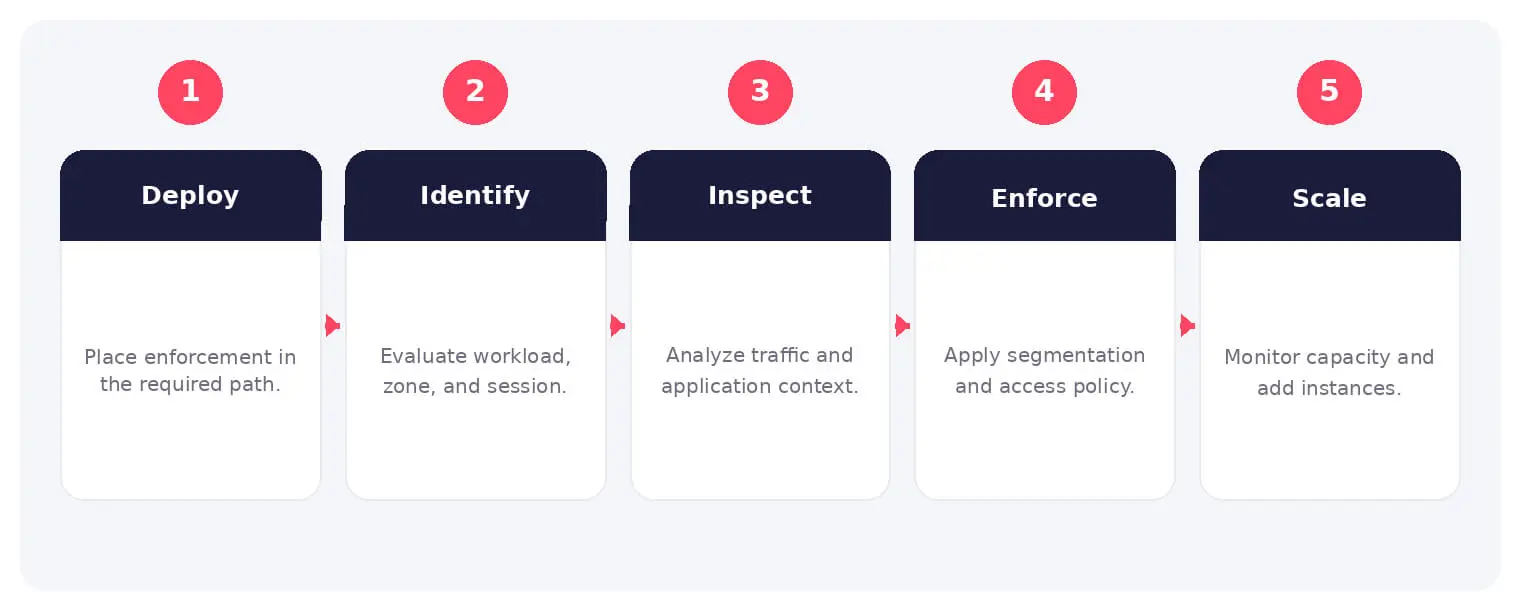
The operating flow above turns the concept into observable steps. Exact implementations vary, but each stage needs accountable ownership, trusted inputs, documented policy, and evidence that analysts can use during investigation and review.
It can enforce north-south traffic at network boundaries and east-west traffic between workloads. Virtual deployment improves flexibility, but coverage depends on routing, orchestration, hypervisor or cloud integration, resource allocation, and policy consistency.
Common Types and Capabilities
- Virtual firewall appliances
- Cloud-native network firewalls
- Distributed microsegmentation controls
- Container and workload firewalls
Security and Business Risks
- Traffic bypass due to routing gaps
- Policy drift across dynamic workloads
- Resource contention and scaling failure
- Compromised management or templates
Warning Signs and Detection
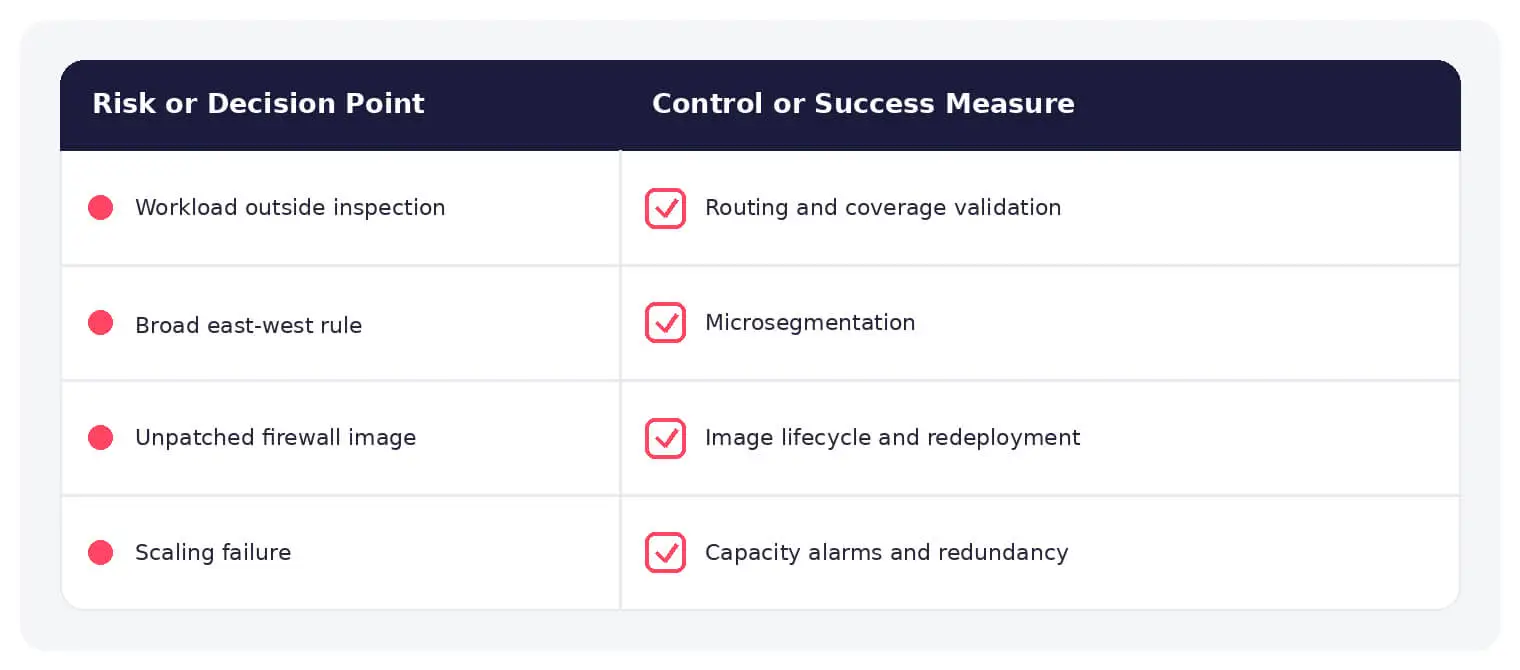
Monitor new interfaces and routes, workloads outside policy, broad security rules, unexpected east-west communication, orchestration changes, capacity pressure, failed health checks, disabled logging, and administrative actions.
Best Practices
Automate deployment from approved templates, force traffic through enforcement, integrate workload identity, segment by application, protect management, patch images, scale redundantly, log decisions, and test failover.
How SOCRadar Can Help
SOCRadar adds external visibility, threat intelligence, exposure context, and continuous monitoring to help teams validate and prioritize risks related to virtual firewall. This context complements internal cloud, network, identity, and application controls.
Explore SOCRadar Attack Surface Management or request a demo to strengthen threat-informed prevention and response.
Frequently Asked Questions
What Is a Virtual Firewall?
A virtual firewall is a software-based firewall deployed as a virtual appliance, a cloud-native service, or a distributed control to protect virtual networks and workloads. Instead of running on dedicated hardware, it operates on hypervisors or within cloud platforms and can enforce rules at network boundaries or between individual workloads.
How Is a Virtual Firewall Different from a Traditional Hardware Firewall?
A hardware firewall is a physical appliance placed at the network perimeter, while a virtual firewall is software that runs on virtualization or cloud infrastructure. Virtual firewalls can move with workloads, enforce policy closer to the workload, and scale as the environment grows. Their coverage, however, depends on routing, orchestration, and consistent policy application.
What Is the Difference Between North-South and East-West Traffic Filtering?
North-south traffic flows between external networks and the virtual environment, such as internet traffic entering a cloud network. East-west traffic flows between workloads inside the same environment, such as communication between virtual machines or containers. Virtual firewalls can enforce both, with east-west controls often implemented as microsegmentation.
What Is the Biggest Security Risk with Virtual Firewalls?
The primary concern is traffic bypass caused by routing gaps. If routing tables, peering connections, or new interfaces send traffic around the enforcement point, packets reach workloads without inspection. Policy drift across dynamic workloads, resource contention, and compromised management interfaces or templates add further risk.
How Can a Workload End Up Outside Firewall Coverage?
In virtualized and cloud environments, traffic follows the routes defined by routing tables, hypervisor integration, and orchestration systems. When a new route, peering connection, or network interface skips the enforcement point, traffic reaches the workload directly. Forcing traffic through enforcement points and reviewing routing changes helps close these gaps.
What Warning Signs Suggest a Virtual Firewall Is Not Covering the Environment?
Look for workloads operating outside policy, unexpectedly broad rules, and east-west communication patterns that should not exist. Other indicators include:
- New interfaces or routes appearing without review
- Orchestration changes and administrative actions outside expected windows
- Capacity pressure, failed health checks, or disabled logging
How Does Policy Drift Happen in Virtual Firewall Deployments?
Drift occurs when workloads are created, moved, or scaled without matching firewall rules being applied or updated. Automation shortcuts, temporary environments, and inconsistent templates can leave some workloads unprotected or governed by outdated rules. Regular consistency checks between deployed policies and the intended design help detect drift early.
How Should Teams Deploy and Manage Virtual Firewalls Securely?
Deploy from approved templates, force traffic through enforcement points, and segment by application rather than broad network zones. Protect management interfaces, patch firewall images, scale redundantly, and log policy decisions. Testing failover confirms that protection holds when individual components fail.
Can Virtual Firewalls Cause Performance or Availability Problems?
Yes. Because virtual firewalls process traffic using shared resources, contention can slow inspection or cause scaling failures under load. Careful resource allocation, redundant scaling, and monitoring of capacity and health checks reduce the chance that performance issues turn into security gaps.
Do Virtual Firewalls Replace Other Cloud Security Controls?
No. A virtual firewall handles network-level filtering, but cloud security also depends on workload identity controls, configuration management, vulnerability handling, and monitoring. Coverage remains tied to routing, orchestration, and policy consistency, so firewalls work best as one layer within a broader control set.
Oct 27, 2026
September 2026: FBI Breach, Clop Hijack & IDScan Leak
The major cyber attacks of September 2026 hit federal law enforcement, a rival cybercrime gang, and the companies that verify identities. ShinyHunters…
Oct 27, 2026
Australia’s Annual Cyber Threat Report 2025-26 Shows Cyber Incidents Up 20%
Australia’s cyber security authority responded to 1,524 cyber security incidents in the 2025-26 financial year, a 20% increase from the previous year…
Oct 27, 2026
PHP2Shell Weaponized After Japanese Real Estate Extortion
An exposed server ties an extortion wave on about 20 Japanese property sites to an operator who later weaponized PHP2Shell (CVE-2026-109618, CVE-2026-109619)…
Intelligence in your inbox every Thursday.
Join 30,000+ security professionals reading SOCRadar research.
Subscribe