CVE-2026-85097: Bricksforge WordPress Plugin Flaw Exploited for Unauthenticated RCE
Threat actors are actively exploiting CVE-2026-85097, a maximum-severity (CVSS 10.0) vulnerability in the Bricksforge plugin for WordPress. The flaw lets unauthenticated attackers upload and execute arbitrary PHP code on vulnerable sites, resulting in remote code execution (RCE).
Patchstack first observed exploitation attempts on October 7, 2026, at 21:47 UTC. Bricksforge versions up to and including 3.1.8.9 are affected, and the issue is fixed in version 3.1.8.10.
Key Takeaways
- Active exploitation: Patchstack telemetry recorded exploitation attempts against CVE-2026-85097 beginning October 7, 2026
- No authentication required: Attackers chain an unauthenticated nonce endpoint, a GIF/PHP polyglot upload and a crafted form submission to execute PHP code
- Root cause: Bricksforge does not validate the url field inside the temporaryFileUploads parameter at form submission
- Automated activity: 63 unique source IPs were recorded, with patterns pointing to automated exploitation over distributed infrastructure
- Fix available: Update to Bricksforge 3.1.8.10 or later; the vendor’s current release is 4.0.1
CVE-2026-85097 at a Glance
| Attribute | Detail |
|---|---|
| CVE ID | CVE-2026-85097 |
| CVSS score | 10.0 (Critical) |
| Product | Bricksforge plugin for WordPress |
| Vulnerability type | Unauthenticated arbitrary file upload leading to RCE |
| Authentication required | No |
| Affected versions | 3.1.8.9 and earlier |
| Fixed version | 3.1.8.10 |
| Exploitation status | Actively exploited |
| First observed exploitation | October 7, 2026, 21:47 UTC |
| MITRE ATT&CK | T1190 Exploit Public-Facing Application |
What Is Bricksforge?
Bricksforge is a WordPress plugin that extends Bricks Builder, a visual website-building tool for WordPress. It adds features such as advanced forms (Pro Forms), animations, custom interactions, dynamic data management and backend customization. The vulnerable code path sits in the Pro Forms file upload handling.
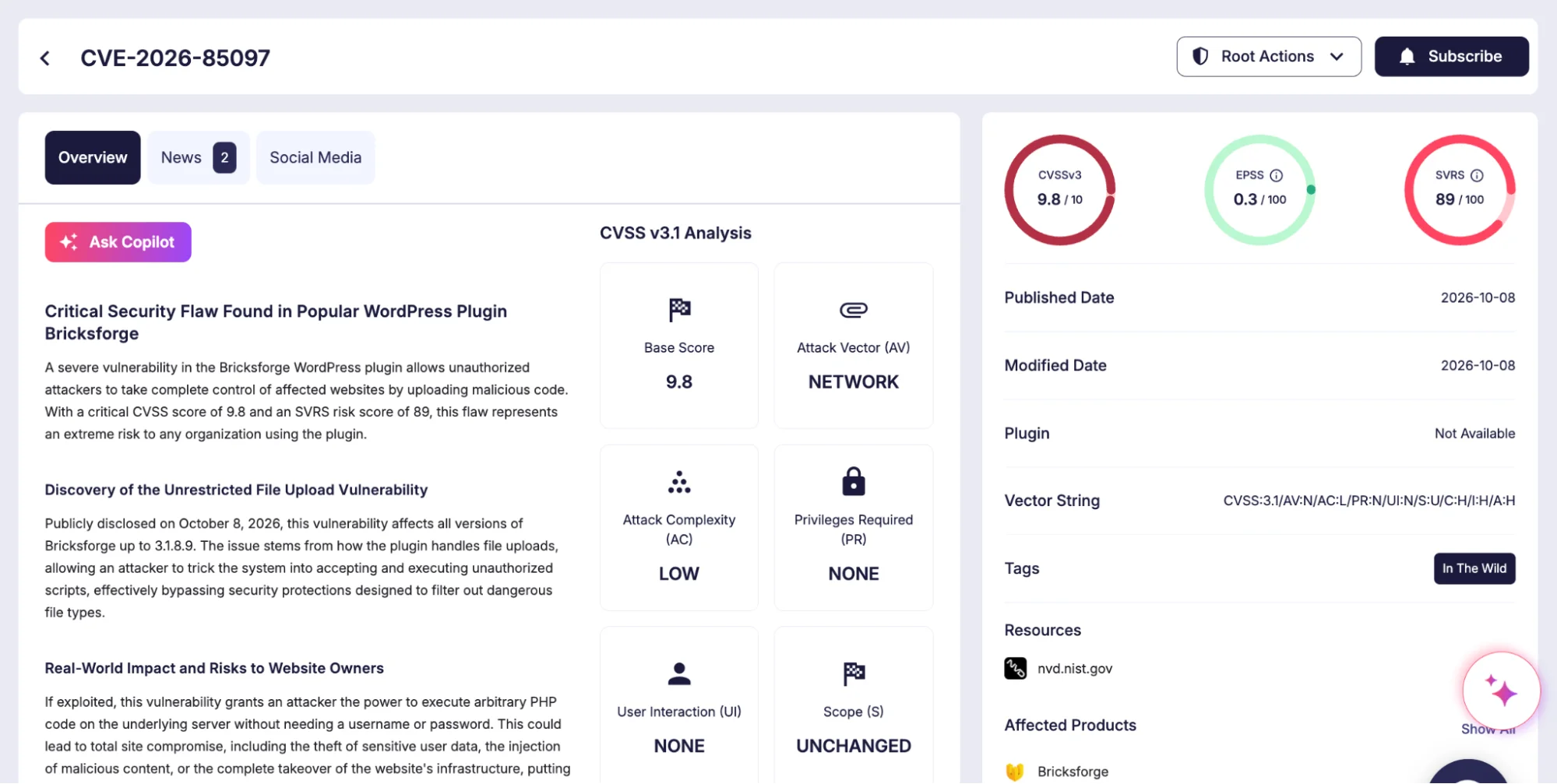
Details of Bricksforge, CVE-2026-85097 (SOCRadar Vulnerability Intelligence)
How the CVE-2026-85097 Exploit Chain Works
Bricksforge validates a file’s MIME type at initial upload, then trusts the client-supplied file metadata when the form is later submitted.
Because the url field inside the temporaryFileUploads parameter is not validated, an attacker can redirect a validated image to a PHP destination in four steps:
- Request a valid nonce from the unauthenticated bricksforge_regenerate_nonce AJAX endpoint
- Upload a GIF/PHP polyglot, a valid image that also contains PHP code, which passes the MIME check and lands in the temporary upload directory
- Submit a form in which the file path points to the validated image while the url ends in a PHP extension
- Bricksforge places the file’s contents at the PHP location, and the server executes the embedded code when that file is requested
The Wordfence advisory describes the same chain. Successful exploitation gives the attacker arbitrary PHP execution on the server, which can be used to deploy web shells, modify site content, read sensitive data and establish persistent access.
All but one of the exploitation attempts Patchstack captured targeted the Bricksforge REST API form submission endpoint, POST /wp-json/bricksforge/v1/form_submit. The remaining request hit /wp-admin/admin-ajax.php with the bricksforge_form_submit action. Every request carried a crafted temporaryFileUploads parameter, as in this normalized representative payload:
| { “temporaryFileUploads”: [ { “field”: “form-field-file”, “file”: { “file”: “/var/www/example.com/wp-content/uploads/bricksforge/tmp/img_example.gif”, “url”: “https://example.com/wp-content/uploads/bricksforge/tmp/img_example.php”, “type”: “image/gif” } } ] } |
The key signature is the mismatch between an image server-side path and a PHP destination URL. In 95% of captured requests, the server-side path ended in .gif or .png. Most payloads referenced the Bricksforge temporary directory, while some used destination filenames matching login_admin_*.php to place PHP files in the regular WordPress uploads directory, such as /wp-content/uploads/2026/10/.
Payload Variations
Attackers are probing for ways around extension filtering:
- Alternative PHP extensions: .php5, .php7, .php8, .phtml, .pht, .phtm and .phps
- Case manipulation: .PHP, .Php, .pHp and .PHTML
- Encoded extensions: URL-encoded and double-encoded forms such as %2ephp, .%70hp and .%2570%2568%2570
- Modified metadata: Altered or missing path, name, originalFilename and url fields
Automated, Distributed Infrastructure
Two clusters stand out. In the first, 44 IPs sent 56 requests with identical payloads within seconds of each other. In the second, three IPs tested 25 variations of PHP extensions and encodings against the same temporary file. Patchstack assesses both patterns as automated exploitation over rotating proxies or distributed infrastructure, and notes they do not on their own attribute the activity to a single threat actor.
The activity came from 63 unique source IPs spanning datacenter servers, cloud providers, VPN and proxy services, and residential or fixed-line ISP connections. The six most active addresses accounted for about 46% of all requests:
| Source IP | Network |
|---|---|
| 177.75.57[.]20 | EXPLORERNET (Brazilian fixed-line ISP) |
| 23.97.62[.]146 | Microsoft Azure |
| 84.247.60[.]125 | HostRoyale |
| 38.154.185[.]97 | B2 Net Solutions |
| 150.109.16[.]166 | Tencent |
| 153.75.90[.]146 | Cloudzy (datacenter) |
Affected and Fixed Bricksforge Versions
| Status | Version |
|---|---|
| Affected | 3.1.8.9 and earlier |
| Fixed | 3.1.8.10 |
| Current release | 4.0.1 (October 8, 2026) |
The Bricksforge changelog lists a security fix for the Pro Forms file upload in version 4.0.1. The vendor states the issue affects every site with Pro Forms active, including sites whose forms use no upload fields.
How to Detect CVE-2026-85097 Exploitation
Review HTTP and application logs for the following indicators:
- Requests to /wp-json/bricksforge/v1/form_submit that contain a temporaryFileUploads parameter
- Upload metadata pairing an image path (.gif, .png) with a PHP-related destination URL
- Calls to the bricksforge_regenerate_nonce AJAX action followed by an upload and a form submission
- Repeated form submissions cycling through file extensions, encodings or capitalization
- Unexpected PHP files in /wp-content/uploads/bricksforge/tmp/ or any other uploads directory, especially files named login_admin_*.php
- HTTP requests to newly created PHP files in upload directories
- Traffic from the source IPs listed above
If a site ran a vulnerable version without protection, review historical logs and the host for unexpected PHP files, unusual application activity and unauthorized changes.
Mitigation
- Update immediately: Upgrade Bricksforge to version 3.1.8.10 or later, preferably the current 4.0.1 release
- Hunt for compromise: Updating closes the vulnerability but does not remove files already planted; check upload directories for PHP files and review access logs for the indicators above
- Block at the edge: Where an immediate update is not possible, apply a WAF or virtual patching rule that blocks form submissions pairing image paths with PHP destination URLs
Frequently Asked Questions
What is CVE-2026-85097?
CVE-2026-85097 is a CVSS 10.0 unauthenticated arbitrary file upload vulnerability in the Bricksforge plugin for WordPress. It lets attackers upload and execute PHP code on vulnerable sites, resulting in remote code execution.
Is CVE-2026-85097 being exploited in the wild?
Yes. Patchstack first observed exploitation attempts on October 7, 2026, at 21:47 UTC, and recorded activity from 63 unique source IPs.
Which Bricksforge versions are affected by CVE-2026-85097?
Bricksforge versions 3.1.8.9 and earlier are affected.
Which Bricksforge version fixes CVE-2026-85097?
The vulnerability is fixed in version 3.1.8.10. The current release is 4.0.1, published on October 8, 2026.
Does exploitation require authentication?
No. Attackers obtain a valid nonce from the unauthenticated bricksforge_regenerate_nonce AJAX endpoint, so no account or login is needed.
How can I tell if my site was targeted?
Check logs for requests to /wp-json/bricksforge/v1/form_submit containing a temporaryFileUploads parameter, and look for unexpected PHP files in /wp-content/uploads/bricksforge/tmp/ or files named login_admin_*.php in upload directories.
Is the exploitation attributed to a specific threat actor?
No. Patchstack links the activity to automated exploitation over rotating proxies or distributed infrastructure, without attributing it to a single threat actor.