Dark Web Profile: Interlock Ransomware
Interlock is a ransomware group active since late 2024, most recently gaining attention for its use of advanced social engineering tactics. Its latest technique, called ClickFix, tricks users into pasting malicious PowerShell commands, disguised as system fixes into the Windows Run dialog. A newer method, FileFix, uses a similar approach through File Explorer, making the attack harder to detect.
In July 2025, CISA, FBI, and other U.S. agencies released an advisory warning about Interlock’s growing activity, especially targeting critical infrastructure and healthcare. The group continues to use double extortion, stealing data before encryption to pressure victims into paying.
Who Is Interlock Ransomware?
Interlock is a newer ransomware group that first appeared in the wild around September 2024. It stands out from many other threat actors by targeting not just Windows machines, but also FreeBSD systems, expanding its reach beyond the usual victims. When Interlock hits a system, it encrypts the files and appends “.interlock” to each filename, turning something like invoice.pdf into invoice.pdf.interlock.
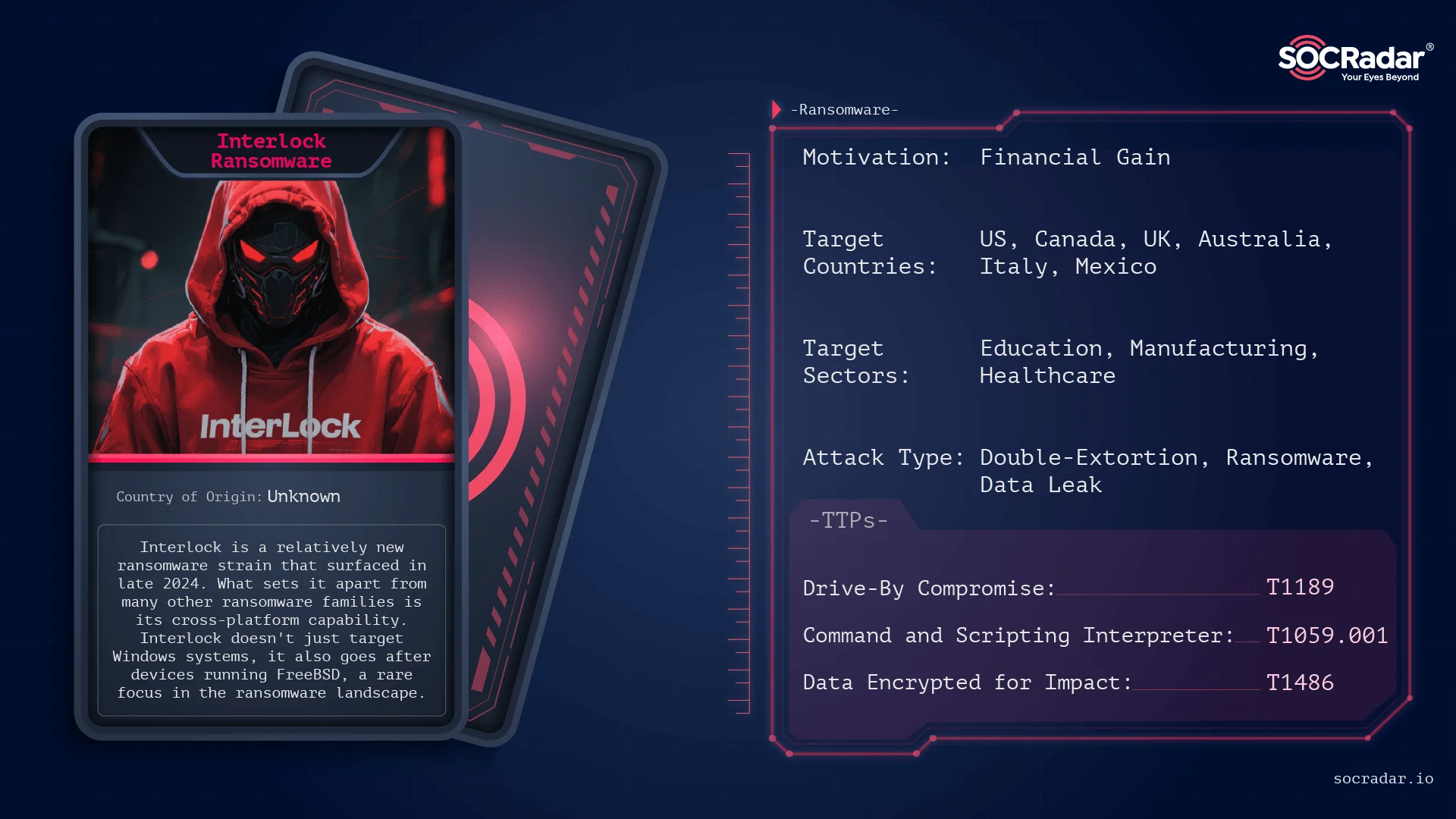
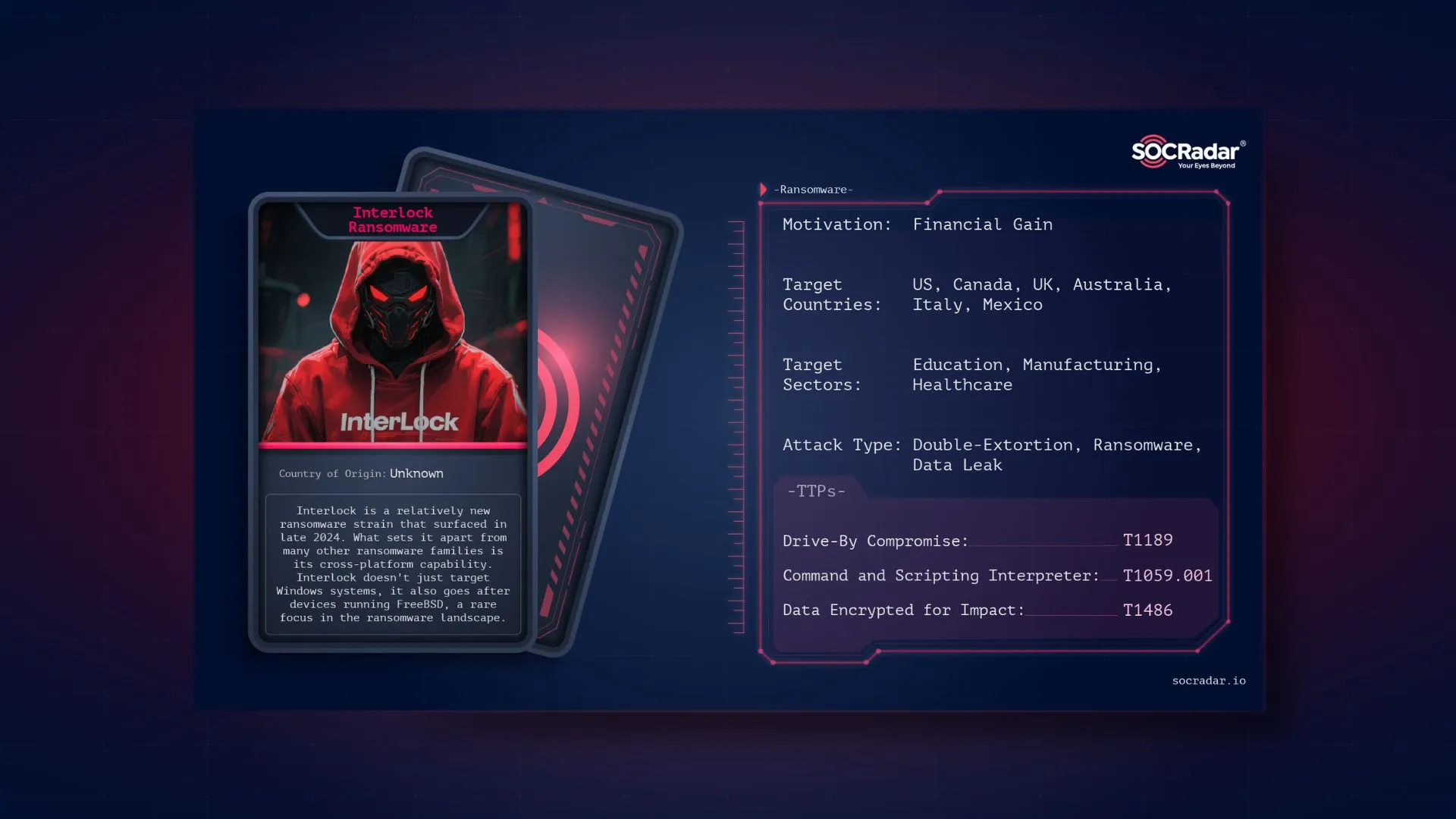
Threat actor card for Interlock Ransomware
The group uses a double extortion model: it steals data before encrypting it, then threatens to leak it on its dark web site, “Worldwide Secrets Blog.” This site hosts victim data, includes a chat portal for negotiations, and lists a contact email. So far, Interlock has not shown a strict pattern in its targets. It has hit sectors like healthcare, tech, government, and manufacturing, mostly in the U.S.

What Are Interlock Ransomware’s Targets?
Interlock mainly targets organizations in North America and Western countries, with a strong focus on the United States, which accounts for the majority of known attacks. Other targeted countries include Canada, the U.K., Italy, Australia, and Mexico.
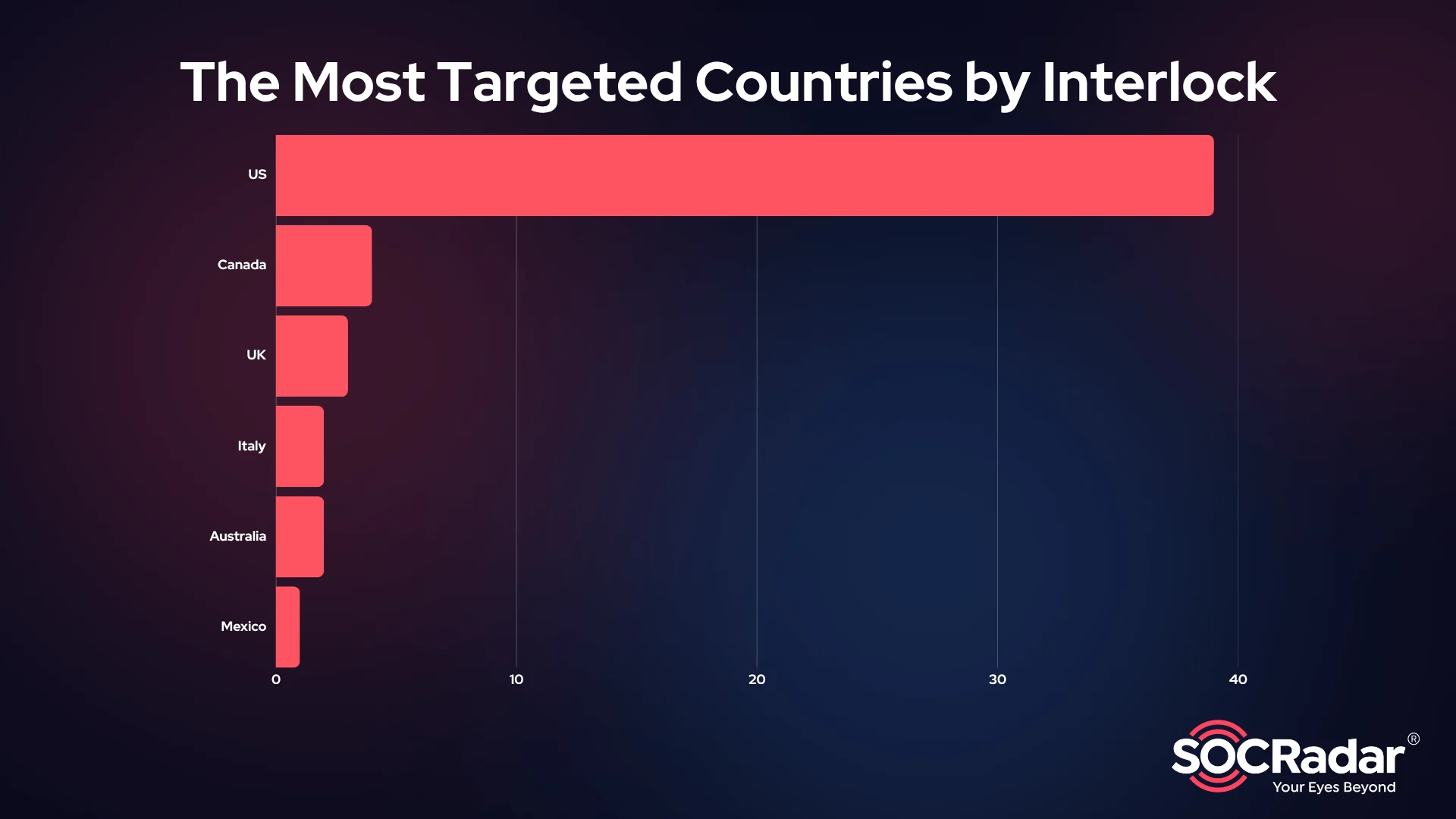
The most targeted countries by Interlock Ransomware
The group’s victim profile spans across several industries, Education, Manufacturing, and Healthcare appear at the top of the list. Interlock also hits the Public sector, Government, Finance, and Technology. This spread reflects an opportunistic strategy focused on sectors with sensitive data and weaker security controls.
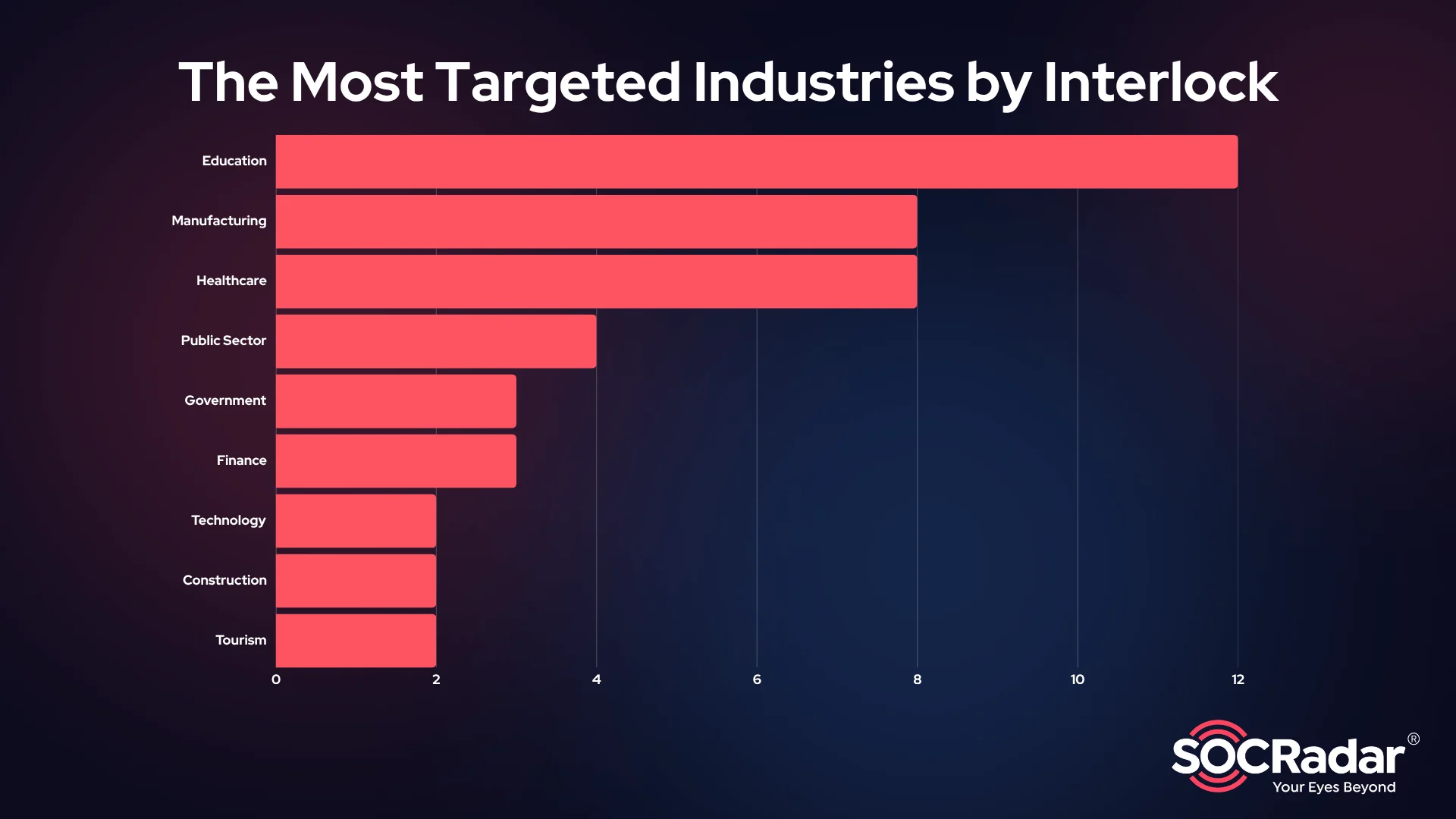
The most targeted industries by Interlock Ransomware
In short, Interlock’s targeting is broad but calculated, favoring victims in critical and high-value sectors, especially in the U.S. and other developed nations.
What Are Interlock Ransomware’s Techniques?
Interlock is a fast-evolving ransomware group that combines social engineering, advanced scripting, and double extortion to attack high-value targets. Using tactics like ClickFix and FileFix, the group tricks users into running malicious PowerShell commands. Once inside, Interlock focuses on persistence, lateral movement, and data theft before encrypting systems and demanding ransom. Furthermore, according to CISA Advisory AA25‑203A, the group has expanded its targeting of critical infrastructure and public services.
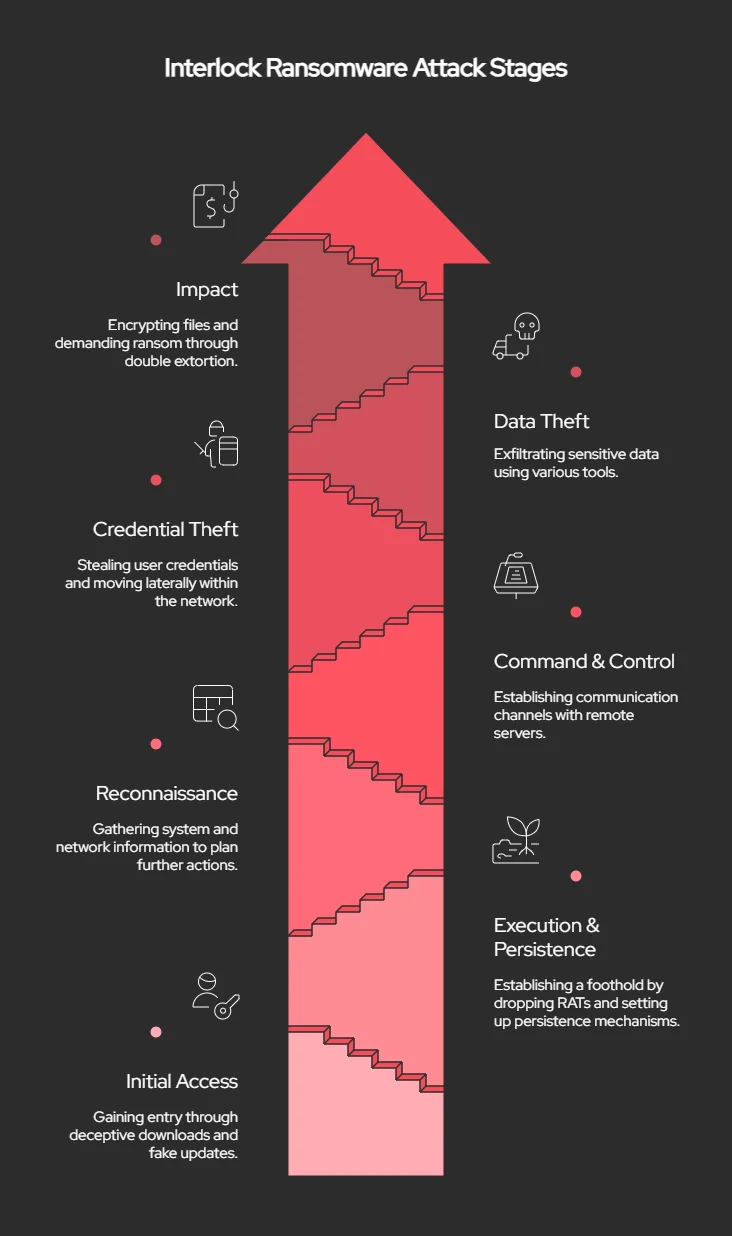
Attack stages of Interlock Ransomware
Initial Access
Interlock actors gain access through drive-by downloads from compromised, legitimate websites. This is not a common entry method for most ransomware groups, making Interlock stand out. In earlier cases, the malicious files appeared as fake updates for Google Chrome or Microsoft Edge. More recently, attackers have disguised the payloads as updates for common security tools.
In some attacks, Interlock uses a social engineering trick known as ClickFix. Victims are shown a fake CAPTCHA and told to copy and paste content into the Windows Run window. This action secretly runs a malicious PowerShell script, starting the infection.
Execution and Persistence
Once inside, Interlock deploys a fake Chrome executable that acts as a remote access trojan. It executes a PowerShell script that drops a file into the Windows Startup folder. This file ensures the malware runs each time the victim logs in.
In other cases, attackers modify the Windows Registry to add a run key named “Chrome Updater,” which points to a log file. This method also ensures the malware launches on startup, helping the attackers maintain persistence.
Reconnaissance
To learn about the system and network, Interlock uses PowerShell to run various commands. These include checking the current user, listing services and tasks, viewing system info, and mapping local drives. They also run arp -a to identify other machines on the network.
Persistence
To maintain access, Interlock adds its malware to the Startup folder or sets a Registry Run key named something harmless, like “Chrome Updater.” Some infections include RATs or tools that relaunch after reboot.
Command and Control
For remote control and communication, Interlock uses tools like Cobalt Strike, SystemBC, and its own remote access trojans, including Interlock RAT and NodeSnake RAT.
Credential Access, Lateral Movement, and Privilege Escalation
After gaining control of a machine, Interlock downloads tools like a credential stealer (cht.exe) and a keylogger (klg.dll). These tools gather usernames, passwords, and browser data. The keylogger saves keystrokes into a file named conhost.txt. In many cases, attackers also deploy info stealers such as Lumma Stealer and Berserk Stealer to collect more credentials.
With stolen credentials, Interlock moves laterally using Remote Desktop Protocol (RDP), AnyDesk, or PuTTY. They may also target domain administrator accounts, possibly using Kerberoasting attacks, to increase their access rights across the network.
Collection and Exfiltration
Before encryption, attackers search for valuable data. They use Azure Storage Explorer to access cloud storage and AzCopy to move stolen files to attacker-controlled Azure blobs. In some cases, they also use WinSCP and other file transfer tools to exfiltrate data.
Impact
After exfiltration, Interlock deploys a ransomware payload disguised as a file named conhost.exe. This file encrypts both Windows and Linux systems using AES and RSA encryption. Some samples also target FreeBSD, showing a broader scope than typical ransomware.
Once encryption is done, a file named tmp41.wasd is executed to delete the ransomware binary, making it harder to analyze. On Linux, a similar function called removeme does the same job.
Encrypted files get renamed with extensions like .interlock or .1nt3rlock. A ransom note titled !__README__!.txt is placed on the system, often deployed using group policy. The note includes a unique victim code and directs victims to contact the attackers via a .onion address on Tor.
Interlock uses a double-extortion model. They don’t list the ransom amount upfront but wait for the victim to reach out. If no payment is made, they threaten—and often follow through—to leak stolen data on their dark web site.
Source: CISA Advisory AA25-203A

What Are the Mitigation Tactics Against Interlock Ransomware?
To reduce the risk of Interlock ransomware attacks, organizations should strengthen their defenses across access control, detection, and recovery. Here are the key steps:
- Block Initial Access
Use DNS filtering and web firewalls to stop drive-by downloads. Train users to recognize fake updates and social engineering tricks like ClickFix. Disable hyperlinks in emails and add banners to messages from outside sources. - Secure Accounts and Authentication
Enforce strong password policies and enable Multi-Factor Authentication (MFA) for all critical accounts. Limit admin privileges and apply the principle of least privilege. Use time-based or just-in-time access for admin-level accounts. - Keep Systems Updated
Patch operating systems, applications, and firmware—especially internet-facing systems—regularly. Prioritize fixing known exploited vulnerabilities. - Improve Detection and Response
Deploy Endpoint Detection and Response (EDR) tools to monitor for unusual activity, including lateral movement. Review new accounts on servers and domain controllers, and audit user access often. - Network Segmentation and Traffic Control
Segment your networks to slow down or block ransomware spread. Restrict remote access from unknown sources and disable unused ports. - Limit Script and Command-Line Use
Disable command-line and scripting tools where not needed. This can stop attackers from running malicious scripts or moving laterally within the network. - Backup and Recovery
Maintain secure, offline, and immutable backups of all critical data. Test your backup and restoration processes regularly to ensure they work in case of a ransomware incident. - Test Your Security Controls
Regularly test your security program against known attack techniques, such as those listed in the MITRE ATT&CK framework, and tune your defenses based on the results.
How Can SOCRadar Help?
Interlock has rapidly grown from a lesser-known actor into a serious ransomware threat, using creative social engineering (like ClickFix), RAT deployment, and advanced lateral movement tools such as Cobalt Strike, AnyDesk, and credential stealers. Their expanding toolkit, use of double extortion, and targeting of sectors like healthcare, education, and manufacturing show clear intent and capability.
As Interlock refines its methods and broadens its targets, organizations must respond with deeper threat visibility and smarter defense strategies.
Start with a free Dark Web Report in SOCRadar Labs to see your domain’s exposure.
Track leaks of credentials, internal data, and PII across dark web forums, ransomware blogs, and Interlock’s “Worldwide Secrets Blog.”
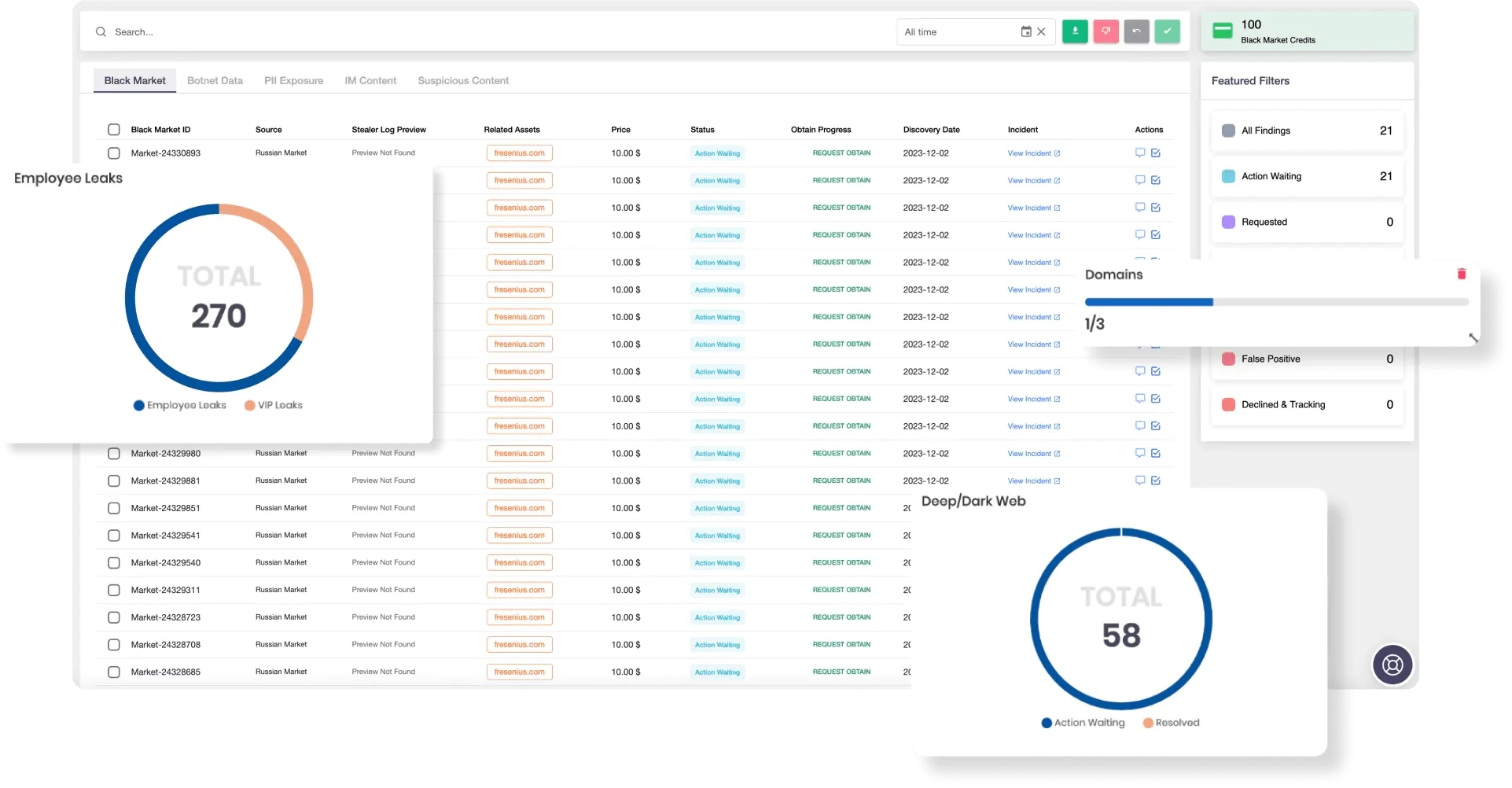
SOCRadar’s Advanced Dark Web Monitoring
Threat Intelligence Feeds
Receive live updates on Interlock’s tactics, file hashes, infrastructure, and malware variants.
Discover exposed assets, outdated systems, and misconfigured services—before attackers do.
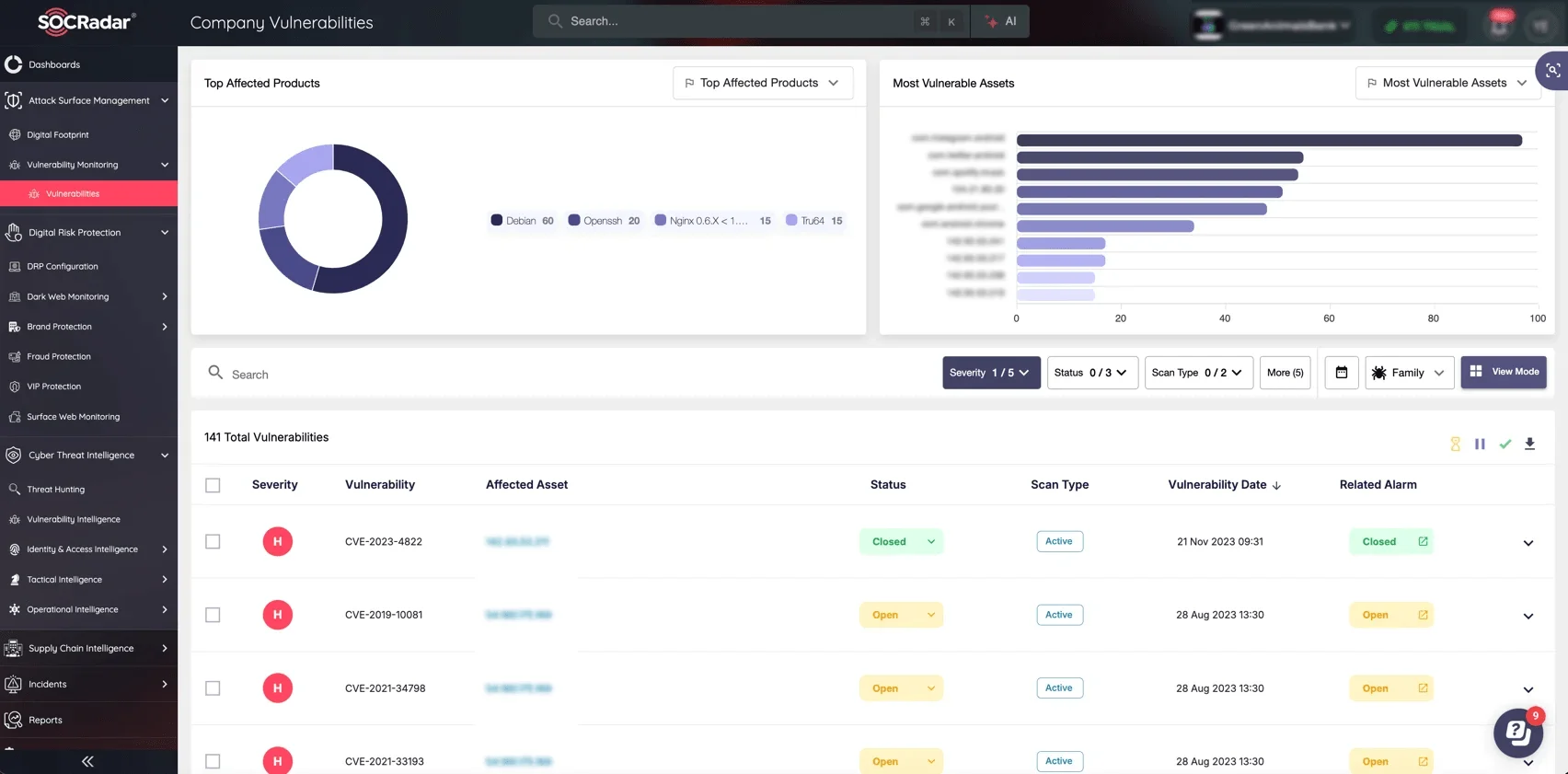
SOCRadar’s Attack Surface Management
Digital Risk Protection
Watch your digital presence to prevent impersonation, data leaks, or abuse of your brand and domains.
Ransomware Group Tracking
Follow Interlock and similar groups to anticipate changes in tactics and prepare response plans.
SOCRadar empowers you to detect early, respond fast, and stay ahead of ransomware threats like Interlock.
What Are the MITRE ATT&CK TTPs of Interlock Ransomware?
| Tactic | Technique | ID |
| Initial Access | Drive-By Compromise | T1189 |
| User Execution: Malicious Copy and Paste | T1204.004 | |
| Execution | Command and Scripting Interpreter: PowerShell | T1059.001 |
| Persistence | Registry Run Keys / Startup Folder | T1547.001 |
| Privilege Escalation | Valid Accounts: Domain Accounts | T1078.002 |
| Defense Evasion | Masquerading | T1036.005 |
| Rundll32 Proxy Execution | T1218.011 | |
| File Deletion | T1070.004 | |
| Credential Access | Credential Dumping | T1003 |
| Credentials from Web Browsers | T1555.003 | |
| Input Capture | T1056 | |
| Keylogging | T1056.001 | |
| Kerberoasting | T1558.003 | |
| Discovery | System Owner/User Discovery | T1033 |
| System Information Discovery | T1082 | |
| System Service Discovery | T1007 | |
| Network Configuration Discovery | T1016 | |
| Lateral Movement | Valid Accounts | T1078 |
| Remote Desktop Protocol (RDP) | T1021.001 | |
| Collection | Data from Cloud Storage | T1530 |
| Command & Control | Ingress Tool Transfer | T1105 |
| Remote Access Tools (AnyDesk, PuTTY) | T1219 | |
| Exfiltration | Exfiltration to Cloud Storage | T1567.002 |
| Exfiltration Over Alternative Protocol | T1048 | |
| Impact | Data Encrypted for Impact | T1486 |
| Financial Theft (Double-Extortion) | T1657 |
What Are the Tools Used by Interlock Ransomware Actors?
| Tool Name | Purpose |
| AnyDesk | Remote access and persistence; supports file transfer |
| Cobalt Strike | Post-exploitation and C2 tool |
| PowerShell | Script execution, reconnaissance, persistence |
| PSExec | Remote command execution |
| PuTTY | Remote SSH connections; lateral movement |
| ScreenConnect | Cracked remote support tool used for persistence |
| SystemBC | Malware used for C2, proxying, and payload delivery |
| Windows Console Host | Used to disguise encryption payload (conhost.exe) |
| WinSCP | File transfer tool used for data exfiltration |
Note: Some files are legitimate tools repurposed for malicious use.
Interlock Ransomware IOCs
- 1.ps1
fba4883bf4f73aa48a957d894051d78e0085ecc3170b1ff50e61ccec6aeee2cd - advanced_port_scanner.exe
4b036cc9930bb42454172f888b8fde1087797fc0c9d31ab546748bd2496bd3e5 - Aisa.exe
18a507bf1c533aad8e6f2a2b023fbbcac02a477e8f05b095ee29b52b90d47421 - AnyDesk.exe
1a70f4eef11fbecb721b9bab1c9ff43a8c4cd7b2cafef08c033c77070c6fe069 - autoservice.dll
a4069aa29628e64ea63b4fb3e29d16dcc368c5add304358a47097eedafbbb565 - Autostart.exe
d535bdc9970a3c6f7ebf0b229c695082a73eaeaf35a63cd8a0e7e6e3ceb22795 - cht
FAFCD5404A992850FFCFFEE46221F9B2FF716006AECB637B80E5CD5AA112D79C - cht.exe
C20BABA26EBB596DE14B403B9F78DDC3C13CE9870EEA332476AC2C1DD582AA07 - cleanup.dll (SystemBC)
1845a910dcde8c6e45ad2e0c48439e5ab8bbbeb731f2af11a1b7bbab3bfe0127 - conhost
44887125aa2df864226421ee694d51e5535d8c6f70e327e9bcb366e43fd892c1 - conhost.dll
a70af759e38219ca3a7f7645f3e103b13c9fb1db6d13b68f3d468b7987540ddf - iexplore.exe
d0c1662ce239e4d288048c0e3324ec52962f6ddda77da0cb7af9c1d9c2f1e2eb - klg.dll
A4F0B68052E8DA9A80B70407A92400C6A5DEF19717E0240AC608612476E1137E - !!!OPEN_ME!!!.txt
68A49D5A097E3850F3BB572BAF2B75A8E158DADB70BADDC205C2628A9B660E7A - PsExec.exe
078163d5c16f64caa5a14784323fd51451b8c831c73396b967b4e35e6879937b - putty.exe
7a43789216ce242524e321d2222fa50820a532e29175e0a2e685459a19e09069 - ScreenConnect.ClientService.exe
2814b33ce81d2d2e528bb1ed4290d665569f112c9be54e65abca50c41314d462 - StorageExplorer.exe
73a9a1e38ff40908bcc15df2954246883dadfb991f3c74f6c514b4cffdabde66 - WinSCP-6.3.5-Setup.exe
8eb7e3e8f3ee31d382359a8a232c984bdaa130584cad11683749026e5df1fdc3
Source: CISA