
What Is a Keylogger?
A keylogger records keyboard input on a computer or mobile device. Attackers use keylogging to capture passwords, payment details, messages, search terms, and other information entered by a user. Monitoring can be implemented through malware, a malicious browser component, operating-system hooks, firmware, or a physical device.
Some keylogging is legitimate when it is disclosed and authorized for troubleshooting, accessibility, or monitored business use. It becomes a security threat when collection occurs without informed authorization or when an attacker abuses a legitimate monitoring capability.
Key Takeaways
- Keyloggers can be software-based, browser-based, kernel-level, mobile, or physical.
- Captured keystrokes often expose credentials before encryption protects the resulting network session.
- Detection requires endpoint, browser, mobile, identity, and physical-security context.
- Password changes should occur from a trusted device after the collection mechanism is removed.
How a Keylogger Works
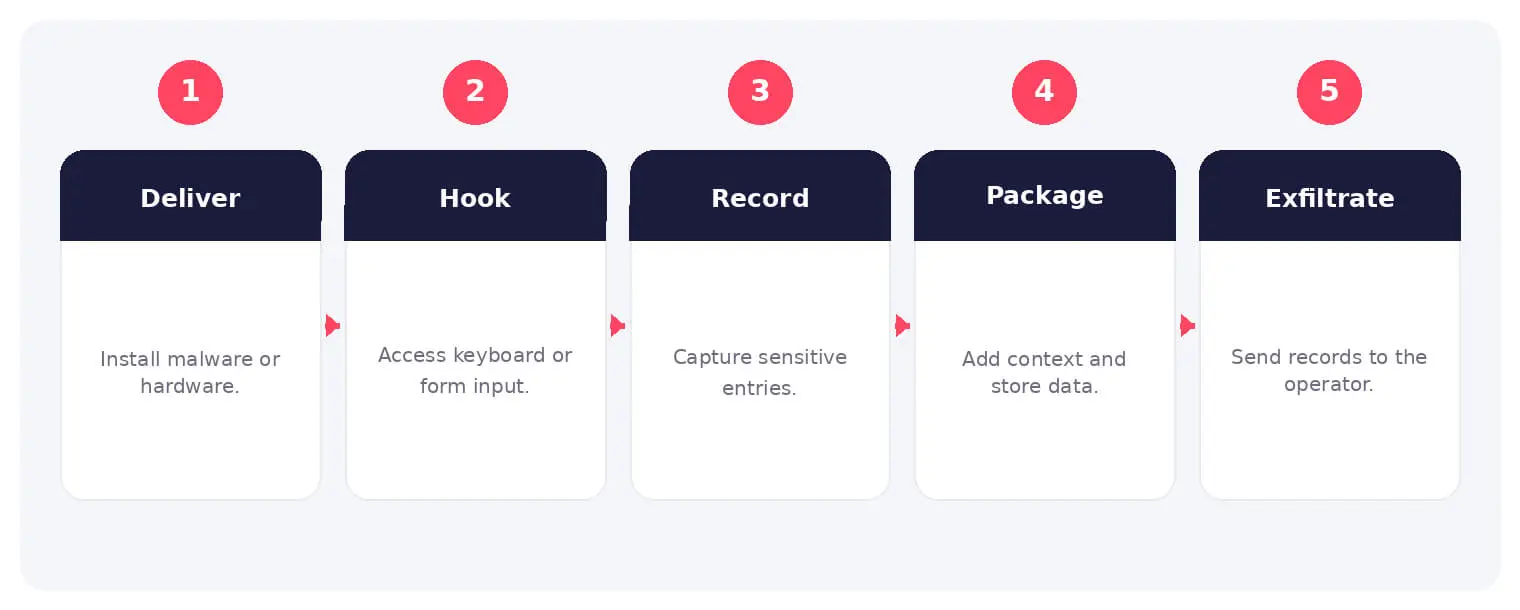
A software keylogger may arrive through phishing, a Trojan, a malicious installer, an extension, or post-compromise tooling. It records input through application hooks, browser access, accessibility features, or lower-level system components.
Collected data is stored locally or sent to attacker infrastructure. More capable spyware may pair keystrokes with screenshots, clipboard content, window titles, form data, and session information to make the capture easier to interpret.
Common Types and Techniques
- User-mode and application-hook keyloggers
- Kernel, driver, and boot-level keyloggers
- Browser extensions and form-grabbing malware
- Hardware implants and malicious peripherals
Security and Business Risks
- Credential and financial theft
- Exposure of confidential communications
- Account takeover and session compromise
- Persistent surveillance of employees or executives
Warning Signs and Detection
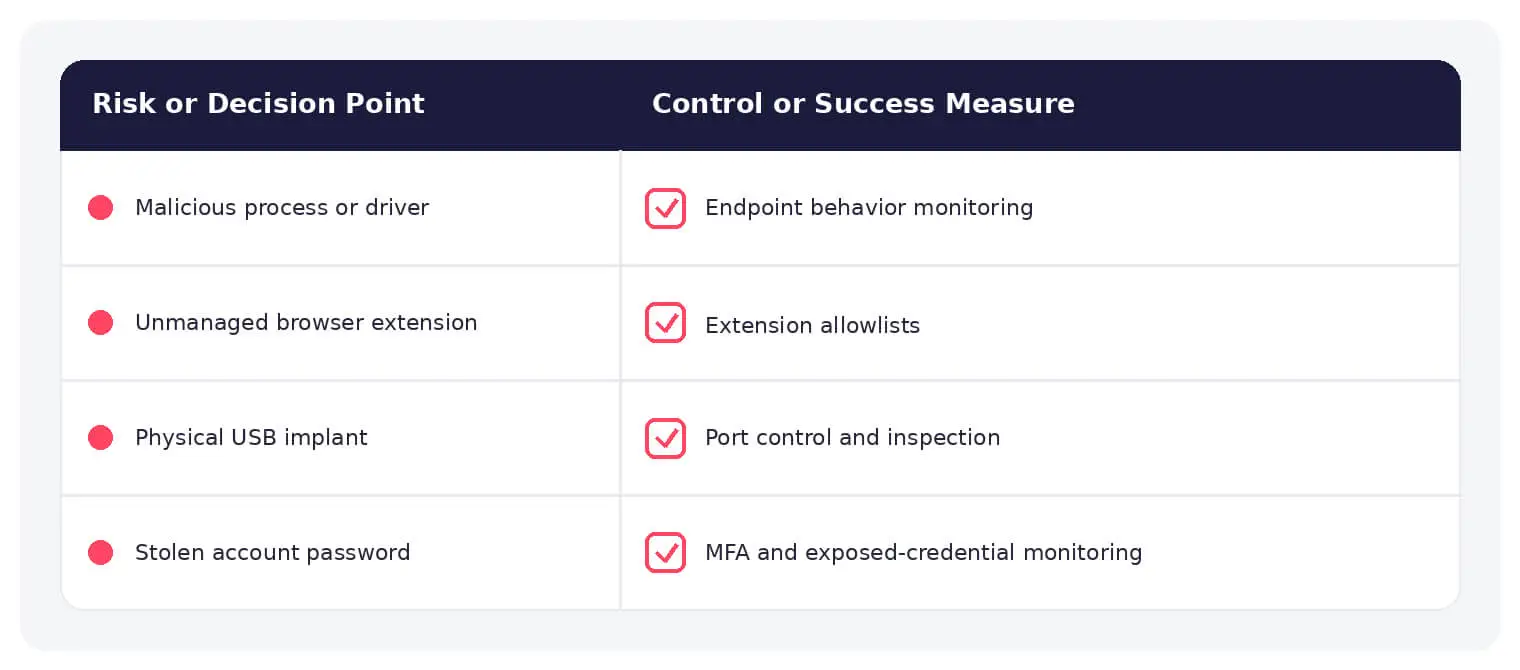
Investigate unfamiliar processes, drivers, extensions, accessibility permissions, input hooks, scheduled tasks, startup items, and outbound traffic. Physical inspection matters for shared workstations, kiosks, and high-risk environments.
Prevention and Response
Use endpoint and mobile protection, restrict installation and administrator rights, manage browser extensions, patch systems, use phishing-resistant MFA, secure work areas, and allow only trusted peripherals. Rebuild a system when integrity cannot be established.
How SOCRadar Can Help
SOCRadar combines external asset visibility, threat intelligence, Dark Web monitoring, vulnerability context, and indicator enrichment to help teams identify exposure and investigate activity connected to keylogger.
Explore SOCRadar Dark Web Monitoring or request a demo to strengthen threat-informed prevention and investigation.
Frequently Asked Questions
What Is a Keylogger and Where Can It Run?
A keylogger records keyboard input on computers and mobile devices, capturing passwords, payment details, and messages as they are typed. The capability can exist as user-mode malware, a kernel driver, a browser extension, firmware, or a physical implant. It becomes a security threat when collection is hidden from the user or exceeds what was authorized and disclosed.
Can a Keylogger Capture Passwords Before They Are Encrypted?
Yes. Keystrokes are recorded at the point of entry, before an application hashes the password or the network session encrypts the traffic. This is why HTTPS and secure password storage do not protect credentials typed on a compromised device.
How Do Keyloggers Get onto a Device?
Typical delivery paths include phishing attachments, Trojanized installers, malicious browser extensions, and post-compromise tooling deployed after an attacker already has access. Hardware keyloggers require physical access instead, which makes shared workstations, kiosks, and public terminals higher-risk environments.
What Is the Difference Between Software and Hardware Keyloggers?
Software keyloggers record input through application hooks, accessibility features, or kernel-level components, and they usually leave traces such as processes, drivers, or outbound traffic. Hardware keyloggers sit inline with a keyboard cable or inside a peripheral, so they generate no host activity and must be found through physical inspection.
What Are the Warning Signs of a Keylogger Infection?
Common indicators include:
- Unfamiliar processes, drivers, browser extensions, scheduled tasks, or startup items
- Accessibility or input-monitoring permissions granted to unknown apps
- Unexpected outbound connections to unfamiliar domains
- Lag or brief freezes while typing
On shared hardware, also inspect ports and cabling for devices your team did not install.
Can Antivirus Detect a Hidden Keylogger?
Endpoint protection can identify many known keyloggers through signatures and behavioral detection, but kernel-level, firmware-based, and custom-built variants may evade a single product. Combining endpoint, browser, mobile, and network telemetry gives defenders more places to spot collection activity.
How Should You Respond to a Suspected Keylogger Infection?
If active compromise is likely, disconnect the device from the network and stop entering sensitive information on it. Identify and remove the collection mechanism, then reset critical credentials from a separate trusted device. If you cannot establish that the system is clean, rebuilding from a known-good image is often the safer option.
Does Changing a Password Stop an Ongoing Keylogger Attack?
Not on its own. A password reset does not always invalidate sessions an attacker has already taken over, and recorded credentials may still work wherever the old password was reused. Revoke active sessions, rotate reused passwords, and enable phishing-resistant MFA to close off the attacker’s remaining paths.
Do On-Screen Keyboards and Password Managers Stop Keyloggers?
They reduce exposure but are not complete defenses. An on-screen keyboard can bypass a basic keyboard hook, yet spyware may capture clicks, screenshots, clipboard contents, or submitted form data instead. Autofill from a password manager keeps credentials out of keystrokes, but clipboard and form-grabbing techniques still apply.
How Can Organizations Reduce Keylogger Risk?
Core controls include:
- Restricting software installation and local administrator rights
- Managing browser extensions and patching systems through policy
- Endpoint and mobile protection with behavioral detection
- Phishing-resistant MFA and rapid session revocation
- Physical controls for shared workstations and approved peripherals only
What Business Risks Do Keyloggers Create?
Captured keystrokes can expose credentials, payment data, and confidential communications, leading to account takeover, financial loss, and disclosure of strategic discussions. Keyloggers on executive or privileged workstations enable persistent surveillance, and harvested credentials often feed deeper intrusions across the environment.
Is Installing a Keylogger on Someone Else’s Device Legal?
It depends on jurisdiction, consent, and purpose, but secret installation or interception without authorization is prohibited in many jurisdictions under computer misuse and privacy laws. Even disclosed workplace monitoring generally requires clear policies defining what is collected and how the data is used.

Oct 23, 2026
CVE-2026-114625: Actively Exploited VeloCloud Orchestrator Flaw Grants Superuser Access
CVE-2026-114625 is an actively exploited SQL injection flaw in VeloCloud Orchestrator that lets authenticated users gain superuser operator privileges…

Oct 22, 2026
PHP2Shell Exploit Tooling Found on Exposed Attacker Server
SOCRadar Threat Intelligence Unit (STRU) researchers found PHP2Shell exploit tooling on an attacker-controlled server whose working directory was exposed…

Oct 22, 2026
New LiteLLM Supply Chain Attack Hits PyPI and Docker
A new LiteLLM supply chain attack has turned version 1.107.0, an official release of the popular open-source LLM gateway, into a credential…
Intelligence in your inbox every Thursday.
Join 30,000+ security professionals reading SOCRadar research.
Subscribe