What Is FortiBleed? Your Questions Answered
1. What is FortiBleed?
FortiBleed is an active, large-scale credential theft campaign targeting internet-exposed Fortinet FortiGate firewalls and SSL VPN gateways. The same threat actor has also been observed targeting FortiWeb and MSSQL services as part of the same campaign SOCRadar coined the term and published the first disclosure of the campaign after threat researchers discovered the attacker’s operational server in the course of monitoring active threat actor infrastructure. The server contained the tools, automation scripts, and a growing database of verified working credentials.
The database currently contains login credentials for more than 86,644 Fortinet devices across 194 countries. Every credential has been verified by the attacker’s own automated tooling before being recorded. It is an ongoing operation.
SOCRadar rates FortiBleed Critical. Organizations are advised to check for the possible leaks.
For the full technical investigation including IOCs, attacker TTPs, and affected versions, read SOCRadar’s FortiBleed research report.
2. Why do different companies report different numbers for FortiBleed?
This is a developing story, and figures across all research publications continue to be updated as the investigation progresses. The variation also reflects methodology: different firms are counting different things. SOCRadar counts compromised devices. When deduplicated to unique IP addresses, the figures converge.
3. How do FortiBleed exposure tools work — and which dataset do they use?
The primary differences between available FortiBleed checkers are the underlying dataset and how the lookup works. Not every tool queries the same data, and not every tool checks the same way.
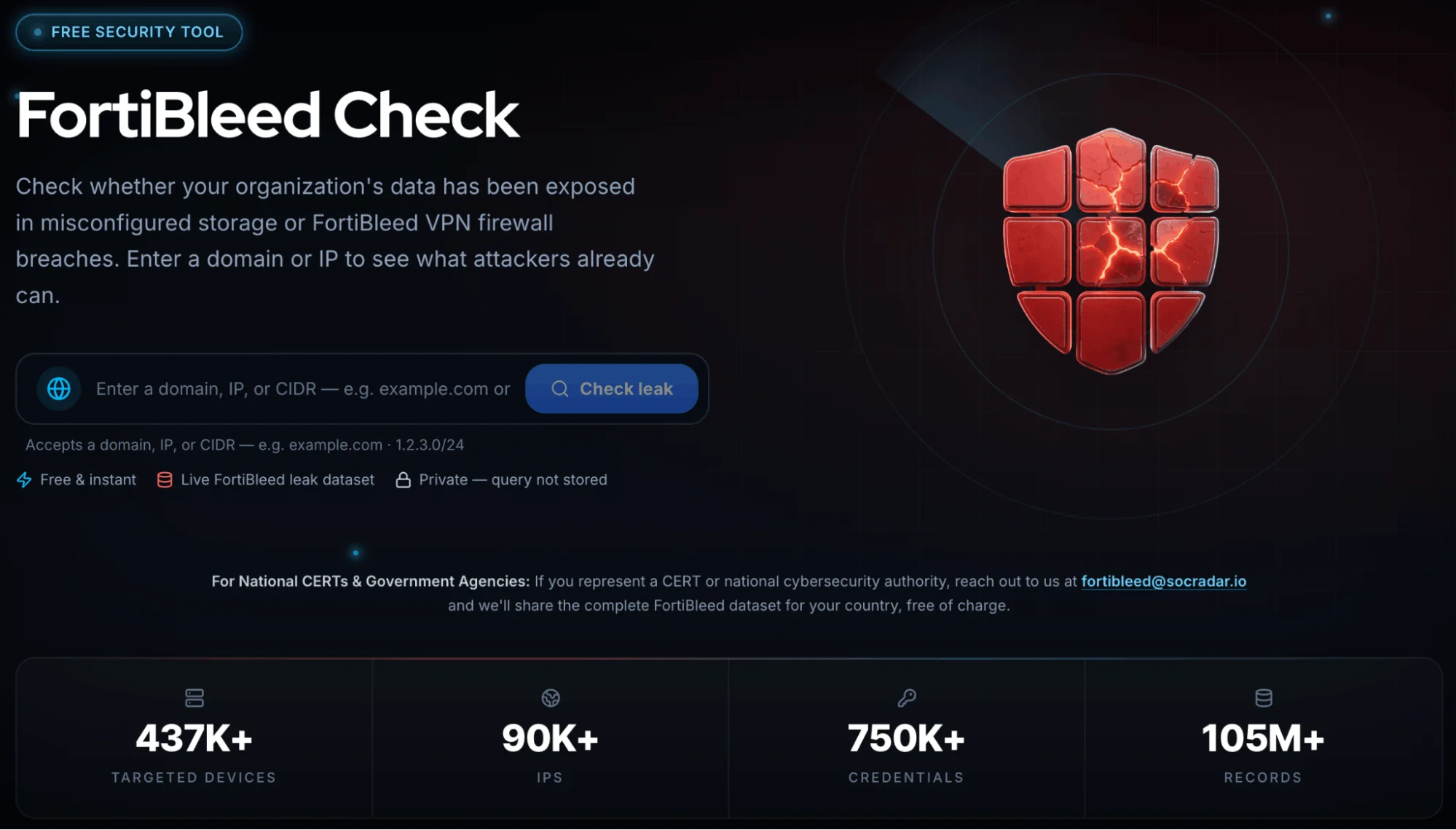
SOCRadar’s FortiBleed Exposure Checker is built on the most extensive dataset currently available – the attacker’s operational database as discovered by SOCRadar researchers, cross-referenced against SOCRadar’s broader threat intelligence. It checks by IP address and domain.
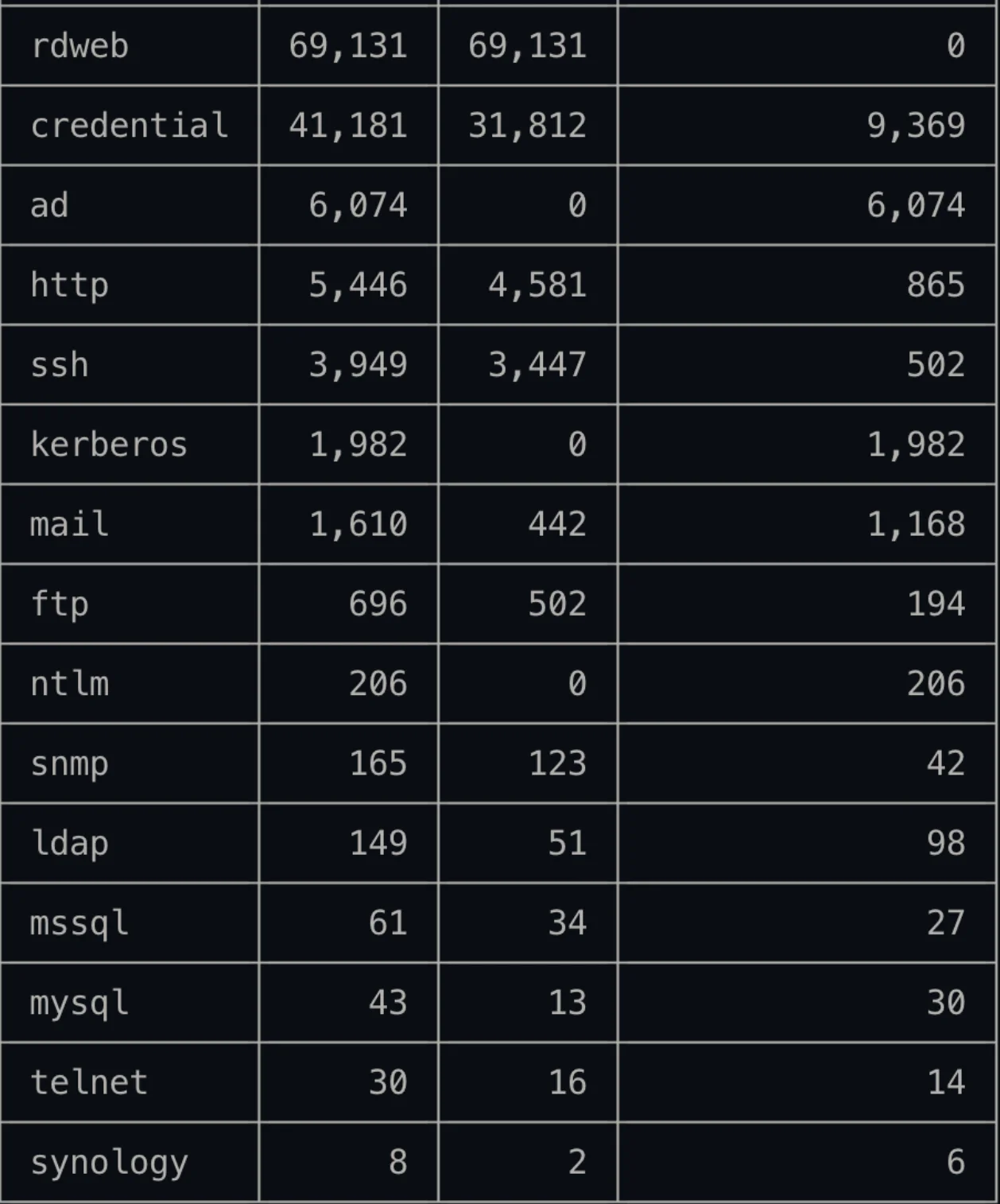
In addition to FortiGate firewall and SSL VPN credentials, the attacker’s operational server also exposed a much broader range of service data. The table below shows the full scope of credential types captured during the campaign:
4. Is FortiBleed a Fortinet vulnerability?
No. FortiBleed is not caused by a software vulnerability in Fortinet products. It exploits operational security failures – specifically, organizations that never rotated passwords after prior breaches, organizations using default or factory credentials, and organizations with management interfaces exposed directly to the public internet.
The attacker tests known leaked passwords against internet-facing devices. No code-level weakness in FortiOS or any other Fortinet product is required. A software patch alone will not resolve this.
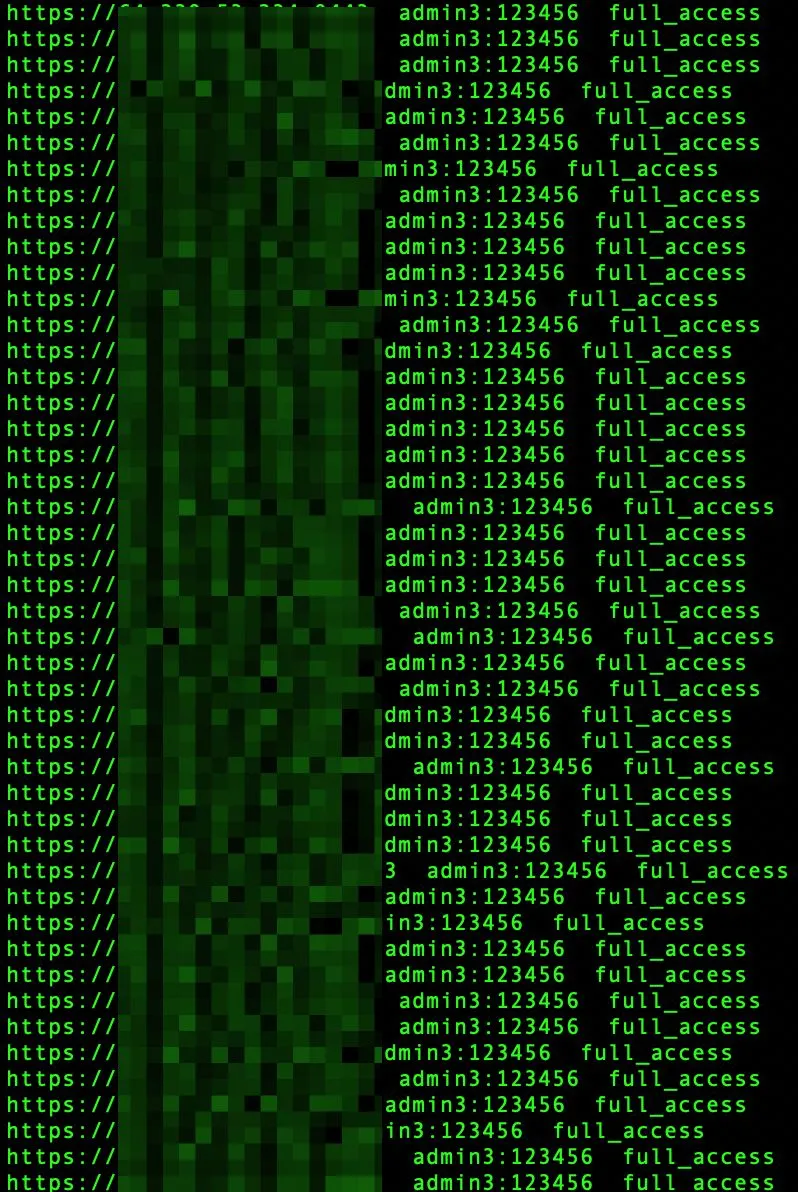
Over 2,500 Fortinet devices were breached with a single default credential (admin3:123456), allowing full access
Even organizations running current firmware can remain exposed. Fortinet’s stronger PBKDF2 password hashing, introduced in FortiOS 7.2.11, 7.4.8, and 7.6.1, only replaces the older SHA-256 storage format after an administrator logs in again following the upgrade. Until that re-login happens, credentials stay stored in the older, more easily cracked format. This is a hashing gap, not a code-level vulnerability, and it is separate from the CVE-2026-24858 issue discussed in Question 5.
5. Is FortiBleed related to a new Fortinet zero-day?
No confirmed Fortinet zero-day has been identified as the source of the FortiBleed dataset.
CVE-2026-24858, a FortiCloud SSO SAML authentication bypass (CVSS up to 9.8) disclosed by Fortinet in January 2026, has been discussed in the context of FortiBleed by some researchers. Whether it contributed to initial access in a subset of cases is under ongoing investigation, but it is not the mechanism driving the campaign at scale.
FortiBleed is primarily a credential reuse campaign, not a zero-day exploitation event. Fortinet has not attributed the campaign to a product-level vulnerability.
6. Has Fortinet been hacked?
No. Fortinet’s own systems have not been compromised. FortiBleed targets the organizations running Fortinet devices, not Fortinet the company.
Fortinet is the vendor whose products are deployed by the affected organizations. The attackers are targeting those deployed devices by logging in with credentials the organizations failed to rotate. Fortinet has stated it is aware of the reported third-party credential compromise.
7. How did threat actors obtain FortiGate credentials?
The operation uses a two-stage, self-reinforcing approach.
- Credential reuse. Attackers assembled a list of usernames and passwords from earlier Fortinet-related breach dumps and infostealer malware logs. They scan internet-facing FortiGate devices and test this list against each one automatically, around the clock. Many organizations never rotated credentials after prior incidents, giving the attackers a high success rate before any brute force was needed.
- Passive harvesting. Once a device is compromised, it is used as a listening post. The attackers passively monitor network traffic passing through the device and collect any additional credentials flowing by. Those credentials are fed back into the scanner to compromise more devices. The system is self-reinforcing.
The top compromised usernames are generic admin accounts and built-in Fortinet system accounts, confirming that many organizations never renamed default accounts or rotated factory passwords.
8. How many Fortinet devices are affected by FortiBleed?
SOCRadar’s current figure is 86,644 compromised Fortinet devices, across 80,000+ unique IPs and 22,405 unique domains in 194 countries. This figure is updated as the investigation continues.
For context, Kevin Beaumont estimated approximately 75,000 devices affected, representing roughly 50% of all internet-facing Fortinet firewalls based on Shodan data. Hudson Rock’s figure of 73,000+ refers to unique firewall URLs rather than devices.
The attacker’s infrastructure is still active. New victims may continue to be added.
9. Are FortiBleed credentials still valid?
Yes, unless the affected organization has rotated its passwords since being added to the database.
The attacker’s tooling verifies each credential before adding it to the database. Every entry represents a confirmed, working login at time of collection. If an organization appears in the FortiBleed dataset and has not changed its Fortinet admin or VPN passwords, those credentials remain active and exploitable.
Rotating credentials immediately is the single most impactful step any affected organization can take.
10. How can I check whether my FortiGate firewall is affected by FortiBleed?
Use SOCRadar’s free FortiBleed Exposure Checker, which queries the attacker’s operational database by IP address and domain.
Organizations requiring manual verification, bulk lookups, or CERT-level coordination can contact [email protected] directly. SOCRadar has already notified thousands of affected customers and national CERTs, and is actively coordinating with government cybersecurity agencies.
11. What data was stolen during the FortiBleed operation?
The confirmed stolen data is verified login credentials – usernames and passwords – for Fortinet firewall and VPN administrative interfaces across 86,644 devices. Though, the same threat actor has also been observed targeting FortiWeb and MSSQL services as part of the same campaign.
The database is organized by country, sector, and organization revenue. That structure is consistent with initial access inventory being prepared for sale, designed to let buyers filter targets by industry and deal size.
Beyond the credentials themselves, compromised devices are used to passively monitor network traffic, which means the attacker may also be collecting additional credentials or sensitive data passing through the device. The full scope of secondary data collection cannot be confirmed from the attacker’s exposed server alone.
12. Are VPN usernames and passwords exposed in FortiBleed?
Yes. The FortiBleed dataset includes credentials for Fortinet SSL VPN interfaces, not just administrative panels.
VPN credentials in this context give the attacker the ability to establish a VPN session directly into the affected organization’s internal network. Port 443 – the standard HTTPS port and the default for Fortinet SSL VPN – dominates the dataset. The scanner also covers ports 4443, 8443, 10443, and others, confirming it was configured to reach all common Fortinet deployment variants, not just default installations.
13. Did attackers use credential stuffing in the FortiBleed campaign?
Yes. Credential stuffing is the primary collection mechanism in FortiBleed.
The attackers compiled known credentials from prior Fortinet-related breach dumps and infostealer logs, then tested them at scale against internet-facing FortiGate devices. This is not random brute force – the attackers are testing real credentials with a documented history against devices they expect to still be using those same passwords.
The success rate across 86,644 confirmed compromises indicates that assumption holds in a large share of cases.
14. Are threat actors selling FortiBleed data on the Dark Web?
As of publication, the FortiBleed dataset has not been observed for sale or distribution on criminal forums. SOCRadar’s Dark Web monitoring is actively tracking for any distribution.
SOCRadar is publishing this research proactively to give affected organizations the maximum possible response window before wider distribution occurs. The dataset’s organization by company revenue, sector, and headcount is the format used by eCrime actors who package initial access for sale – the structure exists to make it easy for buyers to filter targets.
Organizations seeking ongoing visibility into whether their credentials surface on criminal markets can use SOCRadar Dark Web Monitoring.
15. Which countries and industries are most affected by FortiBleed?
India and the United States together account for nearly a third of all credential entries in the dataset. The campaign spans 194 countries, covering Asia, Latin America, Europe, the Middle East, and Africa. The victim list is heavily weighted toward NATO member countries – a pattern consistent with the geopolitical targeting assessed in SOCRadar’s attribution analysis.
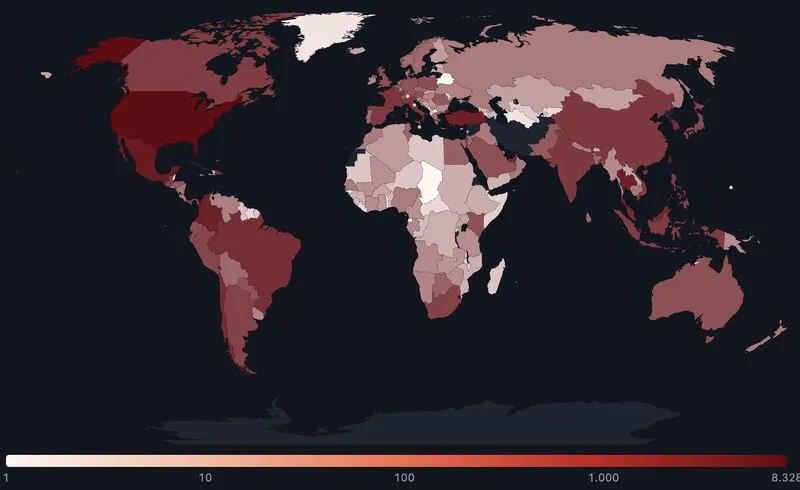
FortiBleed victim distribution heatmap
By sector, the most heavily represented industries are:
- Telecom — the most heavily hit sector by volume, with 5,616 entries
- Government — 591 entries across 111 domains; India alone accounts for over 60% of all government entries
- Manufacturing, energy, financial services, and healthcare — also heavily represented
By organization size, enterprises with revenues above $1B account for over 20% of all entries. No sector and no revenue band was excluded.
16. Who is behind FortiBleed?
The SOCRadar Threat Research team has linked the FortiBleed threat actor to the Lynx / INC ransomware group. The attribution was established through extensive technical analysis and ongoing infrastructure monitoring.
Lynx / INC (also known as INC Ransom) is an active ransomware operation with documented enterprise targeting across healthcare, education, government, and manufacturing sectors, primarily in North America and Europe, with activity traced back to 2023.
The connection explains FortiBleed’s operational structure. A credential database organized by revenue band, sector, and geography, with every entry pre-verified by the attacker’s own tooling, is consistent with an access inventory built for downstream ransomware deployment against high-value targets.
The full technical report, including the investigative methodology and supporting evidence, will be published by the SOCRadar Threat Research team.
17. What should organizations do if they are impacted by FortiBleed?
If your organization appears in the FortiBleed dataset, treat your network perimeter as already compromised and act immediately.
- Change all passwords now: Rotate admin and VPN credentials on every Fortinet device, with priority given to any password unchanged since a prior Fortinet-related breach.
- Enable multi-factor authentication: MFA significantly raises the cost of a successful login even when valid credentials have been stolen. Enable it on every admin and remote-access account.
- Review login history: Check device logs for access at unusual times, from unknown locations, or from accounts that should not be active.
- Restrict management access: Admin interfaces should not be reachable from the public internet. Limit access to trusted IP ranges or require VPN for management.
- Update firmware: Older firmware versions carry known vulnerabilities. Running the latest release removes gaps the attacker could exploit alongside stolen credentials.
- Engage incident response: Do not treat this as precautionary. Engage a professional IR team to assess whether unauthorized access has already occurred and what was reached.
Contact [email protected] to verify your organization’s status or request coordination support.
For the full attacker TTP and IOC list, see the FortiBleed investigation report.
18. Is changing your password and updating firmware enough to recover from FortiBleed?
No. Password rotation and firmware updates are necessary steps, but they are not sufficient on their own.
Because the threat actors gained administrative access to affected devices, they may have already made persistent changes – to configurations, accounts, or monitoring settings – that survive a password change. A new password only prevents future logins using the old credential; it does not undo anything the attacker may have done while inside.
For any device confirmed or suspected to be in the FortiBleed dataset, a full incident response process is strongly recommended. This includes forensic review of device logs and configurations, followed by a reboot to clear any in-memory persistence.
This is also why patching alone will not close the gap. Firmware updates apply PBKDF2 hashing going forward, but they do not automatically rehash credentials already stored on the device. Every administrator needs to log in again after the update for the stronger hashing to take effect. Skipping that step leaves the older, crackable password format in place even on fully patched firmware.
19. How can organizations protect themselves from FortiBleed-related attacks?
The root cause of FortiBleed is operational security failure, not a software flaw – which means the protections are within every organization’s control.
- Rotate credentials after every breach, not eventually. The attacker’s password list is built from prior incident data. Organizations that changed passwords after earlier Fortinet-related events are not in this dataset.
- Eliminate default and factory credentials. The top compromised usernames are generic admin accounts and Fortinet system defaults that were never renamed.
- Reduce internet-exposed attack surface. Fortinet management interfaces and VPN portals exposed directly to the public internet are the attack surface this campaign depends on. SOCRadar Attack Surface Management maps external exposure continuously.
- Monitor for credential leaks before they are weaponized. SOCRadar Credential and Data Leak Detection surfaces leaked credentials early.
- Maintain Dark Web visibility. Early detection of circulating credentials provides a response window before exploitation occurs. SOCRadar Dark Web Monitoring tracks criminal markets continuously.
Check your exposure – FortiBleed Exposure Checker
20. Is FortiBleed an Agentic Ransomware Operation?
FortiBleed is a ransomware operation with agentic AI built directly into its toolchain. The operator known as TOXMAN, an affiliate of both INC and Lynx, ran a purpose-built multi-agent framework called PENTEST LAB: 14 Dockerized agents, each with its own mission prompt, target, and model, coordinated through OpenRouter and armed with nuclei, ffuf, semgrep, sqlmap, and nmap. The account behind it burned $4,554 in API credits.
The agents were pointed at capability rather than at victims. They hunted zero-days in Nextcloud, Keycloak, and Guacamole, validated known CVEs across Fortinet, Active Directory, and ESXi, and generated the FortiGate takeover playbook the group works from. A second AI workspace produced the credential checkers used to validate access at scale. Inside victim networks, the VPN pivots, domain admin paths, and ransomware deployments were carried out by named human operators tracked in the group’s own spreadsheet.