




Oct 06, 2026
Table Of Content
Best OSINT Tools for Cybersecurity in 2026
Key Takeaways
What Is Open Source Intelligence (OSINT) in Cybersecurity?
Best Open Source Intelligence (OSINT) Tools by Category: The 2026 List
OSINT Tools Quick Reference
Key OSINT Websites to Bookmark
Free vs. Paid OSINT Tools: What Does Your Team Actually Need?
How to Run an OSINT Security Investigation: A Step-by-Step Workflow
SOCRadar Free OSINT Tools for Security Teams
Legal and Ethical Considerations in Open Source Intelligence
Frequently Asked Questions About OSINT Tools
Conclusion
Related Articles

SOCRadar XTI Is Live on the Chrome Web Store
Jul 16, 2026
Top 10 Cyber Threat Exposure Management Platforms
Jul 10, 2026
What Is FortiBleed? Your Questions Answered
Jun 19, 2026

Jun 26, 2026
23 Mins Read

Summarize with:
Best OSINT Tools for Cybersecurity in 2026
Attackers are already running open source intelligence operations against your organization. Before writing a single line of exploit code, they are mapping your exposed infrastructure, harvesting employee credentials from breach databases, and fingerprinting unpatched systems. The question is not whether OSINT is being used against you. The question is whether your security team is using it back.
This guide covers the best OSINT tools list for 2026, organized by category with clear notes on pricing. It includes the key OSINT websites to bookmark, a practical five-step investigation workflow your team can run immediately, and a direct comparison of free versus paid capabilities to help you build the right stack for your size and budget.
Key Takeaways
- Open source intelligence tools help security teams map attack surfaces, track threat actors, and enrich incident response using only publicly available data.
- Most day-to-day OSINT needs can be covered by free tools alone; paid tools become relevant when scale and automation become bottlenecks.
- The strongest free starting stack: Shodan, Have I Been Pwned, SpiderFoot, and SOCRadar Free Tools.
- A repeatable investigation workflow matters as much as the individual tools in your stack.
- Legal requirements for open source intelligence collection vary by jurisdiction. GDPR compliance is non-negotiable for organizations handling EU resident data.
What Is Open Source Intelligence (OSINT) in Cybersecurity?
Open source intelligence (OSINT) is the collection and analysis of publicly available information to produce actionable intelligence for cybersecurity, investigations, and threat detection. In cybersecurity, OSINT is used for attack surface management, threat intelligence gathering, and incident response enrichment.
The “open source” in OSINT has nothing to do with software licensing. It simply means the information is publicly accessible: not classified, not covertly obtained, not locked behind restricted access controls. Every piece of data an open source intelligence analyst collects comes from sources that are, in principle, available to anyone who knows where to look.
In cybersecurity, OSINT serves three core functions:
- Attack Surface Management: Understanding your internet exposure before an attacker maps it for you.
- Threat Intelligence: Tracking adversary infrastructure, campaigns, and tactics through publicly observable indicators.
- Incident Response: Rapidly contextualizing alerts with external data about threat actors and malicious infrastructure. When a SOC analyst needs to determine whether an unknown external IP is part of an active campaign, open source intelligence is the fastest path to an answer.
Red teams use OSINT in the pre-engagement reconnaissance phase. SOC analysts use it to enrich alerts and cut investigation time. Threat intelligence teams treat it as a primary collection method. Whatever your role, building an OSINT security capability directly improves your effectiveness from day one.
Best Open Source Intelligence (OSINT) Tools by Category: The 2026 List
Below is a curated OSINT tools list covering the most valuable tools across every major category, with clear notes on pricing and the specific scenarios where each tool delivers the most value.
Domain and IP Intelligence Tools
Shodan | Freemium
The most powerful internet infrastructure search engine available. Shodan continuously indexes open ports, service banners, SSL certificates, and device metadata across the entire public internet. For attack surface management, running Shodan against your own organization’s IP ranges and ASN is one of the most revealing exercises a security team can run. You will frequently find exposed services that internal asset management has no record of. For threat intelligence work, Shodan is equally useful for pivoting from a single malicious IP to a cluster of related infrastructure sharing the same configuration fingerprint.
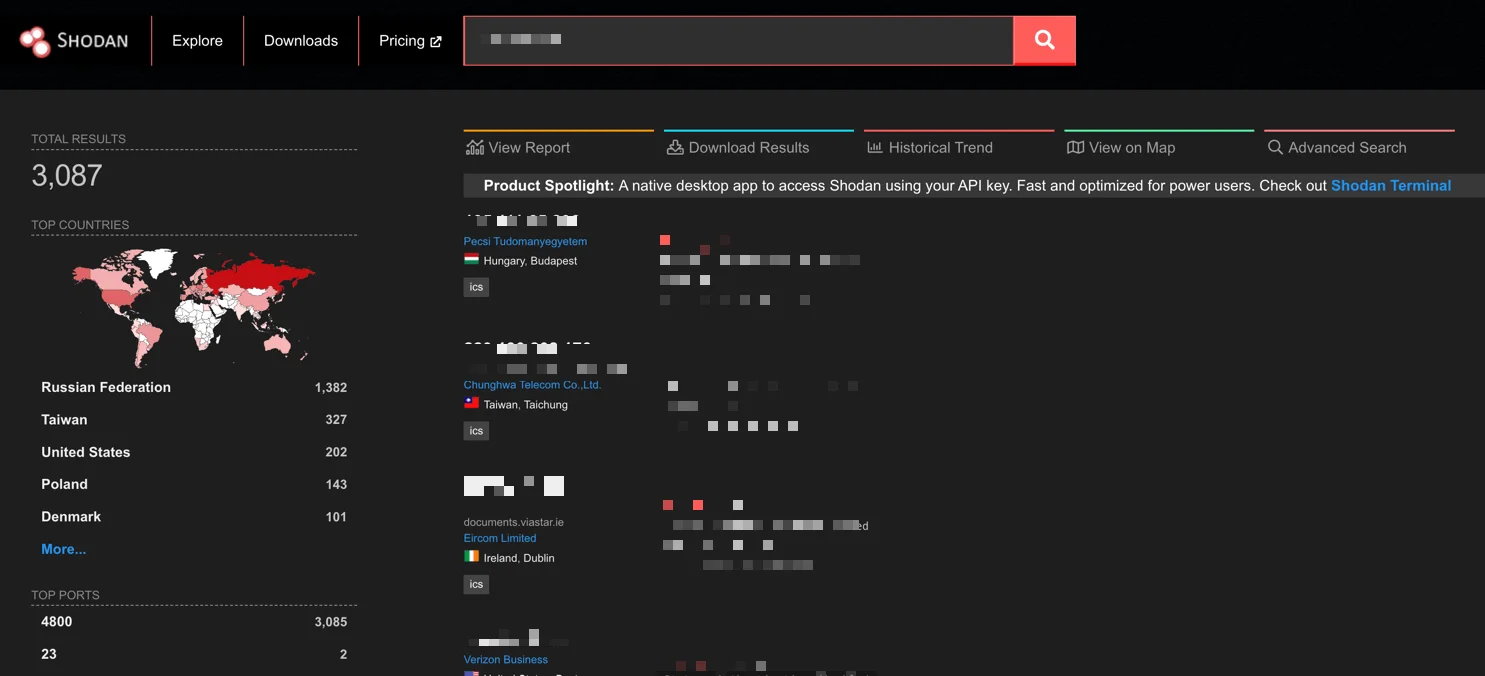
Shodan results page example
DNSDumpster | Free
Free passive DNS enumeration with no registration required. DNSDumpster returns subdomains, DNS records, and a visual infrastructure map within seconds of a query. One of the most useful free OSINT tools for rapidly scoping an organization’s web presence before deeper analysis begins. The visual output alone makes it worth opening at the start of any domain-focused investigation.
SecurityTrails | Freemium
Historical DNS and WHOIS data with a clean API. SecurityTrails allows analysts to trace how an organization’s infrastructure has changed over time and connect current malicious domains to historical threat actor patterns. When a newly registered phishing domain shares registrant history with a known threat actor’s previous infrastructure, SecurityTrails surfaces that connection in a way that current-state DNS tools cannot.
BGPView | Free
Tracks BGP routing information and IP address ownership with no account required. BGPView is useful for understanding which organization controls a given IP range, identifying hosting providers favored by specific threat actors, and monitoring routing changes that could indicate infrastructure shifts. A fast and underused addition to any free OSINT tools stack.
Nmap | Free
The industry standard for network discovery and security auditing. Nmap maps open ports, detects running services and their versions, and fingerprints operating systems across a target network. In an OSINT context, Nmap belongs in the authorized internal reconnaissance phase: mapping your own perimeter to understand what is visible to the outside before an attacker does. It should only ever be run against infrastructure you own or have explicit written permission to scan.
Email and Credential Exposure Tools
Have I Been Pwned | Free
The industry standard for breach monitoring. Have I Been Pwned checks whether organizational email addresses appear in known data breaches across hundreds of sources. The free API integrates directly into identity governance and SIEM workflows, enabling automated alerting when employee credentials surface in a new breach dataset. For any security team conducting periodic exposure checks, this is the first tool to configure and the easiest to justify to non-technical stakeholders.
Have I Been Pwned (HIBP)
Hunter.io | Freemium
Surfaces publicly visible email addresses associated with a target domain and identifies the naming convention the organization uses. Used by red teams for phishing reconnaissance and by blue teams for monitoring exposure. If Hunter.io can surface your employee email addresses in under a minute, so can a threat actor. Regular checks against your own domain reveal exactly how much is already indexed and findable.
Holehe | Free
An open-source tool that checks whether a given email address is registered across hundreds of web services without triggering password reset emails or alerting the account holder. Holehe is particularly useful for tracking threat actors who reuse the same email address across multiple platforms, and for verifying the full scope of account exposure during incident investigations.
Social Media and People Intelligence Tools
Maltego | Community Edition free / Full license paid
The most capable OSINT link analysis platform available. Maltego visualizes relationships between people, domains, IPs, organizations, and social profiles in an interactive graph. Its Transform marketplace integrates hundreds of external data sources simultaneously, making it possible to pivot from a single indicator of compromise to a full intelligence picture in minutes. The Community Edition is sufficient for most investigations; the full license unlocks higher query volumes and access to commercial data transforms that are out of reach on the free tier.
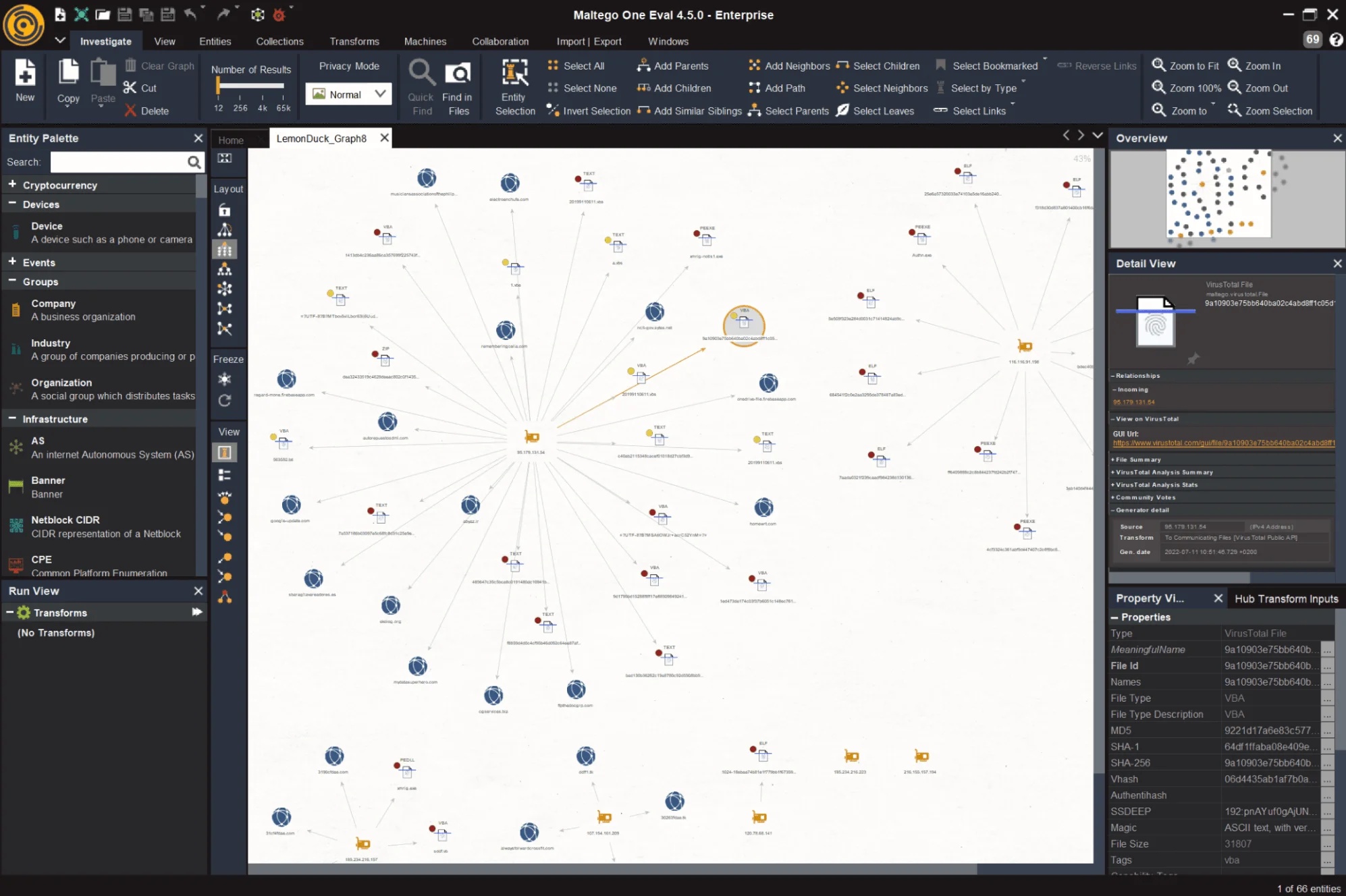
Maltego mapping the LemonDuck malware example
SpiderFoot | Free / SpiderFoot HX paid
Open-source automation framework that queries 200+ data sources simultaneously to build a comprehensive open source intelligence profile on any target. When you need to cover broad reconnaissance ground quickly, covering domains, emails, IPs, social profiles, and leaked credentials, SpiderFoot automates what would otherwise take hours of manual lookups. SpiderFoot HX is the hosted commercial version with additional data sources for teams that need continuous monitoring.
Sherlock | Free
Hunts a given username across 300+ social platforms simultaneously. Sherlock is useful for tracking threat actors who reuse handles across communities, for insider threat investigations where a known username needs to be traced across platforms, and for understanding the social footprint of a person of interest. Results return quickly with no API keys required.
Dark Web and Paste Site Monitoring Tools
SOCRadar Threat Hunting | Free tier available
Most Dark Web monitoring tools search one or two source types. SOCRadar’s Threat Hunting queries 50+ simultaneously: Dark Web markets, messaging platforms, threat feeds, code repositories, paste sites, and more. On the free tier, you can search by IP, domain, email, URL, or keyword; pull WHOIS, DNS, SSL, and JARM metadata; detect exposed files and storage buckets; find Dark Web forum mentions; and access breach credential datasets covering 8,200+ combolists. For SOC teams building an open source intelligence capability with limited budget, this is the highest-value free starting point in this entire category.
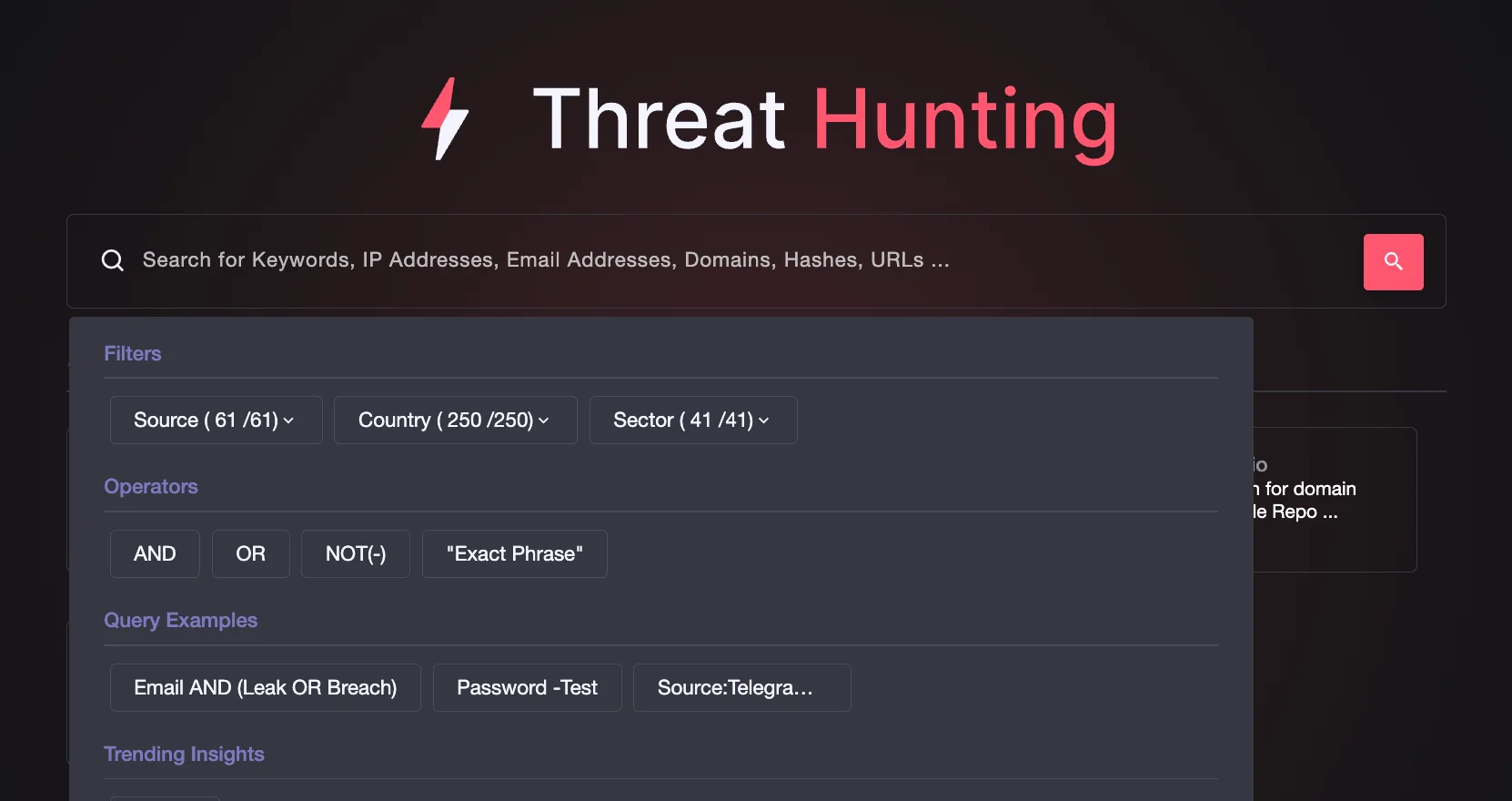
SOCRadar’s Threat Hunting
IntelligenceX (INTELX) | Freemium
Indexes Dark Web content, paste sites, and data leaks across a broad range of sources. Searchable by email address, domain, IP, and Bitcoin address. One of the most capable OSINT websites for breach investigation and for tracking threat actors who operate across both clearnet and Dark Web channels. The paid tier unlocks historical records and higher query rates for teams conducting sustained monitoring campaigns.
Ahmia | Free
A clearnet search engine for .onion Tor sites that enables Dark Web research without a direct Tor connection. Ahmia is suitable for corporate environments where Tor browsing is restricted but security teams still need basic Dark Web visibility. It functions as a practical entry point for investigations that require a first pass across Tor-hosted content before committing to deeper access methods.
Metadata and Search Engine Intelligence Tools
Google Hacking Database (GHDB) | Free
A community-maintained library of thousands of proven Google dork queries organized by vulnerability category. Google dorks are advanced search operators that direct Google to surface specific types of content: exposed configuration files, login pages, database backups, and sensitive documents indexed unintentionally. Running GHDB queries against your own domain is one of the highest-return, zero-cost activities in any OSINT security program and should be part of every periodic exposure review.
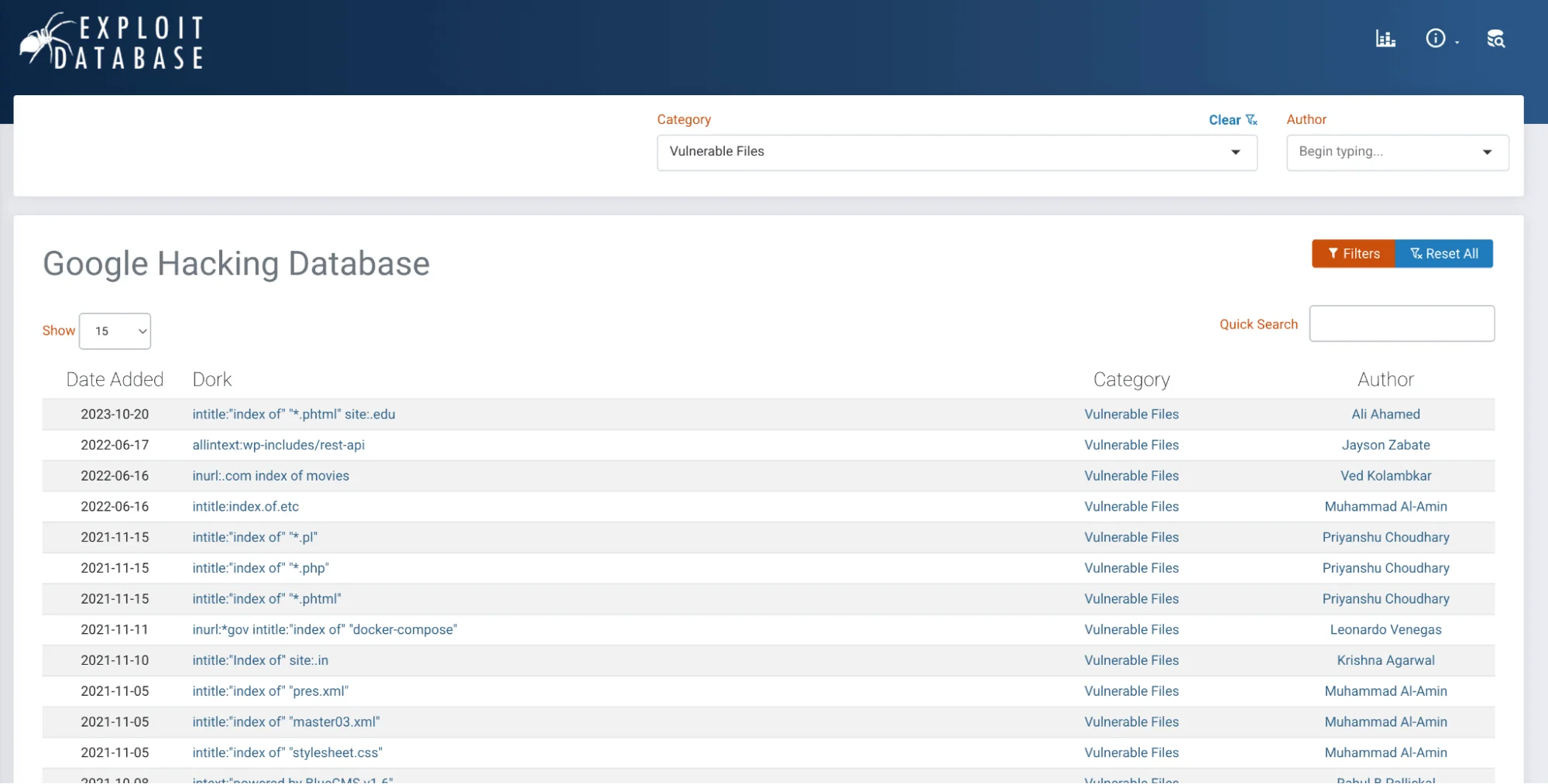
Google Hacking Database – a searchable library of dork queries
theHarvester | Free (included in Kali Linux)
A passive reconnaissance tool that gathers subdomains, virtual hosts, open ports, and email addresses associated with a target domain. theHarvester queries search engines, PGP key servers, and professional networks to collect data without sending active probes. It is a standard component of the Kali Linux distribution and a staple in the initial reconnaissance phase of authorized penetration tests. Running it against your own domain surfaces exactly what attackers see before they begin active scanning.
FOCA | Free
FOCA searches a target domain for publicly accessible documents, downloads them, and extracts embedded metadata: internal usernames, file paths, software versions, and printer data. Organizations routinely publish documents containing metadata that reveals far more than the document content itself. FOCA automates the discovery of this exposure at scale and is a reliable tool for identifying internal naming conventions and infrastructure details that were never intended to be public.
ExifTool | Free
The industry standard for file metadata extraction across hundreds of formats. ExifTool extracts GPS coordinates from photographs, internal system data from office documents, software version information, and creation timestamps. A single photograph shared publicly can expose the device model, software version, and precise GPS location where it was captured. Useful both for analyzing files received during an investigation and for auditing documents your own organization publishes.
Browser Extension OSINT Tools
Browser extensions bring open source intelligence capabilities directly into your investigation workflow without switching tabs or manually copying indicators between tools.
Mitaka | Free
An open-source browser extension that lets you right-click any indicator, whether an IP address, domain, file hash, email, or URL, and instantly query it across a range of OSINT sources including VirusTotal, Shodan, AbuseIPDB, and more. For SOC analysts who work in browser-based SIEM interfaces, Mitaka eliminates the manual copy-paste loop that slows alert triage to a crawl. It is one of the most immediate workflow improvements available to any analyst handling high alert volumes.
Wappalyzer | Freemium
A browser extension that identifies the full technology stack of any website you visit, surfacing CMS platforms, JavaScript frameworks, analytics providers, CDN services, and server infrastructure in real time. For security teams, Wappalyzer is a fast way to profile a target’s attack surface directly from the browser without switching tools. It is particularly useful during reconnaissance for spotting outdated software versions, third-party services with data access, and technology patterns shared across related domains.
BuiltWith | Freemium
A web technology profiler and browser extension that identifies the platforms, analytics providers, advertising technology, CDN services, and hosting infrastructure behind any website. Where Wappalyzer shows the current stack in real time, BuiltWith adds historical data showing when a site changed its technology, making it useful for tracking infrastructure shifts over time and identifying technology patterns shared across related domains or threat actor infrastructure.
Code and Repository Intelligence Tools
Public code repositories are an underutilized open source intelligence surface. Developers inadvertently commit API keys, credentials, internal hostnames, and infrastructure details to repositories that are indexed and searchable by anyone. The tools below systematically surface that exposure.
grep.app | Free
Searches across half a million public git repositories in real time. grep.app is useful for finding exposed API keys, internal domain references, and code patterns associated with specific malware families or threat actor tooling. For blue teams, it is a fast way to determine whether any organizational credentials or internal references have been committed to public repositories, a check that should sit on every security team’s periodic review calendar.
Shodan InternetDB | Free
A lightweight API from Shodan that returns open ports, tags, CPEs, and known vulnerabilities for any IP address with a single HTTP request, requiring no API key. Shodan InternetDB is one of the fastest free tools available for enriching IP addresses during alert triage, and is particularly useful when analysts need quick infrastructure context on a high volume of indicators without consuming paid API quota.
OSINT Tools Quick Reference
A summary of the tools in this guide, organized for fast reference during an active investigation.
| Tool | Category | Free/Paid | Best For |
| Shodan | Domain/IP | Freemium | Infrastructure mapping, attack surface |
| DNSDumpster | Domain/IP | Free | Subdomain discovery, DNS enumeration |
| SecurityTrails | Domain/IP | Freemium | Historical DNS, WHOIS tracking |
| BGPView | Domain/IP | Free | BGP routing, IP ownership |
| Nmap | Domain/IP | Free | Authorized port scanning, service detection |
| Have I Been Pwned | Credentials | Free | Breach monitoring, credential exposure |
| Hunter.io | Freemium | Email discovery, phishing recon | |
| Holehe | Free | Email registration tracking | |
| Maltego | Link analysis | Free/Paid | Relationship visualization, entity profiling |
| SpiderFoot | Automation | Free/Paid | Broad automated reconnaissance |
| Sherlock | Social media | Free | Username hunting, cross-platform tracking |
| SOCRadar Threat Hunting | Dark Web | Free tier | Dark Web monitoring, IOC enrichment |
| IntelligenceX | Dark Web | Freemium | Breach investigation, threat actor tracking |
| Ahmia | Dark Web | Free | Dark Web research without Tor |
| GHDB | Search engine | Free | Exposed data via Google dorks |
| theHarvester | Email/subdomain | Free | Passive recon, subdomain enumeration |
| FOCA | Metadata | Free | Document metadata extraction |
| ExifTool | Metadata | Free | File metadata, GPS from images |
| Mitaka | Browser extension | Free | In-browser IOC lookup |
| Wappalyzer | Browser extension | Freemium | Technology stack identification |
| BuiltWith | Browser extension | Freemium | Technology stack profiling, historical data |
| grep.app | Code repo | Free | Exposed credentials in git repos |
| Shodan InternetDB | Network/IP | Free | Fast IP enrichment, no API key required |
Key OSINT Websites to Bookmark
These OSINT websites provide instant, browser-based intelligence access with no installation required. They are the first tabs to open on any investigation.
- osintframework.com: The definitive tree-structured directory of open source intelligence tools organized by data type. The first place to visit when you know what you need to find but are not sure which tool fits.
- crt.sh: Searches Certificate Transparency logs to enumerate all SSL certificates issued for a domain, including subdomains invisible to standard DNS enumeration. A legitimate organization certificate can reveal internal hostnames, development environments, and staging servers that were never intended to be public.
- urlscan.io: Safely inspects suspicious URLs without exposing your own systems, returning screenshots, DOM content, network requests, and hosting metadata. Essential for any analyst who needs to examine unknown URLs without clicking them directly.
- viz.greynoise.io: Distinguishes background internet noise from targeted attack traffic, providing essential context for SOC analysts triaging alerts involving unfamiliar external IPs. Knowing whether an IP is mass-scanning the entire internet or specifically targeting your organization changes the response priority entirely.
- threatfox.abuse.ch: Free community IOC platform. Search domains, IPs, and file hashes against a constantly updated database of known malware infrastructure. One of the most reliable free threat intelligence references available for day-to-day alert enrichment.
Free vs. Paid OSINT Tools: What Does Your Team Actually Need?
Most security teams can cover the majority of their day-to-day OSINT security needs with free tools alone. The gap between free and paid is less about raw capability and more about scale, automation, data depth, and the cost of analyst time.
| Free Tools | Paid Tools | |
| Best for | Manual, on-demand investigations | Continuous, automated monitoring |
| Query limits | Restricted, browser-based | High-volume, full API access |
| Data depth | Current state only | Historical data, trend analysis |
| Integration | Manual lookups | SIEM, SOAR, pipeline integration |
| Monitoring | Spot-checks | Scheduled scans and alerting |
| Team features | Individual use | Dashboards, collaboration, reporting |
Start with the free stack. Once manual lookups become a bottleneck or you need continuous monitoring across a large asset inventory, that is the signal to invest in paid capabilities. The practical decision point arrives when the analyst hours spent on manual OSINT lookups begin to exceed the cost of a tool that automates them.
How to Run an OSINT Security Investigation: A Step-by-Step Workflow
A repeatable methodology matters as much as the tools themselves. The following workflow applies to the most common investigation scenario: an unknown external indicator that needs rapid profiling.
The scenario: Your SOC flags outbound connections from an internal host to an unfamiliar domain. You need to determine whether this is a threat and what to do about it.
Step 1: Frame Your Questions First
Before opening any tool, write down what you need to know. Who controls this domain? Is it linked to known malicious activity? How long has it been registered? Are other internal systems communicating with it? Clear questions keep the investigation focused, prevent you from disappearing into irrelevant data, and determine which tools are actually worth opening. Investigations without a defined question framework generate data, not intelligence.
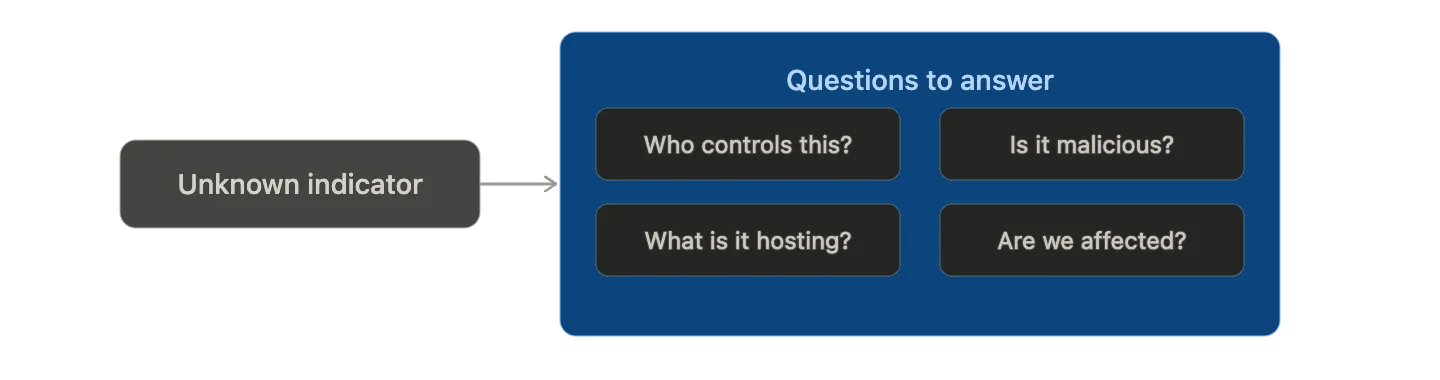
Clear questions determine which tools you reach for, and keep the investigation focused.
Step 2: Passive Infrastructure Reconnaissance
Start with zero-interaction tools that gather intelligence without touching the target. Look up DNS records, hosting infrastructure, open ports, SSL certificate details, and registrant history using Shodan, DNSDumpster, and SecurityTrails. Check whether the domain or IP appears in known threat intelligence sources via ThreatFox and GreyNoise. All sources at this stage are passive: no probes sent, no contact with the target, no risk of alerting an adversary or contaminating evidence.
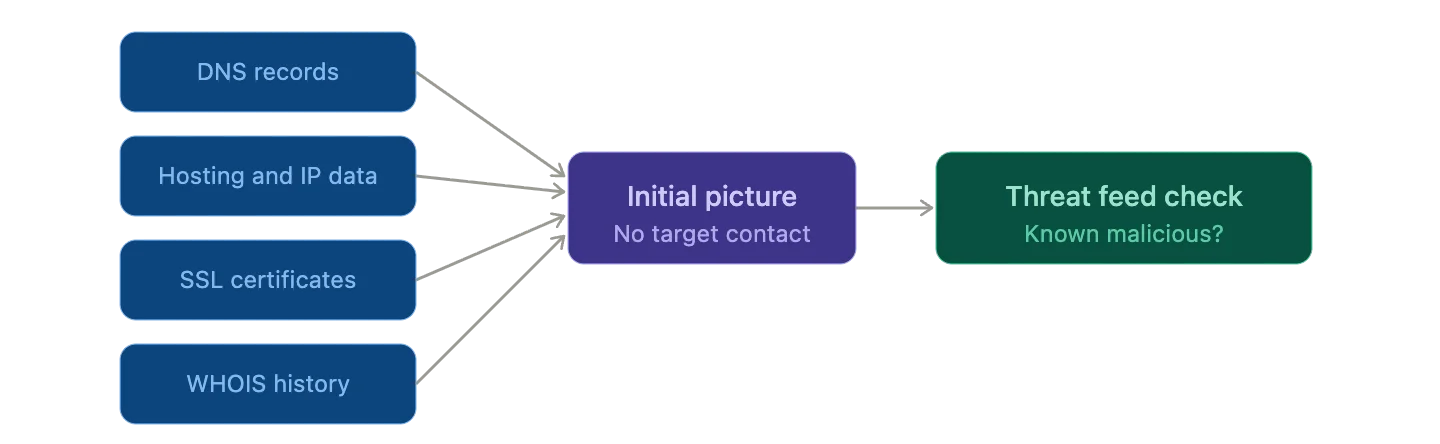
All sources are passive. No probes sent, no contact with the target.
Step 3: Pivot and Build the Intelligence Picture
Each finding becomes a new selector. A hosting IP may link to known malicious infrastructure. A shared SSL certificate may reveal a cluster of related domains registered in the same campaign. A registrant email may surface a known threat actor handle used across multiple operations. Follow each thread and use a link analysis tool like Maltego to visualize connections as a graph rather than a list. Stop pivoting when new selectors stop producing new findings.
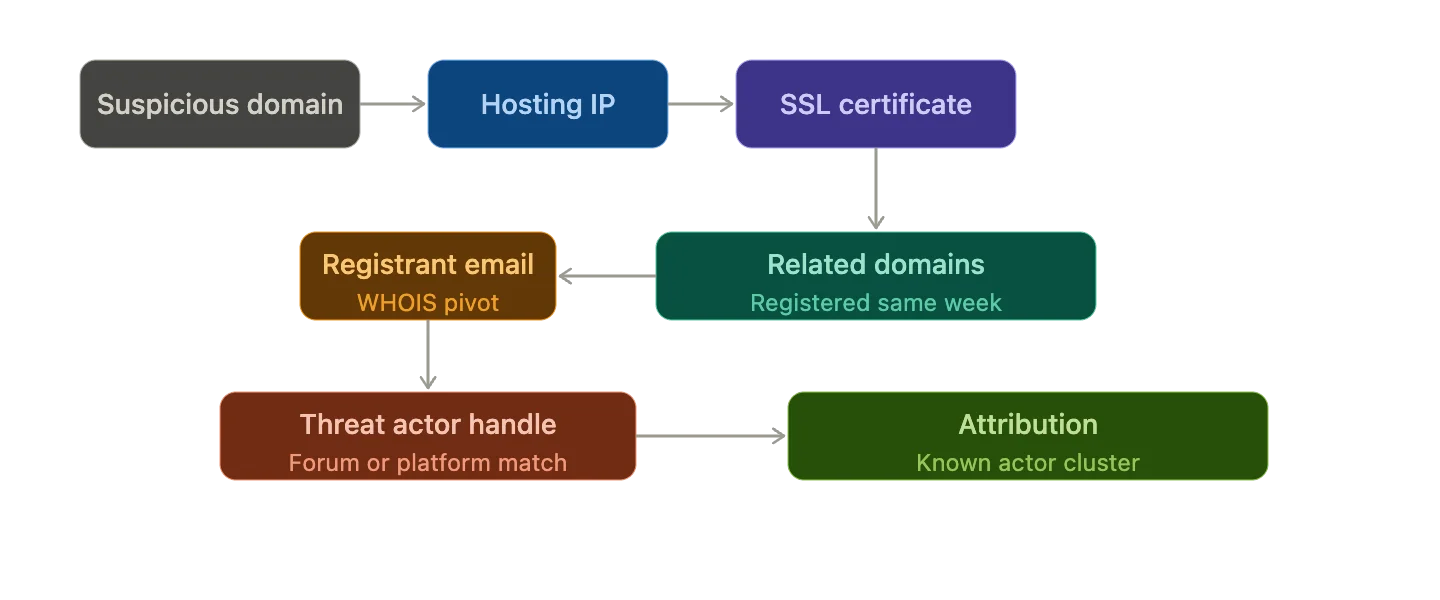
Every finding is a new lead. Follow the chain until the picture is complete.
Step 4: Check for Organizational Exposure
While profiling the external threat, run parallel checks to determine whether your organization is already affected. Look for mentions of your domain in paste sites and Dark Web sources using IntelligenceX or SOCRadar’s Threat Hunting. Check relevant employee credentials against Have I Been Pwned. Review any historical Shodan scans of the suspicious domain for traces of shared infrastructure with organizational assets.
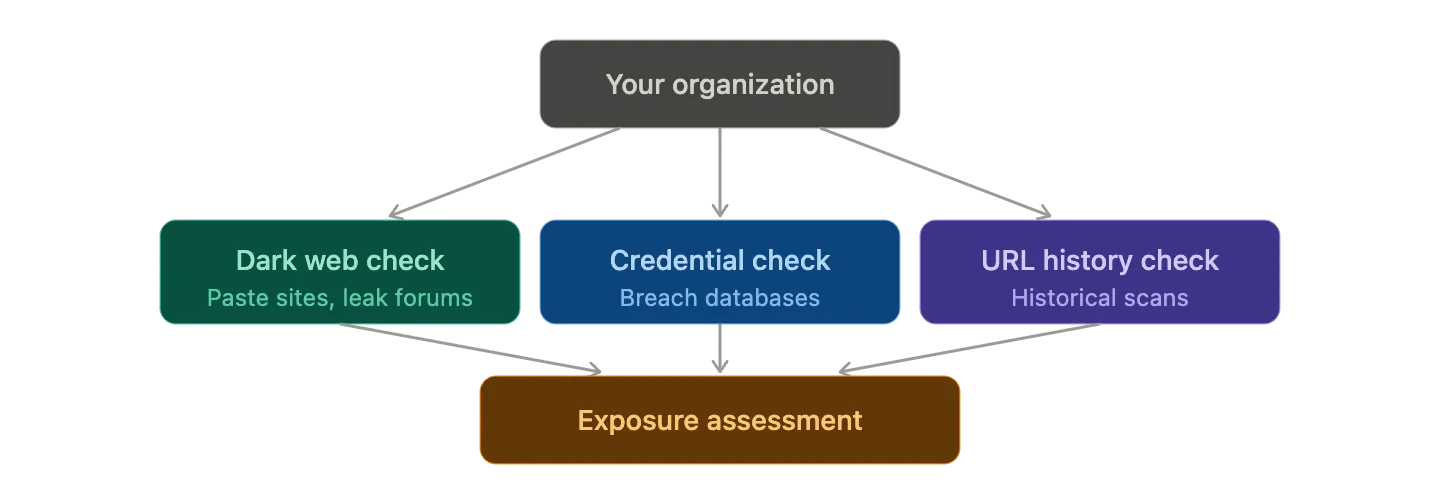
While profiling the threat, run parallel checks to see if your organization is already affected.
Step 5: Document and Act
Record every tool, query, result, and timestamp as you go. Intelligence that cannot be reproduced or attributed is not actionable; it is an unverifiable claim. Produce two outputs at the end of every investigation: a technical IOC list with confidence levels and recommended blocks for the security team, and a plain-language summary with business impact for leadership. The measure of a good OSINT investigation is the clarity of the decision it enables, not the volume of data it collects.
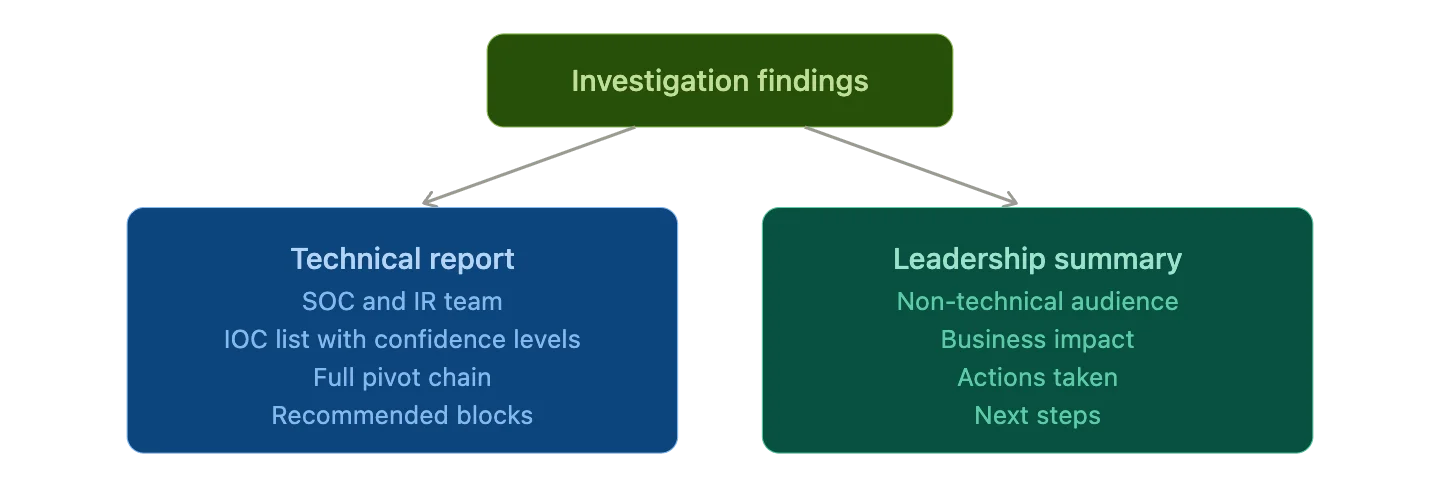
Structure your output for two audiences: the team that blocks the threat, and the team that makes the call.
SOCRadar Free OSINT Tools for Security Teams
If you are building an open source intelligence capability and looking for a single browser-based platform that consolidates the most common lookups, SOCRadar Free Tools is the most practical free starting point available for security teams.
Mid-investigation momentum is easy to lose when six different tools require six different tabs. SOCRadar Free Tools addresses that directly. It is a free, browser-based platform that brings the most common open source intelligence lookups into a single interface with no installation required and no account needed for basic use.
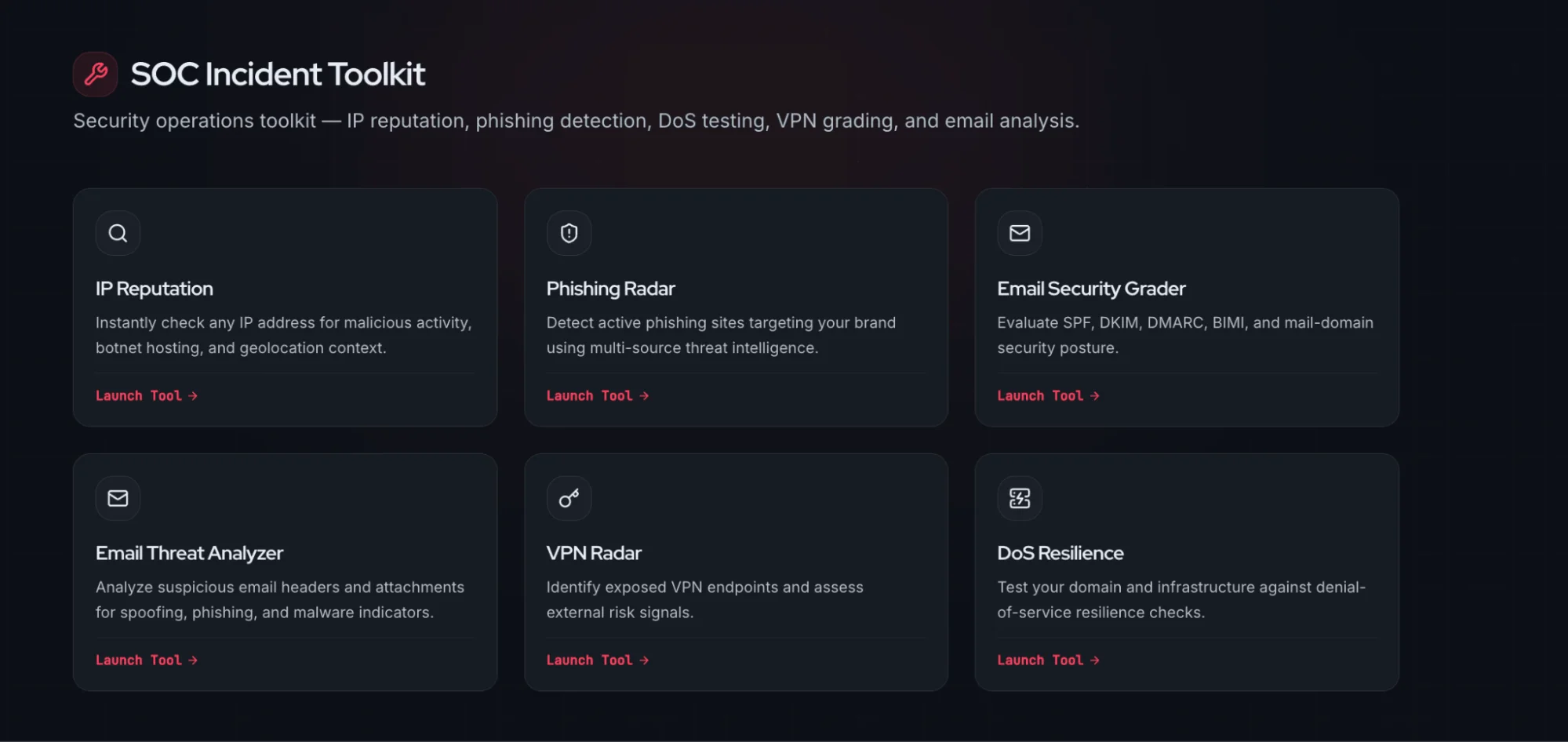
SOCRadar Free Tools, SOC Incident Toolkit
From SOCRadar Free Tools you can check IP and domain reputation, run passive DNS and WHOIS lookups, hunt for typosquatted domains impersonating your brand, scan Dark Web sources for mentions of your organization or leaked credentials, look up CVEs relevant to your infrastructure, and enrich unknown IOCs with threat intelligence context. Think of it as the first tab you open on any investigation: fast triage, zero friction, and genuinely free.
Legal and Ethical Considerations in Open Source Intelligence
Open source intelligence is, by definition, collected from publicly available sources. In most jurisdictions, this makes OSINT activities legal. The boundaries are around what constitutes “publicly available,” how collected data is used, and how long it is retained.
- GDPR (Europe): Europe’s General Data Protection Regulation places strict requirements on how personal data gathered through open source intelligence can be stored, processed, and retained. Organizations in the EU or processing data about EU residents must document legitimate interest, minimize data collection to what is necessary, and maintain a clear retention and deletion policy.
- Platform terms of service: Many OSINT tools that collect from social media or public platforms operate in a grey area with respect to those platforms’ terms of service. Understanding the distinction between legal data collection and terms violations is essential, particularly when using automated scraping tools.
- Unauthorized access: OSINT by definition uses only publicly accessible data. Any technique that requires bypassing access controls, authentication mechanisms, or rate limits crosses from open source intelligence into unauthorized access, which carries criminal liability in most jurisdictions.
- Best practice: Document the legitimate business purpose before beginning any OSINT collection. Use pseudonymous accounts where required by policy. Adhere to all applicable platform terms. Establish a data retention schedule for any personal data collected during investigations, and consult legal counsel before conducting OSINT on individuals in regulated jurisdictions.
Frequently Asked Questions About OSINT Tools
What is the best free OSINT tool for cybersecurity?
For most security teams, Shodan, Have I Been Pwned, and SpiderFoot cover the majority of day-to-day needs at no cost. For a single consolidated platform, SOCRadar Free Tools is the most practical free option for SOC teams, covering IP reputation, Dark Web Monitoring, CVE lookup, and IOC enrichment with no installation required.
What is the difference between OSINT and threat intelligence?
Open source intelligence is a collection method that gathers intelligence from publicly available sources. Threat intelligence is a broader discipline that may use OSINT alongside closed sources, human intelligence, and technical feeds. All OSINT can feed threat intelligence, but not all threat intelligence is OSINT.
Is OSINT legal?
In most jurisdictions, collecting publicly available information is legal, though the landscape varies significantly. Europe’s GDPR places strict requirements on processing personal data even when gathered from public sources. Best practice is to consult legal counsel, adhere to platform terms of service, and maintain clear documentation of collection purpose.
What OSINT tools do penetration testers use most?
theHarvester, Maltego, SpiderFoot, Shodan, and the Google Hacking Database are the most common in penetration testing toolkits. theHarvester and Shodan handle passive reconnaissance, Maltego covers pivoting and relationship analysis, and GHDB surfaces exposed data via Google dorks. Most are free or have free tiers.
How do SOC analysts use OSINT?
SOC analysts use open source intelligence primarily to enrich alerts, turning an unfamiliar IP address or domain into an actionable intelligence picture by checking reputation, historical activity, and known threat actor associations. Tools like urlscan.io, GreyNoise, ThreatFox, and SOCRadar Free Tools are the most practical for this use case.
What is the OSINT Framework?
The OSINT Framework (osintframework.com) is a community-maintained, tree-structured directory of open source intelligence tools organized by the type of information you need to find: email addresses, social media profiles, domain information, Dark Web sources, and more. It is the first place to visit when you know your objective but are unsure which tool fits.
Can OSINT be used for Dark Web monitoring?
Yes. Tools like IntelligenceX, Ahmia, and SOCRadar’s Threat Hunting feature provide Dark Web open source intelligence capabilities without requiring a direct Tor connection, searching Dark Web markets, paste sites, and data leak forums for mentions of your organization’s domains, credentials, and infrastructure.
Conclusion
The OSINT tools covered in this guide are, with few exceptions, free. The websites are a bookmark away. The investigation workflow is repeatable from day one. There is no meaningful barrier to building an open source intelligence capability into your security operations, only the decision to start.
Begin with your own organization. Run Shodan against your IP ranges. Check what employee credentials are exposed in Have I Been Pwned. Search your domain on SOCRadar Free Tools and IntelligenceX. Most security teams are surprised by what is already out there, and that discovery drives more meaningful change than any internal security report.
The best open source intelligence practitioners are not the ones with the most tools. They are the ones who ask the sharpest questions, follow findings systematically, and produce intelligence that enables clear decisions. Everything in this OSINT tools list and guide gives you what you need to start doing exactly that.



