
What Is Adware?
Adware is software that displays or injects advertising on a device, browser, or application. Some advertising-supported software is disclosed and consensual, while unwanted or malicious adware relies on deceptive bundling, persistent browser changes, tracking, redirects, or additional downloads.
The security concern is behavior and consent. Adware can weaken privacy, expose users to malicious advertising, change search settings, add browser extensions, or open a route to more harmful software. Unexplained advertising and browser modification should be treated as a security signal, not only a usability problem.
Key Takeaways
- Adware ranges from disclosed advertising-supported software to deceptive unwanted applications.
- Common signs include pop-ups, redirects, unfamiliar extensions, changed settings, and poor performance.
- Removal must address applications, extensions, policies, scheduled tasks, and synchronization.
- Software controls, browser management, DNS filtering, and user awareness reduce reinfection.
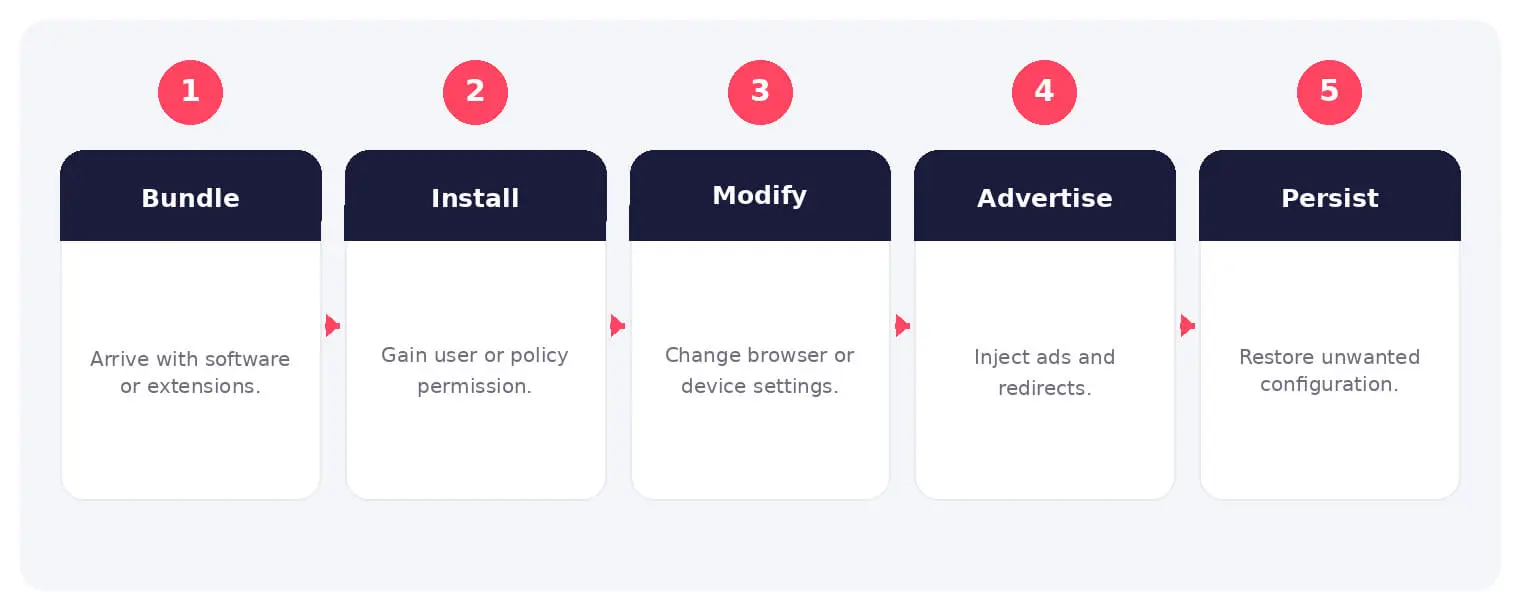
How Adware Works
Adware commonly arrives through bundled installers, misleading download buttons, browser extensions, mobile applications, or compromised advertising networks. Consent may be hidden in confusing language or optional components enabled by default.
Once active, it can inject advertisements, replace search results, open pages, collect browsing information, and download configuration updates. Aggressive families create scheduled tasks, profiles, registry entries, or browser policies so unwanted settings return.
Common Types and Techniques
- Disclosed advertising-supported software
- Potentially unwanted programs with deceptive installation
- Browser hijackers that change search and proxy settings
- Mobile adware that displays overlays outside its application
Security and Business Risks
- Collection of browsing and device data
- Redirects to phishing, scams, or fraudulent updates
- Installation of additional unwanted or malicious components
- Reduced trust and visibility in browser activity
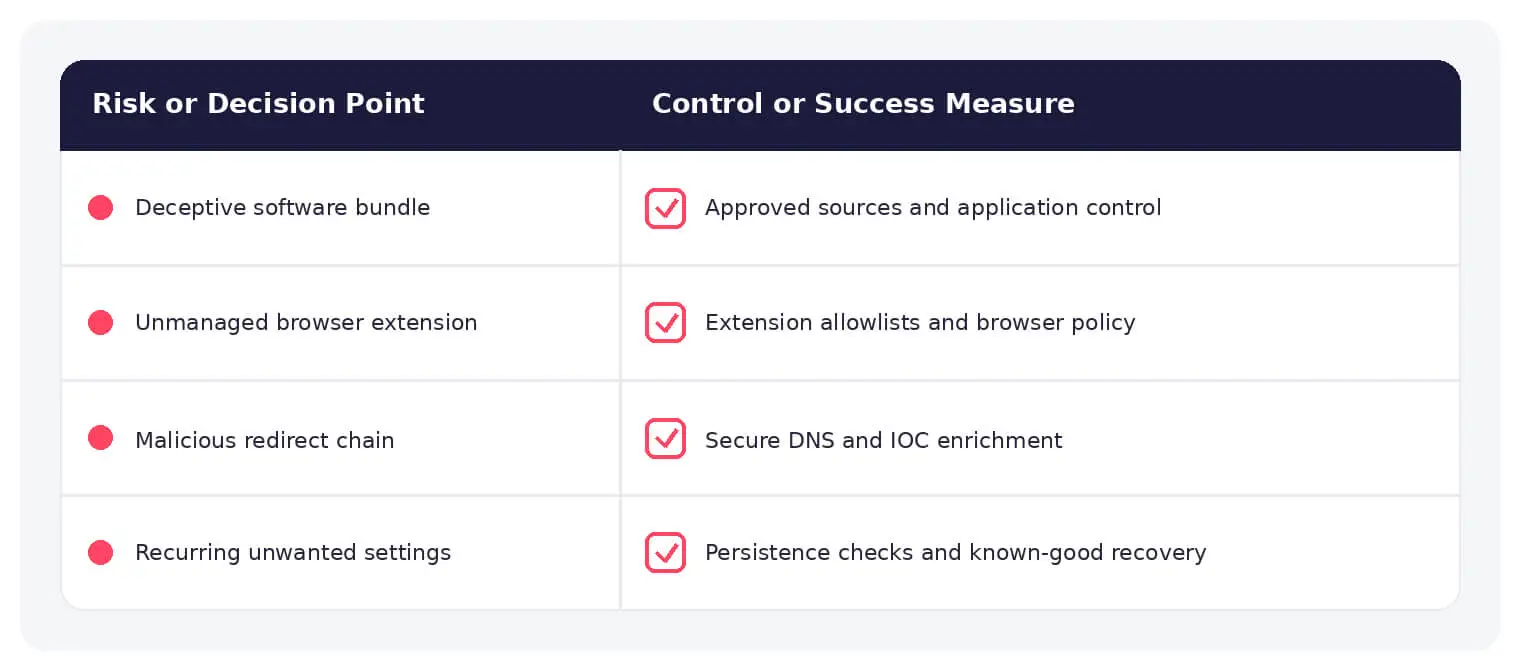
Warning Signs and Detection
Look for recurring pop-ups, redirects, new extensions, altered homepages, unfamiliar search providers, software installed without approval, unusual browser policies, and connections to rare advertising or redirect infrastructure.
Prevention and Response
Allow software only from approved sources, restrict installation rights, manage extensions, inspect downloads, and use endpoint protection, secure DNS, web filtering, and centralized browser policies. Removal should restore a known-good browser and device state.
How SOCRadar Can Help
SOCRadar combines external asset visibility, threat intelligence, Dark Web monitoring, vulnerability context, and indicator enrichment to help teams identify exposure and investigate activity connected to adware.
Explore SOCRadar Extended Threat Intelligence or request a demo to strengthen threat-informed prevention and investigation.
Frequently Asked Questions
Is Adware a Type of Malware?
Not always. The category spans disclosed advertising-supported software, potentially unwanted programs installed through deceptive bundling, and aggressive families whose tracking, redirects, and payload downloads justify treating them as malware. Classification depends on consent and observed behavior rather than the label.
What Risks Does Adware Pose Beyond Intrusive Ads?
The ads are the visible symptom; the underlying risks are data collection, browser and search redirection, and exposure to malicious advertising. Redirects can lead users to phishing pages, scam offers, or fake software updates, and aggressive variants install additional unwanted components. Adware also makes it harder to tell which browser activity is legitimate.
How Does Adware Get Installed on a Device?
Common delivery paths include bundled installers, misleading download buttons on software sites, browser extensions, mobile applications, and compromised advertising networks. Consent is often hidden in confusing prompts or enabled by default as an optional component. Once active, the software injects ads, alters search settings, and may download configuration updates.
Can Mobile Devices Be Infected With Adware?
Yes. Mobile adware typically arrives through applications that abuse permissions to display overlays or full-screen ads outside their own interface. Apps sideloaded from unofficial stores or pushed by aggressive advertising networks carry a higher risk than store-reviewed software.
What Are the Warning Signs of an Adware Infection?
Typical indicators include:
- Recurring pop-ups or notification spam outside normal browsing
- A changed homepage, search provider, or unfamiliar extensions and toolbars
- Searches redirecting through unknown pages
- Applications installed without approval and noticeably slower performance
Browser settings locked behind enterprise-style policies that no administrator configured are a stronger signal that a hijacker or aggressive adware family is present.
How Can Security Teams Detect Adware Across an Organization?
Look for patterns rather than isolated complaints: the same extension appearing on multiple endpoints, browsers controlled by unexpected policies, and connections to rare advertising or redirect domains. Endpoint protection and DNS query logs help identify affected hosts. SOCRadar’s indicator enrichment and threat intelligence can help analysts correlate observed domains and infrastructure with known adware campaigns.
How Should Adware Be Removed From a Browser and Device?
Removal should cover more than uninstalling one program: remove unwanted applications, delete unfamiliar extensions, restore the homepage and search provider, and inspect scheduled tasks, browser policies, and configuration profiles that could reapply the changes. If browser synchronization is active, an infected extension may be pushed back to clean devices, so remove it from the synced data or source profile as well. Verify the restored state before returning the device to normal use.
Why Do Adware Settings Keep Returning After Cleanup?
Aggressive families establish persistence beyond the browser, using scheduled tasks, registry entries, profiles, or enterprise-style browser policies that reapply hijacked settings at startup or each launch. Synchronization can also restore an extension from another device. Cleanup that does not address every persistence location commonly results in the unwanted settings reappearing.
Should Passwords Be Changed After an Adware Infection?
Adware primarily delivers advertising rather than harvesting credentials, but injected pages, redirects, and bundled components can create exposure to credential theft. Resetting credentials entered during suspicious browser activity is a reasonable precaution, and signing out of active sessions matters because a password change alone may not invalidate a session that was already stolen on some platforms.
When Does Adware Warrant Rebuilding a Device?
Rebuilding is worth considering when bundled components installed additional malware, privileged credentials may have been exposed, persistence survives cleanup, or the device cannot be confirmed as clean. A single unwanted extension removed successfully, with no further indicators afterward, may not justify the effort.
How Can Organizations Reduce the Risk of Reinfection?
Combine controls rather than relying on cleanup alone: allow software only from approved sources, restrict local installation rights, manage extensions through centralized browser policies, and use endpoint protection, secure DNS filtering, and web filtering to limit access to known redirect infrastructure. Briefing users on misleading download buttons and deceptive installer prompts closes the remaining gap, since adware depends heavily on obtaining consent through confusion.

Oct 16, 2026
CVE-2026-102764: BeyondTrust Zero-Day Exploited
BeyondTrust has disclosed CVE-2026-102764, a critical Remote Support vulnerability exploited as a zero-day weeks before customers received a patch. The attack began…

Oct 15, 2026
Cisco Secure Email & PAN-OS Zero-Days Exploited
Cisco Secure Email & PAN-OS Zero-Days Exploited Cisco and Palo Alto Networks have patched two actively exploited zero-day vulnerabilities that can lead…
Oct 15, 2026
SOCRadar Splunk Integration: New MSSP and Vulnerability Apps
SOCRadar Splunk Integration: New MSSP and Vulnerability Apps Your analysts live in Splunk. Your external risk does not: SOCRadar alarms for dozens…
Intelligence in your inbox every Thursday.
Join 30,000+ security professionals reading SOCRadar research.
Subscribe