What Is a Dark Web Scan?
A dark web scan is a point-in-time search for specified domains, email addresses, credentials, brands, or other identifiers across available breach data and monitored criminal sources. It can reveal known exposure and help an organization decide where deeper investigation is needed.
A scan is not the same as continuous monitoring and cannot prove that no exposure exists. Coverage depends on collected sources, query scope, access, freshness, and matching quality. Results may include old or duplicated records and must be validated before response.
Key Takeaways
- Domain and corporate-email exposure scans is a central category or use case.
- Reliable assessment depends on source, timing, ownership, and operational context.
- Detection should connect external findings with identity, device, network, and business signals.
- Response should protect affected people and remove every reusable access path.
How a Dark Web Scan Works
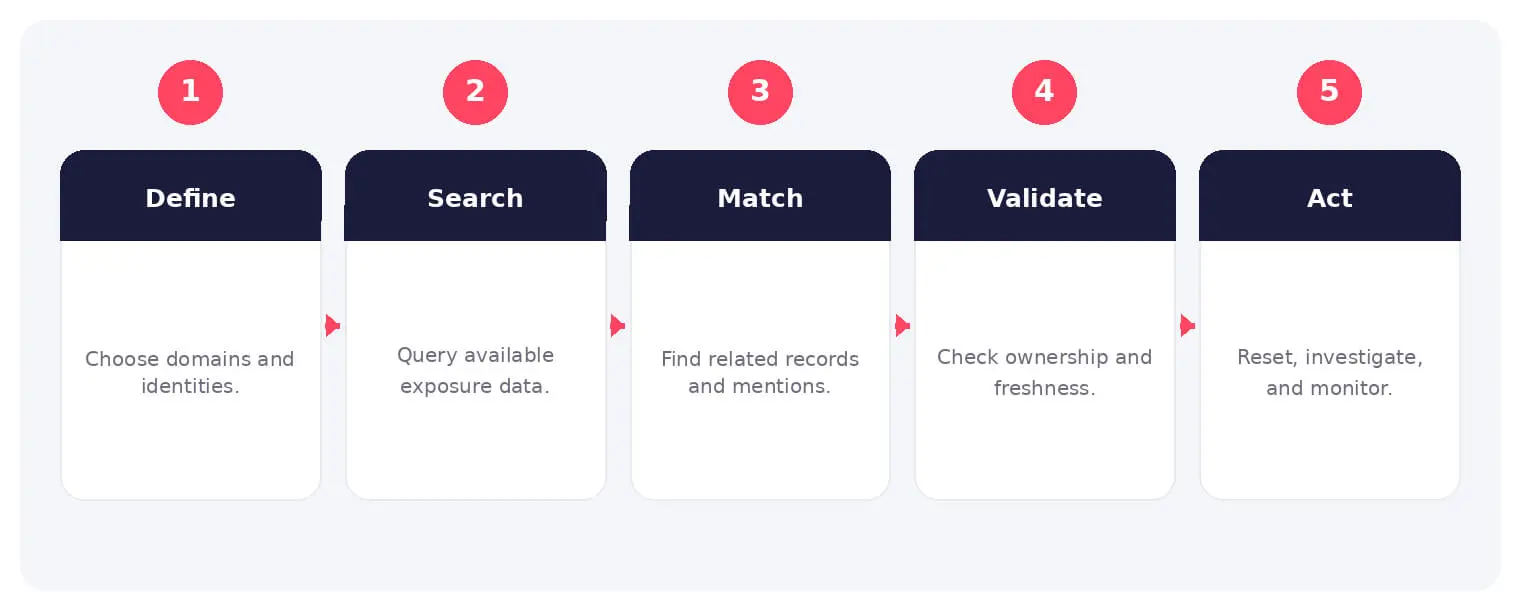
The sequence shown above provides a practical operating model. Individual steps may overlap, repeat, or involve different services and participants, so analysts should validate each stage against available evidence.
A scan is not the same as continuous monitoring and cannot prove that no exposure exists. Coverage depends on collected sources, query scope, access, freshness, and matching quality. Results may include old or duplicated records and must be validated before response.
Common Types and Use Cases
- Domain and corporate-email exposure scans
- Credential and breach-record checks
- Brand and executive mention scans
- Supplier or customer exposure assessments
Security, Privacy, and Business Risks
- False reassurance from a clean result
- Account takeover from valid exposed credentials
- Missed context in stale or duplicated records
- Sensitive findings handled without proper controls
Warning Signs and Validation
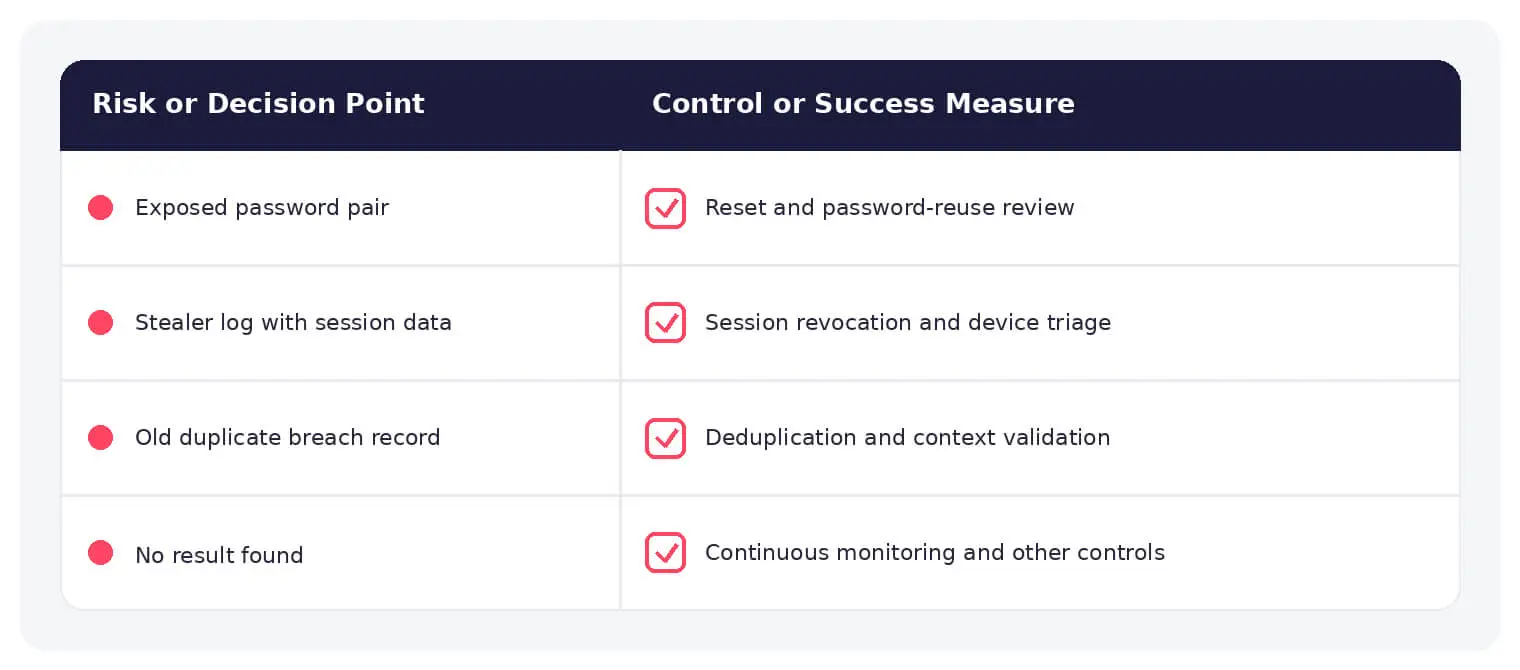
Review the source, breach date, first and last observation, password or token type, affected identity, duplicates, and current account status. Correlate findings with sign-ins and endpoint activity.
Prevention and Response
Treat scans as an entry point, not a guarantee. Reset reused or exposed passwords, revoke stolen sessions, enforce MFA, review identity activity, notify owners securely, and establish continuous monitoring for important assets.
How SOCRadar Can Help
SOCRadar combines external intelligence, Dark Web visibility, brand monitoring, attack-surface discovery, and contextual enrichment to help teams identify exposure and investigate activity connected to dark web scan.
Explore SOCRadar Dark Web Monitoring or request a demo to strengthen external threat detection and response.
Frequently Asked Questions
What Does a Dark Web Scan Actually Check?
A dark web scan searches available breach data and monitored criminal sources for specific identifiers, such as a corporate domain, email addresses, brand names, or known credentials. It provides a point-in-time view of known exposure within the sources and query scope used, not a complete inventory of everything leaked anywhere.
Is a Dark Web Scan the Same as Continuous Dark Web Monitoring?
No. A scan is a one-time query at a specific moment, while continuous monitoring watches sources over time for new records, fresh dumps, and short-lived posts. Because leaked data appears at unpredictable times, important domains and identities are usually better covered by ongoing monitoring rather than one-off scans.
What Sources Do Dark Web Scans Typically Cover?
Coverage varies by provider but commonly includes breach databases, stealer logs, underground forum posts, paste sites, and marketplace listings. The usefulness of a result depends on which sources were collected, how recently they were gathered, and how accurately records are matched to the queried identifiers.
Why Can a Clean Scan Result Still Be Misleading?
A clean result only means no match was found in the data and query scope available at scan time. Records may exist in unmonitored sources, appear later, or fail matching because of altered identifiers. Treating a clean result as proof that nothing is exposed creates false reassurance.
Do Dark Web Scan Results Show Current, Working Credentials?
Not necessarily. Results can mix old breach records, duplicated entries, and passwords that were already changed. However, some findings, such as recent stealer logs containing valid passwords or session tokens, can remain usable, so each record needs review before its severity is judged.
What Details Should Be Reviewed Before Acting on a Scan Finding?
Check the source, breach date, first and last observation, the type of password or token exposed, the affected identity, and whether the record is a duplicate. Correlate the finding with recent sign-in and endpoint activity to determine whether the credential is still active and being used.
What Should Happen After a Scan Finds Exposed Credentials?
Securely notify the credential owner, reset the exposed password along with any reused passwords, and revoke active sessions where the platform supports it. Review identity activity for unexpected sign-ins, investigate suspicious access, and confirm multi-factor authentication is enabled on the affected account.
Does Resetting a Password End an Attacker’s Access Immediately?
Not always. Depending on the platform, an existing stolen session can remain valid after a password change, so sessions should be explicitly revoked or signed out. Phishing-resistant MFA makes new phishing-based logins far harder, but it does not remove a session the attacker already holds.
How Can Organizations Limit the Impact of Dark Web Exposure?
Enforce phishing-resistant MFA, require unique passwords through a password manager, and shorten session lifetimes for sensitive systems. Set up continuous monitoring for key domains and executive identities, and treat external findings as one input alongside identity, endpoint, and network signals during investigations.
Is the Dark Web the Same as the Deep Web?
No. The deep web refers to any content not indexed by standard search engines, including everyday pages such as intranets, webmail, and subscription content. The dark web is a smaller portion of the deep web that requires specific software to access, and it hosts some of the forums and marketplaces where leaked data circulates.
Oct 27, 2026
Australia’s Annual Cyber Threat Report 2025-26 Shows Cyber Incidents Up 20%
Australia’s cyber security authority responded to 1,524 cyber security incidents in the 2025-26 financial year, a 20% increase from the previous year…

Oct 27, 2026
PHP2Shell Weaponized After Japanese Real Estate Extortion
An exposed server ties an extortion wave on about 20 Japanese property sites to an operator who later weaponized PHP2Shell (CVE-2026-109618, CVE-2026-109619)…
Oct 27, 2026
Wasmtime Sandbox Escape Flaws Patched in Cranelift
Two critical Wasmtime sandbox escape flaws, CVE-2026-115889 and CVE-2026-115893, let a crafted WebAssembly (Wasm) module push the Cranelift compiler into generating unsafe…
Intelligence in your inbox every Thursday.
Join 30,000+ security professionals reading SOCRadar research.
Subscribe