Mar 10, 2026

May 14, 2026
6 Mins Read
Sep 13, 2026
Table Of Content
Related Articles

SMS Bombing

Threat Actors
Jan 08, 2026

Dark Web Monitoring
Feb 19, 2026

Ransomware
Jan 31, 2026

OSINT Framework
Apr 17, 2026

What Is Device Fingerprinting?
Device fingerprinting combines observable attributes from a browser, application, device, network, and behavior to estimate whether sessions come from the same device or environment. Signals may include user agent, screen size, fonts, time zone, WebGL, language, storage, IP context, and interaction patterns.
Fingerprints are probabilistic and can change, collide, or be manipulated. Security teams use them for account protection, bot detection, fraud prevention, and risk authentication, while privacy concerns arise when tracking is opaque, persistent, or used beyond a legitimate purpose.
Key Takeaways
- Browser and canvas fingerprinting is a central category or use case.
- Reliable assessment depends on source, timing, ownership, and operational context.
- Detection should connect external findings with identity, device, network, and business signals.
- Response should protect affected people and remove every reusable access path.
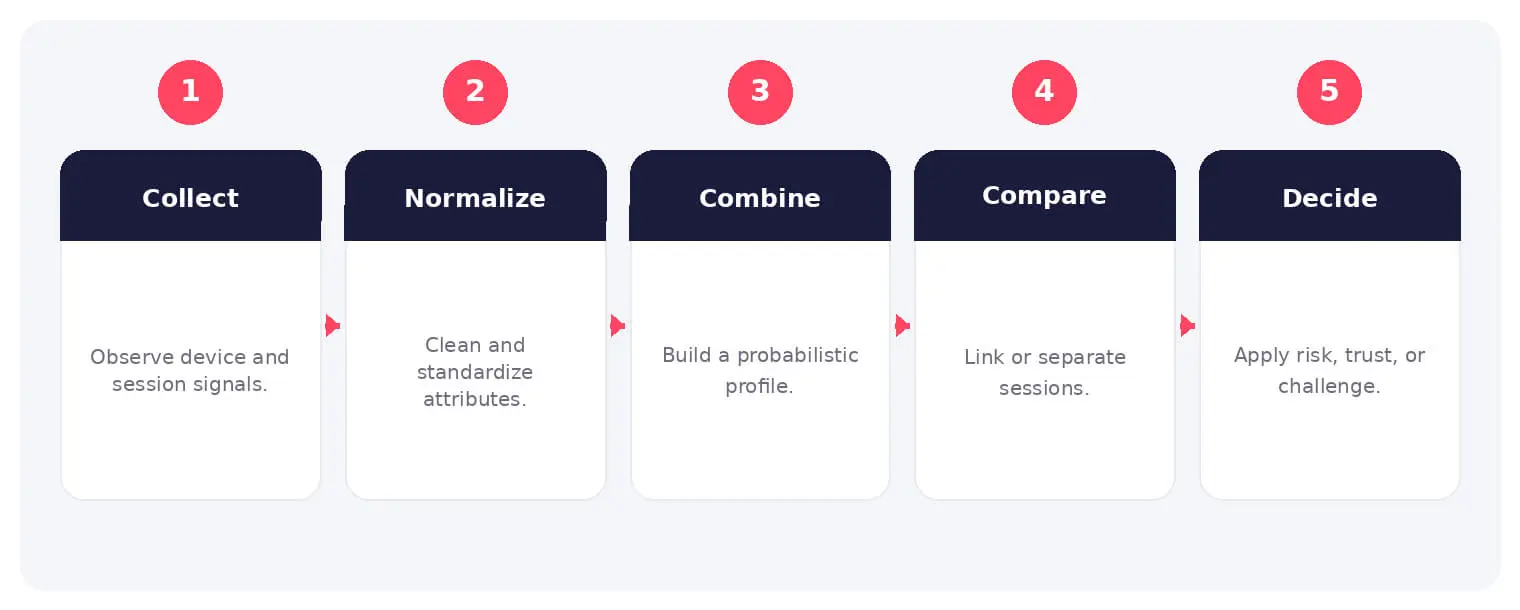
How Device Fingerprinting Works
The sequence shown above provides a practical operating model. Individual steps may overlap, repeat, or involve different services and participants, so analysts should validate each stage against available evidence.
Fingerprints are probabilistic and can change, collide, or be manipulated. Security teams use them for account protection, bot detection, fraud prevention, and risk authentication, while privacy concerns arise when tracking is opaque, persistent, or used beyond a legitimate purpose.
Common Types and Use Cases
- Browser and canvas fingerprinting
- Mobile application and hardware signals
- Network, IP, and location context
- Behavioral and interaction fingerprinting
Security, Privacy, and Business Risks
- Cross-site tracking and privacy concerns
- False matches that block legitimate users
- Evasion through spoofing and antidetect tools
- Overreliance on a fingerprint as identity proof
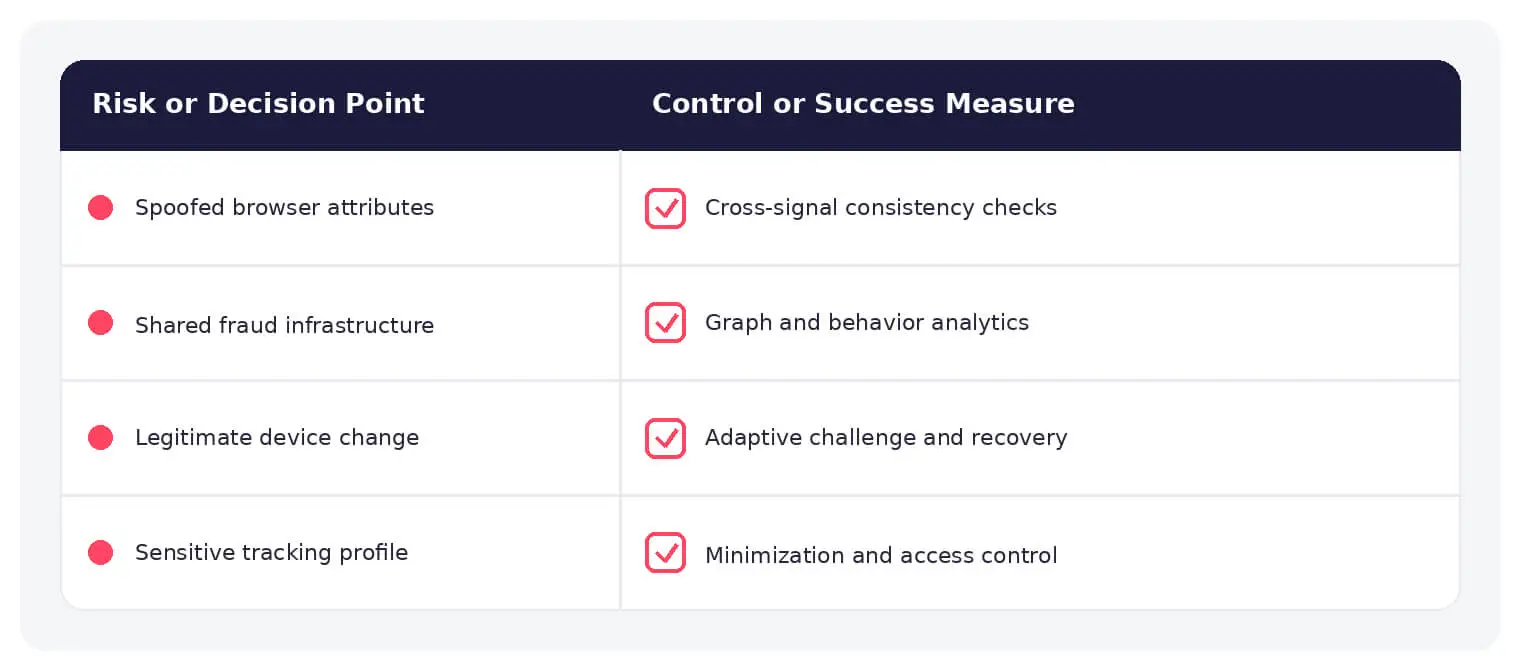
Warning Signs and Validation
Look for internal consistency across device, locale, network, graphics, storage, timing, and behavior. Detect sudden fingerprint changes, impossible combinations, profile rotation, and many accounts tied to shared signals.
Prevention and Response
Use fingerprints as one risk factor, minimize collection, define retention and purpose, provide appropriate notice, protect stored profiles, apply step-up checks, and combine device evidence with identity, transaction, and behavior.
How SOCRadar Can Help
SOCRadar combines external intelligence, Dark Web visibility, brand monitoring, attack-surface discovery, and contextual enrichment to help teams identify exposure and investigate activity connected to device fingerprinting.
Explore SOCRadar Extended Threat Intelligence or request a demo to strengthen external threat detection and response.
Frequently Asked Questions
What Signals Are Used to Build a Device Fingerprint?
Fingerprints are assembled from many individually weak signals, including:
- Browser attributes such as user agent, screen resolution, installed fonts, language, and time zone
- Rendering details exposed through HTML5 canvas and WebGL, which vary with the GPU and drivers
- Network context such as IP address, connection type, and proxy or VPN indicators
- Behavioral patterns such as typing rhythm, mouse movement, or touch dynamics
No single attribute identifies a device on its own; uniqueness comes from combining these signals and weighing how rare each value is.
How Is Device Fingerprinting Different From Cookie Tracking?
Cookie tracking depends on identifiers stored on the device, so deleting cookies or switching browsers breaks the link. Fingerprinting derives an identifier from attributes that are observable on every visit and stored nowhere on the device, making it harder for users to detect or reset. That persistence makes it valuable for fraud detection and contentious for advertising.
What Is Canvas Fingerprinting?
Canvas fingerprinting draws hidden text or images and hashes the pixel output, capturing small rendering differences tied to the GPU, graphics drivers, fonts, and anti-aliasing settings. The resulting hash stays fairly stable even after cookies are cleared. Privacy-focused browsers counter this by randomizing canvas output or blocking scripts from reading it.
Why Can Two Devices Produce the Same Fingerprint?
Because fingerprints combine a finite set of attributes, devices with identical or near-identical configurations can collide, which is common on popular hardware, virtual machines, remote desktops, and corporate images with default settings. A match therefore indicates similarity, not a proven link to one physical device. This is why mature systems weigh fingerprint evidence alongside account, IP, and behavioral context.
How Do Fraudsters Evade Device Fingerprinting?
Antidetect browsers and automation frameworks can alter user agents, canvas and WebGL values, time zones, and other attributes so that one operator appears as many unrelated devices, and complete profiles can be rotated between sessions. Evasion is rarely perfect, because spoofed values often conflict with the network context, locale, or behavior surrounding the session.
What Inconsistencies Reveal a Spoofed Fingerprint?
Useful tells include a mobile user agent paired with desktop-only fonts or screen sizes, a time zone that contradicts the IP location, canvas or WebGL data that does not match the claimed hardware, and a fingerprint that changes on every login for the same account. One fingerprint appearing across many accounts, or hundreds of sign-ups sharing the same environment, also points to automation or fraud operations.
Why Do Fingerprinting Systems Block Legitimate Users?
False matches occur when many real customers share one environment, such as a default browser configuration, a corporate VPN exit node, or standardized company laptops that produce identical fingerprints. Reputation models can then flag new accounts from that environment as risky. Pairing fingerprint checks with step-up verification and a clear recovery path reduces this friction.
How Should Device Fingerprints Fit Into Fraud Prevention?
Treat a fingerprint match as one risk signal alongside identity data, transaction patterns, and network context rather than as proof of identity. Collect only the attributes justified by the stated purpose, define retention limits, protect stored profiles, and give users a way to contest or reset a poor device reputation. Reserve hard blocks for high-confidence matches and use step-up authentication elsewhere.
What Privacy Risks Does Device Fingerprinting Create?
Because nothing is stored on the device, fingerprinting can recognize people across sites without their knowledge and with no identifier to delete, and profiles can be combined with other data and kept indefinitely. Laws such as the GDPR and the ePrivacy regime generally require a lawful basis or consent for this type of processing. Opaque, persistent, or purpose-creep collection raises both regulatory and reputational risk.
Does Private Browsing or Clearing Cookies Stop Device Fingerprinting?
Neither measure removes the fingerprint itself. Clearing cookies deletes stored identifiers and private windows limit storage, but hardware, rendering, and configuration attributes are read fresh on every visit. Anti-fingerprinting features in browsers such as Firefox and Tor reduce accuracy by normalizing or randomizing signals, though this can also complicate fraud controls that rely on the same data.