Mar 10, 2026
Jan 31, 2026
5 Mins Read
Sep 13, 2026
Table Of Content
Related Articles
SMS Bombing
Threat Actors
Jan 08, 2026
Dark Web Monitoring
Feb 19, 2026
Ransomware
Jan 31, 2026
OSINT Framework
Apr 17, 2026

What Is Typosquatting?
Typosquatting registers domains that resemble legitimate names and rely on typing mistakes or visual confusion.
Variants may omit, add, transpose, repeat, or replace characters, use different top-level domains, or exploit look-alike Unicode characters. Attackers use them for phishing, malware, ads, fraud, and traffic diversion.
Key Takeaways
- Missing, repeated, and transposed letters is a central category or capability.
- Reliable assessment requires identity, timing, source, and operational context.
- Detection should correlate external, identity, device, network, and cloud evidence.
- Response should preserve evidence and remove every reusable access path.
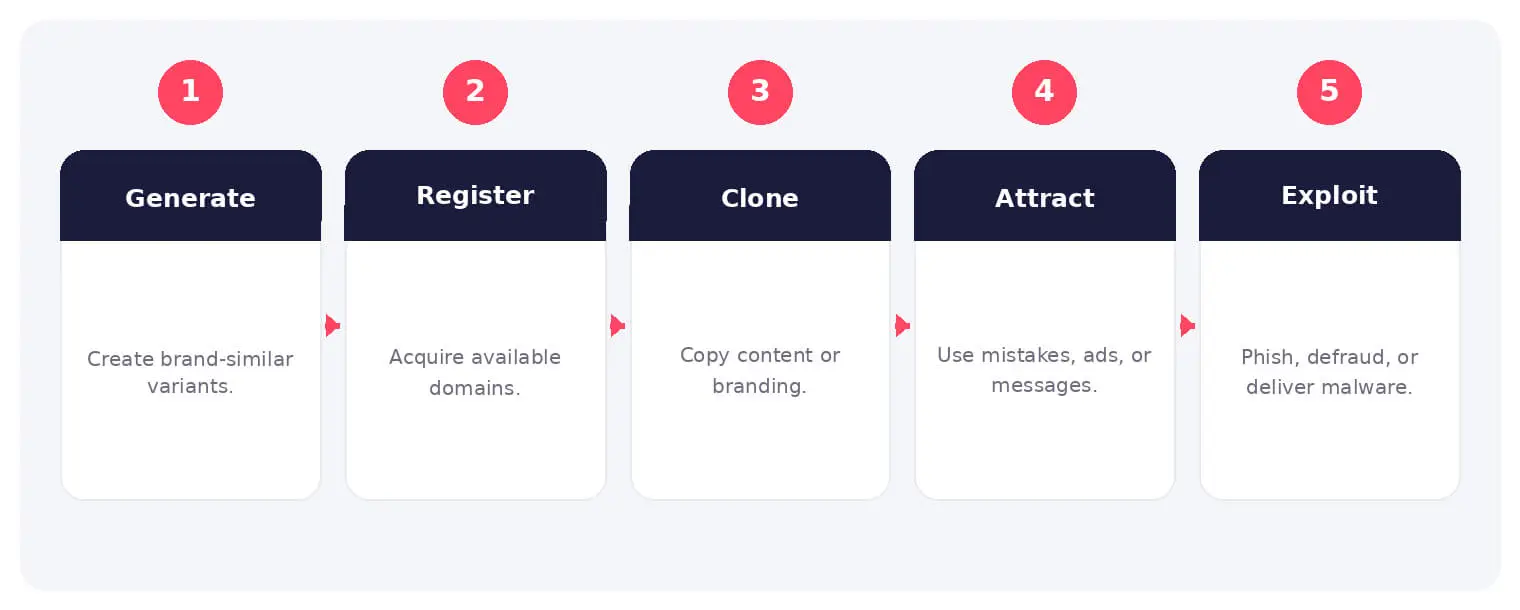
How Typosquatting Works
The sequence above provides a practical operating model. Individual stages may overlap, repeat, or involve different people and services, so analysts should validate each step against the available evidence.
Variants may omit, add, transpose, repeat, or replace characters, use different top-level domains, or exploit look-alike Unicode characters. Attackers use them for phishing, malware, ads, fraud, and traffic diversion.
Common Types and Techniques
- Missing, repeated, and transposed letters
- Adjacent-key and character substitution
- Wrong top-level domains
- Homograph and Unicode look-alikes
Security and Business Risks
- Credential theft and customer fraud
- Malware and fake software delivery
- Brand damage and lost traffic
- BEC and supplier impersonation
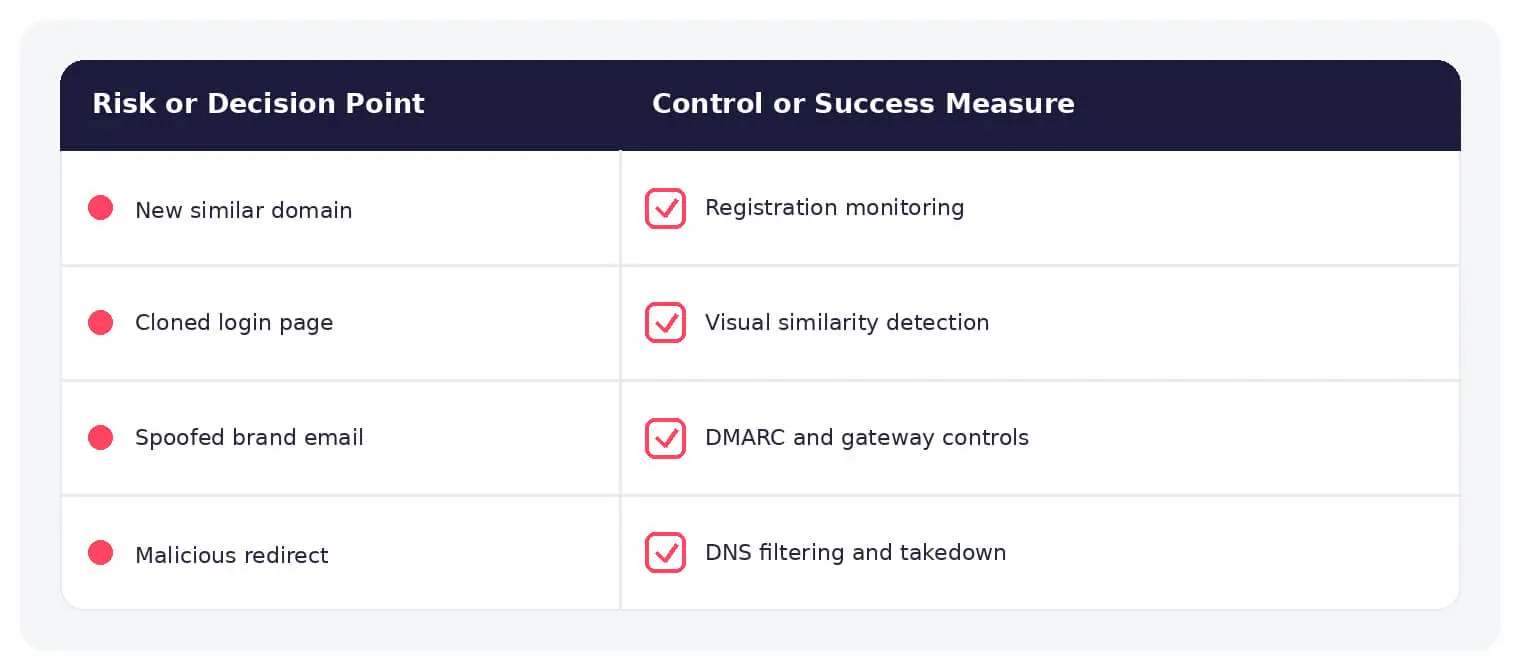
Warning Signs and Detection
Monitor new domains, certificates, DNS, content similarity, email use, advertisements, redirects, and hosting relationships.
Prevention and Response
Register critical variants, use DMARC, monitor continuously, block malicious domains, warn users, preserve evidence, and maintain registrar and hosting takedown workflows.
How SOCRadar Can Help
SOCRadar combines external visibility, threat intelligence, Dark Web monitoring, brand protection, vulnerability context, and indicator enrichment to help teams investigate exposure connected to typosquatting.
Explore SOCRadar Brand Protection or request a demo to strengthen threat-informed prevention and response.
Frequently Asked Questions
What Is Typosquatting?
Typosquatting is the registration of domain names designed to resemble legitimate brands, products, or executives, relying on typing mistakes or visual confusion to send visitors to the wrong site. Attackers use these domains for phishing, malware distribution, fraudulent ads, and traffic diversion.
Which Domain Variations Do Typosquatters Register Most Often?
Frequent patterns include dropped letters, doubled letters, transposed characters, adjacent-key substitutions, and wrong top-level domains such as .net, .co, or .io in place of .com. Hyphenated names, added words like login or secure, and homoglyph substitutions are also common.
Why Are Unicode Homoglyph Domains Hard for Users to Spot?
Unicode includes characters from other scripts, such as Cyrillic, that render nearly identically to Latin letters, so a spoofed domain can look correct even in the address bar. The difference is usually visible only through close inspection of the raw characters or through automated controls that flag mixed-script domains.
How Do Attackers Profit from Typosquatted Domains?
Monetization ranges from phishing pages that harvest credentials and payment details to fake software updates, malvertising, and redirect schemes that sell mistyped traffic. Look-alike domains also support business email compromise when attackers impersonate suppliers, executives, or support teams.
What Warning Signs Indicate a Typosquatting Domain Is Active?
Signals worth treating seriously include a newly issued TLS certificate on a look-alike name, rapid DNS or content changes shortly after registration, page content that closely mirrors the legitimate site, and email or advertisements sent from the near-identical domain. Redirect chains to unrelated destinations are another strong indicator.
How Can Organizations Detect Typosquatting Domains Early?
Continuous monitoring of new domain registrations against brand keywords, combined with certificate transparency logs, DNS record analysis, content similarity checks, and hosting relationship mapping, surfaces threats before they see heavy abuse. Tracking look-alike senders in email traffic and ad platforms adds coverage between registration and active phishing.
What Should Be Done When a Malicious Typosquatting Domain Is Found?
Preserve evidence first, including screenshots, DNS records, and WHOIS or certificate data, then submit takedown requests to the registrar and hosting provider. Block the domain in email gateways, proxies, and DNS filtering, alert users who may have interacted with it, and review authentication logs for suspicious sign-ins.
Does Registering Domain Variants Stop Typosquatting?
No. Defensive registrations reduce the most obvious mistyping paths, but no organization can register every character combination, homoglyph, or new TLD variant. Registration works best as one layer alongside continuous monitoring and ready takedown workflows.
How Does DMARC Help Against Typosquatting?
DMARC, together with SPF and DKIM, helps stop attackers from sending email that directly spoofs your exact domain. It does not block look-alike domains, so messages sent from a typosquatted name fall outside your DMARC policy and must be caught by mail filtering and recipient awareness instead.
What Business Impact Can Typosquatting Cause?
Direct consequences include credential theft, customer fraud, malware infections, and lost traffic or ad revenue. Indirect damage can be just as costly, since customers who fall for a fake domain often blame the real brand, and supplier or executive impersonation can lead to fraudulent payments.
How Is Typosquatting Different from Cybersquatting?
Cybersquatting typically registers a brand’s exact name in advance, often to resell it at a premium. Typosquatting targets look-alike variations that capture mistyped or misread traffic, and those domains are more often used for active phishing, malware, and fraud than for resale.