Axios npm Hijack 2026: Everything You Need to Know – IOCs, Impact & Remediation
On March 31, 2026, a threat actor hijacked the npm account of the lead Axios maintainer and published two malicious versions of one of the world’s most popular JavaScript libraries – Axios (~100M weekly downloads). The malicious versions contained a hidden dependency that silently installed a cross-platform Remote Access Trojan (RAT) the moment any developer or CI/CD pipeline ran npm install.
The malicious versions ([email protected] and [email protected]) were live for approximately 2–3 hours before npm removed them.
- If you’re using [email protected] or older → You are not affected.
- If you ran npm install between ~00:21–03:15 UTC on March 31, 2026 → Treat affected machines as fully compromised.
- Fastest check: Search your lockfiles for [email protected], [email protected], or [email protected].
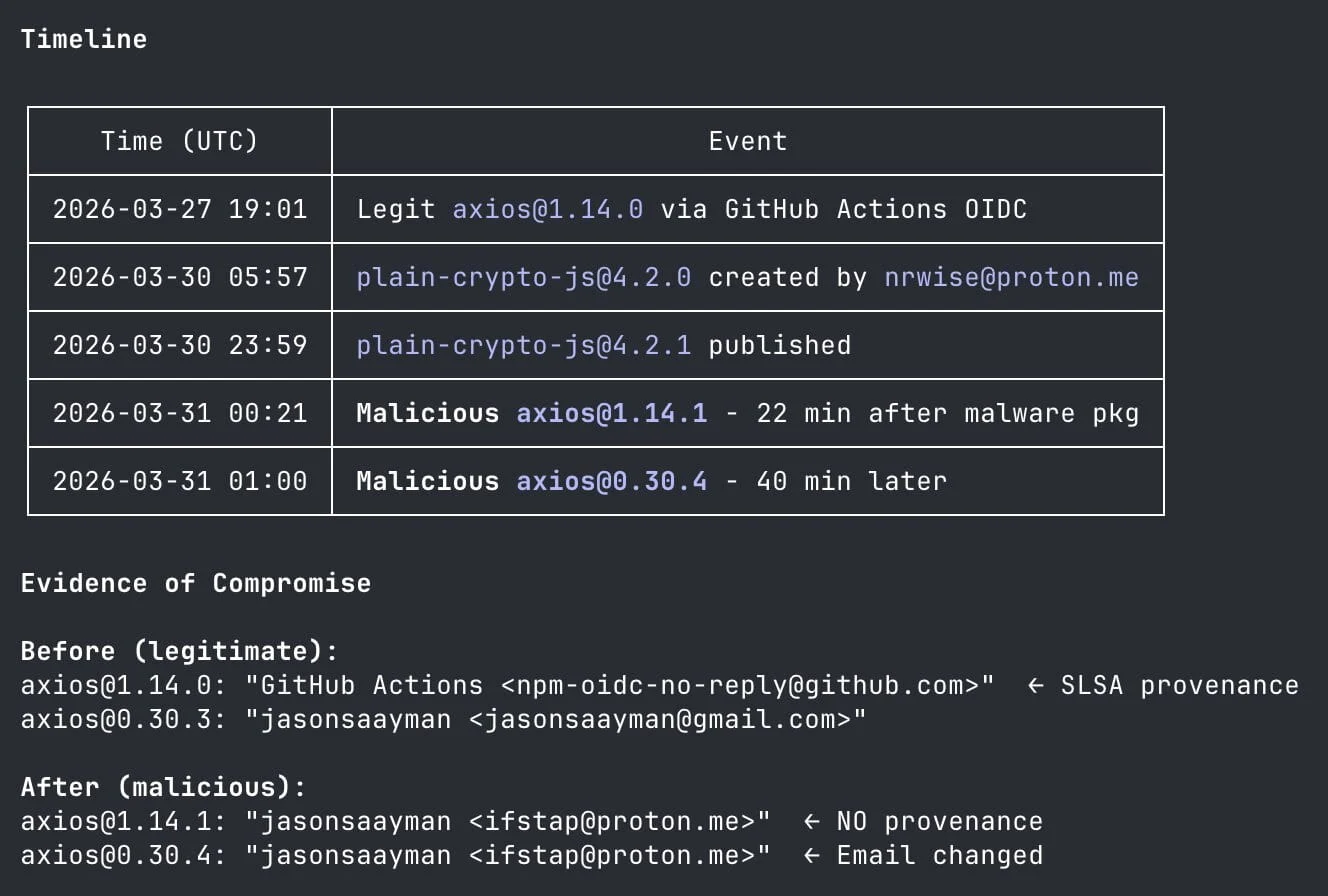
Timeline of the Axios npm compromise, highlighting the staged plain-crypto-js package and the malicious axios releases published through the hijacked maintainer account. (X)
1. What is Axios and Why Does It Matter Here?
Axios is a free, open-source JavaScript library published on npm (Node Package Manager) that simplifies sending and receiving data over the internet (HTTP requests). Think of it as a universal adapter that lets any JavaScript application talk to any web server or API.
Simple example: A mobile app needs today’s weather data.
axios.get('https://api.weather.com/today')
  .then(response => console.log(response.data));
Without a library like Axios, this would require dozens of lines of complex, error-prone code. Axios abstracts that complexity.
Why this matters for your threat surface:
- ~80-100 million weekly downloads on npm – making it one of the most depended-upon packages in the entire JavaScript ecosystem.
- Used in web apps, backend APIs, React Native mobile apps, serverless functions, CI/CD automation pipelines, and developer workstations across virtually every industry.
- Axios is a transitive dependency in thousands of other packages – meaning your organization may be using it even if no developer explicitly installed it.
For CISOs: If your organization uses any Node.js-based software, there is a high probability that Axios is somewhere in your dependency tree.

2. What Exactly Happened in the Axios Supply Chain Attack?
A software supply chain attack means an adversary compromises a trusted component in the software build process – not your application directly, but a library your application depends on. By poisoning a trusted building block, the attacker reaches every downstream user automatically.
Here is what happened step by step:
Step 1 – Account takeover: The attacker compromised the npm account of jasonsaayman, the lead maintainer of Axios. The account’s registered email was changed to an attacker-controlled ProtonMail address ([email protected]).
Step 2 – Pre-staging: ~18 hours before the main attack, the attacker published a clean, innocent-looking “decoy” package called [email protected] to establish trust.
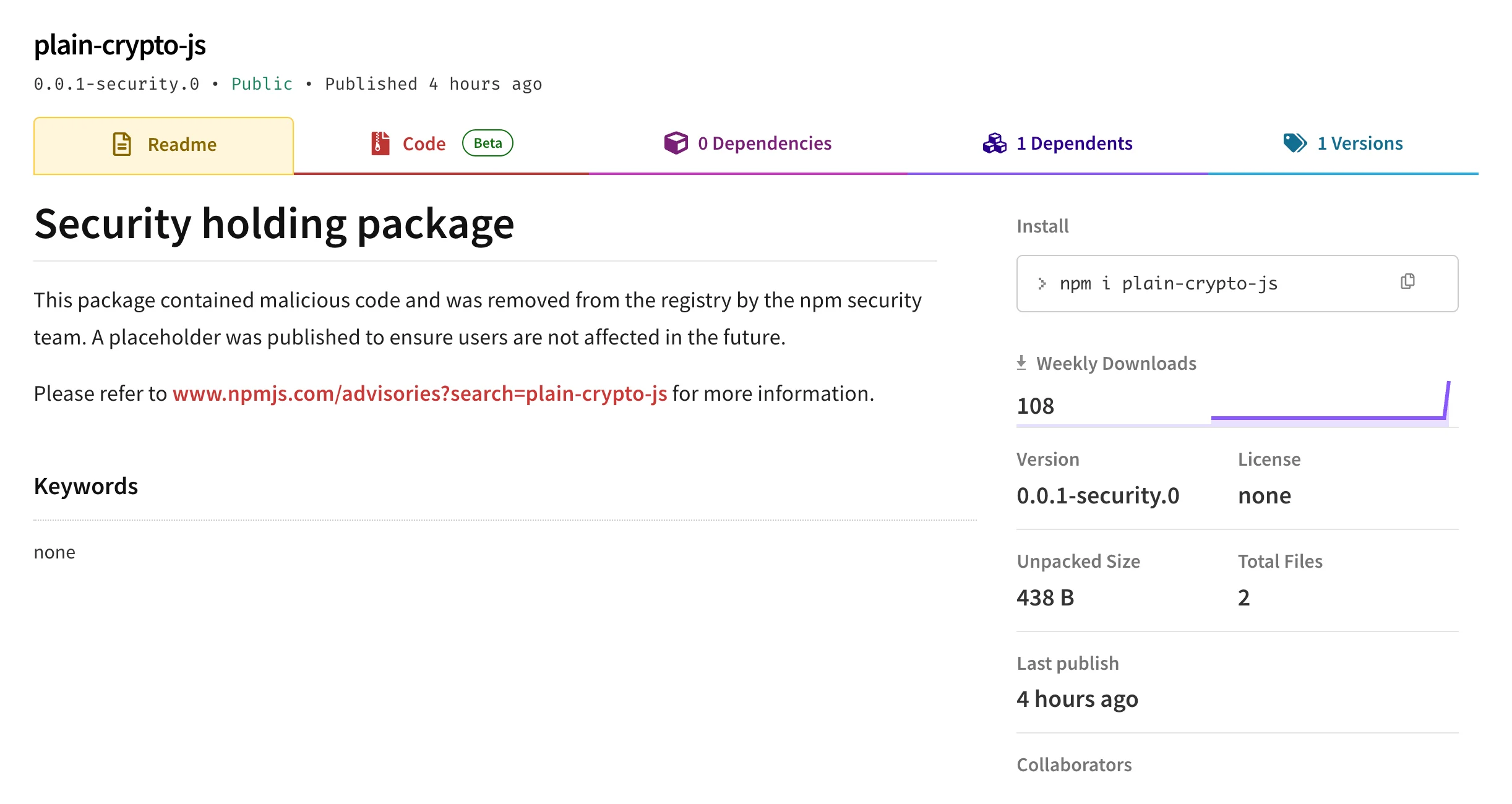
plain-crypto-js after takedown, showing npm’s security holding package on the registry.
Step 3 – Malicious payload deployment: Using a stolen long-lived npm access token, the attacker published two malicious Axios versions – one targeting the current (latest) tag and one targeting the legacy tag – ensuring maximum reach across all user segments.
Step 4 – Hidden dependency with obfuscated RAT dropper: Both malicious versions secretly included [email protected] as a dependency. This package contained a postinstall script (setup.js) that ran automatically the moment npm install completed – no user interaction required.
Step 5 – Cross-platform RAT installation: The dropper, tracked as SILKBELL, checked the operating system and delivered platform-specific payloads for Windows, macOS, and Linux. Those payloads deployed WAVESHAPER.V2, a backdoor capable of collecting system information, enumerating directories, executing commands, and retrieving additional payloads from command-and-control infrastructure.
Step 6 – Self-destruction: After executing, the malware deleted its own files and restored package.json to a clean state to evade detection and forensic analysis.
Maintainer Describes Social Engineering Behind Axios Compromise
On April 2, 2026, Axios lead maintainer Jason Saayman published a post-mortem explaining that the npm supply chain attack began with a targeted social engineering operation. In a follow-up explanation, he said the attackers built a highly convincing setup that closely resembled the tactics Google recently described in its report on UNC1069 social engineering activity.
According to Saayman’s account, the operation unfolded in several stages. First, the attacker allegedly impersonated the founder of a real company, using a cloned identity and believable outreach. Next, he was invited into a real Slack workspace that had been carefully branded to look legitimate, complete with plausible channel activity, linked social content, and what appeared to be team profiles and other open-source maintainers. The attackers then moved the interaction to a Microsoft Teams meeting with what seemed to be multiple participants, further increasing the appearance of legitimacy. During that meeting, Saayman was prompted to install what looked like a missing or outdated component related to Teams, but he later said this installer was actually the RAT that gave the attacker access to his system and ultimately enabled the malicious Axios package publishes.
The disclosure matters because it shows the compromise was not just a package-registry incident. It was the result of a well-prepared human-targeting campaign that used fake corporate identity, trusted collaboration platforms, and a staged troubleshooting scenario to deliver malware. Saayman’s post-mortem also includes a short attack timeline and lessons learned from the incident. Read the full post-mortem here.
3. Which Versions Are Affected?
Malicious Versions (un-published by npm)
| Package | Version | npm Tag | Status |
| axios | 1.14.1 | latest | Malicious – removed |
| axios | 0.30.4 | legacy | Malicious – removed |
| plain-crypto-js | 4.2.1 | – | Malicious – security hold |
Safe Versions
| Package | Safe Version |
| axios | 1.14.0 and all older 1.x versions |
| axios | 0.30.3 and all older 0.x versions |
| plain-crypto-js | 0.0.1-security.0 (npm security stub) |
Note: plain-crypto-js is not a legitimate, widely-used library. Its presence in any project’s dependency tree should be treated as an immediate indicator of compromise.
4. Detailed Attack Timeline
| Time (UTC) | Event |
| 2026-03-30 05:57 | Attacker publishes clean decoy [email protected] to establish credibility |
| 2026-03-30 23:59 | Malicious [email protected] (containing the RAT dropper) published |
| 2026-03-31 00:21 | Malicious [email protected] published via hijacked maintainer account |
| 2026-03-31 01:00 | Malicious [email protected] published – both major version branches targeted |
| ~2026-03-31 03:15 | npm security team un-publishes both malicious Axios versions |
| 2026-03-31 03:25 | npm places a security hold on plain-crypto-js |
| 2026-03-31 04:26 | npm publishes clean security stub [email protected] |
The malicious packages were available for approximately 2 hours and 54 minutes. Given Axios’s global download velocity, this window is more than sufficient for tens of thousands of npm install executions to have occurred – particularly across Asia-Pacific time zones where development activity was high during this window.
5. How Did the Attack Bypass the Project’s CI/CD Pipeline?
This is a critical question for understanding why standard security controls failed to catch this.
The attacker did not go through GitHub Actions or any automated CI/CD pipeline. Instead, they used a stolen long-lived npm access token to publish directly to the npm registry – completely bypassing:
- GitHub branch protection rules
- Code review requirements
- Automated security scanning in CI
- SLSA (Supply-chain Levels for Software Artifacts) build provenance checks
The red flag that expert defenders spotted immediately: Legitimate Axios releases always include OIDC provenance metadata and SLSA build attestations linking the npm package back to a specific GitHub Actions run. The malicious versions had none of this – they were published directly, leaving no verifiable build trail.
For security teams: Require npm publish provenance checks (–provenance flag) and SLSA level 2+ for all internal and critical third-party packages. Absence of OIDC provenance on a new version of a major package should trigger an automatic alert.
6. Who Is Behind the Axios Supply Chain Attack?
On April 1, 2026, Google Threat Intelligence Group publicly attributed the Axios npm package compromise to UNC1069, a North Korea-nexus, financially motivated threat actor. The attribution is based on infrastructure overlaps and the use of WAVESHAPER.V2, an updated backdoor linked to the group’s earlier activity. This updates the initial picture from March 31, 2026, when no public attribution had yet been made.
The attack reflects a high level of operational sophistication:
- Used anonymous ProtonMail addresses for both the hijacked maintainer account ([email protected]) and the decoy package registration ([email protected])
- Executed a deliberate 18-hour pre-staging phase with a clean decoy package – indicating advance planning, not opportunism
- Deployed a cross-platform RAT targeting Windows, macOS, and Linux simultaneously – suggesting significant development resources
- Implemented automated self-deletion and evidence removal after execution
- Targeted both active version branches (latest and legacy) to maximize reach
Even before the official attribution, the campaign already pointed to a capable and well-resourced actor. Its level of sophistication, use of operational security (OPSEC), and focus on a maximum-impact target suggested either a financially motivated threat actor or a nation-state-affiliated group conducting a broad credential harvesting operation.
7. Full IOC List
Malicious Package Hashes (SHA1)
| Package | Version | SHA1 Checksum |
| axios | 1.14.1 | 2553649f232204966871cea80a5d0d6adc700ca |
| axios | 0.30.4 | d6f3f62fd3b9f5432f5782b62d8cfd5247d5ee71 |
| plain-crypto-js | 4.2.1 | 07d889e2dadce6f3910dcbc253317d28ca61c766 |
Malicious Package Hashes (SHA256)
| Family / Artifact | Notes | SHA256 |
| SILKBELL | Obfuscated JavaScript dropper (setup.js) | e10b1fa84f1d6481625f741b69892780140d4e0e7769e7491e5f4d894c2e0e09 |
| WAVESHAPER.V2 | Linux Python RAT | fcb81618bb15edfdedfb638b4c08a2af9cac9ecfa551af135a8402bf980375cf |
| WAVESHAPER.V2 | macOS native binary | 92ff08773995ebc8d55ec4b8e1a225d0d1e51efa4ef88b8849d0071230c9645a |
| WAVESHAPER.V2 | Windows Stage 1 | 617b67a8e1210e4fc87c92d1d1da45a2f311c08d26e89b12307cf583c900d101 |
| N/A | Additional related sample | ed8560c1ac7ceb6983ba995124d5917dc1a00288912387a6389296637d5f815c |
| N/A | system.bat | f7d335205b8d7b20208fb3ef93ee6dc817905dc3ae0c10a0b164f4e7d07121cd |
| N/A | plain-crypto-js-4.2.1.tgz | 58401c195fe0a6204b42f5f90995ece5fab74ce7c69c67a24c61a057325af668 |
Network Indicators (C2)
| Type | Value |
| C2 Domain | sfrclak.com |
| C2 IP Address | 142.11.206.73 |
| Additional suspected infrastructure | 23.254.167.216 |
| Full C2 URL | http://sfrclak.com:8000/6202033 |
| macOS beacon endpoint | /product0 |
| Windows beacon endpoint | /product1 |
| Linux beacon endpoint | /product2 |
Action: Block sfrclak.com and 142.11.206.73 at the firewall, DNS filtering layer, and cloud security group level. It is also worth reviewing telemetry for 23.254.167.216, which Google linked to suspected UNC1069 infrastructure. Search historical DNS, proxy, and EDR logs for related traffic dating back to at least March 30, 2026.
Filesystem Indicators of Compromise (IOCs)
| Platform | Path |
| macOS | /Library/Caches/com.apple.act.mond |
| Windows | %PROGRAMDATA%wt.exe |
| Windows | %TEMP%6202033.vbs |
| Windows | %TEMP%6202033.ps1 |
| Linux | /tmp/ld.py |
| All platforms | node_modules/plain-crypto-js/setup.js (obfuscated with XOR key OrDeR_7077) |
Windows Persistence Indicators
| Type | Value |
| Registry Run Key | HKCUSoftwareMicrosoftWindowsCurrentVersionRunMicrosoftUpdate |
| Persistence File | %PROGRAMDATA%system.bat |
npm Metadata Red Flags
- Missing OIDC / trustedPublisher field on the malicious releases
- No GitHub Actions provenance link
- plain-crypto-js listed as a dependency (legitimate Axios has no such dependency)
For deeper technical analysis, indicators of compromise, and YARA rules, see Google’s research post.
8. How to Check if Your Organization Is Affected
Work through these steps in order of speed. No prior npm experience required.
Step 1 – Check Lockfiles (Fastest, ~2 Minutes)
In every Node.js repository, search package-lock.json, pnpm-lock.yaml, or yarn.lock for:
[email protected]
[email protected]
[email protected]
If any of these strings are found → the environment that last installed dependencies is affected.
Step 2 – Check Installed node_modules
find node_modules -name plain-crypto-js -type dIf the directory exists → affected.
Step 3 – Use the Community Incident Scanner
A ready-to-run scanner script (scan_axios_compromise.sh) has been published by Elastic Security researcher Joe Desimone. It checks:
- All lockfiles in the current directory tree
- Installed node_modules
- Filesystem IOCs listed above
- Running processes for RAT signatures
- npm cache for retained malicious packages
Run this on all developer laptops, build servers, and CI/CD runners.
Step 4 – Network & Endpoint Detection
- Search your SIEM / EDR for outbound connections to sfrclak.com or 142.11.206.73
- Search DNS logs for any resolution of sfrclak.com since March 30, 2026 00:00 UTC
- Search endpoint logs for the filesystem paths listed in Q7
9. How to Remediate if You’re Affected
Immediate Package Remediation
# Downgrade Axios to the last clean version and skip all postinstall scripts
npm install [email protected] --ignore-scripts

# Remove the malicious hidden dependency
rm -rf node_modules/plain-crypto-js
Add a version override to your package.json to prevent accidental re-installation:
{
  "overrides": {
    "axios": "1.14.0"
  }
}
For Yarn/pnpm, use the resolutions field instead:
{
  "resolutions": {
    "axios": "1.14.0"
  }
}
If the RAT Executed → Full Compromise Response
If any of the filesystem IOCs are present, or if the system’s timeline shows npm install ran during the malicious window, do not attempt in-place remediation. The machine must be treated as fully compromised:
- Isolate the machine immediately from the corporate network.
- Re-image or restore from a verified clean backup taken before March 30, 2026.
- Rotate all credentials that were accessible from the compromised machine – this includes:
- npm access tokens
- AWS / GCP / Azure cloud credentials and IAM roles
- GitHub, GitLab, Bitbucket tokens and SSH keys
- CI/CD secrets (GitHub Actions, Jenkins, CircleCI, etc.)
- Database credentials
- VPN certificates and keys
- Any .env files or secrets managers the process could have read
- Review access logs in your cloud environments and code repositories for unauthorized actions in the window following the compromise.
- File an incident report with your legal/compliance team, as credential exposure may trigger notification obligations under GDPR, CCPA, or sector-specific regulations.
- Block the C2 domain and IP at your firewall.
10. Potential Business Impact
| Risk | Details |
| Credential theft | Developer laptops and CI runners typically have access to cloud environments, source code, and production databases. Any credentials stored on-disk or in environment variables during the compromise window may be in attacker hands. |
| Lateral movement | A compromised developer workstation or CI runner is often a stepping stone into production. Attackers routinely pivot from development environments to cloud infrastructure. |
| Intellectual property theft | Source code repositories, API keys, and trade secrets accessible from development environments may have been exfiltrated. |
| Supply chain propagation | If your organization builds and publishes software of its own, a compromised CI/CD system could mean the attacker also tampered with your releases, extending the attack chain to your customers. |
| Compliance and legal exposure | Credential exposure affecting personal data may trigger breach notification obligations under GDPR (72-hour window), CCPA, or HIPAA. |
| Invisible compromise | The malware’s self-deletion capability means the absence of forensic evidence does not mean the malware did not execute. Absence of evidence ≠ evidence of absence. |
CISO note: Because Axios has ~100M weekly downloads and the malicious versions were tagged latest – the default for any npm install command – the global blast radius of this attack is potentially one of the largest in npm history, comparable to the 2021 ua-parser-js compromise and the event-stream incident.
11. How to Prevent Similar npm Supply Chain Attacks
Short-Term Controls (Implement This Week)
- Pin exact versions and commit lockfiles
Never allow floating version ranges (^1.14.0, ~1.14.0). Require exact pins (1.14.0) and commit package-lock.json to version control. Use npm ci (not npm install) in all CI/CD pipelines – it respects the lockfile exactly.
- Disable postinstall scripts in CI
npm ci --ignore-scriptsMost production builds don’t need lifecycle scripts. Disabling them prevents the entire class of attack demonstrated here.
- Implement a package release age policy (“cooldown”)
# Add to .npmrc
min-release-age=3d
This rejects packages published within the last 3 days, giving the security community time to analyze new releases before they enter your supply chain.
- Run npm audit in CI
npm audit --audit-level=highBlock builds that have high or critical vulnerabilities. Integrate this check as a required CI gate.
Medium-Term Controls (Implement This Month)
- Require OIDC/SLSA provenance for critical dependencies
Configure your internal npm proxy (Artifactory, Nexus, Verdaccio) to reject packages that lack cryptographic build provenance. This would have flagged the malicious Axios versions immediately – they had no OIDC provenance record.
- Adopt Software Bill of Materials (SBOM)
Generate an SBOM on every build using tools like syft or cdxgen. Continuously monitor your SBOM against vulnerability databases. This gives you an accurate, up-to-date picture of your dependency tree.
- Rotate to short-lived npm tokens
The attack succeeded in part because the attacker obtained a long-lived npm access token. Migrate to short-lived, automation-scoped tokens and rotate them regularly. Audit which CI/CD systems have npm publish rights.
- Consider migrating critical projects to pnpm
pnpm disables lifecycle scripts (postinstall, preinstall, etc.) by default for all packages except those explicitly allowlisted. This would have prevented the dropper from executing even if the malicious package had been installed.
12. Free Tools for Detection and Ongoing Monitoring
| Tool | What It Does | Cost |
| Community incident scanner (Joe Desimone gist) | Checks for all IOCs from this specific incident | Free |
| Socket.dev | Real-time behavioral analysis of npm packages; flagged this attack within minutes of publication | Free tier available |
| StepSecurity Harden-Runner | Detects anomalous network calls in GitHub Actions pipelines | Free for public repos |
| npm audit | Built-in vulnerability scanner | Free (built-in) |
| npm ls | Lists all installed packages and their dependency origins | Free (built-in) |
| Snyk Open Source | Full SCA scanning with license and vulnerability checks | Free for individuals/OSS |
| GitHub Dependabot | Automated dependency update PRs + security alerts | Free |
| Trivy | CLI-based container and filesystem SCA scanner | Free (open-source) |
| OSV-Scanner | Google’s open-source vulnerability scanner | Free (open-source) |
| Grype | Fast vulnerability scanner for container images and filesystems | Free (open-source) |