Bring Licensed Threat Intelligence into Every Conversation with SOCRadar and ChatGPT
The SOCRadar Threat Intelligence MCP app connects ChatGPT to the SOCRadar MCP server over OAuth, exposing your licensed intelligence modules as callable tools. Analysts enrich indicators, check CVE exploitation, and query Dark Web exposure without leaving the conversation.
You spot a suspicious IP in an alert, and the investigation begins: open the TIP, query the enrichment service, check the vulnerability database, search Dark Web sources – four tabs and twenty minutes later, you finally have context. What if your analysts could ask those questions in plain language, in the workspace where they already draft reports, summarize incidents, and reason through investigations? With the new SOCRadar Threat Intelligence MCP for ChatGPT, they can.
Threat Intelligence Shouldn’t Live in a Separate Tab
Security teams increasingly use AI assistants like ChatGPT to accelerate day-to-day work: summarizing advisories, drafting incident notes, comparing TTPs. But the assistant’s answers are only as good as the data it can reach. General-purpose models don’t have access to your licensed threat intelligence – your Dark Web findings, your stealer-log exposure, the latest ransomware victim listings – so analysts end up copy-pasting between tools, re-keying indicators, and losing investigative momentum with every context switch.
Fragmented Lookups Slow Investigations Down
Each pivot in an investigation – from an IoC to a CVE, from a CVE to a threat actor, from an actor to Dark Web chatter – typically means a different console, a different query syntax, and a different export format. Manual stitching of that context is slow, error-prone, and hard to reproduce. The result is a familiar pattern: enrichment gets skipped under time pressure, and decisions get made on incomplete context.
SOCRadar Intelligence Modules, Now Callable in Natural Language
The integration is powered by SOCRadar’s intelligence modules, exposed as tools through the SOCRadar MCP server. SOCRadar Cyber Threat Intelligence and its companion modules turn raw data from the surface, deep, and Dark Web into contextualized, actionable intelligence. Through the MCP server, the following capabilities become available:
- IoC enrichment: reputation and context for IP addresses, domains, URLs, and hashes
- Vulnerability intelligence: CVE risk, exploitation, and affected-product data
- Threat actor and malware intelligence: actor, campaign, malware, TTP, and indicator data
- Ransomware intelligence: ransomware group activity and victim data
- Identity intelligence: breach and stealer-log exposure data
- CTI threat investigation: Dark Web and threat investigation tools
Integration with ChatGPT
The SOCRadar Threat Intelligence MCP app connects ChatGPT to the SOCRadar Model Context Protocol (MCP) server at https://mcp.socradar.com/. Once the connection is authorized, ChatGPT can call the SOCRadar tools included in your subscription directly from a conversation – no API scripting, no console switching.
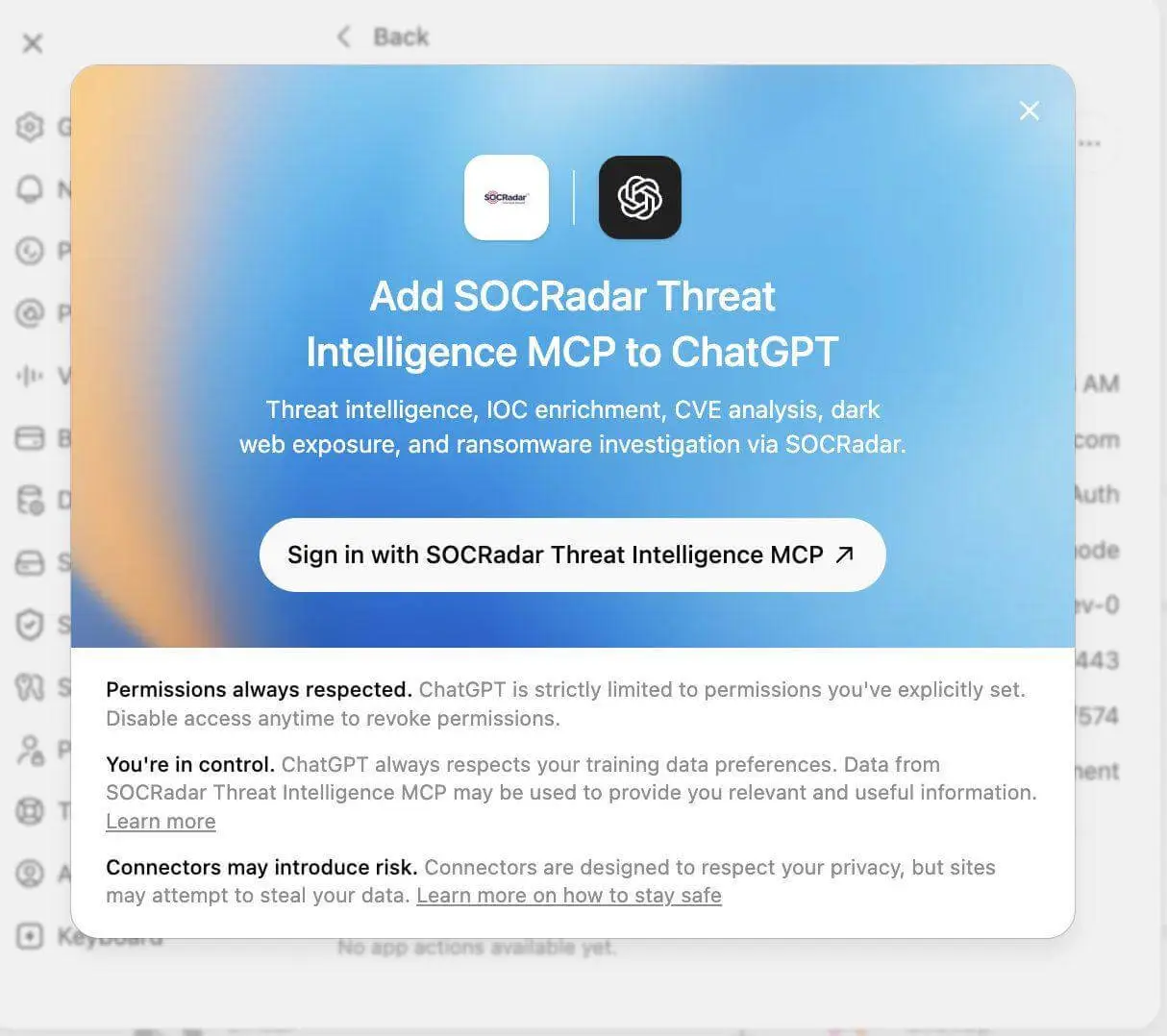
Starting the SOCRadar sign-in process from ChatGPT.
What your analysts can now do inside ChatGPT that they couldn’t before:
- Access and use the tools provided by the SOCRadar MCP server directly within ChatGPT
- Perform threat intelligence actions and investigations using the available SOCRadar MCP tools
- Enrich, investigate, search, and retrieve threat intelligence data through natural-language interactions
How access works: The connection uses OAuth with the SOCRadar MCP server. The available tools and actions are determined by the user’s SOCRadar subscription and the module API keys provided during authorization. Module API keys are optional; if a module field is left empty, its related tools are not available in ChatGPT.
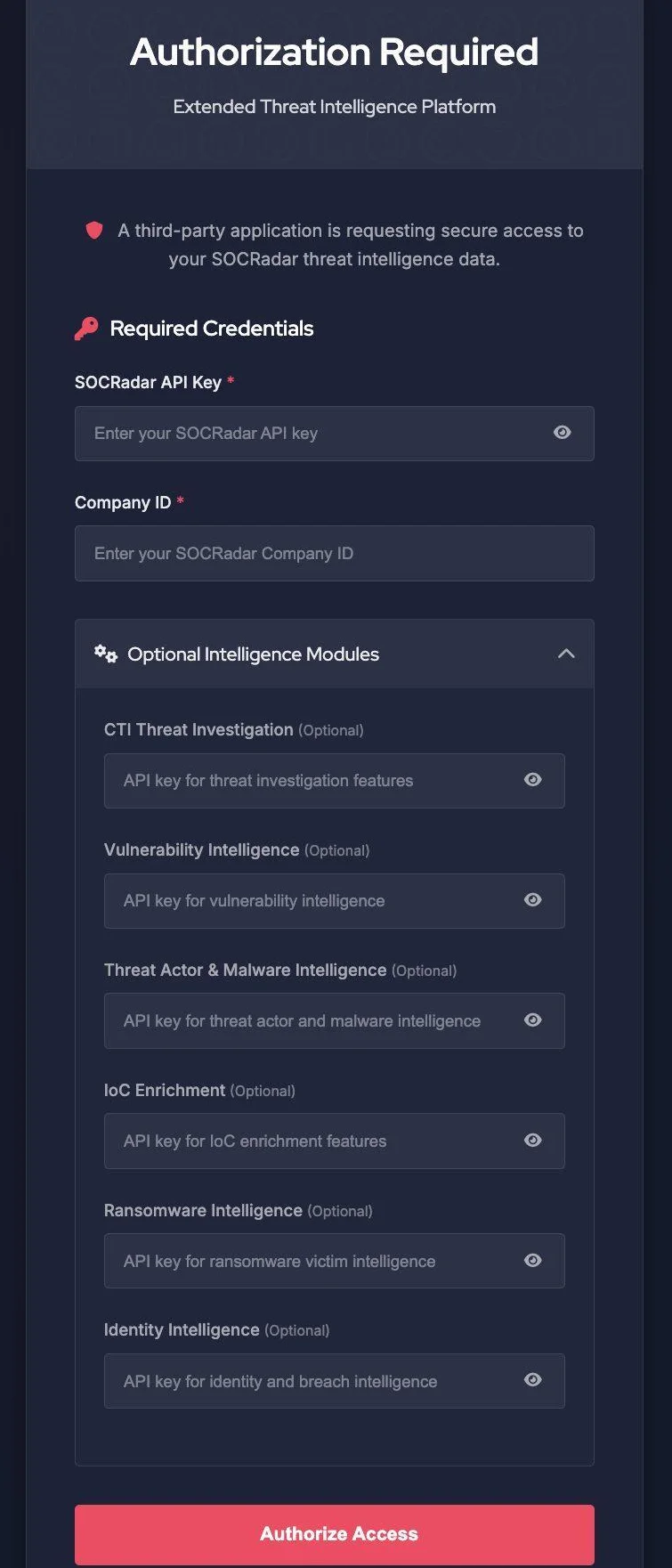
The SOCRadar authorization page: enter the required credentials and any applicable module API keys, then select Authorize Access.
| A note on setup: The SOCRadar app is currently added through ChatGPT developer mode. Custom MCP apps are not reviewed by OpenAI – add the connection only if your organization permits custom apps and trusts the SOCRadar MCP server. Step-by-step configuration is covered in the SOCRadar Help Center guide. |
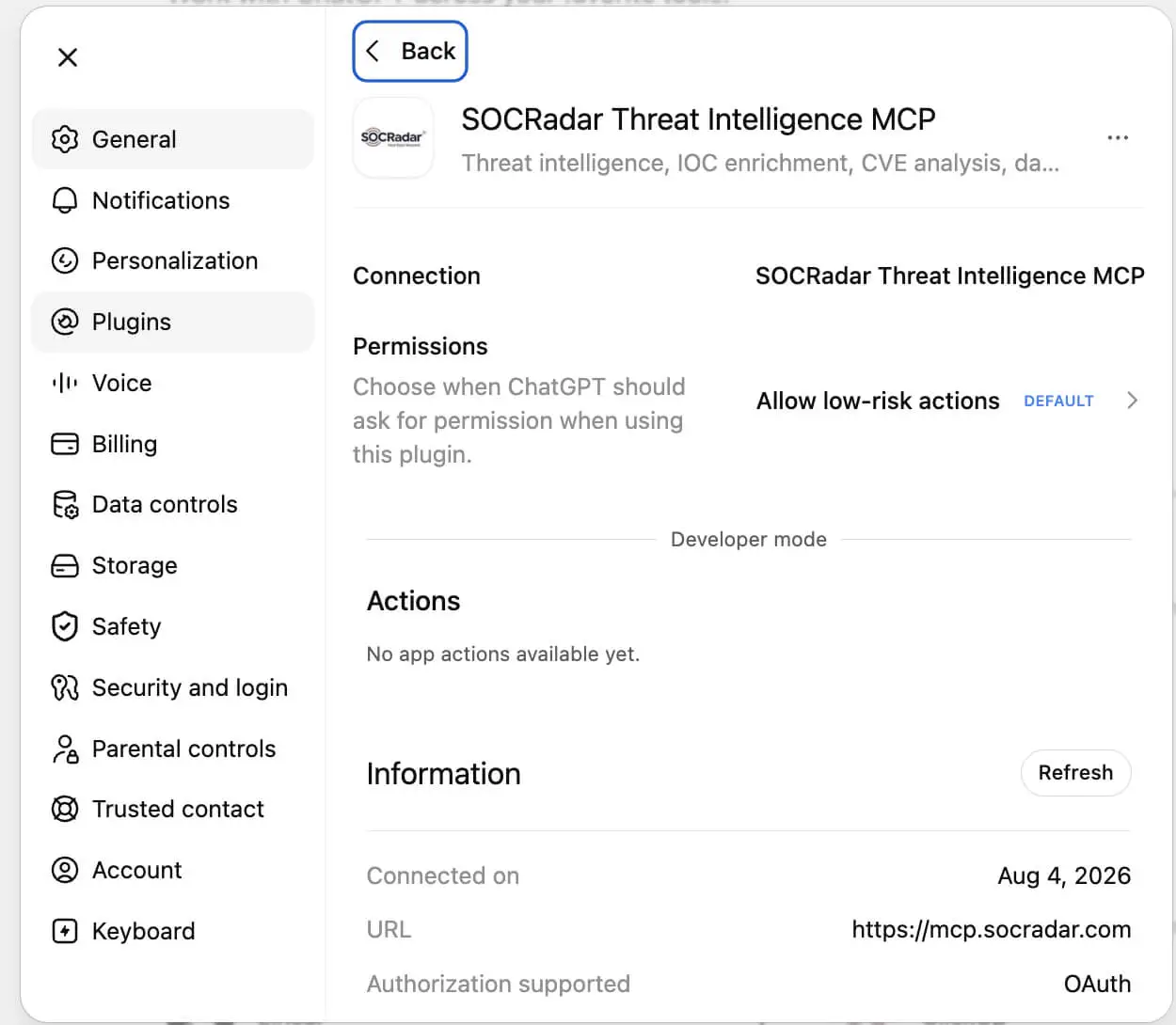
The SOCRadar Threat Intelligence MCP app details page in ChatGPT, showing the server URL (https://mcp.socradar.com) and OAuth authorization status.
How It Works in Practice
Imagine your team is triaging a phishing report that references an unfamiliar IP address. Instead of leaving the conversation, you type: “Enrich 45.147.230.14 with SOCRadar and assess whether it should be blocked.” ChatGPT calls the SOCRadar IoC enrichment tool and returns the indicator’s threat score, activity history, ASN context, and intelligence-feed observations – inline, in seconds.
The investigation keeps moving in the same thread. You follow up with “Use SOCRadar to retrieve the risk score and exploitation signals for CVE-2024-3400” to check a related vulnerability, then “Check SOCRadar for stealer-log exposure associated with example.com” to confirm whether credentials from the targeted domain have already surfaced. Each answer arrives as licensed SOCRadar intelligence, scoped to your subscription, and the entire investigative trail stays in one readable conversation you can hand to the next shift.
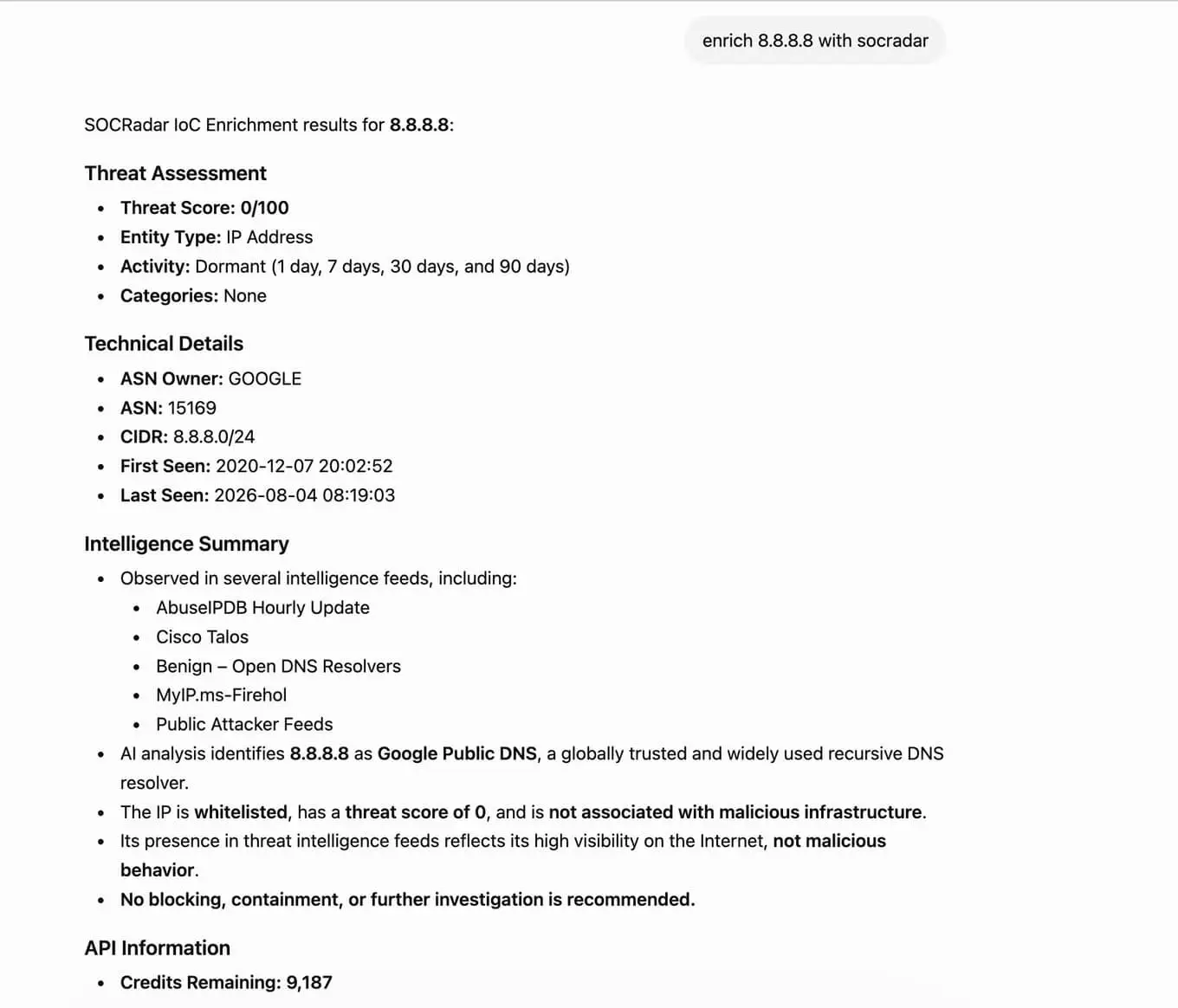
Example SOCRadar indicator enrichment result rendered inside a ChatGPT conversation (“Enrich 8.8.8.8 with SOCRadar”).
Take the Next Step
Mutual users of SOCRadar and ChatGPT can now enrich indicators, investigate threats, and query licensed SOCRadar intelligence in plain language, without leaving their ChatGPT workflow. To get started, follow the setup guide in the SOCRadar Help Center: enable developer mode in ChatGPT, create the SOCRadar Threat Intelligence MCP app, and authorize the connection with your SOCRadar API key, Company ID, and the module API keys you want to make available. You can find your API keys and Company ID under Settings > API Options in the SOCRadar platform. If you need help with entitlements or module access, contact your SOCRadar Customer Success Manager or request a demo.
Frequently Asked Questions
What Is the SOCRadar Threat Intelligence MCP App for ChatGPT?
It is an MCP app that connects ChatGPT to the SOCRadar MCP server at https://mcp.socradar.com/, exposing your licensed SOCRadar intelligence modules as callable tools inside a ChatGPT conversation.
Which SOCRadar Capabilities Are Available in ChatGPT?
IoC enrichment for IPs, domains, URLs, and hashes; vulnerability intelligence covering CVE risk, exploitation, and affected products; threat actor and malware intelligence; ransomware group and victim data; identity intelligence for breach and stealer-log exposure; and CTI threat investigation tools for Dark Web research.
How Does Authentication Work?
The connection uses OAuth with the SOCRadar MCP server. You authorize with your SOCRadar API key, Company ID, and any module API keys you want to make available. Keys and Company ID are found under Settings > API Options in the SOCRadar platform.
Do I Need All Module API Keys?
No. Module API keys are optional. If a module field is left empty during authorization, its related tools are not exposed in ChatGPT.
What Determines Which Tools an Analyst Sees?
The user’s SOCRadar subscription and the module API keys supplied at authorization. Tools outside your entitlements are not available.
How Is the App Added to ChatGPT?
Through ChatGPT developer mode. Custom MCP apps are not reviewed by OpenAI, so add the connection only if your organization permits custom apps and trusts the SOCRadar MCP server. Full steps are in the SOCRadar Help Center guide.
Does This Require Any API Scripting?
No. Once the connection is authorized, analysts query SOCRadar in plain language, for example “Enrich 45.147.230.14 with SOCRadar and assess whether it should be blocked.”
Who Can Use the Integration?
Mutual users of SOCRadar and ChatGPT. For help with entitlements or module access, contact your SOCRadar Customer Success Manager.