A software firewall runs on an endpoint, server, or virtual system and controls traffic entering or leaving that individual host.
Unlike a perimeter appliance, a host firewall follows the workload and can apply policy even when the device is remote or communicating within the same network segment. It should complement, not replace, network-level segmentation and monitoring.
Key Takeaways
A software firewall runs on an endpoint, server, or virtual system and controls traffic entering or leaving that individual host.
Unlike a perimeter appliance, a host firewall follows the workload and can apply policy even when the device is remote or communicating within the same network segment. It should complement, not replace, network-level segmentation and monitoring.
Disabled or tampered local protection is a primary concern.
Effective security combines prevention, continuous visibility, ownership, and tested response.
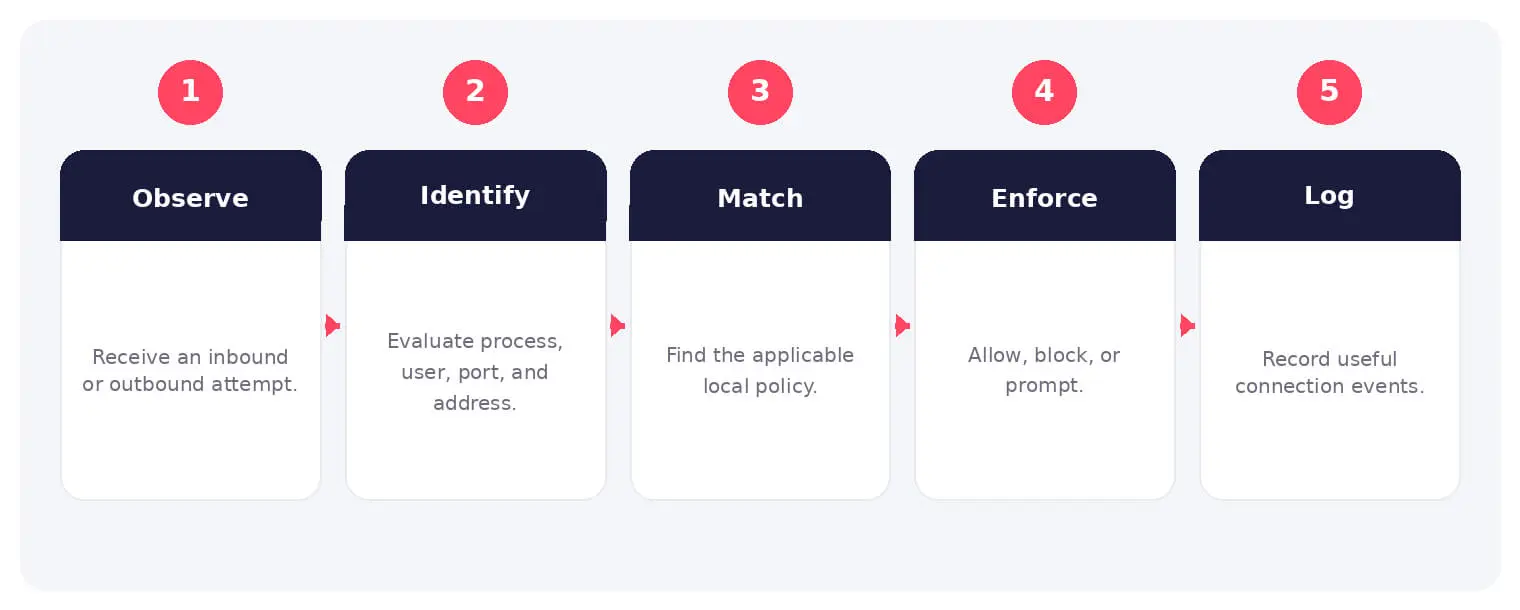
The main stages and decision points associated with software firewall.
How It Works
The operating flow above turns the concept into observable steps. Exact implementations vary, but each stage needs accountable ownership, trusted inputs, documented policy, and evidence that analysts can use during investigation and review.
Unlike a perimeter appliance, a host firewall follows the workload and can apply policy even when the device is remote or communicating within the same network segment. It should complement, not replace, network-level segmentation and monitoring.
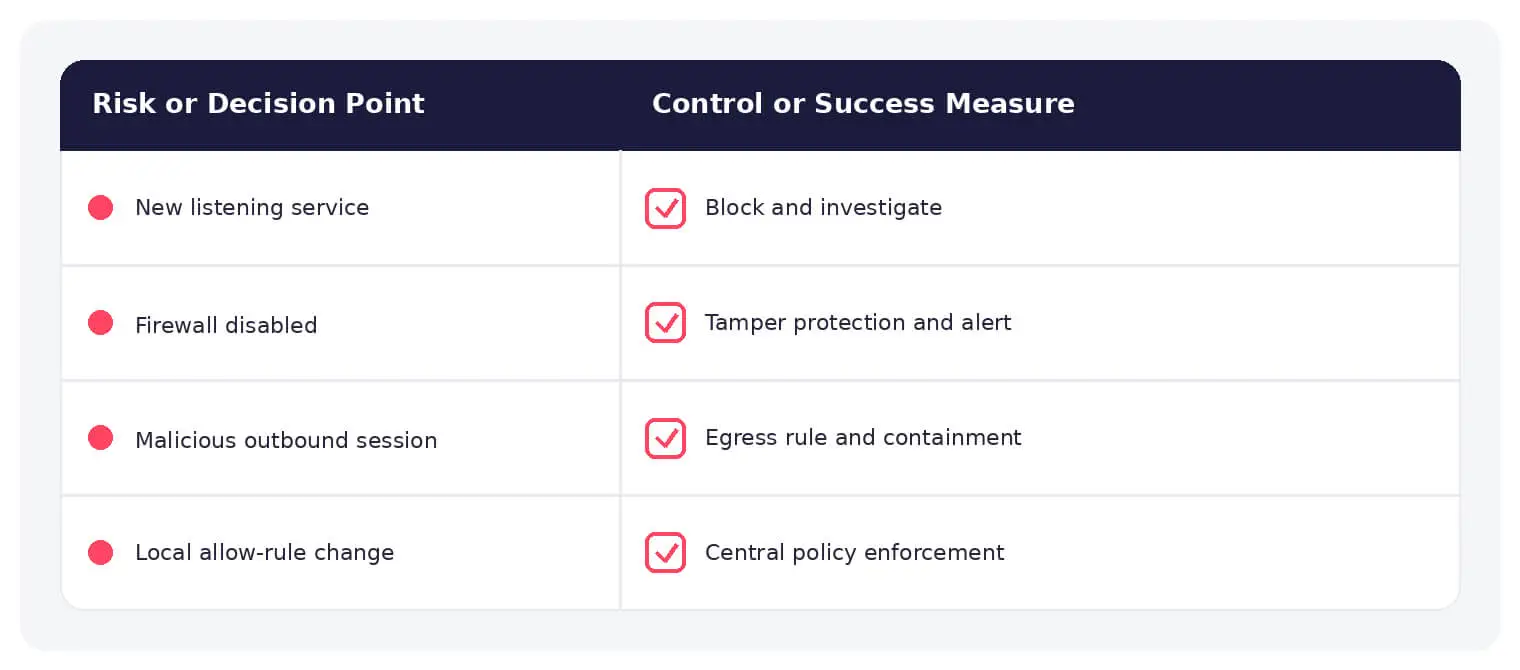
Common software firewall risks paired with practical defensive controls.
Warning Signs and Detection
Monitor firewall-service stops, rule changes, new allow entries, unusual listening ports, blocked outbound traffic, local administrator activity, policy-sync failures, applications requesting exceptions, and endpoints reporting different baselines.
Best Practices
Manage policy centrally, deny unnecessary inbound traffic, restrict outbound access for sensitive workloads, remove local admin rights, protect settings, log high-value events, test applications, and verify coverage continuously.
How SOCRadar Can Help
SOCRadar adds external visibility, threat intelligence, exposure context, and continuous monitoring to help teams validate and prioritize risks related to software firewall. This context complements internal network, endpoint, identity, and vulnerability controls.
Explore SOCRadar Attack Surface Management or request a demo to strengthen threat-informed prevention and response.
Frequently Asked Questions
What Is a Software Firewall?
A software firewall is a host-level filtering layer installed on an endpoint, server, or virtual system that controls traffic entering or leaving that individual machine. Because it runs on the workload itself, it can enforce policy even when the device is remote or communicating within the same network segment.
How Is a Software Firewall Different from a Hardware Firewall?
A hardware firewall sits at the network perimeter and filters traffic between zones, while a software firewall runs on each host and follows that host wherever it connects. The two roles complement each other: the perimeter appliance filters aggregate traffic, and the host firewall applies policy specific to that machine and its processes.
Why Is a Disabled or Tampered Software Firewall Dangerous?
Attackers and malware often stop or reconfigure host firewalls early in an incident to open command-and-control channels or enable lateral movement. A silently disabled firewall removes a key traffic control on the endpoint, and the gap may go unnoticed until unusual connections are already established.
How Does a Software Firewall Handle Outbound Traffic?
Host firewalls can restrict not only what a device accepts but also which processes and destinations it may contact. Restricting outbound access for sensitive workloads limits malware’s ability to reach command-and-control servers or exfiltrate data if the host is compromised.
Which Activities Suggest a Software Firewall Has Been Tampered With?
Look for firewall service stops, unexpected rule changes, new allow entries, unusual listening ports, applications requesting exceptions, and policy-sync failures. Endpoints reporting a different rule baseline than the central policy are another strong indicator.
What Should You Do After Detecting Unexpected Firewall Rule Changes?
First determine whether the change came from an approved administrator or deployment process, then restore the known-good policy and investigate the account or mechanism that made the modification. Review recent outbound connections from the affected host to check whether the change enabled unwanted communication.
How Can Teams Keep Firewall Policies Consistent Across Endpoints?
Manage host firewall rules centrally through endpoint management or security tooling rather than relying on local settings. Remove local administrator rights where practical, protect the firewall configuration from user modification, and continuously compare each endpoint against the approved baseline.
Does Network Segmentation Remove the Need for Host Firewalls?
No. Segmentation limits traffic between network zones, but it does not control what an individual host accepts or sends once connected, especially within the same segment or when a device roams outside the perimeter. Host firewalls complement segmentation by enforcing policy at the workload level.
Do Software Firewalls Apply to Remote and Cloud Workloads?
Yes, and that is one of their main advantages. Because filtering runs on the host, policy applies to remote laptops, virtual machines, and cloud instances regardless of which network they attach to, where a perimeter appliance would have no visibility.
What Business Impact Can Unmanaged Software Firewalls Create?
Inconsistent or disabled host protection widens opportunities for malware communication, lateral movement, and data theft, while poorly tested rules can cause resource conflicts and operational disruption. Environments with compliance obligations may also struggle to evidence endpoint traffic controls when policies drift.