Best DNS Servers for Security and Privacy (2026)
Every connection your devices make starts with a DNS lookup, answered by a resolver that translates domain names into IP addresses and sees every domain you request. Choosing one is a security decision: the right resolver keeps lookups private and blocks known phishing and malware domains before a connection is made.
Among the best DNS servers in 2026, Quad9 stands out for security and Cloudflare for speed and audited privacy, with more specialized options for custom filtering and regional needs.
This guide compares the leading public resolvers on threat blocking, privacy, encryption and resilience, then covers what DNS filtering cannot stop, how organizations keep DNS visibility without giving up privacy, how DNS hijacking works, and how to keep your own domains from being taken over.
Quick Comparison Table: Best DNS Servers
The table lists each provider’s main public addresses, how it handles threat blocking and user data, and which encrypted protocols it supports: DNS over HTTPS (DoH), DNS over TLS (DoT) and DNS over QUIC (DoQ). Details are current as of November 6, 2026.
| Provider | Main IPv4 Addresses | Threat Blocking | Encrypted DNS | Privacy and Logging | Best For |
|---|---|---|---|---|---|
| Quad9 | 9.9.9.9, 149.112.112.112 | On by default (malware, phishing, botnets) | DoH, DoT, DNSCrypt | No personal data collected; Swiss nonprofit | Security |
| Cloudflare | 1.1.1.1, 1.0.0.1 | Optional: 1.1.1.2 adds malware blocking | DoH, DoT | IPs anonymized and deleted within 25 hours, independently audited; US | Speed and privacy |
| NextDNS | Assigned per configuration | Fully configurable, including newly registered domains | DoH, DoT | Logs optional, with user-set retention and storage region; US company | Custom filtering |
| Control D | 76.76.2.1, 76.76.10.1 (malware filter) | Preset filters free; custom rules on paid plans | DoH, DoT, DoQ | Free resolvers keep no query logs; Canada | Power users |
| AdGuard DNS | 94.140.14.14, 94.140.15.15 | Ads, trackers and phishing on by default | DoH, DoT, DoQ, DNSCrypt | No personal data on public servers; Cyprus (EU) | Tracker blocking |
| DNS4EU | 86.54.11.1, 86.54.11.201 (Protective) | On in four of five variants | DoH, DoT | IPs anonymized; data processed in the EU | Users in the EU |
| Google Public DNS | 8.8.8.8, 8.8.4.4 | None | DoH, DoT | IP-linked logs kept 24 to 48 hours; US | Unfiltered baseline behind other controls |
How We Evaluated These DNS Providers
We scored each resolver on five criteria that matter for security and privacy, using each provider’s own documentation and its operational record through 2026:
- Threat blocking: Whether malicious-domain blocking exists, whether it is on by default, how many independent intelligence sources feed it, and how transparent the provider is about why a domain was blocked
- Privacy: What is logged, how long it is kept, whether those claims are independently audited, and which jurisdiction the operator answers to
- Encryption and integrity: Support for DoH, DoT and DoQ, plus DNSSEC validation
- Resilience: Global footprint and track record, including outages in 2025 and 2026
- Control and cost: How much filtering policy you can set yourself and what it costs to remove usage caps
SOCRadar tracks phishing domains, malicious infrastructure and stolen credentials as part of its threat intelligence work, which added one more test: how clearly each option fits into a wider defense. A resolver can be excellent at blocking flagged domains and still miss most of what targets an organization, so this guide also covers what DNS filtering cannot stop.
Raw speed was a tiebreaker only. The major anycast resolvers are close on latency, and the fastest one for you depends on your location and ISP, so test from your own network before committing.
The Best DNS Servers for Security and Privacy, Reviewed
Quad9 (9.9.9.9): Best Secure DNS Server

Quad9 blocks lookups of domains tied to malware, phishing and botnets on its default addresses, with no account or setup beyond entering 9.9.9.9 and 149.112.112.112. Its blocklist combines data from more than 25 threat intelligence providers, and a public query tool shows which source triggered any block, which makes false positives easy to trace.
The operator is a Swiss nonprofit foundation that states it does not collect users’ personal data. DNSSEC validation is enabled on every resolver address, and encrypted DNS is available over DoH, DoT and DNSCrypt. A variant at 9.9.9.11 adds EDNS Client Subnet for better content delivery network (CDN) routing while keeping blocking on.
The trade-off is scope: Quad9 blocks for security reasons only and leaves ads and trackers alone. For users who want privacy and threat blocking without configuration, it is the strongest free choice on this list.
Cloudflare (1.1.1.1): Best for Speed and Privacy
Cloudflare’s resolver consistently ranks at or near the top of public speed benchmarks, and its privacy claims are among the most scrutinized in the market. Under its published commitments, source IP addresses are anonymized and deleted within 25 hours, and resolver data is not sold or used for ad targeting. A new independent examination published in April 2026 confirmed those commitments again.
The default 1.1.1.1 address does not filter anything. Use 1.1.1.2 and 1.0.0.2 to add malware blocking. DoH and DoT are supported on all variants.
One caution for anyone relying on a single provider: on July 14, 2025, an internal configuration error made the resolver unreachable worldwide for 62 minutes. The service is still highly reliable, but the incident is a good argument for a well-chosen secondary resolver.
NextDNS: Best for Custom Filtering

NextDNS turns DNS into a policy engine. Each configuration combines threat intelligence feeds, blocklists, content-category filters and per-device analytics, and security options include blocking newly registered domains and typosquatting protection. Those two settings narrow the gap that every reputation-based blocklist has with freshly registered phishing domains.
Logging is optional: users can turn it off or keep logs for one hour to two years, stored in the US, EU, UK or Switzerland, though NextDNS itself is a US company. The free plan covers 300,000 queries a month; after that, NextDNS keeps resolving but pauses filtering until the monthly reset. Pro costs $1.99 a month for unlimited queries, which matters for router-level deployments where smart TVs and consoles generate heavy query volume.
NextDNS rewards tuning. Users who want a resolver they can set once and forget are better served by Quad9.
Control D: Best for Power Users

Control D offers free preset resolvers that need no account, including 76.76.2.1 for malware blocking and 76.76.2.2 for malware, ads and trackers, and the company states that its free resolvers do not log queries. The company is based in Canada. Supported transports include DoH (including HTTP/3), DoT and DoQ.
Paid plans unlock custom rules, per-device profiles, traffic redirection and analytics, along with filters for phishing and scam sites and newly registered domains. The platform has a real learning curve, but no other option here offers the same depth of DNS policy for advanced users and small teams.
AdGuard DNS: Best for Tracker Blocking
AdGuard’s default servers at 94.140.14.14 and 94.140.15.15 block ads, trackers and phishing domains for every app on a device, which a browser extension cannot do. For its public servers, AdGuard states that it processes no personal data and keeps only aggregate usage statistics; the company is registered in Cyprus, so EU data protection law applies.
AdGuard supports DoH, DoT, DNSCrypt and DoQ, and was the first public resolver to offer DNS over QUIC. Aggressive ad filtering occasionally breaks a site or app; the non-filtering server at 94.140.14.140 is a quick way to confirm whether a blocklist is the cause.
DNS4EU: Best for Users in the EU

DNS4EU is a public resolver built by a consortium co-funded by the European Union andlaunched in June 2025 to reduce Europe’s dependence on non-EU DNS providers. Its free public service offers five variants, including Protective (86.54.11.1), which blocks malicious and fraudulent domains, Protective with Ad Blocking (86.54.11.13) and Unfiltered (86.54.11.100).
Each variant has DoH and DoT endpoints and a second address for redundancy. Client IP addresses are anonymized before anything is logged, and resolution data is processed in the EU. The public service is intended for personal use by EU citizens, and the track record is still short compared with the established providers.
Google Public DNS (8.8.8.8): Reliable, With No Threat Blocking

Google Public DNS at 8.8.8.8 and 8.8.4.4 is one of the most widely used and dependable resolvers, with DoH, DoT and DNSSEC validation. It applies no threat filtering, so it resolves malicious domains like any other.
Google’s policy keeps temporary logs that include your IP address for 24 to 48 hours, then retains sampled logs with the IP replaced by city-level location, and states that the data is not used for ad targeting. Google Public DNS fits best where filtering already happens elsewhere, such as behind a secure web gateway.
How Protective DNS Blocks Threats and Where It Stops
Protective DNS is a resolver that refuses to answer lookups for domains on a threat blocklist. A device that cannot get the IP address of a known phishing page, malware host or command-and-control (C2) server cannot connect to it. The approach is cheap, covers every device on the network and needs no software on endpoints.
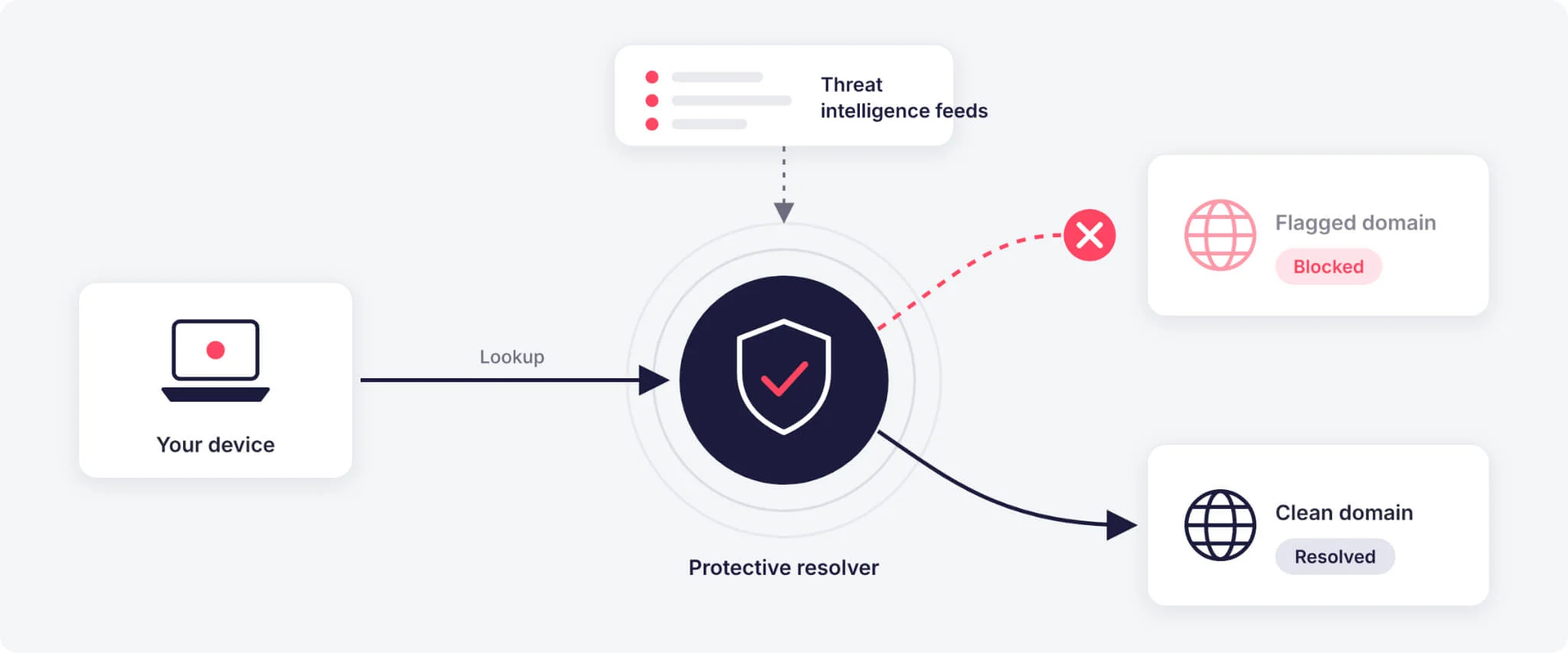
The same design sets its limits. A resolver can only block domains someone has already flagged, and several common attack paths never touch a flagged domain:
- Newly registered domains: A phishing domain registered an hour ago resolves normally until a feed lists it. Optional blocking of newly registered domains in NextDNS and Control D narrows that window, at the cost of occasional false positives
- Abuse of trusted platforms: Phishing pages hosted on major cloud, file-sharing or form-builder services cannot be blocked at the domain level without breaking the legitimate service
- Hijacked subdomains of reputable organizations: When attackers take over a forgotten subdomain, the parent domain’s good reputation works in their favor
- Resolver bypass: Apps, browsers or malware that use their own DoH resolver or a VPN skip the resolver you configured unless the network blocks outbound DNS to unapproved servers
- Stolen credentials and session tokens: Passwords leaked in third-party breaches and session cookies taken by infostealer malware are replayed straight against login pages, with no malicious lookup on your network
Protective DNS is a strong first layer and a weak last one. Organizations still need visibility into their own exposed infrastructure, impersonating domains and leaked credentials.
Encrypted DNS Explained: DoH, DoT, DoQ and DNSSEC
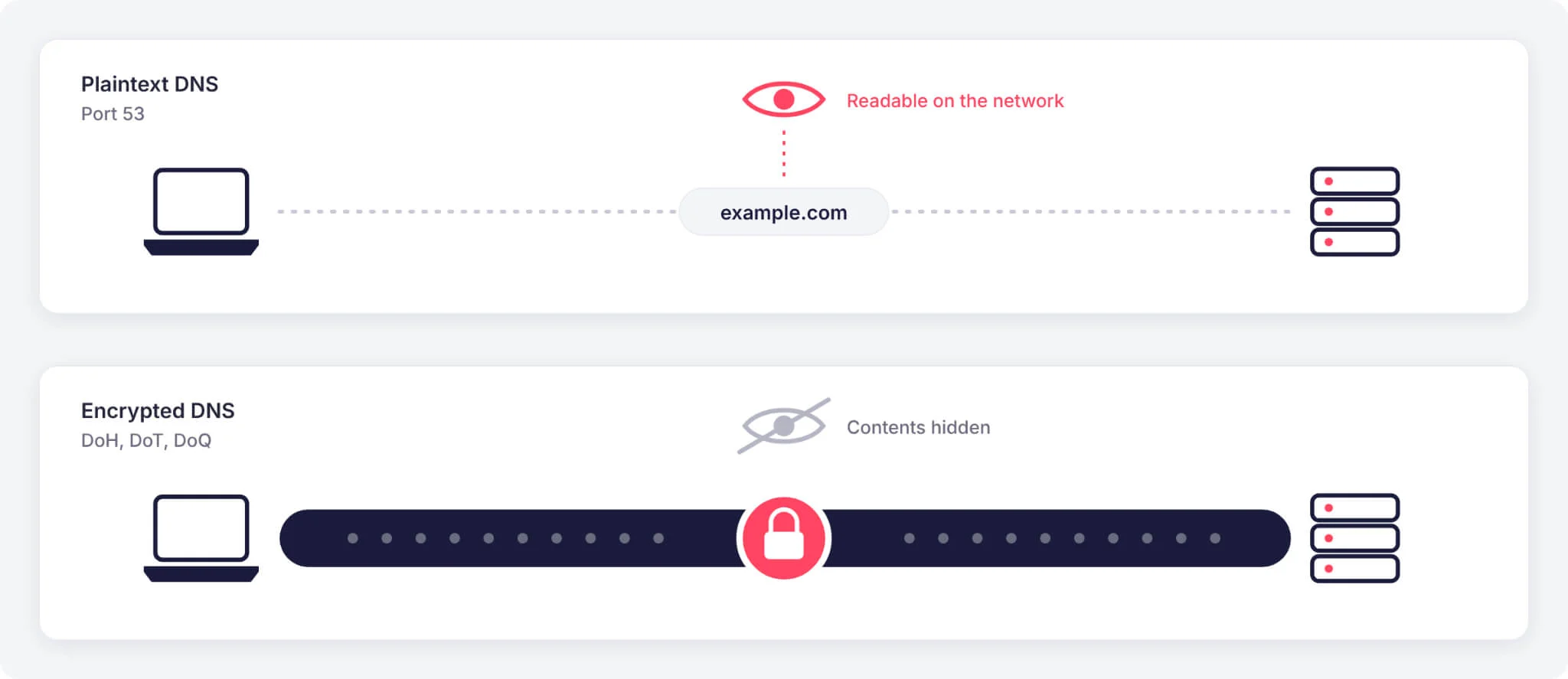
Classic DNS travels in plaintext over port 53, so your ISP, a public Wi-Fi operator or anyone else on the network path can read every lookup and, without safeguards, alter the answers. Encrypted DNS protocols close that gap between your device and the resolver, while DNSSEC proves that answers have not been forged.
| Protocol | What It Protects | Transport and Port | Where You Will See It |
|---|---|---|---|
| DNS over HTTPS (DoH) | Query confidentiality and integrity in transit | HTTPS, TCP 443 | Browser secure DNS settings, Windows 11, iOS and macOS profiles |
| DNS over TLS (DoT) | Query confidentiality and integrity in transit | TLS, TCP 853 | Android Private DNS, routers, enterprise resolvers |
| DNS over QUIC (DoQ) | Same as DoT, with faster recovery on lossy networks | QUIC, UDP 853 | AdGuard DNS, Control D, dedicated apps |
| DNSSEC | Authenticity of DNS records through cryptographic signatures | Records inside normal DNS | Validated by Quad9, Cloudflare, Google and DNS4EU |
DoH and DoT offer similar privacy. DoH blends into regular web traffic, which makes it harder to block on restrictive networks; DoT uses a dedicated port, which makes it easier for IT teams to monitor and enforce. CISA guides federal agencies to encrypt DNS wherever technically feasible.
Two limits are worth knowing. The resolver itself still sees every query, so encryption makes the choice of a trustworthy provider more important. Your ISP can also still see the IP addresses you connect to and, on most sites, the hostname in the TLS handshake.
DNS Security for Organizations: Visibility Versus Privacy
The settings that make Quad9 and Cloudflare strong choices for individuals create a gap for security teams. Their public resolvers give customers no query logs to search, so a SOC that points company devices straight at them loses one of its most useful detection sources.
DNS logs reveal activity that other controls often miss:
- Command-and-control callbacks: Infected hosts look up attacker domains, often on a regular beacon schedule
- DNS tunneling and exfiltration: Data hidden in long or high-volume subdomain queries, tracked by MITRE as Application Layer Protocol: DNS (T1071.004)
- Domain generation algorithms: Bursts of failed lookups for random-looking domains, a sign of malware using Dynamic Resolution: Domain Generation Algorithms (T1568.002)
- Phishing clicks: A lookup of a lookalike domain ties a specific user and device to a campaign during incident response
NSA guidance on encrypted DNS in enterprise networks recommends sending all DNS traffic, encrypted or not, to a designated enterprise resolver and blocking every other resolver. In practice, that means:
- Run an internal or managed resolver that logs queries and forwards them to a protective upstream such as Quad9
- Send DNS logs to your SIEM and keep them for a defined period that matches your privacy and regulatory obligations
- Block outbound DNS on port 53, DoT on port 853 and known public DoH endpoints for everything except the approved resolver
- Control browser DoH settings through enterprise policy, since browsers can otherwise send lookups to their own resolver
Privacy still applies inside the company. Limit who can read DNS logs, set retention on purpose, and tell employees what is collected.
DNS Hijacking: How It Works and How to Prevent It
DNS hijacking is an attack that tampers with DNS settings, resolvers or records so that users reach an attacker-controlled destination instead of the site they requested. The most common methods:
- Router and endpoint tampering: Malware or default admin credentials let attackers change a router’s DNS settings, silently sending every device on the network to a rogue resolver
- Rogue resolvers: An attacker-operated resolver returns forged answers for chosen domains, typically banking, email or software update hosts
- Cache poisoning: Forged responses are injected into a resolver’s cache and served to every user who asks for that name; DNSSEC validation is the main defense
- Registrar and DNS provider account takeover: With stolen credentials, attackers edit a domain’s authoritative records directly, a pattern MITRE tracks under T1584.001 and T1584.002
The last method has hit governments directly. In January 2019, CISA issued Emergency Directive 19-01 after a campaign altered DNS records for multiple US executive branch agency domains, letting attackers redirect and intercept web and email traffic. The required actions still form a sound baseline for any organization.
To reduce the risk of DNS hijacking:
- Change default router admin credentials and keep router firmware updated
- Use a resolver that validates DNSSEC, and sign the zones you own
- Turn on encrypted DNS so on-path attackers cannot read or alter responses
- Protect registrar and DNS hosting accounts with MFA and, for critical domains, a registry lock
- Audit public DNS records regularly against a known-good baseline
- Monitor Certificate Transparency logs for certificates issued for your domains that you did not request
- Check router and endpoint DNS settings periodically for unexpected changes
Your Own DNS Records Are Part of Your Attack Surface
The records your organization publishes are a separate risk from your choice of resolver, and attackers actively scan them for mistakes.
A frequently exploited mistake is the dangling record: a CNAME that still points to a deprovisioned cloud resource or an expired third-party domain. Whoever registers that resource controls your trusted subdomain, a technique known as subdomain takeover and mapped to T1584.001. Two campaigns show the scale:
- SubdoMailing: Disclosed in February 2024, this operation hijacked more than 8,000 domains and 13,000 subdomains of legitimate brands via abandoned CNAME and Sender Policy Framework (SPF) references, sending millions of spam emails a day that passed authentication checks
- Hazy Hawk: Reported in May 2025, this activity claimed abandoned cloud resources behind dangling CNAMEs to take over subdomains of government agencies, universities and large enterprises, then routed visitors to scams and malicious ads
Because a hijacked subdomain inherits its parent’s reputation, reputation-based DNS filtering is unlikely to flag it. Prevention has to happen on the record owner’s side:
- Keep an accurate inventory of every domain and subdomain you own and what each record points to, a step CISA stresses for preventing DNS tampering
- Delete DNS records in the same change that decommissions the cloud resource they point to
- Review CNAME targets and SPF includes for third-party services you no longer use
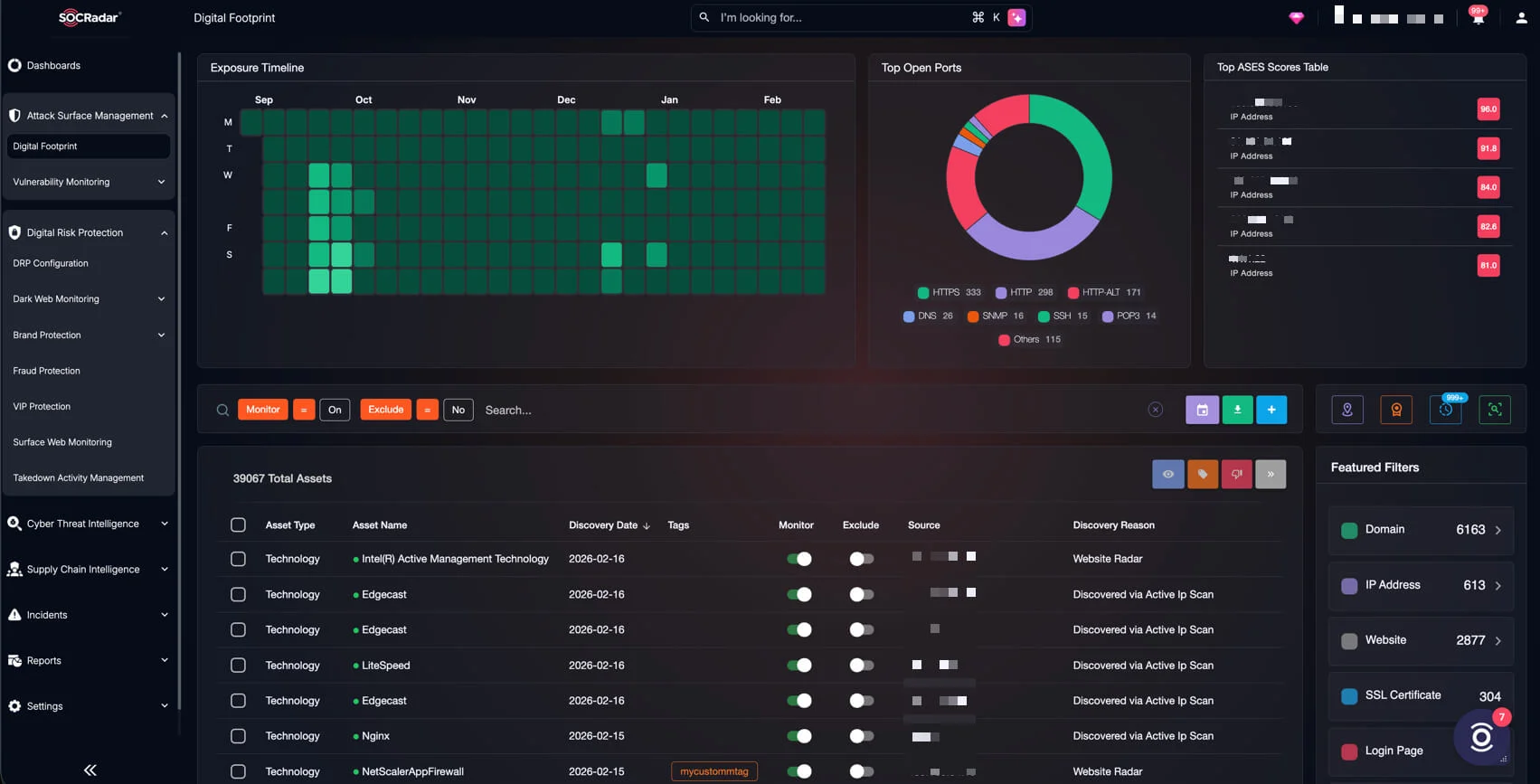
- Monitor your external footprint continuously, since cloud resources change faster than periodic manual audits can track
SOCRadar’s Attack Surface Management handles that last step, continuously mapping your internet-facing domains, subdomains and DNS records so orphaned entries surface before attackers claim them.
Best DNS Server by Use Case
The right resolver depends on what you are protecting and how much you want to configure.
| Use Case | Top Pick | Alternative | Why |
|---|---|---|---|
| Home security, set and forget | Quad9 (9.9.9.9) | Cloudflare (1.1.1.2) | Malware and phishing blocking on by default, no account needed |
| Speed and privacy | Cloudflare (1.1.1.1) | Quad9 (9.9.9.11) | Fast anycast network with audited log deletion |
| Tracker blocking for privacy | AdGuard DNS (94.140.14.14) | NextDNS | Blocks trackers across apps and smart TVs, reducing third-party data collection |
| Small business | NextDNS or Control D | Quad9 | Per-device policy, newly registered domain blocking and logs for investigations |
| Security operations visibility | Internal resolver with logging, forwarding to Quad9 | Managed protective DNS with log export | Keeps the query logs a SOC needs for detection and investigations while still blocking known threats |
| EU data residency | DNS4EU | Quad9 (Switzerland) | EU-backed operator subject to EU law |
How to Change Your DNS Server
Setting DNS on your router covers every device on the network, including smart TVs and consoles that have no DNS settings of their own. Per-device settings are better for laptops and phones that move between networks.
- Router: Open the router’s admin console, find the DNS fields under WAN, Internet or DHCP settings, enter both addresses for your chosen service, then restart the router or renew DHCP leases
- Windows 11: Settings > Network & internet > Wi-Fi or Ethernet > Hardware properties > Edit next to DNS server assignment > Manual; enter the addresses and set DNS over HTTPS to On for providers Windows supports
- macOS: System Settings > Network > select your connection > Details > DNS, then add the addresses with the plus button; install the provider’s configuration profile for encrypted DNS
- iPhone and iPad: Settings > Wi-Fi > tap the info icon next to your network > Configure DNS > Manual; this applies to one network only and is unencrypted, so use the provider’s configuration profile for encrypted DNS everywhere
- Android 9 and later: Settings > Network & internet > Private DNS > Private DNS provider hostname, then enter the provider’s DoT hostname, such as dns.quad9.net or one.one.one.one
- Browsers: Chrome, Edge, Firefox and Brave each offer a secure DNS setting where you can pick a listed provider or paste a custom DoH address
- Organizations: Push the approved resolver to every device through DHCP, Group Policy or mobile device management instead of configuring devices one by one
Enter both addresses for your chosen service, and add its IPv6 addresses if your connection uses IPv6; otherwise lookups can still reach your ISP’s resolver over IPv6. Confirm the change on the provider’s test page, such as 1.1.1.1/help for Cloudflare, test.nextdns.io for NextDNS or test.joindns4.eu for DNS4EU.
Frequently Asked Questions
What Is the Most Secure DNS Server?
Quad9 (9.9.9.9) is the most secure free public DNS server for most users. Quad9 blocks malware, phishing and botnet domains by default using feeds from more than 25 threat intelligence providers, validates DNSSEC on every address and supports encrypted DNS. NextDNS and Control D add stronger controls, such as blocking newly registered domains, for users willing to configure them.
Is 1.1.1.1 Better Than 8.8.8.8?
Cloudflare’s 1.1.1.1 is the stronger choice for privacy and usually matches or beats Google’s 8.8.8.8 on speed. Cloudflare deletes source IP data within 25 hours under independently audited commitments, while Google keeps IP-linked temporary logs for 24 to 48 hours. Neither filters threats by default, but Cloudflare’s 1.1.1.2 adds malware blocking at no cost.
Should Companies Keep DNS Query Logs?
Companies should keep DNS query logs, because they are one of the best sources for spotting malware callbacks, DNS tunneling and phishing clicks. Public privacy-focused resolvers keep no logs for the customer, so organizations usually log at an internal or managed resolver, then set a retention period that matches their privacy obligations.
Is It Safe to Use a Public DNS Server Instead of Your ISP’s?
Using a reputable public DNS server is safe and often more private than relying on an ISP resolver. Providers such as Quad9 and Cloudflare publish their logging policies, support encrypted DNS and validate DNSSEC, while ISP resolvers vary widely on all three. Avoid unknown or unvetted resolvers, which can log your lookups or alter the answers.
Do You Need a Secure DNS Server If You Use a VPN?
A VPN that sends DNS through its own resolvers already hides lookups from your ISP while connected, so a separate secure DNS server matters most when the VPN is off. Check whether the VPN’s resolver blocks malicious domains; if it does not, a protective resolver such as Quad9 covers the gaps whenever the tunnel is down.
Should Primary and Secondary DNS Use Different Providers?
Using two providers improves resilience but can weaken filtering consistency. Cloudflare’s 1.1.1.1 was unreachable worldwide for 62 minutes on July 14, 2025, and a second provider would have kept names resolving. Devices can query either server at any time, though, so pair resolvers with matching protection, such as Quad9’s 9.9.9.9 with Cloudflare’s 1.1.1.2.